In short
A bakery menu printed on brown kraft card. The bakery's name and the headings are in white ink, which shows on brown paper only because the printer adds it as an extra ink. The print file keeps the white on a plate of its own.
What you'll build
The menu of Horno Alto, an invented village bakery: an A5 card of brown kraft folded once, four pages. Kraft has no white in it, so every white on the card is an ink the printer adds: the bakery's name and the course heads straight on the brown, the mounts the three gouache paintings sit on, and the card that carries the opening hours. The prices stand on a tab stop with a dotted leader, in a dark brown printed in process colour. On the coffee page a green panel carries the day's bake in white type cut out of the green. Folio opens the card on an oak counter in daylight.
This recipe answers
- How do I print white on kraft or brown paper, as type and under the colours?
The short answer
// The paper is a colour that prints no ink: the screen and Folio paint kraft, and no plate
// gets a dot of it. Because it is not white, the preflight knows the white ink shows on it.
// The white is a spot ink with the white finish: its own plate, laid down before the others.
const kraft = { hex: '#c19a6b', model: 'cmyk', cmyk: { c: 0, m: 0, y: 0, k: 0 } };
const WHITE = { name: 'Opaque White', cmyk: { c: 0, m: 0, y: 0, k: 0 } };
// A white ink overprints by default: laid under the colours, it must not cut holes in them.
const white = { hex: '#f7f4ee', model: 'spot', spot: { ...WHITE, finish: { kind: 'white' } } };
const PRINT = { standard: 'pdfx4', outputProfile: 'fogra52', convertImages: false,
  inks: [{ name: 'Opaque White', aliases: ['White'], finish: { kind: 'white' } }] };

// White type on a green panel must knock the green out.
// White printed under the green is hidden by it. For white type on a colour, the type must cut
// its shape out of the colour, so this white says overprint: false. Its hex differs by one
// step from the other white, since the PDF tells colours apart by hex; both print on one plate.
const whiteOut = { hex: '#f6f3ed', model: 'spot',
  spot: { ...WHITE, finish: { kind: 'white' }, overprint: false } };
Kraft as the paper, and an opaque white as a spot ink
Ingredients
- Features
- Special inksSpot inks and the ink tableCMYK and grayscale PDFs3D book viewer (Folio)Paper, binding, desk and light (Folio)Semantic colour paletteCovers, title pages and colophonsHeading stylesText, rules and boxes in page designsPictures in page designsParagraph stylesTab stops and leadersCallout boxesPDF exportPages on a canvas
- Also uses
- Heading attributesFull-width chapter bandDesigned openersPaper colourFonts embedded in the PDFCustom resource typesFigures and tables as resourcesRunning heads per sectionUnnumbered chapters
- Type
- Alfa Slab One, Lora (SIL OFL 1.1)
- Assets
coffee-600.jpgloaf-700.jpgpastries-900.jpg- A sourdough loaf, on the cover (Generated With Diffusion Models, original)
- Three pastries (Generated With Diffusion Models, original)
- A cup of coffee (Generated With Diffusion Models, original)
Method
#1 · The paper is kraft, the white is an ink
The code is the short answer above. The paper is a palette colour authored in CMYK at 0 %: the screen and Folio paint kraft, and no plate prints it. The white is a spot colour with the white finish (finishes), named Opaque White in the ink table as the printer will be told. The PDF/X-4 file puts it on a Separation of its own, next to the four process plates. Its screen hex is a step below #ffffff, so the finish mask can tell the ink from a white sheet.
#2 · White straight on the brown
// The mount is a box in the white, the painting a picture over it. The white goes down first
// on press and runs on under the whole painting, so its light tones print on white.
const mount = (x, y, w, h, extra) => [
  { kind: 'box', id: 'mount', style: { backgroundColor: col('white') },
    placement: at('page', 'top-left', x, y, { width: mm(w), height: mm(h) }) },
  { kind: 'image', id: 'photo', resourceId: '{attr.photo}', fit: 'cover', ...extra,
    placement: at('page', 'top-left', x + 4, y + 4, { width: mm(w - 8), height: mm(h - 8) }) },
];
The name, the course heads and the titles of the inside pages are type in the white, set in Alfa Slab One. A white ink is less opaque than a black: the brown shows through a fine stroke, so a heavy slab face at 12 pt or more reads where a light serif would turn beige. The mounts are boxes in the same white, 4 mm larger than each painting on every side. The white runs on under the whole painting, not only round it, so the painting's light tones print on white instead of on the brown.
#3 · Colour on top of the white
The opening hours sit on a card of white ink, in the dark brown of the menu text. A white ink overprints by default, and the brown is set to overprint as well (overprint: true on the palette colour), so on press the brown lands on the white instead of cutting its letters out of it.
#4 · White on top of colour: knock it out
const calloutStyles = [
  { id: 'bake', background: col('green'), marginTop: pt(LEAD), marginBottom: pt(0),
    padding: { top: mm(4), right: mm(5), bottom: mm(4), left: mm(5) },
    body: { fontFamily: SERIF, fontSize: pt(BODY), lineHeight: pt(LEAD), color: col('whiteOut'),
      boldColor: col('whiteOut'), italicColor: col('whiteOut'), textAlign: 'left',
      firstLineIndent: pt(0) } },
  // The hours: brown type on a card of white ink, the colour printed over the white.
  { id: 'hours', background: col('white'), marginTop: pt(LEAD), marginBottom: pt(0),
    padding: { top: mm(4), right: mm(5), bottom: mm(4), left: mm(5) },
    body: { fontFamily: SERIF, fontSize: pt(BODY), lineHeight: pt(LEAD), color: col('ink'),
      boldColor: col('ink'), textAlign: 'left', firstLineIndent: pt(0),
      tabStops: [{ position: 'end', align: 'end' }] } },
];
The press lays the white first and the colours over it, so white type on the green panel would vanish under the green. The panel's type takes a second white on the same plate, with overprint: false: the type cuts its shape out of the green and the white fills it. The two whites differ by one step of hex because the PDF tells colours apart by their hex.
#5 · The prices on a tab stop
const dish = { id: 'dish', name: 'Dish', textAlign: 'left',
  tabStops: [{ position: 'end', align: 'end', leader: '. ' }],
  spaceBetween: pt(LEAD / 3), marginTop: pt(LEAD / 2) };
// The story on the back: half a line between paragraphs.
const story = { id: 'story', name: 'Story', spaceBetween: pt(LEAD / 2) };
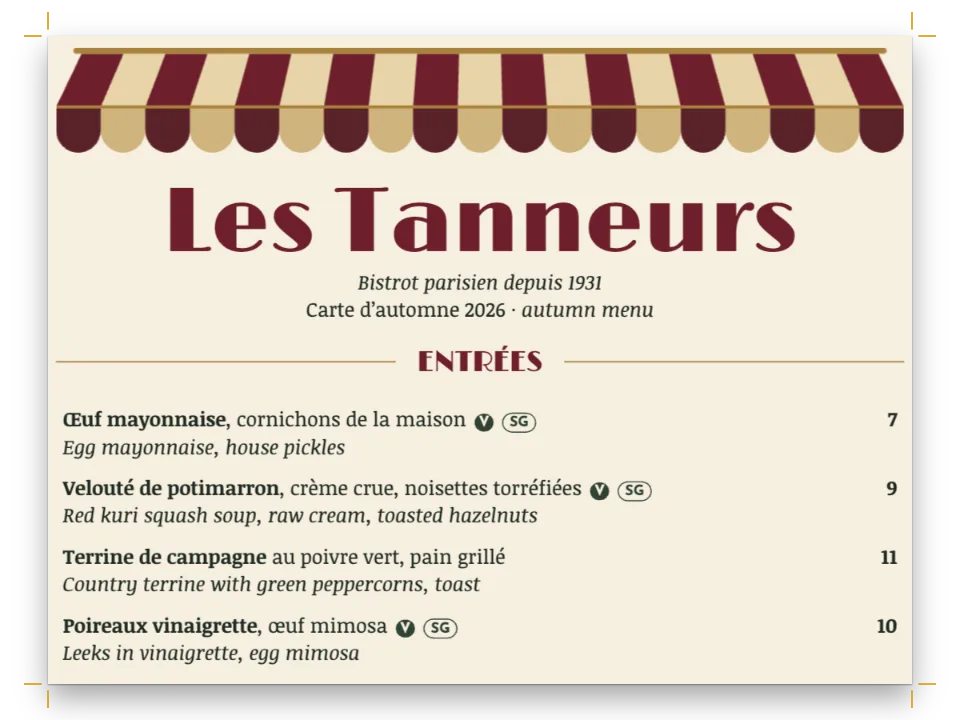
Each section is a :::paragraphs group in the dish style; :tab before the price sends it to the end of the measure, with a dotted leader up to it, as in the bistro menu.
#6 · What the preflight says
// A white ink on white paper prints nothing you can see, and the preflight warns of it
// (whiteInkOnWhite). On kraft it does not fire; the findings left say which special ink the
// job carries and that the press lays the white first.
const findings = preflightDocument(doc);
const report = document.createElement('p');
report.textContent = `Preflight: ${findings.map((f) => f.kind === 'inkPressOrder'
  ? `inkPressOrder (first: ${f.first.join(', ')})` : `${f.kind}${f.ink ? ` (${f.ink})` : ''}`)
  .join('; ') || 'no findings'}`;
document.querySelector(`[data-postext-pdf="${RECIPE}.pdf"]`).after(report);
preflightDocument warns with whiteInkOnWhite when a white ink lands on a page whose paper is white or unset, where it shows nothing. On kraft it stays quiet, and the line under the download button lists what is left: the white as a special ink (spotInkFinish) and the press order that lays it first (inkPressOrder).
#7 · Folio shows the card on a counter
const folio = {
  tilt: 20, yaw: -12,
  paper: { type: 'cardStock', grammage: 250, texture: 'felt', shade: kraft },
  binding: { type: 'folded', cover: 'pages' },
  surface: { type: 'oak' },
  lighting: { environment: 'daylight', intensity: 1.1 },
};
Folio paints the white so that it covers the paper's shade, as the ink does, and the card stock with a felt texture makes the brown read as kraft.
The whole recipe
// ═══ Postext Cookbook · Nº 191 · A bakery menu in white ink on kraft ═════════════════════
// https://postext.dev/en/cookbook/white-ink-kraft-menu
// Code: MIT · Text: original (CC BY 4.0) · Paintings: diffusion models
// Fonts: Alfa Slab One, Lora (SIL OFL 1.1) · Needs postext ≥ 1.85.1
//
// The menu of a bakery, a folded card of brown kraft. Kraft takes no white from the paper, so
// the name and the course heads print in an opaque white ink, and the paintings sit on white
// mounts that the same ink lays under them; the menu text is a dark brown in process colour.
import {
  buildDocumentWithFonts, renderPageToCanvas, registerResourceImage, preflightDocument,
} from 'https://esm.sh/postext';
import { renderToPdf, decompressWoff2 } from 'https://esm.sh/postext-pdf';
import { createFolioFromDocument } from 'https://esm.sh/postext-folio';

const LANG = 'en'; // @lang: the language of the sample document ('en' | 'es')
const RECIPE = 'white-ink-kraft-menu';

// ─── 1 · Design ─────────────────────────────────────────────────────────────
// #region answer: kraft as the paper, and an opaque white as a spot ink
// The paper is a colour that prints no ink: the screen and Folio paint kraft, and no plate
// gets a dot of it. Because it is not white, the preflight knows the white ink shows on it.
// The white is a spot ink with the white finish: its own plate, laid down before the others.
const kraft = { hex: '#c19a6b', model: 'cmyk', cmyk: { c: 0, m: 0, y: 0, k: 0 } };
const WHITE = { name: 'Opaque White', cmyk: { c: 0, m: 0, y: 0, k: 0 } };
// A white ink overprints by default: laid under the colours, it must not cut holes in them.
const white = { hex: '#f7f4ee', model: 'spot', spot: { ...WHITE, finish: { kind: 'white' } } };
const PRINT = { standard: 'pdfx4', outputProfile: 'fogra52', convertImages: false,
  inks: [{ name: 'Opaque White', aliases: ['White'], finish: { kind: 'white' } }] };

// White type on a green panel must knock the green out.
// White printed under the green is hidden by it. For white type on a colour, the type must cut
// its shape out of the colour, so this white says overprint: false. Its hex differs by one
// step from the other white, since the PDF tells colours apart by hex; both print on one plate.
const whiteOut = { hex: '#f6f3ed', model: 'spot',
  spot: { ...WHITE, finish: { kind: 'white' }, overprint: false } };
// #endregion

const palette = {
  kraft, white, whiteOut,
  // The brown overprints: on the white card it lands on the white instead of cutting it away.
  ink: { hex: '#3b2a1c', model: 'cmyk', cmyk: { c: 0, m: 45, y: 75, k: 82 }, overprint: true },
  green: { hex: '#2f5a43', model: 'cmyk', cmyk: { c: 80, m: 25, y: 75, k: 40 } }, // the panel
};
const col = (id) => ({ ...palette[id], paletteId: id });
const colorPalette = [...Object.entries(palette).map(([id, value]) => ({ id, name: id, value })),
  { id: 'main-color', name: 'ink (defaults)', value: palette.ink }];

const [TRIM_W, TRIM_H] = [148, 210]; // A5, an A4 card folded once
The composed script.js runs as it is: paste it into any page’s module script, or open the recipe on CodePen. Recipe folder on GitHub ↗ (opens in a new tab)
Variations
#A notebook cover
Swap the menu for a title and a pattern of white rules on the front: the paper, the ink and the ink table stay as they are.
#Two hits of white
A printer can lay the white twice for a whiter white on dark kraft. Ask for it on the order; the file stays the same, with one white plate.
Pitfalls
- A white ink on a page whose paper is white or unset prints nothing you can see. Set
page.backgroundColorto the stock, in CMYK at 0 %, and the preflight stops warning. - A picture printed straight on kraft, with no white under it, shows the brown through every light tone. Put a box of the white under each picture that has to keep its colours, as the mounts here do.
- White type over a colour must not overprint. With the default it prints under the colour and disappears.
Credits
- Recipe
- Ignacio Ferro
- Text
- Original prose, CC BY 4.0
- Images
- A sourdough loaf, on the cover · Generated With Diffusion Models · original
- Three pastries · Generated With Diffusion Models · original
- A cup of coffee · Generated With Diffusion Models · original
- Fonts
- Alfa Slab One (SIL OFL 1.1) · Lora (SIL OFL 1.1)
Edit this write-up ↗ (opens in a new tab)Recipe folder on GitHub ↗ (opens in a new tab)