In short
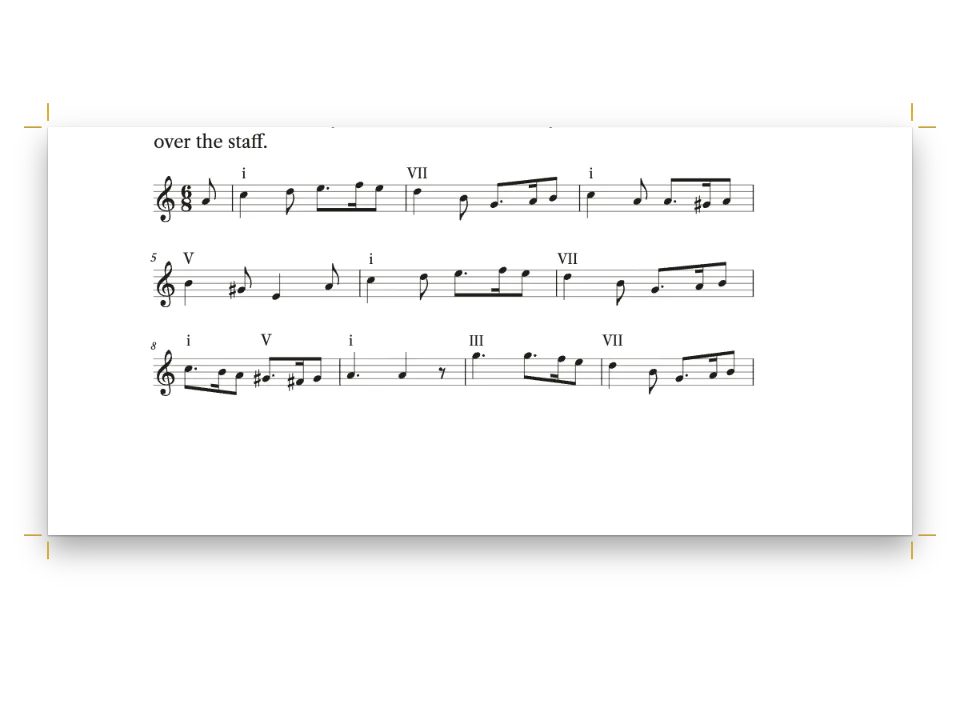
A chapter on cadences from a conservatory harmony book, in two columns. Its five music examples are written as text, drawn as real scores, numbered and captioned like figures, and placed near the paragraph that mentions them.
What you'll build
Chapter 4 of Four-Part Harmony, a method for the first years of the conservatory, on a 210 × 280 mm page in two columns of Crimson Pro. The lesson is on cadences, and its five examples are chorales in four parts on two staves, with Roman numerals under the bass: the five cadences of G major, three lines of Nun danket alle Gott and the Old Hundredth complete. Each one is numbered Example 4.1 to 4.5 (Ejemplo in the Spanish edition), captioned in the label face with a claret label, and placed at the head or the foot of the column after the paragraph that cites it; the whole Old Hundredth runs across both columns at the head of page 63. The settings were written for this method and checked for parallel fifths and octaves, spacing and the resolution of the leading tone.
This recipe answers
- How do I number music examples and float them like figures in a two-column book?
- How do I add a figure with a numbered caption and cite it in the text ("see Fig. 3.2")?
- How do I control where a figure goes: top of page, across both columns, exactly here, or in the margin?
The short answer
// In the Markdown, :ref{id="ex-old-hundredth" style="full"} prints 'Example 4.4' ('Ejemplo
// 4.4' in Spanish) and ::resource{id="…"} anchors the float after the paragraph that cites it.
const example = (id, source, placement, styleId) => {
  const [caption, note, altText] = CAPTIONS[id];
  return { id, typeId: 'example', kind: 'score', caption, note, altText, placement,
    score: { format: 'humdrum', source, styleId }, createdAt: 0, updatedAt: 0 };
};
// The **kern sources are in #region art-scores; captions in content.captions.<lang>.md.
const resources = () => [
  example('ex-cadences', CADENCES, { position: 'bottom' }, 'column'),
  example('ex-nun-danket', NUN_DANKET, { position: 'top' }, 'column'),
  example('ex-nun-danket-3', NUN_DANKET_3, { position: 'auto' }, 'column'),
  // Across both columns in the document's own score style: the whole tune in two systems.
  example('ex-old-hundredth', OLD_HUNDREDTH, { position: 'top', span: 'page' }),
  example('ex-deceptive', DECEPTIVE, { position: 'auto', span: 'page' }),
];
Score resources typed 'example', floated and numbered like figures
Ingredients
- Features
- Numbered music examplesFigure placementCitations that place figuresMusic notationScore styleNumbered captionsFigure and Table in your languageCustom resource typesCaption styleSource and credit linesOne or two columnsDesigned openersHeading attributesRunning heads and foliosMirrored marginsHeads by page roleCallout boxesParagraph stylesSemantic colour palette
- Type
- Crimson Pro, Playfair Display, Fira Sans Condensed (SIL OFL 1.1)
- Assets
- None: every picture is drawn in code
Method
#1 · Write each chorale as Humdrum **kern
// Each example lists its spines as Humdrum wants them, lowest first: the bass staff split into
// tenor and bass, the **harm spine (printed under that staff), the treble staff split into
// soprano and alto. Writing them with spaces keeps the pen free of tab characters.
const kern = (meter, body) => [
  '**kern **harm **kern', '*clefF4 * *clefG2', '*k[f#] * *k[f#]', `*M${meter} * *M${meter}`,
  '*^ * *^', ...body.trim().split('\n'), '== == == == ==', '*- *- *- *- *-',
].map((row) => row.trim().split(/ +/)
  // Spanish harmony books write every degree in capitals: vi is VI, iib is IIb.
  .map((cell) => (LANG === 'es' && /^(?:i{1,3}|iv|vi{0,2})[bc7]?$/.test(cell)
    ? cell.replace(/^[iv]+/, (degree) => degree.toUpperCase()) : cell))
  .join('\t')).join('\n');
Humdrum lists the voices as columns, lowest first, separated by tabs. Each staff is one spine split in two with *^: tenor and bass on the bass staff, soprano and alto on the treble staff, so the engraver sets two voices per staff with their stems apart (the left voice up, the right voice down). A **harm spine after the bass staff prints the Roman numerals under it; Ib is a first inversion, Ic a six-four. The pen writes the columns with spaces and turns them into tabs, so no editor can break the file, and the Spanish edition gets its degrees in capitals (VI, IIb), as Spanish harmony books write them.
#2 · Make every example a resource of type example
The short answer builds the five resources. typeId: 'example' takes the built-in Example type, which the engine adds to the book's resource types when a resource uses it, named in the document's language (locale: 'es' gives Ejemplo) and numbered per chapter, so the first example of chapter 4 is 4.1. A score resource is kept whole and floats like a figure: position: 'top' or 'bottom' takes the head or foot of the next column with room after the citation, and span: 'page' sets the Old Hundredth across both columns. Captions, credits and alt texts come from a second Markdown file per edition.
#3 · Give the column examples a smaller staff
const scoreStyle = {
  staffSize: mm(5.4), musicFont: 'Bravura', barNumbers: 'system', color: col('ink'),
  textFont: TEXT, // the Roman numerals under the bass, in the text face
  marginTop: pt(4), marginBottom: pt(2),
};
const scoreStyles = [ // rastral 4.6 mm: four staves of a chorale fit a column in two systems
  { id: 'column', name: t({ en: 'Column examples', es: 'Ejemplos de columna' }),
    staffSize: mm(4.6), barNumbers: 'none', spacing: 0.8 },
];
The two page-wide chorales use the document's scoreStyle, with 5.4 mm staves and bar numbers at the start of each system. The examples in a column pick the named column style: 4.6 mm staves, no bar numbers and spacing 0.8, which keeps the five bars of Example 4.2 on one system instead of leaving its last bar alone on a second one.
#4 · Start the engraver before the build
await initMusicEngine(); // until it runs, every score is laid out as a grey box
const continuation = { pageNumbering: { startAt: 61 }, // odd: the opener is a recto
  headings: { h1: 3, h2: 0, h3: 0, h4: 0, h5: 0, h6: 0 } }; // the next # is chapter 4
const doc = await buildDocumentWithFonts({ markdown, resources: resources(), continuation },
  config, kitFonts(FONTS));
showPages(doc, { title: t({ en: 'Numbered chorale examples in a harmony method',
  es: 'Corales numerados en un método de armonía' }) });
initMusicEngine() loads Verovio, the engraver, from the package; until it runs, a score is laid out as a grey box. The continuation makes this chapter 4 of a longer book, so the examples number 4.1 to 4.5 and the folios start at 61 on a recto.
#5 · Open the chapter across both columns
const label = { fontFamily: LABEL, fontWeight: 600, textTransform: 'uppercase' };
const opener = {
  enabled: true, minHeight: mm(46),
  slot: { elements: [
      { kind: 'text', id: 'kicker', content: '{attr.kicker}', ...label, fontSize: pt(9),
        letterSpacing: pt(1.8), color: col('accent'), align: 'left',
        placement: { anchor: { to: 'container', edge: 'top-left' },
          offset: { x: mm(0), y: mm(6) } } },
      { kind: 'text', id: 'title', content: '{titleText}', fontFamily: DISPLAY, fontSize: pt(36),
        lineHeight: 1.05, fontWeight: 400, color: col('ink'), align: 'left',
        placement: { anchor: { to: '#kicker', edge: 'below' }, offset: { x: mm(0), y: mm(3) },
          size: { width: mm(150), height: 'auto' } } },
      { kind: 'text', id: 'deck', content: '{attr.deck}', fontFamily: TEXT, fontSize: pt(13),
        lineHeight: 1.25, italic: true, color: col('muted'), align: 'left',
        placement: { anchor: { to: '#title', edge: 'below' }, offset: { x: mm(0), y: mm(3) },
          size: { width: mm(120), height: 'auto' } } },
      { kind: 'rule', id: 'rule', direction: 'horizontal', thickness: pt(1.5), color: col('accent'),
        placement: { anchor: { to: '#deck', edge: 'below' }, offset: { x: mm(0), y: mm(5) },
          size: { width: mm(18) } } },
  ] },
};
The opener takes both columns (span: 'page' on the level-one heading) and draws its kicker and deck from the heading's attributes. minHeight sinks the text 46 mm, so both columns start on the same line under the rule.
The whole recipe
// ═══ Postext Cookbook · Nº 166 · Numbered chorale examples in a harmony method ══
// https://postext.dev/en/cookbook/conservatory-method-chorales
// Code: MIT · Text and four-part settings: original (CC BY 4.0) · Melodies: public domain
// Fonts: Crimson Pro, Playfair Display, Fira Sans Condensed (OFL 1.1) · Needs postext ≥ 1.54.0
import {
  buildDocumentWithFonts, renderPageToCanvas, defaultResourceTypes, initMusicEngine,
} from 'https://esm.sh/postext';

const LANG = 'en'; // @lang: the language of the sample document ('en' | 'es')
const RECIPE = 'conservatory-method-chorales';

// ─── 1 · Design ─────────────────────────────────────────────────────────────
// A claret accent on warm paper tones, every colour linked by id.
const palette = { ink: '#1f1a17', accent: '#7a2531', tint: '#f5eee6', rule: '#cdbfb2',
  muted: '#6a5f57', paper: '#ffffff' };
const col = (id) => ({ hex: palette[id], model: 'hex', paletteId: id });
const colorPalette = [
  ...Object.entries(palette).map(([id, hex]) => ({ id, name: id, value: { hex, model: 'hex' } })),
  { id: 'main-color', name: 'accent (defaults)', value: { hex: palette.accent, model: 'hex' } },
];
const [TEXT, DISPLAY, LABEL] = ['Crimson Pro', 'Playfair Display', 'Fira Sans Condensed'];
const OUTER = 16; // outer margin in mm: running heads and folios align to it
const LEAD = 14.2; // body leading in pt

// #region answer: score resources typed 'example', floated and numbered like figures
// In the Markdown, :ref{id="ex-old-hundredth" style="full"} prints 'Example 4.4' ('Ejemplo
// 4.4' in Spanish) and ::resource{id="…"} anchors the float after the paragraph that cites it.
const example = (id, source, placement, styleId) => {
  const [caption, note, altText] = CAPTIONS[id];
  return { id, typeId: 'example', kind: 'score', caption, note, altText, placement,
    score: { format: 'humdrum', source, styleId }, createdAt: 0, updatedAt: 0 };
};
// The **kern sources are in #region art-scores; captions in content.captions.<lang>.md.
const resources = () => [
  example('ex-cadences', CADENCES, { position: 'bottom' }, 'column'),
  example('ex-nun-danket', NUN_DANKET, { position: 'top' }, 'column'),
  example('ex-nun-danket-3', NUN_DANKET_3, { position: 'auto' }, 'column'),
  // Across both columns in the document's own score style: the whole tune in two systems.
  example('ex-old-hundredth', OLD_HUNDREDTH, { position: 'top', span: 'page' }),
  example('ex-deceptive', DECEPTIVE, { position: 'auto', span: 'page' }),
];
// #endregion

// #region scores: one score style for the page-wide chorale, a smaller one for the columns
const scoreStyle = {
  staffSize: mm(5.4), musicFont: 'Bravura', barNumbers: 'system', color: col('ink'),
  textFont: TEXT, // the Roman numerals under the bass, in the text face
  marginTop: pt(4), marginBottom: pt(2),
The composed script.js runs as it is: paste it into any page’s module script, or open the recipe on CodePen. Recipe folder on GitHub ↗ (opens in a new tab)
Variations
#Set an unnumbered example in the text
A fence holds a score that the text does not cite, like a display formula: no number, no caption.
- ::resource{id="ex-cadences"}
+ ```humdrum {style="column" alt="The five cadences in G major"}
+ **kern	**harm	**kern
+ …
+ ```#Call them music examples
Define a type of your own for another name, and point typeId at it.
- resourceTypes: defaultResourceTypes(LANG),
+ resourceTypes: [...defaultResourceTypes(LANG), { id: 'musex', name: 'Music example',
+   shortLabel: 'Mus. ex.', captionPrefix: 'Music example', numberingTemplate: '{h1}.{n}',
+ resetOn: 'h1', counterFormat: 'decimal' }],Pitfalls
Pitfall
::resource{id="…"} takes double quotes only
A block embed is recognised only as ::resource{id="…"} with double quotes; any other form stays in the text as a visible line. Figures exactly here →
- A score resource never breaks across columns or pages. Keep floated examples to a few bars, and put a longer piece in a fence, which breaks between systems.
- The engraver fills each system to the width of its slot, and the last system keeps its natural width. When an example leaves one bar alone on a second system, lower
spacingor the staff size of its style.
Credits
- Recipe
- Ignacio Ferro
- Text
- Chapter text and the four-part settings of every example · Ignacio Ferro · CC BY 4.0
- Melody of Nun danket alle Gott (Praxis pietatis melica, 1647), read from the soprano of Bach's setting BWV 386 · Johann Crüger · public domain
- Melody of the Old Hundredth (Psalm 134 in the Genevan Psalter, 1551) · Louis Bourgeois (attributed) · public domain
- Fonts
- Crimson Pro (SIL OFL 1.1) · Playfair Display (SIL OFL 1.1) · Fira Sans Condensed (SIL OFL 1.1)
Edit this write-up ↗ (opens in a new tab)Recipe folder on GitHub ↗ (opens in a new tab)