In short
A four-page school chemistry report about testing vinegar. It shows how to write chemical formulas and units with small raised and lowered numbers, plus a few full equations.
What you'll build
Three Year 12 students titrate a cider vinegar with sodium hydroxide to find how much acetic acid it holds, and write the work up as Practical 4 of their chemistry course. The report runs to four A4 pages printed on one side. Its 55 mm left margin holds the section numbers, so every title and paragraph starts on the same edge. The burette and the table head are slate grey, and the only colour is phenolphthalein's pink, pale for the band of the report head and the indicator's range on the curve, deep for the section numbers and the pH readings. Formulas and units in the running text are set in the text face with sub- and superscripts; TeX sets the reaction and three displayed equations. Table 1 and the curve of Figure 1 are both computed from one array of burette readings in the pen.
This recipe answers
- How do I write superscripts, subscripts and chemical formulas without full maths?
- How do I typeset maths (inline, display, equations) and keep it vector in the PDF?
- How do I number headings (1, 1.1, 1.1.1) and style each level differently?
- How do I add a figure with a numbered caption and cite it in the text ("see Fig. 3.2")?
- How do I make a table with header rows, merged cells, column widths and per-cell alignment?
- How do I get "Figure" and "Table" labels in my document's language?
- How do I set a bibliography or glossary (hanging indent, smaller type)?
The short answer
// In the Markdown, ~…~ lowers a run and ^…^ raises it, in the text's own face at 58 % of
// its size: CH~3~COOH, OH^−^ (the minus is U+2212), 25,0 cm^3^, 0,100 mol·dm^−3^, p*K*~a~.
// The marks also work in captions and table cells, which keep their own face ($…$ there
// brings the maths face): the column heads this file writes, each a quantity over its unit:
const units = { cm3: 'cm^3^', conc: 'mol·dm^−3^' }; // the dot keeps a unit one word
const heads = t({ es: ['Valoración', 'V~inicial~', 'V~final~', 'V~b~ gastado'],
  en: ['Titration', 'V~initial~', 'V~final~', 'V~b~ used'] })
  .map((head, i) => (i ? `${head} / ${units.cm3}` : head)); // 'V~b~ gastado / cm^3^'
// Between $$ and $$ is TeX, set by MathJax as vector paths: the reaction, with mhchem's
// \ce{…} (it lowers the 3 of CH3COOH by itself), and the equations. initMathEngine() loads
// MathJax; a build that starts before it resolves prints grey boxes (gotcha: math-bundle).
await initMathEngine();
// A formula's x-height is TeX's 0.442 em of the type size and Inria Serif's is 0.495 em, so
// math.fontSizeScale lifts the formulas' lowercase to the height of the text's.
const MATH_SCALE = 0.495 / 0.442; // about 1.12
Formulas and units in the text face; TeX for the reaction and equations
Ingredients
- Features
- Superscripts and subscriptsMathematicsDesigned openersNumbered headingsAnchoring design elementsHeading attributesUnnumbered chaptersHeading stylesCitations that place figuresNumbered captionsTables from dataTable styleFigure and Table in your languageCaption styleFigures exactly hereBibliographies and glossariesCallout boxesHyphenation and document languageText, rules and boxes in page designsPDF export
- Also uses
- Heads by page roleParagraph stylesFonts embedded in the PDFCustom resource typesFigures and tables as resources
- Type
- Inria Serif, Inria Sans, Sometype Mono (SIL OFL 1.1)
- Assets
- None: every picture is drawn in code
Method
#1 · Write formulas as text, keep TeX for the equations
The code is the short answer above. ~…~ and ^…^ set a run at 58 % of the text size in the text's own face, so CH~3~COOH, OH^−^ (its minus is U+2212) and cm^3^ keep the weight and colour of the sentence around them. The marks also work in captions and table cells, in the caption's or the cell's own face; inline $…$ is set there too, in the maths face. The reaction, written with mhchem's \ce{…}, and the equations are TeX between $$. await initMathEngine() starts the maths engine before the build; it comes from the same import as every other symbol. math.fontSizeScale is 0.495 / 0.442, about 1.12: a formula's x-height is TeX's, 0.442 em of the type size, and Inria Serif's is 0.495 em, so the scale brings the lowercase of formula and text to the same height.
#2 · Hang the section numbers in the margin
const face = (size, extra) => ({ fontFamily: SANS, fontWeight: 700, fontSize: pt(size),
  lineHeight: 1.1, align: 'left', overflow: 'wrap', ...extra });
// The title starts on the text edge; the number hangs off its left side ('left-of') in a box
// of fixed width, set right. An auto width is clamped to the room the column leaves on that
// side, which is none: the box shrinks to 0 mm, the number wraps a character to a line and
// the heads grow by one to three lines (gotcha: negative-offsets).
const hang = (id, content, size, color, extra) => ({ kind: 'text', id, content,
  ...face(size, extra), color: col(color), align: 'right',
  placement: { ...at('#title', 'left-of', -GAP), size: { width: mm(HANG) } } });
const hung = (size, color) => ({ enabled: true, slot: { elements: [
  { kind: 'text', id: 'title', content: '{titleText}', ...face(size), color: col('ink'),
    placement: at('container', 'top-left') },
  hang('number', '{number}', size, color),
] } });
const levels = [
  { level: 1, breakBefore: { enabled: true, parity: 'any' } }, // the next page, either side
  // One grid line per head: the design sets the type, the level's size and leading the flow.
  { level: 2, numberingTemplate: '{2}', fontSize: pt(13), lineHeight: pt(LEAD),
    marginTop: pt(LEAD), marginBottom: pt(0), advancedDesign: hung(13, 'phenol') }, // 5
  { level: 3, numberingTemplate: '{2}.{3}', fontSize: pt(BODY), lineHeight: pt(LEAD),
    marginTop: pt(LEAD), marginBottom: pt(0), advancedDesign: hung(BODY, 'muted') }, // 5.1
];
Each heading level's design is a slot with two elements: the title on the text edge, and the {number} anchored left-of it, 4 mm away, in a 33 mm box set right. The box needs a fixed width. An auto width is clamped to the room the column leaves on its left, and it leaves none, so the box shrinks to 0 mm and the heads grow by one to three lines. The level's fontSize and lineHeight only set the room a head takes in the flow, one 15 pt line. The design sets the type: sections numbered {2} in 13 pt pink, subsections {2}.{3} in grey at the text size.
#3 · Draw the report head from the H1
const BAND = 104; // mm from the top of the page to the band's foot, where the flask stands
// The byline: values from the H1's attributes and the frontmatter, one per line, each
// with its label hung in the margin like a section number.
const byline = [['{attr.authors}', t({ es: 'Autores', en: 'Authors' })],
  ['{attr.group}', t({ es: 'Grupo', en: 'Class' })],
  ['{attr.teacher}', t({ es: 'Profesora', en: 'Teacher' })],
  ['{publishDate}', t({ es: 'Fecha', en: 'Date' })]].flatMap(([content, label], i) => [
  { kind: 'text', id: `value${i}`, content, fontFamily: SERIF, fontSize: pt(10), align: 'left',
    color: col('ink'), overflow: 'clip', placement: at('#title', 'below', 0, 7 + 4.6 * i) },
  { kind: 'text', id: `label${i}`, content: label, fontFamily: MONO, fontWeight: 500,
    fontSize: pt(7.5), letterSpacing: pt(1.2), textTransform: 'uppercase', color: col('ink'),
    align: 'right', overflow: 'clip',
    placement: { ...at(`#value${i}`, 'left-of', -GAP, 0.7), size: { width: mm(HANG) } } },
]);
const report = { id: 'report', numbered: false, advancedDesign: { enabled: true,
  // The band is a box, and boxes count towards the height a head reserves, so the text
  // would start below its foot at 104 mm (where the burette ends too). minHeight sets a floor
  // 8 mm lower, which the H1's bottom margin and the 15 pt grid round up to 15 mm.
  minHeight: mm(BAND + 8 - TOP), slot: { elements: [
    { kind: 'box', id: 'band', style: { backgroundColor: col('blush') },
      placement: { ...at('bleed', 'top-left'), size: { width: 'fill', height: mm(BAND) } } },
    { kind: 'image', id: 'burette', resourceId: 'burette', // its stand 12 mm into the margin
      placement: { ...at('page', 'top-right', 12 - RIGHT), size: { width: mm(34) } } },
    { kind: 'text', id: 'course', content: '{attr.course}', fontFamily: MONO, fontWeight: 600,
      fontSize: pt(7.5), letterSpacing: pt(1.2), textTransform: 'uppercase',
      color: col('phenol'), overflow: 'clip', placement: at('container', 'top-left', 0, 2) },
    { kind: 'text', id: 'title', content: '{titleText}', ...face(27, { lineHeight: 1.06 }),
      color: col('ink'), placement: { ...at('#course', 'below', 0, 5), size: { width: mm(96) } } },
    hang('practice', '{attr.practice}', 27, 'phenol', { lineHeight: 1.06 }), // as a section's
    ...byline,
  ] } } };
const back = { id: 'back', numbered: false, advancedDesign: hung(13, 'phenol') }; // no number
The report's one H1 takes the report heading style, which replaces it with a drawn head: a pink band across the top of the page, the burette, the course line, the title with the practical number hung like a section number, and the byline. The byline's values come from the heading's attributes and the frontmatter's publishDate. The band is a box, and boxes count towards the height a head reserves, so even without minHeight the text would start under the band's foot, 104 mm from the top of the page. minHeight sets a floor 8 mm below the band; with the H1's bottom margin and the 15 pt grid, that leaves 15 mm of white above the abstract instead of 4.7 mm.
#4 · Name the table and figure in the report's language
// The built-in types follow the locale; defaultResourceTypes(LANG) hands them over so one can
// change. Their '{h1}.{n}' prints a plain 1: the H1 is unnumbered, and an empty {h1} drops out
// with its dot.
const resourceTypes = defaultResourceTypes(LANG).map((type) => (type.id === 'table'
  ? { ...type, captionStyle: { position: 'above' } } : type)); // a table's caption goes on top
const tableStyle = { rules: 'horizontal', borderColor: col('rule'), borderWidth: pt(0.5),
  headerBackground: col('slate'), headerColor: col('paper'), headerFontFamily: SANS,
  headerFontSize: pt(8.5), bodyFontFamily: MONO, bodyFontSize: pt(8.8), bodyColor: col('ink'),
  cellPadding: mm(1.5) }; // figures in a monospace face, so the decimal separators line up
const captionStyle = { fontFamily: SANS, fontSize: pt(8.8), color: col('ink'), gap: mm(2.5),
  labelColor: col('phenol'), note: { fontFamily: SANS, fontSize: pt(7.4), color: col('muted') } };
The built-in types follow the document's locale, so the Spanish edition says Tabla and Figura with no setting. defaultResourceTypes(LANG) hands those types over so the recipe can change one of them. Their {h1}.{n} template prints a plain 1 here, because the report's H1 is unnumbered and an empty {h1} drops out with its dot. The table's caption goes above the table, where reports put it. The text cites table and figure with :ref{id="lecturas" style="full"}, in the ink and weight of the words around it.
#5 · Compute the table and the curve from the same readings
const READINGS = [[0.00, 21.30], [0.40, 21.25], [1.10, 22.00], [0.25, 21.10]]; // cm³: synthetic
const titres = READINGS.map(([from, to]) => to - from); // the first is the rough titration
const fair = titres.slice(1);
const mean = fair.reduce((a, b) => a + b) / fair.length; // 20.87 cm³
const sd = Math.sqrt(fair.reduce((s, v) => s + (v - mean) ** 2, 0) / (fair.length - 1)); // 0.03
const num = (x) => x.toFixed(2).replace('.', t({ es: ',', en: '.' })); // the decimal comma
const cell = (content, align = 'right') => ({ content, align }); // figures set right
const label = (es, en) => cell(t({ es, en }), 'left');
// A summary row: its label set right, against its value, and two cells for the merge to cover.
const total = (es, en, x) => [cell(t({ es, en })), cell(''), cell(''), cell(num(x))];
const rows = [heads.map((head, i) => ({ ...cell(head, i ? 'right' : 'left'), isHeader: true })),
  ...READINGS.map(([from, to], i) => [i ? cell(String(i), 'left') : label('Orientativa', 'Rough'),
    cell(num(from)), cell(num(to)), cell(num(titres[i]))]),
  total('Media de 1–3', 'Mean of 1–3', mean), total('Desviación típica', 'Standard deviation', sd)];
// The last two labels span the first three columns. The cells a merge covers stay in the
// row, marked hiddenBy, which mergeCells writes (gotcha: merged-cells-hiddenby).
const table = [rows.length - 2, rows.length - 1].reduce((model, row) => mergeCells(model,
  { start: { row, col: 0 }, end: { row, col: 2 } }), { headerRowCount: 1, rows,
  columnWidths: [1.8, 1, 1, 1.15] }); // relative: the first column holds the longest labels
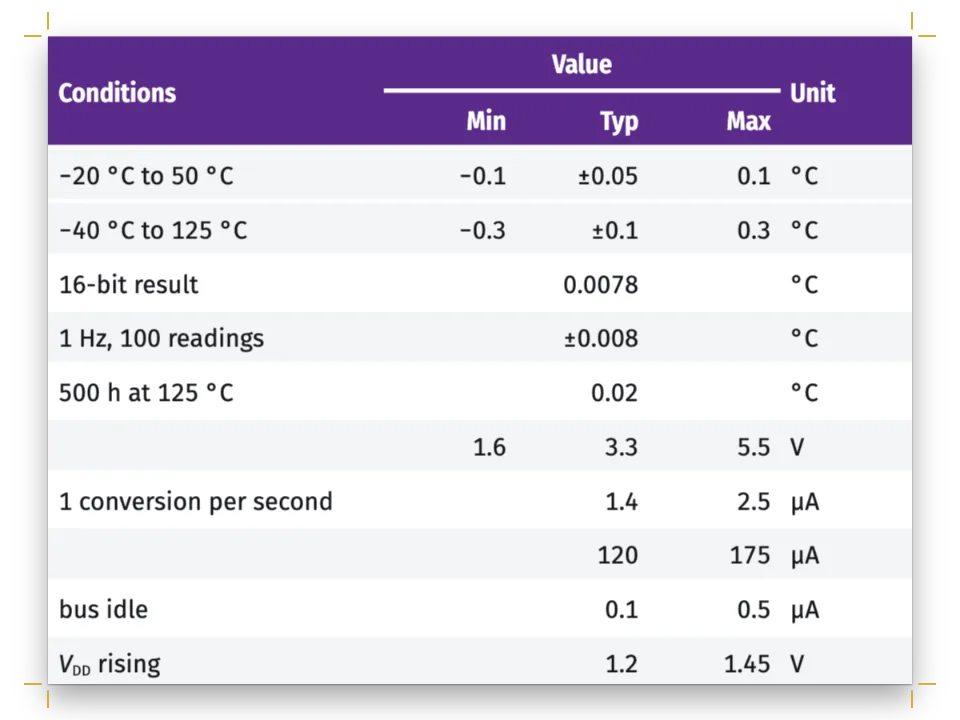
The four pairs of burette readings give every cell of Table 1, the mean and the standard deviation, and the mean volume sets the equivalence point of the pH model that Figure 1 draws. The first row is the header (headerRowCount: 1), and columnWidths gives the label column 1.8 shares of the width. Each cell carries its own align, and mergeCells runs the mean and deviation labels across the first three columns, set right against their values. The figures are in Sometype Mono, so their decimal points line up. The column heads are quantities over units, such as V~b~ used / cm^3^, marked up like the text.
#6 · Close on references with hanging indents
const paragraphStyles = [
  { id: 'references', fontSize: pt(9), lineHeight: pt(12.5), textAlign: 'left',
    hangingIndent: mm(6), spaceBetween: pt(4) }, // ragged, so never hyphenated
  { id: 'colophon', fontFamily: SANS, fontSize: pt(7.4), lineHeight: pt(10), color: col('muted'),
    textAlign: 'left', firstLineIndent: pt(0), marginTop: pt(LEAD) },
];
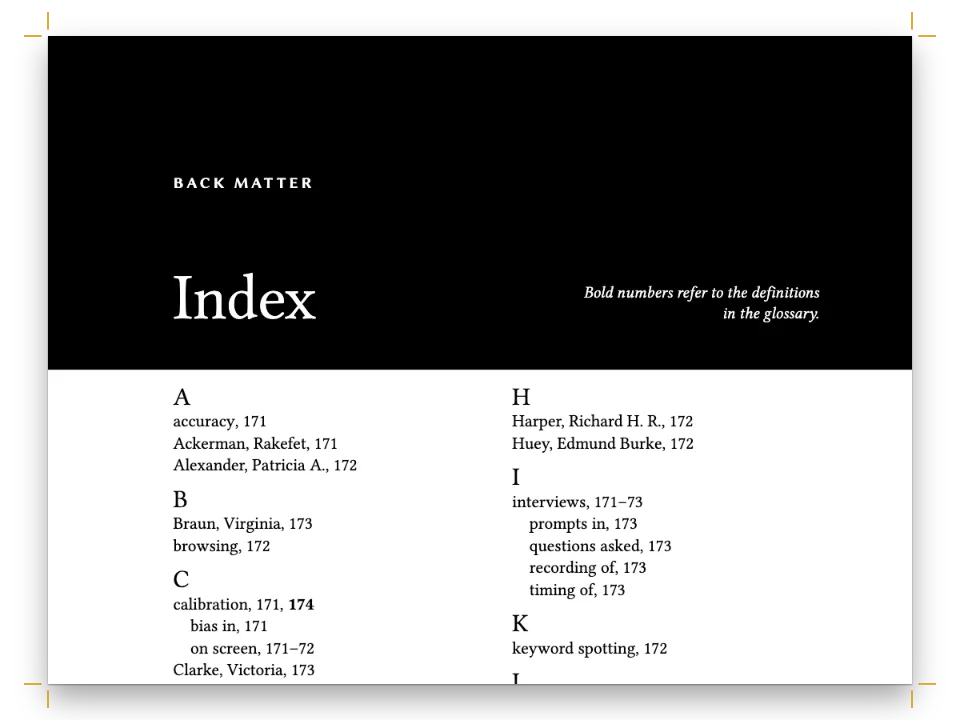
A :::paragraphs{style="references"} fence applies the paragraph style to each reference: 9 on 12.5 pt, ragged, with a 6 mm hanging indent and 4 pt between entries. Ragged paragraphs are not hyphenated unless bodyText.hyphenation.ragged asks for it, so a long title such as Fundamentals of Analytical Chemistry breaks only between words. The colophon has a style of its own, Inria Sans at 7.4 pt, with one 15 pt line of space above it.
The whole recipe
// ═══ Postext Cookbook · Nº 028 · Lab report: formulas, subscripts and a titration curve ═══
// https://postext.dev/en/cookbook/lab-report-formulas
// Code: MIT · Text: original (CC BY 4.0) · Figures: drawn in code (CC BY 4.0)
// Fonts: Inria Serif, Inria Sans, Sometype Mono (SIL OFL 1.1) · Needs postext ≥ 1.57.0
import {
  buildDocumentWithFonts, renderPageToCanvas, registerResourceImage, defaultResourceTypes,
  initMathEngine, renderMath, mergeCells,
} from 'https://esm.sh/postext';
import { renderToPdf, decompressWoff2 } from 'https://esm.sh/postext-pdf';

const LANG = 'en'; // @lang: the language of the sample document ('es' | 'en')
const RECIPE = 'lab-report-formulas';

// ─── 1 · Design ─────────────────────────────────────────────────────────────
const palette = { // white paper and phenolphthalein: pale at the end point, deep past it
  ink: '#1d2126', // text: a blue-black
  phenol: '#ad2c5f', // the accent: numbers, kickers, stripes, the flask's liquid (6.4:1)
  blush: '#f6d5e2', // the end-point pink: the head's band, the indicator's range on the curve
  slate: '#5b6b7a', // the burette's steel, the table head
  rule: '#cfd4da', // hairlines
  muted: '#626a73', // running heads, notes (5.5:1)
  paper: '#ffffff',
};
// col() links a colour to its palette entry; the hex is the value the entry holds.
const col = (id) => ({ hex: palette[id], model: 'hex', paletteId: id });
// 'main-color' as well: the engine's defaults are linked to it, so any left over turn pink.
const colorPalette = Object.entries({ ...palette, 'main-color': palette.phenol })
  .map(([id, hex]) => ({ id, name: id, value: { hex, model: 'hex' } }));
const [SERIF, SANS, MONO] = ['Inria Serif', 'Inria Sans', 'Sometype Mono'];
const [BODY, LEAD] = [10.5, 15]; // pt: text size and leading
// mm: A4, printed on one side, so not mirrored; the wide left margin holds the numbers
const [TRIM_W, TRIM_H, TOP, BOTTOM, LEFT, RIGHT] = [210, 297, 24, 22, 55, 31];
const MEASURE = TRIM_W - LEFT - RIGHT; // mm: 124, about 74 characters of Inria Serif
const GAP = 4; // mm between a hanging number and the text edge
const HANG = LEFT - GAP - 18; // mm: the number column, 18 mm clear of the trim
const at = (to, edge, x = 0, y = 0) => ({ anchor: { to, edge }, offset: { x: mm(x), y: mm(y) } });

// #region answer: formulas and units in the text face; TeX for the reaction and equations
// In the Markdown, ~…~ lowers a run and ^…^ raises it, in the text's own face at 58 % of
// its size: CH~3~COOH, OH^−^ (the minus is U+2212), 25,0 cm^3^, 0,100 mol·dm^−3^, p*K*~a~.
// The marks also work in captions and table cells, which keep their own face ($…$ there
// brings the maths face): the column heads this file writes, each a quantity over its unit:
const units = { cm3: 'cm^3^', conc: 'mol·dm^−3^' }; // the dot keeps a unit one word
const heads = t({ es: ['Valoración', 'V~inicial~', 'V~final~', 'V~b~ gastado'],
  en: ['Titration', 'V~initial~', 'V~final~', 'V~b~ used'] })
  .map((head, i) => (i ? `${head} / ${units.cm3}` : head)); // 'V~b~ gastado / cm^3^'
// Between $$ and $$ is TeX, set by MathJax as vector paths: the reaction, with mhchem's
// \ce{…} (it lowers the 3 of CH3COOH by itself), and the equations. initMathEngine() loads
The composed script.js runs as it is: paste it into any page’s module script, or open the recipe on CodePen. Recipe folder on GitHub ↗ (opens in a new tab)
Variations
#Tint the safety note instead of framing it
A fill in the end-point pink replaces the frame, so the box still carries a single device.
   box('safety', t({ es: 'Seguridad', en: 'Safety' }), {
-    border: { enabled: true, color: col('phenol'), width: pt(0.75) },
+ backgroundEnabled: true, background: col('blush'),#Number tables and figures by section
The results become Table 5.1 and Figure 5.1, counted afresh in each section.
-const resourceTypes = defaultResourceTypes(LANG).map((type) => (type.id === 'table'
-  ? { ...type, captionStyle: { position: 'above' } } : type)); // a table's caption goes on top
+const resourceTypes = defaultResourceTypes(LANG).map((type) => ({ ...type,
+  numberingTemplate: '{h2}.{n}', resetOn: 'h2',
+ ...(type.id === 'table' && { captionStyle: { position: 'above' } }) }));Pitfalls
Pitfall
Maths needs await initMathEngine() before the first build
Formulas laid out before the maths engine is running are grey placeholder boxes. Import initMathEngine from https://esm.sh/postext with the other symbols and await it before the first build; a document with maths built without it prints one console warning. Since postext 1.5 MathJax ships inside the package as one module that initMathEngine fetches, so the plain import works from a CDN and ?bundle is not needed (up to 1.4 every symbol had to come from https://esm.sh/postext?bundle). Import from one URL only: two URLs load two engines. Mathematics →
Pitfall
Container-relative negative offsets render nothing
Auto-width design text is clamped to its container, so a negative offset from the container pushes it out and nothing renders. Anchor such elements to the page or the bleed with explicit mm offsets, or give them a fixed width. Anchoring design elements →
Sandbox check · invalidMath
Invalid LaTeX
Why. MathJax could not parse a formula, so a red placeholder is printed instead.
Fix. Fix the TeX, or escape a dollar sign that was not meant as maths with \$. Docs →
Markdown warning · unclosedMath
Unclosed math delimiter
Why. A $ opens inline maths that is never closed, usually because it belongs to a price.
Fix. Write \$ for a literal dollar, or close the formula on the same line. Docs →
- By default a display formula does not keep with the line that introduces it, so a lead-in ending in “so” can close a page with its equation on the next;
math.keepWithLeadIn: truesends that line over with the formula. This recipe turns it on, so the [OH⁻] equation keeps its sentence however the copy runs. - The TeX glyphs are MathJax's own, not Inria Serif, so an equation reads a little lighter than the text around it. Keep formulas inside sentences as
~and^marks, and reserve TeX for the lines that need it. - The curve's tick labels and axis titles are MathJax outlines, so they use the same glyphs as the equations and stay vector in the PDF:
tex()asksrenderMathfor the paths of each label and places them in the SVG. They can only be drawn onceinitMathEngine()has resolved.
Credits
- Recipe
- Ignacio Ferro
- Text
- Original prose, CC BY 4.0
- Fonts
- Inria Serif (SIL OFL 1.1) · Inria Sans (SIL OFL 1.1) · Sometype Mono (SIL OFL 1.1)
Edit this write-up ↗ (opens in a new tab)Recipe folder on GitHub ↗ (opens in a new tab)