In short
The last pages of a doctoral thesis, from the final chapter to the index. Postext builds the index from words marked in the text and fills in their page numbers.
What you'll build
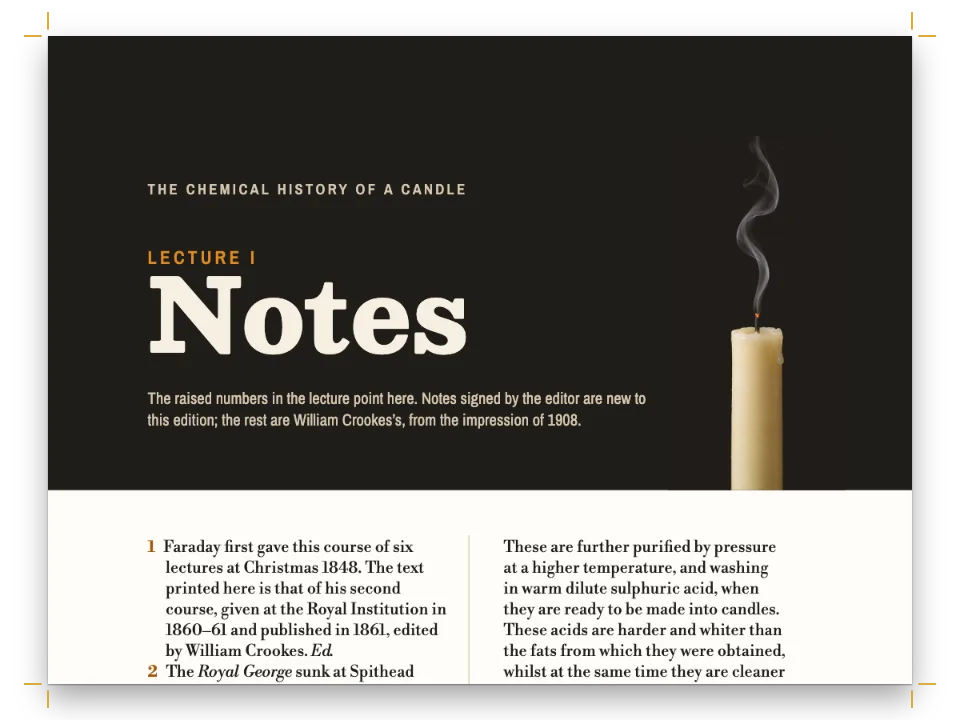
The last seven pages of a doctoral thesis on reading from screens and paper, set on a B5 page in black and white. Chapter 6, appendix A, the glossary, the references and the index each open under the same black band, 62 mm deep, with the title reversed out of it. The chapter shows its numeral in the band and the appendix its letter; the back-matter sections carry the kicker BACK MATTER and a short note in italics. The chapter runs in one justified column. The glossary and the index switch to two ragged columns and the references return to one, with the turnover lines of every entry indented. The index comes from marks in the text: the engine sorts the terms under their letters, finds the page of every mark and joins consecutive pages into runs such as 171–73. Bold numbers point to the glossary's definitions.
This recipe answers
- How do I set a bibliography or glossary (hanging indent, smaller type)?
- How do I build a back-of-book index whose page numbers change by themselves when the text moves?
- How do I stop headings, bold words and bullets from coming out blue?
- How do I number headings (1, 1.1, 1.1.1) and style each level differently?
- How do I set running heads: book title on the left page, chapter title on the right, page number outside?
- How do I force a page or column break, and start every chapter on a right-hand page?
The short answer
// '# Glossary {style="glossary"}' in the Markdown picks a style. Each style starts a page
// of either parity, the appendix a recto (a style that sets no break inherits its level's
// 'odd': gotcha style-inherits-break), stays out of the chapter count (numbered: false, so
// its band has no numeral) and brings its own running heads; the glossary and the index
// set their pages in two columns until the next '#'. The appendix counts, in letters: its
// template prints the level's counter as A, B… config() takes both lists below.
const twoColumns = { layoutType: 'double', gutterWidth: mm(6) };
const backMatter = (id, extra) => ({ id, numbered: false, breakBefore: { enabled: true,
  parity: 'any' }, advancedDesign: opener('Back matter'), header: sectionHeads, ...extra });
const headingStyles = () => [
  backMatter('appendix', { numbered: true, numberingTemplate: '{1:A}', header: appendixHeads,
    breakBefore: { enabled: true, parity: 'odd' }, advancedDesign: opener('Appendix') }),
  backMatter('glossary', { layout: twoColumns }),
  backMatter('references'),
  backMatter('index', { layout: twoColumns }),
];
// One paragraph per entry, in :::paragraphs{style="…"}: the turnover lines hang, so the
// first word of every entry stands clear at the left. Ragged, as APA asks of references,
// with every word whole (hyphenation.ragged is off). The index has its own settings.
const entries = (id, size, lead, hang, extra) => ({ id, fontSize: pt(size),
  lineHeight: pt(lead), textAlign: 'left', hangingIndent: em(hang), ...extra });
const paragraphStyles = () => [
  entries('term', 9.3, 12.4, 1), // the glossary: a bold term, then its definition
  entries('reference', 9.3, 12.4, 1.5, { spaceBetween: pt(2.4) }),
];
Back matter as unnumbered heading styles, entries in hanging indents
Ingredients
- Features
- Section geometryBibliographies and glossariesUnnumbered chaptersBack-of-book indexRunning heads per sectionHeading stylesNumbered headingsChapters that open on a rectoFull-width chapter bandDesigned openersHeading attributesHeads by page roleParagraph stylesCustom resource typesCitations that place figuresTables from dataCaption styleSemantic colour paletteBold, italic and their coloursPDF export
- Also uses
- Callout boxesColumn balancingFigure and Table in your languageLeaving the grid on purposeFonts embedded in the PDF
- Type
- Libertinus Serif, Libertinus Serif Display, Libertinus Sans (SIL OFL 1.1)
- Assets
- None: every picture is drawn in code
Method
#1 · Give each part of the back matter a heading style
The code is the short answer above. # Glossary {style="glossary" note="…"} opens a section that runs to the next level-1 heading, and its pages take the style's layout, running heads and opener (heading styles), so the glossary and the index switch to two columns while the references, whose style sets no layout, fall back to the document's single column. numbered: false keeps these headings out of the chapter count (delete it and the glossary's band prints 2), and each style names its page break, because one that names none inherits the chapter's 'odd' and leaves blank versos. The glossary and reference entries are paragraphs of a :::paragraphs{style="…"} block at 9.3 pt on 12.4 pt, against the text's 11 on 14.6, with turnover lines that hang 1 em in the glossary and 1.5 em in the references (paragraph styles).
#2 · Draw one band for every opener
const SINK = 8; // lines reserved, 41.2 mm: 3.2 mm more than the band, and text on the grid
// Design text sets each baseline 0.8 of its line under the line's top, and a line is 1.2 × the
// size unless lineHeight says otherwise. In mm, a line's part above its baseline and below it:
const PT = 25.4 / 72;
const above = (size, lineHeight = 1.2) => 0.8 * size * lineHeight * PT;
const below = (size, lineHeight = 1.2) => 0.2 * size * lineHeight * PT;
const KICKER = 4.3, TITLE = BAND - TOP - 9.5; // mm under the text block's top: two baselines
// A bottom-aligned box that ends below() under a baseline sets its last line on it. The
// numeral's line is 0.72 of its size, so the line fits inside its box.
const text = (id, content, family, size, lineHeight, baseline, edge, w, extra) => ({
  kind: 'text', id, content, fontFamily: family, fontSize: pt(size), lineHeight,
  color: col('paper'), overflow: 'wrap', align: edge.endsWith('right') ? 'right' : 'left',
  verticalAlign: 'bottom', ...extra, placement: { anchor: { to: 'container', edge },
    size: { width: mm(w), height: mm(baseline + below(size, lineHeight)) } } });
// The mark is '{number}': the chapter's 6, the appendix's A, nothing on an unnumbered heading.
const opener = (label) => ({ enabled: true, minHeight: pt(SINK * LEAD),
  slot: { elements: [
    { kind: 'box', id: 'band', style: { backgroundColor: col('band') }, placement: {
      anchor: { to: 'page', edge: 'top-left' }, size: { width: 'fill', height: mm(BAND) } } },
    text('label', label, LABEL, 8, 1.2, KICKER, 'top-left', 80,
      { fontWeight: 700, letterSpacing: pt(1.6), textTransform: 'uppercase' }),
    text('title', '{titleText}', DISPLAY, 34, 1.04, TITLE, 'top-left', 84),
    text('mark', '{number}', DISPLAY, 118, 0.72, TITLE, 'top-right', 34),
    text('note', '{attr.note}', TEXT, 8.6, 1.3, TITLE, 'top-right', 44, { italic: true }),
  ] } });
The mark is {number}: 6 on the chapter, A on the appendix and nothing on an unnumbered heading. One design serves all three, and the back-matter sections print their {attr.note} where the numeral would stand. minHeight reserves eight lines of 14.6 pt, 41.2 mm from the top of the text block, which clears the band by 3.2 mm and keeps the text on its grid. Design text sets its baseline at 0.8 of the line, so a bottom-aligned box whose foot sits below() under a baseline puts its last line on that baseline. The title, the 118 pt numeral and the last line of the note all stand on the title's baseline, 52.5 mm below the trim. The numeral's line is 0.72 of its size, so the line fits inside its box.
#3 · Letter the appendix from its style
// The style's '{1:A}' (see answer) prints the level's counter as a letter, and startAt=1 on the
// first appendix restarts it after chapter 6. The band and the running head read that letter.
// A resource template's {h1} is a number unless it names a style: '{h1:A}.{n}' counts the
// tables A.1, A.2… and B.1 in a second appendix, with one type for all of them.
const appendixHeads = heads('Appendix {chapterNumber}. {chapterTitle}');
const appendixTables = { ...defaultResourceTypes(LANG).find((type) => type.id === 'table'),
  id: 'table-a', numberingTemplate: '{h1:A}.{n}', resetOn: 'h1' }; // a copy of 'table'
The appendix style sets numberingTemplate: '{1:A}', which prints the level's counter as a letter, and # Interview guide {style="appendix" startAt=1} restarts that counter, so the first appendix is A and not G (heading styles). The band reads the letter through {number} and the running head through {chapterNumber}. A resource type's {h1} prints the counter as a number unless it names a style, so the appendix's tables take a type whose template is '{h1:A}.{n}': A.1, A.2 and so on, and B.1 in a second appendix; with the default type the table would be Table 1.1. The chapter's own headings count from the level templates: '{1}.{2}' prints 6.1, and continuation.headings.h1: 5 makes this the sixth chapter.
#4 · Put the running heads on the outer edge
const HEAD = 17.5, GAP = 9; // mm: the heads' baseline under the trim; the folio to the words
// Each text is placed by its top, above() over HEAD: the folio and the capitals share a baseline.
const head = (id, content, parity, edge, x, size = 7.5, extra) => ({ kind: 'text', id, content,
  parity, pages: 'body', fontFamily: LABEL, fontSize: pt(size), fontWeight: 700,
  letterSpacing: pt(1.3), textTransform: 'uppercase', color: col('ink'), ...extra, placement: {
    anchor: { to: 'page', edge }, offset: { x: mm(x), y: mm(HEAD - above(size)) } } });
const folio = { fontFamily: TEXT, fontWeight: 400, letterSpacing: pt(0) };
const heads = (recto) => ({ elements: [
  head('verso-folio', '{pageNumber}', 'even', 'top-left', OUTER, 9.5, folio),
  head('verso', '{title}', 'even', 'top-left', OUTER + GAP),
  head('recto', recto, 'odd', 'top-right', -(OUTER + GAP)),
  head('recto-folio', '{pageNumber}', 'odd', 'top-right', -OUTER, 9.5, folio),
  // The header's container spans the text block, so one rule serves both pages.
  { kind: 'rule', id: 'hairline', pages: 'body', direction: 'horizontal', thickness: pt(0.5),
    color: col('rule'), placement: { anchor: { to: 'container', edge: 'top-left' },
      offset: { y: mm(HEAD + 2) }, size: { width: 'fill' } } },
] });
const chapterHeads = heads('Chapter {chapterNumber}. {chapterTitle}');
const sectionHeads = heads('{chapterTitle}'); // 'Glossary', 'References', 'Index'
// Openers drop the folio to the foot, centred under the text block, its baseline 12 mm below.
const footer = { elements: [{ kind: 'text', id: 'drop-folio', content: '{pageNumber}',
  pages: 'opener', ...folio, fontSize: pt(9.5), color: col('ink'), align: 'center',
  placement: { anchor: { to: 'container', edge: 'top' }, offset: { y: mm(12 - above(9.5)) } } }] };
The four text elements are anchored to the page and filtered by parity, which keeps the folio on the outer edge of both pages; each is placed by its top, above() over a baseline 17.5 mm below the trim, so the 9.5 pt folio and the 7.5 pt capitals stand on one line. The verso carries the thesis's title ({title}, from the frontmatter) and the recto the section's ({chapterTitle}), such as INDEX on page 177. pages: 'body' keeps them off the openers, whose only folio is the footer's, centred under the text block. The chapter's recto would read Chapter 6. Conclusion and the appendix's Appendix A. Interview guide, but in this sample only the index runs on to a recto.
#5 · Mark the terms where the text discusses them
// Glossary definitions carry 'main' (bold numbers); runs of pages join as 171–72 (Chicago).
// The heads stand on the entries' 11.6 pt pitch, 7.5 pt of space above them: 19 pt from the
// last entry of a letter to the next letter's baseline, 11.6 pt from a letter to its first entry.
const index = { fontFamily: TEXT, fontSize: pt(9), lineHeight: pt(11.6), color: col('ink'),
  indent: em(1), turnoverIndent: em(2), rangeFormat: 'chicago',
  groups: { fontFamily: DISPLAY, fontSize: pt(13), fontWeight: 400, color: col('ink'),
    marginTop: pt(7.5) } };
:index[tablet] prints its word and files it under the same word; Rayner:index{term="Rayner, Keith"} prints nothing and files the page of Rayner under the full name; term="interviews!timing of" makes a sub-entry. The glossary's terms carry main, so their page is set bold, as the note in the index's band says. :::index under # Index {style="index"} prints the entries in the style's two columns, and buildDocument lays the document out again until the page numbers stop moving. The entries are 9 on 11.6 pt, with turnover lines hanging 2 em and sub-entries indented 1 em; the letters are 13 pt in the display face. Marks do not work in table cells, so the rows of Table 6.1 add no pages: look-backs lists the paragraph that reports them, not the table.
#6 · Keep every default in ink
const palette = { ink: '#000000', band: '#000000', rule: '#000000', paper: '#ffffff' };
const col = (id) => ({ hex: palette[id], model: 'hex', paletteId: id });
// Bold, italic and list markers default to 'main-color': pointed at the ink, they print black.
const colorPalette = Object.entries({ ...palette, 'main-color': palette.ink })
  .map(([id, hex]) => ({ id, name: id, value: { hex, model: 'hex' } }));
The engine's defaults for bold, italic, list markers and references follow the palette entry main-color, so pointing it at the ink prints them black instead of blue (color palette). referenceBold: false sets Table 6.1 in roman, like the author–year citations around it.
The whole recipe
// ═══ Postext Cookbook · Nº 031 · Thesis back matter: appendix, glossary and index ═══
// https://postext.dev/en/cookbook/thesis-back-matter
// Code: MIT · Text: original (CC BY 4.0) · Pictures: none
// Fonts: Libertinus Serif, Serif Display and Sans (SIL OFL 1.1) · Needs postext ≥ 1.28.0
import {
  buildDocumentWithFonts, renderPageToCanvas, defaultResourceTypes,
} from 'https://esm.sh/postext';
import { renderToPdf, decompressWoff2 } from 'https://esm.sh/postext-pdf';

const LANG = 'en'; // @lang: the language of the sample document ('en')
const RECIPE = 'thesis-back-matter';

// ─── 1 · Design ─────────────────────────────────────────────────────────────
// #region palette: one ink; every colour is black or white, each under its own name
const palette = { ink: '#000000', band: '#000000', rule: '#000000', paper: '#ffffff' };
const col = (id) => ({ hex: palette[id], model: 'hex', paletteId: id });
// Bold, italic and list markers default to 'main-color': pointed at the ink, they print black.
const colorPalette = Object.entries({ ...palette, 'main-color': palette.ink })
  .map(([id, hex]) => ({ id, name: id, value: { hex, model: 'hex' } }));
// #endregion
const TEXT = 'Libertinus Serif', DISPLAY = 'Libertinus Serif Display', LABEL = 'Libertinus Sans';
const TOP = 24, INNER = 25, OUTER = 31; // mm: a 120 mm measure, about 70 characters at 11 pt
const LEAD = 14.6; // pt: the body's leading, the grid every page is set on
const BAND = 62; // mm from the trim's top: the black band at the head of every opener

// #region answer: back matter as unnumbered heading styles, entries in hanging indents
// '# Glossary {style="glossary"}' in the Markdown picks a style. Each style starts a page
// of either parity, the appendix a recto (a style that sets no break inherits its level's
// 'odd': gotcha style-inherits-break), stays out of the chapter count (numbered: false, so
// its band has no numeral) and brings its own running heads; the glossary and the index
// set their pages in two columns until the next '#'. The appendix counts, in letters: its
// template prints the level's counter as A, B… config() takes both lists below.
const twoColumns = { layoutType: 'double', gutterWidth: mm(6) };
const backMatter = (id, extra) => ({ id, numbered: false, breakBefore: { enabled: true,
  parity: 'any' }, advancedDesign: opener('Back matter'), header: sectionHeads, ...extra });
const headingStyles = () => [
  backMatter('appendix', { numbered: true, numberingTemplate: '{1:A}', header: appendixHeads,
    breakBefore: { enabled: true, parity: 'odd' }, advancedDesign: opener('Appendix') }),
  backMatter('glossary', { layout: twoColumns }),
  backMatter('references'),
  backMatter('index', { layout: twoColumns }),
];
// One paragraph per entry, in :::paragraphs{style="…"}: the turnover lines hang, so the
// first word of every entry stands clear at the left. Ragged, as APA asks of references,
// with every word whole (hyphenation.ragged is off). The index has its own settings.
const entries = (id, size, lead, hang, extra) => ({ id, fontSize: pt(size),
  lineHeight: pt(lead), textAlign: 'left', hangingIndent: em(hang), ...extra });
const paragraphStyles = () => [
The composed script.js runs as it is: paste it into any page’s module script, or open the recipe on CodePen. Recipe folder on GitHub ↗ (opens in a new tab)
Variations
#Start every section on a recto
Theses bound for a library often open each section on a right-hand page. The glossary, the references and the index then move to pages 175, 177 and 179, each after a blank verso, and the index's bold numbers point to page 175.
-const backMatter = (id, extra) => ({ id, numbered: false, breakBefore: { enabled: true,
-  parity: 'any' }, advancedDesign: opener('Back matter'), header: sectionHeads, ...extra });
+const backMatter = (id, extra) => ({ id, numbered: false, breakBefore: { enabled: true,
+ parity: 'odd' }, advancedDesign: opener('Back matter'), header: sectionHeads, ...extra });#Set the front of the thesis too
The preliminaries, counted in roman numerals before page 1, are in Front matter in roman folios, then page 1.
Pitfalls
Pitfall
A heading style inherits its level's page break
A headingStyles entry takes every field it leaves out from its heading level, breakBefore included. A contents page or a colophon styled on an H1 after a :::pagebreak inherits parity 'odd' and lands behind a blank page. Give such a style breakBefore: { enabled: false }. Heading styles →
Pitfall
Page 1 is a recto: plan pages with physical numbers
Page 1 is a right-hand page and page 2 the first verso, so plan spreads with physical page numbers: an opener on an even page faces the odd page after it. Page and column breaks →
Credits
- Recipe
- Ignacio Ferro
- Text
- Original prose, CC BY 4.0
- Fonts
- Libertinus Serif (SIL OFL 1.1) · Libertinus Serif Display (SIL OFL 1.1) · Libertinus Sans (SIL OFL 1.1)
Edit this write-up ↗ (opens in a new tab)Recipe folder on GitHub ↗ (opens in a new tab)