In short
In Morocco, Algeria and Tunisia, books in Arabic print their numbers with the digits Europe uses, 1, 2, 3, not with ١، ٢، ٣. One setting, the language and country of the document, gives the whole book those digits.
What you'll build
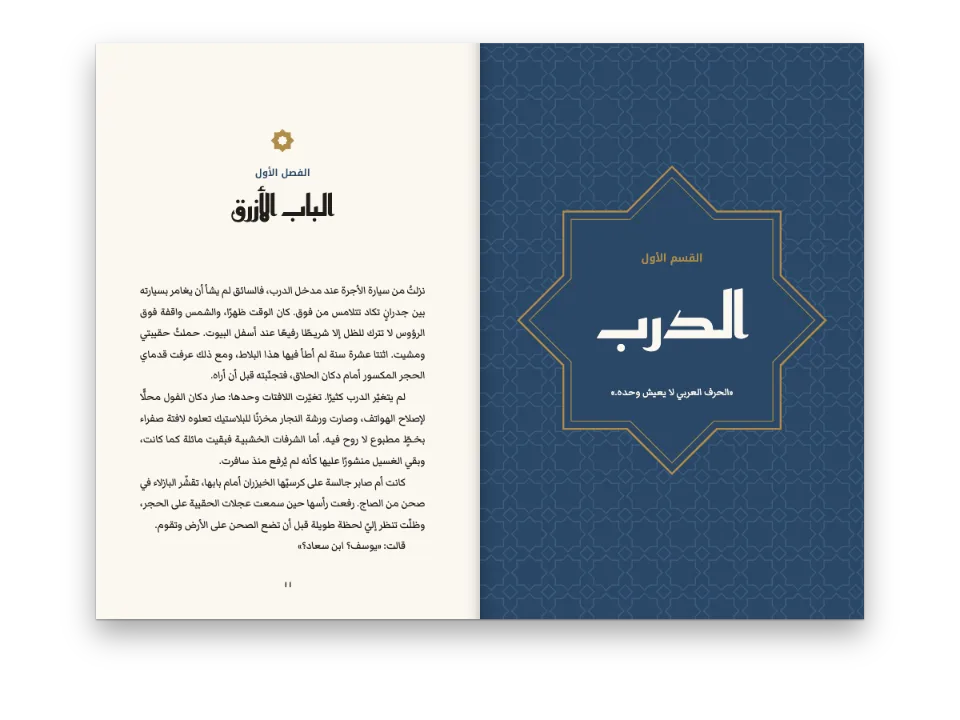
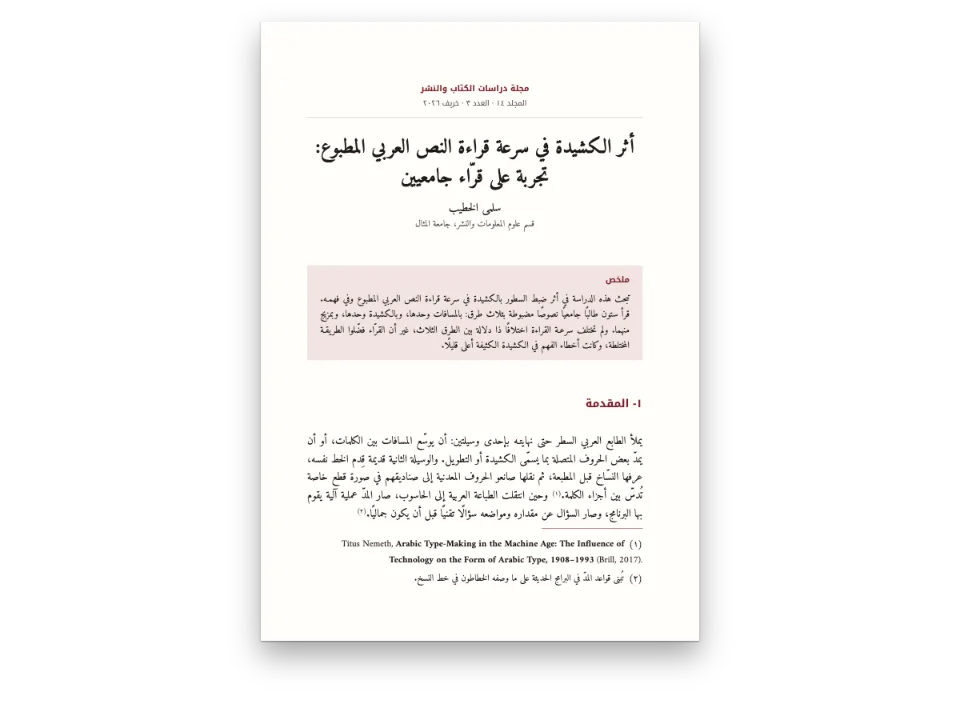
A chapter from a guide to the old cities of Morocco, on the gates of Fes, as a Moroccan publisher would print it: 13.5 × 21 cm, Noto Naskh Arabic at 12.5 pt, headings in Noto Kufi Arabic in the green of Fes tilework. The text runs right to left and the book is bound on the right, like any Arabic book, but every number on the page is written 1, 2, 3: the folios 41 to 44, الفصل 3, the section numbers 3-1 and 3-2, the list of gates 1- to 5-, the note markers (1) and the figure number شكل 3-1. That is the usage of the Maghreb, from Morocco to Tunisia, and the page shows it with one setting. An Arabic novel bound on the right shows the same book with the Mashriq's ١٢.
This recipe answers
- How do I print European digits (1, 2, 3) in an Arabic book for a Maghreb edition?
The short answer
const config = () => ({
  // Written out, never LANG (gotcha: arabic-locale-tag). The Moroccan tag keeps the text right
  // to left and the binding on the right, and sets numerals: 'auto' to European digits: the
  // folios, the chapter and section numbers, the list, the notes and the figure number.
  locale: 'ar-MA',
  colorPalette,
  page: { width: mm(135), height: mm(210), dpi: 150, pageNumbering: { startAt: 41 },
    margins: { top: mm(22), bottom: mm(22), left: mm(19), right: mm(16), mirror: true } },
  layout: { layoutType: 'single' },
  bodyText: { fontFamily: TEXT, fontSize: pt(12.5), lineHeight: pt(20.5), color: col('ink'),
    boldColor: col('ink'), italicColor: col('ink'), referenceColor: col('ink'),
    textAlign: 'justify', firstLineIndent: em(1.5), indentAfterHeading: false },
  headings: { fontFamily: LABEL, fontWeight: 700, color: col('green'), levels: [
    // A chapter opens on an odd page, with no blank page forced before it.
    { level: 1, fontSize: pt(26), lineHeight: pt(41), numberingTemplate: 'الفصل {1}',
      numberSeparator: ': ', breakBefore: { enabled: true, parity: 'odd' },
      marginTop: pt(0), marginBottom: pt(10) },
    { level: 2, fontSize: pt(13), lineHeight: pt(20.5), numberingTemplate: '{1}-{2}',
      numberSeparator: '  ', marginTop: pt(20.5), marginBottom: pt(0) },
  ] },
  orderedLists, footnotes, captionStyle,
  paragraphStyles: [{ id: 'colophon', fontFamily: TEXT, fontSize: pt(8.5), lineHeight: pt(11),
    color: col('muted'), textAlign: 'left', firstLineIndent: pt(0), marginTop: pt(20.5) }],
  header: { elements: [] },
  footer: { elements: [{ kind: 'text', id: 'folio', content: '{pageNumber}', fontFamily: LABEL,
    fontSize: pt(9), color: col('muted'), align: 'center',
    placement: { anchor: { to: 'page', edge: 'bottom' }, offset: { y: mm(-12) } } }] },
});
Ar-MA prints 1, 2, 3 in every number the engine writes
Ingredients
- Features
- Digits of the generated numbersRight-to-left textArabic as the document languageBooks bound on the rightArabic fontsBody typeNumbered headingsFootnotesNumbered listsCaption stylePDF export
- Also uses
- Paragraphs in the other directionHeading attributesFigures exactly hereParagraph stylesFonts embedded in the PDFFigures and tables as resourcesRoman front matter
- Type
- Noto Naskh Arabic, Noto Kufi Arabic (SIL OFL 1.1)
- Assets
- None: every picture is drawn in code
Method
#1 · The country picks the digits
The code is the short answer above. numerals is left at 'auto', and the engine reads the digits from the tag: ar-MA, ar-DZ, ar-TN, ar-LY, ar-MR and ar-EH give European digits, ar alone and the Mashriq regions give ١٢٣ (Digits and numeral styles). Only the numbers the engine writes change: the folio, the heading counters, the list numbers, the note markers, the figure numbers. The years in the text, 789 and 1913, are the author's, typed in the digits of the edition, and the engine never rewrites them. The heading's {startAt=3} reads ٣ as well as 3, so the same Markdown serves both editions.
#2 · Marks around the numbers
// «1-» and «(1)», as Arabic books write them; the number itself follows numerals.
const orderedLists = { color: col('green'), fontWeight: 700, marginTop: pt(0),
  marginBottom: pt(0), levels: [{ level: 1, numberFormat: 'arabic', separator: '-' }] };
const footnotes = { markerTemplate: '({n})', numbering: 'page', noteNumberPosition: 'inline',
  fontSize: pt(10), lineHeight: pt(15), separator: { width: 0.3, color: col('green') } };
// A colon after the label: a full stop after a number reads as a decimal point.
const captionStyle = { fontFamily: TEXT, fontSize: pt(10), color: col('ink'), labelBold: true,
  labelColor: col('green'), labelSeparator: ': ', note: { color: col('muted') } };
Arabic books write a list number with a hyphen after it, 1-, and a note marker in parentheses, (1); both templates take the document's digits, so the Mashriq edition prints ١- and (١) from the same settings (Footnotes). The caption's label ends in a colon, شكل 3-1:, because a full stop after a number reads as a decimal point. Notes start again at (1) on every page, as most Arabic books number them.
#3 · A tile band drawn in code
// The star is two squares turned 45°; between four stars a small square. Paths only.
const star = (cx, cy, r) => {
  const pts = [];
  for (let k = 0; k < 16; k++) {
    const a = (k * Math.PI) / 8;
    const d = k % 2 ? r * 0.7654 : r; // where the two squares' sides cross
    pts.push(`${(cx + d * Math.sin(a)).toFixed(2)} ${(cy - d * Math.cos(a)).toFixed(2)}`);
  }
  return `M${pts.join('L')}Z`;
};
function zellige(W, H, S) {
  let stars = '';
  let inner = '';
  let squares = '';
  for (let y = 0; y <= H + S; y += S) {
    for (let x = 0; x <= W + S; x += S) {
      stars += star(x, y, S * 0.47);
      inner += star(x, y, S * 0.2);
      squares += `M${x + S / 2} ${y + S / 2 - S * 0.17}l${S * 0.17} ${S * 0.17}`
        + `l${-S * 0.17} ${S * 0.17}l${-S * 0.17} ${-S * 0.17}Z`;
    }
  }
  return `<svg xmlns="http://www.w3.org/2000/svg" width="${W * 10}" height="${H * 10}" `
    + `viewBox="0 0 ${W} ${H}"><rect width="${W}" height="${H}" fill="${palette.green}"/>`
    + `<path d="${stars}" fill="${palette.cobalt}" stroke="${palette.paper}" stroke-width="0.5"/>`
    + `<path d="${inner}" fill="${palette.paper}"/>`
    + `<path d="${squares}" fill="${palette.ochre}" stroke="${palette.paper}" stroke-width="0.4"/>`
    + '</svg>';
}
The figure is an SVG generated in the pen: eight-pointed stars made of two squares turned 45°, small squares between them, in the palette's green, cobalt and ochre. Its caption is Arabic in both editions, numbered by the chapter, {h1}-{n}, as the Arabic resource types number their figures.
The whole recipe
// ═══ Postext Cookbook · Nº 109 · A Maghreb edition of an Arabic text, with European digits ═══
// https://postext.dev/en/cookbook/maghreb-edition-european-digits
// Code: MIT · Text: original Arabic prose (CC BY 4.0) · Pattern: drawn in code
// Fonts: Noto Naskh Arabic, Noto Kufi Arabic (SIL OFL 1.1) · Needs postext ≥ 1.65.0
import {
  buildDocument, withLoadedFonts, renderPageToCanvas, registerResourceImage,
} from 'https://esm.sh/postext';
import { renderToPdf, decompressWoff2 } from 'https://esm.sh/postext-pdf';

const LANG = 'en'; // @lang: the language of the frame; the chapter is Arabic in both editions
const RECIPE = 'maghreb-edition-european-digits';

// ─── 1 · Design ─────────────────────────────────────────────────────────────
// The green and cobalt of Fes tilework, on a white book paper.
const palette = {
  ink: '#1c1d1b', // text
  green: '#1d6650', // the accent: headings, the list numbers, the notes' rule
  cobalt: '#25488a', // the tile's second colour
  ochre: '#c99a3e', // the tile's third colour
  muted: '#62655f', // folios, captions' notes, the colophon
  paper: '#ffffff',
};
const col = (id) => ({ hex: palette[id], model: 'hex', paletteId: id });
const colorPalette = Object.entries({ ...palette, 'main-color': palette.green })
  .map(([id, hex]) => ({ id, name: id, value: { hex, model: 'hex' } }));
const [TEXT, LABEL] = ['Noto Naskh Arabic', 'Noto Kufi Arabic'];

// #region marks: list numbers, note markers and figure numbers in the same digits
// «1-» and «(1)», as Arabic books write them; the number itself follows numerals.
const orderedLists = { color: col('green'), fontWeight: 700, marginTop: pt(0),
  marginBottom: pt(0), levels: [{ level: 1, numberFormat: 'arabic', separator: '-' }] };
const footnotes = { markerTemplate: '({n})', numbering: 'page', noteNumberPosition: 'inline',
  fontSize: pt(10), lineHeight: pt(15), separator: { width: 0.3, color: col('green') } };
// A colon after the label: a full stop after a number reads as a decimal point.
const captionStyle = { fontFamily: TEXT, fontSize: pt(10), color: col('ink'), labelBold: true,
  labelColor: col('green'), labelSeparator: ': ', note: { color: col('muted') } };
// #endregion

// #region answer: ar-MA prints 1, 2, 3 in every number the engine writes
const config = () => ({
  // Written out, never LANG (gotcha: arabic-locale-tag). The Moroccan tag keeps the text right
  // to left and the binding on the right, and sets numerals: 'auto' to European digits: the
  // folios, the chapter and section numbers, the list, the notes and the figure number.
  locale: 'ar-MA',
  colorPalette,
  page: { width: mm(135), height: mm(210), dpi: 150, pageNumbering: { startAt: 41 },
    margins: { top: mm(22), bottom: mm(22), left: mm(19), right: mm(16), mirror: true } },
  layout: { layoutType: 'single' },
The composed script.js runs as it is: paste it into any page’s module script, or open the recipe on CodePen. Recipe folder on GitHub ↗ (opens in a new tab)
Variations
Pitfalls
Pitfall
Tag an Arabic book 'ar', not with LANG
A recipe's editions are en and es, but an Arabic sample is Arabic in both: `locale: LANG` would set it left to right, bind it on the left, number its pages 1 2 3 and caption its figures Figure or Figura. From postext 1.30 the tag is also the language the text is shaped in (measured, painted and embedded), so under an English or Spanish tag a face such as Markazi Text does not draw the Arabic forms of its guillemets and stops, and the lines break elsewhere. Write the tag yourself: 'ar' (Arabic-Indic digits, the Mashriq convention), a region such as 'ar-EG' or 'ar-SA', or 'ar-MA', 'ar-DZ' or 'ar-TN' for a Maghreb edition with European digits. A Latin page that only quotes Arabic keeps its own locale. Right-to-left text →
Pitfall
Arabic faces need their arabic file, through the arabic block
Fontsource serves Amiri, Noto Naskh Arabic or Scheherazade New as one file per subset, and the Arabic letters are in the arabic file. loadFonts fetches only latin (and latin-ext), so on screen the Arabic comes from a system face and measures wrong, and fontsourceProvider hands the PDF that latin file, which prints empty boxes. List the arabic kit block, call loadArabicFonts(FONTS, markdown) after loadFonts, with every weight the pages set in Arabic listed in FONTS, and give renderToPdf fontProvider: arabicPdfProvider. Arabic fonts →
Pitfall
'1998. ' or '- ' at a paragraph start opens a list
A paragraph that starts with a number, a period and a space, or with a hyphen and a space, becomes a list item. Put a word joiner (U+2060) before the number, and write dialogue with an em dash. Escapes and literal characters →
Credits
- Recipe
- Ignacio Ferro
- Text
- “The gates of Fes”, a chapter written in Arabic for the recipe, from an invented book on the old cities of Morocco · Postext Cookbook · original
- Fonts
- Noto Naskh Arabic (SIL OFL 1.1) · Noto Kufi Arabic (SIL OFL 1.1)
Edit this write-up ↗ (opens in a new tab)Recipe folder on GitHub ↗ (opens in a new tab)