In short
Sample pages from a classic Chinese history book. It shows how to mark names with a straight red line and book titles with a wavy one, in both vertical and horizontal text.
What you'll build
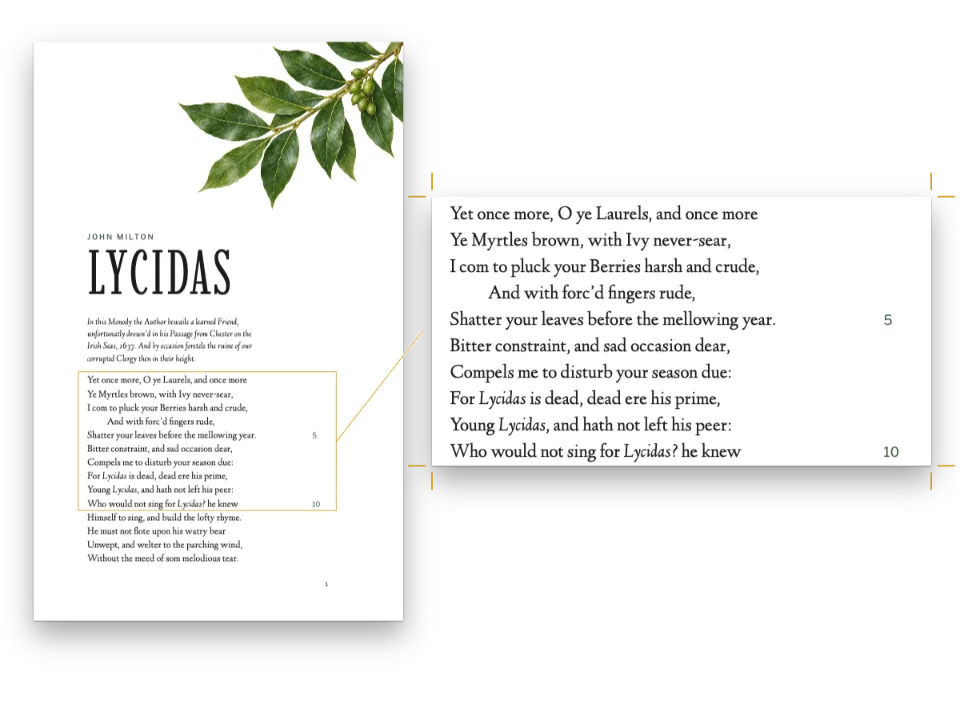
Three specimen pages for a reader of the Records of the Grand Historian, on the 140 × 203 mm trim of a Chinese 大32開 book. The passage is the opening of the Basic Annals of Xiang Yu in the full punctuation of a classical edition: a straight line beside every person, place, state and dynasty, a wavy line beside every book and chapter title, both in vermilion. Page 1 sets the headnote and the editor's conventions in the Kai face. Pages 2 and 3 set the same Markdown twice, down the page and across it, so the spread shows where the marks go: left of the names in vertical lines, under them in horizontal ones. The book is bound on the right, and an indigo band carries each title. Nº 044, Lycidas in the text of 1645, sets its names apart the European way, in italic.
This recipe answers
- How do I mark proper names and book titles in Chinese text with a straight and a wavy line?
- Why does my Chinese emphasis print in a slanted face, and what should I use instead?
- How do I set a Chinese book vertically, bound on the right?
The short answer
// :name[項梁] draws the proper-name line, :book[史記] the book-title mark, :dots[…] dots.
const cjk = {
  bookTitleMark: 'wavy', // zh-Hant's default; mainland editions of the classics use it too
  annotationColor: col('mark'), // unset, the marks print in the colour of the text
  grid: { enabled: true, charsPerLine: CHARS, linesPerPage: LINES },
};
// The book runs down the page, bound on the right: the lines stand left of the names.
const layout = { layoutType: 'single', writingMode: 'vertical-rl' };
// # 項羽本紀 {style="across"} sets the same Markdown across the page, 28 characters to
// the line: the lines run under the names. Its margins set its grid; the book's grid
// counts down the page.
const MEASURE = 28 * SIZE * PT; // mm
const across = {
  id: 'across',
  layout: { layoutType: 'single', writingMode: 'horizontal-tb' },
  margins: { top: mm(SIDE), bottom: mm(H - SIDE - 25 * LEAD * PT), // 25 lines
    left: mm((W - MEASURE) / 2), right: mm((W - MEASURE) / 2) },
};
Marks by the markup, their side by the writing mode
Ingredients
- Features
- Emphasis dots, name and title linesVertical textBooks bound on the rightChinese punctuation widthsChinese line breakingCharacter gridChinese, Japanese and Korean fontsFonts embedded in the PDFPDF exportChinese numeralsHeading stylesSection geometryDesigned openersFull-width chapter bandHeading attributesNumbered listsIndents, alignment and paragraph spacingParagraph stylesSemantic colour palette
- Type
- Noto Serif TC, Noto Sans TC, LXGW WenKai TC (SIL OFL 1.1)
- Assets
- None: every picture is drawn in code
Method
#1 · The markup marks, the writing mode places
The code is the short answer above. :name[項梁] and :book[史記] keep their characters in the text, so search, copied text and the PDF read 項梁 and 史記, and add the marks beside them (Chinese marks, ruby and warichu). The side is decided by the writing mode alone: layout.writingMode: 'vertical-rl' puts the lines left of the characters, and the heading style across, whose layout is 'horizontal-tb', puts them under. bookTitleMark: 'wavy' is what a zh-Hant document gets by default; it is written out because a switch to zh-Hans would otherwise print the titles in 《》. Two marks of one kind that touch, as in 東漢班固 or 史記項羽本紀, each give up an eighth of an em at the meeting ends, so the lines read as two names.
#2 · Leading with room for the marks
const [SONG, HEI, KAI] = ['Noto Serif TC', 'Noto Sans TC', 'LXGW WenKai TC']; // 宋, 黑, 楷
const PT = 25.4 / 72; // mm in a point
const [W, H] = [140, 203]; // mm: 大32開
const SIZE = 10.5; // pt: 五號
// A gap of 7.5 pt (0.71 em) between lines: a line of marks needs half an em of it, dots on
// one side and lines on the other five eighths. At 15 pt the build reports every marked
// paragraph (cjkMarksExceedLeading: gap 0.43 em).
const LEAD = 18; // pt
const [CHARS, LINES] = [42, 17]; // the vertical grid: characters down a line, lines across
const SIDE = (W - LINES * LEAD * PT) / 2; // mm: the side margins of a vertical page
The marks live in the gap between lines and never change the line pitch (Marks, ruby and warichu). At 10.5 pt on 18 pt the gap is 0.71 em, which holds the name lines of one column and the dots of the next, as on the fifth convention of page 1. The grid counts the page in characters: 42 down each line and 17 lines across, and it moves the margins so the type area is exactly that: 25.7 mm of margin at the head, 21.7 mm at the foot (Character grid).
#3 · One opener, turned with the page
// The grid centres the text between the minimum margins; the band stops at its foot.
const FOOT = 20 + (H - 24 - 20 - CHARS * SIZE * PT) / 2; // mm, with minimums of 24 and 20
const BAND = SIDE + 3.5 * LEAD * PT; // mm from the trim, which is the right edge down the page
const onBand = { align: 'left', overflow: 'wrap' }; // design text centres and cuts by default
const next = (id, y) => ({ anchor: { to: `#${id}`, edge: 'below' }, offset: { y: mm(y) } });
const opener = {
  enabled: true,
  minHeight: pt(4 * LEAD), // the text starts on the fifth line, half a line clear of the band
  slot: { elements: [
    // Across the page the band's length runs past the trim; down it, it ends at the text's
    // foot, clear of the folio.
    { kind: 'box', id: 'band', style: { backgroundColor: col('band') },
      placement: { anchor: { to: 'bleed', edge: 'top-left' },
        size: { width: mm(H - FOOT), height: mm(BAND) } } },
    { kind: 'text', id: 'kicker', content: '{attr.kicker}', ...onBand, fontFamily: HEI,
      fontWeight: 700, fontSize: pt(8), letterSpacing: pt(1.6), color: col('tint'),
      placement: { anchor: { to: 'container', edge: 'top-left' }, offset: { y: mm(6 - SIDE) } } },
    { kind: 'text', id: 'title', content: '{titleText}', ...onBand, fontFamily: SONG,
      fontWeight: 700, fontSize: pt(46), lineHeight: 1, letterSpacing: pt(3),
      color: col('paper'), placement: next('kicker', 2) },
    { kind: 'text', id: 'byline', content: '{attr.byline}', ...onBand, fontFamily: KAI,
      fontSize: pt(10), color: col('tint'), placement: next('title', 2) },
  ] },
};
A heading design is laid out in the flow of its page, so one set of elements serves both directions (Vertical writing). Anchored to the top-left of the bleed, the band lies across the head of the horizontal page and down the right edge of the vertical ones, where reading starts. The kicker, the title and the byline stack in the flow too: one under another across the page, one left of another down it. The band's length is measured along the flow: 181.3 mm stops it at the foot of the vertical text, clear of the folio, and runs past the trim of the horizontal page.
#4 · Folios for a book bound on the right
const foot = (id, content, parity, edge, x, extra) => ({ kind: 'text', id, content, parity,
  fontFamily: HEI, fontSize: pt(7), color: col('muted'), ...extra,
  placement: { anchor: { to: 'page', edge }, offset: { x: mm(x), y: mm(-11) } } });
const folio = { fontFamily: SONG, fontSize: pt(9) };
// Bound on the right, a recto (odd) lies left of the spine: its outer edge is its left one.
const footer = { elements: [
  foot('folio-odd', '{pageNumber}', 'odd', 'bottom-left', SIDE, folio),
  foot('folio-even', '{pageNumber}', 'even', 'bottom-right', -SIDE, folio),
  foot('slug', '{attr.slug}', 'all', 'bottom', 0, { letterSpacing: pt(0.4) }),
] };
Vertical text binds the book on the right (Binding): page 1 lies left of the spine, and a recto's outer edge is its left one. The odd folio goes bottom-left and the even one bottom-right, the reverse of a Western book, and pageNumbering.format: 'trad-chinese-informal' prints them 一, 二, 三. The slug line between them comes from an attribute of each heading, slug="…"; with the colophon, it is all that changes between the English and the Spanish editions.
#5 · A second ink
const palette = {
  ink: '#221e1b', // the text
  band: '#23394b', // the opener band and the small heads
  mark: '#b5412c', // the name, title and emphasis marks: the second ink
  tint: '#c7d2da', // kickers and bylines on the band
  muted: '#6f6a64', // folios, slug lines, the colophon
  paper: '#ffffff',
};
const col = (id) => ({ hex: palette[id], model: 'hex', paletteId: id });
const colorPalette = [
  ...Object.entries(palette).map(([id, hex]) => ({ id, name: id, value: { hex, model: 'hex' } })),
  { id: 'main-color', name: 'band (defaults)', value: { hex: palette.band, model: 'hex' } },
];
A classical edition prints its marks in the ink of the text. A reader for students can print them in a second colour, so they stand apart from the strokes of the characters: annotationColor links them to the palette's mark, the vermilion of a red-ink commentary, and one change to that entry retints every line and dot of the book.
The whole recipe
// ═══ Postext Cookbook · Nº 077 · Proper-name and book-title marks, across and down ═════
// https://postext.dev/en/cookbook/proper-name-marks
// Code: MIT · Text: Sima Qian, Shiji 7 (PD) · Punctuation, headnote, conventions: CC BY 4.0
// Fonts: Noto Serif TC, Noto Sans TC, LXGW WenKai TC (SIL OFL 1.1) · Needs postext ≥ 1.25.0
// Specimen pages for a classical reader: the opening of the Basic Annals of Xiang Yu with
// its proper-name lines and wavy title lines, set down the page and then across it.
import {
  buildDocument, withLoadedFonts, renderPageToCanvas, loadVerticalAlternates,
} from 'https://esm.sh/postext';
import { renderToPdf, decompressWoff2 } from 'https://esm.sh/postext-pdf';

const LANG = 'en'; // @lang: the language of the slug lines and the colophon ('en' | 'es')
const RECIPE = 'proper-name-marks';

// ─── 1 · Design ─────────────────────────────────────────────────────────────
// #region palette: the indigo of a thread-bound cover, vermilion for the marks
const palette = {
  ink: '#221e1b', // the text
  band: '#23394b', // the opener band and the small heads
  mark: '#b5412c', // the name, title and emphasis marks: the second ink
  tint: '#c7d2da', // kickers and bylines on the band
  muted: '#6f6a64', // folios, slug lines, the colophon
  paper: '#ffffff',
};
const col = (id) => ({ hex: palette[id], model: 'hex', paletteId: id });
const colorPalette = [
  ...Object.entries(palette).map(([id, hex]) => ({ id, name: id, value: { hex, model: 'hex' } })),
  { id: 'main-color', name: 'band (defaults)', value: { hex: palette.band, model: 'hex' } },
];
// #endregion
// #region type: 五號 on 18 pt, 42 characters by 17 lines down the page
const [SONG, HEI, KAI] = ['Noto Serif TC', 'Noto Sans TC', 'LXGW WenKai TC']; // 宋, 黑, 楷
const PT = 25.4 / 72; // mm in a point
const [W, H] = [140, 203]; // mm: 大32開
const SIZE = 10.5; // pt: 五號
// A gap of 7.5 pt (0.71 em) between lines: a line of marks needs half an em of it, dots on
// one side and lines on the other five eighths. At 15 pt the build reports every marked
// paragraph (cjkMarksExceedLeading: gap 0.43 em).
const LEAD = 18; // pt
const [CHARS, LINES] = [42, 17]; // the vertical grid: characters down a line, lines across
const SIDE = (W - LINES * LEAD * PT) / 2; // mm: the side margins of a vertical page
// #endregion

// #region answer: marks by the markup, their side by the writing mode
// :name[項梁] draws the proper-name line, :book[史記] the book-title mark, :dots[…] dots.
const cjk = {
  bookTitleMark: 'wavy', // zh-Hant's default; mainland editions of the classics use it too
  annotationColor: col('mark'), // unset, the marks print in the colour of the text
The composed script.js runs as it is: paste it into any page’s module script, or open the recipe on CodePen. Recipe folder on GitHub ↗ (opens in a new tab)
Variations
#Print the titles in 《》
Mainland books outside the classics set titles in brackets: the Markdown stays as it is, and the brackets print as punctuation of the text.
-  bookTitleMark: 'wavy', // zh-Hant's default; mainland editions of the classics use it too
+ bookTitleMark: 'brackets', // 《史記》《項羽本紀》#Print the marks in the ink of the text
Leave annotationColor unset and each mark takes the colour of the block it marks.
- annotationColor: col('mark'), // unset, the marks print in the colour of the textPitfalls
Pitfall
Tag the document zh-Hans or zh-Hant, not with LANG
A recipe's editions are en and es, but a Chinese sample is Chinese in both: `locale: LANG` would tag it English or Spanish, hyphenate its Latin words, label its figures Figure or Figura and give the PDF the wrong language. From postext 1.30 the tag is also the language the text is shaped in (measured, painted and embedded), so under an English or Spanish tag a Chinese face sets its digits and the punctuation it shares with Latin text in other forms, and the lines break elsewhere. Write the tag yourself: 'zh-Hans' (mainland conventions: GB line breaking, Kaiming punctuation) or 'zh-Hant' (Taiwan: full-width centred punctuation); 'zh-HK' for Hong Kong. A bare 'zh' reads as Simplified, mainland. A Japanese sample takes 'ja' (gotcha ja-locale-tag). Chinese line breaking →
Pitfall
Chinese faces load by slices, through the cjk block
Fontsource serves a Chinese, Japanese or Korean family as about a hundred files per weight, each covering a range of characters. loadFonts fetches only the latin file, so on screen the Han characters come from a system face and measure wrong, and fontsourceProvider hands the PDF that latin file, which prints them as empty boxes. List the cjk kit block, call loadCjkFonts(FONTS, markdown) after loadFonts (once per voice, with the text it sets, when the book uses several CJK faces) and give renderToPdf fontProvider: cjkPdfProvider: both take the files that hold the text's characters. Chinese, Japanese and Korean fonts →
Pitfall
A right-bound book shows its spreads with showBook
In a book bound on the right (Arabic, Hebrew or Persian text, vertical Chinese, or page.binding 'right') page 1 is still the recto, but it lies on the left of the spine, and the pairs read [3 | 2]. showPages lays every book out left-bound; showBook from the book block (the cjk block carries the same function) reads doc.binding and mirrors the pairs. capture.hero still names a spread in reading order, [verso, recto]: [2, 3]. Books bound on the right →
Pitfall
Chinese has no italic
The CJK families ship no italic, and Chinese typography marks emphasis with dots beside the characters, not with a slant. In a document tagged Chinese, *…* sets emphasis dots on the Chinese characters it holds and keeps italics for the Latin words (cjk.emphasis: 'dots', the default for Chinese); :dots[…] sets them anywhere. With cjk.emphasis: 'italic', or in a document tagged en or es, *…* makes the canvas slant the upright glyphs, a synthetic oblique that Chinese typography never uses (the PDF falls back to the upright face): keep the Chinese tag, or set emphasis in bold or in a Kai face (LXGW WenKai) through a paragraph or chip style. Chinese, Japanese and Korean fonts →
Layout warning · cjkMarksExceedLeading
Marks crowd the next line
Why. A paragraph with emphasis dots or proper-name and book-title lines has a line gap under half an em (five eighths with marks on both sides): the marks live in the leading, whose height never changes for them, so they touch the next line.
Fix. Give the paragraph a paragraph style with more leading, or raise `bodyText.lineHeight`. Docs →
- A heading drawn by a design prints its title through the design, and design text drops the marks:
# :book[項羽本紀]would show no wavy line in the band. Running heads, captions and table cells print their text without marks too. - Postext does not stop on
cjkMarksExceedLeading: the build lists it indoc.contentWarningsand the Sandbox’s Checks panel shows it, but the pages print anyway, with the marks crowding the next line. When you change the leading, read that list; at 15 pt it holds every marked paragraph of these pages.
Credits
- Recipe
- Ignacio Ferro
- Text
- The opening of the Basic Annals of Xiang Yu (項羽本紀), Records of the Grand Historian (史記), chapter 7; characters from the zh.wikisource transcription · Sima Qian (司馬遷) · public domain
- The punctuation, the paragraphs and the marks of the passage, the headnote (題解), the conventions (凡例), the slug lines and the colophon · Ignacio Ferro · CC BY 4.0
- Fonts
- Noto Serif TC (SIL OFL 1.1) · Noto Sans TC (SIL OFL 1.1) · LXGW WenKai TC (SIL OFL 1.1)
Edit this write-up ↗ (opens in a new tab)Recipe folder on GitHub ↗ (opens in a new tab)