简单来说
一篇两页的漫画,存成印刷用的 PDF 和几种电子书:一种保留原页面,读者可以一格一格放大;一种给 Kindle;还有一种把对白变成文字。
成品一览
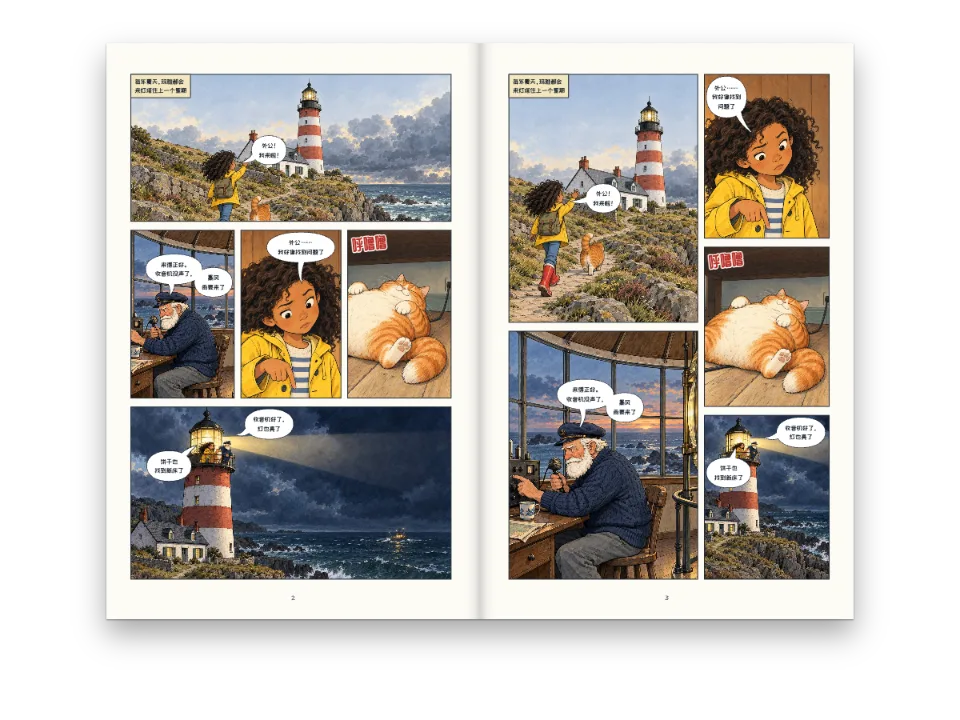
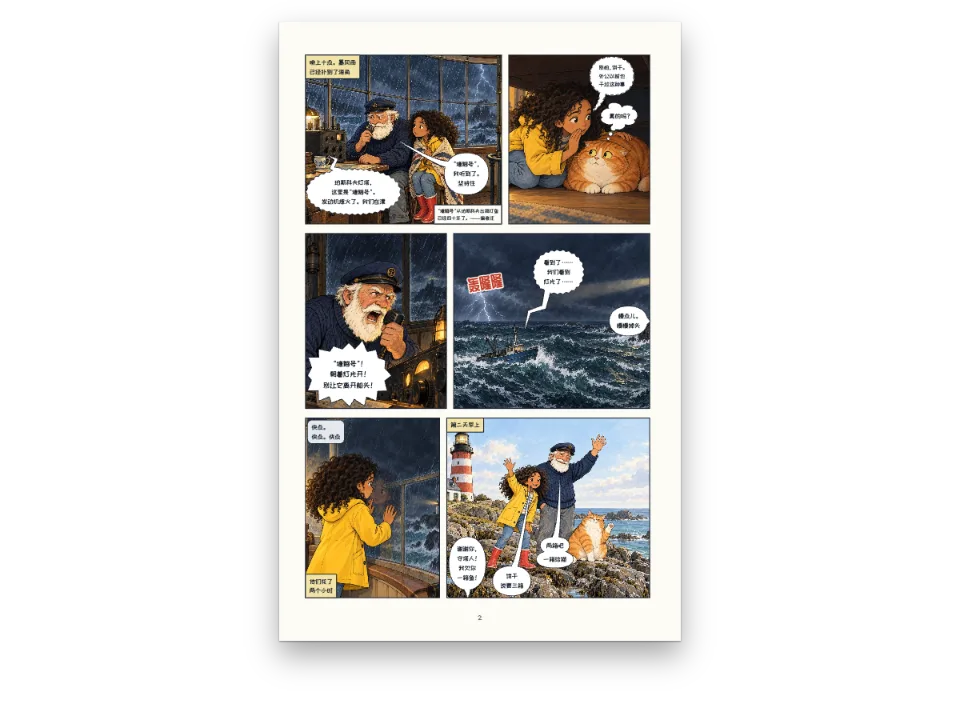
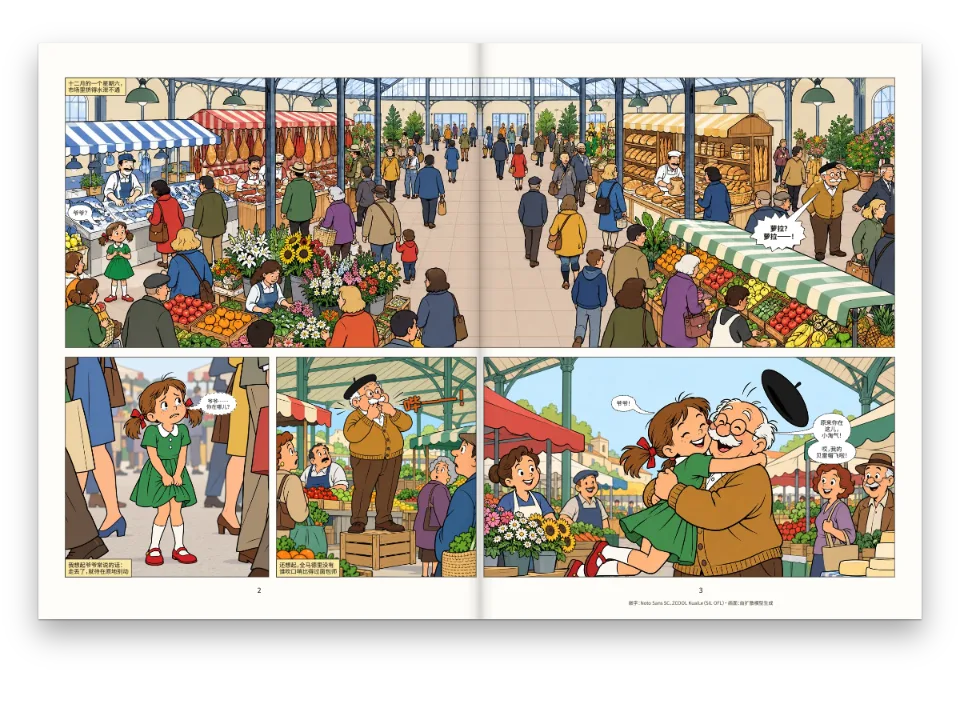
《珀斯科夫灯塔》第一章:一页扉页和两页漫画,只排一次版,导出四种文件。PDF 用于印刷。固定版式 EPUB 保留印刷页面,并带有区域导航,阅读器可以一格一格地显示,从来到灯塔的那一格,放大到收音机,再到玛雅。第二个固定版式 EPUB 加上了 Kindle Panel View;流式版本把每一格排成裁好的画面,后面接着这一格的对白。页面上列出每个文件在阅读器里打开的样子,并附下载链接,共十种语言。
这道食谱解答
- 怎样做一本可以逐格阅读的漫画EPUB?
简短回答
// The fixed layout keeps every printed page and writes regions.xhtml (EPUB Region-Based
// Navigation): one panel region per panel in reading order, its balloons nested in it.
// kindlePanelView adds Kindle's tap-to-magnify targets; the reflowable book sets each panel
// as its cropped picture followed by its lines as text.
const book = {
  metadata: { title: doc.metadata.title, creators: [doc.metadata.author], language: config().locale,
    modified: new Date('2026-10-07T00:00:00Z') }, // a fixed date: the same bytes on every run
  fonts: await epubFonts([LETTERING, SFX], markdown), // every face the pages set, as bytes
  resourceBytes: (fileId) => ({ bytes: imageBytes(fileId), mediaType: 'image/jpeg' }),
  onWarning: (w) => console.warn(`[epub] ${w.kind}`, w.family ?? w.fileId ?? w.detail),
};
const epubs = {
  fixed: await renderToEpub(doc, { ...book, layout: 'fixed' }),
  kindle: await renderToEpub(doc, { ...book, layout: 'fixed', kindlePanelView: true }),
  reflowable: await renderToEpub(doc, { ...book, layout: 'reflowable' }),
};
用料
- 类型
- Comic Neue, Bangers, Zen Antique, Dela Gothic One, ZCOOL KuaiLe, ZCOOL QingKe HuangYou, Playpen Sans Arabic, Lalezar(SIL OFL 1.1)
- 素材
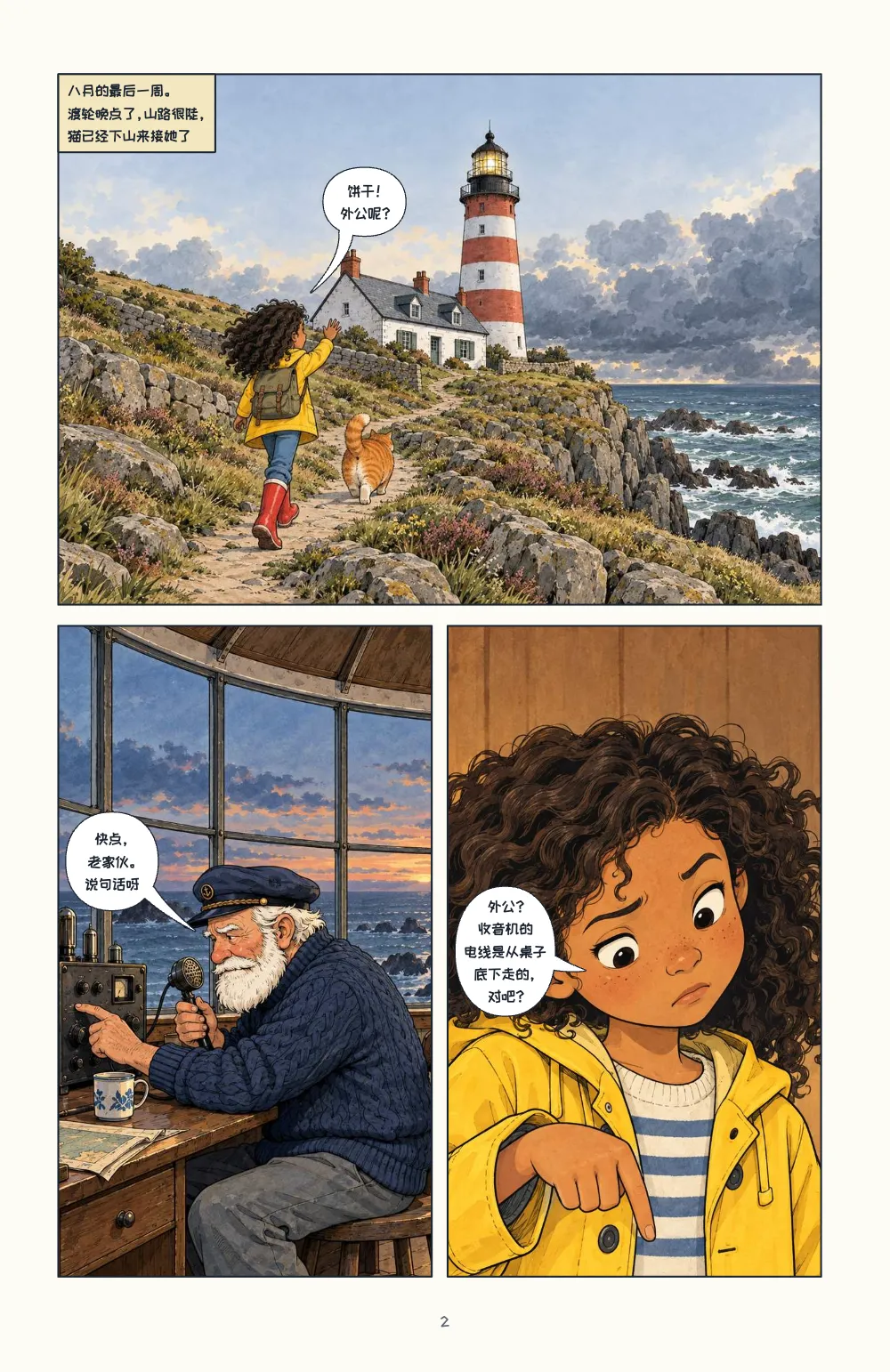
lh-arrive.jpglh-beam.jpglh-biscuit.jpglh-maya.jpglh-radio.jpg- Panel picture: Maya arrives at the lighthouse (Generated With Diffusion Models, 原创)
- Panel picture: Tomás at the radio (Generated With Diffusion Models, 原创)
- Panel picture: Maya finds the problem (Generated With Diffusion Models, 原创)
- Panel picture: Biscuit asleep on the cable (Generated With Diffusion Models, 原创)
- Panel picture: the lamp lit at night (Generated With Diffusion Models, 原创)
做法
#1 · 把同一个文档导出为 EPUB
代码就是上面的简短回答。renderToEpub 接收的就是 renderToPdf 打印的文档,所以 EPUB 的页面就是 PDF 的页面(漫画的输出)。用 layout: 'fixed' 且书中有漫画页时,它还会写出 regions.xhtml:按阅读顺序每格一个 panel 区域,每个区域是一个按页面百分比表示的矩形,格内的对话框、旁白框和拟声词作为子区域嵌套其中。翻页方向跟随漫画的阅读方向,所以日文版和阿拉伯文版从右往左翻。kindlePanelView: true 为每一格加一个点击区域和一份放大的副本,并写入 Kindle 需要的元数据。流式版本没有页面可保留:每一格是它的画面(按页面上的方式裁切),后面是它的对白,“玛雅:饼干!外公呢?”,人名取自 comics.cast。
#2 · 嵌入页面用到的字体
// For each weight and style the lettering asks for, the file loadComicFonts chose (the
// nearest one Fontsource ships), only the slices whose characters the book sets. A file that
// serves several weights is embedded once, with a weight range ('400 700').
const inRange = (range, cp) => range.split(',').some((part) => {
  const [lo, hi = lo] = part.trim().slice(2).split('-');
  return cp >= parseInt(lo, 16) && cp <= parseInt(hi, 16);
});
async function epubFonts(families, text) {
  const cps = [...new Set(text)].map((ch) => ch.codePointAt(0));
  const byFile = new Map(); // url → the face it serves
  for (const family of families) {
    const meta = await fontsourceMeta(family);
    const asks = [[400, 'normal'], [700, 'normal'], [400, 'italic'], [700, 'italic']];
    for (const [weight, style] of asks) {
      const w = meta.weights.reduce((a, b) => (Math.abs(b - weight) < Math.abs(a - weight) ? b : a),
        400);
      const s = style === 'italic' && meta.styles.includes('italic') ? 'italic' : 'normal';
      for (const { url, range } of await comicFaceFiles(family, w, s, meta, text)) {
        if (range && !cps.some((cp) => inRange(range, cp))) continue;
        const face = byFile.get(url) ?? { family, style: s, weights: new Set(), range };
        face.weights.add(weight);
        byFile.set(url, face);
      }
    }
  }
  return Promise.all([...byFile].map(async ([url, { family, style, weights, range }]) => ({
    family, style, format: 'woff2', unicodeRange: range,
    weight: weights.size > 1 ? `${Math.min(...weights)} ${Math.max(...weights)}` : [...weights][0],
    bytes: new Uint8Array(await (await fetch(url)).arrayBuffer()) })));
}
固定版式 EPUB 用自己携带的字体画出文字,缺了的字体会换成阅读器自带的。嵌字要用到常规、粗体和斜体;漫画字体提供的字重更少,所以每一种需求都拿到 loadComicFonts 为它选的文件,同一个文件服务两个字重时只嵌入一次,字重写成范围 '400 700'。日文和中文字体只嵌入包含本版本所用字符的分片,日文版因此只有 1.4 MB。
#3 · 把每个文件读回来
const el = (tag, css, text) => Object.assign(document.createElement(tag),
  { textContent: text ?? '' }, { style: css });
const shelf = el('section', 'display: flex; flex-wrap: wrap; gap: 16px; justify-content: center;'
  + 'padding: 24px 16px 0; color: #d9d5cc; font: 13px/1.5 system-ui, sans-serif');
for (const [name, bytes] of Object.entries(epubs)) {
  const epub = readEpub(bytes);
  const regions = new TextDecoder().decode(epub.files.get(`${epub.root}regions.xhtml`)
    ?? new Uint8Array());
  const panels = regions.split('<li epub:type="panel">').slice(1); // one per panel
  const card = el('article', 'width: min(300px, 92vw); padding: 16px; border: 1px solid #2c3038');
  const steps = el('ol', 'margin: 8px 0; padding-left: 22px');
  steps.append(...panels.map((p, i) => el('li', '', `panel ${i + 1}: ${(p.match(
    /epub:type="(balloon|caption|sound-area|text-area)"/g) ?? []).length} text regions`)));
  const link = Object.assign(el('a', 'color: #d8a21a', `Download ${RECIPE}-${name}.epub`), {
    href: URL.createObjectURL(new Blob([bytes])), download: `${RECIPE}-${name}.epub` });
  card.append(el('h2', 'margin: 0; font-size: 15px; color: #f4f1ea', `EPUB 3 · ${name}`),
    el('p', 'margin: 4px 0 0', `${epub.layout} · ${epub.pageProgression} · `
      + `${epub.spine.length} documents · ${Math.round(bytes.length / 1024)} KB`),
    panels.length ? steps : el('p', '', 'No region navigation: the panels are text.'), link);
  shelf.append(card);
}
document.getElementById('pages').before(shelf);
readEpub 像阅读器一样打开这些字节:版式、翻页方向、书脊。每张卡片下的列表就是逐格阅读本身,读自 regions.xhtml:五格以及格内的文字区域,按读者经过的顺序排列。三个文件在英文、日文和阿拉伯文版本中都通过了 EPUBCheck 5.4,没有错误和警告。
#4 · 一次排版,十个版本
const [LETTERING, SFX] = t({
  en: ['Comic Neue', 'Bangers'], es: ['Comic Neue', 'Bangers'], ca: ['Comic Neue', 'Bangers'],
  ja: ['Zen Antique', 'Dela Gothic One'], zh: ['ZCOOL KuaiLe', 'ZCOOL QingKe HuangYou'],
  ar: ['Playpen Sans Arabic', 'Lalezar'], pt: ['Comic Neue', 'Bangers'],
  fr: ['Comic Neue', 'Bangers'], de: ['Comic Neue', 'Bangers'], it: ['Comic Neue', 'Bangers'],
});
每个 content.<lang>.md 存放一个版本的文字,人物标识相同。各语言的格子区域完全一样;对话框的区域跟着对话框移动,因为对话框会围绕每种语言的文字重新嵌字。
完整食谱
// ═══ Postext Cookbook · Nº 148 · A comic EPUB read panel by panel ═══════════════════
// https://postext.dev/en/cookbook/comic-epub-guided-view
// Code: MIT · Text: original (CC BY 4.0) · Pictures: generated with diffusion models
// Fonts: Comic Neue, Bangers and the faces of five editions (OFL) · Needs postext ≥ 1.65.0
//
// A short comic laid out once and exported four ways: a PDF for print, a fixed-layout EPUB
// whose region-based navigation lets a reading system step through it panel by panel, the
// same EPUB with Kindle Panel View, and a reflowable EPUB with each panel's lines as text.
// Each file is read back to list what a reader will find in it.
import {
  buildDocument, withLoadedFonts, renderPageToCanvas, registerResourceImage, loadVerticalAlternates,
} from 'https://esm.sh/postext';
import { renderToPdf, decompressWoff2 } from 'https://esm.sh/postext-pdf';
import { renderToEpub, readEpub } from 'https://esm.sh/postext-epub';

const LANG = 'zh'; // @lang: 'en' | 'es' | 'ca' | 'zh' | 'ar' | 'ja' | 'pt' | 'fr' | 'de' | 'it'
const RECIPE = 'comic-epub-guided-view';

// ─── 1 · Design ─────────────────────────────────────────────────────────────
// #region palette: the night sea, the lighthouse red and the yellow of the captions
const palette = {
  ink: '#1b2430', // panel borders, lettering and the title page
  accent: '#b8322a', // the lighthouse red: title and sound effects
  caption: '#f4e7bf', // caption boxes
  muted: '#5f6873', // folios and the imprint
  paper: '#fdfbf6',
};
const col = (id) => ({ hex: palette[id], model: 'hex', paletteId: id });
const colorPalette = [
  ...Object.entries(palette).map(([id, hex]) => ({ id, name: id, value: { hex, model: 'hex' } })),
  { id: 'main-color', name: 'accent (defaults)', value: { hex: palette.accent, model: 'hex' } },
];
// #endregion

// #region editions: six editions, each lettered in faces for its script
const [LETTERING, SFX] = t({
  en: ['Comic Neue', 'Bangers'], es: ['Comic Neue', 'Bangers'], ca: ['Comic Neue', 'Bangers'],
  ja: ['Zen Antique', 'Dela Gothic One'], zh: ['ZCOOL KuaiLe', 'ZCOOL QingKe HuangYou'],
  ar: ['Playpen Sans Arabic', 'Lalezar'], pt: ['Comic Neue', 'Bangers'],
  fr: ['Comic Neue', 'Bangers'], de: ['Comic Neue', 'Bangers'], it: ['Comic Neue', 'Bangers'],
});
// #endregion

const comics = {
  gutter: { horizontal: mm(4), vertical: mm(3) },
  panel: { borderWidth: pt(1), borderColor: col('ink'), background: col('paper') },
  lettering: { fontFamily: LETTERING, fontSize: pt(8), color: col('ink'), inset: mm(1.5) },
  balloonStyles: [{ id: 'speech', stroke: col('ink') }, { id: 'caption', fill: col('caption'),
组合好的script.js可以直接运行:把它粘贴到任何页面的模块脚本中,或在CodePen上打开这道食谱。 GitHub上的食谱文件夹 ↗ (在新标签页中打开)
变化
#不要 Kindle 版
每个固定版式 EPUB 都会写入区域导航;Kindle Panel View 只是在此之上增加内容。
- kindle: await renderToEpub(doc, { ...book, layout: 'fixed', kindlePanelView: true }),#给流式版本加封面
-  reflowable: await renderToEpub(doc, { ...book, layout: 'reflowable' }),
+  reflowable: await renderToEpub(doc, { ...book, layout: 'reflowable',
+ cover: { bytes: imageBytes('lh-beam.jpg'), mediaType: 'image/jpeg' } }),常见问题
- 如果每个字重都嵌入一次同一个字体文件,就会复制四份;在使用字重范围之前,中文版有 5.3 MB。
致谢
- 文本
- 原创文字, CC BY 4.0
- 图片
- Panel picture: Maya arrives at the lighthouse · Generated With Diffusion Models · 原创
- Panel picture: Tomás at the radio · Generated With Diffusion Models · 原创
- Panel picture: Maya finds the problem · Generated With Diffusion Models · 原创
- Panel picture: Biscuit asleep on the cable · Generated With Diffusion Models · 原创
- Panel picture: the lamp lit at night · Generated With Diffusion Models · 原创
- 字体
- Comic Neue (SIL OFL 1.1) · Bangers (SIL OFL 1.1) · Zen Antique (SIL OFL 1.1) · Dela Gothic One (SIL OFL 1.1) · ZCOOL KuaiLe (SIL OFL 1.1) · ZCOOL QingKe HuangYou (SIL OFL 1.1) · Playpen Sans Arabic (SIL OFL 1.1) · Lalezar (SIL OFL 1.1)