باختصار
في المغرب والجزائر وتونس تطبع الكتب العربية أعدادها بالأرقام التي تستعملها أوروبا، 1، 2، 3، لا بالأرقام ١، ٢، ٣. وإعداد واحد، هو لغة المستند وبلده، يكفي لتُطبع هذه الأرقام في الكتاب كله.
ما الذي ستنضده
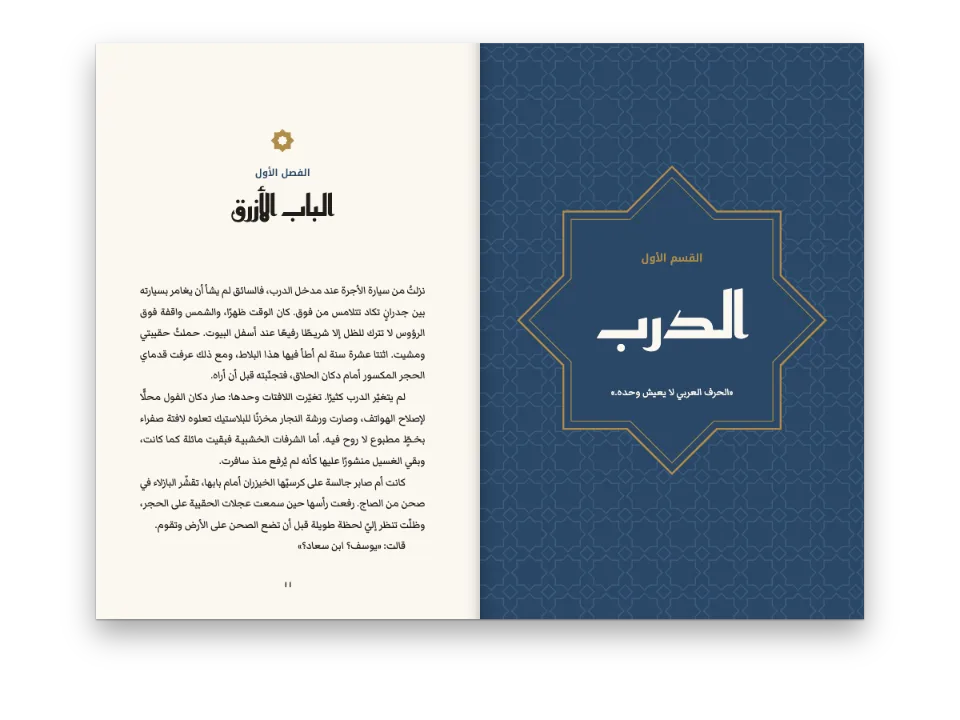
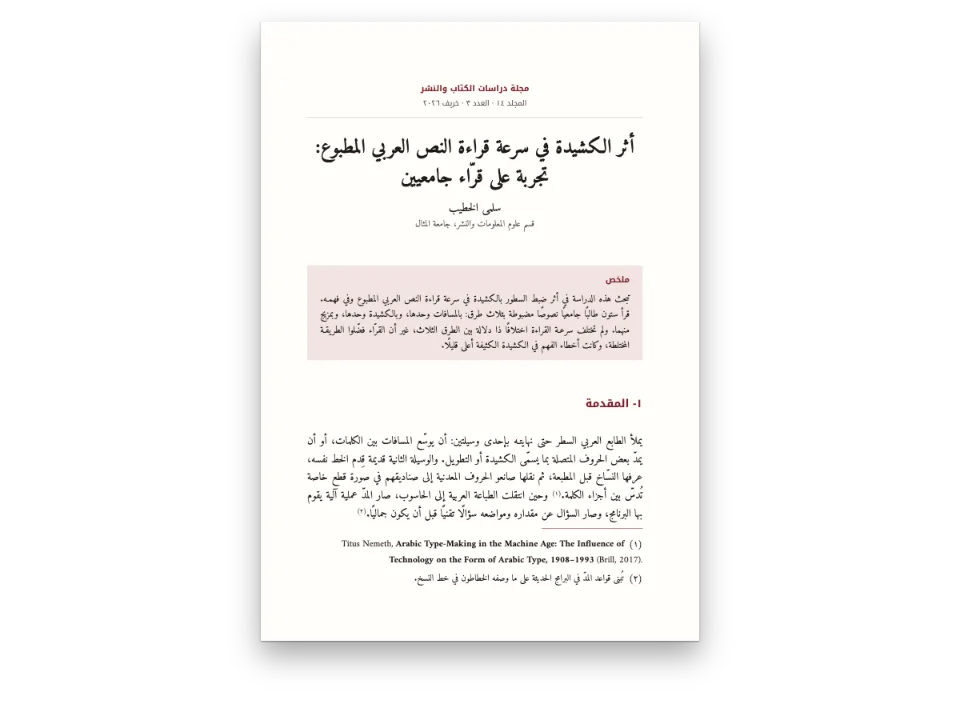
فصل من دليل إلى المدن العتيقة في المغرب، عن أبواب فاس، كما كان سيطبعه ناشر مغربي: 13.5 × 21 سم، بخط Noto Naskh Arabic بحجم 12.5 pt، والعناوين بخط Noto Kufi Arabic بخضرة زليج فاس. يجري النص من اليمين إلى اليسار ويُجلَّد الكتاب على اليمين، ككل كتاب عربي، لكن كل عدد في الصفحة يُكتب 1، 2، 3: أرقام الصفحات من 41 إلى 44، و«الفصل 3»، وأرقام الأقسام 3-1 و3-2، وقائمة الأبواب من 1- إلى 5-، وعلامات الحواشي (1)، ورقم الشكل «شكل 3-1». هذا هو العرف في المغرب العربي، من المغرب إلى تونس، وتُظهره الصفحة بإعداد واحد. وتعرض رواية عربية مجلّدة على اليمين الكتاب نفسه بأرقام المشرق ١٢.
تجيب هذه الوصفة عن
- كيف أطبع الأرقام الأوروبية (1، 2، 3) في كتاب عربي لطبعة مغاربية؟
الجواب المختصر
const config = () => ({
  // Written out, never LANG (gotcha: arabic-locale-tag). The Moroccan tag keeps the text right
  // to left and the binding on the right, and sets numerals: 'auto' to European digits: the
  // folios, the chapter and section numbers, the list, the notes and the figure number.
  locale: 'ar-MA',
  colorPalette,
  page: { width: mm(135), height: mm(210), dpi: 150, pageNumbering: { startAt: 41 },
    margins: { top: mm(22), bottom: mm(22), left: mm(19), right: mm(16), mirror: true } },
  layout: { layoutType: 'single' },
  bodyText: { fontFamily: TEXT, fontSize: pt(12.5), lineHeight: pt(20.5), color: col('ink'),
    boldColor: col('ink'), italicColor: col('ink'), referenceColor: col('ink'),
    textAlign: 'justify', firstLineIndent: em(1.5), indentAfterHeading: false },
  headings: { fontFamily: LABEL, fontWeight: 700, color: col('green'), levels: [
    // A chapter opens on an odd page, with no blank page forced before it.
    { level: 1, fontSize: pt(26), lineHeight: pt(41), numberingTemplate: 'الفصل {1}',
      numberSeparator: ': ', breakBefore: { enabled: true, parity: 'odd' },
      marginTop: pt(0), marginBottom: pt(10) },
    { level: 2, fontSize: pt(13), lineHeight: pt(20.5), numberingTemplate: '{1}-{2}',
      numberSeparator: '  ', marginTop: pt(20.5), marginBottom: pt(0) },
  ] },
  orderedLists, footnotes, captionStyle,
  paragraphStyles: [{ id: 'colophon', fontFamily: TEXT, fontSize: pt(8.5), lineHeight: pt(11),
    color: col('muted'), textAlign: 'left', firstLineIndent: pt(0), marginTop: pt(20.5) }],
  header: { elements: [] },
  footer: { elements: [{ kind: 'text', id: 'folio', content: '{pageNumber}', fontFamily: LABEL,
    fontSize: pt(9), color: col('muted'), align: 'center',
    placement: { anchor: { to: 'page', edge: 'bottom' }, offset: { y: mm(-12) } } }] },
});
المكونات
- الميزات
- أشكال الأرقام في الأعداد المولَّدةالنص من اليمين إلى اليسارالعربية لغةً للمستندكتب مجلّدة من اليمينالخطوط العربيةخط المتنالعناوين المرقّمةالحواشي السفليةالقوائم المرقّمةنمط التعليقالتصدير إلى PDF
- تستخدم أيضًا
- فقرات بالاتجاه المعاكسسمات العنوانأشكال في هذا الموضع بالضبطأنماط الفقراتالخطوط المضمَّنة في PDFالأشكال والجداول بوصفها مواردترقيم روماني للصفحات التمهيدية
- الخطوط
- Noto Naskh Arabic, Noto Kufi Arabic (SIL OFL 1.1)
- الأصول
- لا شيء: كل صورة مرسومة بالشيفرة
طريقة التحضير
#1 · البلد يختار الأرقام
الشيفرة هي الجواب المختصر أعلاه. يبقى numerals على 'auto'، فيقرأ المحرّك الأرقام من رمز اللغة: تختار ar-MA وar-DZ وar-TN وar-LY وar-MR وar-EH الأرقام العربية الغربية، وتختار ar وحدها ومناطق المشرق ١٢٣ (الأرقام وأنماط الترقيم). لا يتغير إلا ما يكتبه المحرّك من أعداد: رقم الصفحة، وعدّادات العناوين، وأرقام القوائم، وعلامات الحواشي، وأرقام الأشكال. أما السنوات في النص، 789 و1913، فهي من كلام المؤلف، مكتوبة بأرقام الطبعة، ولا يعيد المحرّك كتابتها أبدًا. ويقرأ {startAt=3} في العنوان ٣ كما يقرأ 3، فيخدم Markdown نفسه الطبعتين.
#2 · العلامات حول الأعداد
// «1-» and «(1)», as Arabic books write them; the number itself follows numerals.
const orderedLists = { color: col('green'), fontWeight: 700, marginTop: pt(0),
  marginBottom: pt(0), levels: [{ level: 1, numberFormat: 'arabic', separator: '-' }] };
const footnotes = { markerTemplate: '({n})', numbering: 'page', noteNumberPosition: 'inline',
  fontSize: pt(10), lineHeight: pt(15), separator: { width: 0.3, color: col('green') } };
// A colon after the label: a full stop after a number reads as a decimal point.
const captionStyle = { fontFamily: TEXT, fontSize: pt(10), color: col('ink'), labelBold: true,
  labelColor: col('green'), labelSeparator: ': ', note: { color: col('muted') } };
تكتب الكتب العربية رقم القائمة تتبعه شَرطة، 1-، وعلامة الحاشية بين قوسين، (1)؛ والقالبان كلاهما يأخذان أرقام المستند، فتطبع الطبعة المشرقية ١- و(١) بالإعدادات نفسها (الحواشي السفلية). تنتهي تسمية التعليق بنقطتين، «شكل 3-1:»، لأن النقطة بعد العدد تُقرأ فاصلة عشرية. وتبدأ الحواشي من (1) في كل صفحة، كما ترقّمها أكثر الكتب العربية.
#3 · شريط زليج مرسوم بالكود
// The star is two squares turned 45°; between four stars a small square. Paths only.
const star = (cx, cy, r) => {
  const pts = [];
  for (let k = 0; k < 16; k++) {
    const a = (k * Math.PI) / 8;
    const d = k % 2 ? r * 0.7654 : r; // where the two squares' sides cross
    pts.push(`${(cx + d * Math.sin(a)).toFixed(2)} ${(cy - d * Math.cos(a)).toFixed(2)}`);
  }
  return `M${pts.join('L')}Z`;
};
function zellige(W, H, S) {
  let stars = '';
  let inner = '';
  let squares = '';
  for (let y = 0; y <= H + S; y += S) {
    for (let x = 0; x <= W + S; x += S) {
      stars += star(x, y, S * 0.47);
      inner += star(x, y, S * 0.2);
      squares += `M${x + S / 2} ${y + S / 2 - S * 0.17}l${S * 0.17} ${S * 0.17}`
        + `l${-S * 0.17} ${S * 0.17}l${-S * 0.17} ${-S * 0.17}Z`;
    }
  }
  return `<svg xmlns="http://www.w3.org/2000/svg" width="${W * 10}" height="${H * 10}" `
    + `viewBox="0 0 ${W} ${H}"><rect width="${W}" height="${H}" fill="${palette.green}"/>`
    + `<path d="${stars}" fill="${palette.cobalt}" stroke="${palette.paper}" stroke-width="0.5"/>`
    + `<path d="${inner}" fill="${palette.paper}"/>`
    + `<path d="${squares}" fill="${palette.ochre}" stroke="${palette.paper}" stroke-width="0.4"/>`
    + '</svg>';
}
الشكل صورة SVG يولّدها المثال: نجوم ثمانية من مربعين مُدارين بزاوية 45°، وبينها مربعات صغيرة، بألوان لوحة الألوان الأخضر والأزرق الكوبالتي والمغرة. وتعليقه عربي في الطبعتين، مرقّم بالفصل، {h1}-{n}، كما ترقّم أنواع الموارد العربية أشكالها.
الوصفة كاملة
// ═══ Postext Cookbook · Nº 109 · A Maghreb edition of an Arabic text, with European digits ═══
// https://postext.dev/en/cookbook/maghreb-edition-european-digits
// Code: MIT · Text: original Arabic prose (CC BY 4.0) · Pattern: drawn in code
// Fonts: Noto Naskh Arabic, Noto Kufi Arabic (SIL OFL 1.1) · Needs postext ≥ 1.65.0
import {
  buildDocument, withLoadedFonts, renderPageToCanvas, registerResourceImage,
} from 'https://esm.sh/postext';
import { renderToPdf, decompressWoff2 } from 'https://esm.sh/postext-pdf';

const LANG = 'en'; // @lang: the language of the frame; the chapter is Arabic in both editions
const RECIPE = 'maghreb-edition-european-digits';

// ─── 1 · Design ─────────────────────────────────────────────────────────────
// The green and cobalt of Fes tilework, on a white book paper.
const palette = {
  ink: '#1c1d1b', // text
  green: '#1d6650', // the accent: headings, the list numbers, the notes' rule
  cobalt: '#25488a', // the tile's second colour
  ochre: '#c99a3e', // the tile's third colour
  muted: '#62655f', // folios, captions' notes, the colophon
  paper: '#ffffff',
};
const col = (id) => ({ hex: palette[id], model: 'hex', paletteId: id });
const colorPalette = Object.entries({ ...palette, 'main-color': palette.green })
  .map(([id, hex]) => ({ id, name: id, value: { hex, model: 'hex' } }));
const [TEXT, LABEL] = ['Noto Naskh Arabic', 'Noto Kufi Arabic'];

// #region marks: list numbers, note markers and figure numbers in the same digits
// «1-» and «(1)», as Arabic books write them; the number itself follows numerals.
const orderedLists = { color: col('green'), fontWeight: 700, marginTop: pt(0),
  marginBottom: pt(0), levels: [{ level: 1, numberFormat: 'arabic', separator: '-' }] };
const footnotes = { markerTemplate: '({n})', numbering: 'page', noteNumberPosition: 'inline',
  fontSize: pt(10), lineHeight: pt(15), separator: { width: 0.3, color: col('green') } };
// A colon after the label: a full stop after a number reads as a decimal point.
const captionStyle = { fontFamily: TEXT, fontSize: pt(10), color: col('ink'), labelBold: true,
  labelColor: col('green'), labelSeparator: ': ', note: { color: col('muted') } };
// #endregion

// #region answer: ar-MA prints 1, 2, 3 in every number the engine writes
const config = () => ({
  // Written out, never LANG (gotcha: arabic-locale-tag). The Moroccan tag keeps the text right
  // to left and the binding on the right, and sets numerals: 'auto' to European digits: the
  // folios, the chapter and section numbers, the list, the notes and the figure number.
  locale: 'ar-MA',
  colorPalette,
  page: { width: mm(135), height: mm(210), dpi: 150, pageNumbering: { startAt: 41 },
    margins: { top: mm(22), bottom: mm(22), left: mm(19), right: mm(16), mirror: true } },
  layout: { layoutType: 'single' },
يعمل ملف script.js المجمّع كما هو: الصقه في سكربت الوحدة (module) لأي صفحة، أو افتح الوصفة على CodePen. مجلد الوصفة على GitHub ↗ (يفتح في تبويب جديد)
تنويعات
أخطاء شائعة
خطأ شائع
اوسم الكتاب العربي بـ 'ar'، لا بـ LANG
نسختا الوصفة هما en وes، لكن المثال العربي عربي في كلتيهما: `locale: LANG` سيجعله من اليسار إلى اليمين، ويجلّده على اليسار، ويرقّم صفحاته 1 2 3، ويسمّي أشكاله Figure أو Figura. ومنذ postext 1.30 صار الوسم أيضًا اللغة التي يُشكَّل بها النص (يُقاس ويُرسم ويُضمَّن بها)، فتحت وسم إنجليزي أو إسباني لا يرسم خط مثل Markazi Text الأشكال العربية لعلامتَي التنصيص « » وللنقطة، وتنكسر الأسطر في مواضع أخرى. اكتب الوسم بنفسك: 'ar' (الأرقام العربية المشرقية، عُرف المشرق)، أو منطقة مثل 'ar-EG' أو 'ar-SA'، أو 'ar-MA' أو 'ar-DZ' أو 'ar-TN' لنسخة مغاربية بالأرقام الأوروبية. أما الصفحة اللاتينية التي تقتبس العربية فقط فتحتفظ بلغتها. النص من اليمين إلى اليسار →
خطأ شائع
الخطوط العربية تحتاج إلى ملفها arabic، عبر الكتلة arabic
يقدّم Fontsource الخطوط Amiri وNoto Naskh Arabic وScheherazade New في ملف لكل مجموعة فرعية، والحروف العربية في ملف arabic. لا يجلب loadFonts إلا latin (وlatin-ext)، فيأتي النص العربي على الشاشة من خط النظام ويُقاس خطأً، ويسلّم fontsourceProvider ملف latin ذاك إلى PDF، فيطبع مربعات فارغة. اذكر كتلة الأدوات arabic، واستدعِ loadArabicFonts(FONTS, markdown) بعد loadFonts، مع ذكر كل وزن تضع به الصفحاتُ نصًا عربيًا في FONTS، وأعطِ renderToPdf القيمة fontProvider: arabicPdfProvider. الخطوط العربية →
خطأ شائع
'1998. ' أو '- ' في أول الفقرة يفتح قائمة
الفقرة التي تبدأ برقم ثم نقطة ثم مسافة، أو بواصلة ثم مسافة، تصير بندًا في قائمة. ضع رابط الكلمات (U+2060) قبل الرقم، واكتب الحوار بالشرطة الطويلة. الهروب والمحارف الحرفية →
الحقوق
- الوصفة
- Ignacio Ferro
- النص
- “The gates of Fes”, a chapter written in Arabic for the recipe, from an invented book on the old cities of Morocco · Postext Cookbook · أصلي
- الخطوط
- Noto Naskh Arabic (SIL OFL 1.1) · Noto Kufi Arabic (SIL OFL 1.1)
- الشيفرة
- MIT، مثل Postext
حرّر هذا الشرح ↗ (يفتح في تبويب جديد)مجلد الوصفة على GitHub ↗ (يفتح في تبويب جديد)