باختصار
أخبر التنضيد بالجزء الذي يجب أن يظهر دائمًا من كل صورة. وحين ينقص عمودًا بضعةُ أسطر، تطول الصورة بدل أن تترك فراغًا.
ما الذي ستنضده
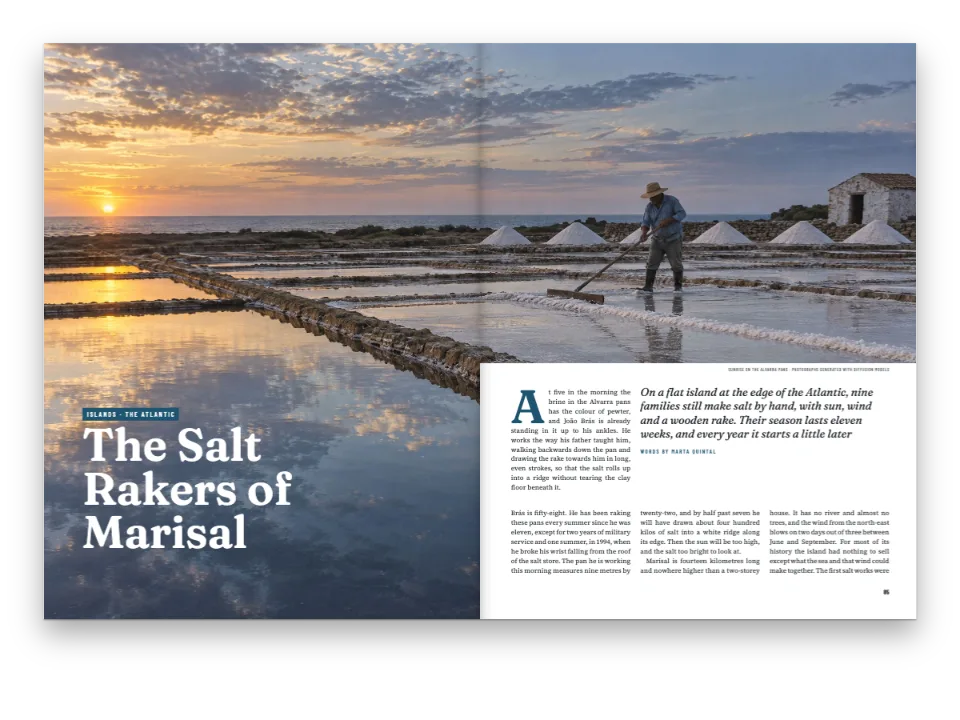
ثلاث صفحات من مجلة ساحلية: تحقيق عن مهن بلدة على مصبّ نهر، بصورة تنزف حتى الحواف في صفحة الافتتاح وخمس صور في الأعمدة. تنضد الوصفة التحقيق مرتين بالنص نفسه. في المرة الأولى تحتفظ الصور بشكل ملفاتها، وفي الصفحة 2 ينتهي العمودان قبل الشبكة بسطر: الأيسر تحت آخر فقرة فيه، والأيمن فوق الصورة التي في أسفله. وفي المرة الثانية تحدّد كل صورة الجزء الذي يجب أن يظهر دائمًا من إطارها، فيقصّ المحرّك ما خارجه: في الصفحة نفسها تطول صورة جامعة المحار وصورة رافئة الشباك سطرًا لكلٍّ منهما، وينتهي العمودان عند آخر سطر في الشبكة. لم يضطر أحد إلى اختيار مواضع القصّ.
تجيب هذه الوصفة عن
- كيف أسمح بقصّ صورة لتملأ عمودًا قصيرًا مع بقاء موضوعها ظاهرًا دائمًا؟
- كيف أجعل أسافل الأعمدة متساوية وأوازن الصفحة الأخيرة (الضبط العمودي)؟
- كيف أتحكم في موضع الشكل: أعلى الصفحة، أو بعرض العمودين، أو هنا تمامًا، أو في الهامش؟
الجواب المختصر
// Each photo names the rectangle that must always show, in fractions of the file:
// x and width of its width, y and height of its height. Outside it the engine may crop,
// so the photo can stand taller (sides cut, down to the area's width) or lower (top and
// bottom cut, down to its height) than the file, always as wide as its column.
const SAFE_AREAS = {
  mariscadora: { x: 0.2, y: 0.36, width: 0.34, height: 0.46 }, // Carmen, her rake and basket
  redeira: { x: 0.34, y: 0.14, width: 0.4, height: 0.66 }, // Rosa and the net in her lap
  carpintero: { x: 0.12, y: 0.2, width: 0.64, height: 0.62 }, // Manuel and the whole hull
  faro: { x: 0.34, y: 0.14, width: 0.32, height: 0.56 }, // the tower and the walker below it
  pulpeira: { x: 0.2, y: 0.08, width: 0.56, height: 0.82 }, // Lucía, the octopus, the cauldron
};
// Columns end flush on this grid by whole lines. A heading or a photo that does not fit a
// column's foot leaves lines empty there; these settings forbid the usual fixes (space above
// a heading, under a photo, or a paragraph run long), so only a photo with a safe area can
// take them, by growing a line at a time. Without safe areas the short columns stay short.
const balancing = { enabled: true, maxLinesPerHeading: 0, stretchAfterLists: false,
  stretchAfterFloats: false, looseParagraphs: false };
المكونات
- الميزات
- المنطقة الآمنة في الصورةموازنة الأعمدةموضع الأشكالالأشكال والجداول بوصفها موارداستشهادات تضع الأشكالأشكال في هذا الموضع بالضبطنمط التعليقأنواع موارد مخصّصةصفحات افتتاح مصمَّمةالصور في تصاميم الصفحةسمات العنوانعمود واحد أو عمودانهوامش متناظرةالترويسات وأرقام الصفحاتالترويسات بحسب دور الصفحةلوحة ألوان دلاليةأنماط الفقراتصفحات على اللوحة (Canvas)التصدير إلى PDF
- الخطوط
- Newsreader, Archivo, Archivo Narrow (SIL OFL 1.1)
- الأصول
carpintero-1600.jpgestuario-1700.jpgfaro-1600.jpgmariscadora-1600.jpgpulpeira-1600.jpgredeira-1600.jpg- The estuary at low water at dawn, with shellfish gatherers (Generated With Diffusion Models, أصلي)
- A shellfish gatherer kneeling on the wet sand (Generated With Diffusion Models, أصلي)
- A net mender on the quay (Generated With Diffusion Models, أصلي)
- A shipwright planing a wooden boat in his shed (Generated With Diffusion Models, أصلي)
- A lighthouse on a granite point and a walker below it (Generated With Diffusion Models, أصلي)
- A cook lifting an octopus from a copper cauldron at a market (Generated With Diffusion Models, أصلي)
طريقة التحضير
#1 · حدّد ما يجب أن يبقى، ولا شيء غيره
الشيفرة هي الجواب المختصر أعلاه. المنطقة الآمنة أربعة كسور من الصورة تُقاس من زاويتها العليا اليسرى. يستطيع المحرّك أن يعرض الصورة بأي شكل بين الملف كاملًا وهذا المستطيل، بعرض عمودها دائمًا: أطول إذا قصّ الجانبين، وأقصر إذا قصّ الأعلى والأسفل. وما يقع خارج المنطقة يُقصّ بنسبة الهامش الذي على كل جانب، فتبقى روسا، الجالسة يمين المنتصف على الرصيف، يمين المنتصف حين يُقصّ الجانبان.
#2 · اجعل ضبط الأعمدة لا يأخذ إلا من الصور
المنطقة نفسها من الشيفرة تضبط موازنة الأعمدة. أدواتها المعتادة تضيف بياضًا: سطرًا فوق عنوان، أو فراغًا تحت صورة، أو فقرة تطول سطرًا. هنا كلها معطّلة، كي تُظهر النسخة التي بلا مناطق آمنة كل عمود قصير كما هو. وتُجرَّب الصورة ذات المنطقة الآمنة قبل أي من تلك الأدوات، لأن الصورة الأطول لا تفتح فراغًا في النص.
#3 · المنطقة الآمنة جزء من المورد
const FILES = { estuario: [1700, 1133] }; // px, declared as they are; the rest 1600 × 1067
// Caption and alt text of each photo, one block per photo: content.figures.<lang>.md.
const figureTexts = String.raw`mariscadora
Carmen Lago separa berberechos en su parcela de la ría, en bajamar.
Una mujer con botas verdes, de rodillas en la arena mojada junto a un rastro y una cesta.

redeira
Rosa Doval remienda un paño de cerco en el muelle.
Una mujer sentada en un taburete cose una red verde; detrás, barcos de pesca.

carpintero
Manuel Barreiro cepilla el forro de la gamela.
Un hombre mayor cepilla el costado de una barca de madera a medio construir.

faro
La punta de Arnela: el faro y el camino de la costa.
Un faro blanco sobre rocas de granito; abajo, una caminante con mochila roja.

pulpeira
Lucía Fraga saca un pulpo del caldero de cobre.
Una mujer con mandil saca un pulpo cocido de un caldero de cobre humeante.
`;
const CAPTIONS = Object.fromEntries(figureTexts.trim().split(/\n\s*\n/)
  .map((block) => block.split('\n').map((line) => line.trim()))
  .map(([id, caption, alt]) => [id, [caption, alt]]));
const PLACEMENT = { pulpeira: { position: 'here' } }; // the rest float to the first free slot
const photo = (id, safe) => {
  const [w, h] = FILES[id] ?? [1600, 1067];
  const [caption, alt] = CAPTIONS[id] ?? [];
  return { id, typeId: 'figure', kind: 'bitmap', createdAt: 0, updatedAt: 0,
    bitmap: { fileId: `${id}-${w}.jpg`, format: 'jpeg', width: w, height: h },
    ...(caption && { caption, altText: alt, placement: PLACEMENT[id] ?? { position: 'auto' } }),
    ...(safe && SAFE_AREAS[id] && { safeArea: SAFE_AREAS[id] }) };
};
const resources = (safe) => ['estuario', ...Object.keys(CAPTIONS)].map((id) => photo(id, safe));
يوضع safeArea في المورد، بجانب ملفه وتعليقه وموضعه، فتحتفظ به الصورة أينما طفت وفي أي مستند يستعملها. الوصفة إما أن تمرّره أو تحذفه، وهذا هو الفرق الوحيد بين النسختين. أما صورة المصبّ في الافتتاح فيرسمها نمط العنوان وليست شكلًا عائمًا، فلا تحتاج إليه.
#4 · انضد النسختين وقارن بينهما
const build = (safe) => buildDocumentWithFonts({ markdown, resources: resources(safe) }, config(),
  kitFonts(FONTS));
const docs = { plain: await build(false), safe: await build(true) };
يخرج المستندان من الإعدادات نفسها ومن نص Markdown نفسه. لا تُملأ حتى الأسفل إلا الصفحات التي يستمر بعدها النص: في الصفحة 3، آخر صفحات التحقيق، يكفي أن تنتهي الأعمدة على ارتفاع واحد. من دون مناطق آمنة ينتهي العمود الثاني قبل الأول بسطر؛ ومعها تطول صورة الأخطبوط هذا السطر فيتساوى العمودان. وزر PDF ينضد النسخة المعروضة، ويقصّ ملف PDF كل صورة إلى إطارها بالطريقة نفسها.
الوصفة كاملة
// ═══ Postext Cookbook · Nº 116 · Photos that grow to fill a short column ═══════════
// https://postext.dev/en/cookbook/photos-fill-short-columns
// Code: MIT · Text: original (CC BY 4.0) · Photos: diffusion models
// Fonts: Newsreader, Archivo, Archivo Narrow (SIL OFL 1.1) · Needs postext ≥ 1.25.0
//
// A magazine feature set twice. Without safe areas some columns end short; with them the
// engine crops each photo outside its area to set it taller, and the photos fill those lines.
import {
  buildDocumentWithFonts, renderPageToCanvas, registerResourceImage, defaultResourceTypes,
} from 'https://esm.sh/postext';
import { renderToPdf, decompressWoff2 } from 'https://esm.sh/postext-pdf';

const LANG = 'es'; // @lang: the language of the sample document ('es' | 'en')
const RECIPE = 'photos-fill-short-columns';

// ─── 1 · Design ─────────────────────────────────────────────────────────────
// #region palette: six named colours, the accents taken from the photos: sea slate, net green
const palette = {
  ink: '#1d2326', // text: a cold near-black
  sea: '#2f5d73', // the accent: kicker, caption labels, folios, references
  net: '#3f6b55', // the second colour: the opener's rule
  rule: '#c9d1d3', // hairlines
  muted: '#5f6a6e', // running heads, credits, the colophon
  paper: '#ffffff',
};
const col = (id) => ({ hex: palette[id], model: 'hex', paletteId: id });
const colorPalette = [
  ...Object.entries(palette).map(([id, hex]) => ({ id, name: id, value: { hex, model: 'hex' } })),
  // The engine's defaults link to 'main-color': pointed at the accent, no default blue shows.
  { id: 'main-color', name: 'sea (defaults)', value: { hex: palette.sea, model: 'hex' } },
];
// #endregion
const [TEXT, DISPLAY, LABEL] = ['Newsreader', 'Archivo', 'Archivo Narrow'];
const LEAD = 13.6; // body leading in pt: the grid the photos grow by
const [PAGE_W, PAGE_H, TOP, BOTTOM, INNER, OUTER, GUTTER] = [225, 297, 22, 22, 18, 16, 7]; // mm
const PHOTO_H = 150; // the opener's bleed photo: 225 × 150 mm, the shape of the file
const at = (to, edge, x, y, size) => ({ anchor: { to, edge }, offset: { x: mm(x), y: mm(y) },
  ...(size && { size }) });
const text = (id, content, family, size, color, placement, extra) => ({ kind: 'text', id,
  content, fontFamily: family, fontSize: pt(size), color: col(color), placement,
  align: 'left', overflow: 'wrap', ...extra }); // the running heads ask for an ellipsis instead
const caps = (size) => ({ fontWeight: 700, textTransform: 'uppercase',
  letterSpacing: pt(size * 0.18) });

// #region answer: a safe area per photo, and balancing that may only grow pictures
// Each photo names the rectangle that must always show, in fractions of the file:
// x and width of its width, y and height of its height. Outside it the engine may crop,
// so the photo can stand taller (sides cut, down to the area's width) or lower (top and
يعمل ملف script.js المجمّع كما هو: الصقه في سكربت الوحدة (module) لأي صفحة، أو افتح الوصفة على CodePen. مجلد الوصفة على GitHub ↗ (يفتح في تبويب جديد)
تنويعات
#أبقِ صورة مضمّنة مع نصها
الصورة الموضوعة بـposition: 'here' ولها منطقة آمنة تُقصّ من أعلاها وأسفلها حين تكون أطول قليلًا من المساحة الباقية في عمودها، بدل أن تنتقل إلى العمود التالي.
-const PLACEMENT = { pulpeira: { position: 'here' } }; // the rest float to the first free slot
+const PLACEMENT = { pulpeira: { position: 'here' }, faro: { position: 'here' } };#أعِد إلى الموازنة وسائلها الأخرى
مع الإعدادات الافتراضية تبقى الصور أول ما يُجرَّب، وتأخذ العناوين والأشكال العائمة ما لا تبلغه المنطقة الآمنة.
-const balancing = { enabled: true, maxLinesPerHeading: 0, stretchAfterLists: false,
-  stretchAfterFloats: false, looseParagraphs: false };
+const balancing = { enabled: true };أخطاء شائعة
- المنطقة الآمنة التي تغطي الصورة كلها، أو التي يقلّ أحد ضلعيها عن 2% منها، تُهمَل: تظهر الصورة كاملة كما لو لم تكن لها منطقة.
- لا تطول إلا الأشكال العائمة في عمود والصور داخل النص. الصورة العائمة بعرض العمودين تحتفظ بشكلها، لأنها إن طالت دفعت كل الأعمدة التي تحتها معًا.
الحقوق
- الوصفة
- Ignacio Ferro
- النص
- The feature, the captions and the colophon, in Spanish and English; Arnela and its people are imaginary · Postext Cookbook · CC BY 4.0
- الصور
- The estuary at low water at dawn, with shellfish gatherers · Generated With Diffusion Models · أصلي
- A shellfish gatherer kneeling on the wet sand · Generated With Diffusion Models · أصلي
- A net mender on the quay · Generated With Diffusion Models · أصلي
- A shipwright planing a wooden boat in his shed · Generated With Diffusion Models · أصلي
- A lighthouse on a granite point and a walker below it · Generated With Diffusion Models · أصلي
- A cook lifting an octopus from a copper cauldron at a market · Generated With Diffusion Models · أصلي
- الخطوط
- Newsreader (SIL OFL 1.1) · Archivo (SIL OFL 1.1) · Archivo Narrow (SIL OFL 1.1)
- الشيفرة
- MIT، مثل Postext
حرّر هذا الشرح ↗ (يفتح في تبويب جديد)مجلد الوصفة على GitHub ↗ (يفتح في تبويب جديد)