Kurz gesagt
Eine Seite Rechenaufgaben für Neunjährige auf Spanisch, Englisch, Französisch und Deutsch. Jedes Land schreibt die Division auf seine Art, und das Blatt folgt ihm; ein Schalter zeigt die Lehrerfassung mit allen Lösungen.
Was Sie setzen
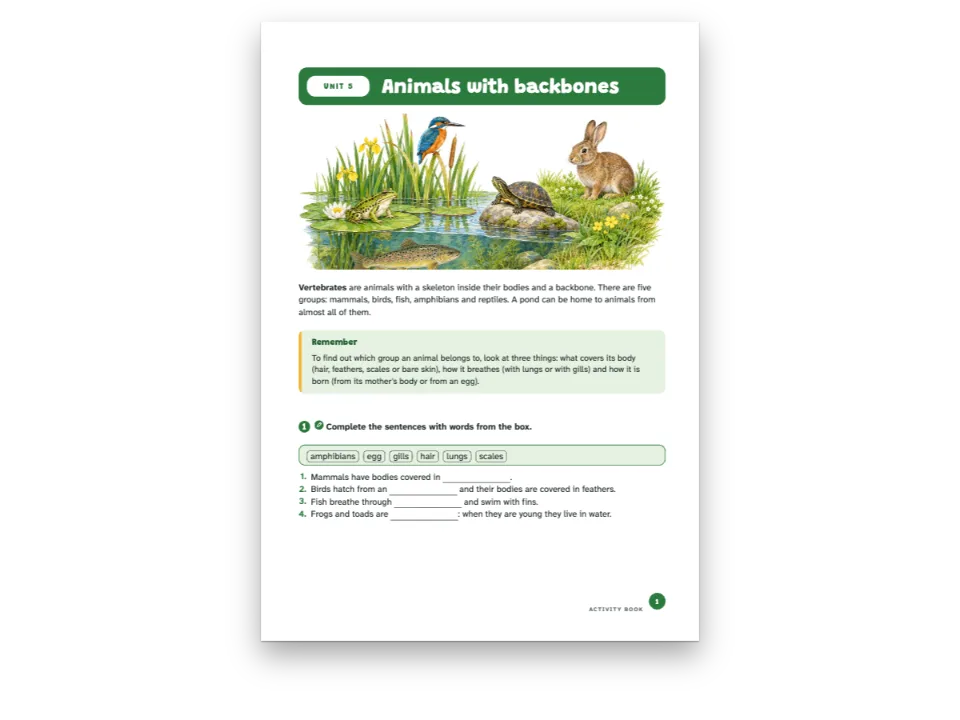
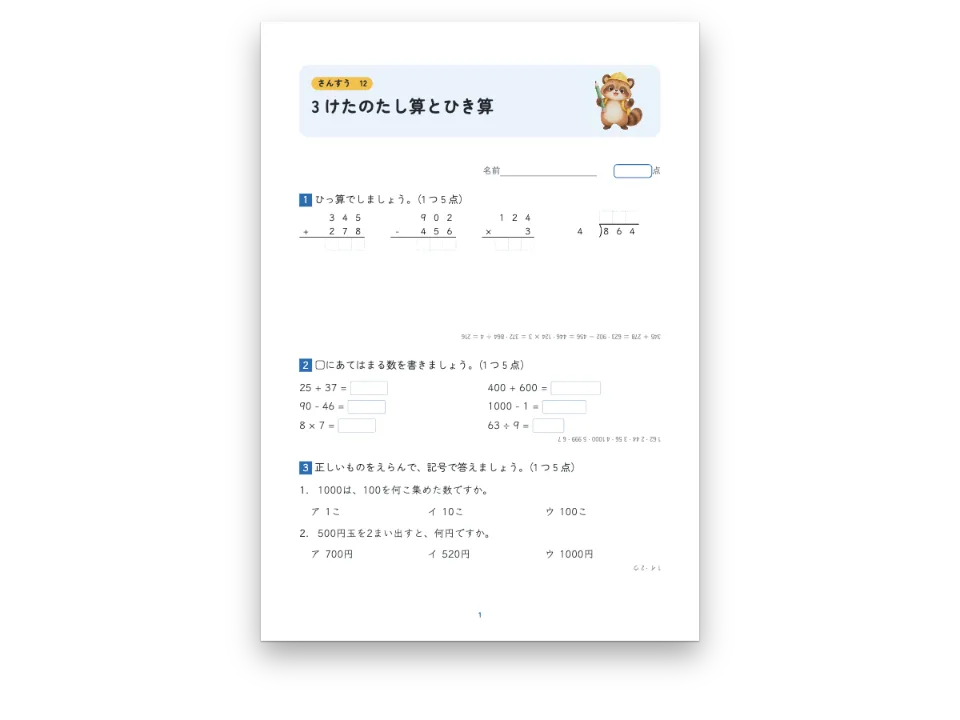
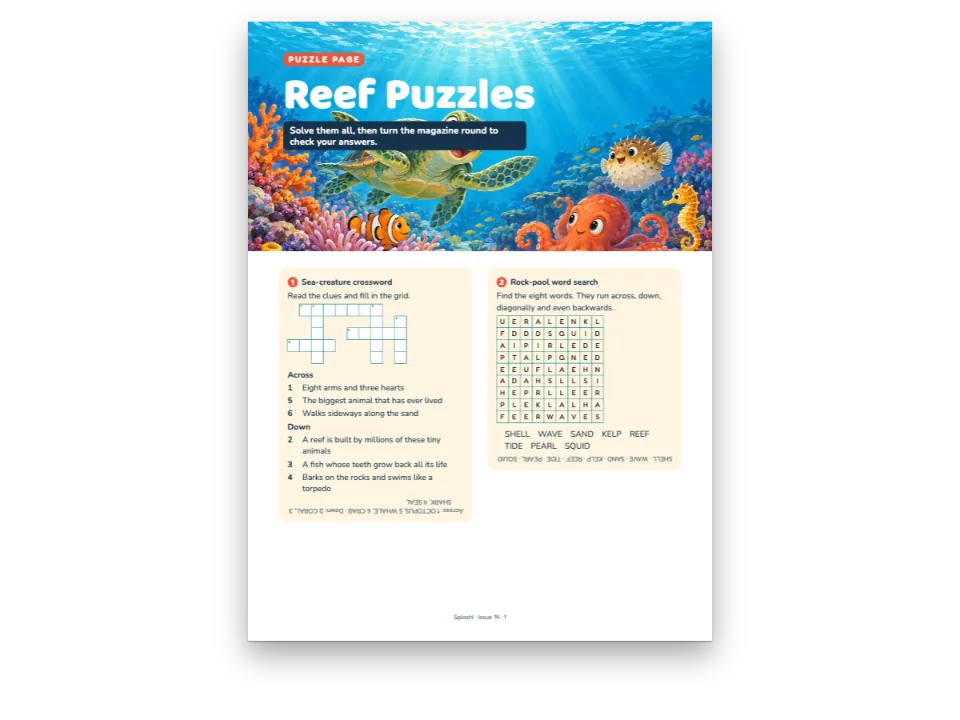
Einheit 3 eines Rechenhefts für die vierte Klasse, Die vier Grundrechenarten, in vier Ausgaben. Zuerst eine Reihe Kopfrechenaufgaben in drei Spalten, dann Additionen, Subtraktionen und Multiplikationen, eine Ziffer pro Kästchen, mit einer Kästchenreihe für das Ergebnis, zuletzt schriftliche Divisionen und eine Sachaufgabe auf kariertem Papier. Bei der Division gehen die Ausgaben auseinander: Das englische Blatt stellt den Divisor vor die Klammer ⟌ und den Quotienten darüber; das spanische und das französische setzen den Divisor in einen Winkel rechts neben den Dividenden und den Quotienten darunter; das deutsche schreibt 864 : 4 = in eine Zeile, mit Platz für die Rechenschritte darunter, und seine Produkte mit dem Malpunkt. Auch das Dezimalkomma oder der Dezimalpunkt beim Kopfrechnen richtet sich nach der Sprache. Ein Schalter über den Seiten macht aus dem Schülerblatt die Lehrerfassung, in der jede Lösung orange in ihrem Kästchen steht.
Dieses Rezept beantwortet
- Wie setze ich die schriftliche Division so, wie die Schulen jedes Landes sie schreiben?
- Wie erzeuge ich aus dem Schülerbuch die Lehrerausgabe mit den Lösungen an ihrer Stelle?
Die kurze Antwort
// `- 864 : 4` in the Markdown is one operation; the style sets it digit by digit in squares
// of 7.2 mm, a cell for each figure of the answer. Long division follows the country: the
// divisor in an L right of the dividend in Spain and France (potence), `864 : 4 =` on one
// line in Germany, the bracket ⟌ in English-speaking schools.
const calculo = {
  id: 'calculo',
  number: { shape: 'disc', background: col('accent'), fontFamily: LABEL, fontWeight: 700 },
  instruction: { bold: true, color: col('ink') },
  grid: { cell: mm(9), fontFamily: TEXT, fontSize: pt(15), rule: col('rule'),
    color: col('ink') },
  arithmetic: { columns: 4,
    division: t({ es: 'potence', fr: 'potence', de: 'inline', en: 'bracket' }) },
  blank: { look: 'box', width: em(3.2), color: col('rule'), weight: pt(0.8) },
  area: { kind: 'grid', spacing: mm(5), color: col('rule'), weight: pt(0.4) },
  answers: { color: col('accent'), fontFamily: LABEL }, // the teacher's copy, in the accent
  marginTop: mm(7), marginBottom: mm(2), itemSpacing: em(0.5),
};
Zutaten
- Funktionen
- Schriftliches RechnenLehrerausgabeÜbungsstileÜbungenLücken und WortspeicherOffene Fragen und SchreibflächenGestaltete AuftakteÜberschriftenattributeSemantische FarbpaletteSilbentrennung und DokumentspracheSeiten auf einem CanvasPDF-ExportAbsatzformate
- Schrift
- Fira Sans, Lexend (SIL OFL 1.1)
- Dateien
- Keine: Jedes Bild wird im Code gezeichnet
Zubereitung
#1 · Die Aufgaben als Zeilen im Markdown schreiben
// `- 864 : 4` in the Markdown is one operation; the style sets it digit by digit in squares
// of 7.2 mm, a cell for each figure of the answer. Long division follows the country: the
// divisor in an L right of the dividend in Spain and France (potence), `864 : 4 =` on one
// line in Germany, the bracket ⟌ in English-speaking schools.
const calculo = {
  id: 'calculo',
  number: { shape: 'disc', background: col('accent'), fontFamily: LABEL, fontWeight: 700 },
  instruction: { bold: true, color: col('ink') },
  grid: { cell: mm(9), fontFamily: TEXT, fontSize: pt(15), rule: col('rule'),
    color: col('ink') },
  arithmetic: { columns: 4,
    division: t({ es: 'potence', fr: 'potence', de: 'inline', en: 'bracket' }) },
  blank: { look: 'box', width: em(3.2), color: col('rule'), weight: pt(0.8) },
  area: { kind: 'grid', spacing: mm(5), color: col('rule'), weight: pt(0.4) },
  answers: { color: col('accent'), fontFamily: LABEL }, // the teacher's copy, in the accent
  marginTop: mm(7), marginBottom: mm(2), itemSpacing: em(0.5),
};
Ein :::exercise{type="arithmetic"} nimmt eine Rechnung pro Listenpunkt, - 864 ÷ 4, mit den Zeichen, die ihr Land schreibt (÷, :, ×, ·). Die Engine rechnet Ergebnis, Quotient und Rest aus, und der Stil bestimmt, wie die Aufgabe gezeichnet wird: Kästchen von 7,2 mm und eine arithmetic.division, die mit t() je Ausgabe gewählt wird. Eine Kopfrechenreihe ist eine gewöhnliche Lückenaufgabe, deren Liste in einer Gruppe :::columns{count=3} steht; jedes [[70]] wird zu einem Kästchen, so breit wie die anderen.
#2 · Den Kopf des Blatts setzen
const at = (to, edge, x = 0, y = 0, size) => ({ anchor: { to, edge },
  offset: { x: mm(x), y: mm(y) }, ...(size && { size }) });
const field = (id, attr, x, width) => [
  { kind: 'text', id, content: `{attr.${attr}}`, fontFamily: LABEL, fontSize: pt(9.5),
    fontWeight: 600, color: col('muted'), align: 'left',
    placement: at('container', 'top-left', x, 26) },
  { kind: 'rule', id: `${id}-line`, direction: 'horizontal', thickness: pt(0.75),
    color: col('rule'), placement: at('container', 'top-left', x + 17, 31, { width: mm(width) }) },
];
const head = { enabled: true, minHeight: mm(36), slot: { elements: [
  { kind: 'box', id: 'band', style: { backgroundColor: col('accent'), borderRadius: mm(3) },
    placement: at('container', 'top-left', 0, 0, { width: 'fill', height: mm(19) }) },
  { kind: 'text', id: 'unit', content: '{attr.unidad}', fontFamily: LABEL, fontSize: pt(9),
    fontWeight: 700, color: col('accent'), align: 'center', verticalAlign: 'middle',
    textTransform: 'uppercase', letterSpacing: pt(1.2), lineHeight: 1.1,
    box: { backgroundColor: col('paper'), borderRadius: mm(3.5) },
    placement: at('container', 'top-left', 5, 5, { width: mm(26), height: mm(9) }) },
  { kind: 'text', id: 'title', content: '{titleText}', fontFamily: LABEL, fontSize: pt(21),
    fontWeight: 700, color: col('paper'), align: 'left', lineHeight: 1.1,
    placement: at('container', 'top-left', 37, 5.2) },
  ...field('name', 'nombre', 0, 100), ...field('date', 'fecha', 124, 38),
] } };
Die Überschrift der Ebene 1 zeichnet das orangefarbene Band, das Feld und den Titel, dazu die Felder für Name und Datum aus ihren Attributen (nombre="Name" fecha="Date"). So beschriftet jede Ausgabe sie in ihrer Sprache.
#3 · Zwischen Schülerblatt und Lehrerfassung wechseln
const form = document.getElementById('controls');
const labels = t({ es: ['Alumno', 'Profesor'], en: ['Pupil', 'Teacher'],
  fr: ['Élève', 'Enseignant'], de: ['Schüler', 'Lehrkraft'] });
form.querySelectorAll('label span').forEach((span, k) => { span.textContent = labels[k]; });
function render() {
  // The same config, edited in place: the next build sees the edition the form asks for.
  config.exercises.edition = form.elements.edition.value;
  const doc = buildDocument({ markdown }, config); // the faces are loaded by now
  showPages(doc, { title });
  document.querySelectorAll('#pt-actions a, [data-postext-pdf]').forEach((old) => old.remove());
  offerPdf(() => renderToPdf(doc, { fontProvider: fontsourceProvider }),
    `${RECIPE}-${LANG}-${config.exercises.edition}.pdf`);
}
form.addEventListener('change', render);
render();
exercises.edition: 'teacher' druckt jede Lösung an ihren Platz, in der Farbe aus answers.color, hier der Akzentfarbe: die Kästchen beim Kopfrechnen, die Ziffern jedes Ergebnisses, Quotient und Rest, die Musterlösung der Sachaufgabe. Das Formular über den Seiten ändert die Konfiguration an Ort und Stelle und setzt neu; die Schriften sind schon geladen, also genügt das einfache buildDocument. Für die Seitenbilder werden vorher beide Blätter gesetzt, deshalb zeigen die veröffentlichten Seiten erst das Schülerblatt und dann die Lehrerfassung.
Das ganze Rezept
// ═══ Postext Cookbook · Nº 170 · Column arithmetic as each country writes it ═══════
// https://postext.dev/en/cookbook/column-arithmetic-by-country
// Code: MIT · Text: original (CC BY 4.0) · Pictures: none
// Fonts: Fira Sans, Lexend (SIL OFL 1.1) · Needs postext ≥ 1.59.0
import { buildDocumentWithFonts, buildDocument, renderPageToCanvas } from 'https://esm.sh/postext';
import { renderToPdf, decompressWoff2 } from 'https://esm.sh/postext-pdf';

const LANG = 'de'; // @lang: the language of the worksheet ('es' | 'en' | 'fr' | 'de')
const RECIPE = 'column-arithmetic-by-country';

// ─── 1 · Design ─────────────────────────────────────────────────────────────
// #region palette: ink, one orange accent, a pale tint, the grey of squared paper
const palette = {
  ink: '#1f2328', accent: '#c4511c', tint: '#fbeee6', rule: '#b9c0c8', muted: '#5f6670',
  paper: '#ffffff',
};
const col = (id) => ({ hex: palette[id], model: 'hex', paletteId: id });
const colorPalette = [
  ...Object.entries(palette).map(([id, hex]) => ({ id, name: id, value: { hex, model: 'hex' } })),
  { id: 'main-color', name: 'accent (defaults)', value: { hex: palette.accent, model: 'hex' } },
];
// #endregion
const [TEXT, LABEL] = ['Fira Sans', 'Lexend'];

// #region answer: operations in squares, long division as the edition's schools set it
// `- 864 : 4` in the Markdown is one operation; the style sets it digit by digit in squares
// of 7.2 mm, a cell for each figure of the answer. Long division follows the country: the
// divisor in an L right of the dividend in Spain and France (potence), `864 : 4 =` on one
// line in Germany, the bracket ⟌ in English-speaking schools.
const calculo = {
  id: 'calculo',
  number: { shape: 'disc', background: col('accent'), fontFamily: LABEL, fontWeight: 700 },
  instruction: { bold: true, color: col('ink') },
  grid: { cell: mm(9), fontFamily: TEXT, fontSize: pt(15), rule: col('rule'),
    color: col('ink') },
  arithmetic: { columns: 4,
    division: t({ es: 'potence', fr: 'potence', de: 'inline', en: 'bracket' }) },
  blank: { look: 'box', width: em(3.2), color: col('rule'), weight: pt(0.8) },
  area: { kind: 'grid', spacing: mm(5), color: col('rule'), weight: pt(0.4) },
  answers: { color: col('accent'), fontFamily: LABEL }, // the teacher's copy, in the accent
  marginTop: mm(7), marginBottom: mm(2), itemSpacing: em(0.5),
};
// #endregion

// #region head: the unit pill, the title and the lines for a name and a date
const at = (to, edge, x = 0, y = 0, size) => ({ anchor: { to, edge },
  offset: { x: mm(x), y: mm(y) }, ...(size && { size }) });
const field = (id, attr, x, width) => [
<form id="controls" aria-label="Edition">
  <label><input type="radio" name="edition" value="student" checked> <span></span></label>
  <label><input type="radio" name="edition" value="teacher"> <span></span></label>
</form>
<main id="pages"></main>
/* The edition switch above the desk: two pills in the sheet's orange. */
#controls {
  display: flex; justify-content: center; gap: 8px; padding: 14px 16px; background: #16181d;
  font: 600 14px/1.2 Lexend, system-ui, sans-serif;
}
#controls label {
  display: inline-flex; align-items: center; gap: 6px; min-height: 44px; padding: 0 18px;
  border-radius: 22px; color: #f4f1ea; border: 1px solid #5f6670; cursor: pointer;
}
#controls label:has(input:checked) { background: #c4511c; border-color: #c4511c; }
#controls input { accent-color: #fff; }
Das zusammengesetzte script.js läuft unverändert: Fügen Sie es in das Modulskript einer beliebigen Seite ein, oder öffnen Sie das Rezept auf CodePen. Ordner des Rezepts auf GitHub ↗ (öffnet sich in einem neuen Tab)
Varianten
#Die Lösungen kopfüber an den Fuß stellen
Eine Gewohnheit aus Rätselheften: die Lösung jeder Aufgabe, um 180° gedreht, direkt darunter.
-  exercises: { edition: 'student' }, // the switch above the pages sets 'teacher'
+ exercises: { edition: 'student', solutions: { placement: 'inverted', layout: 'key' } },#In jeder Ausgabe mit der Klammer dividieren
Auch Schulen in Japan und China schreiben die Division mit der Klammer; eine Sprache, die Sie nicht aufführen, behält ihre eigene Voreinstellung.
-    division: t({ es: 'potence', fr: 'potence', de: 'inline', en: 'bracket' }) },
+ division: 'bracket' },Häufige Fehler
- Rechnungen nehmen nur ganze Zahlen: Eine Aufgabe mit Dezimalzahlen wie
12,5 + 3,75wird nicht gelesen und so gedruckt, wie sie dasteht. Lassen Sie Dezimalzahlen in den Lücken beim Kopfrechnen, wo die Lösung Text ist.
Nachweise
- Rezept
- Ignacio Ferro
- Text
- Eigener Text, CC BY 4.0
- Schriften
- Fira Sans (SIL OFL 1.1) · Lexend (SIL OFL 1.1)
- Code
- MIT, wie Postext
Diesen Text bearbeiten ↗ (öffnet sich in einem neuen Tab)Ordner des Rezepts auf GitHub ↗ (öffnet sich in einem neuen Tab)