En pocas palabras
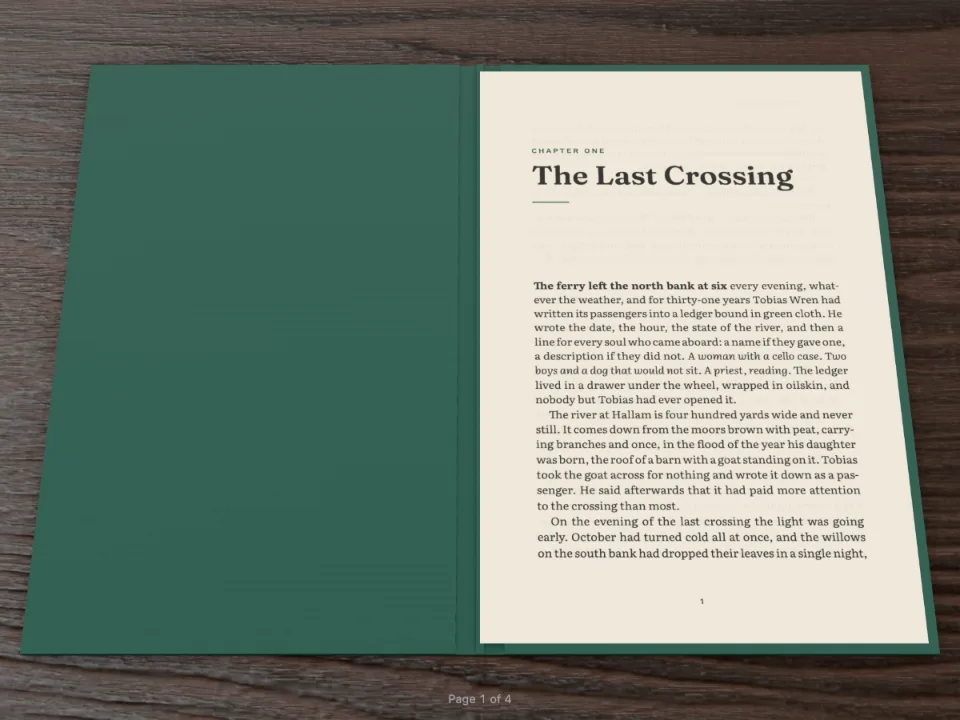
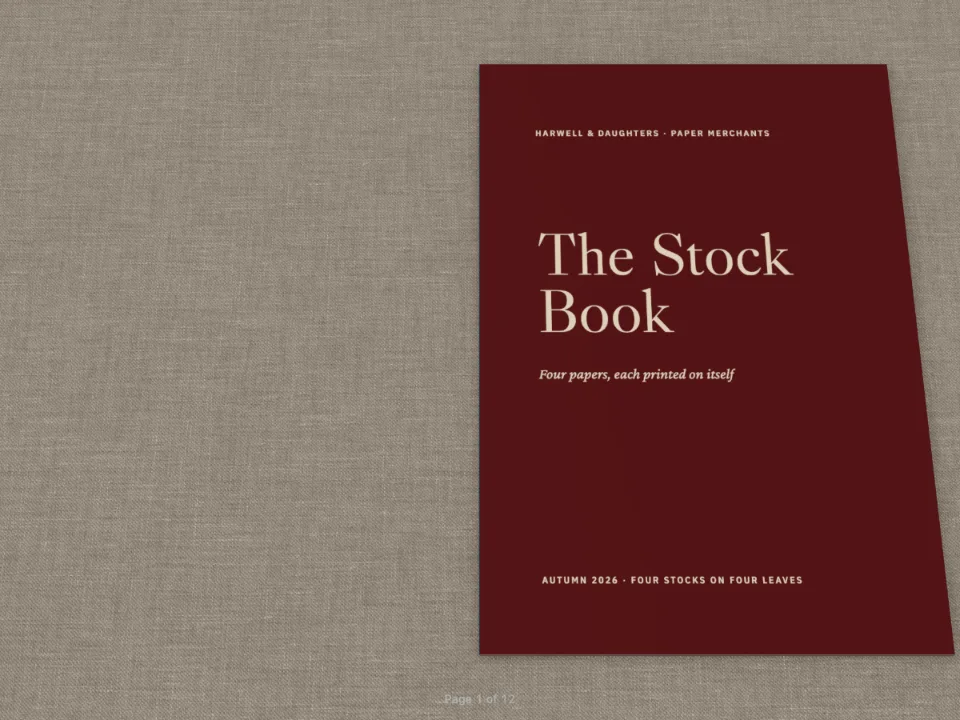
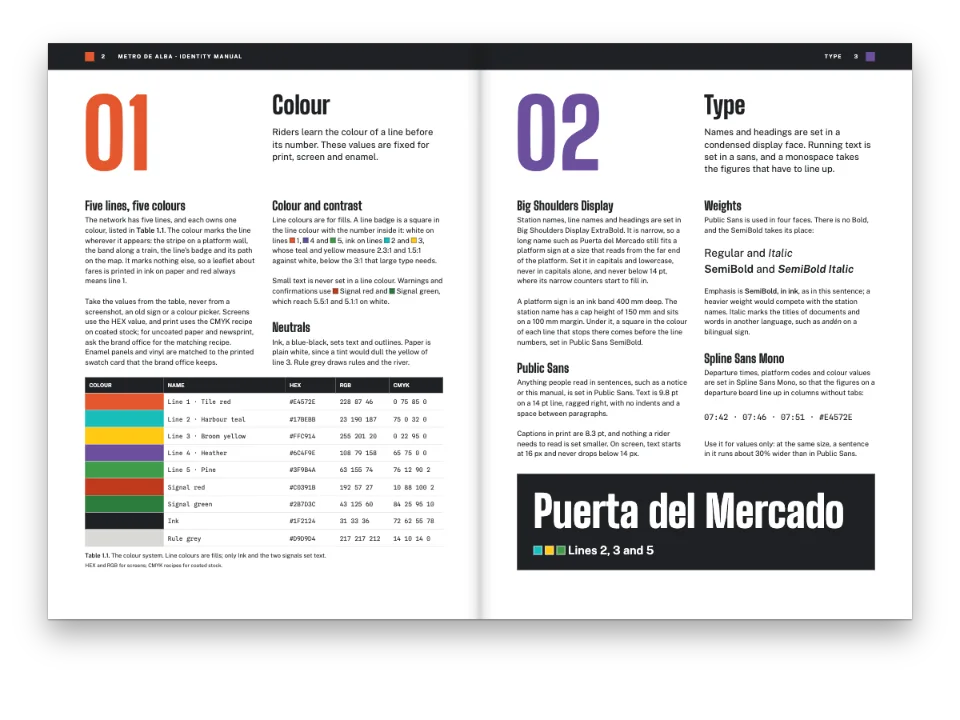
Un librito de bolsillo en 3D junto a un panel de controles. Cambia el papel, la encuadernación, la mesa o la luz y el libro cambia en el acto, sin componerse otra vez.
Lo que vas a componer
Six Knots, un libro de bolsillo de diez páginas a 110 × 160 mm, abierto en Folio junto a un panel con todos los ajustes de config.folio. Elige un papel y las hojas cambian de color, superficie y rigidez; pasa de rústica a tapa dura y aparece una caja alrededor del bloque; elige la caja en lugar de las cubiertas impresas, tela o piel, una mesa, una luz, una inclinación. El libro se compone una vez. Cada cambio llega al visor con setAppearance, así que no se mueve ninguna línea ni se vuelve a pintar ninguna página, y bajo el formulario aparecen los ajustes como el código que se pega en config.folio.
Esta receta responde a
- ¿Cómo veo la encuadernación, la cubierta, el papel y la luz de un libro antes de mandarlo a imprenta?
- ¿Cómo muestro mi documento como un libro en 3D cuyas páginas el lector pasa con la mano?
La respuesta corta
const book = createFolioFromDocument(document.getElementById('folio'), doc, {
  // The look starts from doc.config.folio; setAppearance replaces it on every change.
  appearance: { textureBaseUrl: 'https://postext.dev/folio/textures' },
  onChange: ({ pages }) => kitStatus(`${doc.pages.length} pages · open at `
    + pages.map((i) => i + 1).join('–')),
});
function update() {
  const folio = folioOf();
  // Only the appearance changes: the pages keep their paintings, nothing is laid out again.
  book.setAppearance({ folio });
  show('grammage-out', `${folio.paper.grammage} g/m²`);
  show('intensity-out', folio.lighting.intensity.toFixed(2));
  show('tilt-out', `${folio.tilt}°`);
  document.getElementById('folio-json').textContent = `folio: ${JSON.stringify(folio, null, 2)}`;
}
form.addEventListener('input', update);
// A stock sets its own weight: picking one moves the weight slider to the stock's.
const WEIGHTS = { uncoated: 90, bookWove: 80, coatedMatte: 115, coatedSilk: 115,
  coatedGloss: 115, bible: 40, newsprint: 48, cardStock: 250 };
form.elements['paper.type'].addEventListener('change', (event) => {
  form.elements['paper.grammage'].value = WEIGHTS[event.target.value];
  update();
});
document.getElementById('reset-view').addEventListener('click', () => book.resetView());
update();
Ingredientes
- Funciones
- Papel, encuadernación, mesa y luz (Folio)Visor de libro en 3D (Folio)Estilos de títuloAperturas diseñadasAtributos de títuloEstilos de párrafoCabeceras según el tipo de páginaPaleta de color semánticaMárgenes simétricosPáginas en un canvas
- Tipografía
- Source Serif 4, Outfit (SIL OFL 1.1)
- Recursos
- Ninguno: todas las imágenes se dibujan en código
Elaboración
#1 · Nombra los campos como la configuración
const form = document.getElementById('controls');
const hex = (value) => ({ hex: value, model: 'hex' });
function folioOf() { // 'paper.grammage' → { paper: { grammage } }, typed by the input
  const folio = {};
  for (const el of form.elements) {
    if (!el.name || el.type === 'button' || el.tagName === 'OUTPUT') continue;
    const value = el.type === 'checkbox' ? el.checked : el.type === 'range' ? Number(el.value)
      : el.type === 'color' ? hex(el.value) : el.value;
    const [group, key] = el.name.split('.');
    if (key) (folio[group] ??= {})[key] = value;
    else folio[group] = value;
  }
  return folio;
}
const show = (name, value) => { form.elements[name].value = value; };
Cada campo del formulario se llama como su ruta en config.folio (paper.grammage, binding.cover, lighting.environment), de modo que un solo bucle convierte el formulario en el objeto que recibe el visor: números de los deslizadores, booleanos de las casillas y un color { hex, model } del selector. Ese mismo objeto es el config.folio del documento cuando el pen lo compone, así que el Sandbox abre el libro tal como empieza el formulario.
#2 · Cubiertas que el visor pasa como tapas
const field = { kind: 'box', id: 'field', style: { backgroundColor: col('brick') },
  placement: { ...at('bleed', 'top-left'), size: { width: 'fill', height: mm(TRIM_H) } } };
const flush = { numbered: false, span: 'page', footer: { elements: [] },
  margins: { top: mm(0), bottom: mm(0), left: mm(0), right: mm(0) } };
const cover = (id, title, extra = {}) => ({ id, ...flush, ...extra, advancedDesign: {
  enabled: true, minHeight: mm(TRIM_H), slot: { elements: [field, ...title] } } });
const headingStyles = [
  cover('cover', [
    text('title', '{titleText}', { fontFamily: SANS, fontWeight: 700, fontSize: pt(40),
      lineHeight: 0.92, color: col('cream') },
    { ...at('page', 'top-left', INNER, 30), size: { width: mm(80) } }),
    text('strap', '{attr.strap}', { fontFamily: 'Source Serif 4', italic: true,
      fontSize: pt(11), lineHeight: 1.3, color: col('cream') },
    { ...at('#title', 'below', 0, 6), size: { width: mm(72) } }),
    text('author', '{author}', caps(7, col('cream')), at('page', 'bottom-left', INNER, -16)),
  ]),
  cover('back', [
    text('strap', '{attr.strap}', { fontFamily: 'Source Serif 4', italic: true,
      fontSize: pt(11), lineHeight: 1.3, color: col('cream'), align: 'center' },
    { ...at('page', 'center', 0, 0), size: { width: mm(76) } }),
  ], { breakBefore: { enabled: true, parity: 'even' } }), // the back: always a verso
];
Con binding.cover: 'pages' la primera página es la tapa delantera y la última la trasera, si cae en un verso. El estilo de la contracubierta salta a página par, así que el libro acaba siempre en un verso y giran las dos tapas. Cambia el formulario a A case round the pages y esas dos páginas giran como hojas corrientes dentro de una caja de tela.
#3 · Cambia el libro sin rehacerlo
El código es la respuesta corta de arriba. setAppearance({ folio }) sustituye los ajustes del documento y vuelve a dibujar la escena: grosor y rigidez del papel, la caja, los mapas de la mesa y la luz. Las páginas conservan su pintura, así que el cambio aparece en el fotograma siguiente. Cada tipo de papel trae su gramaje, por eso al elegir uno se mueve el deslizador del peso; resetView() devuelve la cámara a su sitio después de que el lector gire el libro arrastrando con el botón derecho.
La receta completa
// ═══ Postext Cookbook · Nº 103 · A bench for the Folio viewer's settings ═══════════════ // https://postext.dev/en/cookbook/folio-settings-bench // Code: MIT · Text: original (CC BY 4.0) · Pictures: none // Fonts: Source Serif 4, Outfit (SIL OFL 1.1) · Needs postext ≥ 1.13.4 // // A pocket book of knots, laid out once and opened in postext-folio next to a form of every // folio setting: paper, binding, covers, desk, light and tilt. Each change goes to the viewer // with setAppearance, so the book is redrawn in place and no page is laid out or painted // again. The settings as code sit under the form, ready to paste into config.folio. import { buildDocument, renderPageToCanvas, clearMeasurementCache } from 'https://esm.sh/postext'; import { createFolioFromDocument } from 'https://esm.sh/postext-folio'; const LANG = 'en'; // @lang: the language of the sample document ('en' | 'es') const RECIPE = 'folio-settings-bench'; // ─── 1 · Design ───────────────────────────────────────────────────────────── // #region palette: brick red for the covers and the knot numbers, a warm ink for the text const palette = { ink: '#24211f', brick: '#9a3b2e', // the cover field, kickers and folios cream: '#f6efe2', // type on the covers muted: '#6f6860', }; const col = (id) => ({ hex: palette[id], model: 'hex', paletteId: id }); const colorPalette = [ ...Object.entries(palette).map(([id, hex]) => ({ id, name: id, value: { hex, model: 'hex' } })), { id: 'main-color', name: 'accent (defaults)', value: { hex: palette.brick, model: 'hex' } }, ]; // #endregion const [TRIM_W, TRIM_H, TOP, BOTTOM, INNER, OUTER] = [110, 160, 15, 17, 14, 12]; // mm: a pocket const LEAD = 12.4; // pt const SANS = 'Outfit'; const at = (to, edge, x = 0, y = 0) => ({ anchor: { to, edge }, offset: { x: mm(x), y: mm(y) } }); const text = (id, content, look, placement) => ({ kind: 'text', id, content, overflow: 'wrap', align: 'left', placement, ...look }); const caps = (size, color) => ({ fontFamily: SANS, fontSize: pt(size), fontWeight: 600, letterSpacing: pt(size * 0.16), textTransform: 'uppercase', color }); // #region covers: a full-page colour field on page 1 and on the last page const field = { kind: 'box', id: 'field', style: { backgroundColor: col('brick') }, placement: { ...at('bleed', 'top-left'), size: { width: 'fill', height: mm(TRIM_H) } } }; const flush = { numbered: false, span: 'page', footer: { elements: [] }, margins: { top: mm(0), bottom: mm(0), left: mm(0), right: mm(0) } }; const cover = (id, title, extra = {}) => ({ id, ...flush, ...extra, advancedDesign: { enabled: true, minHeight: mm(TRIM_H), slot: { elements: [field, ...title] } } }); const headingStyles = [ cover('cover', [ text('title', '{titleText}', { fontFamily: SANS, fontWeight: 700, fontSize: pt(40), lineHeight: 0.92, color: col('cream') }, { ...at('page', 'top-left', INNER, 30), size: { width: mm(80) } }), text('strap', '{attr.strap}', { fontFamily: 'Source Serif 4', italic: true, fontSize: pt(11), lineHeight: 1.3, color: col('cream') }, { ...at('#title', 'below', 0, 6), size: { width: mm(72) } }), text('author', '{author}', caps(7, col('cream')), at('page', 'bottom-left', INNER, -16)), ]), cover('back', [ text('strap', '{attr.strap}', { fontFamily: 'Source Serif 4', italic: true, fontSize: pt(11), lineHeight: 1.3, color: col('cream'), align: 'center' }, { ...at('page', 'center', 0, 0), size: { width: mm(76) } }), ], { breakBefore: { enabled: true, parity: 'even' } }), // the back: always a verso ]; // #endregion const opener = { enabled: true, minHeight: mm(22), slot: { elements: [ text('kicker', '{attr.kicker}', caps(6.8, col('brick')), at('container', 'top-left', 0, 1)), text('title', '{titleText}', { fontFamily: SANS, fontWeight: 600, fontSize: pt(19), lineHeight: 1, color: col('ink') }, { ...at('#kicker', 'below', 0, 2), size: { width: 'fill' } }), ] } }; // #region form: the form's fields (index.html) are named by their path in config.folio const form = document.getElementById('controls'); const hex = (value) => ({ hex: value, model: 'hex' }); function folioOf() { // 'paper.grammage' → { paper: { grammage } }, typed by the input const folio = {}; for (const el of form.elements) { if (!el.name || el.type === 'button' || el.tagName === 'OUTPUT') continue; const value = el.type === 'checkbox' ? el.checked : el.type === 'range' ? Number(el.value) : el.type === 'color' ? hex(el.value) : el.value; const [group, key] = el.name.split('.'); if (key) (folio[group] ??= {})[key] = value; else folio[group] = value; } return folio; } const show = (name, value) => { form.elements[name].value = value; }; // #endregion const config = () => ({ // a factory: the engine caches resolved configs per object locale: 'en-us', colorPalette, page: { sizePreset: 'custom', width: mm(TRIM_W), height: mm(TRIM_H), dpi: 150, margins: { top: mm(TOP), bottom: mm(BOTTOM), left: mm(INNER), right: mm(OUTER), mirror: true } }, layout: { layoutType: 'single' }, bodyText: { fontFamily: 'Source Serif 4', fontSize: pt(9.3), lineHeight: pt(LEAD), color: col('ink'), boldColor: col('ink'), italicColor: col('ink'), referenceColor: col('ink'), textAlign: 'justify', firstLineIndent: mm(3.5), indentAfterHeading: false, hyphenation: { enabled: true }, optimalLineBreaking: true, avoidWidows: true, avoidOrphans: true, avoidRunts: true }, headings: { fontFamily: SANS, color: col('ink'), fontWeight: 600, levels: [ // Restated: any headings object drops the H1 break (gotcha: headings-drop-h1-break). { level: 1, fontSize: pt(19), breakBefore: { enabled: true, parity: 'any' }, marginBottom: pt(LEAD / 2), advancedDesign: opener }, ] }, headingStyles, paragraphStyles: [{ id: 'colophon', fontFamily: SANS, fontSize: pt(6.5), lineHeight: pt(9), color: col('muted'), textAlign: 'left', firstLineIndent: pt(0), marginTop: pt(LEAD) }], header: { elements: [] }, folio: folioOf(), // the form's starting settings: the document's own look in the Sandbox footer: { elements: [text('folio', '{pageNumber}', { ...caps(6.5, col('brick')), align: 'center' }, at('page', 'bottom', 0, -9))] }, }); // ─── 2 · Content ──────────────────────────────────────────────────────────── const markdown = String.raw`---Muestra en Markdown · 64 líneas · content.en.md
title: "Six Knots" subtitle: "A pocket book for the boat and the garden" author: "Ellen Marsh" --- # Six Knots {style="cover" strap="A pocket book for the boat and the garden"} # Before you tie {kicker="Introduction"} A knot is a way of making a rope hold onto something: another rope, a post, a ring, itself. There are thousands of them, and most of us need six. The six in this book will moor a boat, hang a hammock, tie down a load, join two lines and make a loop that will not slip, and every one of them can be untied again, which is half the point of a good knot. Learn them with a piece of soft rope about an arm's length long, and tie each one ten times before you move on. Then tie it with your eyes shut. A knot you have to think about will fail you on a cold, wet evening, when the boat is moving and the rope is stiff. Each knot has a standing part, the long end that takes the load, and a working end, the short end you tie with. When the instructions say *over* and *under*, they mean the working end passing over or under the standing part. # The reef knot {kicker="Knot 1 · Joining"} The reef knot joins two ends of the same rope around a bundle: a parcel, a sail rolled on its boom, a bandage. Left over right and under, then right over left and under. If the two ends lie on the same side of the knot, you have tied it correctly; if they lie on opposite sides, you have a granny knot, which jams or slips. Never use a reef knot to join two different ropes that will take a load. It is a binding knot, not a bend, and under strain it can capsize into two loops that slide apart. # The bowline {kicker="Knot 2 · Loops"} The bowline makes a loop at the end of a rope that will neither slip nor jam. Make a small loop in the standing part, with the working end on top. Bring the end up through the loop, round behind the standing part, and back down through the loop. The old way to remember it: the rabbit comes out of the hole, goes round the tree, and goes back down the hole. A bowline holds a mooring line on a post, a rope round a person's chest in a rescue, and the corner of a tarpaulin in a gale. However hard it has been pulled, you can break it open again by pushing the collar forward. # The clove hitch {kicker="Knot 3 · Hitches"} The clove hitch ties a rope to a post or a rail in a moment. Take two turns round the post, crossing the second over the first, and tuck the end under the second turn. It is quick to tie and quick to adjust, which makes it the knot for fenders on a boat and for the first turn of a lashing. It can work loose when the pull comes and goes, so on anything that matters add two half hitches round the standing part, or use a round turn instead. # The figure-eight {kicker="Knot 4 · Stoppers"} The figure-eight is a stopper: it sits at the end of a rope and stops it running out through a block, a cleat or a hole. Make a loop, pass the end round behind the standing part and down through the loop, and pull it snug. It looks like the number it is named after. Climbers tie it doubled, as a loop, and every sailor ties it in the ends of the sheets. Unlike a simple overhand knot, it can always be untied, even after a long day under strain. # The sheet bend {kicker="Knot 5 · Joining"} The sheet bend joins two ropes, even ropes of different thickness. Make a bight in the thicker rope. Pass the thinner end up through the bight, round behind both its parts, and under itself. For a wet or slippery line, take the end round twice: that is a double sheet bend, and it will not shake loose. It is the knot for lengthening a line that turned out too short, and for mending a net, where it is tied thousands of times. # The round turn {kicker="Knot 6 · Hitches"} A round turn and two half hitches will hold almost anything to a ring or a post, and it can be untied while the rope is under load. Take the working end twice round the post, then make two half hitches round the standing part, each one the same way. The round turn takes the strain, and the hitches only keep it in place. That is why it is the safest knot for tying a boat to a ring on the quay at the end of the day, and the last one in this book. # Looking after rope {kicker="Afterword"} Rope lasts for years if you treat it well. Rinse salt out of it in fresh water after a season on the boat, and dry it loosely coiled in the shade, never in a tight hank in the sun. Sunlight weakens synthetic fibre faster than any load. Seal the ends before they fray: whip them with waxed twine, or melt a synthetic end in a flame and roll it smooth between wet fingers. A rope that has been crushed, cut or burned along its length belongs in the garden, tying up beans, and no longer on the boat. Coil it the same way every time, and it will come off the coil without kinks when you need it in a hurry. :::paragraphs{style="colophon"} Set in Source Serif 4 and Outfit (SIL Open Font License) · Text: original, CC BY 4.0. ::: # Six Knots {style="back" strap="Tie them ten times each, then once more in the dark."}`; // content.<lang>.md, inlined by the Cookbook // ─── 3 · Fonts ────────────────────────────────────────────────────────────── const FONTS = { 'Source Serif 4': ['400', '400i', '700'], Outfit: ['400', '600', '700'] }; // ─── 4 · Build & show ─────────────────────────────────────────────────────── await loadFonts(FONTS, markdown); const doc = await buildWithFonts(() => buildDocument({ markdown }, config()), markdown); showPages(doc, { title: 'Six Knots · the Folio settings bench' }); // cover: 'pages' needs an even count (gotcha: folio-cover-pages-even); the back's break // gives it one. if (doc.pages.length % 2) console.warn(`${doc.pages.length} pages: the back cover is missing`); // #region answer: one viewer, restyled in place by setAppearance on every change const book = createFolioFromDocument(document.getElementById('folio'), doc, { // The look starts from doc.config.folio; setAppearance replaces it on every change. appearance: { textureBaseUrl: 'https://postext.dev/folio/textures' }, onChange: ({ pages }) => kitStatus(`${doc.pages.length} pages · open at ` + pages.map((i) => i + 1).join('–')), }); function update() { const folio = folioOf(); // Only the appearance changes: the pages keep their paintings, nothing is laid out again. book.setAppearance({ folio }); show('grammage-out', `${folio.paper.grammage} g/m²`); show('intensity-out', folio.lighting.intensity.toFixed(2)); show('tilt-out', `${folio.tilt}°`); document.getElementById('folio-json').textContent = `folio: ${JSON.stringify(folio, null, 2)}`; } form.addEventListener('input', update); // A stock sets its own weight: picking one moves the weight slider to the stock's. const WEIGHTS = { uncoated: 90, bookWove: 80, coatedMatte: 115, coatedSilk: 115, coatedGloss: 115, bible: 40, newsprint: 48, cardStock: 250 }; form.elements['paper.type'].addEventListener('change', (event) => { form.elements['paper.grammage'].value = WEIGHTS[event.target.value]; update(); }); document.getElementById('reset-view').addEventListener('click', () => book.resetView()); update(); // #endregionKit · core, fonts, viewer: igual en todas las recetas · 235 líneas
// ─── Kit ── helpers shared by every Cookbook recipe · postext.dev/cookbook ───── // ─── Kit · core v1 ── the same in every recipe · postext.dev/cookbook ───────── function mm(value) { return { value, unit: 'mm' }; } function pt(value) { return { value, unit: 'pt' }; } function em(value) { return { value, unit: 'em' }; } /** The sample language's string: t({ en: 'Figure', es: 'Figura' }). */ function t(strings) { return strings[LANG] ?? Object.values(strings)[0]; } /** A file in this recipe's assets folder, served from the Postext repo by jsDelivr. */ function asset(file) { return `https://cdn.jsdelivr.net/gh/drnachio/postext@main/cookbook/${RECIPE}/assets/${file}`; } // ─── Kit · fonts v1 ── the same in every recipe · postext.dev/cookbook ──────── // Postext measures text with the faces the browser has loaded, and caches the // widths, so every face must be ready before the first build. Faces come from // Fontsource: the same static files the PDF embeds, so screen and PDF agree. /** faces = { 'Family Name': ['400', '400i', '700'] }. `text` is the sample: * letters beyond Latin-1 (č, ł, ő…) also load the latin-ext files. With * `optional`, a face Fontsource does not ship is skipped instead of failing. * Resolves to the number of faces added. */ async function loadFonts(faces, text = '', { optional = false } = {}) { kitStatus('Loading fonts…'); const ranges = { latin: 'U+0000-00FF,U+0131,U+0152-0153,U+02BB-02BC,U+02C6,U+02DA,U+02DC,U+0304,U+0308,U+0329,' + 'U+2000-206F,U+20AC,U+2122,U+2191,U+2193,U+2212,U+2215,U+FEFF,U+FFFD', 'latin-ext': 'U+0100-02BA,U+02BD-02C5,U+02C7-02CC,U+02CE-02D7,U+02DD-02FF,U+0304,U+0308,U+0329,' + 'U+1D00-1DBF,U+1E00-1E9F,U+1EF2-1EFF,U+2020,U+20A0-20AB,U+20AD-20C0,U+2113,U+2C60-2C7F,U+A720-A7FF', }; const subsets = /[Ā-˿Ḁ-ỿ]/.test(text) ? ['latin', 'latin-ext'] : ['latin']; const jobs = []; let added = 0; for (const [family, specs] of Object.entries(faces)) { const id = fontsourceId(family); const meta = optional ? await fontsourceMeta(family) : null; for (const spec of new Set(specs)) { const weight = parseInt(spec, 10); const style = spec.endsWith('i') ? 'italic' : 'normal'; if (hasFace(family, weight, style)) continue; if (optional && !(meta?.weights.includes(weight) && meta.styles.includes(style))) continue; for (const subset of subsets) { const url = `https://cdn.jsdelivr.net/npm/@fontsource/${id}@5/files/${id}-${subset}-${weight}-${style}.woff2`; const face = new FontFace(family, `url(${url}) format('woff2')`, { weight: String(weight), style, unicodeRange: ranges[subset] }); jobs.push(face.load().then((ready) => { document.fonts.add(ready); added++; }, () => { if (subset === 'latin' && !optional) throw new Error(`Fontsource has no ${family} ${weight} ${style}`); })); } } } await Promise.all(jobs).catch((error) => { kitFail(error); throw error; }); return added; } /** Runs `build` (a buildDocument or buildBundle call) and checks the faces * the pages use. A regular face missing from FONTS is loaded with a warning; * bold and italic variants are loaded when the family ships them. Then the * measurement caches are cleared and the build runs again. */ async function buildWithFonts(build, text = '') { const tried = new Set(); for (let round = 0; round < 3; round++) { kitStatus('Laying out…'); await new Promise(requestAnimationFrame); // let the status paint first const result = await Promise.resolve().then(build).catch((error) => { kitFail(error); throw error; }); const wanted = { base: {}, variants: {} }; for (const { font, base } of [result].flat().flatMap(fontStringsOf)) { const { family, weight, style } = parseFont(font); const key = `${family}|${weight}|${style}`; if (tried.has(key) || hasFace(family, weight, style)) continue; tried.add(key); (wanted[base ? 'base' : 'variants'][family] ??= []).push(`${weight}${style === 'italic' ? 'i' : ''}`); } if (Object.keys(wanted.base).length) { console.warn(`[cookbook] FONTS does not list ${JSON.stringify(wanted.base)}: loading them.`); } const added = await loadFonts(wanted.base, text) + await loadFonts(wanted.variants, text, { optional: true }); if (added === 0) return result; clearMeasurementCache(); } throw new Error('The fonts did not settle after three builds.'); } /** Every font string of the layout. `base` marks a block's own face; its * bold, italic and bold-italic variants are listed whether or not used. */ function fontStringsOf(doc) { const found = new Map(); const walk = (node) => { if (!node || typeof node !== 'object') return; if (Array.isArray(node)) { node.forEach(walk); return; } for (const [key, value] of Object.entries(node)) { if (typeof value === 'string' && /fontString$/i.test(key)) { found.set(value, found.get(value) || key === 'fontString'); } else if (value && typeof value === 'object') walk(value); } }; walk(doc.pages); walk(doc.blocks); return [...found].map(([font, base]) => ({ font, base })); } /** '700 37.5px Open Sans' / 'italic 400 13px "Source Serif 4"' → { family, weight, style }. * A string with no weight ('95.8px Young Serif', from a design text) is 400. */ function parseFont(font) { const m = /^(?:(italic|oblique)\s+)?(?:small-caps\s+)?(?:(\d+|bold|normal)\s+)?[\d.]+px\s+(.+)$/.exec(font.trim()); if (!m) throw new Error(`Unexpected font string: ${font}`); const weight = m[2] === 'bold' ? 700 : !m[2] || m[2] === 'normal' ? 400 : Number(m[2]); return { family: m[3].replace(/^["']|["']$/g, ''), weight, style: m[1] ? 'italic' : 'normal' }; } /** True when a loaded FontFace covers exactly this family, weight and style * (document.fonts.check() is also true for families nobody declared). */ function hasFace(family, weight, style) { for (const face of document.fonts) { if (face.status !== 'loaded' || face.style !== style) continue; if (face.family.replace(/^["']|["']$/g, '') !== family) continue; const [low, high = low] = face.weight.split(' ').map(Number); if (weight >= low && weight <= high) return true; } return false; } /** Fontsource's id for a family: 'Source Serif 4' → 'source-serif-4'. */ function fontsourceId(family) { return family.toLowerCase().replace(/\s+/g, '-'); } /** The weights and styles a family ships ({ weights: [400, 700], styles: ['normal', 'italic'] }), or null. */ function fontsourceMeta(family) { fontsourceMeta.cache ??= new Map(); const id = fontsourceId(family); if (!fontsourceMeta.cache.has(id)) { fontsourceMeta.cache.set(id, fetch(`https://api.fontsource.org/v1/fonts/${id}`) .then((res) => (res.ok ? res.json() : null), () => null)); } return fontsourceMeta.cache.get(id); } // ─── Kit · viewer v1 ── the same in every recipe · postext.dev/cookbook ─────── /** Shows the pages as facing spreads on a dark desk: the first page is a * recto on its own, then verso | recto pairs, as in a bound book. Pages * are painted when they scroll near the screen. */ function showPages(docs, { title, width = 460 } = {}) { const root = viewer(title); const pages = [docs].flat().flatMap((doc) => doc.pages.map((page) => ({ doc, page, n: (doc.pageIndexOffset ?? 0) + page.index }))); const spreads = []; let verso = null; for (const p of pages) { if (p.n % 2 === 1) { if (verso) spreads.push([verso, null]); verso = p; } else { spreads.push([verso, p]); verso = null; } } if (verso) spreads.push([verso, null]); const density = Math.min(window.devicePixelRatio || 1, 2); showPages.painter?.disconnect(); const painter = new IntersectionObserver((entries) => { for (const { isIntersecting, target } of entries) { if (!isIntersecting) continue; painter.unobserve(target); const { doc, page } = target.postext; renderPageToCanvas(page, doc, target, { scale: (width * density) / page.width }); } }, { rootMargin: '800px' }); showPages.painter = painter; root.replaceChildren(...spreads.map((pair) => { const spread = document.createElement('div'); spread.className = 'pt-spread'; for (const p of pair) { const figure = document.createElement('figure'); if (p) { const label = p.page.pageLabel || String(p.n + 1); const canvas = document.createElement('canvas'); canvas.postext = p; canvas.style.aspectRatio = `${p.page.width} / ${p.page.height}`; canvas.setAttribute('role', 'img'); canvas.setAttribute('aria-label', `Page ${label}`); const folio = document.createElement('figcaption'); folio.textContent = label; figure.append(canvas, folio); painter.observe(canvas); } else figure.className = 'pt-blank'; spread.append(figure); } return spread; })); kitStatus(`${pages.length} ${pages.length === 1 ? 'page' : 'pages'}`); document.documentElement.dataset.postext = 'ready'; return pages.length; } /** The desk, the bar and the error reporting, created once. */ function viewer(title) { if (!document.getElementById('pt-kit')) { document.head.insertAdjacentHTML('beforeend', `<style id="pt-kit"> :root { color-scheme: dark; } body { margin: 0; background: #0e1014; color: #b9bcc4; font: 13px/1.45 system-ui, sans-serif; } #pt-bar { position: sticky; top: 0; z-index: 1; display: flex; flex-wrap: wrap; align-items: center; gap: 6px 16px; padding: 10px 16px; background: rgb(14 16 20 / .92); backdrop-filter: blur(6px); border-bottom: 1px solid #23262d; } #pt-bar strong { color: #f4f1ea; font-weight: 600; } #pt-actions { display: flex; gap: 12px; margin-left: auto; } #pt-actions a, #pt-actions button { color: #d8a21a; font: inherit; background: none; border: 0; padding: 0; cursor: pointer; } #pages { display: grid; justify-items: center; gap: 48px; padding: 32px 16px 72px; } .pt-spread { display: flex; } .pt-spread figure { margin: 0; width: min(460px, 44vw); } .pt-spread canvas { display: block; width: 100%; background: #fff; box-shadow: 0 1px 2px rgb(0 0 0 / .5), 0 22px 44px -16px rgb(0 0 0 / .8); } .pt-spread figure:first-child canvas { box-shadow: inset -14px 0 14px -14px rgb(0 0 0 / .18), 0 1px 2px rgb(0 0 0 / .5), 0 22px 44px -16px rgb(0 0 0 / .8); } .pt-spread figcaption { margin-top: 10px; text-align: center; font: 600 10px/1 system-ui, sans-serif; letter-spacing: .18em; text-transform: uppercase; color: #6c7079; } .pt-blank { visibility: hidden; } @media (max-width: 760px) { .pt-spread { flex-direction: column; gap: 32px; } .pt-spread figure { width: min(460px, 92vw); } .pt-blank { display: none; } } </style>`); document.body.insertAdjacentHTML('afterbegin', '<header id="pt-bar"><strong id="pt-title"></strong><span id="pt-status" role="status"></span><span id="pt-actions"></span></header>'); document.getElementById('pt-title').textContent = document.title || 'Postext'; addEventListener('error', (event) => kitFail(event.error ?? event.message)); addEventListener('unhandledrejection', (event) => kitFail(event.reason)); } if (title) document.getElementById('pt-title').textContent = title; return document.getElementById('pages') ?? document.body.appendChild(Object.assign(document.createElement('main'), { id: 'pages' })); } function kitStatus(text) { viewer(); document.getElementById('pt-status').textContent = text; } function kitFail(error) { document.documentElement.dataset.postext = 'error'; kitStatus(`Error: ${error?.message ?? error}`); } // ─── /Kit ───────────────────────────────────────────────────────────────────────
<section id="bench">
  <div id="folio" role="region" aria-label="The book in 3D"></div>
  <form id="controls" aria-label="Folio settings">
    <fieldset>
      <legend>Paper</legend>
      <label>Stock <select name="paper.type">
        <option value="uncoated">Uncoated</option><option value="bookWove" selected>Book wove</option>
        <option value="coatedMatte">Coated matte</option><option value="coatedSilk">Coated silk</option>
        <option value="coatedGloss">Coated gloss</option><option value="bible">Bible</option>
        <option value="newsprint">Newsprint</option><option value="cardStock">Card</option>
      </select></label>
      <label>Weight <output name="grammage-out">80 g/m²</output>
        <input type="range" name="paper.grammage" min="30" max="300" step="5" value="80"></label>
      <label>Texture <select name="paper.texture">
        <option value="auto" selected>The stock’s</option><option value="smooth">Smooth</option>
        <option value="vellum">Vellum</option><option value="wove">Wove</option>
        <option value="laid">Laid</option><option value="linen">Linen</option>
        <option value="felt">Felt</option>
      </select></label>
      <label class="check"><input type="checkbox" name="paper.showThrough" checked> Show-through</label>
    </fieldset>
    <fieldset>
      <legend>Binding</legend>
      <label>Type <select name="binding.type">
        <option value="hardcover">Hardcover</option><option value="paperback" selected>Paperback</option>
        <option value="sewn">Sewn softcover</option><option value="layflat">Lay-flat</option>
        <option value="saddleStitch">Saddle stitch</option>
      </select></label>
      <label>Covers <select name="binding.cover">
        <option value="pages" selected>The first and last pages</option>
        <option value="case">A case round the pages</option>
      </select></label>
      <label>Material <select name="binding.coverMaterial">
        <option value="auto" selected>The binding’s</option><option value="cloth">Cloth</option>
        <option value="paper">Paper</option><option value="leather">Leather</option>
      </select></label>
      <label>Colour <input type="color" name="binding.coverColor" value="#9a3b2e"></label>
    </fieldset>
    <fieldset>
      <legend>Desk and light</legend>
      <label>Surface <select name="surface.type">
        <option value="oak" selected>Oak</option><option value="walnut">Walnut</option>
        <option value="linen">Linen</option><option value="felt">Felt</option>
        <option value="leather">Leather</option><option value="marble">Marble</option>
        <option value="plain">Plain</option><option value="none">None</option>
      </select></label>
      <label>Light <select name="lighting.environment">
        <option value="studio">Studio</option><option value="daylight" selected>Daylight</option>
        <option value="lamp">Lamp</option><option value="overcast">Overcast</option>
        <option value="night">Night</option>
      </select></label>
      <label>Intensity <output name="intensity-out">1.0</output>
        <input type="range" name="lighting.intensity" min="0.25" max="2" step="0.05" value="1"></label>
      <label class="check"><input type="checkbox" name="lighting.shadows" checked> Shadows</label>
      <label>Tilt <output name="tilt-out">22°</output>
        <input type="range" name="tilt" min="0" max="40" step="1" value="22"></label>
      <button type="button" id="reset-view">Reset view</button>
    </fieldset>
    <pre id="folio-json" aria-label="The folio settings as code"></pre>
  </form>
</section>
<main id="pages"></main>
/* The bench: the book on the left, the settings on the right, the flat pages below. */
#bench {
  display: grid; grid-template-columns: minmax(0, 1fr) 300px; gap: 16px;
  max-width: 1320px; margin: 0 auto; padding: 16px; box-sizing: border-box;
  color: #c9ccd3; font: 13px/1.4 system-ui, sans-serif;
}
#folio { height: min(80vh, 760px); min-height: 420px; }
#controls { display: grid; gap: 12px; align-content: start; }
#controls fieldset {
  display: grid; gap: 8px; margin: 0; padding: 10px 12px 12px;
  border: 1px solid #2a2e36; border-radius: 6px;
}
#controls legend {
  padding: 0 4px; color: #f0b35a; font-weight: 600; font-size: 11px;
  letter-spacing: .12em; text-transform: uppercase;
}
#controls label { display: grid; grid-template-columns: 1fr auto; gap: 4px 8px; align-items: center; }
#controls label > select, #controls label > input[type="range"] { grid-column: 1 / -1; }
#controls label.check { display: flex; gap: 8px; }
#controls select, #controls button {
  min-height: 32px; padding: 4px 8px; border: 1px solid #3a3f49; border-radius: 4px;
  background: #1a1d23; color: #eceef2; font: inherit;
}
#controls input[type="color"] {
  width: 44px; height: 32px; padding: 0; border: 1px solid #3a3f49; border-radius: 4px;
  background: none;
}
#controls input[type="range"] { accent-color: #f0b35a; }
#controls output { color: #8d9199; font-variant-numeric: tabular-nums; }
#controls button { cursor: pointer; }
#controls button:hover, #controls button:focus-visible { border-color: #f0b35a; }
#folio-json {
  margin: 0; padding: 10px 12px; max-height: 220px; overflow: auto; border-radius: 6px;
  background: #15171c; color: #aeb3bd; font: 11.5px/1.45 ui-monospace, Menlo, monospace;
}
@media (max-width: 860px) {
  #bench { grid-template-columns: minmax(0, 1fr); }
  #folio { height: 70vh; }
}
El script.js compuesto funciona tal cual: pégalo como script de módulo en cualquier página o abre la receta en CodePen. Carpeta de la receta en GitHub ↗ (se abre en una nueva pestaña)
Variantes
#Empieza en tapa dura con caja de tela
Cambia los valores iniciales del formulario en index.html; el documento y el Sandbox los siguen.
-        <option value="hardcover">Hardcover</option><option value="paperback" selected>Paperback</option>
+ <option value="hardcover" selected>Hardcover</option><option value="paperback">Paperback</option>#Un libro con su aspecto en la configuración
Un libro sobre la mesa escribe los mismos ajustes una vez en config.folio, sin formulario, y el muestrario pone un papel distinto en cada hoja.
Errores frecuentes
Error frecuente
El visor Folio toma el tamaño de su contenedor
createFolioFromDocument encaja el libro en el elemento que le das, con los botones y el contador de páginas en sus márgenes. Un elemento sin altura (un div vacío en el flujo normal) no muestra nada: dale una altura en CSS. Visor de libro en 3D (Folio) →
Error frecuente
cover: 'pages' necesita un número par de páginas para la tapa trasera
Con binding.cover en 'pages' la primera página gira como tapa delantera, y la última como tapa trasera solo si cae en un verso. Con un número impar de páginas el libro tiene tapa delantera y no trasera: complétalo hasta un número par o deja la caja. Papel, encuadernación, mesa y luz (Folio) →
Error frecuente
Carga todas las fuentes antes de componer
La composición mide el texto con las fuentes que el navegador ha cargado y guarda los anchos, así que una fuente que llega después de la primera composición deja cortes de línea erróneos y un PDF que ya no coincide con la pantalla. Carga antes todos los pesos y estilos, y llama a clearMeasurementCache() antes de recomponer si alguna llega tarde. Fuentes antes de componer →
Error frecuente
Una configuración se cachea por identidad: crea un objeto nuevo
El motor guarda en caché las configuraciones resueltas según la identidad del objeto, así que modificar el mismo objeto y volver a componer reutiliza el resultado anterior. Crea un objeto nuevo en cada composición: por eso la configuración de una receta es una función, config(). Páginas en un canvas →
Error frecuente
Cualquier objeto headings desactiva el salto de página del H1
Por defecto un H1 salta a una página impar (always-odd), pero cualquier objeto headings anula ese valor, así que los capítulos van seguidos y span: 'page' no hace nada. Vuelve a declarar headings.levels[0].breakBefore: { enabled: true, parity } en cada configuración. Capítulos que abren en página impar →
Créditos
- Receta
- Ignacio Ferro
- Texto
- Texto original, CC BY 4.0
- Fuentes
- Source Serif 4 (SIL OFL 1.1) · Outfit (SIL OFL 1.1)
- Código
- MIT, como Postext
Editar este texto ↗ (se abre en una nueva pestaña)Carpeta de la receta en GitHub ↗ (se abre en una nueva pestaña)