In breve
Un capitolo del manuale da campo per chi lavora sui sentieri, sul drenaggio dell’acqua dai percorsi. Mostra come dare ai titoli sette livelli, ciascuno con un aspetto proprio, perché il lettore veda come si incastrano le parti.
Che cosa comporrai
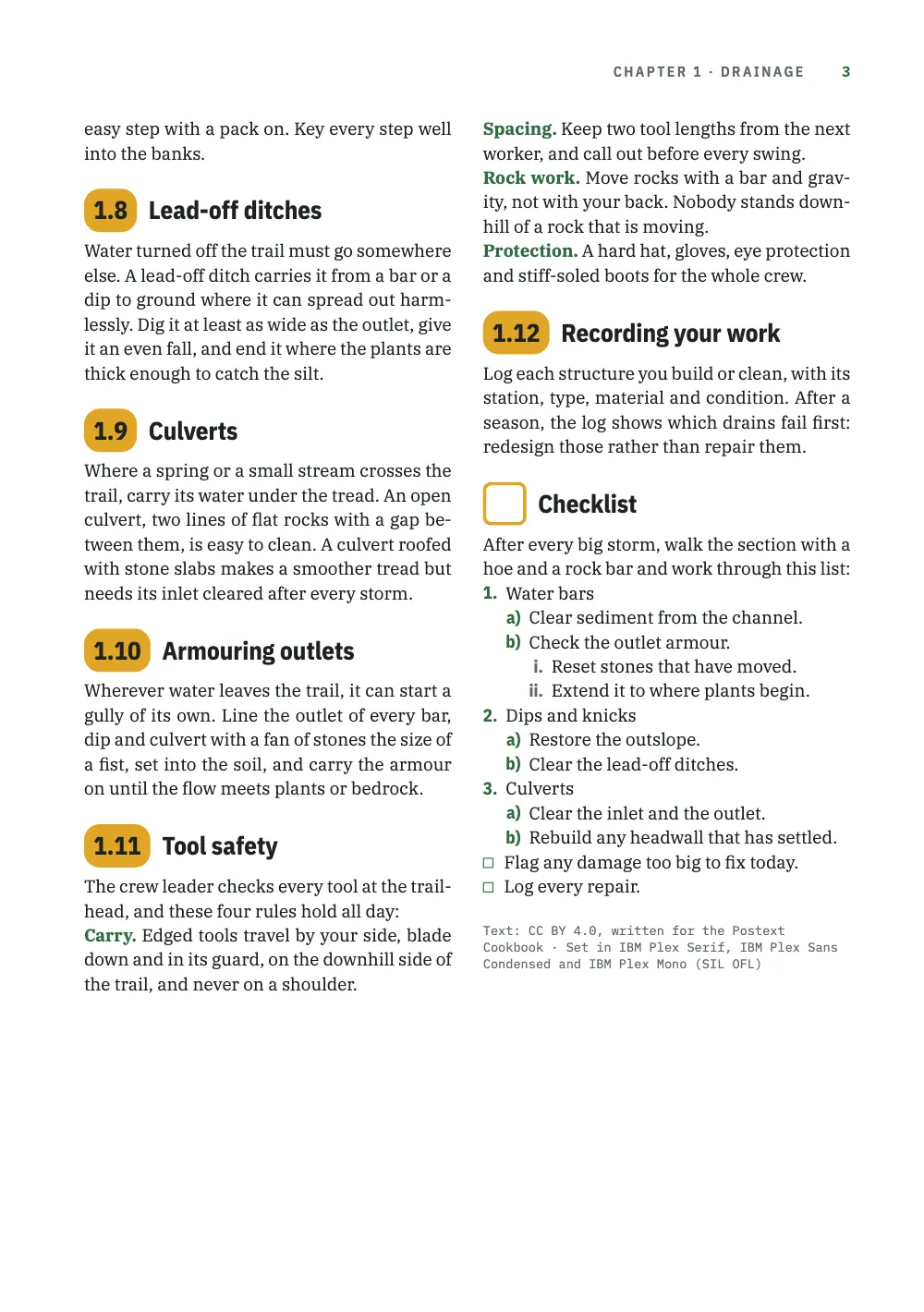
Il capitolo 1 del manuale da campo di una squadra di manutenzione dei sentieri, Drainage, su tre pagine B5 a due colonne: IBM Plex Serif per il testo, IBM Plex Sans Condensed per i titoli e i numeri di sezione, IBM Plex Mono per etichette, folii e numeri di sottosezione. L’apertura compone il numero del capitolo in una grande pillola ambra sopra il profilo altimetrico di un sentiero, dove punti ambra segnano dodici siti destinati a nuove canalette di scolo. Pillole più piccole numerano le sezioni da 1.1 a 1.12 e si allargano a 1.10. I titoli 1.2.1, 1.5.1 e 1.5.2 sono maiuscole spaziate sotto un filetto verde. I livelli da 4 a 6 non sono numerati e cambiano invece carattere (graziato corsivo, condensato nero verde, maiuscole monospaziate), e un settimo livello in corsivo grigio nomina gli attrezzi. Le regole di sicurezza si aprono su termini verdi in linea. Una checklist non numerata, segnata da un quadrato vuoto, chiude il capitolo con elenchi numerati 1., a) e i. e due caselle di attività.
Questa ricetta risponde a
- Come numero i titoli (1, 1.1, 1.1.1) e do a ogni livello uno stile diverso?
- Come costruisco un badge numerico accanto al titolo che si allarga quando il numero cresce (9 → 10)?
- Come gestisco più di sei livelli di titolo?
- Come personalizzo gli elenchi: punti elenco per livello, numerazione (a)/(i), caselle di controllo, spaziature che restano sulla griglia?
La risposta breve
const H2 = 13.5; // pt: the number and the title share one size and one line height,
const LH = 1.2; // so, under the same top padding, they share one baseline
// Every section head starts on a grid line, so the 3 pt the pill falls short of two lines
// is the gap the grid snap leaves between the pill and the text under it.
const PILL_H = 2 * LEAD - 3, PAD = (PILL_H - H2 * LH) / 2; // pt
const face = { fontFamily: DISPLAY, fontWeight: 700, fontSize: pt(H2), lineHeight: LH };
const pill = { kind: 'text', id: 'pill', content: '{number}', ...face, color: col('ink'),
  box: { backgroundColor: col('signal'), borderRadius: mm(3), // no width: the pill is its
    padding: { top: pt(PAD), bottom: pt(PAD), left: mm(1.8), right: mm(1.8) } }, // number
  placement: at('container', 'top-left') }; // plus its padding
// 'right-of' hangs the title on the pill's right edge and aligns its lines left, so a long
// title wraps beside the number, never under it.
const sectionTitle = (from) => ({ kind: 'text', id: 'title', content: '{titleText}', ...face,
  color: col('ink'), overflow: 'wrap', box: { padding: { top: pt(PAD) } },
  placement: at(`#${from}`, 'right-of', mm(2.2)) });
// The H1 counter, a point, the H2 counter: 1.1 … 1.12 in the pill. h2 joins headings.levels.
const h2 = { level: 2, numberingTemplate: '{1}.{2}',
  advancedDesign: { enabled: true, slot: { elements: [pill, sectionTitle('pill')] } } };
Ingredienti
- Funzionalità
- Titoli numeratiTesto, filetti e riquadri nei progetti di paginaAncoraggio degli elementi del progettoLivelli dei titoliStili di titoloCapitoli non numeratiAperture progettateImmagini nei progetti di paginaAttributi dei titoliStili di paragrafoGrassetto, corsivo e i loro coloriElenchi puntati e liste di controlloElenchi numeratiGriglia della linea di baseVedove, orfane e righe corteTestatine e folioTestatine secondo il ruolo della paginaMargini speculariTavolozza di colori semanticaFigure e tabelle come risorse
- Usa anche
- Fascia di capitolo a tutta larghezza
- Tipo
- IBM Plex Serif, IBM Plex Sans Condensed, IBM Plex Mono (SIL OFL 1.1)
- Risorse
- Nessuna: ogni immagine è disegnata nel codice
Preparazione
#1 · Metti il numero in una pillola che cresce con lui
Il codice è nella risposta breve qui sopra. numberingTemplate: '{1}.{2}' unisce i contatori del capitolo e della sezione in 1.1–1.12 (impostazioni per livello). Un livello con un progetto grafico avanzato non stampa più il numero prima del titolo, quindi è il progetto grafico a collocare {number}. Qui sta in un elemento di testo con un box pieno e arrotondato e senza larghezza, così la pillola è larga quanto il numero più la sua spaziatura interna: 10,1 mm per 1.9 e 12,7 mm per 1.10. 'right-of' appende il titolo al bordo destro della pillola e ne allinea le righe a sinistra, ed è per questo che il lungo titolo della 1.5 va a capo accanto al numero (collocazione degli elementi). La pillola è 3 pt più bassa di due linee di griglia, e ogni titolo di sezione comincia su una linea di griglia, quindi quei 3 pt sono lo spazio tra la pillola e il testo sotto di essa, sia che il titolo apra una colonna sia che segua un paragrafo.
#2 · Metti un filetto al terzo livello e spazialo
// A rule, a mono number and a tracked title: three elements, so this head is a design.
const small = { fontSize: pt(8.4), lineHeight: LH };
const DROP = 6; // pt: the rule drops this far toward the number, which keeps its grid line
const h3 = { level: 3, numberingTemplate: '{1}.{2}.{3}', // 1.5.1: restarts under every H2
  advancedDesign: { enabled: true, slot: { elements: [
    { kind: 'rule', id: 'rule', direction: 'horizontal', thickness: pt(0.75), color: col('band'),
      placement: { ...at('container', 'top-left', mm(0), pt(DROP)), size: { width: 'fill' } } },
    { kind: 'text', id: 'num', content: '{number}', fontFamily: LABEL, fontWeight: 500, ...small,
      color: col('band'), placement: at('#rule', 'below', mm(0), pt(LEAD - DROP)) },
    { kind: 'text', id: 'title', content: '{titleText}', fontFamily: DISPLAY, fontWeight: 600,
      ...small, letterSpacing: pt(1.35), textTransform: 'uppercase', color: col('ink'),
      overflow: 'wrap', placement: at('#num', 'right-of', mm(2)) },
  ] } } };
Anche il livello 3 è disegnato da un progetto grafico: un filetto verde di 0,75 pt, il numero in IBM Plex Mono e il titolo spaziato accanto. Il terzo contatore di '{1}.{2}.{3}' riparte sotto ogni sezione, quindi 1.2.1 e 1.5.1 finiscono entrambi con 1. DROP abbassa solo il filetto. Il numero è collocato LEAD - DROP sotto di esso, il che tiene numero e titolo una linea di griglia sotto la testa del titolo per qualunque DROP. Con il filetto più vicino al numero che al paragrafo sopra, si legge come parte del titolo.
#3 · Scendi attraverso i livelli da 4 a 6
const headings = { fontFamily: DISPLAY, color: col('ink'), // every head sits on the grid,
  lineHeight: pt(LEAD), marginTop: pt(LEAD), marginBottom: pt(0), // a line above, none below
  levels: [
    // Each chapter opens on a recto.
    { level: 1, span: 'page', breakBefore: { enabled: true, parity: 'odd' },
      numberingTemplate: '{1}', advancedDesign: opener },
    h2, h3,
    // No template below level 3, so no number: each level changes face, colour or case.
    { level: 4, fontFamily: 'IBM Plex Serif', fontWeight: 400, italic: true, fontSize: pt(11) },
    { level: 5, fontSize: pt(9.4), color: col('band') },
    { level: 6, fontFamily: LABEL, fontWeight: 600, fontSize: pt(7.8), textTransform: 'uppercase' },
  ] };
Un livello senza numberingTemplate non stampa numeri, quindi dal livello 4 in giù i titoli si distinguono invece per carattere, colore o maiuscole: un graziato corsivo al livello 4, il carattere da titolazione in verde al 5 e maiuscole monospaziate semineretto al 6. L’interlinea e i margini impostati su headings stesso arrivano a ogni livello e mettono ogni titolo sulla griglia, con una riga vuota sopra e nessuna sotto. Il livello 1 apre ogni capitolo su un recto, con parity: 'odd'.
#4 · Crea un settimo livello e una sezione non numerata con gli stili
const headingStyles = [
  // Markdown stops at ######: '###### Rock bar {style="level7"}' stays level 6 in the
  // outline and is set in lower case, lighter and grey.
  { id: 'level7', fontFamily: DISPLAY, fontWeight: 500, italic: true, fontSize: pt(8.4),
    textTransform: 'none', color: col('muted') },
  // numbered: false: no number, and the H2 counter does not move. An empty {number} would
  // still paint the amber pill, so the style draws a hollow square in its place.
  { id: 'checklist', numbered: false, advancedDesign: { enabled: true, slot: { elements: [
    { kind: 'box', id: 'box', style: { borderColor: col('signal'), borderWidth: pt(1.8),
      borderRadius: mm(1.5) }, placement: { ...at('container', 'top-left'),
      size: { width: pt(PILL_H), height: pt(PILL_H) } } },
    sectionTitle('box'),
  ] } } },
];
const paragraphStyles = [
  // Run-in heads: the bold term opening each rule prints in the accent, not in body ink.
  { id: 'rules', boldColor: col('band'), firstLineIndent: pt(0) },
  { id: 'colophon', fontFamily: LABEL, fontSize: pt(6.8), lineHeight: pt(9),
    color: col('muted'), textAlign: 'left', firstLineIndent: pt(0), marginTop: pt(LEAD) },
];
Il Markdown si ferma a ######, e ###### *Rock bar* sarebbe solo un altro livello 6, in corsivo. Lo stile di titolo 'level7' compone i nomi degli attrezzi in un condensato corsivo grigio di peso 500, più leggero del 600 del livello 6, e textTransform: 'none' disattiva le maiuscole che altrimenti erediterebbero. Si leggono un gradino sotto l’etichetta monospaziata sopra di loro, anche se in corpo 8,4 sono più grandi dei suoi 7,8 pt (stili di titolo). numbered: false esclude la checklist dal conteggio, quindi una sezione dopo di essa sarebbe comunque la 1.13. Un {number} vuoto dipingerebbe comunque la pillola ambra, quindi lo stile porta un proprio progetto grafico, con un quadrato vuoto al posto della pillola. I termini verdi in linea delle regole di sicurezza vengono dal boldColor di uno stile di paragrafo.
#5 · Cambia i segni degli elenchi con la profondità
// Zero margins keep lists on the grid; a '- [ ]' item's bullet becomes taskCheckboxChar, '☐'.
const unorderedLists = { gap: mm(2), marginTop: pt(0), marginBottom: pt(0), color: col('band'),
  levels: [{ level: 2, bulletChar: '–', color: col('sage') }] }; // '•' stays at level 1
// Level 1 keeps the defaults: 'arabic' and a full stop.
const orderedLists = { fontFamily: DISPLAY, color: col('band'), gap: mm(1.6),
  marginTop: pt(0), marginBottom: pt(0), levels: [
    { level: 2, numberFormat: 'lower-alpha', separator: ')' },
    { level: 3, numberFormat: 'lower-roman', color: col('muted') }] };
Ogni profondità prende da levels il proprio segno, colore e separatore: la checklist conta 1., a) e i. (impostazioni per livello degli elenchi ordinati) e i punti elenco sfumano dal verde al salvia (impostazioni per livello degli elenchi puntati). Il livello 1 mantiene il formato predefinito, 'arabic'. Le due voci - [ ] che chiudono la checklist stampano taskCheckboxChar, ☐ per impostazione predefinita, al posto del punto elenco, nel verde dei punti elenco di primo livello (estensioni degli elenchi di attività). Con margini zero sopra e sotto, ogni elenco resta sulla griglia della linea di base.
#6 · Apri il capitolo sul profilo del sentiero
const DEPTH = 96; // mm: the profile's foot, measured from the top of the page
const CLEAR = 6; // mm: the least room between the profile's foot and the text under it
const LEGEND = 7; // mm: how far the legend's top sits above the profile's foot
const big = { ...face, fontSize: pt(54), lineHeight: 1, color: col('ink') };
// The opener reserves height down to the profile's foot; minHeight reaches CLEAR mm past
// it, so the text starts on the first grid line CLEAR mm or more under the picture.
const opener = { enabled: true, minHeight: mm(DEPTH - TOP + CLEAR), slot: { elements: [
  { kind: 'image', id: 'profile', resourceId: 'profile',
    placement: { ...at('page', 'top-left'), size: { width: 'fill' } } },
  { kind: 'text', id: 'num', content: '{number}', ...big, box: { backgroundColor: col('signal'),
    borderRadius: mm(4), padding: { top: pt(4), bottom: pt(4), left: mm(4), right: mm(4) } },
    placement: at('container', 'top-left') },
  { kind: 'text', id: 'title', content: '{titleText}', ...big, box: { padding: { top: pt(4) } },
    placement: at('#num', 'right-of', mm(4)) },
  { kind: 'text', id: 'lead', content: '{attr.lead}', fontFamily: 'IBM Plex Serif', italic: true,
    fontSize: pt(11.5), lineHeight: 1.3, color: col('ink'), align: 'left', overflow: 'wrap',
    placement: { ...at('#num', 'below', mm(0), mm(5)), size: { width: mm(100) } } },
  // The legend is design text over the picture: each edition words it in its heading.
  { kind: 'text', id: 'legend', content: '{attr.profile}', fontFamily: LABEL, fontWeight: 500,
    fontSize: pt(7), color: col('tint'), placement: at('page', 'top-right', mm(-OUTER),
      mm(DEPTH - LEGEND)) },
] } };
Il profilo è un elemento immagine dell’apertura, ancorato alla pagina e largo quanto essa. Una figura a tutta larghezza flottante in testa e citata a pagina 1 avrebbe aperto invece la pagina 2 (elementi immagine). L’apertura riserva l’altezza fino al piede dell’immagine, e minHeight arriva 6 mm oltre, così il testo comincia sulla prima linea di griglia che sta almeno 6 mm sotto il profilo. La legenda sul verde è testo del progetto grafico, riempito dall’attributo profile del titolo. La pillola grande riprende il carattere e il riempimento della pillola di sezione, e {number} stampa il numero del capitolo, da numberingTemplate: '{1}'.
La ricetta completa
// ═══ Postext Cookbook · Nº 018 · Section heads seven levels deep ═════════════════ // https://postext.dev/en/cookbook/section-heads-field-manual // Code: MIT · Text: original (CC BY 4.0) · Picture: drawn in code (MIT) // Fonts: IBM Plex Serif, Sans Condensed, Mono (SIL OFL 1.1) · Needs postext ≥ 1.25.0 import { buildDocumentWithFonts, renderPageToCanvas, registerResourceImage, } from 'https://esm.sh/postext'; const LANG = 'en'; // @lang: the language of the sample document ('en' | 'es') const RECIPE = 'section-heads-field-manual'; // ─── 1 · Design ───────────────────────────────────────────────────────────── const palette = { // forest green for structure, a signal amber for numbers ink: '#1d2320', // text: a green-black band: '#2f6b3f', // the accent: rules, run-in terms, bullets, numbers, folios (6.4:1) signal: '#e0a526', // the number pills, with ink on them (7.3:1) sage: '#7a9e80', // the second bullet and the profile's upper contours tint: '#e9f0e6', // the opener's sky; the legend on the green (5.5:1) muted: '#5f6a62', // running heads, level 7, roman list numbers, the colophon (5.6:1) }; // col(id): a colour linked to its palette entry, in text styles and design slots alike. const col = (id) => ({ hex: palette[id], model: 'hex', paletteId: id }); // Defaults this config does not restate link to 'main-color', so it points at the accent. const colorPalette = Object.entries({ ...palette, 'main-color': palette.band }) .map(([id, hex]) => ({ id, name: id, value: { hex, model: 'hex' } })); const TRIM = { width: 176, height: 250 }; // mm: ISO B5, a common size for field manuals const [TOP, INNER, OUTER] = [22, 16, 14]; // mm: margins; the running heads align to OUTER const LEAD = 13.2; // pt: the body leading, the pitch of the baseline grid const LINES = 44; // grid lines in the text block, so every full column ends on one baseline const [DISPLAY, LABEL] = ['IBM Plex Sans Condensed', 'IBM Plex Mono']; // with the serif text const at = (to, edge, x, y) => ({ anchor: { to, edge }, offset: { x, y } }); // #region answer: section numbers 1.1 … 1.12 in an amber pill that widens with the number const H2 = 13.5; // pt: the number and the title share one size and one line height, const LH = 1.2; // so, under the same top padding, they share one baseline // Every section head starts on a grid line, so the 3 pt the pill falls short of two lines // is the gap the grid snap leaves between the pill and the text under it. const PILL_H = 2 * LEAD - 3, PAD = (PILL_H - H2 * LH) / 2; // pt const face = { fontFamily: DISPLAY, fontWeight: 700, fontSize: pt(H2), lineHeight: LH }; const pill = { kind: 'text', id: 'pill', content: '{number}', ...face, color: col('ink'), box: { backgroundColor: col('signal'), borderRadius: mm(3), // no width: the pill is its padding: { top: pt(PAD), bottom: pt(PAD), left: mm(1.8), right: mm(1.8) } }, // number placement: at('container', 'top-left') }; // plus its padding // 'right-of' hangs the title on the pill's right edge and aligns its lines left, so a long // title wraps beside the number, never under it. const sectionTitle = (from) => ({ kind: 'text', id: 'title', content: '{titleText}', ...face, color: col('ink'), overflow: 'wrap', box: { padding: { top: pt(PAD) } }, placement: at(`#${from}`, 'right-of', mm(2.2)) }); // The H1 counter, a point, the H2 counter: 1.1 … 1.12 in the pill. h2 joins headings.levels. const h2 = { level: 2, numberingTemplate: '{1}.{2}', advancedDesign: { enabled: true, slot: { elements: [pill, sectionTitle('pill')] } } }; // #endregion // #region ruled: level 3, a green rule over the number and a tracked capital title // A rule, a mono number and a tracked title: three elements, so this head is a design. const small = { fontSize: pt(8.4), lineHeight: LH }; const DROP = 6; // pt: the rule drops this far toward the number, which keeps its grid line const h3 = { level: 3, numberingTemplate: '{1}.{2}.{3}', // 1.5.1: restarts under every H2 advancedDesign: { enabled: true, slot: { elements: [ { kind: 'rule', id: 'rule', direction: 'horizontal', thickness: pt(0.75), color: col('band'), placement: { ...at('container', 'top-left', mm(0), pt(DROP)), size: { width: 'fill' } } }, { kind: 'text', id: 'num', content: '{number}', fontFamily: LABEL, fontWeight: 500, ...small, color: col('band'), placement: at('#rule', 'below', mm(0), pt(LEAD - DROP)) }, { kind: 'text', id: 'title', content: '{titleText}', fontFamily: DISPLAY, fontWeight: 600, ...small, letterSpacing: pt(1.35), textTransform: 'uppercase', color: col('ink'), overflow: 'wrap', placement: at('#num', 'right-of', mm(2)) }, ] } } }; // #endregion // #region opener: the chapter number in the section pill, scaled up, over the trail's profile const DEPTH = 96; // mm: the profile's foot, measured from the top of the page const CLEAR = 6; // mm: the least room between the profile's foot and the text under it const LEGEND = 7; // mm: how far the legend's top sits above the profile's foot const big = { ...face, fontSize: pt(54), lineHeight: 1, color: col('ink') }; // The opener reserves height down to the profile's foot; minHeight reaches CLEAR mm past // it, so the text starts on the first grid line CLEAR mm or more under the picture. const opener = { enabled: true, minHeight: mm(DEPTH - TOP + CLEAR), slot: { elements: [ { kind: 'image', id: 'profile', resourceId: 'profile', placement: { ...at('page', 'top-left'), size: { width: 'fill' } } }, { kind: 'text', id: 'num', content: '{number}', ...big, box: { backgroundColor: col('signal'), borderRadius: mm(4), padding: { top: pt(4), bottom: pt(4), left: mm(4), right: mm(4) } }, placement: at('container', 'top-left') }, { kind: 'text', id: 'title', content: '{titleText}', ...big, box: { padding: { top: pt(4) } }, placement: at('#num', 'right-of', mm(4)) }, { kind: 'text', id: 'lead', content: '{attr.lead}', fontFamily: 'IBM Plex Serif', italic: true, fontSize: pt(11.5), lineHeight: 1.3, color: col('ink'), align: 'left', overflow: 'wrap', placement: { ...at('#num', 'below', mm(0), mm(5)), size: { width: mm(100) } } }, // The legend is design text over the picture: each edition words it in its heading. { kind: 'text', id: 'legend', content: '{attr.profile}', fontFamily: LABEL, fontWeight: 500, fontSize: pt(7), color: col('tint'), placement: at('page', 'top-right', mm(-OUTER), mm(DEPTH - LEGEND)) }, ] } }; // #endregion // #region levels: numbers down to 1.1.1, then italic, bold and label faces for 4 to 6 const headings = { fontFamily: DISPLAY, color: col('ink'), // every head sits on the grid, lineHeight: pt(LEAD), marginTop: pt(LEAD), marginBottom: pt(0), // a line above, none below levels: [ // Each chapter opens on a recto. { level: 1, span: 'page', breakBefore: { enabled: true, parity: 'odd' }, numberingTemplate: '{1}', advancedDesign: opener }, h2, h3, // No template below level 3, so no number: each level changes face, colour or case. { level: 4, fontFamily: 'IBM Plex Serif', fontWeight: 400, italic: true, fontSize: pt(11) }, { level: 5, fontSize: pt(9.4), color: col('band') }, { level: 6, fontFamily: LABEL, fontWeight: 600, fontSize: pt(7.8), textTransform: 'uppercase' }, ] }; // #endregion // #region styles: a seventh level and an unnumbered section as heading styles; run-in terms const headingStyles = [ // Markdown stops at ######: '###### Rock bar {style="level7"}' stays level 6 in the // outline and is set in lower case, lighter and grey. { id: 'level7', fontFamily: DISPLAY, fontWeight: 500, italic: true, fontSize: pt(8.4), textTransform: 'none', color: col('muted') }, // numbered: false: no number, and the H2 counter does not move. An empty {number} would // still paint the amber pill, so the style draws a hollow square in its place. { id: 'checklist', numbered: false, advancedDesign: { enabled: true, slot: { elements: [ { kind: 'box', id: 'box', style: { borderColor: col('signal'), borderWidth: pt(1.8), borderRadius: mm(1.5) }, placement: { ...at('container', 'top-left'), size: { width: pt(PILL_H), height: pt(PILL_H) } } }, sectionTitle('box'), ] } } }, ]; const paragraphStyles = [ // Run-in heads: the bold term opening each rule prints in the accent, not in body ink. { id: 'rules', boldColor: col('band'), firstLineIndent: pt(0) }, { id: 'colophon', fontFamily: LABEL, fontSize: pt(6.8), lineHeight: pt(9), color: col('muted'), textAlign: 'left', firstLineIndent: pt(0), marginTop: pt(LEAD) }, ]; // #endregion // #region lists: bullets that fade with depth; numbers 1. then a) then i.; task boxes // Zero margins keep lists on the grid; a '- [ ]' item's bullet becomes taskCheckboxChar, '☐'. const unorderedLists = { gap: mm(2), marginTop: pt(0), marginBottom: pt(0), color: col('band'), levels: [{ level: 2, bulletChar: '–', color: col('sage') }] }; // '•' stays at level 1 // Level 1 keeps the defaults: 'arabic' and a full stop. const orderedLists = { fontFamily: DISPLAY, color: col('band'), gap: mm(1.6), marginTop: pt(0), marginBottom: pt(0), levels: [ { level: 2, numberFormat: 'lower-alpha', separator: ')' }, { level: 3, numberFormat: 'lower-roman', color: col('muted') }] }; // #endregion // Running heads, HEAD mm from the trim: folio and book on versos, chapter and folio on rectos. const HEAD = 12; // mm; an opener keeps only a drop folio, HEAD mm above its foot const FOLIO_GAP = 9; // mm from a folio to the title beside it const runHead = { fontFamily: DISPLAY, fontWeight: 600, fontSize: pt(7.8), letterSpacing: pt(1.2), textTransform: 'uppercase', color: col('muted') }; const folio = { ...runHead, fontFamily: LABEL, color: col('band') }; const head = (id, content, parity, edge, x, style = runHead) => ({ kind: 'text', id, content, parity, pages: 'body', ...style, placement: at('page', edge, mm(x), mm(HEAD)) }); const config = () => ({ locale: t({ en: 'en-us', es: 'es' }), // each edition's hyphenation patterns colorPalette, page: { sizePreset: 'custom', width: mm(TRIM.width), height: mm(TRIM.height), dpi: 150, margins: { top: mm(TOP), bottom: mm(TRIM.height - TOP - (LINES * LEAD * 25.4) / 72), left: mm(INNER), right: mm(OUTER), mirror: true } }, layout: { layoutType: 'double', gutterWidth: mm(6) }, bodyText: { fontFamily: 'IBM Plex Serif', fontSize: pt(9.4), lineHeight: pt(LEAD), color: col('ink'), boldColor: col('ink'), italicColor: col('ink'), referenceColor: col('ink'), textAlign: 'justify', firstLineIndent: mm(4), indentAfterHeading: false, minWordSpacing: 0.85, maxWordSpacing: 1.4 }, // a narrow band: an even grey, line to line headings, headingStyles, paragraphStyles, unorderedLists, orderedLists, header: { elements: [head('v-folio', '{pageNumber}', 'even', 'top-left', OUTER, folio), head('v-book', '{title}', 'even', 'top-left', OUTER + FOLIO_GAP), head('r-chapter', t({ en: 'Chapter {chapterNumber} · {chapterTitle}', es: 'Capítulo {chapterNumber} · {chapterTitle}' }), 'odd', 'top-right', -(OUTER + FOLIO_GAP)), head('r-folio', '{pageNumber}', 'odd', 'top-right', -OUTER, folio), ] }, footer: { elements: [{ kind: 'text', id: 'drop-folio', content: '{pageNumber}', pages: 'opener', ...folio, placement: at('page', 'bottom', mm(0), mm(-HEAD)) }] }, }); // ─── 2 · Content ──────────────────────────────────────────────────────────── const markdown = String.raw`---Esempio Markdown · 132 righe · content.en.md
title: "Trail Crew Field Manual" subtitle: "Maintenance with hand tools" author: "Postext Cookbook" --- # Drainage {lead="Where and how to build the drains of a trail, from an outsloped tread to a stone culvert." profile="Lookout Ridge Trail, km 0 to 4.2 · twelve sites flagged for new water bars"} In one season, boots pack a new trail until its tread sheds rain like a metal roof, and the rain runs down it, picking up speed and soil. This chapter shows how to turn that water off the trail before it cuts a rut. ## Why water is the enemy The faster water runs, the more soil it carries away, and it runs faster the steeper the grade and the longer the run. A sheet of water that barely moves on a flat tread turns into a cutting stream on a long, steep pitch. Once a rut forms, hikers walk beside it, the tread widens and each storm digs the rut deeper. Drainage breaks the run into short pieces, so the water never gets going. ## Reading the ground Walk the section during a storm if you can, or straight after one. Water will show you where it wants to go. Look for these signs: - silt fans below a steep pitch - puddles that hikers step around, wearing a new path beside them - a rut down the middle of the tread - shallower than a boot sole: reshape it - deeper: it needs a water bar - roots and rocks standing proud of the tread ### Flag before you dig Mark every site with flagging tape before the crew arrives, and record its station in the log: its distance from the trailhead, the grade and the structure you propose. When the section is walked and flagged, a crew leader can plan the day in minutes. ## Outslope first The cheapest drain is a tread that tilts. Shape it to fall by about 5 per cent toward the downhill edge, 3 cm across a tread 60 cm wide, so that water crosses it in a thin sheet instead of running down its length. Rake off the berm of loose soil that builds up along the outer edge, since a berm turns the tread back into a gutter. Check the tilt with a short level across the tread; an outslope too slight to see still sheds water, and a steeper one only turns ankles. ## Grade dips In a grade dip, the grade reverses for a short way: the trail drops, rises again for a few metres, then resumes its climb, and water leaves at the low point. Built into new trail, dips are almost invisible to hikers and need little upkeep. On an old trail you can often carve one with a grub hoe where the grade eases. ## Water bars: turning water off steep tread Where the grade is too steep for a dip, a water bar turns the flow across the tread. It is a line of rock or timber set into the tread at an angle, its top a little above the surface, with an armoured outlet at its lower end. ### Laying out a bar Skew the bar 30 to 45 degrees off the square, so the water keeps enough speed to carry its silt away; a bar laid straight across the tread fills with sediment after the first storm. Space the bars more closely as the grade steepens: on loose soil at 10 per cent, one every 25 or 30 metres, and closer still on a steeper pitch. #### Choosing the spot Place the bar where the water can leave with ease, in a natural hollow on the downhill side. Never let it drain onto a switchback or over a steep drop, where the outflow would cut into the slope below. ### Building a rock bar Dig a trench across the tread at the angle you chose, two thirds as deep as your tallest rock is high. Set the rocks on edge and shoulder to shoulder, with at least two thirds of each one buried, and key the upper end 30 cm into the bank so that water cannot run around it. #### The trench Keep the trench walls vertical and its floor on firm mineral soil. Throw the spoil well downhill, clear of the tread, and keep the best for backfill. On loose soil, widen the trench and line its downhill side with smaller stones, so that the bar rests on something firm. ##### Tools for the trench A grub hoe and a shovel open it, and two steel bars set the rocks. ###### Steel bars Each is about 1.5 m long; the heavier weighs as much as a loaded daypack. Lay them down when not in use, never upright against a tree. ###### Rock bar {style="level7"} The heavy one: a lever to pry rocks loose and walk them into place. Keep your fingers clear of the pivot rock and lift with your legs. ###### Tamping bar {style="level7"} The lighter bar, with a flat tamping foot at one end. Backfill in layers no thicker than a hand and tamp each one hard: the first flow carries off loose fill behind a bar. ## Knicks On flat or rolling tread where puddles gather, a knick drains water with no structure at all. It is a shallow half-moon about 3 metres long, shaved into the tread so its outer edge sits a hand’s depth below the rest. ## Check steps Where the trail climbs a gully and the water cannot be turned aside, slow it down instead. Check steps are low risers of stone or timber set across the tread, each one holding back a level bed of soil, and the water loses speed at every landing. A rise of 15 to 20 cm makes an easy step with a pack on. Key every step well into the banks. ## Lead-off ditches Water turned off the trail must go somewhere else. A lead-off ditch carries it from a bar or a dip to ground where it can spread out harmlessly. Dig it at least as wide as the outlet, give it an even fall, and end it where the plants are thick enough to catch the silt. ## Culverts Where a spring or a small stream crosses the trail, carry its water under the tread. An open culvert, two lines of flat rocks with a gap between them, is easy to clean. A culvert roofed with stone slabs makes a smoother tread but needs its inlet cleared after every storm. ## Armouring outlets Wherever water leaves the trail, it can start a gully of its own. Line the outlet of every bar, dip and culvert with a fan of stones the size of a fist, set into the soil, and carry the armour on until the flow meets plants or bedrock. ## Tool safety The crew leader checks every tool at the trailhead, and these four rules hold all day: :::paragraphs{style="rules"} **Carry.** Edged tools travel by your side, blade down and in its guard, on the downhill side of the trail, and never on a shoulder. **Spacing.** Keep two tool lengths from the next worker, and call out before every swing. **Rock work.** Move rocks with a bar and gravity, not with your back. Nobody stands downhill of a rock that is moving. **Protection.** A hard hat, gloves, eye protection and stiff-soled boots for the whole crew. ::: ## Recording your work Log each structure you build or clean, with its station, type, material and condition. After a season, the log shows which drains fail first: redesign those rather than repair them. ## Checklist {style="checklist"} After every big storm, walk the section with a hoe and a rock bar and work through this list: 1. Water bars 1. Clear sediment from the channel. 2. Check the outlet armour. 1. Reset stones that have moved. 2. Extend it to where plants begin. 2. Dips and knicks 1. Restore the outslope. 2. Clear the lead-off ditches. 3. Culverts 1. Clear the inlet and the outlet. 2. Rebuild any headwall that has settled. - [ ] Flag any damage too big to fix today. - [ ] Log every repair. :::paragraphs{style="colophon"} Text: CC BY 4.0, written for the Postext Cookbook · Set in IBM Plex Serif, IBM Plex Sans Condensed and IBM Plex Mono (SIL OFL) :::`; // content.<lang>.md, inlined by the Cookbook // The profile is a resource that no :ref cites: only the opener's image element draws it. const resources = [{ id: 'profile', typeId: 'figure', kind: 'svg', createdAt: 0, updatedAt: 0, svg: { fileId: 'profile.svg', width: TRIM.width * 10, height: DEPTH * 10 }, altText: t({ en: 'A 376 m climb in 4.2 km; amber dots mark twelve sites flagged for water bars.', es: 'Subida de 376 m en 4,2 km; puntos ámbar en doce sitios balizados para desviadores.' }) }]; // #region art: the trail's elevation profile, drawn in code with a seeded PRNG function profileSvg() { // Survey points, distance (km) and elevation (m): an easy valley, then the climb. const KM = 4.2; const pts = [[0, 1180], [0.8, 1190], [1.5, 1204], [2.1, 1226], [2.6, 1262], [3.0, 1330], [3.35, 1412], [3.7, 1486], [4.0, 1535], [4.2, 1556]]; const Y0 = DEPTH - 12; // mm: where 1180 m sits in the picture const K = 50 / 376; // mm of picture per metre of climb const elev = (d) => { // smoothstep between survey points: monotone, no overshoot const next = pts.findIndex(([x]) => x > d); const i = next < 0 ? pts.length - 2 : Math.max(0, next - 1); const [[x0, e0], [x1, e1]] = [pts[i], pts[i + 1]]; const u = Math.min(1, (d - x0) / (x1 - x0)); return e0 + (e1 - e0) * u * u * (3 - 2 * u); }; let seed = 18; // Mulberry32: the same wobble on every run const rand = () => { seed = (seed + 0x6d2b79f5) | 0; let r = Math.imul(seed ^ (seed >>> 15), 1 | seed); r = (r + Math.imul(r ^ (r >>> 7), 61 | r)) ^ r; return ((r ^ (r >>> 14)) >>> 0) / 4294967296; }; const N = 220; const crest = Array.from({ length: N + 1 }, (_, i) => [(TRIM.width * i) / N, Y0 - (elev((KM * i) / N) - 1180) * K + (rand() - 0.5) * 0.5]); const xy = (list) => list.map(([x, y]) => `${x.toFixed(2)} ${y.toFixed(2)}`).join('L'); // Contour bands every 50 m, from the band green in the valley to sage on the ridge: each // band is the profile clipped between two contours. const mix = (a, b, u) => '#' + [1, 3, 5].map((i) => Math.round(parseInt(a.slice(i, i + 2), 16) * (1 - u) + parseInt(b.slice(i, i + 2), 16) * u).toString(16).padStart(2, '0')).join(''); const bands = Array.from({ length: 8 }, (_, k) => { const floor = Y0 - k * 50 * K; const top = crest.map(([x, y]) => [x, Math.min(floor, Math.max(y, floor - 50 * K))]); return `<path d="M0 ${floor}L${xy(top)}L${TRIM.width} ${floor}Z" ` + `fill="${mix(palette.band, palette.sage, k / 7)}"/>`; }).join(''); // The twelve flagged sites, placed one per 32 m of climb: they crowd where it steepens. const dots = Array.from({ length: 12 }, (_, k) => { const target = 1180 + 32 * (k + 0.5); let [lo, hi] = [0, KM]; for (let it = 0; it < 40; it++) { const mid = (lo + hi) / 2; if (elev(mid) < target) lo = mid; else hi = mid; } return `<circle cx="${((TRIM.width * lo) / KM).toFixed(2)}" ` + `cy="${(Y0 - (target - 1180) * K).toFixed(2)}" r="1.9" fill="${palette.signal}" ` + `stroke="${palette.ink}" stroke-width="0.35"/>`; }).join(''); return `<svg xmlns="http://www.w3.org/2000/svg" width="${TRIM.width * 10}" ` + `height="${DEPTH * 10}" viewBox="0 0 ${TRIM.width} ${DEPTH}">` + `<rect width="${TRIM.width}" height="${DEPTH}" fill="${palette.tint}"/>` + `<path d="M0 ${DEPTH}L${xy(crest)}L${TRIM.width} ${DEPTH}Z" fill="${palette.band}"/>` + `${bands}<path d="M${xy(crest)}" fill="none" stroke="${palette.ink}" ` + `stroke-width="0.7" stroke-linejoin="round"/>${dots}</svg>`; } // #endregion // ─── 3 · Fonts ────────────────────────────────────────────────────────────── // Every face the pages paint, loaded before the first build. const FONTS = { 'IBM Plex Serif': ['400', '400i', '700'], 'IBM Plex Sans Condensed': ['500i', '600', '700'], 'IBM Plex Mono': ['400', '500', '600'] }; // ─── 4 · Build & show ─────────────────────────────────────────────────────── await loadSvg('profile.svg', profileSvg()); const doc = await buildDocumentWithFonts({ markdown, resources }, config(), kitFonts(FONTS)); showPages(doc, { title: t({ en: 'Section heads seven levels deep', es: 'Títulos de sección hasta siete niveles' }) });Kit · core, fonts, viewer, images: uguale in ogni ricetta · 270 righe
// ─── Kit ── helpers shared by every Cookbook recipe · postext.dev/cookbook ───── // ─── Kit · core v1 ── the same in every recipe · postext.dev/cookbook function mm(value) { return { value, unit: 'mm' }; } function pt(value) { return { value, unit: 'pt' }; } function em(value) { return { value, unit: 'em' }; } /** The sample language's string: t({ en: 'Figure', es: 'Figura' }). */ function t(strings) { return strings[LANG] ?? Object.values(strings)[0]; } /** A file in this recipe's assets folder, served from the Postext repo by jsDelivr. */ function asset(file) { return `https://cdn.jsdelivr.net/gh/drnachio/postext@main/cookbook/${RECIPE}/assets/${file}`; } // ─── Kit · fonts v3 ── the same in every recipe · postext.dev/cookbook // Postext loads the faces a config asks for before layout (prepareFonts, // buildDocumentWithFonts) and asks the kit for the files: Fontsource's, the // files the PDF embeds too. /** The options of buildDocumentWithFonts / prepareFonts / withLoadedFonts: * the Fontsource resolver, and the faces of FONTS loaded with the ones the * config names. FONTS = { 'Family Name': ['400', '400i', '700'] }. */ function kitFonts(FONTS = {}) { const faces = Object.entries(FONTS).flatMap(([family, specs]) => specs.map((spec) => ({ family, weight: parseInt(spec, 10), style: spec.endsWith('i') ? 'italic' : 'normal' }))); return { resolve: fontsourceResolver, faces }; } /** A face's Fontsource files, in a fixed order: latin, then latin-ext and greek * when `text` needs them and the family ships them (kitSubsetsFor), each with * its unicode-range. Null for a weight or slant Fontsource does not ship. */ async function fontsourceResolver(family, weight, style, { text = '' } = {}) { const id = fontsourceId(family); const meta = await fontsourceMeta(family); if (meta && !(meta.weights.includes(weight) && meta.styles.includes(style))) return null; kitStatus('Loading fonts…'); const at = await fontsourceAt(id); return ['latin', ...kitSubsetsFor(text, meta)].map((subset) => ({ source: `${at}files/${id}-${subset}-${weight}-${style}.woff2`, unicodeRange: kitRanges()[subset], })); } /** The unicode-range of each Fontsource file the kit loads (a function: the * kit is inlined after the pen's code, which runs before a const would be set). */ function kitRanges() { return { latin: 'U+0000-00FF,U+0131,U+0152-0153,U+02BB-02BC,U+02C6,U+02DA,U+02DC,U+0304,U+0308,U+0329,' + 'U+2000-206F,U+20AC,U+2122,U+2191,U+2193,U+2212,U+2215,U+FEFF,U+FFFD', 'latin-ext': 'U+0100-02BA,U+02BD-02C5,U+02C7-02CC,U+02CE-02D7,U+02DD-02FF,U+0304,U+0308,U+0329,' + 'U+1D00-1DBF,U+1E00-1E9F,U+1EF2-1EFF,U+2020,U+20A0-20AB,U+20AD-20C0,U+2113,U+2C60-2C7F,U+A720-A7FF', greek: 'U+0370-03FF', }; } /** For the cjk, arabic and comics blocks, which add their own files: the * faces of `faces` = { 'Family Name': ['400', '400i', '700'] }. `text` is the sample: * č ł † α χ also load latin-ext and greek files (kitSubsetsFor). With * `optional`, a face Fontsource does not ship is skipped instead of failing. * The files are added once all have loaded, in the order asked (latin, then * latin-ext, then greek), whatever order they arrive in: the last one added * wins a character two files hold. Resolves to the number of faces added. */ async function loadFonts(faces, text = '', { optional = false } = {}) { kitStatus('Loading fonts…'); const ranges = kitRanges(); const jobs = []; for (const [family, specs] of Object.entries(faces)) { const id = fontsourceId(family); const todo = [...new Set(specs)].map((spec) => [parseInt(spec, 10), spec.endsWith('i') ? 'italic' : 'normal']) .filter(([weight, style]) => !hasFace(family, weight, style)); // before any await const at = fontsourceAt(id); const meta = optional || /[^\0-ÿ]/u.test(text) ? await fontsourceMeta(family) : null; const subsets = ['latin', ...kitSubsetsFor(text, meta)]; for (const [weight, style] of todo) { if (optional && !(meta?.weights.includes(weight) && meta.styles.includes(style))) continue; for (const subset of subsets) { const url = `${await at}files/${id}-${subset}-${weight}-${style}.woff2`; const face = new FontFace(family, `url(${url}) format('woff2')`, { weight: String(weight), style, unicodeRange: ranges[subset] }); jobs.push(face.load().catch(() => { if (subset === 'latin' && !optional) throw new Error(`Fontsource has no ${family} ${weight} ${style}`); })); } } } const ready = await Promise.all(jobs).catch((error) => { kitFail(error); throw error; }); return ready.filter((face) => face && document.fonts.add(face)).length; } /** A loaded FontFace covers this family, weight and style (fonts.check() would * also say yes for families nobody declared). */ function hasFace(family, weight, style) { for (const face of document.fonts) { if (face.status !== 'loaded' || face.style !== style) continue; if (face.family.replace(/^["']|["']$/g, '') !== family) continue; const [low, high = low] = face.weight.split(' ').map(Number); if (weight >= low && weight <= high) return true; } return false; } /** The files beyond latin `text` needs that `meta`'s family ships. */ function kitSubsetsFor(text, meta) { return [[/[Ā-˿ᴀ-ᶿḀ-ỿ†ℓⱠ-Ɀ꜠-ꟿ]/u, 'latin-ext'], [/[Ͱ-Ͽ]/u, 'greek']] .filter(([re, x]) => re.test(text) && meta?.subsets?.includes(x)).map(([, x]) => x); } /** Fontsource's id for a family: 'Source Serif 4' → 'source-serif-4'. */ function fontsourceId(family) { return family.toLowerCase().replace(/\s+/g, '-'); } /** A package's folder at the one version @5 names now (#766). */ function fontsourceAt(id, u = `https://cdn.jsdelivr.net/npm/@fontsource/${id}@`) { return (fontsourceAt.c ??= {})[id] ??= fetch(u + '5/package.json').then((r) => r.json()) .then((p) => p.version || 5, () => 5).then((v) => `${u}${v}/`); } /** The family's Fontsource metadata (weights, styles, subsets), or null. */ function fontsourceMeta(family) { fontsourceMeta.cache ??= new Map(); const id = fontsourceId(family); if (!fontsourceMeta.cache.has(id)) { fontsourceMeta.cache.set(id, fetch(`https://api.fontsource.org/v1/fonts/${id}`) .then((res) => (res.ok ? res.json() : null), () => null)); } return fontsourceMeta.cache.get(id); } // ─── Kit · viewer v2 ── the same in every recipe · postext.dev/cookbook /** The pages as spreads on a dark desk, page 1 alone, then verso | recto, * each painted when it scrolls near. Other options go to renderPageToCanvas. */ function showPages(docs, { title, width = 460, ...render } = {}) { const root = viewer(title); const pages = [docs].flat().flatMap((doc) => doc.pages.map((page) => ({ doc, page, n: (doc.pageIndexOffset ?? 0) + page.index }))); const spreads = []; let verso = null; for (const p of pages) { if (p.n % 2 === 1) { if (verso) spreads.push([verso, null]); verso = p; } else { spreads.push([verso, p]); verso = null; } } if (verso) spreads.push([verso, null]); const density = Math.min(window.devicePixelRatio || 1, 2); showPages.painter?.disconnect(); const painter = new IntersectionObserver((entries) => { for (const { isIntersecting, target } of entries) { if (!isIntersecting) continue; painter.unobserve(target); const { doc, page } = target.postext; renderPageToCanvas(page, doc, target, { ...render, scale: (width * density) / page.width }); } }, { rootMargin: '800px' }); showPages.painter = painter; root.replaceChildren(...spreads.map((pair) => { const spread = document.createElement('div'); spread.className = 'pt-spread'; for (const p of pair) { const figure = document.createElement('figure'); if (p) { const label = p.page.pageLabel || String(p.n + 1); const canvas = document.createElement('canvas'); canvas.postext = p; canvas.style.aspectRatio = `${p.page.width} / ${p.page.height}`; canvas.setAttribute('role', 'img'); canvas.setAttribute('aria-label', `Page ${label}`); const folio = document.createElement('figcaption'); folio.textContent = label; figure.append(canvas, folio); painter.observe(canvas); } else figure.className = 'pt-blank'; spread.append(figure); } return spread; })); kitStatus(`${pages.length} ${pages.length === 1 ? 'page' : 'pages'}`); document.documentElement.dataset.postext = 'ready'; return pages.length; } /** The desk, the bar and the error reporting, created once. */ function viewer(title) { if (!document.getElementById('pt-kit')) { document.head.insertAdjacentHTML('beforeend', `<style id="pt-kit"> :root { color-scheme: dark; } body { margin: 0; background: #0e1014; color: #b9bcc4; font: 13px/1.45 system-ui, sans-serif; } #pt-bar { position: sticky; top: 0; z-index: 1; display: flex; flex-wrap: wrap; align-items: center; gap: 6px 16px; padding: 10px 16px; background: rgb(14 16 20 / .92); backdrop-filter: blur(6px); border-bottom: 1px solid #23262d; } #pt-bar strong { color: #f4f1ea; font-weight: 600; } #pt-actions { display: flex; gap: 12px; margin-left: auto; } #pt-actions a, #pt-actions button { color: #d8a21a; font: inherit; background: none; border: 0; padding: 0; cursor: pointer; } #pages { display: grid; justify-items: center; gap: 48px; padding: 32px 16px 72px; } .pt-spread { display: flex; } .pt-spread figure { margin: 0; width: min(460px, 44vw); } .pt-spread canvas { display: block; width: 100%; background: #fff; box-shadow: 0 1px 2px rgb(0 0 0 / .5), 0 22px 44px -16px rgb(0 0 0 / .8); } .pt-spread figure:first-child canvas { box-shadow: inset -14px 0 14px -14px rgb(0 0 0 / .18), 0 1px 2px rgb(0 0 0 / .5), 0 22px 44px -16px rgb(0 0 0 / .8); } .pt-spread figcaption { margin-top: 10px; text-align: center; font: 600 10px/1 system-ui, sans-serif; letter-spacing: .18em; text-transform: uppercase; color: #6c7079; } .pt-blank { visibility: hidden; } @media (max-width: 760px) { .pt-spread { flex-direction: column; gap: 32px; } .pt-spread figure { width: min(460px, 92vw); } .pt-blank { display: none; } } </style>`); document.body.insertAdjacentHTML('afterbegin', '<header id="pt-bar"><strong id="pt-title"></strong><span id="pt-status" role="status"></span><span id="pt-actions"></span></header>'); document.getElementById('pt-title').textContent = document.title || 'Postext'; addEventListener('error', (event) => kitFail(event.error ?? event.message)); addEventListener('unhandledrejection', (event) => kitFail(event.reason)); } if (title) document.getElementById('pt-title').textContent = title; return document.getElementById('pages') ?? document.body.appendChild(Object.assign(document.createElement('main'), { id: 'pages' })); } function kitStatus(text) { viewer(); document.getElementById('pt-status').textContent = text; } function kitFail(error) { document.documentElement.dataset.postext = 'error'; kitStatus(`Error: ${error?.message ?? error}`); } // ─── Kit · images v3 ── recipes with pictures · postext.dev/cookbook /** Registers a photo or PNG for the canvas and keeps its bytes for the PDF. * fetch → ImageBitmap never taints the canvas (a plain cross-origin <img> would). */ async function loadImage(fileId, url) { const res = await fetch(url); if (!res.ok) throw new Error(`Image not found (${res.status}): ${url}`); const bytes = new Uint8Array(await res.arrayBuffer()); registerResourceImage(fileId, await createImageBitmap(new Blob([bytes]))); (loadImage.bytes ??= new Map()).set(fileId, bytes); } /** Registers SVG markup as a vector image, its fonts inside (inlineSvgFonts, ≥ 1.25). * `options` go to registerResourceImage: { singleInk: true } tints it on the canvas. */ async function loadSvg(fileId, svg, options) { if (typeof inlineSvgFonts === 'function') svg = await inlineSvgFonts(svg, svgFaces); const img = new Image(); img.src = `data:image/svg+xml;charset=utf-8,${encodeURIComponent(svg)}`; await img.decode(); registerResourceImage(fileId, img, options); (loadImage.bytes ??= new Map()).set(fileId, new TextEncoder().encode(svg)); } /** A face's Fontsource files: nearest weight; latin + what the SVG sets. */ async function svgFaces(family, weight, style, { codePoints = [] } = {}) { const [id, m] = [fontsourceId(family), await fontsourceMeta(family)]; const w = m?.weights.reduce((a, b) => (Math.abs(b - weight) < Math.abs(a - weight) ? b : a)) ?? weight; const s = m?.styles.includes(style) === false ? 'normal' : style; return Promise.all(['latin', ...kitSubsetsFor(String.fromCodePoint(...codePoints), m)].map(async (x) => new Uint8Array( await (await fetch(`${await fontsourceAt(id)}files/${id}-${x}-${w}-${s}.woff2`)).arrayBuffer()))); } /** renderToPdf({ resourceBytes: imageBytes }) */ function imageBytes(fileId) { return loadImage.bytes?.get(fileId); } /** renderToHtml({ resourceImageUrl: imageUrl }) */ function imageUrl(fileId) { const bytes = imageBytes(fileId); if (!bytes) return undefined; imageUrl.urls ??= new Map(); if (!imageUrl.urls.has(fileId)) { const type = /\.svg$/i.test(fileId) ? 'image/svg+xml' : /\.png$/i.test(fileId) ? 'image/png' : 'image/jpeg'; imageUrl.urls.set(fileId, URL.createObjectURL(new Blob([bytes], { type }))); } return imageUrl.urls.get(fileId); } // ─── /Kit ───────────────────────────────────────────────────────────────────────
Lo script.js composto funziona così com’è: incollalo nello script modulo di qualsiasi pagina, oppure apri la ricetta su CodePen. Cartella della ricetta su GitHub ↗ (si apre in una nuova scheda)
Varianti
#Togli il numero del capitolo dalle pillole
Togli dal modello il contatore del capitolo e le pillole dicono da 1 a 12, allargandosi a 10; il livello 3 stampa 1.5.1 finché anche il suo modello non toglie {1}.
-const h2 = { level: 2, numberingTemplate: '{1}.{2}',
+const h2 = { level: 2, numberingTemplate: '{2}',#Dai a ogni pillola la stessa larghezza
Una larghezza fissa, quella di 1.10, centra ogni numero in una pillola uguale e allinea i titoli in una sola colonna.
-  placement: at('container', 'top-left') }; // plus its padding
+ placement: { ...at('container', 'top-left'), size: { width: mm(12.7) } } };Errori frequenti
Errore frequente
Un elemento flottante 'top' va alla pagina dopo la sua citazione, a meno che non possa aprire la pagina che lo cita
Per impostazione predefinita un elemento flottante non va mai sopra il proprio riferimento, quindi un flottante 'top' a tutta larghezza citato a pagina N apre la pagina N+1. Imposta placement.citingPage: true sulla risorsa o sul defaultPlacement del suo tipo (o layout.floatsAtCitingPage per tutto il libro, da postext 1.25) e aprirà invece la pagina N, con il testo sopra il riferimento che scende sotto di esso, quando entra entro layout.maxTopFraction e la riga che lo cita resta su quella pagina. Non apre mai la prima pagina di un capitolo né una pagina dopo un’interruzione forzata: lì apre ancora la pagina successiva, e 'auto' o 'bottom' possono prendere il piede della pagina che lo cita. Collocazione delle figure →
Verifica della Sandbox · headingHierarchy
Salto nella gerarchia dei titoli
Perché. Un titolo salta un livello, come un H1 seguito direttamente da un H3.
Soluzione. Usa il livello immediatamente inferiore, oppure cambia lo stile del livello che intendevi invece di saltarne uno. Documentazione →
- Il settimo livello è un titolo di livello 6 con lo stile
level7, quindi nessun titolo dell’esempio scende più di un livello sotto il titolo che lo precede: The trench, Tools for the trench, STEEL BARS e Rock bar vanno 4, 5, 6, 6. L’avviso della Sandbox «Salto nella gerarchia dei titoli» segnala proprio un salto del genere, quindi in questo capitolo non compare mai.
Crediti
- Ricetta
- Ignacio Ferro
- Testo
- Testo originale, CC BY 4.0
- Font
- IBM Plex Serif (SIL OFL 1.1) · IBM Plex Sans Condensed (SIL OFL 1.1) · IBM Plex Mono (SIL OFL 1.1)
- Codice
- MIT, come Postext
Modifica questo testo ↗ (si apre in una nuova scheda)Cartella della ricetta su GitHub ↗ (si apre in una nuova scheda)