かんたんな説明
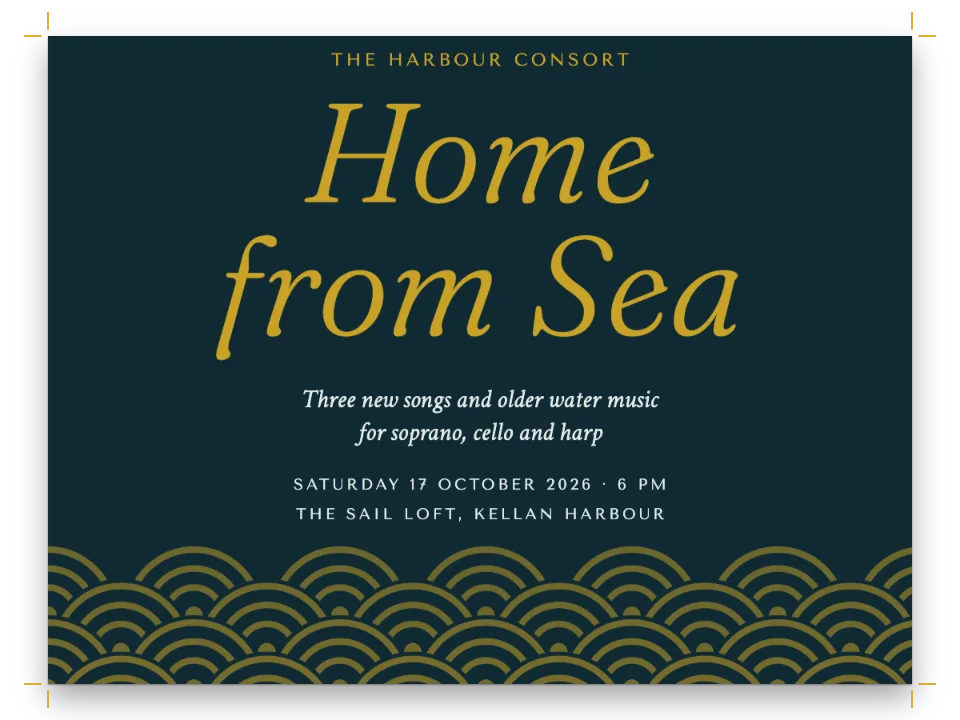
活版印刷の工房の修了証です。受講者ひとりに1ページで、模様の縁取りと印章が入ります。名前を一度書けば、修了証が1枚できあがります。
できあがり
プロビデンスにある架空の活版工房、Quoin Roomの修了証です。受講者ひとりにUSレター1ページを使います。スペイン語版は、サラゴサの工房La CuñaのA4判の証書として組みます。クリーム色のギョーシェのレンズ模様を詰めたティールの帯が紙面を囲み、四隅にはクリーム色のロゼットを置きます。どちらも正弦曲線とハイポトロコイドからコードで描いています。字間を空けた大文字の表題の下に、受講者の名前をPinyon Scriptの48ptで金色の罫の上に組み、文言はRosarivoで中央にそろえます。署名欄のあいだには2本のリボンを垂らした赤い印章を置き、その下に1行の刊記を入れます。ページ全体をひとつの見出しスタイルが描くので、受講者ひとりがMarkdownの見出しひとつにあたり、PDFにはクラス全員が名前ごとのしおりつきで収まります。
このレシピが答える質問
- すべてのページに透かし、背景の色、装飾画像を加えるには?
- 番号のないアートワーク(オーナメント、カット、ロゴ)を組むには?
- バッジやステッカーをページ上の決まった位置に固定するには?
- フォントを埋め込んだ本物のPDFをブラウザーで書き出すには?
手短な答え
const certificate = () => ({ // a function: it uses the elements defined below
  id: 'certificate',
  // Section geometry, for this style's pages only: a narrower measure, and a text area that
  // ends at the seal, so a citation too long for the page moves on instead of running under it.
  margins: { left: mm(SIDE), right: mm(SIDE), bottom: mm(H - SIGN) },
  // Header and footer elements paint over the page and reserve nothing (gotcha:
  // header-paints-over-text), so the frame, the seal and the signatures go there. In the
  // opener the signature lines would count towards its height (gotcha:
  // opener-reserves-anchored), and a design that reaches below the text area takes the page.
  header: { elements: [frame, serial] },
  footer: { elements: signatures },
  // The citation starts 18 lines of the 17 pt grid under the top margin, 140 mm down (19
  // lines, 146 mm, on A4): an opener's height rounds up to whole lines, and without
  // marginBottom: 0 the level's 0.5 em under a heading would add a line. minHeight is a
  // floor: the title block alone would start the citation at 128 mm (134 mm on A4).
  advancedDesign: { enabled: true, minHeight: mm(y(106)), slot: { elements: title } },
  marginBottom: mm(0),
});
// Hook-up: headingStyles: [certificate()], and in the Markdown one heading per student:
// # Imogen Achterberg {style="certificate" serial="26-031"}
材料
- 機能
- 節ごとの柱ページデザインの画像デザインした章扉デザイン要素の基準位置ページデザインのテキスト・罫・ボックス見出しスタイル節ごとのページ構成見出しの属性用紙の色セマンティックカラーパレットリソースとしての図と表文書のメタデータキャンバス上のページPDFの書き出しPDFに埋め込むフォントPDFのしおり
- 種類
- Rosarivo, Pinyon Script, Aboreto (SIL OFL 1.1)
- 素材
- なし:画像はすべてコードで描画
作り方
#1 · ひとつの見出しスタイルにページを描かせる
スタイルそのものは上の手短な答えにあります。見出しスタイルは、その節に属するページを受け持ちます(見出しスタイル)。headerとfooterは文書のもの(ここでは空)を置き換え、marginsは版面を決め、advancedDesignは章扉を描きます。章扉の高さは、17ptの本文グリッドの行単位に切り上げられます。minHeightの106 mmは18行になるので、文言は紙の上端から140 mmで始まります。A4ではy()がこれを112.7 mm、つまり19行にし、文言は146 mmから始まります。表題のブロックだけなら、文言は128 mm(A4では134 mm)から始まるところです。marginBottom: 0がなければ、見出しの下に既定で入る0.5 emのせいで、同じ106 mmが19行になります。
#2 · 枠はヘッダーからページに掛ける
const frame = { kind: 'image', id: 'frame', resourceId: 'guilloche',
  placement: { anchor: { to: 'page', edge: 'top-left' }, // the trim box
    size: { width: 'fill', height: 'fill' } } }; // the SVG has the page's proportions
const serial = { kind: 'text', id: 'serial', ...caps, fontSize: pt(8.5), letterSpacing: pt(1.6),
  content: t({ en: 'No. {attr.serial}', es: 'N.º {attr.serial}' }), // from the heading line
  color: col('seal'), align: 'right', placement: at('top-right', -MARGIN, 29) };
const PX = 10; // declared pixels per mm: an SVG resource only needs the right proportions
const svg = (id, w, h, altText) => ({ id, typeId: 'figure', kind: 'svg', createdAt: 0,
  updatedAt: 0, altText, svg: { fileId: `${id}.svg`, width: w * PX, height: h * PX } });
const resources = [
  svg('guilloche', W, H, t({ en: 'A teal guilloche border with cream rosettes at the corners.',
    es: 'Una orla de guilloché verde azulado con rosetas color crema en las esquinas.' })),
  svg('seal', SEAL.w, SEAL.h, t({ en: 'A red seal with a serrated edge and two ribbon tails.',
    es: 'Un sello rojo de borde dentado con dos cintas.' })),
];
画像要素は、配置した大きさでリソースを描きます(画像要素)。ページの左上隅に固定し、縦横とも'fill'にすると、ギョーシェは仕上がり全体を覆います。SVGはページと同じ縦横比で宣言してあるので、伸び縮みせずに収まります。ヘッダーはこれをpage.backgroundColorの上に描き、場所は取りません。本文を仕上がりから少なくとも32 mm、26 mmにある内側の罫より内に保つのは余白だけの仕事です。ヘッダーに透かしを置くと文字の上に刷られます。ヘッダーは本文の後に描かれるからです。ヘッダーの中の{attr.serial}は、そのページが属する節の見出しの属性を参照するので、修了証はそれぞれ自分の番号を印字します。
#3 · 章扉には表題のブロックだけを置く
const centred = (top) => at('top', 0, y(top)); // tracked or not, the letters are centred
const title = [
  { kind: 'text', id: 'kicker', ...caps, fontSize: pt(9.5), letterSpacing: pt(2.4),
    content: '{attr.workshop}', placement: centred(39) }, // the wording: see merge
  { kind: 'text', id: 'title', content: t({ en: 'Certificate', es: 'Diploma' }), ...caps,
    fontSize: pt(46), lineHeight: 1, letterSpacing: pt(3), placement: centred(48) },
  { kind: 'text', id: 'of', content: t({ en: 'of completion', es: 'de aprovechamiento' }),
    ...caps, fontSize: pt(11), letterSpacing: pt(4), placement: centred(68) },
  { kind: 'text', id: 'lead', content: '{attr.lead}',
    fontFamily: 'Rosarivo', italic: true, fontSize: pt(13), color: col('muted'),
    placement: centred(90) },
  { kind: 'text', id: 'name', content: '{titleText}', fontFamily: 'Pinyon Script',
    fontSize: pt(48), lineHeight: 1.25, // 60 pt from line to line of a long name
    color: col('ink'), align: 'center', overflow: 'wrap', // a long name takes a second line
    placement: { ...centred(97), size: { width: mm(W - 2 * MARGIN) } } },
  { kind: 'rule', id: 'underline', direction: 'horizontal', thickness: pt(0.75),
    color: col('gold'), placement: { anchor: { to: '#name', edge: 'below' },
      offset: { x: mm(18), y: mm(5) }, size: { width: mm(W - 2 * MARGIN - 36) } } },
];
各行はページの'top'辺に固定して中央にそろえ、yは仕上がりから測ります。こうすれば余白がどうであれブロックの位置は変わりません。y()はこの位置をレターからA4へ引き伸ばします。名前は見出しの本文そのもので、{titleText}で参照するため、PDFのしおりとタグにも名前が入ります。長い名前は2行目に送られます。見出しデザインのテキストは折り返すからです(overflow: 'wrap')。字間を空けた行に補正は要りません。最後の文字の後のトラッキングは幅に数えられないので、文字そのものが中央にそろいます。
#4 · 印章と署名をひとつの線から吊るす
// mm: each signature line stops 3 mm short of the seal (56 on Letter, 53 on A4)
const LINE = (W - 2 * MARGIN - 2 * SEAL.r) / 2 - 3;
const under = (id, gap, x = 0) => ({ anchor: { to: `#${id}`, edge: 'below' },
  offset: { x: mm(x), y: mm(gap) }, size: { width: mm(LINE) } });
const signatures = [
  { kind: 'image', id: 'seal', resourceId: 'seal',
    placement: { ...at('top', 0, SIGN), size: { width: mm(SEAL.w) } } },
  ...[1, 2].flatMap((n, i) => [ // signer1 and role1, signer2 and role2: the wording again
    { kind: 'rule', id: `line${i}`, direction: 'horizontal', thickness: pt(0.6), color: col('rule'),
      placement: { ...at('top-left', i ? W - MARGIN - LINE : MARGIN, SIGN + 23),
        size: { width: mm(LINE) } } },
    { kind: 'text', id: `who${i}`, content: `{attr.signer${n}}`, fontFamily: 'Rosarivo',
      fontSize: pt(10.5), color: col('ink'), align: 'center', placement: under(`line${i}`, 1.6) },
    { kind: 'text', id: `role${i}`, content: `{attr.role${n}}`, ...caps, fontSize: pt(7.5),
      letterSpacing: pt(1.4), color: col('muted'), align: 'center',
      placement: under(`who${i}`, 0.6) },
  ]),
  { kind: 'text', id: 'imprint', fontFamily: 'Rosarivo', italic: true, fontSize: pt(7),
    content: '{attr.imprint}', color: col('muted'), placement: at('top', 0, SIGN + 50) },
];
フッターの中身はすべて、印章の上端であるSIGNから測ります。スタイルの下余白も同じ線で版面を終わらせるので、ページに収まらないほど長い文言は、印章の下にもぐらずに次のページへ送られます。署名欄と名前を章扉に移すと、その高さに数えられてしまいます(幅と詳細デザイン)。それらは版面より下まで届くため、章扉がページ全体を占め、文言は次のページへ送られます。LINEは左右の余白のあいだの幅から印章の円盤34 mmを引き、残りを半分にして3 mmを引きます。こうして各署名欄は、どちらの判型でも印章の3 mm手前で止まります(レターで56 mm、A4で53 mm)。名前と肩書きはそれぞれ署名欄と同じ幅のテキスト要素なので、欄の下の中央に収まります。
#5 · 名簿を見出しに差し込む
// Name and serial: {titleText} and {attr.serial} in the designs (gotcha: attr-values). The
// lines every certificate shares are the front matter of content.<lang>.md, written onto each
// heading as attributes too: {attr.workshop}, {attr.lead}, the signers and the imprint.
const { metadata: wording, content: citation } = extractFrontmatter(markdown);
const shared = Object.entries(wording).map(([key, value]) => `${key}="${value}"`).join(' ');
const heading = (name, serial) => `# ${name} {style="certificate" serial="${serial}" ${shared}}`;
const CLASS = t({
  en: [['Imogen Achterberg', '26-031'], ['Tomás Okafor', '26-032'], ['Ruth Adair', '26-033']],
  es: [['Lucía Beltrán Ochoa', '26-017'], ['Íñigo Sarasola', '26-018'], ['Ana Rius', '26-019']],
});
const merged = CLASS.map(([name, serial]) => `${heading(name, serial)}\n\n${citation}`)
  .join('\n\n');
const metadata = { // the PDF's title and author
  title: t({ en: 'Certificates of completion, fall 2026',
    es: 'Diplomas del curso de otoño de 2026' }),
  author: t({ en: 'The Quoin Room', es: 'La Cuña' }) };
名簿の各行は、スタイルを指定し、通し番号を属性に持つ#見出しになり(見出しの属性)、その後にcontent.en.mdの文言が続きます。3行なら3ページです。レベル1のbreakBeforeはパリティが'any'なので、見出しごとに新しいページを始め、修了証のあいだに白ページははさまりません。スタイルはこの設定を引き継ぎます。
#6 · クラス全員でひとつのPDFにする
offerPdf(() => renderToPdf(doc, { fontProvider: fontsourceProvider, resourceBytes: imageBytes }),
  `${RECIPE}.pdf`); // bookmarks: one per heading, so one per student
document.querySelector('[data-postext-pdf]').textContent = t({ en: 'Class list → one PDF',
  es: 'Toda la clase en un PDF' });
クラスはひとつの文書なので、renderToPdfは3ページのファイルを1本書き出し、見出しごとに受講者の名前のしおりをつけます。renderToPdfは本の各章のような文書の配列も受け取れますが、受講者ごとに文書を分けると、ひとりにつきbuildDocumentを1回呼ぶことになります。見出しにしておけばクラス全員が一度のビルドで組まれ、ビューアーはそのビルドから3枚の修了証をすべて表示します。PDFはページで使う4つの書体を埋め込み、キットのフォントプロバイダーがそれらをFontsourceから取得します(なぜフォントプロバイダーが必要か)。
レシピの全体
// ═══ Postext Cookbook · Nº 063 · Certificate with a guilloche border ═══════════════
// https://postext.dev/en/cookbook/certificate-single-page
// Code: MIT · Text: original (CC BY 4.0) · Guilloche and seal: generated in code (CC BY 4.0)
// Fonts: Rosarivo, Pinyon Script, Aboreto (SIL OFL 1.1) · Needs postext ≥ 1.34.0
// End-of-course certificates, one page per student, drawn by one heading style, in one PDF.
import {
  buildDocumentWithFonts, renderPageToCanvas, registerResourceImage, extractFrontmatter,
} from 'https://esm.sh/postext';
import { renderToPdf, decompressWoff2 } from 'https://esm.sh/postext-pdf';

const LANG = 'en'; // @lang: the language of the sample document ('en' | 'es')
const RECIPE = 'certificate-single-page';

// ─── 1 · Design ─────────────────────────────────────────────────────────────
const palette = {
  ink: '#1f2a2e', // text and the student's name
  teal: '#1f5f5b', // the frame, the title lines
  gold: '#b08d57', // hairlines and the rule under the name; never text (2.9:1 on paper)
  seal: '#8d2c2c', // the seal and the serial number
  rule: '#8f8878', // signature lines
  muted: '#6d6a60', // the lead-in, the signatories' roles, the imprint
  paper: '#fbf8ef', // the sheet
};
const col = (id) => ({ hex: palette[id], model: 'hex', paletteId: id });
const colorPalette = Object.entries(palette)
  .map(([id, hex]) => ({ id, name: id, value: { hex, model: 'hex' } }));
const [W, H] = t({ en: [215.9, 279.4], es: [210, 297] }); // US Letter; A4 for the Spanish diploma
const MARGIN = 32; // mm on every side, inside the frame's inner rule (26 mm in)
const SIDE = 50; // mm: the certificate's side margins, a 116 mm measure (110 on A4)
// Positions are drawn on US Letter and stretched to A4: y(90) is 90 mm down on Letter.
const y = (mm) => (mm * H) / 279.4;
const SIGN = y(194); // mm from the top: the seal's top edge, where the text area ends
const SEAL = { w: 40, h: 45, r: 17 }; // mm: the seal with its ribbon tails, and its disc's radius
const at = (edge, x, top) => ({ anchor: { to: 'page', edge }, offset: { x: mm(x), y: mm(top) } });
const caps = { fontFamily: 'Aboreto', textTransform: 'uppercase', color: col('teal') };

// #region answer: one heading style draws the whole certificate
const certificate = () => ({ // a function: it uses the elements defined below
  id: 'certificate',
  // Section geometry, for this style's pages only: a narrower measure, and a text area that
  // ends at the seal, so a citation too long for the page moves on instead of running under it.
  margins: { left: mm(SIDE), right: mm(SIDE), bottom: mm(H - SIGN) },
  // Header and footer elements paint over the page and reserve nothing (gotcha:
  // header-paints-over-text), so the frame, the seal and the signatures go there. In the
  // opener the signature lines would count towards its height (gotcha:
  // opener-reserves-anchored), and a design that reaches below the text area takes the page.
  header: { elements: [frame, serial] },
  footer: { elements: signatures },
組み立てたscript.jsはそのまま動きます。任意のページのモジュールスクリプトに貼り付けるか、レシピをCodePenで開いてください。 GitHub上のレシピのフォルダー ↗ (新しいタブで開きます)
アレンジ
#受講者ごとにPDFを分ける
受講者ひとりにつきボタンをひとつ置き、サンプル自身のビルドと同じbuildDocumentWithFontsで、その修了証だけを独立した文書としてビルドし、ファイル名に通し番号をつけます。1ファイルは約245 KBです。
-offerPdf(() => renderToPdf(doc, { fontProvider: fontsourceProvider, resourceBytes: imageBytes }),
-  `${RECIPE}.pdf`); // bookmarks: one per heading, so one per student
-document.querySelector('[data-postext-pdf]').textContent = t({ en: 'Class list → one PDF',
-  es: 'Toda la clase en un PDF' });
+for (const [name, serial] of CLASS) {
+  const one = `${heading(name, serial)}\n\n${citation}`;
+  offerPdf(async () => renderToPdf(await buildDocumentWithFonts({ markdown: one, metadata,
+    resources }, config(), kitFonts(FONTS)), { fontProvider: fontsourceProvider,
+    resourceBytes: imageBytes }), `${serial}.pdf`);
+  document.querySelector(`[data-postext-pdf="${serial}.pdf"]`).textContent = name;
+}#枠と表題を紺で刷る
SVGの図版と設定は同じpaletteオブジェクトを参照するので、1項目を変えれば帯、ロゼットの模様、表題の行の色が変わります。
-  teal: '#1f5f5b', // the frame, the title lines
+ teal: '#2b3a67', // the frame, the title linesよくあるつまずき
つまずき
章扉はページに固定した要素のうち最も下のものまで高さを確保する
詳細デザインの章扉は、最も下にある要素までの高さを確保します。見出しより下にあるページや裁ち落としに固定した要素もこれに含まれるため、ページの下端に置いた装飾があると本文が次のページへ押し出されます。こうした要素にはreserve: falseを与えてください(postext 1.5から)。固定した位置に描かれ、高さは何も確保しません。帯そのものに従う要素(帯の下端に固定したものや、高さが'fill'のもの)が帯の高さを決めることはありません。 デザインした章扉 →
つまずき
ヘッダーとフッターの要素は本文の上に描かれる
ヘッダーとフッターの要素はページの上に重ねて描かれ、本文の領域はそのための場所を空けません。要素は余白の中に収めてください。その場所を確保するのは余白です。 柱とノンブル →
つまずき
属性値には{も}も書けない。"を含む値は一重引用符で囲む
属性値は閉じ波かっこで終わるため、{や}を含められません。二重引用符を含む値は一重引用符で囲みます。ドル記号は問題ありません。 見出しの属性 →
つまずき
SVGの図に<marker>やフィルターを使わない(ラスターにフォールバックする)
SVGの図がPDFでベクターのまま残るのは、<marker>、フィルター、マスクを使っていない場合だけです。使っているとラスターにフォールバックし、深く入れ子にしたフィルターはChromeで図を真っ白にすることがあります。矢じりはパスで描いてください。 リソースとしての図と表 →
クレジット
- 本文
- 書き下ろしの文章, CC BY 4.0
- フォント
- Rosarivo (SIL OFL 1.1) · Pinyon Script (SIL OFL 1.1) · Aboreto (SIL OFL 1.1)