かんたんな説明
9歳の子ども向けの計算プリントを、スペイン語、英語、フランス語、ドイツ語で作ります。わり算の書き方は国ごとに違い、プリントもそれに合わせます。スイッチで、答えをすべて書き込んだ先生用に切り替わります。
できあがり
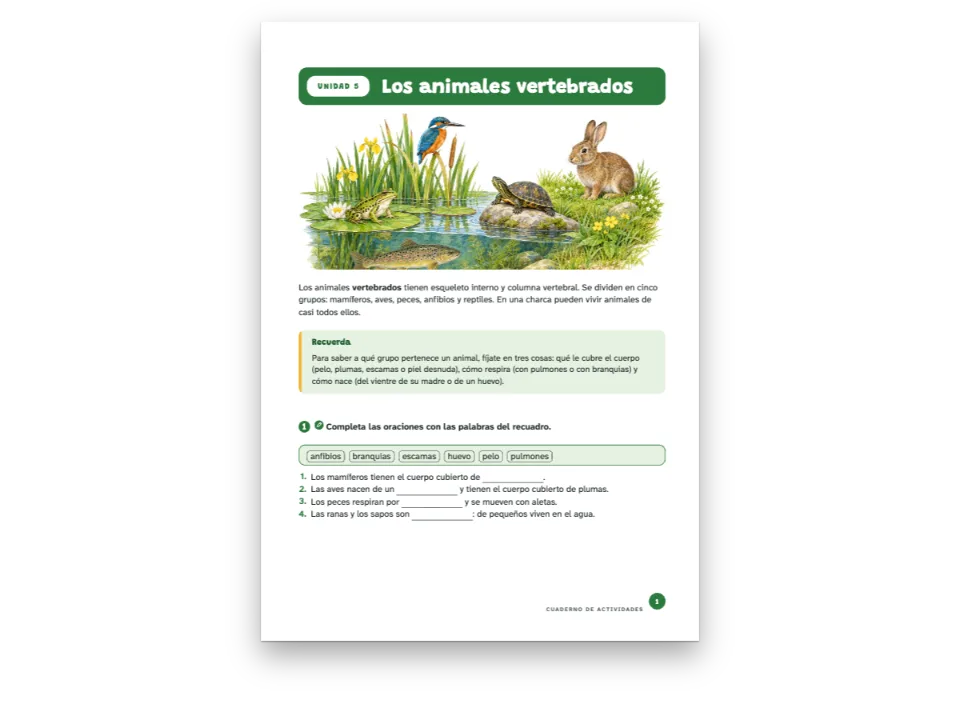
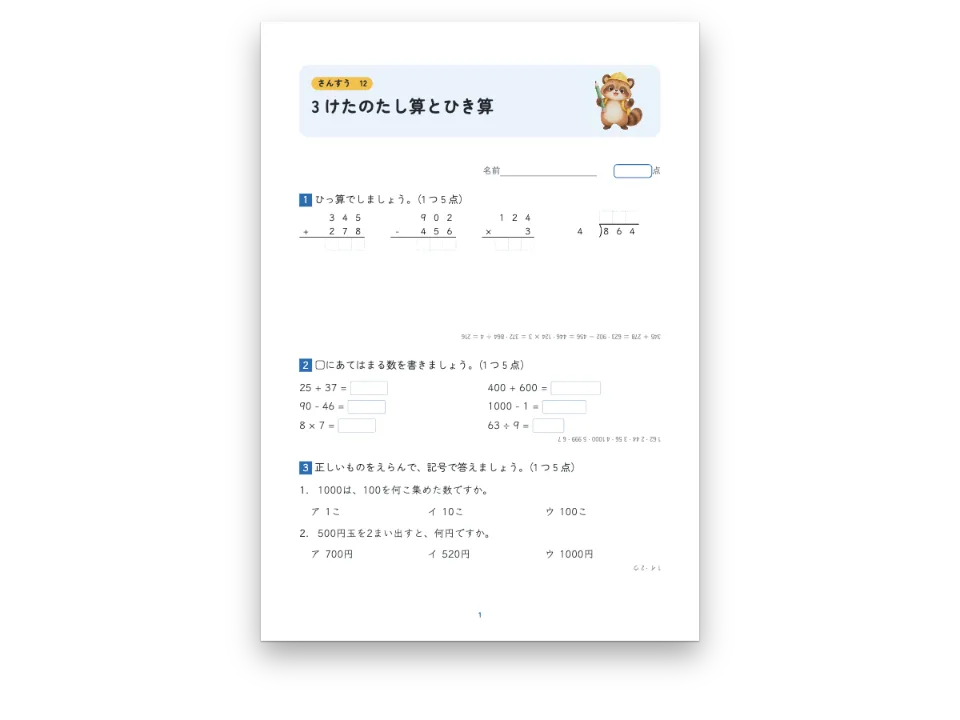
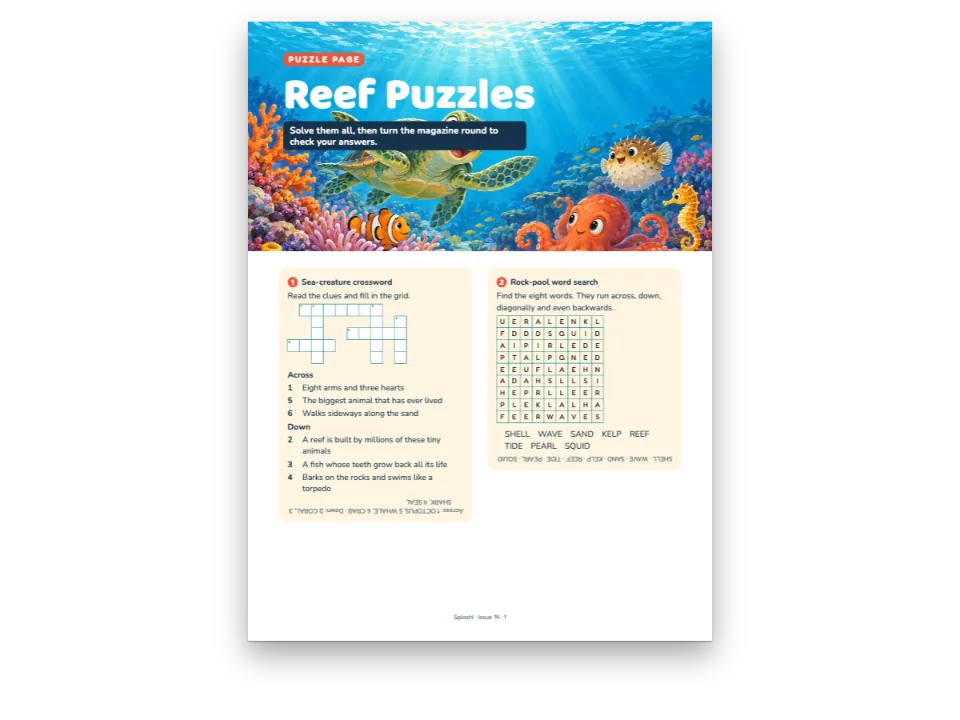
小学4年の計算ドリルの第3単元『四則計算』を、4つの版で組みます。まず3列に並べた暗算、次にたし算・ひき算・かけ算の筆算を1マスに1けたずつ、答えを書くマスの列をつけて置き、最後にわり算と方眼紙の文章題が来ます。版ごとの違いが出るのはわり算です。英語版はわる数を ⟌ の外に書き、商を上に置きます。スペイン語版とフランス語版は、わる数をわられる数の右のかこみに入れ、商をその下に書きます。ドイツ語版は 864 : 4 = を1行に書いて下に途中の計算を書く場所を空け、かけ算の記号には点を使います。暗算に出てくる小数点がコンマか点かも、言語に合わせて変わります。ページの上のスイッチで児童用のプリントが先生用に変わり、答えがすべてオレンジ色でそれぞれのマスに入ります。
このレシピが答える質問
- わり算の筆算を国ごとの学校の書き方で組むには?
- 生徒用から、答えを欄に刷り込んだ教師用を作るには?
手短な答え
// `- 864 : 4` in the Markdown is one operation; the style sets it digit by digit in squares
// of 7.2 mm, a cell for each figure of the answer. Long division follows the country: the
// divisor in an L right of the dividend in Spain and France (potence), `864 : 4 =` on one
// line in Germany, the bracket ⟌ in English-speaking schools.
const calculo = {
  id: 'calculo',
  number: { shape: 'disc', background: col('accent'), fontFamily: LABEL, fontWeight: 700 },
  instruction: { bold: true, color: col('ink') },
  grid: { cell: mm(9), fontFamily: TEXT, fontSize: pt(15), rule: col('rule'),
    color: col('ink') },
  arithmetic: { columns: 4,
    division: t({ es: 'potence', fr: 'potence', de: 'inline', en: 'bracket' }) },
  blank: { look: 'box', width: em(3.2), color: col('rule'), weight: pt(0.8) },
  area: { kind: 'grid', spacing: mm(5), color: col('rule'), weight: pt(0.4) },
  answers: { color: col('accent'), fontFamily: LABEL }, // the teacher's copy, in the accent
  marginTop: mm(7), marginBottom: mm(2), itemSpacing: em(0.5),
};
材料
- 機能
- 筆算教師用指導書練習問題のスタイル練習問題穴埋めと語群記述問題と解答欄デザインした章扉見出しの属性セマンティックカラーパレットハイフネーションと文書の言語キャンバス上のページPDFの書き出し段落スタイル
- 種類
- Fira Sans, Lexend (SIL OFL 1.1)
- 素材
- なし:画像はすべてコードで描画
作り方
#1 · 計算を Markdown に1行ずつ書く
// `- 864 : 4` in the Markdown is one operation; the style sets it digit by digit in squares
// of 7.2 mm, a cell for each figure of the answer. Long division follows the country: the
// divisor in an L right of the dividend in Spain and France (potence), `864 : 4 =` on one
// line in Germany, the bracket ⟌ in English-speaking schools.
const calculo = {
  id: 'calculo',
  number: { shape: 'disc', background: col('accent'), fontFamily: LABEL, fontWeight: 700 },
  instruction: { bold: true, color: col('ink') },
  grid: { cell: mm(9), fontFamily: TEXT, fontSize: pt(15), rule: col('rule'),
    color: col('ink') },
  arithmetic: { columns: 4,
    division: t({ es: 'potence', fr: 'potence', de: 'inline', en: 'bracket' }) },
  blank: { look: 'box', width: em(3.2), color: col('rule'), weight: pt(0.8) },
  area: { kind: 'grid', spacing: mm(5), color: col('rule'), weight: pt(0.4) },
  answers: { color: col('accent'), fontFamily: LABEL }, // the teacher's copy, in the accent
  marginTop: mm(7), marginBottom: mm(2), itemSpacing: em(0.5),
};
:::exercise{type="arithmetic"} には、リストの項目ひとつにつき1問を、- 864 ÷ 4 のようにその国の記号(÷、:、×、·)で書きます。答え、商、余りはエンジンが計算し、筆算の描き方はスタイルが決めます。マスは 7.2 mm、arithmetic.division は t() で版ごとに選びます。暗算の列はふつうの穴埋め問題で、そのリストを :::columns{count=3} のグループに入れると、どの [[70]] もほかと同じ幅のマスになります。
#2 · プリントの見出しを組む
const at = (to, edge, x = 0, y = 0, size) => ({ anchor: { to, edge },
  offset: { x: mm(x), y: mm(y) }, ...(size && { size }) });
const field = (id, attr, x, width) => [
  { kind: 'text', id, content: `{attr.${attr}}`, fontFamily: LABEL, fontSize: pt(9.5),
    fontWeight: 600, color: col('muted'), align: 'left',
    placement: at('container', 'top-left', x, 26) },
  { kind: 'rule', id: `${id}-line`, direction: 'horizontal', thickness: pt(0.75),
    color: col('rule'), placement: at('container', 'top-left', x + 17, 31, { width: mm(width) }) },
];
const head = { enabled: true, minHeight: mm(36), slot: { elements: [
  { kind: 'box', id: 'band', style: { backgroundColor: col('accent'), borderRadius: mm(3) },
    placement: at('container', 'top-left', 0, 0, { width: 'fill', height: mm(19) }) },
  { kind: 'text', id: 'unit', content: '{attr.unidad}', fontFamily: LABEL, fontSize: pt(9),
    fontWeight: 700, color: col('accent'), align: 'center', verticalAlign: 'middle',
    textTransform: 'uppercase', letterSpacing: pt(1.2), lineHeight: 1.1,
    box: { backgroundColor: col('paper'), borderRadius: mm(3.5) },
    placement: at('container', 'top-left', 5, 5, { width: mm(26), height: mm(9) }) },
  { kind: 'text', id: 'title', content: '{titleText}', fontFamily: LABEL, fontSize: pt(21),
    fontWeight: 700, color: col('paper'), align: 'left', lineHeight: 1.1,
    placement: at('container', 'top-left', 37, 5.2) },
  ...field('name', 'nombre', 0, 100), ...field('date', 'fecha', 124, 38),
] } };
単元のレベル1見出しが、オレンジの帯、札、題を描きます。名前と日付の欄は見出しの属性(nombre="Name" fecha="Date")から作るので、どの版にもその言語で欄の名前が入ります。
#3 · 児童用と先生用を切り替える
const form = document.getElementById('controls');
const labels = t({ es: ['Alumno', 'Profesor'], en: ['Pupil', 'Teacher'],
  fr: ['Élève', 'Enseignant'], de: ['Schüler', 'Lehrkraft'] });
form.querySelectorAll('label span').forEach((span, k) => { span.textContent = labels[k]; });
function render() {
  // The same config, edited in place: the next build sees the edition the form asks for.
  config.exercises.edition = form.elements.edition.value;
  const doc = buildDocument({ markdown }, config); // the faces are loaded by now
  showPages(doc, { title });
  document.querySelectorAll('#pt-actions a, [data-postext-pdf]').forEach((old) => old.remove());
  offerPdf(() => renderToPdf(doc, { fontProvider: fontsourceProvider }),
    `${RECIPE}-${LANG}-${config.exercises.edition}.pdf`);
}
form.addEventListener('change', render);
render();
exercises.edition: 'teacher' を指定すると、すべての答えがそれぞれの位置に answers.color の色(ここではアクセント色)で刷られます。暗算のマス、各答えの数字、商と余り、文章題の解答例です。ページの上のフォームは設定をその場で書き換えて組み直します。フォントは読み込み済みなので、ふつうの buildDocument で足ります。キャプチャでは先に両方のプリントを組むので、公開されるページは児童用、先生用の順に並びます。
レシピの全体
// ═══ Postext Cookbook · Nº 170 · Column arithmetic as each country writes it ═══════
// https://postext.dev/en/cookbook/column-arithmetic-by-country
// Code: MIT · Text: original (CC BY 4.0) · Pictures: none
// Fonts: Fira Sans, Lexend (SIL OFL 1.1) · Needs postext ≥ 1.59.0
import { buildDocumentWithFonts, buildDocument, renderPageToCanvas } from 'https://esm.sh/postext';
import { renderToPdf, decompressWoff2 } from 'https://esm.sh/postext-pdf';

const LANG = 'es'; // @lang: the language of the worksheet ('es' | 'en' | 'fr' | 'de')
const RECIPE = 'column-arithmetic-by-country';

// ─── 1 · Design ─────────────────────────────────────────────────────────────
// #region palette: ink, one orange accent, a pale tint, the grey of squared paper
const palette = {
  ink: '#1f2328', accent: '#c4511c', tint: '#fbeee6', rule: '#b9c0c8', muted: '#5f6670',
  paper: '#ffffff',
};
const col = (id) => ({ hex: palette[id], model: 'hex', paletteId: id });
const colorPalette = [
  ...Object.entries(palette).map(([id, hex]) => ({ id, name: id, value: { hex, model: 'hex' } })),
  { id: 'main-color', name: 'accent (defaults)', value: { hex: palette.accent, model: 'hex' } },
];
// #endregion
const [TEXT, LABEL] = ['Fira Sans', 'Lexend'];

// #region answer: operations in squares, long division as the edition's schools set it
// `- 864 : 4` in the Markdown is one operation; the style sets it digit by digit in squares
// of 7.2 mm, a cell for each figure of the answer. Long division follows the country: the
// divisor in an L right of the dividend in Spain and France (potence), `864 : 4 =` on one
// line in Germany, the bracket ⟌ in English-speaking schools.
const calculo = {
  id: 'calculo',
  number: { shape: 'disc', background: col('accent'), fontFamily: LABEL, fontWeight: 700 },
  instruction: { bold: true, color: col('ink') },
  grid: { cell: mm(9), fontFamily: TEXT, fontSize: pt(15), rule: col('rule'),
    color: col('ink') },
  arithmetic: { columns: 4,
    division: t({ es: 'potence', fr: 'potence', de: 'inline', en: 'bracket' }) },
  blank: { look: 'box', width: em(3.2), color: col('rule'), weight: pt(0.8) },
  area: { kind: 'grid', spacing: mm(5), color: col('rule'), weight: pt(0.4) },
  answers: { color: col('accent'), fontFamily: LABEL }, // the teacher's copy, in the accent
  marginTop: mm(7), marginBottom: mm(2), itemSpacing: em(0.5),
};
// #endregion

// #region head: the unit pill, the title and the lines for a name and a date
const at = (to, edge, x = 0, y = 0, size) => ({ anchor: { to, edge },
  offset: { x: mm(x), y: mm(y) }, ...(size && { size }) });
const field = (id, attr, x, width) => [
<form id="controls" aria-label="Edition">
  <label><input type="radio" name="edition" value="student" checked> <span></span></label>
  <label><input type="radio" name="edition" value="teacher"> <span></span></label>
</form>
<main id="pages"></main>
/* The edition switch above the desk: two pills in the sheet's orange. */
#controls {
  display: flex; justify-content: center; gap: 8px; padding: 14px 16px; background: #16181d;
  font: 600 14px/1.2 Lexend, system-ui, sans-serif;
}
#controls label {
  display: inline-flex; align-items: center; gap: 6px; min-height: 44px; padding: 0 18px;
  border-radius: 22px; color: #f4f1ea; border: 1px solid #5f6670; cursor: pointer;
}
#controls label:has(input:checked) { background: #c4511c; border-color: #c4511c; }
#controls input { accent-color: #fff; }
組み立てたscript.jsはそのまま動きます。任意のページのモジュールスクリプトに貼り付けるか、レシピをCodePenで開いてください。 GitHub上のレシピのフォルダー ↗ (新しいタブで開きます)
アレンジ
#答えを逆さにして問題の下に置く
パズル本でよく見るやり方です。各問題の答えを180°回して、その下に置きます。
-  exercises: { edition: 'student' }, // the switch above the pages sets 'teacher'
+ exercises: { edition: 'student', solutions: { placement: 'inverted', layout: 'key' } },#どの版でも ⟌ でわり算を書く
日本や中国の学校もこの形を使います。リストにない言語は、その言語の既定の形になります。
-    division: t({ es: 'potence', fr: 'potence', de: 'inline', en: 'bracket' }) },
+ division: 'bracket' },よくあるつまずき
- 計算に使えるのは整数だけです。
12,5 + 3,75のような小数の計算は読み取られず、書いたとおりに印刷されます。小数は暗算の穴埋めに入れてください。そこでは答えをテキストとして扱います。
クレジット
- 本文
- 書き下ろしの文章, CC BY 4.0
- フォント
- Fira Sans (SIL OFL 1.1) · Lexend (SIL OFL 1.1)