Em poucas palavras
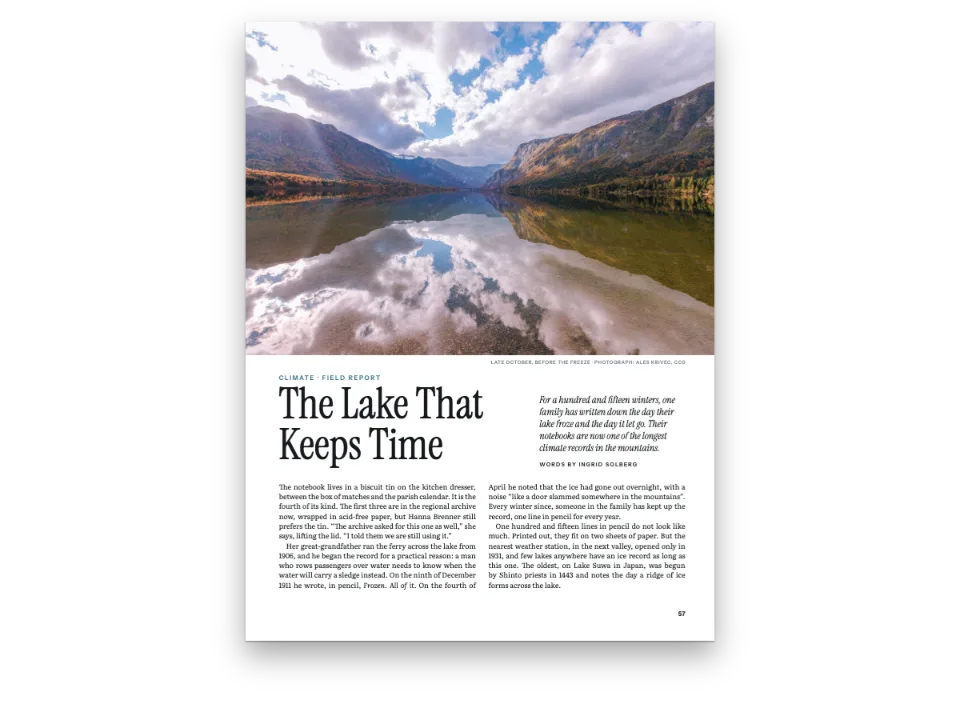
Uma reportagem de viagem de seis páginas de uma revista mensal, composta em três colunas estreitas. Mostra como pôr fotos e uma citação grande sobre duas colunas ou a página toda, e um boxe de dicas práticas numa só.
O que você vai compor
Seis páginas da edição de novembro de Meridian, uma revista mensal de viagem, em página de 225 × 297 mm. A reportagem abre numa página dupla: uma só foto de salinas ao nascer do sol atravessa as duas páginas, com o título vazado em branco sobre a água à esquerda e, à direita, sob a imagem, o primeiro parágrafo com a capitular, o olho e a assinatura. Depois o texto corre em três colunas justificadas de 61,7 mm cada. As fotos ocupam duas colunas, a largura toda ou uma coluna; uma citação em destaque atravessa duas colunas entre os parágrafos; um boxe com fundo de cor e um mapa da ilha abre a página de fecho. Um pequeno quadrado azul encerra o texto.
Esta receita responde a
- O Postext consegue compor três ou mais colunas de texto, ou fazer o texto contornar uma imagem?
- Como decido onde vai uma figura: no alto da página, sobre as duas colunas, exatamente aqui ou na margem?
- Como levo um boxe para o alto ou o pé da página enquanto o texto continua correndo?
- Como acrescento a uma abertura uma linha de autor, uma linha fina ou um primeiro parágrafo com capitular?
A resposta curta
const GUTTER = 5; // mm between the columns
const WIDTH = TRIM.width - MARGIN.inner - MARGIN.outer; // the text block, 195 mm
const COLUMN = (WIDTH - 2 * GUTTER) / 3; // 61.7 mm: about 40 characters of 9.6 pt text
const layout = { layoutType: 'multiple', columnCount: 3, gutterWidth: mm(GUTTER) };
// A float takes `columns` adjacent columns and the gutters between them: the head (or foot)
// of the first run of columns that are still empty, on its page or the next. As many columns
// as the page has is a page-wide float, like span: 'page'.
const across = {
  raker: { position: 'top', columns: 2 }, // 128.3 mm wide, at the head of two columns
  pans: { position: 'top', span: 'page' }, // 195 mm, the whole text block
  flor: { position: 'bottom' }, // 61.7 mm: one column, the default
  sieve: { position: 'top', columns: 2 }, // cited in the first column: heads the other two
  quay: { position: 'top', columns: 2 }, // two columns again, on the closing page
};
// A floated box takes `columns` the same way: the style sets it, a fence may override it
// with :::callout{type="pull" columns="3"}. A box set in the flow ('here') keeps to its column.
const pull = { id: 'pull', placement: 'top', columns: 2, backgroundEnabled: false,
  stripe: { enabled: true, side: 'top', width: pt(2.5), color: col('sea') }, // one device
  padding: { top: mm(3), right: pt(0), bottom: mm(1), left: pt(0) },
  body: { fontFamily: 'Fraunces', fontSize: pt(19), lineHeight: pt(2 * LEAD - 3),
    italic: true, textAlign: 'left', hyphenation: false, color: col('sea'),
    firstLineIndent: pt(0) } };
const visit = { id: 'visit', placement: 'top', // one column, at the head of the next free one
  background: col('tint'), padding: { top: mm(4), right: mm(4), bottom: mm(4), left: mm(4) },
  titleStyle: { ...label, fontWeight: 700, fontSize: pt(8.5), letterSpacing: pt(1.4),
    color: col('sea'), gap: mm(2) },
  body: { fontFamily: 'Barlow Condensed', fontWeight: 500, fontSize: pt(9.6),
    lineHeight: pt(12.4), textAlign: 'left', hyphenation: false, boldColor: col('sea'),
    paragraphSpacing: true, firstLineIndent: pt(0) } };
Ingredientes
- Funcionalidades
- Três ou mais colunasFlutuantes em várias colunasBoxes flutuantesBoxesPosicionamento de figurasAberturas desenhadasImagens nos designs de páginaCapitulares nas aberturasAtributos de títuloEstilos de títuloCabeços e fóliosCabeços por tipo de páginaEstilo de legendaLinhas de fonte e créditoChips no textoTipos de recurso personalizadosFiguras e tabelas como recursosPaleta de cores semânticaMargens espelhadas
- Tipografia
- Source Serif 4, Fraunces, Barlow Condensed (SIL OFL 1.1)
- Materiais
flor-1200.jpgpans-1840.jpgquay-960.jpgraker-1500.jpgsieve-1500.jpgspread-left-1200.jpgspread-right-1200.jpg- Sunrise on the salt pans (the opening spread, in two halves) (Generated With Diffusion Models, CC BY 4.0)
- Sunrise on the salt pans, the recto's half (Generated With Diffusion Models, CC BY 4.0)
- A rake drawing up wet salt (Generated With Diffusion Models, CC BY 4.0)
- The salt flats from above (Generated With Diffusion Models, CC BY 4.0)
- A salt maker with a basket of flor de sal (Generated With Diffusion Models, CC BY 4.0)
- Skimming flor de sal with a sieve (Generated With Diffusion Models, CC BY 4.0)
- Salt sacks on a harbour quay at dusk (Generated With Diffusion Models, CC BY 4.0)
- The sidebar's map of Marisal, drawn in code (Ignacio Ferro, MIT)
Preparo
#1 · Dividir a página em três colunas e deixar os flutuantes ocuparem uma, duas ou três
O código é a resposta curta acima. layoutType: 'multiple' com columnCount: 3 divide a mancha de 195 mm em três colunas iguais; com uma medianiz de 5 mm, cada uma tem 61,7 mm de largura, uns 40 caracteres de Source Serif em 9,6 pt. O placement.columns de uma imagem ocupa esse número de colunas vizinhas e as medianizes entre elas: a foto do rodo tem 128,3 mm de largura, e a das salinas, com span: 'page', os 195 mm inteiros. O estilo da citação faz o mesmo com um boxe: columns: 2 num estilo com placement: 'top' leva o boxe ao alto de duas colunas livres, e o texto continua em volta. Um grid de três colunas convém a uma reportagem com muitas fotos, porque cada uma pode ocupar uma, duas ou três colunas. Um texto longo com poucas imagens se lê melhor em duas colunas mais largas.
#2 · Abrir numa página dupla, com uma foto atravessando as duas páginas
const PHOTO = 165; // mm: how far down the recto the right half of the photograph bleeds
// The verso is its own heading style: the left half of the picture fills the page, and the
// kicker and headline are reversed out of the dark water at its foot. The picture reserves
// nothing, so nothing is pushed off the page; the recto's heading opens the next page.
const spread = { id: 'spread', span: 'page', advancedDesign: { enabled: true, slot: { elements: [
  { kind: 'image', id: 'photo', resourceId: 'spread-left', reserve: false,
    placement: { ...at('bleed', 'top-left'), size: { width: 'fill', height: 'fill' } } },
  { kind: 'text', id: 'kicker', content: '{attr.kicker}', ...label, fontSize: pt(10),
    letterSpacing: pt(2), color: col('paper'), // on a sea-blue tab: the water is too bright
    box: { backgroundColor: col('sea'), padding: { top: mm(1.2), right: mm(2.4),
      bottom: mm(1.2), left: mm(2.4) } },
    placement: at('page', 'top-left', 20, 188) },
  { kind: 'text', id: 'headline', content: '{titleText}', fontFamily: 'Fraunces',
    fontWeight: 600, fontSize: pt(66), lineHeight: 0.96, // a multiple of the size
    color: col('paper'), align: 'left', overflow: 'wrap',
    placement: at('#kicker', 'below', 0, 3, 150) },
] } } };
// The recto: the right half of the picture, cut to PHOTO mm, then the lead with its drop cap
// in the first column and the standfirst (the heading's own text) across the other two.
const air = { padding: { bottom: mm(6) } }; // empty padding counts: the columns start lower
const deck = { id: 'deck', span: 'page', advancedDesign: { enabled: true, slot: { elements: [
  { kind: 'image', id: 'photo', resourceId: 'spread-right', // cropped to 225 × 165 mm
    placement: { ...at('bleed', 'top-left'), size: { width: 'fill', height: mm(PHOTO) } } },
  { kind: 'text', id: 'credit', content: '{attr.credit}', ...label, fontWeight: 500,
    fontSize: pt(6.8), letterSpacing: pt(0.5), color: col('muted'), align: 'right',
    placement: at('container', 'top-right', 0, PHOTO - MARGIN.top + 2) },
  { kind: 'text', id: 'lead', content: '{attr.lead}', fontFamily: 'Source Serif 4',
    fontSize: pt(9.6), lineHeight: LEAD / 9.6, color: col('ink'), align: 'justify',
    hyphenate: true, box: air, placement: at('container', 'top-left', 0, PHOTO - 10, COLUMN),
    dropCap: { lines: 4, fontFamily: 'Fraunces', fontWeight: 600, color: col('sea'),
      gap: mm(1.6) } },
  { kind: 'text', id: 'standfirst', content: '{titleText}', fontFamily: 'Fraunces', italic: true,
    fontSize: pt(16.5), lineHeight: 1.24, color: col('ink'), align: 'left', overflow: 'wrap',
    placement: at('container', 'top-left', COLUMN + GUTTER, PHOTO - 11, 2 * COLUMN + GUTTER) },
  { kind: 'text', id: 'byline', content: '{attr.byline}', ...label, fontSize: pt(8.5),
    letterSpacing: pt(1.5), color: col('sea'), box: air,
    placement: at('#standfirst', 'below', 0, 4) },
] } } };
Cada metade da foto pertence a um estilo de título com span: 'page', e um título na largura da página sempre abre uma página nova, de modo que a página do título e a do olho vêm uma depois da outra. A metade esquerda enche a página par e não reserva nada (reserve: false), e assim o título pode ficar sobre a água do pé. A direita é cortada em 165 mm, e o primeiro parágrafo, o olho e a assinatura pendem do contêiner sob ela. Esse parágrafo é um texto de design com uma capitular (dropCap) de quatro linhas, na largura de uma coluna; o preenchimento inferior vazio dele conta na altura da abertura, e as colunas começam 6 mm abaixo. continuation.pageIndexOffset: 83 faz da página 84 uma página par, e as duas metades ficam frente a frente.
#3 · Declarar as fotos e citar cada uma onde ela deve cair
// No figure numbers: the pictures get a type with an empty caption prefix and template.
const photoType = { id: 'photo', name: 'Photograph', shortLabel: 'photo', captionPrefix: '',
  numberingTemplate: '', resetOn: 'never', counterFormat: 'decimal' };
const CREDIT = 'Photograph generated with diffusion models';
// Pixels at the page's 150 dpi (gotcha: bitmap-print-size): each shrinks to its frame.
const photo = (id, [w, h], altText, caption) => ({ id, typeId: 'photo',
  kind: 'bitmap', createdAt: 0, updatedAt: 0, altText,
  bitmap: { fileId: `${id}-${w}.jpg`, format: 'jpeg', width: w, height: h },
  note: CREDIT, ...(caption && { caption, placement: across[id] }) });
const resources = [ // the two halves of the spread are drawn by the headings, never cited
  photo('spread-left', [1200, 1584], 'Salt pans at sunrise, the sky mirrored in still brine.'),
  photo('spread-right', [1200, 880], 'A salt raker at work below a row of white salt heaps.'),
  photo('raker', [1500, 1125], 'A wooden rake pushing a ridge of wet salt crystals.',
    'Raking the crystallisers at dawn. The salt rolls up in a ridge; a rake that digs in '
    + 'tears the clay floor and greys the harvest.'),
  photo('pans', [1840, 1150], 'Rectangular salt pans in pink, ochre and grey by the sea.',
    'The Alvarra flats from the lighthouse hill. The pink basins are nearly ready: an alga '
    + 'colours the brine once it holds more than 200 grams of salt a litre.'),
  photo('flor', [1200, 1488], 'An older woman in a straw hat holding a basket of salt.',
    'Amélia Sousa with an afternoon’s flor de sal, about four kilos from two pans.'),
  photo('sieve', [1500, 1125], 'Hands skimming a crust of salt crystals with a round sieve.',
    'Skimming the flower: the sieve works the downwind edge of the pan, where the breeze has '
    + 'drifted the crust.'),
  photo('quay', [960, 1200], 'Sacks of salt on a harbour quay beside a blue boat at dusk.',
    'Porto Velho, the last week of September: fifty-kilo sacks wait for the mainland boat.'),
  { id: 'map', typeId: 'photo', kind: 'svg', createdAt: 0, updatedAt: 0, // drawn below
    svg: { fileId: 'map.svg', width: MAP.width * 10, height: MAP.height * 10 },
    placement: { position: 'here' }, // in the sidebar, under its title
    caption: 'The Alvarra pans (pink) lie on the eastern flats, 6 km from Porto Velho (the '
      + 'squares) by the coast road. The lighthouse hill is the triangle; the ferry, dashed.',
    altText: 'A map of a long, low island with salt pans at its eastern end and a harbour '
      + 'town at the west.' },
];
Um flutuante vai para o primeiro alto (ou pé) livre das colunas depois da linha que o cita, por isso são as linhas ::resource que decidem as páginas. A foto da peneira é citada no alto da primeira coluna da quinta página, quando a segunda e a terceira ainda estão vazias, e as encabeça na mesma página. A do porto é citada no fim dessa página e encabeça duas colunas da seguinte. Fotos do mesmo tipo nunca passam umas à frente das outras, por isso as citações seguem a ordem da matéria. Os bitmaps são medidos a 150 dpi, o valor da página: 1500 px dão 254 mm e são reduzidos aos 128,3 mm de duas colunas.
#4 · Cabeços e fólios fora da página dupla de abertura
const head = { ...label, fontSize: pt(7.5), letterSpacing: pt(1.3), color: col('muted') };
const folio = { fontFamily: 'Barlow Condensed', fontWeight: 700, fontSize: pt(9.5),
  color: col('ink') };
const pin = (edge, x, y) => ({ anchor: { to: 'page', edge }, offset: { x: mm(x), y: mm(y) } });
const sides = [['even', 'left', 1], ['odd', 'right', -1]]; // 1: the outer edge is on the left
// The label is 2 pt smaller, so it sits 0.68 mm lower in its box: one shared baseline.
const DROP = (0.8 * 1.2 * 2 * 25.4) / 72;
const header = { elements: sides.flatMap(([parity, edge, s]) => [
  { kind: 'text', id: `folio-${parity}`, content: '{pageNumber}', ...folio, align: edge,
    placement: pin(`top-${edge}`, s * MARGIN.outer, 12) },
  { kind: 'text', id: `head-${parity}`, ...head, align: edge,
    content: s > 0 ? '{title} · {subtitle}' : '{chapterTitle}',
    placement: pin(`top-${edge}`, s * (MARGIN.outer + 9), 12 + DROP) },
].map((element) => ({ ...element, parity, pages: 'body' }))) }; // none on the spread
const footer = { elements: [{ kind: 'text', id: 'drop-folio', content: '{pageNumber}', ...folio,
  align: 'right', parity: 'odd', pages: 'opener', // the recto of the spread: a folio at the foot
  placement: pin('bottom-right', -MARGIN.outer, -12) }] };
Os elementos de cabeçalho são pintados sobre a página e não reservam espaço, de modo que o fólio e o rótulo são ancorados à página, na margem superior. pages: 'body' os tira das duas páginas da abertura, que são páginas de abertura porque cada uma começa com um título na largura da página. A página ímpar da abertura recebe o fólio no pé, por meio de pages: 'opener' e parity: 'odd'; a par, toda ocupada pela foto, não leva nenhum.
#5 · Desenhar em código o mapa do boxe
function mulberry32(seed) {
  return () => {
    seed = (seed + 0x6d2b79f5) | 0;
    let r = Math.imul(seed ^ (seed >>> 15), 1 | seed);
    r = (r + Math.imul(r ^ (r >>> 7), 61 | r)) ^ r;
    return ((r ^ (r >>> 14)) >>> 0) / 4294967296;
  };
}
function islandMap() { // in mm: a long, low island lying south-west to north-east
  const rand = mulberry32(135);
  const f = (id, a = 1) => `fill="${palette[id]}"${a < 1 ? ` fill-opacity="${a}"` : ''}`;
  const [cx, cy, rx, ry, turn] = [28, 27, 23, 9.5, -0.5]; // centre, half-axes, radians
  const place = (u, v) => [cx + u * Math.cos(turn) - v * Math.sin(turn),
    cy + u * Math.sin(turn) + v * Math.cos(turn)]; // island frame to map
  const coast = Array.from({ length: 48 }, (_, i) => {
    const a = (i / 48) * 2 * Math.PI;
    const k = 0.9 + rand() * 0.16; // a ragged shore
    return place(rx * k * Math.cos(a), ry * k * Math.sin(a)).map((n) => n.toFixed(2)).join(' ');
  });
  const pans = []; // a grid of basins on the eastern flats, inside the shore
  for (let u = 6; u < 19; u += 2.4) {
    for (let v = -5; v < 5; v += 1.9) {
      if ((u / rx) ** 2 + (v / ry) ** 2 > 0.62) continue;
      const [x, y] = place(u, v);
      pans.push(`<rect x="${(x - 1).toFixed(2)}" y="${(y - 0.7).toFixed(2)}" width="2" `
        + `height="1.4" transform="rotate(${(turn * 180) / Math.PI} ${x.toFixed(2)} `
        + `${y.toFixed(2)})" ${f(rand() < 0.7 ? 'salt' : 'rule')}/>`);
    }
  }
  const [tx, ty] = place(-18, 3); // Porto Velho, on the south-west shore
  const town = [[0, 0], [1.3, 0.2], [0.4, 1.2], [1.7, 1.3], [-0.9, 0.9]].map(([dx, dy]) =>
    `<rect x="${(tx + dx).toFixed(2)}" y="${(ty + dy).toFixed(2)}" width="0.9" height="0.9" `
    + `${f('ink')}/>`).join('');
  const [lx, ly] = place(2, -6.5); // the lighthouse hill, on the north shore
  const ferry = `M${tx} ${ty + 1.5}C${tx - 6} ${ty + 6} 6 46 1.5 48`; // to the mainland, south-west
  return `<svg xmlns="http://www.w3.org/2000/svg" width="${MAP.width * 10}" `
    + `height="${MAP.height * 10}" viewBox="0 0 ${MAP.width} ${MAP.height}">`
    + `<rect width="${MAP.width}" height="${MAP.height}" ${f('sea', 0.16)}/>`
    + `<path d="M${coast.join('L')}Z" ${f('paper')} stroke="${palette.muted}" `
    + 'stroke-width="0.25"/>' + pans.join('') + town
    + `<path d="M${lx - 1.4} ${ly + 1.1}L${lx} ${ly - 1.3}L${lx + 1.4} ${ly + 1.1}Z" ${f('ink')}/>`
    + `<path d="${ferry}" fill="none" stroke="${palette.ink}" stroke-width="0.3" `
    + 'stroke-dasharray="1 0.8"/>'
    + `<path d="M0.4 46.4L1.5 48L2.9 47Z" ${f('ink')}/>` // the arrowhead, a path (no marker)
    + '</svg>';
}
O mapa é um recurso SVG com placement: 'here', citado dentro do contêiner do boxe, e por isso fica sob o título do boxe, na medida dele. Não tem letreiros: o texto dentro de um SVG não pode usar as fontes web da página, de modo que a legenda nomeia as formas. A ponta de seta da rota da balsa é um traçado, porque um <marker> não sobreviveria à exportação para PDF.
A receita completa
// ═══ Postext Cookbook · Nº 135 · Magazine feature on a three-column grid ═════════
// https://postext.dev/en/cookbook/magazine-three-column-feature
// Code: MIT · Text: original (CC BY 4.0) · Photographs: generated with diffusion models
// Fonts: Source Serif 4, Fraunces, Barlow Condensed (SIL OFL 1.1) · Needs postext ≥ 1.28.0
// A travel feature from a monthly magazine, pages 84–89 of the issue. The story opens on a
// spread, a photograph bled across both pages, then runs on in three columns: pictures across
// two of them, one across the page and one in a single column, a pull quote floated across
// two columns, a sidebar in one, running heads, folios and an end mark.
import {
  buildDocumentWithFonts, renderPageToCanvas, registerResourceImage,
} from 'https://esm.sh/postext';

const LANG = 'en'; // @lang: the language of the sample document ('en' | 'es')
const RECIPE = 'magazine-three-column-feature';

// ─── 1 · Design ─────────────────────────────────────────────────────────────
// #region palette: an Atlantic blue for the one accent, a salt tint for the sidebar
const palette = {
  ink: '#1c2024', // text: a blue-black
  sea: '#1d5470', // the accent: kickers, crossheads, the quote, the drop cap
  tint: '#edf1f2', // the sidebar's ground
  rule: '#c5ced3', // the map's resting pans
  muted: '#5c656d', // running heads, credits, the colophon
  paper: '#ffffff', // the page, and the headline reversed out of the photograph
  salt: '#dfa79c', // the pans on the sidebar's map, the pink of ripe brine
};
const col = (id) => ({ hex: palette[id], model: 'hex', paletteId: id });
const colorPalette = [
  ...Object.entries(palette).map(([id, hex]) => ({ id, name: id, value: { hex, model: 'hex' } })),
  // The engine's defaults link to 'main-color': point it at the accent, so nothing prints blue.
  { id: 'main-color', name: 'sea (defaults)', value: { hex: palette.sea, model: 'hex' } },
];
// #endregion
const TRIM = { width: 225, height: 297 }; // a magazine trim, in mm
const MARGIN = { top: 22, bottom: 20, inner: 16, outer: 14 }; // mirrored
const LEAD = 14; // body leading in pt: the baseline grid
const MAP = { width: 54, height: 50 }; // mm: the sidebar's map, as wide as its measure
const label = { fontFamily: 'Barlow Condensed', fontWeight: 600, textTransform: 'uppercase',
  align: 'left' }; // design text is centred by default
const at = (to, edge, x = 0, y = 0, width) => ({ anchor: { to, edge },
  offset: { x: mm(x), y: mm(y) }, ...(width && { size: { width: mm(width) } }) });

// #region answer: three equal columns, and floats that take one, two or all three of them
const GUTTER = 5; // mm between the columns
const WIDTH = TRIM.width - MARGIN.inner - MARGIN.outer; // the text block, 195 mm
const COLUMN = (WIDTH - 2 * GUTTER) / 3; // 61.7 mm: about 40 characters of 9.6 pt text
const layout = { layoutType: 'multiple', columnCount: 3, gutterWidth: mm(GUTTER) };
// A float takes `columns` adjacent columns and the gutters between them: the head (or foot)
O script.js montado funciona como está: cole-o como script de módulo em qualquer página ou abra a receita no CodePen. Pasta da receita no GitHub ↗ (abre em uma nova aba)
Variações
#Pôr a citação sobre as três colunas
Um boxe flutuante dá preferência ao atributo columns da linha de abertura sobre o do estilo, por isso uma citação pode ocupar a largura toda.
- :::callout{type="pull"}
+ :::callout{type="pull" columns="3"}#Compor a reportagem em duas colunas
Para uma reportagem com menos fotos e parágrafos mais longos, veja Reportagem de revista: da foto de abertura ao sinal final, numa diagramação double.
Erros comuns
Erro comum
Um flutuante 'top' vai para a página seguinte à sua citação, a menos que possa encabeçar a página que o cita
Por padrão um flutuante nunca fica acima da própria referência, então um flutuante 'top' na largura da página citado na página N abre a página N+1. Com placement.citingPage: true no recurso ou no defaultPlacement do seu tipo (ou layout.floatsAtCitingPage para o livro todo, desde o postext 1.25) ele encabeça a página N, e o texto acima da referência desce para baixo dele, quando cabe dentro de layout.maxTopFraction e a linha que o cita continua nessa página. Nunca encabeça a primeira página de um capítulo nem uma página depois de uma quebra forçada: ali continua abrindo a página seguinte, e 'auto' ou 'bottom' podem ocupar o pé da página que o cita. Posicionamento de figuras →
Erro comum
Um título na largura da página sempre abre uma página nova
Um título cujo nível ou estilo define span: 'page' é composto como abertura no alto de uma página, tenha ou não breakBefore. Colocado depois de outro texto, ou de outra abertura na mesma página, ele passa para a página seguinte e deixa vazio o resto da atual. Uma manchete que atravessa as duas colunas (ou os dois andares de uma página vertical) sob o cabeçalho do jornal vai no design da própria abertura, ao lado do cabeçalho, ou dentro de um boxe :::callout{span="page"} como título sem span, que é como newspaper-front-page compõe as suas manchetes. Aberturas desenhadas →
Erro comum
A página 1 é ímpar: planeje com os números físicos
A página 1 fica à direita e a 2 é a primeira página par, então planeje as páginas duplas com os números físicos de página: uma abertura em página par fica de frente para a ímpar que vem depois dela. Quebras de página e de coluna →
Erro comum
Bitmaps tiram o tamanho de impressão de uma resolução: declare-a, não calcule pixels de impressão
Um bitmap sem resolução é colocado a um pixel por pixel da diagramação na resolução do documento, então uma foto de 2400 px mede 406 mm de largura numa página de 150 dpi. Declare os pixels reais do arquivo e dê à imagem sua resolução (bitmap.resolution: 300), ou ajuste layout.bitmapResolution para todos os bitmaps: um valor de ppi, ou 'file' para ler o que o arquivo informa. A coluna continua limitando a imagem. Figuras e tabelas como recursos →
- Uma foto em duas colunas encabeça duas colunas que ainda estejam vazias. Citada na segunda coluna, ela não encontra esse par na página, porque só resta a terceira coluna, e espera a página seguinte.
- A matéria está ajustada para terminar nivelada na sexta página, sob a foto do porto. Depois de editar, confira que a última página continua cheia: com umas linhas a menos, a foto vai para uma página só dela.
- Com linhas de 40 caracteres, um parágrafo justificado tem poucos pontos de quebra.
maxJustifyTracking: 15deixa uma linha que não cabe com o dobro do espaço normal receber até 0,015 em de tracking. Corrija uma última linha de uma palavra só editando o texto, como foi feito nestas páginas.
Créditos
- Receita
- Ignacio Ferro
- Texto
- Texto original, CC BY 4.0
- Imagens
- Sunrise on the salt pans (the opening spread, in two halves) · Generated With Diffusion Models · CC BY 4.0
- Sunrise on the salt pans, the recto's half · Generated With Diffusion Models · CC BY 4.0
- A rake drawing up wet salt · Generated With Diffusion Models · CC BY 4.0
- The salt flats from above · Generated With Diffusion Models · CC BY 4.0
- A salt maker with a basket of flor de sal · Generated With Diffusion Models · CC BY 4.0
- Skimming flor de sal with a sieve · Generated With Diffusion Models · CC BY 4.0
- Salt sacks on a harbour quay at dusk · Generated With Diffusion Models · CC BY 4.0
- The sidebar's map of Marisal, drawn in code · Ignacio Ferro · MIT
- Fontes
- Source Serif 4 (SIL OFL 1.1) · Fraunces (SIL OFL 1.1) · Barlow Condensed (SIL OFL 1.1)
- Código
- MIT, como o Postext
Editar este texto ↗ (abre em uma nova aba)Pasta da receita no GitHub ↗ (abre em uma nova aba)