简单来说
一个印刷工坊的结业证书,每位学员一页,带花纹边框和印章。每个学员的名字只要写一行,就能生成一整张证书。
成品一览
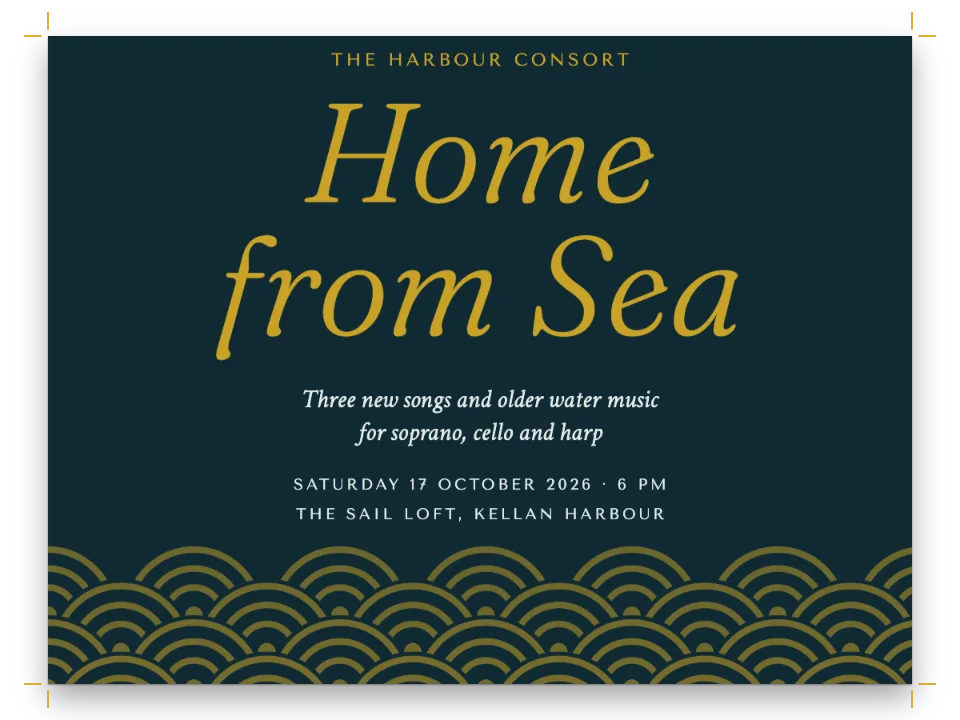
Quoin Room的结业证书。这是普罗维登斯一家虚构的凸版印刷工坊,每位学员一页US Letter。西班牙文版则是萨拉戈萨一家工坊La Cuña的A4证书。一条填满米色扭索纹透镜图案的青绿色边框围住整张纸,四角各有一个米色花饰;两者都用正弦曲线和内摆线在代码里画出。在加大字距的大写标题下方,学员姓名用48 pt的Pinyon Script排在一条金色横线上,嘉许语用Rosarivo居中排。一枚带两条飘带的红色印章位于两条签名线之间,下方有一行印刷说明。整页都由一个标题样式画出,所以每位学员就是一个Markdown标题,PDF里是全班的证书,每个姓名一个书签。
这道食谱解答
- 怎样给每一页加水印、背景底色或装饰图片?
- 怎样排不编号的插图:饰图、小花饰、标志?
- 怎样把徽标或贴纸固定在页面上的某个位置?
- 怎样在浏览器中导出嵌入字体的真正PDF?
简短回答
const certificate = () => ({ // a function: it uses the elements defined below
  id: 'certificate',
  // Section geometry, for this style's pages only: a narrower measure, and a text area that
  // ends at the seal, so a citation too long for the page moves on instead of running under it.
  margins: { left: mm(SIDE), right: mm(SIDE), bottom: mm(H - SIGN) },
  // Header and footer elements paint over the page and reserve nothing (gotcha:
  // header-paints-over-text), so the frame, the seal and the signatures go there. In the
  // opener the signature lines would count towards its height (gotcha:
  // opener-reserves-anchored), and a design that reaches below the text area takes the page.
  header: { elements: [frame, serial] },
  footer: { elements: signatures },
  // The citation starts 18 lines of the 17 pt grid under the top margin, 140 mm down (19
  // lines, 146 mm, on A4): an opener's height rounds up to whole lines, and without
  // marginBottom: 0 the level's 0.5 em under a heading would add a line. minHeight is a
  // floor: the title block alone would start the citation at 128 mm (134 mm on A4).
  advancedDesign: { enabled: true, minHeight: mm(y(106)), slot: { elements: title } },
  marginBottom: mm(0),
});
// Hook-up: headingStyles: [certificate()], and in the Markdown one heading per student:
// # Imogen Achterberg {style="certificate" serial="26-031"}
用料
做法
#1 · 让一个标题样式画出整页
样式本身就是上面的简短回答。标题样式管辖它所在章节的页面(标题样式):它的header和footer取代文档的页眉页脚(这里文档的是空的),margins设定版心,advancedDesign画出章首区。章首区的高度会向上取整为17 pt正文网格的整行数。106 mm的minHeight变成18行,所以嘉许语从距上边缘140 mm处开始;在A4上,y()把它变成112.7 mm,即19行,嘉许语从146 mm处开始。如果只有标题块,嘉许语会从128 mm处开始(A4上是134 mm)。没有marginBottom: 0的话,标题下默认的0.5 em会把同样的106 mm推到19行。
#2 · 在页眉里把边框挂到页面上
const frame = { kind: 'image', id: 'frame', resourceId: 'guilloche',
  placement: { anchor: { to: 'page', edge: 'top-left' }, // the trim box
    size: { width: 'fill', height: 'fill' } } }; // the SVG has the page's proportions
const serial = { kind: 'text', id: 'serial', ...caps, fontSize: pt(8.5), letterSpacing: pt(1.6),
  content: t({ en: 'No. {attr.serial}', es: 'N.º {attr.serial}' }), // from the heading line
  color: col('seal'), align: 'right', placement: at('top-right', -MARGIN, 29) };
const PX = 10; // declared pixels per mm: an SVG resource only needs the right proportions
const svg = (id, w, h, altText) => ({ id, typeId: 'figure', kind: 'svg', createdAt: 0,
  updatedAt: 0, altText, svg: { fileId: `${id}.svg`, width: w * PX, height: h * PX } });
const resources = [
  svg('guilloche', W, H, t({ en: 'A teal guilloche border with cream rosettes at the corners.',
    es: 'Una orla de guilloché verde azulado con rosetas color crema en las esquinas.' })),
  svg('seal', SEAL.w, SEAL.h, t({ en: 'A red seal with a serrated edge and two ribbon tails.',
    es: 'Un sello rojo de borde dentado con dos cintas.' })),
];
图片元素按它的放置尺寸绘制资源(图片元素):锚定在页面左上角、两边都设为'fill'时,扭索纹覆盖整个成品尺寸框;SVG按页面比例声明,所以填满时不会变形。页眉把它画在page.backgroundColor之上,而且不占空间,只靠页边距让正文离裁切边至少32 mm,落在26 mm处的内框线之内。放在页眉里的水印会印在文字上面,因为页眉是在正文之后绘制的。在页眉中,{attr.serial}读取本页所属章节的标题属性,所以每张证书印出自己的编号。
#3 · 章首区只放标题块
const centred = (top) => at('top', 0, y(top)); // tracked or not, the letters are centred
const title = [
  { kind: 'text', id: 'kicker', ...caps, fontSize: pt(9.5), letterSpacing: pt(2.4),
    content: '{attr.workshop}', placement: centred(39) }, // the wording: see merge
  { kind: 'text', id: 'title', content: t({ en: 'Certificate', es: 'Diploma' }), ...caps,
    fontSize: pt(46), lineHeight: 1, letterSpacing: pt(3), placement: centred(48) },
  { kind: 'text', id: 'of', content: t({ en: 'of completion', es: 'de aprovechamiento' }),
    ...caps, fontSize: pt(11), letterSpacing: pt(4), placement: centred(68) },
  { kind: 'text', id: 'lead', content: '{attr.lead}',
    fontFamily: 'Rosarivo', italic: true, fontSize: pt(13), color: col('muted'),
    placement: centred(90) },
  { kind: 'text', id: 'name', content: '{titleText}', fontFamily: 'Pinyon Script',
    fontSize: pt(48), lineHeight: 1.25, // 60 pt from line to line of a long name
    color: col('ink'), align: 'center', overflow: 'wrap', // a long name takes a second line
    placement: { ...centred(97), size: { width: mm(W - 2 * MARGIN) } } },
  { kind: 'rule', id: 'underline', direction: 'horizontal', thickness: pt(0.75),
    color: col('gold'), placement: { anchor: { to: '#name', edge: 'below' },
      offset: { x: mm(18), y: mm(5) }, size: { width: mm(W - 2 * MARGIN - 36) } } },
];
每一行都锚定在页面的'top'边上,也就是水平居中,y从裁切边量起,所以无论页边距怎么设,标题块都待在原位;y()把这些位置从Letter拉伸到A4。姓名就是标题自己的文字,通过{titleText}读取,所以PDF的书签和标签里都有它。长姓名会折到第二行,因为标题设计里的文本会自动换行(overflow: 'wrap')。加了字距的行不需要修正:最后一个字母后面的字距不计入宽度,居中的就是字母本身。
#4 · 印章和签名都从同一条边量起
// mm: each signature line stops 3 mm short of the seal (56 on Letter, 53 on A4)
const LINE = (W - 2 * MARGIN - 2 * SEAL.r) / 2 - 3;
const under = (id, gap, x = 0) => ({ anchor: { to: `#${id}`, edge: 'below' },
  offset: { x: mm(x), y: mm(gap) }, size: { width: mm(LINE) } });
const signatures = [
  { kind: 'image', id: 'seal', resourceId: 'seal',
    placement: { ...at('top', 0, SIGN), size: { width: mm(SEAL.w) } } },
  ...[1, 2].flatMap((n, i) => [ // signer1 and role1, signer2 and role2: the wording again
    { kind: 'rule', id: `line${i}`, direction: 'horizontal', thickness: pt(0.6), color: col('rule'),
      placement: { ...at('top-left', i ? W - MARGIN - LINE : MARGIN, SIGN + 23),
        size: { width: mm(LINE) } } },
    { kind: 'text', id: `who${i}`, content: `{attr.signer${n}}`, fontFamily: 'Rosarivo',
      fontSize: pt(10.5), color: col('ink'), align: 'center', placement: under(`line${i}`, 1.6) },
    { kind: 'text', id: `role${i}`, content: `{attr.role${n}}`, ...caps, fontSize: pt(7.5),
      letterSpacing: pt(1.4), color: col('muted'), align: 'center',
      placement: under(`who${i}`, 0.6) },
  ]),
  { kind: 'text', id: 'imprint', fontFamily: 'Rosarivo', italic: true, fontSize: pt(7),
    content: '{attr.imprint}', color: col('muted'), placement: at('top', 0, SIGN + 50) },
];
页脚里的一切都从SIGN量起,也就是印章的上边缘;样式的下边距也让版心止于同一条边,所以嘉许语太长时会转到下一页,而不会压到印章下面。如果把签名线和姓名移进章首区,它们会计入章首区的高度(通栏与高级设计);由于它们伸到版心之下,章首区会占满整页,嘉许语只能转到下一页。LINE取两侧页边距之间的宽度,减去印章34 mm的圆盘,剩下的对半分,再减去3 mm,所以在两种纸张尺寸上,每条签名线都在离印章3 mm处停止(Letter上长56 mm,A4上长53 mm)。每个姓名和职务都是一个与签名线等宽的文本元素,因此在线下居中。
#5 · 把班级名单合并成标题
// Name and serial: {titleText} and {attr.serial} in the designs (gotcha: attr-values). The
// lines every certificate shares are the front matter of content.<lang>.md, written onto each
// heading as attributes too: {attr.workshop}, {attr.lead}, the signers and the imprint.
const { metadata: wording, content: citation } = extractFrontmatter(markdown);
const shared = Object.entries(wording).map(([key, value]) => `${key}="${value}"`).join(' ');
const heading = (name, serial) => `# ${name} {style="certificate" serial="${serial}" ${shared}}`;
const CLASS = t({
  en: [['Imogen Achterberg', '26-031'], ['Tomás Okafor', '26-032'], ['Ruth Adair', '26-033']],
  es: [['Lucía Beltrán Ochoa', '26-017'], ['Íñigo Sarasola', '26-018'], ['Ana Rius', '26-019']],
});
const merged = CLASS.map(([name, serial]) => `${heading(name, serial)}\n\n${citation}`)
  .join('\n\n');
const metadata = { // the PDF's title and author
  title: t({ en: 'Certificates of completion, fall 2026',
    es: 'Diplomas del curso de otoño de 2026' }),
  author: t({ en: 'The Quoin Room', es: 'La Cuña' }) };
每一行名单变成一个#标题,指定样式,并把编号作为属性带着(标题属性),后面接content.en.md里的文字,所以三行名单就是三页。第1级的breakBefore设为奇偶性'any',让每个标题从新的一页开始,证书之间不插空白页;样式继承这一设置。
#6 · 为全班生成一个PDF
offerPdf(() => renderToPdf(doc, { fontProvider: fontsourceProvider, resourceBytes: imageBytes }),
  `${RECIPE}.pdf`); // bookmarks: one per heading, so one per student
document.querySelector('[data-postext-pdf]').textContent = t({ en: 'Class list → one PDF',
  es: 'Toda la clase en un PDF' });
全班是一个文档,所以renderToPdf写出一个三页的文件,每个标题一个书签,以学员姓名命名。renderToPdf也接受文档数组,比如一本书的各章;但每位学员一个文档,就意味着每人调用一次buildDocument。写成标题后,全班在一次构建中完成排版,查看器显示的三张证书都来自这次构建。PDF嵌入页面上用到的四种字体,由套件的字体提供器从Fontsource取来(为什么需要字体提供器?)。
完整食谱
// ═══ Postext Cookbook · Nº 063 · Certificate with a guilloche border ═══════════════
// https://postext.dev/en/cookbook/certificate-single-page
// Code: MIT · Text: original (CC BY 4.0) · Guilloche and seal: generated in code (CC BY 4.0)
// Fonts: Rosarivo, Pinyon Script, Aboreto (SIL OFL 1.1) · Needs postext ≥ 1.34.0
// End-of-course certificates, one page per student, drawn by one heading style, in one PDF.
import {
  buildDocumentWithFonts, renderPageToCanvas, registerResourceImage, extractFrontmatter,
} from 'https://esm.sh/postext';
import { renderToPdf, decompressWoff2 } from 'https://esm.sh/postext-pdf';

const LANG = 'en'; // @lang: the language of the sample document ('en' | 'es')
const RECIPE = 'certificate-single-page';

// ─── 1 · Design ─────────────────────────────────────────────────────────────
const palette = {
  ink: '#1f2a2e', // text and the student's name
  teal: '#1f5f5b', // the frame, the title lines
  gold: '#b08d57', // hairlines and the rule under the name; never text (2.9:1 on paper)
  seal: '#8d2c2c', // the seal and the serial number
  rule: '#8f8878', // signature lines
  muted: '#6d6a60', // the lead-in, the signatories' roles, the imprint
  paper: '#fbf8ef', // the sheet
};
const col = (id) => ({ hex: palette[id], model: 'hex', paletteId: id });
const colorPalette = Object.entries(palette)
  .map(([id, hex]) => ({ id, name: id, value: { hex, model: 'hex' } }));
const [W, H] = t({ en: [215.9, 279.4], es: [210, 297] }); // US Letter; A4 for the Spanish diploma
const MARGIN = 32; // mm on every side, inside the frame's inner rule (26 mm in)
const SIDE = 50; // mm: the certificate's side margins, a 116 mm measure (110 on A4)
// Positions are drawn on US Letter and stretched to A4: y(90) is 90 mm down on Letter.
const y = (mm) => (mm * H) / 279.4;
const SIGN = y(194); // mm from the top: the seal's top edge, where the text area ends
const SEAL = { w: 40, h: 45, r: 17 }; // mm: the seal with its ribbon tails, and its disc's radius
const at = (edge, x, top) => ({ anchor: { to: 'page', edge }, offset: { x: mm(x), y: mm(top) } });
const caps = { fontFamily: 'Aboreto', textTransform: 'uppercase', color: col('teal') };

// #region answer: one heading style draws the whole certificate
const certificate = () => ({ // a function: it uses the elements defined below
  id: 'certificate',
  // Section geometry, for this style's pages only: a narrower measure, and a text area that
  // ends at the seal, so a citation too long for the page moves on instead of running under it.
  margins: { left: mm(SIDE), right: mm(SIDE), bottom: mm(H - SIGN) },
  // Header and footer elements paint over the page and reserve nothing (gotcha:
  // header-paints-over-text), so the frame, the seal and the signatures go there. In the
  // opener the signature lines would count towards its height (gotcha:
  // opener-reserves-anchored), and a design that reaches below the text area takes the page.
  header: { elements: [frame, serial] },
  footer: { elements: signatures },
组合好的script.js可以直接运行:把它粘贴到任何页面的模块脚本中,或在CodePen上打开这道食谱。 GitHub上的食谱文件夹 ↗ (在新标签页中打开)
变化
#每位学员一个PDF
每位学员一个按钮,和示例自己的构建一样用buildDocumentWithFonts把那张证书作为独立文档生成,并以编号命名文件;每个文件约245 KB。
-offerPdf(() => renderToPdf(doc, { fontProvider: fontsourceProvider, resourceBytes: imageBytes }),
-  `${RECIPE}.pdf`); // bookmarks: one per heading, so one per student
-document.querySelector('[data-postext-pdf]').textContent = t({ en: 'Class list → one PDF',
-  es: 'Toda la clase en un PDF' });
+for (const [name, serial] of CLASS) {
+  const one = `${heading(name, serial)}\n\n${citation}`;
+  offerPdf(async () => renderToPdf(await buildDocumentWithFonts({ markdown: one, metadata,
+    resources }, config(), kitFonts(FONTS)), { fontProvider: fontsourceProvider,
+    resourceBytes: imageBytes }), `${serial}.pdf`);
+  document.querySelector(`[data-postext-pdf="${serial}.pdf"]`).textContent = name;
+}#边框和标题改用藏青色
SVG图稿和配置读取同一个palette对象,所以改一个条目,就能给边框、花饰图案和标题行换色。
-  teal: '#1f5f5b', // the frame, the title lines
+ teal: '#2b3a67', // the frame, the title lines常见问题
易错点
章首页预留的高度一直到最低的页面锚定元素
高级设计的章首页会预留到其最低元素为止的高度,标题下方锚定在页面或出血上的元素也算在内,所以页脚处的装饰会把正文推到下一页。给这样的元素设reserve: false(从postext 1.5起):它绘制在锚定的位置,不预留任何空间。跟随区段本身的元素(锚定在区段底边,或高度为'fill')从不决定区段的高度。 设计过的章首页 →
易错点
SVG插图中不要用<marker>或滤镜(会退回位图)
SVG图只有在不含<marker>、滤镜和蒙版时,才能在PDF中保持矢量;否则会退回位图,而且层层嵌套的滤镜可能让它在Chrome中变成空白。箭头用路径来画。 作为资源的图和表 →
致谢
- 文本
- 原创文字, CC BY 4.0
- 字体
- Rosarivo (SIL OFL 1.1) · Pinyon Script (SIL OFL 1.1) · Aboreto (SIL OFL 1.1)