简单来说
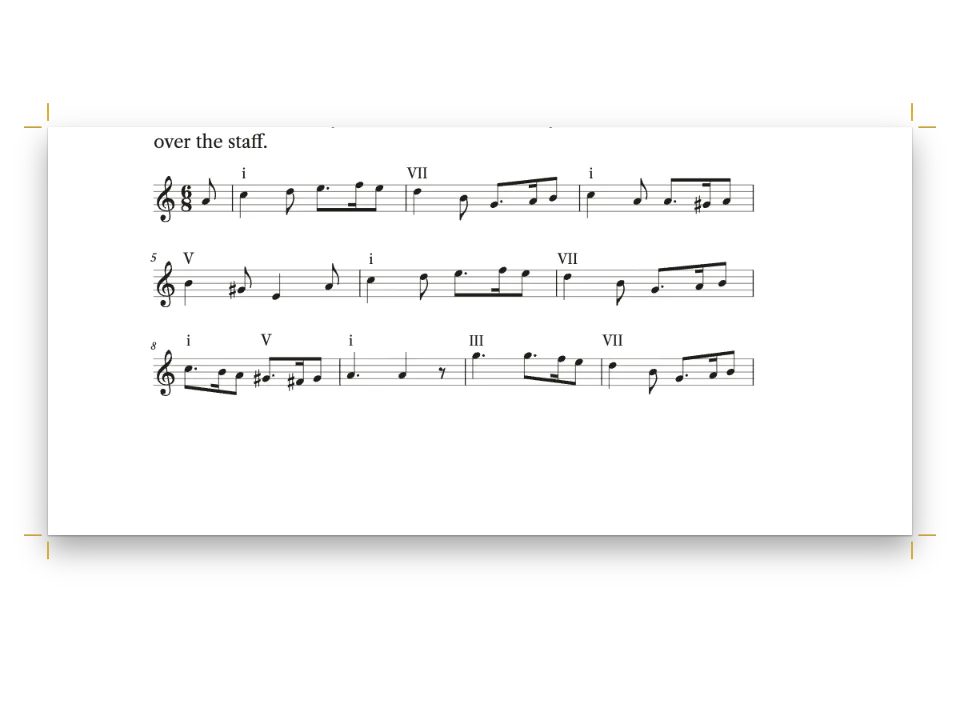
一本音乐学院和声教材中讲终止式的一章,分两栏排。五个谱例以文本写成,刻成真正的乐谱,像插图一样编号、配图注,并放在提到它们的段落附近。
成品一览
《Four-Part Harmony》第4章,一本供音乐学院低年级使用的和声教程,开本210 × 280 mm,用Crimson Pro排成两栏。这一课讲终止式,五个谱例都是写在两行谱表上的四声部众赞歌,低音下方标出罗马数字级数:G大调的五种终止式、《Nun danket alle Gott》的三句,以及完整的日内瓦诗篇第134篇(Old Hundredth)。每个谱例都有编号,从Example 4.1到4.5(西班牙文版为Ejemplo),图注用标签字体,标签为酒红色,并排在引用它的段落之后那一栏的顶部或底部;整首诗篇横跨两栏,排在第63页顶部。这些和声配置是为本教程写的,并检查过平行五度和八度、声部间距以及导音的解决。
这道食谱解答
- 在双栏书里,怎样给谱例编号并让它们像插图一样浮动?
- 怎样加一幅带编号题注的图,并在正文里引用它(“见图3.2”)?
- 怎样控制图的位置:页面顶部、横跨两栏、就放在这里,还是放在边栏里?
简短回答
// In the Markdown, :ref{id="ex-old-hundredth" style="full"} prints 'Example 4.4' ('Ejemplo
// 4.4' in Spanish) and ::resource{id="…"} anchors the float after the paragraph that cites it.
const example = (id, source, placement, styleId) => {
  const [caption, note, altText] = CAPTIONS[id];
  return { id, typeId: 'example', kind: 'score', caption, note, altText, placement,
    score: { format: 'humdrum', source, styleId }, createdAt: 0, updatedAt: 0 };
};
// The **kern sources are in #region art-scores; captions in content.captions.<lang>.md.
const resources = () => [
  example('ex-cadences', CADENCES, { position: 'bottom' }, 'column'),
  example('ex-nun-danket', NUN_DANKET, { position: 'top' }, 'column'),
  example('ex-nun-danket-3', NUN_DANKET_3, { position: 'auto' }, 'column'),
  // Across both columns in the document's own score style: the whole tune in two systems.
  example('ex-old-hundredth', OLD_HUNDREDTH, { position: 'top', span: 'page' }),
  example('ex-deceptive', DECEPTIVE, { position: 'auto', span: 'page' }),
];
用料
做法
#1 · 用Humdrum **kern写每首众赞歌
// Each example lists its spines as Humdrum wants them, lowest first: the bass staff split into
// tenor and bass, the **harm spine (printed under that staff), the treble staff split into
// soprano and alto. Writing them with spaces keeps the pen free of tab characters.
const kern = (meter, body) => [
  '**kern **harm **kern', '*clefF4 * *clefG2', '*k[f#] * *k[f#]', `*M${meter} * *M${meter}`,
  '*^ * *^', ...body.trim().split('\n'), '== == == == ==', '*- *- *- *- *-',
].map((row) => row.trim().split(/ +/)
  // Spanish harmony books write every degree in capitals: vi is VI, iib is IIb.
  .map((cell) => (LANG === 'es' && /^(?:i{1,3}|iv|vi{0,2})[bc7]?$/.test(cell)
    ? cell.replace(/^[iv]+/, (degree) => degree.toUpperCase()) : cell))
  .join('\t')).join('\n');
Humdrum把各声部写成用制表符分隔的列,从最低的声部写起。每行谱表是一列(spine),用*^一分为二:低音谱表上是男高音和男低音,高音谱表上是女高音和女低音,于是刻谱器在每行谱表上排两个声部,符干分开(左边的声部朝上,右边的朝下)。低音谱表之后的**harm列在它下方印出级数;Ib是第一转位,Ic是四六和弦。脚本用空格写各列,再把空格换成制表符,这样任何编辑器都弄不坏文件;西班牙文版的级数全用大写(VI、IIb),这是西班牙和声教材的写法。
#2 · 把每个谱例做成example类型的资源
简短回答创建了这五个资源。typeId: 'example'使用内置的“谱例”类型:资源用到它时,引擎就把它加入书的资源类型,名称随文档语言而定(locale: 'es'得到Ejemplo),按章编号,所以第4章的第一个谱例是4.1。乐谱资源始终完整,像插图一样浮动:position: 'top'或'bottom'占据引用之后第一个有空间的栏的顶部或底部,span: 'page'让Old Hundredth横跨两栏。图注、出处和替代文本来自每个版本的第二个Markdown文件。
#3 · 给栏内谱例更小的谱表
const scoreStyle = {
  staffSize: mm(5.4), musicFont: 'Bravura', barNumbers: 'system', color: col('ink'),
  textFont: TEXT, // the Roman numerals under the bass, in the text face
  marginTop: pt(4), marginBottom: pt(2),
};
const scoreStyles = [ // rastral 4.6 mm: four staves of a chorale fit a column in two systems
  { id: 'column', name: t({ en: 'Column examples', es: 'Ejemplos de columna' }),
    staffSize: mm(4.6), barNumbers: 'none', spacing: 0.8 },
];
两个通栏的众赞歌使用文档的scoreStyle:谱表高5.4 mm,每行开头标小节号。栏内谱例选用名为column的样式:谱表4.6 mm,不标小节号,间距0.8,使谱例4.2的五个小节留在同一行,而不是把最后一小节单独留到第二行。
#4 · 排版前启动刻谱器
await initMusicEngine(); // until it runs, every score is laid out as a grey box
const continuation = { pageNumbering: { startAt: 61 }, // odd: the opener is a recto
  headings: { h1: 3, h2: 0, h3: 0, h4: 0, h5: 0, h6: 0 } }; // the next # is chapter 4
const doc = await buildDocumentWithFonts({ markdown, resources: resources(), continuation },
  config, kitFonts(FONTS));
showPages(doc, { title: t({ en: 'Numbered chorale examples in a harmony method',
  es: 'Corales numerados en un método de armonía' }) });
initMusicEngine()从软件包加载刻谱器Verovio;在它运行之前,每份乐谱都排成灰色方框。continuation让这一章成为一本更长的书的第4章,所以谱例编号为4.1到4.5,页码从右页的61开始。
#5 · 让章首横跨两栏
const label = { fontFamily: LABEL, fontWeight: 600, textTransform: 'uppercase' };
const opener = {
  enabled: true, minHeight: mm(46),
  slot: { elements: [
      { kind: 'text', id: 'kicker', content: '{attr.kicker}', ...label, fontSize: pt(9),
        letterSpacing: pt(1.8), color: col('accent'), align: 'left',
        placement: { anchor: { to: 'container', edge: 'top-left' },
          offset: { x: mm(0), y: mm(6) } } },
      { kind: 'text', id: 'title', content: '{titleText}', fontFamily: DISPLAY, fontSize: pt(36),
        lineHeight: 1.05, fontWeight: 400, color: col('ink'), align: 'left',
        placement: { anchor: { to: '#kicker', edge: 'below' }, offset: { x: mm(0), y: mm(3) },
          size: { width: mm(150), height: 'auto' } } },
      { kind: 'text', id: 'deck', content: '{attr.deck}', fontFamily: TEXT, fontSize: pt(13),
        lineHeight: 1.25, italic: true, color: col('muted'), align: 'left',
        placement: { anchor: { to: '#title', edge: 'below' }, offset: { x: mm(0), y: mm(3) },
          size: { width: mm(120), height: 'auto' } } },
      { kind: 'rule', id: 'rule', direction: 'horizontal', thickness: pt(1.5), color: col('accent'),
        placement: { anchor: { to: '#deck', edge: 'below' }, offset: { x: mm(0), y: mm(5) },
          size: { width: mm(18) } } },
  ] },
};
章首页横跨两栏(一级标题上的span: 'page'),眉题和导语取自标题的属性。minHeight让正文下沉46 mm,两栏都从短线下方的同一行开始。
完整食谱
// ═══ Postext Cookbook · Nº 166 · Numbered chorale examples in a harmony method ══
// https://postext.dev/en/cookbook/conservatory-method-chorales
// Code: MIT · Text and four-part settings: original (CC BY 4.0) · Melodies: public domain
// Fonts: Crimson Pro, Playfair Display, Fira Sans Condensed (OFL 1.1) · Needs postext ≥ 1.54.0
import {
  buildDocumentWithFonts, renderPageToCanvas, defaultResourceTypes, initMusicEngine,
} from 'https://esm.sh/postext';

const LANG = 'en'; // @lang: the language of the sample document ('en' | 'es')
const RECIPE = 'conservatory-method-chorales';

// ─── 1 · Design ─────────────────────────────────────────────────────────────
// A claret accent on warm paper tones, every colour linked by id.
const palette = { ink: '#1f1a17', accent: '#7a2531', tint: '#f5eee6', rule: '#cdbfb2',
  muted: '#6a5f57', paper: '#ffffff' };
const col = (id) => ({ hex: palette[id], model: 'hex', paletteId: id });
const colorPalette = [
  ...Object.entries(palette).map(([id, hex]) => ({ id, name: id, value: { hex, model: 'hex' } })),
  { id: 'main-color', name: 'accent (defaults)', value: { hex: palette.accent, model: 'hex' } },
];
const [TEXT, DISPLAY, LABEL] = ['Crimson Pro', 'Playfair Display', 'Fira Sans Condensed'];
const OUTER = 16; // outer margin in mm: running heads and folios align to it
const LEAD = 14.2; // body leading in pt

// #region answer: score resources typed 'example', floated and numbered like figures
// In the Markdown, :ref{id="ex-old-hundredth" style="full"} prints 'Example 4.4' ('Ejemplo
// 4.4' in Spanish) and ::resource{id="…"} anchors the float after the paragraph that cites it.
const example = (id, source, placement, styleId) => {
  const [caption, note, altText] = CAPTIONS[id];
  return { id, typeId: 'example', kind: 'score', caption, note, altText, placement,
    score: { format: 'humdrum', source, styleId }, createdAt: 0, updatedAt: 0 };
};
// The **kern sources are in #region art-scores; captions in content.captions.<lang>.md.
const resources = () => [
  example('ex-cadences', CADENCES, { position: 'bottom' }, 'column'),
  example('ex-nun-danket', NUN_DANKET, { position: 'top' }, 'column'),
  example('ex-nun-danket-3', NUN_DANKET_3, { position: 'auto' }, 'column'),
  // Across both columns in the document's own score style: the whole tune in two systems.
  example('ex-old-hundredth', OLD_HUNDREDTH, { position: 'top', span: 'page' }),
  example('ex-deceptive', DECEPTIVE, { position: 'auto', span: 'page' }),
];
// #endregion

// #region scores: one score style for the page-wide chorale, a smaller one for the columns
const scoreStyle = {
  staffSize: mm(5.4), musicFont: 'Bravura', barNumbers: 'system', color: col('ink'),
  textFont: TEXT, // the Roman numerals under the bass, in the text face
  marginTop: pt(4), marginBottom: pt(2),
组合好的script.js可以直接运行:把它粘贴到任何页面的模块脚本中,或在CodePen上打开这道食谱。 GitHub上的食谱文件夹 ↗ (在新标签页中打开)
变化
#在正文中放一个不编号的谱例
用代码块写的乐谱留在正文里,正文并不引用它,像独立的公式一样:没有编号,也没有图注。
- ::resource{id="ex-cadences"}
+ ```humdrum {style="column" alt="G大调的五种终止式"}
+ **kern	**harm	**kern
+ …
+ ```#改称“音乐谱例”
为另一个名称定义自己的类型,并让typeId指向它。
- resourceTypes: defaultResourceTypes(LANG),
+ resourceTypes: [...defaultResourceTypes(LANG), { id: 'musex', name: '音乐谱例',
+   shortLabel: '谱例', captionPrefix: '音乐谱例', numberingTemplate: '{h1}.{n}',
+ resetOn: 'h1', counterFormat: 'decimal' }],常见问题
- 乐谱资源从不在栏与栏、页与页之间断开。浮动谱例要限制在几个小节之内;较长的曲子放进代码块,它会在行与行之间断开。
- 刻谱器把每行谱填满到所在位置的宽度,最后一行保留自然宽度。如果某个谱例把一个小节单独留在第二行,就调低其样式的
spacing或谱表大小。
致谢
- 文本
- Chapter text and the four-part settings of every example · Ignacio Ferro · CC BY 4.0
- Melody of Nun danket alle Gott (Praxis pietatis melica, 1647), read from the soprano of Bach's setting BWV 386 · Johann Crüger · 公有领域
- Melody of the Old Hundredth (Psalm 134 in the Genevan Psalter, 1551) · Louis Bourgeois (attributed) · 公有领域
- 字体
- Crimson Pro (SIL OFL 1.1) · Playfair Display (SIL OFL 1.1) · Fira Sans Condensed (SIL OFL 1.1)