简单来说
当一栏因为某段文字不能在那里断开而停在页脚上方一行时,这个设置会重新断开该栏中某一段的行,让这一栏排到底。
成品一览
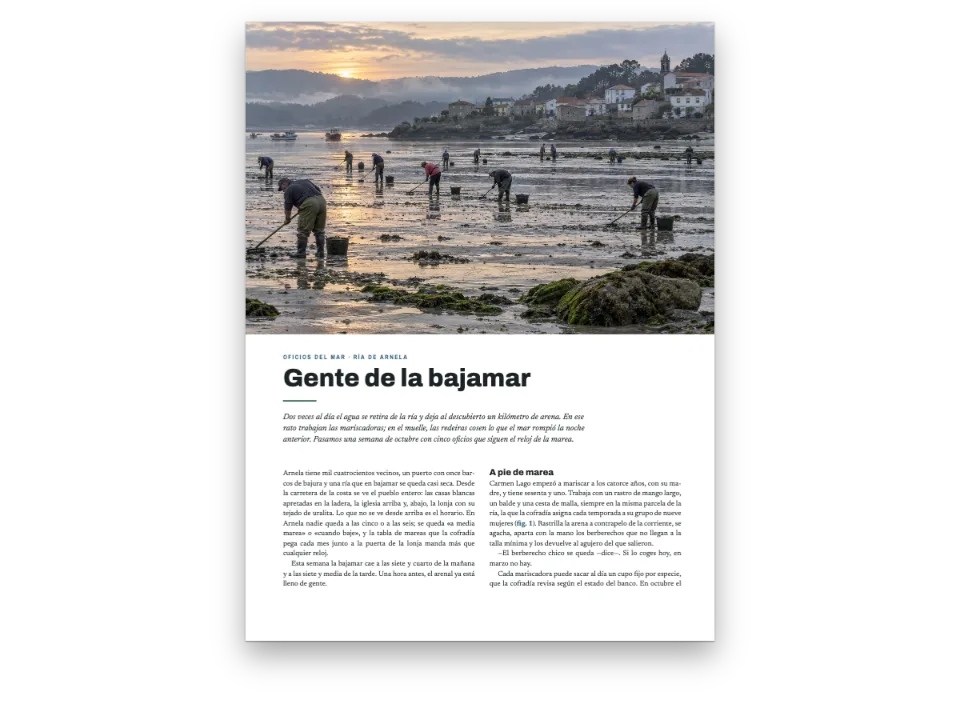
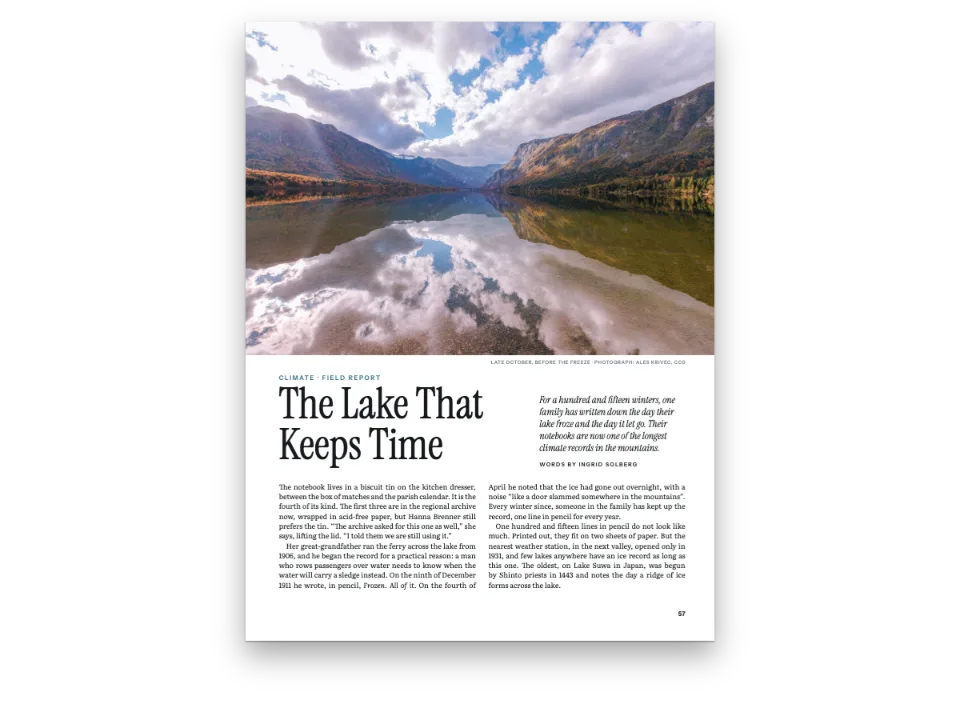
海岸杂志《Littoral》的三页:一篇关于菲涅耳透镜的长文,开篇是一幅画,画的是灯室里点亮的透镜。正文用 Public Sans 排成两栏齐左,段与段之间空一条网格线;寡行和孤行规则要求每段在断开处两侧至少各留两行。示例把这篇文章排了两遍。不开启设置时,在开篇页上,左栏比右栏早结束一行:下一段不能只在栏底放一行。开启后,在同一页上,第一段多排了一行,两栏都结束在网格的最后一行。翻到下一页,这个设置还收回了平衡在两个小标题上方多加的空白。
这道食谱解答
- 为什么一栏在页脚上方空出一两行?怎样在不违反寡行孤行规则的前提下把它补满?
- 怎样让各栏底部齐平,最后一页也排得平衡(垂直两端对齐)?
- 怎样避免段末孤行、段首孤行和只有一个词的末行(孤字),并让标题与正文不分开?
简短回答
const balancing = {
  // A ragged column has no lever of its own when the widow and orphan rules hold its last
  // line back: no heading or list end to open, no justified paragraph to set looser. This
  // one lets a paragraph of the short column run a line long, within its own word spacing
  // (or a justified one no looser than maxWordSpacing), or, when none can, set one a line
  // short so the split after it takes the line. A change is kept only when the pages end
  // with fewer short columns; otherwise the column stays as it was.
  fillShortColumns: true, // default false
  // The paragraphs go first: a crosshead keeps its one line of air unless they cannot help.
  maxLinesBeforeLoose: 0,
};
const bodyText = {
  fontFamily: 'Public Sans', fontSize: pt(9.4), lineHeight: pt(LEAD), color: col('ink'),
  boldColor: col('ink'), italicColor: col('ink'), referenceColor: col('ink'),
  textAlign: 'left', firstLineIndent: pt(0), paragraphSpacing: true, // a grid line between
  hyphenation: { enabled: true }, optimalLineBreaking: true, optimalRagged: true,
  avoidWidows: true, widowMinLines: 2, avoidOrphans: true, orphanMinLines: 2, // the cause
  avoidRunts: true,
};
用料
- 类型
- Public Sans, Libre Caslon Display, Libre Caslon Text(SIL OFL 1.1)
- 素材
lens-1400.jpg- A lit Fresnel lens in a lighthouse lantern at dusk (Generated With Diffusion Models, 原创)
做法
#1 · 给齐左排的栏一个自己的手段
const balancing = {
  // A ragged column has no lever of its own when the widow and orphan rules hold its last
  // line back: no heading or list end to open, no justified paragraph to set looser. This
  // one lets a paragraph of the short column run a line long, within its own word spacing
  // (or a justified one no looser than maxWordSpacing), or, when none can, set one a line
  // short so the split after it takes the line. A change is kept only when the pages end
  // with fewer short columns; otherwise the column stays as it was.
  fillShortColumns: true, // default false
  // The paragraphs go first: a crosshead keeps its one line of air unless they cannot help.
  maxLinesBeforeLoose: 0,
};
const bodyText = {
  fontFamily: 'Public Sans', fontSize: pt(9.4), lineHeight: pt(LEAD), color: col('ink'),
  boldColor: col('ink'), italicColor: col('ink'), referenceColor: col('ink'),
  textAlign: 'left', firstLineIndent: pt(0), paragraphSpacing: true, // a grid line between
  hyphenation: { enabled: true }, optimalLineBreaking: true, optimalRagged: true,
  avoidWidows: true, widowMinLines: 2, avoidOrphans: true, orphanMinLines: 2, // the cause
  avoidRunts: true,
};
栏平衡补满短栏的办法是:在标题上方、列表之后、方框或插图下方加网格线,最后才把两端对齐的段落放松一行。齐左排的正文栏在小标题之间没有这些位置,寡行和孤行规则留下的那一行就空着。fillShortColumns 让这一栏里某个齐左的段落按自身的词距多排一行;如果没有段落能做到,就把某段少排一行,让断开处后面的段落上移补满这一行。只有当短栏变少时引擎才保留这一改动,所以开启它不会让任何一页变差。maxLinesBeforeLoose: 0 先试段落再试标题,于是每个小标题上方都只保留一条网格线的空白。
#2 · 排两遍再比较
const withFill = (fill) => ({ ...config, headings: { ...config.headings,
  balancing: { ...balancing, fillShortColumns: fill } } }); // a copy: config keeps true
const build = (fill) => buildDocumentWithFonts({ markdown, resources }, withFill(fill),
  kitFonts(FONTS));
const docs = { off: await build(false), on: await build(true) };
两份文档出自同一份配置和同一段 Markdown。第二遍直接使用配置;第一遍使用关闭了该设置的副本,因此在 Sandbox 中打开的文件包带有 fillShortColumns: true。桌面上方的两个按钮在两遍之间切换。只有文字继续流向下一页的页面才会排到栏底:第 3 页是文章的结尾,两遍中它的各栏都被截成一样高。
#3 · 用画作开篇
const DEPTH = 150; // mm: how far down the page the painting bleeds
const sans = { fontFamily: 'Public Sans', fontWeight: 700, textTransform: 'uppercase' };
const at = (to, edge, x, y, width) => ({ anchor: { to, edge },
  offset: { x: mm(x), y: mm(y) }, ...(width && { size: { width: mm(width) } }) });
const air = { padding: { bottom: mm(6) } }; // counts: the text starts 6 mm under the byline
const opener = {
  enabled: true,
  slot: { elements: [
    { kind: 'image', id: 'art', resourceId: 'lens', placement: { anchor: { to: 'bleed',
      edge: 'top-left' }, size: { width: 'fill', height: mm(DEPTH) } } },
    { kind: 'text', id: 'credit', content: '{attr.credit}', ...sans, fontWeight: 500,
      fontSize: pt(6.5), letterSpacing: pt(0.6), color: col('muted'), align: 'right',
      placement: at('container', 'top-right', 0, DEPTH - TOP + 2) },
    { kind: 'text', id: 'kicker', content: '{attr.kicker}', ...sans, fontSize: pt(8.5),
      letterSpacing: pt(1.7), color: col('brass'), align: 'left',
      placement: at('container', 'top-left', 0, DEPTH - TOP + 9) },
    { kind: 'text', id: 'headline', content: '{titleText}', fontFamily: 'Libre Caslon Display',
      fontSize: pt(46), lineHeight: 1.02, color: col('ink'), align: 'left',
      placement: at('#kicker', 'below', 0, 2.5, 112) },
    { kind: 'text', id: 'standfirst', content: '{attr.standfirst}', fontFamily: 'Libre Caslon Text',
      italic: true, fontSize: pt(12), lineHeight: 1.3, color: col('sea'), align: 'left',
      placement: at('#headline', 'right-of', 8, 2.5) },
    { kind: 'text', id: 'byline', content: '{attr.byline}', ...sans, fontSize: pt(7.5),
      letterSpacing: pt(1.3), color: col('ink'), align: 'left', box: air,
      placement: at('#standfirst', 'below', 0, 3.5) },
  ] },
};
这幅画是锚定在出血线上的图像元素,高 150 mm,所以三边都延伸到裁切线,浮动元素做不到这一点。眉题、标题、导语和署名都来自 # 行的属性。署名下方有 6 mm 的内边距,计入开篇的高度,所以正文栏从它下面的第一条网格线开始。
#4 · 开篇页不放书眉
const label = { ...sans, fontWeight: 600, fontSize: pt(7.5), letterSpacing: pt(1.3),
  color: col('muted') };
const folio = { fontFamily: 'Public Sans', fontWeight: 700, fontSize: pt(8.5), color: col('ink') };
const pin = (edge, x, y) => ({ anchor: { to: 'page', edge }, offset: { x: mm(x), y: mm(y) } });
const sides = [['even', 'left', 1], ['odd', 'right', -1]]; // 1: the outer edge is on the left
const header = { elements: sides.flatMap(([parity, edge, s]) => [
  { kind: 'text', id: `folio-${parity}`, content: '{pageNumber}', ...folio,
    placement: pin(`top-${edge}`, s * OUTER, 12) },
  { kind: 'text', id: `head-${parity}`, ...label,
    content: s > 0 ? '{title} · {subtitle}' : '{chapterTitle}',
    placement: pin(`top-${edge}`, s * (OUTER + 9), 12.35) }, // the smaller size's baseline
  { kind: 'rule', id: `rule-${parity}`, direction: 'horizontal', thickness: pt(0.5),
    color: col('rule'), placement: { ...pin(`top-${edge}`, s * OUTER, 17),
      size: { width: mm(197) } } },
].map((element) => ({ ...element, parity, pages: 'body' }))) }; // none on the opener
const footer = { elements: sides.map(([parity, edge, s]) => ({ kind: 'text', parity,
  id: `drop-folio-${parity}`, ...folio, content: '{pageNumber}', pages: 'opener', align: edge,
  placement: pin(`bottom-${edge}`, s * OUTER, -11) })) }; // the opener's only folio
左页书眉从 frontmatter 取杂志名和期号,右页取文章标题,pages: 'body' 让两者都不出现在开篇页上,开篇页只在页脚放页码。标签比页码低 0.35 mm,让两种字号共用一条基线。下方的细线长 197 mm,等于版心宽度。
完整食谱
// ═══ Postext Cookbook · Nº 177 · Filling the column the widow rule left short ═════
// https://postext.dev/en/cookbook/filling-short-columns
// Code: MIT · Text: original (CC BY 4.0) · Painting: diffusion model
// Fonts: Public Sans, Libre Caslon Display, Libre Caslon Text (OFL) · Needs postext ≥ 1.65.0
//
// A magazine long read in two ragged columns, set twice. Without fillShortColumns a column
// whose paragraph would split into a widow ends a line above the foot; with it, a paragraph
// of that column is set a line longer or shorter, and the column ends on the last grid line.
import {
  buildDocumentWithFonts, renderPageToCanvas, registerResourceImage,
} from 'https://esm.sh/postext';

const LANG = 'en'; // @lang: the language of the sample document ('en' | 'es')
const RECIPE = 'filling-short-columns';

// ─── 1 · Design ─────────────────────────────────────────────────────────────
// Every colour below is linked to this palette by id.
const palette = {
  ink: '#1b2026', // text: a slate near-black
  brass: '#875a14', // the accent: kicker and crossheads (6:1 on paper)
  sea: '#2c4a5e', // the standfirst
  rule: '#c9ccd0', // hairlines
  muted: '#5d656e', // running heads, credit, colophon
  paper: '#ffffff',
};
const col = (id) => ({ hex: palette[id], model: 'hex', paletteId: id });
const colorPalette = [
  ...Object.entries(palette).map(([id, hex]) => ({ id, name: id, value: { hex, model: 'hex' } })),
  // The engine's defaults link to 'main-color': point it at the accent, so nothing prints blue.
  { id: 'main-color', name: 'brass (defaults)', value: { hex: palette.brass, model: 'hex' } },
];
const TOP = 22; // top margin in mm: the opener's container starts here
const OUTER = 14; // outer margin in mm: folios and running heads align to it
const LEAD = 13.2; // body leading in pt: the baseline grid every column ends on

// #region answer: ragged columns that end on the grid: fillShortColumns
const balancing = {
  // A ragged column has no lever of its own when the widow and orphan rules hold its last
  // line back: no heading or list end to open, no justified paragraph to set looser. This
  // one lets a paragraph of the short column run a line long, within its own word spacing
  // (or a justified one no looser than maxWordSpacing), or, when none can, set one a line
  // short so the split after it takes the line. A change is kept only when the pages end
  // with fewer short columns; otherwise the column stays as it was.
  fillShortColumns: true, // default false
  // The paragraphs go first: a crosshead keeps its one line of air unless they cannot help.
  maxLinesBeforeLoose: 0,
};
const bodyText = {
组合好的script.js可以直接运行:把它粘贴到任何页面的模块脚本中,或在CodePen上打开这道食谱。 GitHub上的食谱文件夹 ↗ (在新标签页中打开)
变化
#让小标题先吸收空白
按默认顺序,标题在段落被拉长之前最多可取两条网格线,下一页的小标题上方又会变宽。
-  maxLinesBeforeLoose: 0,
+ maxLinesBeforeLoose: 2,#改为两端对齐
两端对齐的段落在不开启设置时就能在 maxWordSpacing 以内多排一行。开启 fillShortColumns 后,它也可以少排一行,而且不会比它自己最松的一行更松。
-  textAlign: 'left', firstLineIndent: pt(0), paragraphSpacing: true, // a grid line between
+ textAlign: 'justify', firstLineIndent: pt(0), paragraphSpacing: true, // a grid line between常见问题
- 这个设置只补一行的空缺。缺两行的栏,比如在段间空行之后只剩放下一段一行的位置,可能仍然偏短:增删一句文字来调整。
- 如果某段重排后会以过短的末行结束,就不会采用它,所以只有短段落的一栏可能仍然偏短。
致谢
- 文本
- 原创文字, CC BY 4.0
- 图片
- A lit Fresnel lens in a lighthouse lantern at dusk · Generated With Diffusion Models · 原创
- 字体
- Public Sans (SIL OFL 1.1) · Libre Caslon Display (SIL OFL 1.1) · Libre Caslon Text (SIL OFL 1.1)