简单来说
一本杂志的天气专栏,用同一份文字做了两遍。示例演示怎样用同一套设置同时得到分栏的印刷版和深色单栏的屏幕阅读版。
成品一览
Notes on Weather,一本小杂志的秋季栏目,用同一份Markdown排两次。纸上是一期225 × 297 mm的刊物:一个雨蓝色的篇名页,三篇随笔,每篇在浅雾色色带下开篇,正文两栏两端对齐,配有雨量计和风玫瑰的插图,以及一张雾中山谷的照片。屏幕上则是单栏齐左的Newsreader,近黑底上的浅灰字,用读者可以选择和复制的HTML文本排出,没有篇名页、雾色色带和页码。窗格打开时显示雨量计,它缩小到窗格高度,用夜间配色绘制,旁边是它所在的印刷页。向上滚动可以看到Rain一篇的开篇;拖动窗格的角,文字会按新尺寸重新排版。屏幕版面设计是印刷配置中htmlViewer.overrides下的九个键。
这道食谱解答
- 怎样为同一文档显示响应式、可滚动的HTML阅读视图?
- 怎样用同一份配置,让屏幕版的设计比印刷版更简洁?
简短回答
// config() stores it as htmlViewer: { overrides: screenOverrides() }; canvas and PDF ignore it.
const screenOverrides = () => ({
  colorPalette: paletteOf(night), // arrays are replaced whole: the night values
  parts: { page: false }, // no divider page; the part still names the notes after it
  // 96 dpi: the mm and pt inherited from print render at their CSS size.
  page: { dpi: 96, margins: { top: px(40), bottom: px(40), mirror: false } },
  layout: { layoutType: 'single', // one column
    fitFiguresToPage: true }, // tall figures shrink to the pane; off by default, as in print
  bodyText: { fontSize: px(17), lineHeight: px(27), textAlign: 'left' }, // ragged for reading
  // Heading levels merge on `level`: the print level keeps everything not restated here.
  headings: { levels: [{ level: 1, span: 'column', breakBefore: { enabled: false },
    marginTop: px(40), marginBottom: px(26),
    advancedDesign: { minHeight: px(0), slot: { elements: screenOpener } } }] }, // no band air
  footer: { elements: [] }, // a scrolling page runs no folios (print's header is empty already)
  captionStyle: { fontSize: px(13), gap: px(10) },
  paragraphStyles: [{ ...colophon, fontSize: px(13), lineHeight: px(20) }], // restated whole
});
// The host owns the page size: the pane's, in CSS pixels (gotcha: viewer-settings-sandbox-only).
// Wide panes get wider margins, so the measure stops at MEASURE.
const MEASURE = 470; // px: about 65 characters of Newsreader at 17 px
const MIN_SIDE = 34; // px: the side margins of a narrow pane
function screenConfig({ width, height }) {
  const merged = applyHtmlViewerOverrides(config()); // print + overrides, a fresh object
  const side = px(Math.max(MIN_SIDE, (width - MEASURE) / 2));
  return { ...merged, page: { ...merged.page, width: px(width), height: px(height),
    margins: { ...merged.page.margins, left: side, right: side } } };
}
用料
- 功能
- 为屏幕简化的设计HTML阅读版缩放以适合页面的图设计过的章首页篇页通栏章首色带标题属性图的放置语义调色板按页面角色显示书眉单栏或双栏纸张颜色在Canvas上绘制页面作为资源的图和表用你的语言显示“图”和“表”自定义资源类型决定图位置的引用段落样式
- 类型
- Newsreader, Gloock, Reddit Sans(SIL OFL 1.1)
- 素材
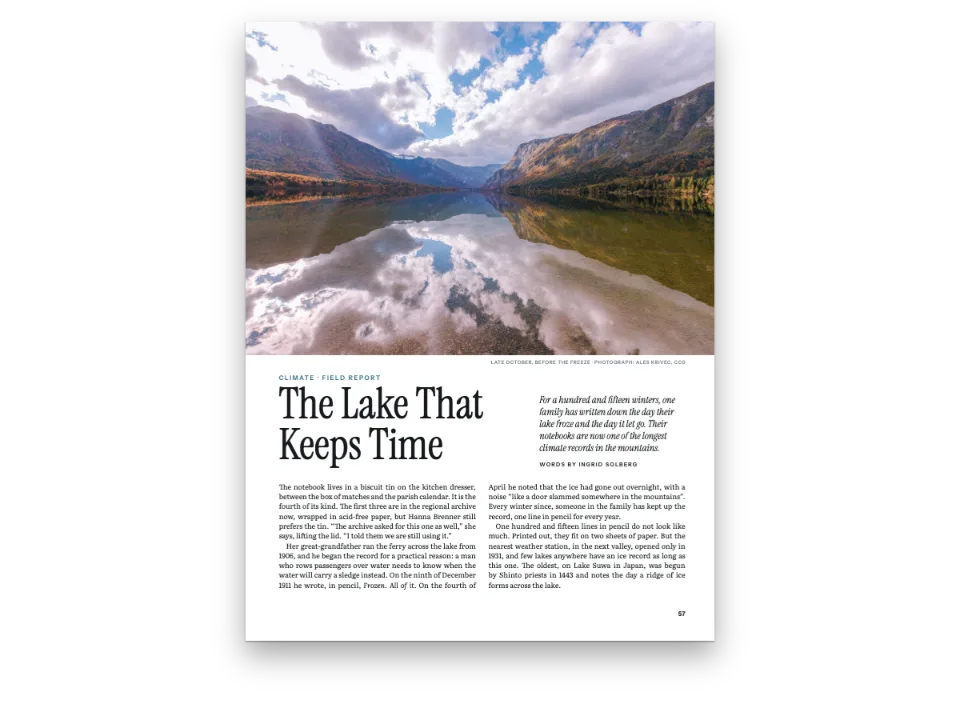
valley-1610.jpg- Radiation fog in a valley at dawn (Figure 2) (Generated With Diffusion Models, 原创)
- The rain gauge, the wind rose and the part page's rain, drawn in code in both palettes (Ignacio Ferro, CC BY 4.0)
做法
#1 · 一套颜色名称,两套取值
const day = { ink: '#1b222b', rain: '#3d6f9e', slate: '#2d3a4a', fog: '#e9edf1',
  rule: '#c8d0d8', muted: '#5f6a76', paper: '#ffffff' };
const night = { ink: '#e6e8eb', rain: '#9cc3e6', slate: '#56657a', fog: '#1b2129',
  rule: '#2e3742', muted: '#98a2ae', paper: '#111418' };
const paletteOf = (values) => // main-color: the engine's defaults follow the rain blue
  Object.entries({ ...values, 'main-color': values.rain })
    .map(([id, hex]) => ({ id, name: id, value: { hex, model: 'hex' } }));
// Every colour names its palette entry: text, captions, the openers' design elements and the
// reference colour follow whichever palette the config carries. The hex is the day value.
const col = (id) => ({ hex: day[id], model: 'hex', paletteId: id });
配置中的每种颜色都指向一个调色板id,旁边写的十六进制值只是日间的后备值。所以屏幕版只需替换一个数组,就能换成夜间配色。简短回答中的覆盖项按键合并对象,按level合并各级标题,其他数组则整体替换,colorPalette也在其中。main-color属于调色板,所以使用它的引擎默认值也随之改变。新的调色板会传到每一个与它关联的颜色:正文、题注、开篇的设计元素和参照颜色。
#2 · 开篇:纸上是色带,屏幕上只有文字
const text = (id, content, fontFamily, style) => ({ kind: 'text', id, content, fontFamily,
  color: col('ink'), align: 'left', ...style,
  overflow: 'wrap' }); // titles break onto more lines
const kicker = text('kicker', '{partTitle} · {attr.kicker}', 'Reddit Sans',
  { fontWeight: 600, textTransform: 'uppercase', color: col('rain') });
const title = text('title', '{titleText}', 'Gloock');
const lead = text('lead', '{attr.lead}', 'Newsreader', { italic: true, hyphenate: true });
const at = (to, edge, y, x = px(0)) => ({ anchor: { to, edge }, offset: { x, y } });
const under = (id, y, width) => ({ ...at(`#${id}`, 'below', y), size: { width } });
const band = (y, height) => ({ ...at('bleed', 'top-left', y), size: { width: 'fill', height } });
const fromTop = (y, x) => at('container', 'top-left', y, x);
// minHeight sets the reservation: the band's foot below the top margin, plus AIR. The band hangs
// from the bleed and counts too, but ends higher (gotcha: opener-reserves-anchored).
const printOpener = { enabled: true, minHeight: mm(BAND - TOP + AIR), slot: { elements: [
  { kind: 'box', id: 'band', style: { backgroundColor: col('fog') },
    placement: band(mm(0), mm(BAND)) },
  { kind: 'rule', id: 'horizon', direction: 'horizontal', thickness: pt(2), color: col('rain'),
    placement: band(mm(BAND - 0.7), pt(2)) }, // 2 pt is 0.7 mm: the rule ends at the band's foot
  { ...kicker, fontSize: pt(8), letterSpacing: pt(1.8), placement: fromTop(mm(12)) },
  { ...title, fontSize: pt(54), lineHeight: 1.04, placement: under('kicker', mm(2.5), mm(150)) },
  { ...lead, fontSize: pt(11.5), lineHeight: 1.36, placement: under('title', mm(4), mm(118)) },
] } };
const screenOpener = [
  { ...kicker, fontSize: px(12), letterSpacing: px(2.6), placement: fromTop(px(4)) },
  { ...title, fontSize: px(48), lineHeight: 1.05, placement: under('kicker', px(6), 'fill') },
  { ...lead, fontSize: px(18), lineHeight: 1.45, color: col('muted'),
    placement: under('title', px(10), 'fill') },
];
眉题、标题和导语元素只定义一次,再展开到两套版面设计中,所以两个版本显示同样的标题属性:{attr.kicker}、{attr.lead}和篇的{partTitle}。在纸上,一级标题分页到新的一页,横跨两栏,它的版面设计从出血处挂下一条雾色色带。minHeight预留的深度是色带在上页边距以下的部分加上AIR,即色带与第一行之间的9 mm。印刷版标题用54 pt,因为每个标题都只是一个短词,也是该页唯一的大字。在屏幕上,同一级标题排成栏内标题,没有色带,也没有空白。覆盖项按level合并,所以它没有重新声明的标题设置都保持印刷版的样子。
#3 · 只在纸上存在的篇页
const onField = { color: col('paper'), lineHeight: 1 };
const parts = {
  margins: { top: mm(212), left: mm(24), right: mm(40) }, // the fence's list sits low
  bodyStyle: { fontSize: pt(13), lineHeight: pt(19), color: col('paper'),
    numberColor: col('paper') },
  design: { elements: [
    { kind: 'box', id: 'field', style: { backgroundColor: col('rain') },
      placement: band(mm(0), 'fill') },
    { kind: 'image', id: 'strokes', resourceId: 'rain', placement: band(mm(0), 'fill') },
    text('series', '{title}', 'Reddit Sans', { ...onField, fontWeight: 600, fontSize: pt(9),
      letterSpacing: pt(2.4), textTransform: 'uppercase', placement: fromTop(mm(30), mm(24)) }),
    text('numeral', '{number}', 'Gloock', { ...onField, fontSize: pt(190),
      placement: under('series', mm(10), mm(150)) }),
    text('name', '{titleText}', 'Gloock', { ...onField, fontSize: pt(60),
      placement: under('numeral', mm(-6), mm(150)) }),
  ] },
};
在印刷版中,:::part打开雨蓝色的篇页:一个四边出血的框,一个避开文字的雨丝图像元素,取自围栏的罗马数字和篇名,以及白色的随笔列表。屏幕覆盖项设parts.page: false,于是不开新页,也不排列表。篇仍然把它的编号和标题用到其后的随笔上,屏幕版的眉题和印刷版一样读作“Autumn · Note 1”。
#4 · 每幅图画两次
// The valley is a photograph, one JPEG in assets/ that both editions share, at its pixels.
const photo = { kind: 'bitmap', svg: undefined,
  bitmap: { fileId: 'valley-1610.jpg', format: 'jpeg', width: 1610, height: 690 } };
const figure = (id, edition, [width, height], placement, caption, alt) => ({ id,
  typeId: 'figure', kind: 'svg', createdAt: 0, updatedAt: 0, placement,
  svg: { fileId: `${id}-${edition}.svg`, width, height },
  caption: caption && t(caption), altText: alt && t(alt) }); // the HTML edition's <img alt>
const figures = (edition) => [
  figure('gauge', edition, [900, 1260], { position: 'auto', span: 'column' }, {
    en: 'The rain gauge in section: the funnel feeds a tube with a tenth of its area.',
    es: 'El pluviómetro en sección: el embudo vierte en un tubo con la décima parte de su área.',
  }, {
    en: 'Rain falls on a funnel set in a can sunk in the lawn; the funnel drains into a narrow '
      + 'tube, half full, beside a graduated measuring stick.',
    es: 'La lluvia cae en un embudo sobre un vaso hundido en el césped; el embudo vierte en un '
      + 'tubo estrecho, medio lleno, junto a una regla graduada.' }),
  { ...figure('valley', edition, [1610, 690], { position: 'bottom', span: 'page' }, {
    en: 'Radiation fog at dawn: cold air drains off the hills overnight and fills the valley.',
    es: 'Niebla de irradiación al amanecer: el aire frío baja de las lomas y llena el valle.',
  }, {
    en: 'A valley between wooded hills lies under layers of fog at sunrise, with a church '
      + 'tower, trees and a river showing through it, seen from a fenced bank.',
    es: 'Un valle entre lomas boscosas yace bajo la niebla al amanecer; asoman la torre de '
      + 'una iglesia, árboles y un río, vistos desde un ribazo con una cerca.' }), ...photo },
  figure('rose', edition, [900, 900], { position: 'top', span: 'column' }, {
    en: 'Where a year of morning winds came from at the garden station: west and south-west.',
    es: 'De dónde vino el viento de un año de mañanas en el jardín: del oeste y del suroeste.',
  }, {
    en: 'A wind rose of sixteen petals on three rings; the longest petals point west and '
      + 'south-west, the shortest east.',
    es: 'Una rosa de los vientos de dieciséis pétalos sobre tres anillos; los más largos '
      + 'apuntan al oeste y al suroeste, los más cortos al este.' }),
  figure('rain', 'field', [2250, 2970]), // drawn by the part design, never cited: unnumbered
];
换调色板不会给SVG重新着色,所以每幅图按每套调色板各画一次。山谷是一张照片,两个版本共用同一个JPEG。figures(edition)为两个版本生成相同的资源,各自指向该版本的文件:印刷版是gauge-day.svg,屏幕版是gauge-night.svg。id、题注、替代文字和位置都不变,所以Markdown中的每个:ref在两个版本里都解析为同一幅图、同一个编号。在屏幕版中,替代文字写入每个<img alt>,屏幕阅读器可以读到它。
#5 · 承载屏幕版
const FOLDED = 200; // px: a pane narrower or shorter than this is hidden or squeezed; skip it
if (!pane.clientHeight) { // no style.css: a height, and a corner to drag the pane smaller, but
  // not under 400 px, where an opener can take a whole page and push its text to the next
  pane.style.cssText = 'height:580px;min-height:400px;min-width:240px;overflow:auto;resize:both';
}
pane.style.background = night.paper; // the pane's own ground, beside the pages and the scrollbar
const shadow = pane.attachShadow({ mode: 'open' }); // the page's selectors cannot reach in, and
// the edition's root resets the text properties it would inherit (letter-spacing…) by itself
const inShadow = `<style>::selection{background:${night.rain}55}</style>`; // the night blue
let size = '';
function showScreen() {
  const [width, height] = [pane.clientWidth, pane.clientHeight];
  if (`${width}×${height}` === size || width < FOLDED || height < FOLDED) return; // same, or folded
  const first = !size; // the first build opens on Figure 1's page, like the print proof
  size = `${width}×${height}`;
  const screenDoc = buildDocument({ markdown, resources: figures('night') },
    screenConfig({ width, height }));
  const place = pane.scrollTop / pane.scrollHeight; // the reader's place, kept across rebuilds
  shadow.innerHTML = inShadow + renderToHtml(screenDoc,
    { mode: 'single', padding: 0, resourceImageUrl: imageUrl });
  const fig = first && screenDoc.pages.find((page) => holds(page, 'gauge')); // 'single' mode
  pane.scrollTop = fig ? fig.index * height : place * pane.scrollHeight; // stacks pane-tall pages
  screenLabel.textContent =
    `${t({ en: 'Screen', es: 'Pantalla' })} · HTML · ${width} × ${height} px`;
}
showScreen();
let timer = 0; // debounced; its first call, on observe(), finds the size unchanged
new ResizeObserver(() => { clearTimeout(timer); timer = setTimeout(showScreen, 150); })
  .observe(pane);
每个屏幕页都与窗格一样高,所以fitFiguresToPage把雨量计缩小到连同题注能放进一页为止(版面)。在CSS假定的96 dpi下,从印刷版继承来的毫米和点按标称尺寸渲染(集成HTML阅读器)。示例把renderToHtml输出的绝对定位行写进一个Shadow DOM,页面的选择器够不到它们。letter-spacing之类的继承属性能越过这道边界,版面的根元素会自己把它们重置,因为引擎测量这些行时没有考虑它们。HTML页面除非上色,否则是透明的,所以page.backgroundColor从调色板取夜间的纸色。ResizeObserver等待150 ms,只在窗格的宽度或高度变化时才用新的config()重新构建;重建之后,窗格滚回到原来高度比例的位置。
完整食谱
// ═══ Postext Cookbook · Nº 011 · One source, print and screen editions ═══════════
// https://postext.dev/en/cookbook/print-and-screen-editions
// Code: MIT · Text: original (CC BY 4.0) · Drawings: code (CC BY 4.0) · Photo: diffusion models
// Fonts: Newsreader, Gloock, Reddit Sans (SIL OFL 1.1) · Needs postext ≥ 1.25.0
import {
  buildDocument, prepareFonts, withLoadedFonts, renderPageToCanvas, renderToHtml,
  applyHtmlViewerOverrides, registerResourceImage, defaultResourceTypes,
} from 'https://esm.sh/postext';

const LANG = 'en'; // @lang: the language of the sample document ('en' | 'es')
const RECIPE = 'print-and-screen-editions';

// ─── 1 · Design ─────────────────────────────────────────────────────────────
// #region palette: one set of colour ids, two sets of values: day for paper, night for screens
const day = { ink: '#1b222b', rain: '#3d6f9e', slate: '#2d3a4a', fog: '#e9edf1',
  rule: '#c8d0d8', muted: '#5f6a76', paper: '#ffffff' };
const night = { ink: '#e6e8eb', rain: '#9cc3e6', slate: '#56657a', fog: '#1b2129',
  rule: '#2e3742', muted: '#98a2ae', paper: '#111418' };
const paletteOf = (values) => // main-color: the engine's defaults follow the rain blue
  Object.entries({ ...values, 'main-color': values.rain })
    .map(([id, hex]) => ({ id, name: id, value: { hex, model: 'hex' } }));
// Every colour names its palette entry: text, captions, the openers' design elements and the
// reference colour follow whichever palette the config carries. The hex is the day value.
const col = (id) => ({ hex: day[id], model: 'hex', paletteId: id });
// #endregion
const px = (value) => ({ value, unit: 'px' }); // screen sizes, written as CSS pixels
const [TOP, BAND, AIR] = [22, 86, 9]; // mm: top margin, the fog band's depth, air under it

// #region opener: print opens each note under a fog band; the screen keeps the words only
const text = (id, content, fontFamily, style) => ({ kind: 'text', id, content, fontFamily,
  color: col('ink'), align: 'left', ...style,
  overflow: 'wrap' }); // titles break onto more lines
const kicker = text('kicker', '{partTitle} · {attr.kicker}', 'Reddit Sans',
  { fontWeight: 600, textTransform: 'uppercase', color: col('rain') });
const title = text('title', '{titleText}', 'Gloock');
const lead = text('lead', '{attr.lead}', 'Newsreader', { italic: true, hyphenate: true });
const at = (to, edge, y, x = px(0)) => ({ anchor: { to, edge }, offset: { x, y } });
const under = (id, y, width) => ({ ...at(`#${id}`, 'below', y), size: { width } });
const band = (y, height) => ({ ...at('bleed', 'top-left', y), size: { width: 'fill', height } });
const fromTop = (y, x) => at('container', 'top-left', y, x);
// minHeight sets the reservation: the band's foot below the top margin, plus AIR. The band hangs
// from the bleed and counts too, but ends higher (gotcha: opener-reserves-anchored).
const printOpener = { enabled: true, minHeight: mm(BAND - TOP + AIR), slot: { elements: [
  { kind: 'box', id: 'band', style: { backgroundColor: col('fog') },
    placement: band(mm(0), mm(BAND)) },
  { kind: 'rule', id: 'horizon', direction: 'horizontal', thickness: pt(2), color: col('rain'),
    placement: band(mm(BAND - 0.7), pt(2)) }, // 2 pt is 0.7 mm: the rule ends at the band's foot
  { ...kicker, fontSize: pt(8), letterSpacing: pt(1.8), placement: fromTop(mm(12)) },
<section id="editions">
  <figure class="edition"><canvas id="proof" role="img"></canvas><figcaption></figcaption></figure>
  <figure class="edition screen"><div id="screen" role="region" tabindex="0"></div><figcaption></figcaption></figure>
</section>
<main id="pages"></main>
/* The reading room: the printed page and the screen edition side by side, on a fog-grey desk. */
#editions {
  display: flex; justify-content: center; align-items: center; gap: 32px;
  box-sizing: border-box; min-height: min(75vw, 100vh); padding: 28px;
  background: #dde3e9;
}
.edition { margin: 0; display: flex; flex-direction: column; gap: 14px; }
.edition figcaption {
  font: 600 11px/1 system-ui, sans-serif; letter-spacing: .16em; text-transform: uppercase;
  color: #4f5a66;
}
#proof {
  aspect-ratio: 225 / 297;
  display: block; height: min(580px, calc(100vh - 188px)); background: #fff;
  box-shadow: 0 1px 2px rgb(20 30 40 / .25), 0 20px 40px -18px rgb(20 30 40 / .5);
}
.screen { flex: 0 1 580px; min-width: 0; }
/* The pane the edition fills: its size is the page size, so resizing it re-lays the text.
   Drag its corner to try. Its background is the night paper, set by the script. At least
   400 px tall: in a shorter pane an opener can take a whole page and push its text to
   the next. */
#screen {
  height: min(580px, calc(100vh - 188px)); overflow-y: auto; scrollbar-gutter: stable;
  resize: both; min-width: 240px; min-height: 400px; max-width: 100%;
  border-radius: 10px; box-shadow: 0 0 0 7px #1c2129, 0 26px 48px -20px rgb(10 14 20 / .7);
  scrollbar-width: thin; scrollbar-color: #2e3742 transparent;
}
@media (max-width: 760px) {
  #editions { flex-direction: column; min-height: 0; padding: 24px 16px; }
  #proof { height: auto; width: min(420px, 100%); }
  .screen { flex: none; width: 100%; }
  #screen { height: 72vh; }
}
组合好的script.js可以直接运行:把它粘贴到任何页面的模块脚本中,或在CodePen上打开这道食谱。 GitHub上的食谱文件夹 ↗ (在新标签页中打开)
变化
#日间阅读
去掉夜间调色板,窗格和插图改用日间的取值;屏幕版就会显示白色页面、深色文字和日间插图。
-  colorPalette: paletteOf(night), // 数组整体替换:用夜间取值
   parts: { page: false }, // 不开篇页;篇仍为其后的随笔命名
@@
-pane.style.background = night.paper; // 窗格自身的底色,位于页面和滚动条旁
+pane.style.background = day.paper; // 窗格自身的底色,位于页面和滚动条旁
@@
-  const screenDoc = buildDocument({ markdown, resources: figures('night') },
+ const screenDoc = buildDocument({ markdown, resources: figures('day') },#给印刷版开篇加上色带上的章号
如果印刷版要更醒目的开篇,用饱和色带和大号章号,参见满版出血色带上的章首页;屏幕覆盖项保持不变。
常见问题
易错点
HTML输出没有栏间线、网格和标记,且背景透明
renderToHtml不画栏间线、基线网格和裁切标记,页面也是透明的,除非传入background;在深色页面上,就成了深色背景上的深色文字。 HTML阅读版 →
易错点
有些htmlViewer设置只在沙盒中有效
htmlViewer.maxCharsPerLine、columnGap和optimalLineBreaking由沙盒的查看器读取,renderToHtml不读。在你自己的页面中,自己设定页面尺寸,把mode和columnGap传给renderToHtml;覆盖设置用applyHtmlViewerOverrides应用。 HTML阅读版 →
易错点
章首页预留的高度一直到最低的页面锚定元素
高级设计的章首页会预留到其最低元素为止的高度,标题下方锚定在页面或出血上的元素也算在内,所以页脚处的装饰会把正文推到下一页。给这样的元素设reserve: false(从postext 1.5起):它绘制在锚定的位置,不预留任何空间。跟随区段本身的元素(锚定在区段底边,或高度为'fill')从不决定区段的高度。 设计过的章首页 →
- 窗格至少保持400 px高(示例中的
min-height)。在高度不到约350 px的窄窗格里,屏幕版开篇比页面的版心还高;这时开篇独占一整页,随笔的第一段从下一页开始。 - 排版之前先给窗格定好尺寸。没有宽度的窗格,无论是被隐藏还是在flex行里被挤掉,都会得到零宽的页面,所以
showScreen()会跳过比FOLDED(200 px)更窄或更矮的窗格。
致谢
- 文本
- 原创文字, CC BY 4.0
- 图片
- Radiation fog in a valley at dawn (Figure 2) · Generated With Diffusion Models · 原创
- The rain gauge, the wind rose and the part page's rain, drawn in code in both palettes · Ignacio Ferro · CC BY 4.0
- 字体
- Newsreader (SIL OFL 1.1) · Gloock (SIL OFL 1.1) · Reddit Sans (SIL OFL 1.1)