成品一览
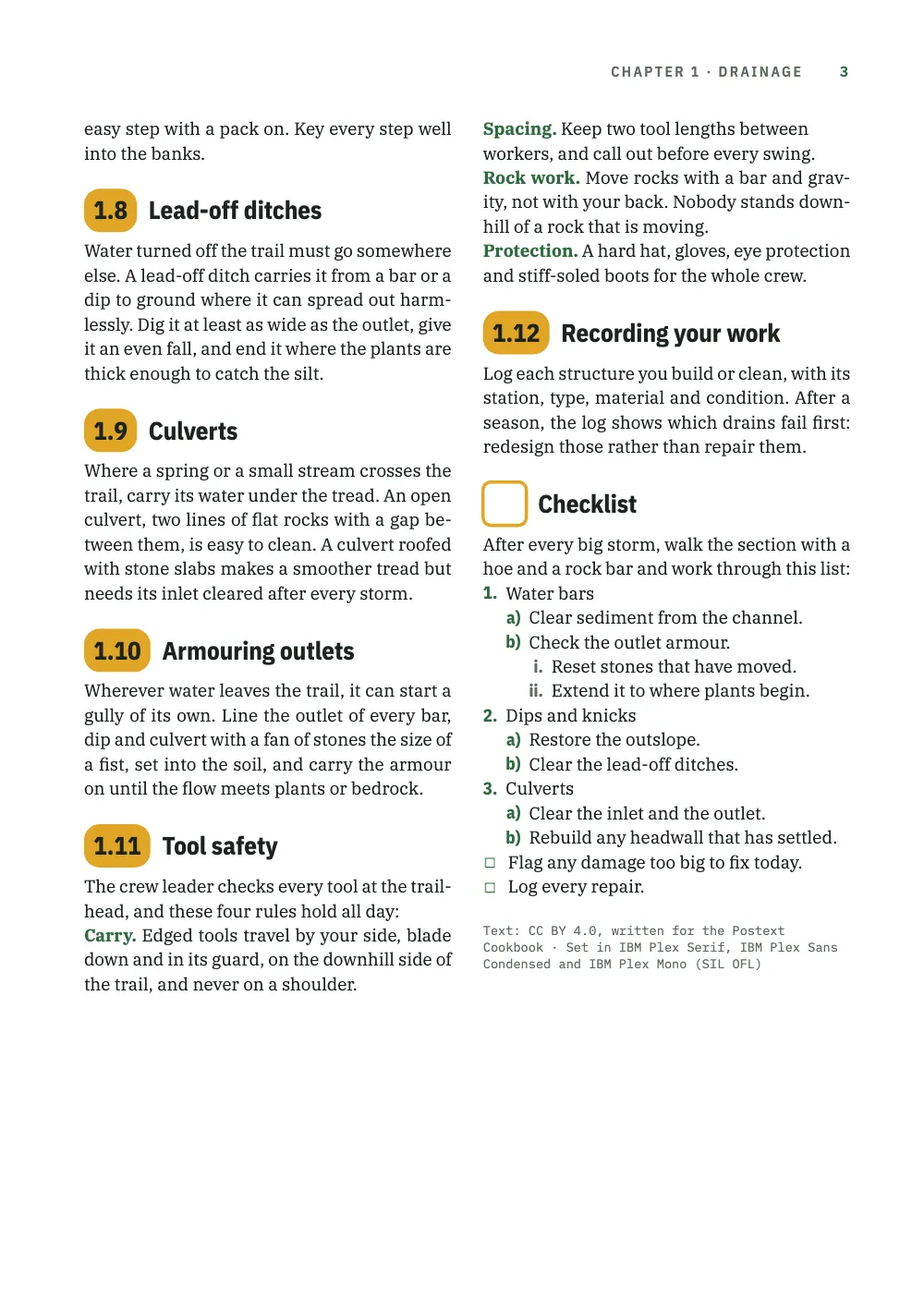
一本步道维护队野外手册的第1章Drainage,排成三页B5、每页两栏:正文用IBM Plex Serif,标题和节号用IBM Plex Sans Condensed,标签、页码和小节编号用IBM Plex Mono。章首页把章号放在一个大号琥珀色胶囊里,下面是一条步道的高程剖面,琥珀色圆点标出十二个计划新建截水沟的位置。较小的胶囊给1.1到1.12节编号,到1.10时变宽。标题1.2.1、1.5.1和1.5.2是加宽字距的大写字母,上方一条绿线。第4到6级不编号,改用字体来区分(衬线斜体、绿色窄体粗体、等宽大写),第七级用灰色斜体排工具名。安全规则以绿色的段首术语开头。一份不编号的检查清单以空心方块为标记,结束本章,其中的列表按1.、a)和i.编号,还有两个任务复选框。
这道食谱解答
- 怎样给标题编号(1、1.1、1.1.1),并给每一级设置不同样式?
- 怎样在标题旁做一个编号徽标,让它在编号变长时(9 → 10)自动变宽?
- 标题超过六级怎么办?
- 怎样定制列表:每级的项目符号、(a)/(i)编号、任务复选框、保持在网格上的间距?
简短回答
const H2 = 13.5; // pt: the number and the title share one size and one line height,
const LH = 1.2; // so, under the same top padding, they share one baseline
// Every section head starts on a grid line, so the 3 pt the pill falls short of two lines
// is the gap the grid snap leaves between the pill and the text under it.
const PILL_H = 2 * LEAD - 3, PAD = (PILL_H - H2 * LH) / 2; // pt
const face = { fontFamily: DISPLAY, fontWeight: 700, fontSize: pt(H2), lineHeight: LH };
const pill = { kind: 'text', id: 'pill', content: '{number}', ...face, color: col('ink'),
  box: { backgroundColor: col('signal'), borderRadius: mm(3), // no width: the pill is its
    padding: { top: pt(PAD), bottom: pt(PAD), left: mm(1.8), right: mm(1.8) } }, // number
  placement: at('container', 'top-left') }; // plus its padding
// 'right-of' hangs the title on the pill's right edge and aligns its lines left, so a long
// title wraps beside the number, never under it (gotcha: overflow-ellipsis-default).
const sectionTitle = (from) => ({ kind: 'text', id: 'title', content: '{titleText}', ...face,
  color: col('ink'), overflow: 'wrap', box: { padding: { top: pt(PAD) } },
  placement: at(`#${from}`, 'right-of', mm(2.2)) });
// The H1 counter, a point, the H2 counter: 1.1 … 1.12 in the pill. h2 joins headings.levels.
const h2 = { level: 2, numberingTemplate: '{1}.{2}',
  advancedDesign: { enabled: true, slot: { elements: [pill, sectionTitle('pill')] } } };
用料
做法
#1 · 把编号放进随它变宽的胶囊
代码见上文简短回答。numberingTemplate: '{1}.{2}'把章计数器和节计数器连起来,得到1.1到1.12(按级别覆盖)。带高级设计的级别不再在标题前印编号,所以由设计自己放置{number}。这里它在一个文本元素中,带填充的圆角box,不设宽度,因此胶囊的宽度等于编号加内边距:1.9是10.1 mm,1.10是12.7 mm。'right-of'把标题挂在胶囊右边缘,各行齐左,所以1.5的长标题在编号旁折行(元素定位)。标题还需要overflow: 'wrap',因为默认情况下放不下的设计文本会用省略号截断。胶囊比两条网格线的间距矮3 pt,而每个节标题都从网格线开始,所以无论标题是开栏还是跟在段落后面,这3 pt都是胶囊与下方文字之间的间隙。
#2 · 第三级加线并加宽字距
// Headings have no letterSpacing of their own; design text has, so this head is a design.
const small = { fontSize: pt(8.4), lineHeight: LH };
const DROP = 6; // pt: the rule drops this far toward the number, which keeps its grid line
const h3 = { level: 3, numberingTemplate: '{1}.{2}.{3}', // 1.5.1: restarts under every H2
  advancedDesign: { enabled: true, slot: { elements: [
    { kind: 'rule', id: 'rule', direction: 'horizontal', thickness: pt(0.75), color: col('band'),
      placement: { ...at('container', 'top-left', mm(0), pt(DROP)), size: { width: 'fill' } } },
    { kind: 'text', id: 'num', content: '{number}', fontFamily: LABEL, fontWeight: 500, ...small,
      color: col('band'), placement: at('#rule', 'below', mm(0), pt(LEAD - DROP)) },
    { kind: 'text', id: 'title', content: '{titleText}', fontFamily: DISPLAY, fontWeight: 600,
      ...small, letterSpacing: pt(1.35), textTransform: 'uppercase', color: col('ink'),
      overflow: 'wrap', placement: at('#num', 'right-of', mm(2)) },
  ] } } };
在1.4.1中,标题级别没有letterSpacing,但设计文本有,所以第3级也用设计来画:一条0.75 pt的绿线、IBM Plex Mono的编号和旁边加宽字距的标题。'{1}.{2}.{3}'的第三个计数器在每一节下重新开始,所以1.2.1和1.5.1都以1结尾。DROP只降低那条线。编号放在线下方LEAD - DROP处,这样无论DROP取什么值,编号和标题都在标题顶端下方一条网格线处。线离编号比离上面的段落近,读起来就属于标题。
#3 · 第4到6级逐级递减
const headings = { fontFamily: DISPLAY, color: col('ink'), // every head sits on the grid,
  lineHeight: pt(LEAD), marginTop: pt(LEAD), marginBottom: pt(0), // a line above, none below
  levels: [
    // Any headings object drops the H1 page break: restated (gotcha: headings-drop-h1-break).
    { level: 1, span: 'page', breakBefore: { enabled: true, parity: 'odd' },
      numberingTemplate: '{1}', advancedDesign: opener },
    h2, h3,
    // No template below level 3, so no number: each level changes face, colour or case.
    { level: 4, fontFamily: 'IBM Plex Serif', fontWeight: 400, italic: true, fontSize: pt(11) },
    { level: 5, fontSize: pt(9.4), color: col('band') },
    { level: 6, fontFamily: LABEL, fontWeight: 600, fontSize: pt(7.8), textTransform: 'uppercase' },
  ] };
没有numberingTemplate的级别不印编号,所以从第4级往下,标题改用字体、颜色或大小写来区分:第4级是衬线斜体,第5级是绿色的展示字体,第6级是半粗的等宽大写字母。在headings本身设置的行距和外边距作用于每一级,把每个标题放在网格上,上方一个空行,下方没有。只要设了headings对象,章前的默认分页就会取消,所以第1级重新声明它。
#4 · 用样式做出第七级和不编号的节
const headingStyles = [
  // Markdown stops at ######, and a heading drops *marks* (gotcha: heading-marks-dropped):
  // '###### Rock bar {style="level7"}' stays level 6, set in lower case, lighter and grey.
  { id: 'level7', fontFamily: DISPLAY, fontWeight: 500, italic: true, fontSize: pt(8.4),
    textTransform: 'none', color: col('muted') },
  // numbered: false: no number, and the H2 counter does not move. An empty {number} would
  // still paint the amber pill, so the style draws a hollow square in its place.
  { id: 'checklist', numbered: false, advancedDesign: { enabled: true, slot: { elements: [
    { kind: 'box', id: 'box', style: { borderColor: col('signal'), borderWidth: pt(1.8),
      borderRadius: mm(1.5) }, placement: { ...at('container', 'top-left'),
      size: { width: pt(PILL_H), height: pt(PILL_H) } } },
    sectionTitle('box'),
  ] } } },
];
const paragraphStyles = [
  // Run-in heads: the bold term opening each rule prints in the accent, not in body ink.
  { id: 'rules', boldColor: col('band'), firstLineIndent: pt(0) },
  { id: 'colophon', fontFamily: LABEL, fontSize: pt(6.8), lineHeight: pt(9),
    color: col('muted'), textAlign: 'left', firstLineIndent: pt(0), marginTop: pt(LEAD) },
];
Markdown到######为止,而且标题会去掉粗体和斜体标记,所以###### *Rock bar*只会印成又一个第6级。标题样式'level7'把工具名排成灰色、字重500的窄体斜体,比第6级的600轻,textTransform: 'none'关掉它们原本会继承的大写。它们读起来比上方的等宽标签低一级,虽然8.4 pt的字号比标签的7.8 pt大(标题样式)。numbered: false把检查清单排除在计数之外,所以它后面的节仍是1.13。空的{number}仍会画出琥珀色胶囊,所以这个样式自带设计,用一个空心方块代替胶囊。安全规则中绿色的段首术语来自段落样式的boldColor。
#5 · 列表标记随深度变化
// Zero margins keep lists on the grid; a '- [ ]' item's bullet becomes taskCheckboxChar, '☐'.
const unorderedLists = { gap: mm(2), marginTop: pt(0), marginBottom: pt(0), color: col('band'),
  levels: [{ level: 2, bulletChar: '–', color: col('sage') }] }; // '•' stays at level 1
// Level 1 keeps the defaults: 'arabic', never CSS's 'decimal' (gotcha: numbering-vocabularies).
const orderedLists = { fontFamily: DISPLAY, color: col('band'), gap: mm(1.6),
  marginTop: pt(0), marginBottom: pt(0), levels: [
    { level: 2, numberFormat: 'lower-alpha', separator: ')' },
    { level: 3, numberFormat: 'lower-roman', color: col('muted') }] };
每一层都从levels取自己的标记、颜色和分隔符:检查清单按1.、a)和i.计数(有序列表按级别覆盖),项目符号从绿色渐变为灰绿色(无序列表按级别覆盖)。第1级保留默认格式'arabic';若用CSS的叫法'decimal',会印出“undefined”。结束检查清单的两个- [ ]项在项目符号的位置印出taskCheckboxChar(默认是☐),颜色与第一级项目符号的绿色相同(任务列表扩展)。上下外边距都为零,每个列表都保持在基线网格上。
#6 · 在步道剖面上开始本章
const DEPTH = 96; // mm: the profile's foot, measured from the top of the page
const CLEAR = 6; // mm: the least room between the profile's foot and the text under it
const LEGEND = 7; // mm: how far the legend's top sits above the profile's foot
const big = { ...face, fontSize: pt(54), lineHeight: 1, color: col('ink') };
// A picture reserves no height in an opener (gotcha: opener-image-no-reserve), so minHeight
// reaches past the profile: the text starts on the first grid line CLEAR mm or more under it.
const opener = { enabled: true, minHeight: mm(DEPTH - TOP + CLEAR), slot: { elements: [
  { kind: 'image', id: 'profile', resourceId: 'profile',
    placement: { ...at('page', 'top-left'), size: { width: 'fill' } } },
  { kind: 'text', id: 'num', content: '{number}', ...big, box: { backgroundColor: col('signal'),
    borderRadius: mm(4), padding: { top: pt(4), bottom: pt(4), left: mm(4), right: mm(4) } },
    placement: at('container', 'top-left') },
  { kind: 'text', id: 'title', content: '{titleText}', ...big, box: { padding: { top: pt(4) } },
    placement: at('#num', 'right-of', mm(4)) },
  { kind: 'text', id: 'lead', content: '{attr.lead}', fontFamily: 'IBM Plex Serif', italic: true,
    fontSize: pt(11.5), lineHeight: 1.3, color: col('ink'), align: 'left', overflow: 'wrap',
    placement: { ...at('#num', 'below', mm(0), mm(5)), size: { width: mm(100) } } },
  // Design text: an SVG drawn as an image cannot use web fonts (gotcha: svg-no-webfonts).
  { kind: 'text', id: 'legend', content: '{attr.profile}', fontFamily: LABEL, fontWeight: 500,
    fontSize: pt(7), color: col('tint'), placement: at('page', 'top-right', mm(-OUTER),
      mm(DEPTH - LEGEND)) },
] } };
剖面是章首页的一个图片元素,锚定在页面上,与页面等宽。若改用浮动到顶部、在第1页引用的通页图,它会出现在第2页的开头(图片元素)。在章首页中,图片不占用高度,所以minHeight让正文从图片下方至少6 mm处的第一条网格线开始。绿色上的图例是设计文本,因为作为图片绘制的SVG不能使用页面的字体。大胶囊沿用节胶囊的字体和填充色,{number}印出本章自己的编号,来自numberingTemplate: '{1}'。
完整食谱
// ═══ Postext Cookbook · Nº 018 · Section heads seven levels deep ═════════════════ // https://postext.dev/en/cookbook/section-heads-field-manual // Code: MIT · Text: original (CC BY 4.0) · Picture: drawn in code (MIT) // Fonts: IBM Plex Serif, Sans Condensed, Mono (SIL OFL 1.1) · Needs postext ≥ 1.4.1 import { buildDocument, renderPageToCanvas, clearMeasurementCache, registerResourceImage, } from 'https://esm.sh/postext'; const LANG = 'en'; // @lang: the language of the sample document ('en' | 'es') const RECIPE = 'section-heads-field-manual'; // ─── 1 · Design ───────────────────────────────────────────────────────────── const palette = { // forest green for structure, a signal amber for numbers ink: '#1d2320', // text: a green-black band: '#2f6b3f', // the accent: rules, run-in terms, bullets, numbers, folios (6.4:1) signal: '#e0a526', // the number pills, with ink on them (7.3:1) sage: '#7a9e80', // the second bullet and the profile's upper contours tint: '#e9f0e6', // the opener's sky; the legend on the green (5.5:1) muted: '#5f6a62', // running heads, level 7, roman list numbers, the colophon (5.6:1) }; // The hex as well as the id: design slots read only the hex (gotcha: palette-skips-designs). const col = (id) => ({ hex: palette[id], model: 'hex', paletteId: id }); // Defaults this config does not restate link to 'main-color', so it points at the accent. const colorPalette = Object.entries({ ...palette, 'main-color': palette.band }) .map(([id, hex]) => ({ id, name: id, value: { hex, model: 'hex' } })); const TRIM = { width: 176, height: 250 }; // mm: ISO B5, a common size for field manuals const [TOP, INNER, OUTER] = [22, 16, 14]; // mm: margins; the running heads align to OUTER const LEAD = 13.2; // pt: the body leading, the pitch of the baseline grid const LINES = 44; // grid lines in the text block, so every full column ends on one baseline const [DISPLAY, LABEL] = ['IBM Plex Sans Condensed', 'IBM Plex Mono']; // with the serif text const at = (to, edge, x, y) => ({ anchor: { to, edge }, offset: { x, y } }); // #region answer: section numbers 1.1 … 1.12 in an amber pill that widens with the number const H2 = 13.5; // pt: the number and the title share one size and one line height, const LH = 1.2; // so, under the same top padding, they share one baseline // Every section head starts on a grid line, so the 3 pt the pill falls short of two lines // is the gap the grid snap leaves between the pill and the text under it. const PILL_H = 2 * LEAD - 3, PAD = (PILL_H - H2 * LH) / 2; // pt const face = { fontFamily: DISPLAY, fontWeight: 700, fontSize: pt(H2), lineHeight: LH }; const pill = { kind: 'text', id: 'pill', content: '{number}', ...face, color: col('ink'), box: { backgroundColor: col('signal'), borderRadius: mm(3), // no width: the pill is its padding: { top: pt(PAD), bottom: pt(PAD), left: mm(1.8), right: mm(1.8) } }, // number placement: at('container', 'top-left') }; // plus its padding // 'right-of' hangs the title on the pill's right edge and aligns its lines left, so a long // title wraps beside the number, never under it (gotcha: overflow-ellipsis-default). const sectionTitle = (from) => ({ kind: 'text', id: 'title', content: '{titleText}', ...face, color: col('ink'), overflow: 'wrap', box: { padding: { top: pt(PAD) } }, placement: at(`#${from}`, 'right-of', mm(2.2)) }); // The H1 counter, a point, the H2 counter: 1.1 … 1.12 in the pill. h2 joins headings.levels. const h2 = { level: 2, numberingTemplate: '{1}.{2}', advancedDesign: { enabled: true, slot: { elements: [pill, sectionTitle('pill')] } } }; // #endregion // #region ruled: level 3, a green rule over the number and a tracked capital title // Headings have no letterSpacing of their own; design text has, so this head is a design. const small = { fontSize: pt(8.4), lineHeight: LH }; const DROP = 6; // pt: the rule drops this far toward the number, which keeps its grid line const h3 = { level: 3, numberingTemplate: '{1}.{2}.{3}', // 1.5.1: restarts under every H2 advancedDesign: { enabled: true, slot: { elements: [ { kind: 'rule', id: 'rule', direction: 'horizontal', thickness: pt(0.75), color: col('band'), placement: { ...at('container', 'top-left', mm(0), pt(DROP)), size: { width: 'fill' } } }, { kind: 'text', id: 'num', content: '{number}', fontFamily: LABEL, fontWeight: 500, ...small, color: col('band'), placement: at('#rule', 'below', mm(0), pt(LEAD - DROP)) }, { kind: 'text', id: 'title', content: '{titleText}', fontFamily: DISPLAY, fontWeight: 600, ...small, letterSpacing: pt(1.35), textTransform: 'uppercase', color: col('ink'), overflow: 'wrap', placement: at('#num', 'right-of', mm(2)) }, ] } } }; // #endregion // #region opener: the chapter number in the section pill, scaled up, over the trail's profile const DEPTH = 96; // mm: the profile's foot, measured from the top of the page const CLEAR = 6; // mm: the least room between the profile's foot and the text under it const LEGEND = 7; // mm: how far the legend's top sits above the profile's foot const big = { ...face, fontSize: pt(54), lineHeight: 1, color: col('ink') }; // A picture reserves no height in an opener (gotcha: opener-image-no-reserve), so minHeight // reaches past the profile: the text starts on the first grid line CLEAR mm or more under it. const opener = { enabled: true, minHeight: mm(DEPTH - TOP + CLEAR), slot: { elements: [ { kind: 'image', id: 'profile', resourceId: 'profile', placement: { ...at('page', 'top-left'), size: { width: 'fill' } } }, { kind: 'text', id: 'num', content: '{number}', ...big, box: { backgroundColor: col('signal'), borderRadius: mm(4), padding: { top: pt(4), bottom: pt(4), left: mm(4), right: mm(4) } }, placement: at('container', 'top-left') }, { kind: 'text', id: 'title', content: '{titleText}', ...big, box: { padding: { top: pt(4) } }, placement: at('#num', 'right-of', mm(4)) }, { kind: 'text', id: 'lead', content: '{attr.lead}', fontFamily: 'IBM Plex Serif', italic: true, fontSize: pt(11.5), lineHeight: 1.3, color: col('ink'), align: 'left', overflow: 'wrap', placement: { ...at('#num', 'below', mm(0), mm(5)), size: { width: mm(100) } } }, // Design text: an SVG drawn as an image cannot use web fonts (gotcha: svg-no-webfonts). { kind: 'text', id: 'legend', content: '{attr.profile}', fontFamily: LABEL, fontWeight: 500, fontSize: pt(7), color: col('tint'), placement: at('page', 'top-right', mm(-OUTER), mm(DEPTH - LEGEND)) }, ] } }; // #endregion // #region levels: numbers down to 1.1.1, then italic, bold and label faces for 4 to 6 const headings = { fontFamily: DISPLAY, color: col('ink'), // every head sits on the grid, lineHeight: pt(LEAD), marginTop: pt(LEAD), marginBottom: pt(0), // a line above, none below levels: [ // Any headings object drops the H1 page break: restated (gotcha: headings-drop-h1-break). { level: 1, span: 'page', breakBefore: { enabled: true, parity: 'odd' }, numberingTemplate: '{1}', advancedDesign: opener }, h2, h3, // No template below level 3, so no number: each level changes face, colour or case. { level: 4, fontFamily: 'IBM Plex Serif', fontWeight: 400, italic: true, fontSize: pt(11) }, { level: 5, fontSize: pt(9.4), color: col('band') }, { level: 6, fontFamily: LABEL, fontWeight: 600, fontSize: pt(7.8), textTransform: 'uppercase' }, ] }; // #endregion // #region styles: a seventh level and an unnumbered section as heading styles; run-in terms const headingStyles = [ // Markdown stops at ######, and a heading drops *marks* (gotcha: heading-marks-dropped): // '###### Rock bar {style="level7"}' stays level 6, set in lower case, lighter and grey. { id: 'level7', fontFamily: DISPLAY, fontWeight: 500, italic: true, fontSize: pt(8.4), textTransform: 'none', color: col('muted') }, // numbered: false: no number, and the H2 counter does not move. An empty {number} would // still paint the amber pill, so the style draws a hollow square in its place. { id: 'checklist', numbered: false, advancedDesign: { enabled: true, slot: { elements: [ { kind: 'box', id: 'box', style: { borderColor: col('signal'), borderWidth: pt(1.8), borderRadius: mm(1.5) }, placement: { ...at('container', 'top-left'), size: { width: pt(PILL_H), height: pt(PILL_H) } } }, sectionTitle('box'), ] } } }, ]; const paragraphStyles = [ // Run-in heads: the bold term opening each rule prints in the accent, not in body ink. { id: 'rules', boldColor: col('band'), firstLineIndent: pt(0) }, { id: 'colophon', fontFamily: LABEL, fontSize: pt(6.8), lineHeight: pt(9), color: col('muted'), textAlign: 'left', firstLineIndent: pt(0), marginTop: pt(LEAD) }, ]; // #endregion // #region lists: bullets that fade with depth; numbers 1. then a) then i.; task boxes // Zero margins keep lists on the grid; a '- [ ]' item's bullet becomes taskCheckboxChar, '☐'. const unorderedLists = { gap: mm(2), marginTop: pt(0), marginBottom: pt(0), color: col('band'), levels: [{ level: 2, bulletChar: '–', color: col('sage') }] }; // '•' stays at level 1 // Level 1 keeps the defaults: 'arabic', never CSS's 'decimal' (gotcha: numbering-vocabularies). const orderedLists = { fontFamily: DISPLAY, color: col('band'), gap: mm(1.6), marginTop: pt(0), marginBottom: pt(0), levels: [ { level: 2, numberFormat: 'lower-alpha', separator: ')' }, { level: 3, numberFormat: 'lower-roman', color: col('muted') }] }; // #endregion // Running heads, HEAD mm from the trim: folio and book on versos, chapter and folio on rectos. const HEAD = 12; // mm; an opener keeps only a drop folio, HEAD mm above its foot const FOLIO_GAP = 9; // mm from a folio to the title beside it const runHead = { fontFamily: DISPLAY, fontWeight: 600, fontSize: pt(7.8), letterSpacing: pt(1.2), textTransform: 'uppercase', color: col('muted') }; const folio = { ...runHead, fontFamily: LABEL, color: col('band') }; const head = (id, content, parity, edge, x, style = runHead) => ({ kind: 'text', id, content, parity, pages: 'body', ...style, placement: at('page', edge, mm(x), mm(HEAD)) }); const config = () => ({ // a factory: the engine caches resolved configs per object locale: t({ en: 'en-us', es: 'es' }), // exact codes (gotcha: hyphenation-locales) colorPalette, page: { sizePreset: 'custom', width: mm(TRIM.width), height: mm(TRIM.height), dpi: 150, margins: { top: mm(TOP), bottom: mm(TRIM.height - TOP - (LINES * LEAD * 25.4) / 72), left: mm(INNER), right: mm(OUTER), mirror: true } }, layout: { layoutType: 'double', gutterWidth: mm(6) }, bodyText: { fontFamily: 'IBM Plex Serif', fontSize: pt(9.4), lineHeight: pt(LEAD), color: col('ink'), boldColor: col('ink'), italicColor: col('ink'), referenceColor: col('ink'), textAlign: 'justify', firstLineIndent: mm(4), indentAfterHeading: false, minWordSpacing: 0.85, maxWordSpacing: 1.4, // a narrow band: an even grey, line to line maxRuntTracking: 0 }, // runt fixes tighten spaces only (gotcha: runt-tracking-unpainted) headings, headingStyles, paragraphStyles, unorderedLists, orderedLists, header: { elements: [head('v-folio', '{pageNumber}', 'even', 'top-left', OUTER, folio), head('v-book', '{title}', 'even', 'top-left', OUTER + FOLIO_GAP), head('r-chapter', t({ en: 'Chapter {chapterNumber} · {chapterTitle}', es: 'Capítulo {chapterNumber} · {chapterTitle}' }), 'odd', 'top-right', -(OUTER + FOLIO_GAP)), head('r-folio', '{pageNumber}', 'odd', 'top-right', -OUTER, folio), ] }, footer: { elements: [{ kind: 'text', id: 'drop-folio', content: '{pageNumber}', pages: 'opener', ...folio, placement: at('page', 'bottom', mm(0), mm(-HEAD)) }] }, }); // ─── 2 · Content ──────────────────────────────────────────────────────────── const markdown = String.raw`---Markdown样例 · 132行 · content.en.md
title: "Trail Crew Field Manual" subtitle: "Maintenance with hand tools" author: "Postext Cookbook" --- # Drainage {lead="Where and how to build the drains of a trail, from an outsloped tread to a stone culvert." profile="Lookout Ridge Trail, km 0 to 4.2 · twelve sites flagged for new water bars"} In one season, boots pack a new trail until its tread sheds rain like a metal roof, and the rain runs down it, picking up speed and soil. This chapter shows how to turn that water off the trail before it cuts a rut. ## Why water is the enemy The faster water runs, the more soil it carries away, and it runs faster the steeper the grade and the longer the run. A sheet of water that barely moves on a flat tread turns into a cutting stream on a long, steep pitch. Once a rut forms, hikers walk beside it, the tread widens and each storm digs the rut deeper. Drainage breaks the run into short pieces, so the water never gets going. ## Reading the ground Walk the section during a storm if you can, or straight after one. Water will show you where it wants to go. Look for these signs: - silt fans below a steep pitch - puddles that hikers step around, wearing a new path beside them - a rut down the middle of the tread - shallower than a boot sole: reshape it - deeper: it needs a water bar - roots and rocks standing proud of the tread ### Flag before you dig Mark every site with flagging tape before the crew arrives, and record its station in the log: its distance from the trailhead, the grade and the structure you propose. When the section is walked and flagged, a crew leader can plan the day in minutes. ## Outslope first The cheapest drain is a tread that tilts. Shape it to fall by about 5 per cent toward the downhill edge, 3 cm across a tread 60 cm wide, so that water crosses it in a thin sheet instead of running down its length. Rake off the berm of loose soil that builds up along the outer edge, since a berm turns the tread back into a gutter. Check the tilt with a short level across the tread; an outslope too slight to see still sheds water, and a steeper one only turns ankles. ## Grade dips In a grade dip, the grade reverses for a short way: the trail drops, rises again for a few metres, then resumes its climb, and water leaves at the low point. Built into new trail, dips are almost invisible to hikers and need little upkeep. On an old trail you can often carve one with a grub hoe where the grade eases. ## Water bars: turning water off steep tread Where the grade is too steep for a dip, a water bar turns the flow across the tread. It is a line of rock or timber set into the tread at an angle, its top a little above the surface, with an armoured outlet at its lower end. ### Laying out a bar Skew the bar 30 to 45 degrees off the square, so the water keeps enough speed to carry its silt away; a bar laid straight across the tread fills with sediment after the first storm. Space the bars more closely as the grade steepens: on loose soil at 10 per cent, one every 25 or 30 metres, and closer still on a steeper pitch. #### Choosing the spot Place the bar where the water can leave with ease, in a natural hollow on the downhill side. Never let it drain onto a switchback or over a steep drop, where the outflow would cut into the slope below. ### Building a rock bar Dig a trench across the tread at the angle you chose, two thirds as deep as your tallest rock is high. Set the rocks on edge and shoulder to shoulder, with at least two thirds of each one buried, and key the upper end 30 cm into the bank so that water cannot run around it. #### The trench Keep the trench walls vertical and its floor on firm mineral soil. Throw the spoil well downhill, clear of the tread, and keep the best for backfill. On loose soil, widen the trench and line its downhill side with smaller stones, so that the bar rests on something firm. ##### Tools for the trench A grub hoe and a shovel open it, and two steel bars set the rocks. ###### Steel bars Each is about 1.5 m long; the heavier weighs as much as a loaded daypack. Lay them down when not in use, never upright against a tree. ###### Rock bar {style="level7"} The heavy one: a lever to pry rocks loose and walk them into place. Keep your fingers clear of the pivot rock and lift with your legs. ###### Tamping bar {style="level7"} The lighter bar, with a flat tamping foot at one end. Backfill in layers no thicker than a hand and tamp each one hard: the first flow carries off loose fill behind a bar. ## Knicks On flat or rolling tread where puddles gather, a knick drains water with no structure at all. It is a shallow half-moon about 3 metres long, shaved into the tread so its outer edge sits a hand’s depth below the rest. ## Check steps Where the trail climbs a gully and the water cannot be turned aside, slow it down instead. Check steps are low risers of stone or timber set across the tread, each one holding back a level bed of soil, and the water loses speed at every landing. A rise of 15 to 20 cm makes an easy step with a pack on. Key every step well into the banks. ## Lead-off ditches Water turned off the trail must go somewhere else. A lead-off ditch carries it from a bar or a dip to ground where it can spread out harmlessly. Dig it at least as wide as the outlet, give it an even fall, and end it where the plants are thick enough to catch the silt. ## Culverts Where a spring or a small stream crosses the trail, carry its water under the tread. An open culvert, two lines of flat rocks with a gap between them, is easy to clean. A culvert roofed with stone slabs makes a smoother tread but needs its inlet cleared after every storm. ## Armouring outlets Wherever water leaves the trail, it can start a gully of its own. Line the outlet of every bar, dip and culvert with a fan of stones the size of a fist, set into the soil, and carry the armour on until the flow meets plants or bedrock. ## Tool safety The crew leader checks every tool at the trailhead, and these four rules hold all day: :::paragraphs{style="rules"} **Carry.** Edged tools travel by your side, blade down and in its guard, on the downhill side of the trail, and never on a shoulder. **Spacing.** Keep two tool lengths between workers, and call out before every swing. **Rock work.** Move rocks with a bar and gravity, not with your back. Nobody stands downhill of a rock that is moving. **Protection.** A hard hat, gloves, eye protection and stiff-soled boots for the whole crew. ::: ## Recording your work Log each structure you build or clean, with its station, type, material and condition. After a season, the log shows which drains fail first: redesign those rather than repair them. ## Checklist {style="checklist"} After every big storm, walk the section with a hoe and a rock bar and work through this list: 1. Water bars 1. Clear sediment from the channel. 2. Check the outlet armour. 1. Reset stones that have moved. 2. Extend it to where plants begin. 2. Dips and knicks 1. Restore the outslope. 2. Clear the lead-off ditches. 3. Culverts 1. Clear the inlet and the outlet. 2. Rebuild any headwall that has settled. - [ ] Flag any damage too big to fix today. - [ ] Log every repair. :::paragraphs{style="colophon"} Text: CC BY 4.0, written for the Postext Cookbook · Set in IBM Plex Serif, IBM Plex Sans Condensed and IBM Plex Mono (SIL OFL) :::`; // content.<lang>.md, inlined by the Cookbook // The profile is a resource that no :ref cites: only the opener's image element draws it. const resources = [{ id: 'profile', typeId: 'figure', kind: 'svg', createdAt: 0, updatedAt: 0, svg: { fileId: 'profile.svg', width: TRIM.width * 10, height: DEPTH * 10 }, altText: t({ en: 'A 376 m climb in 4.2 km; amber dots mark twelve sites flagged for water bars.', es: 'Subida de 376 m en 4,2 km; puntos ámbar en doce sitios balizados para desviadores.' }) }]; // #region art: the trail's elevation profile, drawn in code with a seeded PRNG function profileSvg() { // Survey points, distance (km) and elevation (m): an easy valley, then the climb. const KM = 4.2; const pts = [[0, 1180], [0.8, 1190], [1.5, 1204], [2.1, 1226], [2.6, 1262], [3.0, 1330], [3.35, 1412], [3.7, 1486], [4.0, 1535], [4.2, 1556]]; const Y0 = DEPTH - 12; // mm: where 1180 m sits in the picture const K = 50 / 376; // mm of picture per metre of climb const elev = (d) => { // smoothstep between survey points: monotone, no overshoot const next = pts.findIndex(([x]) => x > d); const i = next < 0 ? pts.length - 2 : Math.max(0, next - 1); const [[x0, e0], [x1, e1]] = [pts[i], pts[i + 1]]; const u = Math.min(1, (d - x0) / (x1 - x0)); return e0 + (e1 - e0) * u * u * (3 - 2 * u); }; let seed = 18; // Mulberry32: the same wobble on every run const rand = () => { seed = (seed + 0x6d2b79f5) | 0; let r = Math.imul(seed ^ (seed >>> 15), 1 | seed); r = (r + Math.imul(r ^ (r >>> 7), 61 | r)) ^ r; return ((r ^ (r >>> 14)) >>> 0) / 4294967296; }; const N = 220; const crest = Array.from({ length: N + 1 }, (_, i) => [(TRIM.width * i) / N, Y0 - (elev((KM * i) / N) - 1180) * K + (rand() - 0.5) * 0.5]); const xy = (list) => list.map(([x, y]) => `${x.toFixed(2)} ${y.toFixed(2)}`).join('L'); // Contour bands every 50 m, from the band green in the valley to sage on the ridge: each // band is the profile clipped between two contours. const mix = (a, b, u) => '#' + [1, 3, 5].map((i) => Math.round(parseInt(a.slice(i, i + 2), 16) * (1 - u) + parseInt(b.slice(i, i + 2), 16) * u).toString(16).padStart(2, '0')).join(''); const bands = Array.from({ length: 8 }, (_, k) => { const floor = Y0 - k * 50 * K; const top = crest.map(([x, y]) => [x, Math.min(floor, Math.max(y, floor - 50 * K))]); return `<path d="M0 ${floor}L${xy(top)}L${TRIM.width} ${floor}Z" ` + `fill="${mix(palette.band, palette.sage, k / 7)}"/>`; }).join(''); // The twelve flagged sites, placed one per 32 m of climb: they crowd where it steepens. const dots = Array.from({ length: 12 }, (_, k) => { const target = 1180 + 32 * (k + 0.5); let [lo, hi] = [0, KM]; for (let it = 0; it < 40; it++) { const mid = (lo + hi) / 2; if (elev(mid) < target) lo = mid; else hi = mid; } return `<circle cx="${((TRIM.width * lo) / KM).toFixed(2)}" ` + `cy="${(Y0 - (target - 1180) * K).toFixed(2)}" r="1.9" fill="${palette.signal}" ` + `stroke="${palette.ink}" stroke-width="0.35"/>`; }).join(''); return `<svg xmlns="http://www.w3.org/2000/svg" width="${TRIM.width * 10}" ` + `height="${DEPTH * 10}" viewBox="0 0 ${TRIM.width} ${DEPTH}">` + `<rect width="${TRIM.width}" height="${DEPTH}" fill="${palette.tint}"/>` + `<path d="M0 ${DEPTH}L${xy(crest)}L${TRIM.width} ${DEPTH}Z" fill="${palette.band}"/>` + `${bands}<path d="M${xy(crest)}" fill="none" stroke="${palette.ink}" ` + `stroke-width="0.7" stroke-linejoin="round"/>${dots}</svg>`; } // #endregion // ─── 3 · Fonts ────────────────────────────────────────────────────────────── // Every face the pages paint, loaded before the first build (gotcha: fonts-first). const FONTS = { 'IBM Plex Serif': ['400', '400i', '700'], 'IBM Plex Sans Condensed': ['500i', '600', '700'], 'IBM Plex Mono': ['400', '500', '600'] }; // ─── 4 · Build & show ─────────────────────────────────────────────────────── await loadFonts(FONTS, markdown); await loadSvg('profile.svg', profileSvg()); const doc = await buildWithFonts(() => buildDocument({ markdown, resources }, config()), markdown); showPages(doc, { title: t({ en: 'Section heads seven levels deep', es: 'Títulos de sección hasta siete niveles' }) });工具包 · core, fonts, viewer, images:每道食谱都相同 · 270行
// ─── Kit ── helpers shared by every Cookbook recipe · postext.dev/cookbook ───── // ─── Kit · core v1 ── the same in every recipe · postext.dev/cookbook ───────── function mm(value) { return { value, unit: 'mm' }; } function pt(value) { return { value, unit: 'pt' }; } function em(value) { return { value, unit: 'em' }; } /** The sample language's string: t({ en: 'Figure', es: 'Figura' }). */ function t(strings) { return strings[LANG] ?? Object.values(strings)[0]; } /** A file in this recipe's assets folder, served from the Postext repo by jsDelivr. */ function asset(file) { return `https://cdn.jsdelivr.net/gh/drnachio/postext@main/cookbook/${RECIPE}/assets/${file}`; } // ─── Kit · fonts v1 ── the same in every recipe · postext.dev/cookbook ──────── // Postext measures text with the faces the browser has loaded, and caches the // widths, so every face must be ready before the first build. Faces come from // Fontsource: the same static files the PDF embeds, so screen and PDF agree. /** faces = { 'Family Name': ['400', '400i', '700'] }. `text` is the sample: * letters beyond Latin-1 (č, ł, ő…) also load the latin-ext files. With * `optional`, a face Fontsource does not ship is skipped instead of failing. * Resolves to the number of faces added. */ async function loadFonts(faces, text = '', { optional = false } = {}) { kitStatus('Loading fonts…'); const ranges = { latin: 'U+0000-00FF,U+0131,U+0152-0153,U+02BB-02BC,U+02C6,U+02DA,U+02DC,U+0304,U+0308,U+0329,' + 'U+2000-206F,U+20AC,U+2122,U+2191,U+2193,U+2212,U+2215,U+FEFF,U+FFFD', 'latin-ext': 'U+0100-02BA,U+02BD-02C5,U+02C7-02CC,U+02CE-02D7,U+02DD-02FF,U+0304,U+0308,U+0329,' + 'U+1D00-1DBF,U+1E00-1E9F,U+1EF2-1EFF,U+2020,U+20A0-20AB,U+20AD-20C0,U+2113,U+2C60-2C7F,U+A720-A7FF', }; const subsets = /[Ā-˿Ḁ-ỿ]/.test(text) ? ['latin', 'latin-ext'] : ['latin']; const jobs = []; let added = 0; for (const [family, specs] of Object.entries(faces)) { const id = fontsourceId(family); const meta = optional ? await fontsourceMeta(family) : null; for (const spec of new Set(specs)) { const weight = parseInt(spec, 10); const style = spec.endsWith('i') ? 'italic' : 'normal'; if (hasFace(family, weight, style)) continue; if (optional && !(meta?.weights.includes(weight) && meta.styles.includes(style))) continue; for (const subset of subsets) { const url = `https://cdn.jsdelivr.net/npm/@fontsource/${id}@5/files/${id}-${subset}-${weight}-${style}.woff2`; const face = new FontFace(family, `url(${url}) format('woff2')`, { weight: String(weight), style, unicodeRange: ranges[subset] }); jobs.push(face.load().then((ready) => { document.fonts.add(ready); added++; }, () => { if (subset === 'latin' && !optional) throw new Error(`Fontsource has no ${family} ${weight} ${style}`); })); } } } await Promise.all(jobs).catch((error) => { kitFail(error); throw error; }); return added; } /** Runs `build` (a buildDocument or buildBundle call) and checks the faces * the pages use. A regular face missing from FONTS is loaded with a warning; * bold and italic variants are loaded when the family ships them. Then the * measurement caches are cleared and the build runs again. */ async function buildWithFonts(build, text = '') { const tried = new Set(); for (let round = 0; round < 3; round++) { kitStatus('Laying out…'); await new Promise(requestAnimationFrame); // let the status paint first const result = await Promise.resolve().then(build).catch((error) => { kitFail(error); throw error; }); const wanted = { base: {}, variants: {} }; for (const { font, base } of [result].flat().flatMap(fontStringsOf)) { const { family, weight, style } = parseFont(font); const key = `${family}|${weight}|${style}`; if (tried.has(key) || hasFace(family, weight, style)) continue; tried.add(key); (wanted[base ? 'base' : 'variants'][family] ??= []).push(`${weight}${style === 'italic' ? 'i' : ''}`); } if (Object.keys(wanted.base).length) { console.warn(`[cookbook] FONTS does not list ${JSON.stringify(wanted.base)}: loading them.`); } const added = await loadFonts(wanted.base, text) + await loadFonts(wanted.variants, text, { optional: true }); if (added === 0) return result; clearMeasurementCache(); } throw new Error('The fonts did not settle after three builds.'); } /** Every font string of the layout. `base` marks a block's own face; its * bold, italic and bold-italic variants are listed whether or not used. */ function fontStringsOf(doc) { const found = new Map(); const walk = (node) => { if (!node || typeof node !== 'object') return; if (Array.isArray(node)) { node.forEach(walk); return; } for (const [key, value] of Object.entries(node)) { if (typeof value === 'string' && /fontString$/i.test(key)) { found.set(value, found.get(value) || key === 'fontString'); } else if (value && typeof value === 'object') walk(value); } }; walk(doc.pages); walk(doc.blocks); return [...found].map(([font, base]) => ({ font, base })); } /** '700 37.5px Open Sans' / 'italic 400 13px "Source Serif 4"' → { family, weight, style }. * A string with no weight ('95.8px Young Serif', from a design text) is 400. */ function parseFont(font) { const m = /^(?:(italic|oblique)\s+)?(?:small-caps\s+)?(?:(\d+|bold|normal)\s+)?[\d.]+px\s+(.+)$/.exec(font.trim()); if (!m) throw new Error(`Unexpected font string: ${font}`); const weight = m[2] === 'bold' ? 700 : !m[2] || m[2] === 'normal' ? 400 : Number(m[2]); return { family: m[3].replace(/^["']|["']$/g, ''), weight, style: m[1] ? 'italic' : 'normal' }; } /** True when a loaded FontFace covers exactly this family, weight and style * (document.fonts.check() is also true for families nobody declared). */ function hasFace(family, weight, style) { for (const face of document.fonts) { if (face.status !== 'loaded' || face.style !== style) continue; if (face.family.replace(/^["']|["']$/g, '') !== family) continue; const [low, high = low] = face.weight.split(' ').map(Number); if (weight >= low && weight <= high) return true; } return false; } /** Fontsource's id for a family: 'Source Serif 4' → 'source-serif-4'. */ function fontsourceId(family) { return family.toLowerCase().replace(/\s+/g, '-'); } /** The weights and styles a family ships ({ weights: [400, 700], styles: ['normal', 'italic'] }), or null. */ function fontsourceMeta(family) { fontsourceMeta.cache ??= new Map(); const id = fontsourceId(family); if (!fontsourceMeta.cache.has(id)) { fontsourceMeta.cache.set(id, fetch(`https://api.fontsource.org/v1/fonts/${id}`) .then((res) => (res.ok ? res.json() : null), () => null)); } return fontsourceMeta.cache.get(id); } // ─── Kit · viewer v1 ── the same in every recipe · postext.dev/cookbook ─────── /** Shows the pages as facing spreads on a dark desk: the first page is a * recto on its own, then verso | recto pairs, as in a bound book. Pages * are painted when they scroll near the screen. */ function showPages(docs, { title, width = 460 } = {}) { const root = viewer(title); const pages = [docs].flat().flatMap((doc) => doc.pages.map((page) => ({ doc, page, n: (doc.pageIndexOffset ?? 0) + page.index }))); const spreads = []; let verso = null; for (const p of pages) { if (p.n % 2 === 1) { if (verso) spreads.push([verso, null]); verso = p; } else { spreads.push([verso, p]); verso = null; } } if (verso) spreads.push([verso, null]); const density = Math.min(window.devicePixelRatio || 1, 2); showPages.painter?.disconnect(); const painter = new IntersectionObserver((entries) => { for (const { isIntersecting, target } of entries) { if (!isIntersecting) continue; painter.unobserve(target); const { doc, page } = target.postext; renderPageToCanvas(page, doc, target, { scale: (width * density) / page.width }); } }, { rootMargin: '800px' }); showPages.painter = painter; root.replaceChildren(...spreads.map((pair) => { const spread = document.createElement('div'); spread.className = 'pt-spread'; for (const p of pair) { const figure = document.createElement('figure'); if (p) { const label = p.page.pageLabel || String(p.n + 1); const canvas = document.createElement('canvas'); canvas.postext = p; canvas.style.aspectRatio = `${p.page.width} / ${p.page.height}`; canvas.setAttribute('role', 'img'); canvas.setAttribute('aria-label', `Page ${label}`); const folio = document.createElement('figcaption'); folio.textContent = label; figure.append(canvas, folio); painter.observe(canvas); } else figure.className = 'pt-blank'; spread.append(figure); } return spread; })); kitStatus(`${pages.length} ${pages.length === 1 ? 'page' : 'pages'}`); document.documentElement.dataset.postext = 'ready'; return pages.length; } /** The desk, the bar and the error reporting, created once. */ function viewer(title) { if (!document.getElementById('pt-kit')) { document.head.insertAdjacentHTML('beforeend', `<style id="pt-kit"> :root { color-scheme: dark; } body { margin: 0; background: #0e1014; color: #b9bcc4; font: 13px/1.45 system-ui, sans-serif; } #pt-bar { position: sticky; top: 0; z-index: 1; display: flex; flex-wrap: wrap; align-items: center; gap: 6px 16px; padding: 10px 16px; background: rgb(14 16 20 / .92); backdrop-filter: blur(6px); border-bottom: 1px solid #23262d; } #pt-bar strong { color: #f4f1ea; font-weight: 600; } #pt-actions { display: flex; gap: 12px; margin-left: auto; } #pt-actions a, #pt-actions button { color: #d8a21a; font: inherit; background: none; border: 0; padding: 0; cursor: pointer; } #pages { display: grid; justify-items: center; gap: 48px; padding: 32px 16px 72px; } .pt-spread { display: flex; } .pt-spread figure { margin: 0; width: min(460px, 44vw); } .pt-spread canvas { display: block; width: 100%; background: #fff; box-shadow: 0 1px 2px rgb(0 0 0 / .5), 0 22px 44px -16px rgb(0 0 0 / .8); } .pt-spread figure:first-child canvas { box-shadow: inset -14px 0 14px -14px rgb(0 0 0 / .18), 0 1px 2px rgb(0 0 0 / .5), 0 22px 44px -16px rgb(0 0 0 / .8); } .pt-spread figcaption { margin-top: 10px; text-align: center; font: 600 10px/1 system-ui, sans-serif; letter-spacing: .18em; text-transform: uppercase; color: #6c7079; } .pt-blank { visibility: hidden; } @media (max-width: 760px) { .pt-spread { flex-direction: column; gap: 32px; } .pt-spread figure { width: min(460px, 92vw); } .pt-blank { display: none; } } </style>`); document.body.insertAdjacentHTML('afterbegin', '<header id="pt-bar"><strong id="pt-title"></strong><span id="pt-status" role="status"></span><span id="pt-actions"></span></header>'); document.getElementById('pt-title').textContent = document.title || 'Postext'; addEventListener('error', (event) => kitFail(event.error ?? event.message)); addEventListener('unhandledrejection', (event) => kitFail(event.reason)); } if (title) document.getElementById('pt-title').textContent = title; return document.getElementById('pages') ?? document.body.appendChild(Object.assign(document.createElement('main'), { id: 'pages' })); } function kitStatus(text) { viewer(); document.getElementById('pt-status').textContent = text; } function kitFail(error) { document.documentElement.dataset.postext = 'error'; kitStatus(`Error: ${error?.message ?? error}`); } // ─── Kit · images v1 ── recipes with pictures · postext.dev/cookbook ────────── /** Registers a photo or PNG for the canvas and keeps its bytes for the PDF. * fetch → ImageBitmap never taints the canvas (a plain cross-origin <img> would). */ async function loadImage(fileId, url) { const res = await fetch(url); if (!res.ok) throw new Error(`Image not found (${res.status}): ${url}`); const bytes = new Uint8Array(await res.arrayBuffer()); registerResourceImage(fileId, await createImageBitmap(new Blob([bytes]))); (loadImage.bytes ??= new Map()).set(fileId, bytes); } /** Registers SVG markup (drawn in code, or fetched) as a vector image. */ async function loadSvg(fileId, svg) { const img = new Image(); img.src = `data:image/svg+xml;charset=utf-8,${encodeURIComponent(svg)}`; await img.decode(); registerResourceImage(fileId, img); (loadImage.bytes ??= new Map()).set(fileId, new TextEncoder().encode(svg)); } /** renderToPdf({ resourceBytes: imageBytes }) */ function imageBytes(fileId) { return loadImage.bytes?.get(fileId); } /** renderToHtml({ resourceImageUrl: imageUrl }) */ function imageUrl(fileId) { const bytes = imageBytes(fileId); if (!bytes) return undefined; imageUrl.urls ??= new Map(); if (!imageUrl.urls.has(fileId)) { const type = /\.svg$/i.test(fileId) ? 'image/svg+xml' : /\.png$/i.test(fileId) ? 'image/png' : 'image/jpeg'; imageUrl.urls.set(fileId, URL.createObjectURL(new Blob([bytes], { type }))); } return imageUrl.urls.get(fileId); } // ─── /Kit ───────────────────────────────────────────────────────────────────────
组合好的script.js可以直接运行:把它粘贴到任何页面的模块脚本中,或在CodePen上打开这道食谱。 GitHub上的食谱文件夹 ↗
变化
#胶囊里去掉章号
把章计数器从模板中去掉,胶囊就读作1到12,到10时变宽;第3级仍印1.5.1,直到它自己的模板也去掉{1}。
-const h2 = { level: 2, numberingTemplate: '{1}.{2}',
+const h2 = { level: 2, numberingTemplate: '{2}',#让所有胶囊同宽
设一个固定宽度(1.10的宽度),每个编号就居中排在等宽的胶囊里,标题对齐成一列。
-  placement: at('container', 'top-left') }; // 再加上内边距
+ placement: { ...at('container', 'top-left'), size: { width: mm(12.7) } } };常见问题
易错点
传入任何headings对象都会关掉H1换页
默认情况下,H1换页到右页(always-odd),但只要传入headings对象,这个默认值就会被重置,于是各章接排,span: 'page'也不起作用。在每份配置中重新写明headings.levels[0].breakBefore: { enabled: true, parity }。 从右页开始的章 →
易错点
标题会丢掉粗体和斜体标记
在postext 1.4.1中,标题行会丢失行内标记:###### *Rock bar*印出的是第6级普通字体的Rock bar,没有星号,也不是斜体。第七级标题,或标题中要单独突出的词,需要改用标题样式({style="…"})或高级设计。 标题样式 →
易错点
替换调色板时,设计元素和引用颜色不会跟着变
postext 1.4.1把colorPalette读入文字样式(正文、标题、列表、题注、表格、框),但不读入页眉、页脚、章首页和篇章页的元素,也不读入bodyText.referenceColor:它们保留写在paletteId旁边的十六进制颜色。替换调色板时(例如做深色屏幕版或换色),在构建前根据colorPalette重写每一个关联的颜色。 语义调色板 →
易错点
章首页的图片从不计入它预留的高度
在postext 1.4.1中,高级设计标题计算预留高度时不算其中的图片:文字、线条和框都计入,即使它们锚定在页面上;但图片(例如出血铺满页面顶部的图)不预留任何空间,所以正文可能排到它上面。把minHeight设为正文应当开始的位置。 设计过的章首页 →
易错点
'top'浮动体不会出现在引用它的那一页
浮动体不会排在自己的引用之前,所以在第N页引用的整页宽'top'浮动体会出现在第N+1页的顶部。把引用提前,或者使用position 'auto'或'bottom',它们可以占用引用页的底部。 图的放置 →
易错点
SVG <img>中的文字不能使用网络字体
SVG作为图像绘制,而图像无法使用页面的网络字体,所以其中的标签会退回系统字体。把文字转成轮廓,在SVG中嵌入@font-face子集,或者把标签移到题注里。 作为资源的图和表 →
易错点
列表写'arabic',资源写'roman-upper',页码写'upper-roman'
每种编号设置对格式的拼写都不同:列表的numberFormat用'arabic'(写'decimal'会打印出"undefined"),资源类型的counterFormat用'roman-upper',页码和:::numbering用'upper-roman'。 编号列表 →
易错点
大多数警告只在沙盒中出现
未知的id、样式和指令,缺失的字体和过松的行,都由沙盒检查,而不是引擎:CodePen示例只能得到doc.warnings和parseMarkdownWithIssues。未知样式会悄悄退回默认,未知指令会作为文字打印出来,所以要核对你的id。 警告与诊断 →
易错点
不换行空格仍然会断行
在postext 1.4.1中,断行器把U+00A0当作普通空格,所以0.08 %、2.006 s或Section 2可能被拆到两行。把两部分连写(0.08%),或者改写句子。 转义与字面字符 →
易错点
frontmatter的每个值都加引号
YAML会把title: 1984读成数字,把日期读成Date对象;非字符串的值在占位符中打印为空,PDF也会没有标题。每个值都加引号:title: "1984"。 文档元数据 →
易错点
排版前加载所有字体
排版用浏览器已加载的字体测量文字,并缓存宽度,所以首次构建之后才到的字体会造成断行错误,PDF也不再与屏幕一致。先加载所有字重和样式;有字体迟到时,重新构建前调用clearMeasurementCache()。 排版前加载字体 →
易错点
消除孤字时收紧的字距可能根本不绘制
在postext 1.4.1中,段落以孤字结尾时,排版会把它排短一行:先收紧词间距,再用最多maxRuntTracking个千分之一em的负字距。Canvas和PDF渲染器只绘制大于零的字距,所以收紧了字距的段落印出来时并没有收紧:两端对齐的行从词间空格中扣掉了这部分差额,显得拥挤,末行还可能超出行长,在栏边被裁掉。设置bodyText.maxRuntTracking: 0,保留词间距的修正,再改写重新出现的孤字。 段末孤行、段首孤行与孤字 →
- 第七级其实是带
level7样式的六级标题,所以示例中没有哪个标题比前一个标题低一级以上:The trench、Tools for the trench、STEEL BARS和Rock bar依次是4、5、6、6。沙盒的警告“标题层级跳跃”报告的正是这种跳级,所以本章不会出现它。 - 以冒号结尾的引导句,只有在第一项能放进剩余空间时才与列表留在一起:1.4.1中这条规则只检查一行,所以两行的第一项遇到只剩一行的空间时,会独自移到下一栏,把冒号留在原处。1.2节在两个版本中都把第一项控制在一行以内。
致谢
- 文本
- 原创文字, CC BY 4.0
- 字体
- IBM Plex Serif (SIL OFL 1.1) · IBM Plex Sans Condensed (SIL OFL 1.1) · IBM Plex Mono (SIL OFL 1.1)