باختصار
غلاف مجلة عن الطعام والزراعة وصفحاتها الأولى، بغلاف مصوَّر وصفحة محتويات. تبيّن كيف تحدّد لكل باب لونه الخاص الذي يرافقه في صفحاته.
ما الذي ستنضده
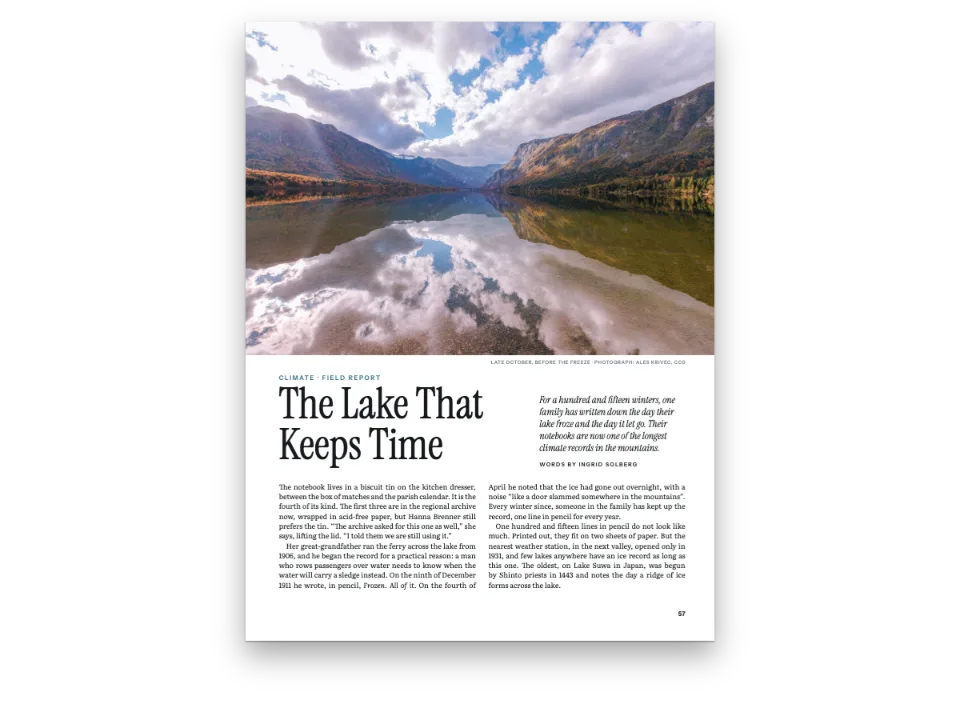
ست صفحات من عدد من FALLOW، مجلة فصلية متخيَّلة عن الطعام والأرض، على صفحة قياسها 230 × 300 mm. وادٍ توسكاني ينزف خارج حواف الغلاف تحت اسم المجلة بخط Bodoni بحجم 118 pt، وثلاثة عناوين غلاف على لوح بلون الورق، سطر كلٍّ منها التمهيدي بلون بابه، والسعر والرمز الشريطي في الزاوية. في الصفحة 2 المحتويات المولَّدة: لسان ملوّن لكل باب، وتحته عنوان الموضوع ورقم صفحته ومقدمته. وفي العمود الأيمن كلمة المحرر والمساهمون وبيانات الطبع. الأبواب التالية طينية وزيتونية وخمرية. يبدأ كل موضوع بصورة تنزف عبر رأس الصفحة ولوح بلون الباب يرتفع داخلها، وتأخذ ألسنة أرقام صفحاته ونقاط قوائمه وإطاراته ذلك اللون. تضبط اللونَ كتلةُ :::part فوق كل موضوع، ولا تفتتح صفحةً فاصلة.
تجيب هذه الوصفة عن
- كيف أصمم غلافًا وصفحة عنوان مختصر وصفحة عنوان وصفحة بيانات النشر؟
- كيف أضيف جدول محتويات يحدّث نفسه (نقاط توجيه، أرقام صفحات، مؤلفون، صفوف الأجزاء)؟
- كيف أقسّم كتابًا إلى أجزاء أو أقسام، لكل منها لونه وصفحته الفاصلة؟
- كيف أعطي كل فصل صورته أو لونه أو شكل افتتاحه الخاص؟
الجواب المختصر
const MASTHEAD = TRIM.width - MARGIN.inner - MARGIN.outer; // the word spans the text block
const PANEL = 84; // mm: the cover lines' panel, a column of paper over the photograph
const SEAM = 0.3; // mm: each box overlaps the one above, so no hairline of photo shows
// A cover line: a kicker in its section's colour over a line in Bodoni, on paper boxes of one
// width. Chained with 'below' they read as one panel, and a longer line pushes the rest down.
const sheet = (top, bottom) => ({ backgroundColor: col('paper'),
  padding: { top: mm(top), right: mm(5), bottom: mm(bottom), left: mm(5) } });
const small = { ...label, fontSize: pt(8), letterSpacing: pt(1.6), color: col('ink') };
const coverLine = (n, colour, above = n === 1 ? '#masthead' : `#line${n - 1}`) => [
  text(`kicker${n}`, `{attr.kicker${n}}`, { ...small, color: col(colour),
    box: sheet(n === 1 ? 5 : 4, 1.5) },
  { ...at(above, 'below', 0, n === 1 ? 8 : -SEAM), size: { width: mm(PANEL) } }),
  text(`line${n}`, `{attr.line${n}}`, { ...bodoni, italic: true, fontSize: pt(15),
    lineHeight: 1.12, color: col('ink'), box: sheet(0, n === 3 ? 5 : 0) }, // line 3 ends the panel
  { ...at(`#kicker${n}`, 'below', 0, -SEAM), size: { width: mm(PANEL) } }),
];
const cover = { enabled: true, slot: { elements: [
  { kind: 'image', id: 'photo', resourceId: 'cover', // the JPEG is cropped to the trim, 23 : 30
    placement: { ...at('bleed', 'top-left'), size: { width: 'fill', height: 'fill' } } },
  text('strap', '{subtitle}', small, at('page', 'top-left', MARGIN.inner, 12)), // a recto
  text('issue', '{attr.issue}', { ...small, align: 'right' },
    at('page', 'top-right', -MARGIN.outer, 12)),
  text('masthead', '{titleText}', { ...bodoni, fontWeight: 900, fontSize: pt(118),
    lineHeight: 0.86, // set tight: the masthead is capitals, with no descenders
    letterSpacing: pt(1), textTransform: 'uppercase', align: 'center', color: col('ink') },
  { ...at('#strap', 'below', 0, 6), size: { width: mm(MASTHEAD) } }),
  ...coverLine(1, 'olive'), ...coverLine(2, 'terracotta'), ...coverLine(3, 'wine'),
  // The price and a made-up barcode sit in the corner, anchored to the page, not the words.
  text('price', '{attr.price}', { ...small, fontSize: pt(7), box: sheet(1, 1.5) },
    { ...at('page', 'bottom-right', -MARGIN.outer, -12), size: { width: mm(32) } }),
  { kind: 'image', id: 'barcode', resourceId: 'barcode',
    placement: { ...at('#price', 'above', 0, SEAM), size: { width: mm(32) } } },
] } };
// hook-up: headingStyles gets { id: 'cover', numbered: false, toc: false, advancedDesign: cover,
// footer: { elements: [] } }, with no folio; the Markdown's first line is
// # Fallow {style="cover" issue="…" price="…" kicker1="…" line1="…" … kicker3="…" line3="…"}
المكونات
- الميزات
- تثبيت عناصر التصميمجدول المحتوياتألوان لكل جزءترويسات لكل قسمصفحات افتتاح مصمَّمةأنماط العناوينفصول بلا أرقامالصور في تصاميم الصفحةالنصوص والخطوط والمربعات في تصاميم الصفحةسمات العنوانلوحة ألوان دلاليةشريط فصل بعرض الصفحةموضع الأشكالإطارات عائمةإطارات التنبيهأنماط الفقراتأنواع موارد مخصّصةالأشكال والجداول بوصفها مواردصفحات على اللوحة (Canvas)
- تستخدم أيضًا
- أشكال في هذا الموضع بالضبطلون الورقفواصل الصفحات والأعمدةصفحات فواصل الأجزاءمسافة عمودية صريحة
- الخطوط
- Spectral, Bodoni Moda, Jost (SIL OFL 1.1)
- الأصول
castellina-cover-1150.jpgcastellina-farm-1530.jpgfields-1610.jpgflasks-1920.jpgharvest-1840.jpg- Castellina in Chianti (the cover and its copy in the contents) (Rowan Heuvel, CC0 1.0)
- Castellina in Chianti, a detail (the feature's photograph) (Rowan Heuvel, CC0 1.0)
- Plants in beakers (the Field notes opener) (chuttersnap, CC0 1.0)
- Harvesting the wheat crop (the Kitchen opener) (meriç tuna, CC0 1.0)
- Fields from above near Castellina in Chianti (the feature's opener) (Generated With Diffusion Models, أصلي)
- The cover's barcode, drawn in code (Ignacio Ferro, MIT)
طريقة التحضير
#1 · علّق الغلاف من اسم المجلة
الشيفرة هي الجواب المختصر أعلاه. لا يُربط بالصفحة إلا الصورة الفوتوغرافية والسطران في الرأس والسعر. كل ما عدا ذلك مربوط بعنصر آخر (موضع العناصر): اسم المجلة تحت السطر العلوي، والسطر التمهيدي الأول على بُعد 8 mm تحت اسم المجلة، ثم كل عنوان تحت سطره التمهيدي وكل سطر تمهيدي تحت العنوان الذي قبله، فإذا طال عنوان غلاف أو كبر اسم المجلة دفع ما تحته إلى أسفل بدل أن يُطبع فوقه. لكل سطر تمهيدي ولكل عنوان صندوقه الخاص بلون الورق، بعرض 84 mm، والصناديق الستة المكدّسة معًا تصنع اللوح الذي يكبر مع الكلمات. كل صندوق بعد الأول يتراكب على الذي فوقه بمقدار 0.3 mm (SEAM)، والرمز الشريطي يتراكب على السعر بالطريقة نفسها، لأن تعبئتين متلامستين فحسب على Canvas تتركان بينهما خيطًا رفيعًا من الصورة. لا صفحة عنوان مختصر للمجلة ولا صفحة عنوان؛ على الغلاف اسمها، وفي صفحة المحتويات رقم العدد والموسم وبيانات الطبع. أما الصفحات التمهيدية للكتاب فانظر صفحات تمهيدية بأرقام رومانية، ثم الصفحة 1.
#2 · اجعل كل باب جزءًا بلا صفحة
const parts = { page: false }; // a :::part now only sets the section's title and palette
const story = (id, picture) => ({ id, numbered: false, advancedDesign: opener(picture) });
const headingStyles = () => [
  { id: 'cover', numbered: false, toc: false, advancedDesign: cover,
    footer: { elements: [] } }, // no folio on the cover (the header is empty everywhere)
  { id: 'contents', numbered: false, toc: false, advancedDesign: contentsOpener,
    footer: folioLine('{title}', '{publishDate}') }, // no section yet: the issue instead
  // One opener for every story; the style names its picture, the part its colour.
  story('grain', 'flasks'), story('rest', 'fields'), story('bread', 'harvest'),
];
مع parts.page: false لا تفتتح كتلةٌ مثل :::part{title="Features" palette="band=#5d6a2b"} صفحةً فاصلة، وتكتفي بضبط عنوان الباب ولوحة ألوانه بدءًا من الكتلة التالية (الحاوية :::part). يأخذ عنوان H1 لكل موضوع نمط عنوان فيه numbered: false، فتسرده المحتويات بلا رقم. يختار النمط صورة صفحة الافتتاح، ويقدّم الجزء اللون.
#3 · اربط كل ألوان الأبواب بمدخل واحد
const palette = {
  ink: '#1c1a16', // text: a warm near-black
  paper: '#fbf8f1', // the page, and type set on colour
  band: '#8b6a3e', // the house earth; each :::part fence brings its own 'band'
  muted: '#6b6358', // credits and the standfirsts in the contents
  olive: '#5d6a2b', terracotta: '#a3472a', wine: '#7a2c3a', // as in the :::part fences: edit both
};
// A part overrides by id: col() writes the id beside the hex, and the designs follow it.
const col = (id) => ({ hex: palette[id], model: 'hex', paletteId: id });
const colorPalette = [
  ...Object.entries(palette).map(([id, hex]) => ({ id, name: id, value: { hex, model: 'hex' } })),
  // The engine's defaults link to 'main-color': point it at the ink, so nothing prints blue.
  { id: 'main-color', name: 'ink (defaults)', value: { hex: palette.ink, model: 'hex' } },
];
يتجاوز الجزء مداخل لوحة الألوان بحسب معرّفاتها، لذلك يرتبط كل ما يتغير مع الباب بالمدخل band: لوح صفحة الافتتاح، ولسان رقم الصفحة، ونقاط القوائم وأرقامها، والاقتباس البارز، وشريط إطار المعلومات وعنوانه. في النص يجري التجاوز بالقيمة: أي لون تساوي قيمة hex فيه القيمة الأساسية للمدخل band (#8b6a3e) يأخذ لون الباب، ولهذا لا يستعمل أي مدخل آخر تلك القيمة. أما عناصر التصميم فتعمل على العكس: يصل إليها تجاوز الجزء عبر paletteId، ولذلك تكتب col() المعرّف بجانب قيمة hex.
#4 · دع المحتويات تجمّع نفسها
const mid = at('container', 'left', 0, -1); // the row's middle, 1 mm up: air above the title
const contents = { // passed to the config as `toc`
  levels: [{ level: 1, fontFamily: 'Bodoni Moda', fontSize: pt(17), fontWeight: 600,
    marginBottom: pt(2 * LEAD) }], // in ink, on the body's 13.5 pt leading
  pageNumber: { fontSize: pt(26), width: mm(14) }, // in the levels' Bodoni
  leader: { enabled: false }, subtitle: { enabled: true, attr: 'standfirst', // in italic
    fontFamily: 'Spectral', fontSize: pt(10), color: col('muted') },
  // A part row is a design as wide as the column; its 'band' takes the part's palette. No
  // {pageNumber} in it: each story under the tab prints its own page.
  parts: { height: pt(2 * LEAD), design: { elements: [ // two grid lines (the default: 2 em)
    { kind: 'rule', id: 'line', thickness: pt(0.75), color: col('band'), // behind the tab
      placement: { ...mid, size: { width: 'fill' } } },
    text('tab', '{titleText}', { ...label, fontSize: pt(8), letterSpacing: pt(1.6),
      color: col('paper'), box: { backgroundColor: col('band'),
        padding: { top: mm(1.2), right: mm(2.4), bottom: mm(1.2), left: mm(2.4) } } },
    mid),
  ] } },
};
// The colophon closes the contents page; the Markdown calls it with :::paragraphs.
const colophon = { id: 'colophon', fontFamily: 'Jost', fontSize: pt(7), lineHeight: pt(10),
  color: col('muted'), textAlign: 'left', firstLineIndent: pt(0), marginTop: pt(LEAD) };
const air = { padding: { bottom: mm(9) } }; // empty padding counts: the columns start lower
const contentsOpener = { enabled: true, slot: { elements: [
  { kind: 'rule', id: 'rule', thickness: pt(1), color: col('ink'),
    placement: { ...at('container', 'top-left'), size: { width: 'fill' } } },
  text('kicker', '{titleText}', { ...label, fontSize: pt(9), letterSpacing: pt(1.8),
    color: col('band') }, at('#rule', 'below', 0, 5)),
  text('issue', '{attr.issue}', { ...bodoni, italic: true, fontSize: pt(44), lineHeight: 1.05,
    color: col('ink') }, at('#kicker', 'below', 0, 2)),
  text('strap', '{subtitle}', { fontFamily: 'Spectral', italic: true, fontSize: pt(11),
    color: col('muted'), align: 'left' }, at('#issue', 'below', 0, 1.5)),
  text('number', '{attr.number}', { ...bodoni, fontWeight: 900, fontSize: pt(160), lineHeight: 1,
    align: 'right', color: col('band'), box: air }, at('container', 'top-right', 0, 4)),
] } };
يسرد :::toc الموضوعات ويخصّص لكل :::part صفًّا مصمَّمًا من toc.parts.design بلوحة ألوان ذلك الجزء (جدول المحتويات)، فيطبع تصميم صف واحد ثلاثة ألسنة بثلاثة ألوان. الخط واللسان كلاهما معلَّقان من mid، منتصف الصف مرفوعًا 1 mm، وهذا يُبقي اللسان بعيدًا عن العنوان الذي تحته. مع إيقاف النقاط الإرشادية لا يمتد شيء بين العنوان ورقم صفحته (3 و4 و6)، وتطبع subtitle.attr السمة standfirst لصفحة الافتتاح تحت العنوان بالخط المائل. بيانات الطبع التي تختم العمود الأيمن نمط فقرة، بخط Jost 7 pt بلون muted، يطبّقه Markdown بالتوجيه :::paragraphs{style="colophon"}.
#5 · أعطِ كل موضوع الافتتاحية نفسها
const PHOTO = 150; // mm from the top edge to the foot of the picture
const FOOT = PHOTO - MARGIN.top; // the same foot from the container, which starts at the margin
const LIFT = 34; // mm: how far the panel rises into the picture
const WIDE = 136; // mm: the panel's width
const panel = (top, bottom) => ({ backgroundColor: col('band'),
  padding: { top: mm(top), right: mm(6), bottom: mm(bottom), left: mm(6) } });
const below = (id) => ({ ...at(`#${id}`, 'below', 0, -SEAM), size: { width: mm(WIDE) } });
const opener = (resourceId) => ({ enabled: true, slot: { elements: [
  { kind: 'image', id: 'picture', resourceId, // fitted, never cropped: each file is 230 : 150
    placement: { ...at('bleed', 'top-left'), size: { width: 'fill', height: mm(PHOTO) } } },
  text('credit', '{attr.credit}', { ...small, fontSize: pt(6.5), color: col('muted'),
    letterSpacing: pt(0.6), align: 'right' }, at('container', 'top-right', 0, FOOT + 2)),
  text('section', '{partTitle}', { ...label, fontSize: pt(8.5), letterSpacing: pt(1.7),
    color: col('paper'), box: panel(6, 2) }, { ...at('container', 'top-left', 0, FOOT - LIFT),
    size: { width: mm(WIDE) } }),
  text('title', '{titleText}', { ...bodoni, fontWeight: 700, fontSize: pt(32), lineHeight: 1.02,
    color: col('paper'), box: panel(0, 3) }, below('section')),
  text('standfirst', '{attr.standfirst}', { fontFamily: 'Spectral', italic: true,
    fontSize: pt(11.5), lineHeight: 1.35, overflow: 'wrap', align: 'left',
    color: col('paper'), box: panel(0, 6) }, below('title')),
  // The panel and the byline reach below the picture's foot, so they set where the story
  // starts; the byline's empty padding keeps the first line 5 mm under it.
  text('byline', '{attr.byline}', { ...small, fontSize: pt(7.5), letterSpacing: pt(1.3),
    box: { padding: { top: mm(4), bottom: mm(5) } } }, at('#standfirst', 'below')),
] } });
تنزف الصورة خارج أعلى الصفحة وتمتد 150 mm إلى أسفل. يرتفع لوح بلون band مسافة 34 mm داخل ذيلها. اللوح ثلاثة صناديق نصية بعرض 136 mm، كل منها مسلسل بالموضع below تحت الذي قبله، فيها اسم الباب من {partTitle} والعنوان والمقدمة. ينزل اللوح وسطر اسم الكاتب تحت أسفل الصورة، فيبدأ الموضوع تحت أدنى عنصر، وهو سطر اسم الكاتب، الذي تُبقي حشوته السفلية الفارغة البالغة 5 mm السطرَ الأول على تلك المسافة تحته على الأقل.
#6 · سمِّ الباب في سطر رقم الصفحة
const TAB = 6.5; // mm: the tab's side; the words beside it take its height and centre on it
const folioLine = (first, second) => ({ elements: [['even', 'left', 1], ['odd', 'right', -1]]
  .flatMap(([parity, side, s]) => {
    const inward = s > 0 ? 'right-of' : 'left-of'; // from the outer edge towards the gutter
    const beside = (id, content, style, to, gap) => text(id, content, { ...style, align: side },
      { ...at(to, inward, s * gap), size: { height: mm(TAB) } }); // text centres vertically
    return [
      text(`tab-${parity}`, '{pageNumber}', { ...label, fontSize: pt(8), color: col('paper'),
        align: 'center', box: { backgroundColor: col('band') } },
      { ...at('page', `bottom-${side}`, s * MARGIN.outer, -11),
        size: { width: mm(TAB), height: mm(TAB) } }),
      beside(`first-${parity}`, first, { ...small, color: col('band') }, `#tab-${parity}`, 3),
      beside(`second-${parity}`, second, { fontFamily: 'Spectral', italic: true,
        fontSize: pt(8), color: col('muted') }, `#first-${parity}`, 2.5),
    ].map((element) => ({ ...element, parity })); // no pages filter: openers get folios too
  }) });
يقع رقم الصفحة في مربع بلون band ضلعه 6.5 mm عند الذيل من جهة الهامش الخارجي. يُربط اسم الباب بجانبه نحو الفاصل الداخلي، وعنوان الموضوع بجانب الاسم؛ ارتفاع الصناديق الثلاثة 6.5 mm ونصوصها موسَّطة عموديًا، فتتشارك خط منتصف واحدًا. تطبع المجلات رقم الصفحة في صفحة الافتتاح أيضًا، لذلك ليس في التذييل مرشِّح pages. يُفرغ نمط عنوان الغلاف التذييل، ويضع نمط المحتويات اسم المجلة وموسم العدد ({title} و{publishDate}) في موضع الباب والموضوع.
الوصفة كاملة
// ═══ Postext Cookbook · Nº 023 · Magazine cover and sectioned contents ═══════════════
// https://postext.dev/en/cookbook/magazine-cover-and-contents
// Code: MIT · Text: original (CC BY 4.0) · Photos: R. Heuvel, chuttersnap, m. tuna (CC0), diffusion
// Fonts: Spectral, Bodoni Moda, Jost (SIL OFL 1.1) · Needs postext ≥ 1.25.0
import {
  buildDocumentWithFonts, renderPageToCanvas, registerResourceImage,
} from 'https://esm.sh/postext';

const LANG = 'en'; // @lang: the language of the sample document ('en' | 'es')
const RECIPE = 'magazine-cover-and-contents';

// ─── 1 · Design ─────────────────────────────────────────────────────────────
// #region palette: one house colour, 'band', that every section overrides
const palette = {
  ink: '#1c1a16', // text: a warm near-black
  paper: '#fbf8f1', // the page, and type set on colour
  band: '#8b6a3e', // the house earth; each :::part fence brings its own 'band'
  muted: '#6b6358', // credits and the standfirsts in the contents
  olive: '#5d6a2b', terracotta: '#a3472a', wine: '#7a2c3a', // as in the :::part fences: edit both
};
// A part overrides by id: col() writes the id beside the hex, and the designs follow it.
const col = (id) => ({ hex: palette[id], model: 'hex', paletteId: id });
const colorPalette = [
  ...Object.entries(palette).map(([id, hex]) => ({ id, name: id, value: { hex, model: 'hex' } })),
  // The engine's defaults link to 'main-color': point it at the ink, so nothing prints blue.
  { id: 'main-color', name: 'ink (defaults)', value: { hex: palette.ink, model: 'hex' } },
];
// #endregion
const TRIM = { width: 230, height: 300 }; // an independent-magazine trim, in mm
const MARGIN = { top: 22, bottom: 20, inner: 16, outer: 14 }; // mirrored
const LEAD = 13.5; // body leading in pt: the baseline grid
const caps = { fontFamily: 'Jost', fontWeight: 600, textTransform: 'uppercase' }; // the label face
const label = { ...caps, align: 'left' }; // design text is centred by default
const bodoni = { fontFamily: 'Bodoni Moda', overflow: 'wrap', align: 'left' };
const at = (to, edge, x = 0, y = 0) => ({ anchor: { to, edge }, offset: { x: mm(x), y: mm(y) } });
const text = (id, content, look, placement) => ({ kind: 'text', id, content, placement, ...look });

// #region answer: the cover, one design slot whose words hang from each other
const MASTHEAD = TRIM.width - MARGIN.inner - MARGIN.outer; // the word spans the text block
const PANEL = 84; // mm: the cover lines' panel, a column of paper over the photograph
const SEAM = 0.3; // mm: each box overlaps the one above, so no hairline of photo shows
// A cover line: a kicker in its section's colour over a line in Bodoni, on paper boxes of one
// width. Chained with 'below' they read as one panel, and a longer line pushes the rest down.
const sheet = (top, bottom) => ({ backgroundColor: col('paper'),
  padding: { top: mm(top), right: mm(5), bottom: mm(bottom), left: mm(5) } });
const small = { ...label, fontSize: pt(8), letterSpacing: pt(1.6), color: col('ink') };
const coverLine = (n, colour, above = n === 1 ? '#masthead' : `#line${n - 1}`) => [
  text(`kicker${n}`, `{attr.kicker${n}}`, { ...small, color: col(colour),
يعمل ملف script.js المجمّع كما هو: الصقه في سكربت الوحدة (module) لأي صفحة، أو افتح الوصفة على CodePen. مجلد الوصفة على GitHub ↗ (يفتح في تبويب جديد)
تنويعات
#نضّد اسم المجلة بلون الدار
يأخذ اسم المجلة البني الترابي الذي طُبع به الرقم الكبير 14 في صفحة المحتويات.
-    textTransform: 'uppercase', align: 'center', color: col('ink') },
+ textTransform: 'uppercase', align: 'center', color: col('band') },#افتتح كل باب بصفحة فاصلة
للأجزاء التي لها صفحة خاصة، ولرقم صفحة في كل صف جزء من المحتويات، انظر أجزاء ملوّنة من سمة واحدة.
أخطاء شائعة
خطأ شائع
العنصر العائم 'top' يذهب إلى الصفحة التالية لإحالته ما لم يُسمح له بتصدر صفحة الإحالة
افتراضيًا لا يصعد العنصر العائم أبدًا فوق الإحالة إليه، فالعنصر العائم 'top' الممتد بعرض الصفحة والمُحال إليه في الصفحة N يفتتح الصفحة N+1. اضبط placement.citingPage: true على المورد أو على defaultPlacement لنوعه (أو layout.floatsAtCitingPage للكتاب كله، منذ postext 1.25) فيتصدر الصفحة N بدلًا من ذلك، وينزل النص الذي فوق الإحالة تحته، إذا اتسع له المكان في حدود layout.maxTopFraction وبقي سطر الإحالة في تلك الصفحة. ولا يتصدر أبدًا الصفحة الأولى من فصل ولا صفحة بعد فاصل قسري: فهناك يظل يفتتح الصفحة التالية، ويمكن للموضع 'auto' أو 'bottom' أن يشغل أسفل صفحة الإحالة. موضع الأشكال →
خطأ شائع
الصور النقطية تأخذ مقاس طباعتها من دقتها: صرّح بالدقة لا ببكسلات محسوبة للطباعة
الصورة النقطية بلا دقة تُوضع ببكسل لكل بكسل تخطيط بدقة dpi المستند، فصورة من 2400 px عرضها 406 mm في صفحة 150 dpi. صرّح ببكسلات الملف الحقيقية وأعطِ الصورة دقتها (bitmap.resolution: 300)، أو اضبط layout.bitmapResolution لكل الصور النقطية: قيمة ppi، أو 'file' لقراءة الدقة التي يذكرها الملف. يظل العمود يحدّ الصورة. الأشكال والجداول بوصفها موارد →
- عنصر الصورة يضع صورته كاملة داخل مستطيله ولا يقصّها أبدًا. قُصّ كل ملف JPEG على نسب مستطيله أولًا، 23 : 30 للغلاف و230 × 150 mm لصفحات الافتتاح، وإلا صغرت الصورة وتركت شرائط بيضاء عند الحواف.
- في النص يعيد الجزء تلوين كل لون تساوي قيمة hex فيه القيمة الأساسية للمدخل
band، سواء ارتبط بالمدخلbandأم لا. احتفظ بتلك القيمة لما ينبغي أن يتغير مع الباب. - الموضوعات مضبوطة الطول في اللغتين: اختُصرت بعض جمل Field notes الإسبانية لتبقى في صفحة واحدة، وفقدت جملة من التحقيق الإنجليزي ثلاث كلمات لينتهي عمودا الصفحة 4 على مستوى واحد. بعد أي تعديل تحقق من أن أي موضوع لا يمتد ببضعة أسطر إلى صفحة جديدة، وأن كل صفحة غير الصفحة الأخيرة من موضوعها تنتهي أعمدتها على مستوى واحد.
الحقوق
- الوصفة
- Ignacio Ferro
- النص
- نص أصلي, CC BY 4.0
- الصور
- Castellina in Chianti (the cover and its copy in the contents) · Rowan Heuvel · CC0 1.0
- Castellina in Chianti, a detail (the feature's photograph) · Rowan Heuvel · CC0 1.0
- Plants in beakers (the Field notes opener) · chuttersnap · CC0 1.0
- Harvesting the wheat crop (the Kitchen opener) · meriç tuna · CC0 1.0
- Fields from above near Castellina in Chianti (the feature's opener) · Generated With Diffusion Models · أصلي
- The cover's barcode, drawn in code · Ignacio Ferro · MIT
- الخطوط
- Spectral (SIL OFL 1.1) · Bodoni Moda (SIL OFL 1.1) · Jost (SIL OFL 1.1)
- الشيفرة
- MIT، مثل Postext
حرّر هذا الشرح ↗ (يفتح في تبويب جديد)مجلد الوصفة على GitHub ↗ (يفتح في تبويب جديد)