Chapter 5.5 · Part II · The craft
Document format: videos
Video resources: YouTube, Vimeo, files of your own and HLS streams, what each output shows, the fields of a video, its poster and address, the players, the VDT and bundles, and videos that play on Folio's pages
In short
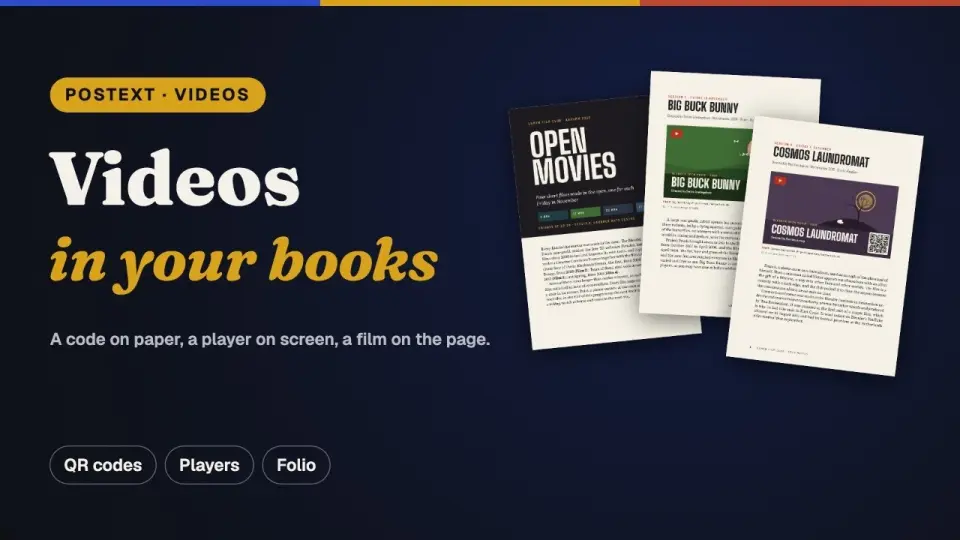
This page covers the videos of a book. A video can come from YouTube or Vimeo, or be a file of your own. You cite it in the text like a picture, and it has a number of its own, like figures and tables. On paper and in a PDF it shows a still frame with a play mark and a QR code that opens the video. The web view and e-books play it. In the 3D book a click on the frame plays the video on the page itself, and it goes on playing while the page turns.
A video is a resource like a picture: it is declared once, cited in the text and floated to the first free slot after its reference. References, numbering, placement and text wrap are explained on Document format: pictures and tables; what follows is particular to videos.
#Videos
A video resource (kind: 'video') is a YouTube or Vimeo video, or a video of your own: a file kept in the book (MP4, WebM) or one at a web address, a file on a server or an HLS stream (an .m3u8 playlist). It is placed, captioned, floated and cited like a picture, and numbered in a sequence of its own: the built-in video type prints Video 1.1, Video 1.2… beside Figure 1.1 and Table 1.1 (see Configuration › Resource types). Each output shows it as it can:
| Output | What it shows |
|---|---|
| Canvas, PDF | The poster, a frame of the video, with a play mark and a QR code that opens the video (Configuration › Video style). In the PDF the poster is also a link to the video. |
| Folio | The poster, as printed. A click on it plays the video on the page itself, and it goes on playing while the leaf turns (see Videos on Folio's pages below). YouTube and Vimeo videos stay posters. |
| HTML viewer | The video's player: YouTube's or Vimeo's, or the browser's HTML5 player for a file or an address. An HLS stream plays natively in Safari and in recent Chrome; elsewhere the host attaches a player such as hls.js, as the Sandbox does. With videoStyle. it shows the printed poster instead. |
| EPUB | A file plays in the reading system's own player, packed in the book or read from its production address. A YouTube or Vimeo video is its poster, linked to the video: an EPUB may not embed a web page's player. An HLS stream is its linked poster too: an HLS playlist is not a media type an EPUB may play. Where the reading system runs scripts, the files of one page or chapter keep to player.exclusive: starting one pauses the others it does not play alongside. |
const talk: Resource = {
  id: 'keeper-talk', typeId: 'video', kind: 'video',
  caption: 'The keeper explains the lamp.',
  altText: 'A lighthouse keeper beside the lamp',
  createdAt: 0, updatedAt: 0,
  video: {
    source: 'youtube',                        // 'youtube' | 'vimeo' | 'file'
    url: 'https://youtu.be/aqz-KE-bpKQ',
    poster: { fileId: 'talk.jpg', format: 'jpeg', width: 1280, height: 720 },
    start: 30,                                // plays from 0:30; the printed link starts there too
  },
};
The text cites a video as it cites a figure: :ref{id="keeper-talk"} prints Video 1.1 and floats the poster to the first free slot after the reference, and ::resource{id="keeper-talk"} with placement.position: 'here' sets it inline. The fields of Resource.video (ResourceVideo):
| Field | Type | Meaning |
|---|---|---|
source | 'youtube' · 'vimeo' · 'file' | Where the video plays from: a YouTube or Vimeo page, or a video of your own ('file'), uploaded or at an address. |
url | string | YouTube or Vimeo: the video's address, in any form (a watch page, youtu.be, Shorts, an embed link, youtube-nocookie.com; a Vimeo page, channel page or unlisted link with its hash). A file: its production address, where the published book will find it. A video of your own with no file of its own plays from this address: an MP4 or WebM on a server, or an HLS stream (…/master.m3u8). |
fileId, format | string | A file: the uploaded video, stored out of band like a bitmap, and its format: 'mp4', 'webm', 'ogv', 'mov', or 'hls' for an HLS stream. Without a format, the address's extension tells it (.m3u8 is 'hls'), else 'mp4'. |
poster | { fileId, format, width, height } | The poster frame, a bitmap. |
width, height, duration | number | The video's frame size in px (its ratio when there is no poster) and length in seconds. |
posterTime | number | The second of a file's frame used as the poster, kept so it can be picked again. |
start, end | number | Play from start to end seconds. The QR code and the PDF link start at start too. |
player | VideoPlayerOptions | This video's player options, laid over videoStyle.player. |
The poster. It is set at the measure of its slot (or the placement.width fraction of it), in its own ratio, whatever its pixel size: a screen-sized frame is enlarged rather than printed small. Like a bitmap it can carry a safe area and follow placement.align. A video without a poster prints a dark box in the video's ratio (16:9 when nothing says) with its overlays, and raises a videoWithoutPoster content warning. In the Sandbox the poster of a YouTube or Vimeo video is fetched from the platform when its address is entered, and a file's is a frame you pick in the video.
The address. The QR code and the PDF link open the video's page, https://youtu.be/<id> or https://vimeo.com/<id>, from start. A file has no page: they open its production address, which is also where a video with no file of its own plays from (an MP4 on a server, an HLS stream). Without one, print gets no QR code and no link (videoWithoutUrl), and an HTML or EPUB output that does not carry the file shows the poster. A YouTube or Vimeo address that names no video of that platform raises videoUrlInvalid; the poster is shown in place of a player.
The players. The player options (controls, download button, full screen, speed menu, picture in picture, casting, autoplay, a muted start, loop, preload, privacy-enhanced embeds) are set for the whole book in videoStyle.player and for one video in video.player; each player honours what it can (see Configuration › Video style). The HTML backend takes the playable URL of a file through the resourceVideoUrl(fileId) option, as it takes pictures through resourceImageUrl, and falls back to the production address. Its videos: { files, streams, hls } option chooses between player and poster per source, over videoStyle.html (hls, a video played from an HLS address, follows files unless set); the EPUB writer uses it. A <video> that plays an HLS address carries data-pt-hls, so a host can give it a player in browsers without native HLS (Safari and recent Chrome play it as it is). In a right-to-left book the player and the poster's overlays are turned back like a picture, so the QR code reads.
In the VDT. The resource block of a video has kind: 'video', its poster as fileId / format (drawn like a bitmap), and video (VDTResourceVideo): the link a reader is sent to, the YouTube or Vimeo embedUrl with the player options applied, a file's fileId, the mimeType of a video of your own (of its file or of its address alone, application/vnd.apple.mpegurl for HLS), the start / end range, the resolved player, linkPoster, html, and the overlays playMark and qr (the QR modules as rows of '0' / '1'), with rects relative to the body's top-left corner. A host drawing videos itself can use the helpers postext exports: parseVideoUrl, videoWatchUrl, resourceVideoLink, videoEmbedUrl, videoEmbedAllow, videoElementAttributes, mediaFragment, videoMimeType, videoFormatOfUrl, resourceVideoFormat, isHlsMimeType, HLS_MIME_TYPE, youtubePosterUrls, encodeQr, layoutVideo, playMarkTriangle and qrModuleRuns.
In a bundle. A .postext carries a file (resources/<id>.mp4) and the poster (resources/<id>.poster.jpg): the manifest entry names them in file and poster, gives the poster's size in width / height, and keeps the rest in video without file ids. bundleVideoUrl(bundle) is the resourceVideoUrl resolver over a bundle's files. A video played from an address alone carries no file: its entry has only the poster. In a bilingual bundle a language can give a video its own poster and video (another cut, at its own address) in localized[…].resources.
#Videos on Folio's pages
In the 3D book a video of your own plays on the page it is printed on. A click on the poster starts it there, whatever the pointer does on the book (turning pages, orbiting the view or selecting text): the page's shader draws the video's frames over the poster, so the picture bends and curls with the paper while the leaf is turned, and it goes on playing during the turn. A click on a playing video pauses it, a click on a paused one resumes it, and Space or Enter does the same for the first video on the open spread. Starting another video stops the one playing (it goes back to its poster), and a video stops when the book comes to rest on a spread that no longer shows it, or at its end. The pointer turns into a hand over a video it can play; a drag that starts on one still turns the page or the view. A video set to play on its own (video.player.autoplay) starts by itself the first time the book comes to rest on its spread, once the book has settled (a host laying it out in steps included), and never again in that viewer.
A video that plays alongside the others (video.player.exclusive: false, since postext 1.18) changes both rules. Starting it stops only the exclusive videos, so several such videos play at once; starting an exclusive video stops it too. With autoplay it starts, muted, each time the book comes to rest on its spread, and stops when the spread is turned away: the silent loops (loop) of a page run together every time the reader turns to it.
- What plays. A file (the host turns its
fileIdinto a URL with thevideoUrloption, an object URL in the Sandbox) or, without one, its address: MP4, WebM or an HLS stream. An HLS stream plays through hls.js wherever the browser has Media Source Extensions (loaded on the first play; an optional peer dependency ofpostext-folio), capped at the variant nearest the picture's size on screen, so a picture a few hundred pixels tall never pulls a 4K variant; the browser's own HLS is the fallback. Its requests carry apt-corsquery of their own, so the browser's cache never hands them a copy another player fetched without CORS. YouTube and Vimeo play in iframes, which WebGL cannot draw: a click on their poster turns the page as anywhere else. - Cross-origin reads. WebGL draws a video only when its server allows the read (CORS,
Access-Control-Allow-Origin). A video that cannot be read stays a poster, andonVideohearserror. - Sound. The click lets the video play with its sound; a browser that still refuses gets it muted. A video that starts on its own has its sound once the reader has clicked or typed on the page (turning to it counts); before that it starts muted, and a click on it unmutes it before the next one pauses it.
video.player.mutedstarts it muted,loopplays it again, andstart/endgive the part that plays. - On every page. The picture is drawn where the layout puts it: turned with a rotated resource, upright on a vertical page, and unmirrored in a right-to-left book, like the poster. A poster cropped within its safe area crops the video the same way.
- Without WebGL2, or with reduced motion, the video plays in an HTML
<video>laid over the page.
const book = createFolioFromDocument(container, doc, {
  // An uploaded video's playable URL (an object URL over its bytes).
  videoUrl: (fileId) => urls.get(fileId),
  onVideo: ({ resourceId, state }) => console.log(resourceId, state), // playing | paused | stopped | error
});
book.stopVideo();
videos: false turns it off. toggleVideoAt({ page, x, y }) does what a click there does, and pageVideoSpots(page, doc) lists where each video lies on a page, for a host that draws its own controls.
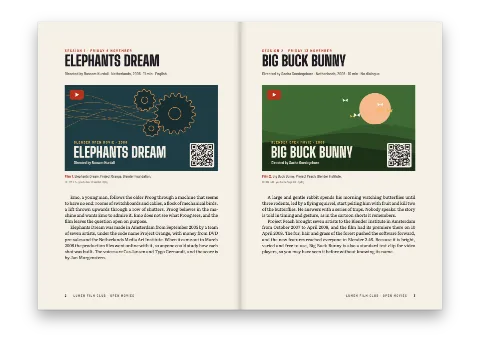
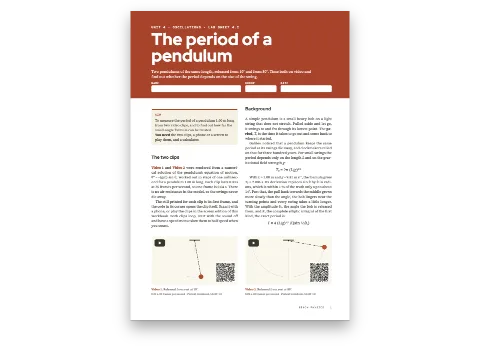
Two Cookbook recipes set videos: Nº 131, A film club programme with QR codes on the posters, prints each film as a title card with a play mark and a QR code, and Nº 132, A lab sheet whose clips play on screen and in the EPUB, sets the player options for the HTML edition and packs its own clips in a fixed-layout EPUB.
#Examples in the Cookbook
Recipes that use what this page describes, each under the section it suits best. A recipe shows its pages beside the whole script.