かんたんな説明
アラビア語新聞の1面と中面です。記事は右の段から始まって左の段へ続きます。アラビア語の読者がページを読む順番です。
できあがり
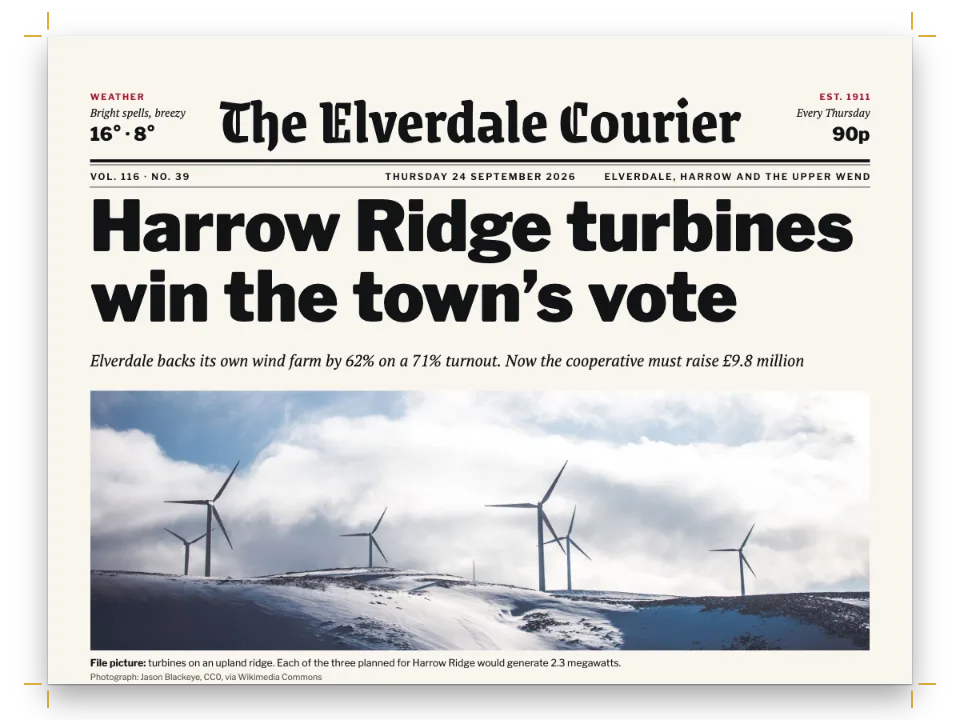
架空の港町で出る架空の日刊紙『الساحل』の2ページを、246 × 328 mmのコンパクト判に組みます。1面には84 ptのAref Ruqaaで組んだ題字、町の新しい路面電車についてのトップ記事とページ幅の見出し、コードで描いた地図、地の3本の短信の帯が入ります。2ページは青い面名の下で地域面を始め、記事5本とその日の礼拝時刻を載せます。本文の第1段、短信、表の列、題字の耳と、すべてが右から読まれます。英語の新聞1面は同じ要素を左から右に組んでいます。
このレシピが答える質問
- アラビア語のページではどの段が先ですか?2段組みの新聞を組むには?
手短な答え
// locale 'ar' mirrors the page: the body's first column is the right one, the story runs down
// it and on at the top of the left one, and the column rule sits between them as before.
const layout = { layoutType: 'double', gutterWidth: mm(6),
  columnRule: { enabled: true, color: col('rule'), lineWidth: pt(0.5) } };
// A headline over both columns is a page-span box without a frame: the columns under it start
// level, right then left, and a box with placement="bottom" closes the page the same way.
const banner = { id: 'banner', backgroundEnabled: false, span: 'page',
  padding: { top: pt(0), right: pt(0), bottom: pt(0), left: pt(0) },
  titleStyle: { ...kufi(9, 700, 'sea'), gap: mm(1.2) }, // the kicker, from the fence's title
  marginTop: pt(0), marginBottom: pt(LEAD / 2),
  body: { fontFamily: TEXT, fontSize: pt(13), lineHeight: pt(21), textAlign: 'right' } };
材料
- 機能
- 1段組みと2段組み右から左のテキスト段間罫段抜きの囲み囲みの中や本文中の段組みフロートする囲みデザインした章扉見出しスタイル見出しの属性ページデザインのテキスト・罫・ボックスアラビア語のフォント文書の言語としてのアラビア語生成される番号の数字柱とノンブルセマンティックカラーパレット囲み段落スタイルPDFの書き出し
- 種類
- Aref Ruqaa, Noto Kufi Arabic, Noto Naskh Arabic (SIL OFL 1.1)
- 素材
- なし:画像はすべてコードで描画
作り方
#1 · 2段組みで、第1段は右
コードは前出の手短な答えにあります。layoutType: 'double'と段間罫は英語の新聞と同じ設定です。locale: 'ar'でページの向きが変わり、記事はまず右の段を埋め、左の段の頭へ続きます(ページの順序と右綴じ)。両段にまたがる見出しは枠のないページ幅の囲みで、その下の段は同じ高さから始まります。「短信」欄は地にフロートとして配置したページ幅の囲みで、中に:::columns{count=3}を入れます。その段も右から左へ流れます。2ページの礼拝時刻の表も同じで、文書の方向で組んだ表は第1列を右に置きます。
#2 · 2つの耳に挟まれた題字
const ear = (id, side, lines) => lines.map(([key, content, look], i) => text(`${id}-${key}`,
  content, { ...look, align: side }, { ...(i === 0 ? at('container', `top-${side}`, 0, 4)
    : at(`#${id}-${lines[i - 1][0]}`, 'below', 0, 1)), size: { width: mm(48) } }));
const nameplate = { enabled: true, minHeight: mm(46), slot: { elements: [
  text('name', '{titleText}', { fontFamily: NAME, fontSize: pt(84), fontWeight: 700,
    lineHeight: 1.1, color: col('sea'), align: 'center' },
  { ...at('container', 'top', 0, -3), size: { width: 'fill' } }),
  // In the mirrored page, 'right' is the start of the line: issue and date there, price opposite.
  ...ear('start', 'right', [['k', '{attr.issue}', kufi(8, 700, 'sea')],
    ['d', '{publishDate}', kufi(9, 400)]]),
  ...ear('end', 'left', [['k', '{attr.city}', kufi(8, 700, 'sea')],
    ['p', '{attr.price}', kufi(9, 400)]]),
  { kind: 'rule', id: 'thick', thickness: pt(2.5), color: col('ink'),
    placement: { ...at('container', 'top-left', 0, 40), size: { width: 'fill' } } },
  { kind: 'rule', id: 'thin', thickness: pt(0.5), color: col('ink'),
    placement: { ...at('#thick', 'below', 0, 0.8), size: { width: 'fill' } } },
] } };
1面の1レベル見出しが紙名で、見出しスタイルで描きます。そのデザインは左右反転したページに描かれるので、top-rightが行の始まりになります。号数と日付をそこに、都市名と価格を反対の端に置きます(左・右・始端・終端の意味)。ルクア体は数語を大きく見せるための見出し用の書体で、カシーダがなく、本文には使いません。
#3 · 面名とノンブル行
const flag = { enabled: true, minHeight: mm(13), slot: { elements: [
  { kind: 'rule', id: 'bar', thickness: pt(3), color: col('ink'),
    placement: { ...at('container', 'top-left', 0, 9), size: { width: 'fill' } } },
  text('flag', '{titleText}', { ...kufi(12, 700, 'paper'), align: 'right',
    box: { backgroundColor: col('sea'), padding: { top: mm(1), right: mm(3), bottom: mm(1.4),
      left: mm(3) } } }, at('#bar', 'above')),
] } };
// The folio line keeps its physical sides: the number at the outer corner of each page.
const folio = (parity, edge, x) => ({ kind: 'text', id: `n-${parity}`, parity,
  content: '{pageNumber}  ·  {title}  ·  {publishDate}', ...kufi(8, 600, 'muted'),
  align: edge, placement: at('page', `top-${edge}`, x, 7) });
const header = { elements: [folio('even', 'right', -SIDE), folio('odd', 'left', SIDE),
  { kind: 'rule', id: 'folio-rule', thickness: pt(0.5), color: col('rule'),
    placement: { ...at('page', 'top-left', SIDE, 11.5),
      size: { width: mm(TRIM.width - 2 * SIDE) } } }] };
中面は、太罫の上の面名として描いた1レベル見出しで始まります。ノンブル行はヘッダーなので、物理的な左右を保ちます。偶数ページである2ページでは、ノンブルは右の角にあり、右開きの新聞ではそこが小口側です。1面では見出しスタイルでヘッダーを消しています。
#4 · コードで描いた地図
function routeSvg() { // 222 × 44 mm, 1 unit = 1 mm
  const [W, H] = [222, 44];
  const coast = 'M0 36C30 33 52 40 80 35S128 24 152 28S196 37 222 31V44H0Z';
  // Eighteen stations along a line that leaves the port (east, on the right) for the university.
  const line = 'M210 22C186 17 170 13 150 16S112 25 92 20S56 9 34 12S14 19 10 17';
  const stops = Array.from({ length: 18 }, (_, i) => i / 17);
  const pointAt = (t) => { // the line as three cubic pieces, sampled per piece
    const seg = [[210, 22, 186, 17, 170, 13, 150, 16], [150, 16, 130, 19, 112, 25, 92, 20],
      [92, 20, 72, 15, 56, 9, 34, 12], [34, 12, 22, 14, 14, 19, 10, 17]];
    const k = Math.min(3, Math.floor(t * 4));
    const u = t * 4 - k;
    const [x0, y0, x1, y1, x2, y2, x3, y3] = seg[k];
    const b = (a, c, d, e) => (1 - u) ** 3 * a + 3 * (1 - u) ** 2 * u * c + 3 * (1 - u) * u * u * d
      + u ** 3 * e;
    return [b(x0, x1, x2, x3), b(y0, y1, y2, y3)];
  };
  const rings = stops.map((t, i) => {
    const [x, y] = pointAt(t);
    const big = i === 0 || i === 17 || i === 8;
    return `<circle cx="${x.toFixed(1)}" cy="${y.toFixed(1)}" r="${big ? 2.6 : 1.6}" `
      + `fill="${palette.paper}" stroke="${palette.ink}" stroke-width="${big ? 1 : 0.7}"/>`;
  }).join('');
  let grid = '';
  for (let x = 6; x < W; x += 12) grid += `M${x} 0V${H}`;
  for (let y = 6; y < H; y += 12) grid += `M0 ${y}H${W}`;
  return `<svg xmlns="http://www.w3.org/2000/svg" width="${W * 10}" height="${H * 10}" `
    + `viewBox="0 0 ${W} ${H}"><rect width="${W}" height="${H}" fill="${palette.sand}"/>`
    + `<path d="${grid}" stroke="${palette.paper}" stroke-width="0.6"/>`
    + `<path d="${coast}" fill="${palette.sea}" fill-opacity="0.25"/>`
    + `<path d="${line}" fill="none" stroke="${palette.sea}" stroke-width="2.4"/>${rings}</svg>`;
}
路面電車の地図はパレットの色を使ったパスと円のSVGで、文字を含みません。地名はキャプションに置き、紙面の書体で組みます。この図版の種別には番号もラベルもありません。新聞は図版に番号を振らないからです。
レシピの全体
// ═══ Postext Cookbook · Nº 108 · A two-column Arabic newspaper page ══════════════════
// https://postext.dev/en/cookbook/arabic-newspaper-two-columns
// Code: MIT · Text: original Arabic news copy (CC BY 4.0) · Map: drawn in code
// Fonts: Aref Ruqaa, Noto Kufi Arabic, Noto Naskh Arabic (SIL OFL 1.1) · Needs postext ≥ 1.65.0
import {
  buildDocument, withLoadedFonts, renderPageToCanvas, registerResourceImage,
} from 'https://esm.sh/postext';
import { renderToPdf, decompressWoff2 } from 'https://esm.sh/postext-pdf';

const LANG = 'en'; // @lang: the language of the frame; the paper is Arabic in both editions
const RECIPE = 'arabic-newspaper-two-columns';

// ─── 1 · Design ─────────────────────────────────────────────────────────────
// #region palette: newsprint, a cold ink and the sea blue of the paper's name
const palette = {
  ink: '#121416', // text and the heavy rules
  sea: '#0f5f7a', // the accent: the nameplate, section flags, kickers, the tram line
  sand: '#e9e2d2', // the In brief strip and the map's land
  rule: '#9b988f', // hairlines: the column rule, the folio line
  muted: '#5b5852', // bylines, captions' credits, the imprint
  paper: '#f8f5ee', // newsprint, and type reversed out of the flags
};
const col = (id) => ({ hex: palette[id], model: 'hex', paletteId: id });
const colorPalette = Object.entries({ ...palette, 'main-color': palette.ink })
  .map(([id, hex]) => ({ id, name: id, value: { hex, model: 'hex' } }));
// #endregion
const [NAME, HEAD, TEXT] = ['Aref Ruqaa', 'Noto Kufi Arabic', 'Noto Naskh Arabic'];
const TRIM = { width: 246, height: 328 }; // mm: a 3 : 4 compact
const SIDE = 12; // mm: newspaper margins, narrow and not mirrored
const LEAD = 16; // pt: the body leading, 1.5 × an 10.7 pt Naskh
const kufi = (size, weight, colour = 'ink') => ({ fontFamily: HEAD, fontSize: pt(size),
  fontWeight: weight, color: col(colour) });
const at = (to, edge, x = 0, y = 0) => ({ anchor: { to, edge }, offset: { x: mm(x), y: mm(y) } });
const text = (id, content, look, placement) => ({ kind: 'text', id, content, overflow: 'wrap',
  ...look, placement });

// #region answer: two columns, the first one on the right
// locale 'ar' mirrors the page: the body's first column is the right one, the story runs down
// it and on at the top of the left one, and the column rule sits between them as before.
const layout = { layoutType: 'double', gutterWidth: mm(6),
  columnRule: { enabled: true, color: col('rule'), lineWidth: pt(0.5) } };
// A headline over both columns is a page-span box without a frame: the columns under it start
// level, right then left, and a box with placement="bottom" closes the page the same way.
const banner = { id: 'banner', backgroundEnabled: false, span: 'page',
  padding: { top: pt(0), right: pt(0), bottom: pt(0), left: pt(0) },
  titleStyle: { ...kufi(9, 700, 'sea'), gap: mm(1.2) }, // the kicker, from the fence's title
  marginTop: pt(0), marginBottom: pt(LEAD / 2),
  body: { fontFamily: TEXT, fontSize: pt(13), lineHeight: pt(21), textAlign: 'right' } };
組み立てたscript.jsはそのまま動きます。任意のページのモジュールスクリプトに貼り付けるか、レシピをCodePenで開いてください。 GitHub上のレシピのフォルダー ↗ (新しいタブで開きます)
アレンジ
よくあるつまずき
つまずき
アラビア語の本のタグはLANGではなく'ar'にする
レシピの版はenとesですが、アラビア語のサンプルはどちらの版でもアラビア語です。`locale: LANG`では左から右に組まれ、左綴じになり、ページ番号は1 2 3となり、図のキャプションにはFigureやFiguraが付きます。postext 1.30以降、このタグはテキストを組む言語(計測、描画、埋め込みに使う言語)でもあるので、英語やスペイン語のタグでは、Markazi Textのようなフォントがギュメ(« »)や終止符をアラビア語の字形で描かず、改行の位置も変わります。タグは自分で書いてください。'ar'(アラビア・インド数字、マシュリク地域の慣習)、'ar-EG'や'ar-SA'のような地域付きのタグ、ヨーロッパ式数字を使うマグレブ版なら'ar-MA'、'ar-DZ'、'ar-TN'です。アラビア語を引用するだけのラテン文字のページは、自分のロケールのままにします。 右から左のテキスト →
つまずき
アラビア語の書体にはarabicブロックを通じてarabicファイルが必要
FontsourceはAmiri、Noto Naskh Arabic、Scheherazade Newをサブセットごとに1ファイルとして配信し、アラビア文字はarabicファイルに入っています。loadFontsが取得するのはlatin(とlatin-ext)だけなので、画面ではアラビア文字がシステムの書体で出て計測が狂い、fontsourceProviderはPDFにそのlatinファイルを渡すため、空の四角が印字されます。キットのarabicブロックを挙げ、loadFontsのあとにloadArabicFonts(FONTS, markdown)を呼び(ページでアラビア文字に使うすべてのウェイトをFONTSに挙げておきます)、renderToPdfにfontProvider: arabicPdfProviderを渡してください。 アラビア語のフォント →
- 礼拝時刻は表のセルにアラビア・インド数字で入力しています。
localeが変えるのはエンジンが書く数字だけなので、マグレブ版では入力し直します。
クレジット
- 本文
- Two pages of an imaginary Arabic daily, الساحل, and its city, written in Arabic for the recipe · Postext Cookbook · オリジナル
- フォント
- Aref Ruqaa (SIL OFL 1.1) · Noto Kufi Arabic (SIL OFL 1.1) · Noto Naskh Arabic (SIL OFL 1.1)