かんたんな説明
活字の歴史を扱う研究書の1章です。巻末に、人物の一覧と項目の一覧の2つを、それぞれが出てくるページ付きで作る方法を示します。
できあがり
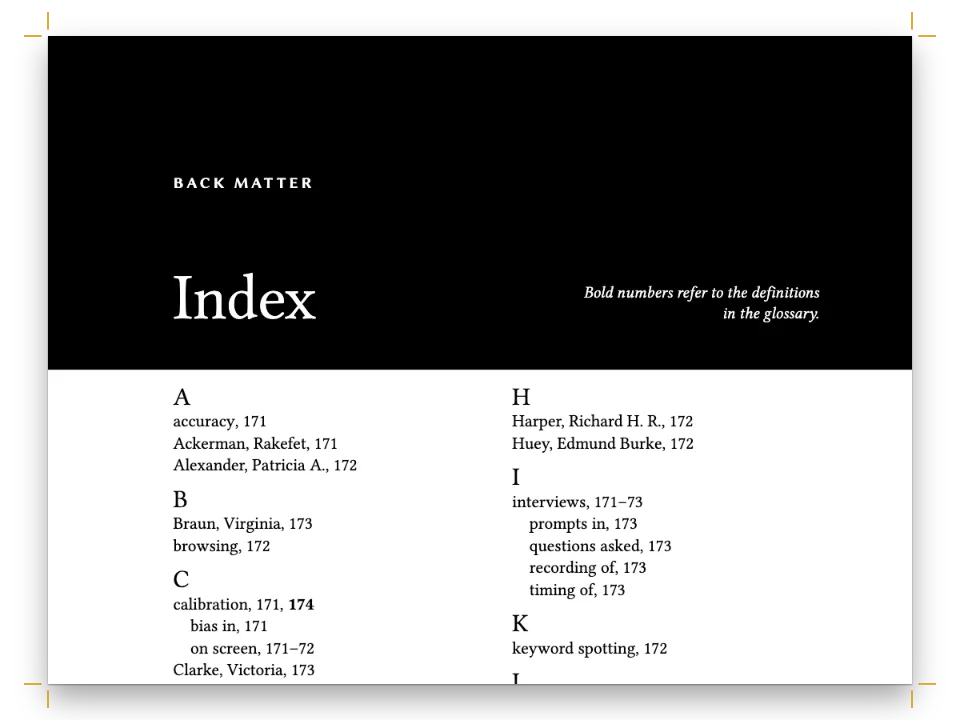
活字を論じる研究書『Letters of Metal』の第4章で、判型は155×235mmです。Crimson Proの1段組みで、題にはBodoniのイタリック、アクセントにれんが色を使います。論考はグーテンベルクのテクストゥーラから、ジェンソン、アルドゥスとグリッフォ、ガラモンとプランタン、キャスロンとバスカヴィル、フルニエのポイント制、プラデルとヒルが彫りイバラが刷ったスペインの活字を経て、ボドニのモダンまでたどります。最後はこの種の本の常として、向かい合う2ページに2つの索引を置きます。偶数ページには印刷者、父型彫刻師、パトロンを、奇数ページには活字、道具、書物を並べます。どちらも同じマーク付きの本文から作られ、そこに載るページ番号はすべて、マークが実際に組まれたページです。
このレシピが答える質問
- 同じマークを付けたテキストから、人名索引と事項索引の2つを印刷するには?
- 本文が動くと自動でノンブルが変わる索引を作るには?
手短な答え
// Marks in the Markdown. A person goes to the names index, inverted:
//   :index[Aldus Manutius]{term="Manutius, Aldus" index="names" main}
// A subject goes to the main index, with levels split by "!" and a sort key when the
// printed form would file in the wrong place:
//   :index[textura]{term="Blackletter!textura" main}
//   :index{term="42-line Bible" sort="Forty-two-line Bible"}
//   :index{term="Cursive" see="Italic"}
// Printed at the end, each under its own heading:
//   # Index of Names {style="index"}    then    :::index{index="names"}
//   # Index of Subjects {style="index"} then    :::index
const indexHeading = {
  id: 'index',
  numbered: false, // no chapter number, and the next chapter is still chapter 5
  breakBefore: { enabled: true, parity: 'any' },
  layout: { layoutType: 'double', gutterWidth: mm(7) }, // the section after the heading
};
const index = {
  fontSize: pt(8.6), lineHeight: pt(11.2), // one leading for entries and letter heads
  indent: em(1), turnoverIndent: em(2),
  rangeFormat: 'chicago', // 212–14, as a monograph prints it
  main: { bold: true }, // the page of the principal discussion
  groups: { fontFamily: 'Bodoni Moda', fontSize: pt(11), fontWeight: 600, color: col('brick') },
};
材料
- 併用する機能
- PDFに埋め込むフォント節ごとのページ構成
- 種類
- Crimson Pro, Bodoni Moda, Libre Franklin (SIL OFL 1.1)
- 素材
- なし:画像はすべてコードで描画
作り方
#1 · 人物には人名索引用の、事項には事項索引用のマークを付ける
コードは上の手短な答えにあり、残りはMarkdownの中にあります。index="names"の付いたマークは:::index{index="names"}が刷る索引に入り、それ以外のマークはすべて、属性なしの:::indexが刷る事項索引に入ります。たとえば:index[Aldus Manutius]{term="Manutius, Aldus" index="names" main}は本文に名前を刷り、人名索引の「Manutius」の下に太字のページを登録します。その2行あとの:index[italic]{term="Italic" main}は、同じページを事項索引の「Italic」の下に登録します。章の主題でもある人物には、両方のマークを付けられます。
#2 · 名前を倒置し、読者が引く文字で並べる
名前は姓を先にして登録します(term="Garamond, Claude"、term="Dall’Aglio, Margherita")。コンマも見出し語の一部なので、照合順序は索引編集者と同じく「Didot, Firmin」を「Didot, François-Ambroise」の前に並べます。刷られる形のままでは違う文字の下に入ってしまうときは、sortで並べ替えのキーを与えます。英語版ではterm="42-line Bible" sort="Forty-two-line Bible"とマークしているので、この聖書は0–9のグループを新たに作らず、Fの下に入ります。下位項目(term="Foundries!Plantin-Moretus")、太字の主要ページ(main)、ボドニの節を挟むrange="start"とrange="end"、参照(see="Italic"、seealso="Matrices")が残りを受け持ちます。階層のあるseeの参照先はコロンで区切って刷られ、「Humanist type. See Roman type: Venetian」のようになります。
#3 · ビルドは1回、ページ番号は文書が自分で確定する
// A pass finds the page of every mark and prints both indexes with those numbers. When the
// printed index moves a mark (an index set before the text would), the layout runs again,
// until no page number changes (in a buildBundle book, the chapter with :::index gets them all).
const doc = await buildDocumentWithFonts({ markdown }, config(), kitFonts(FONTS));
索引が刷るページ番号はレイアウトのあとにしか存在せず、索引を刷ればそれ自体がページを取ります。これを処理するのがbuildDocument()です。章を組み、各マークのページを読み取り、2つの索引を刷り、番号が変わるたびに組み直します。ここでは索引が本文のあとにあるので、2回目のパスは1回目を確かめるだけです。索引が本文より前にあると、その後のページがすべてずれ、パスは結果が一致するまで続きます。ボドニの節に段落を1つ足せば、人名索引はウィッティンガムの新しいページを自分で反映します。
#4 · 各索引に2段組みの扉を付ける
const opener = (sink, size) => ({
  enabled: true,
  minHeight: pt(LEAD * sink), // the text starts on the same grid line in every chapter
  slot: { elements: [
    { kind: 'text', id: 'kicker', content: '{attr.kicker}', ...label, fontSize: pt(7.8),
      letterSpacing: pt(1.6), color: col('brick'), align: 'left',
      placement: at('container', 'top-left', 0, 10) },
    { kind: 'text', id: 'title', content: '{titleText}', fontFamily: 'Bodoni Moda', italic: true,
      fontSize: pt(size), lineHeight: 1.08, color: col('ink'), align: 'left',
      overflow: 'wrap', // design text ends in an ellipsis by default
      placement: { ...at('#kicker', 'below', 0, 3), size: { width: 'fill', height: 'auto' } } },
    { kind: 'rule', id: 'rule', direction: 'horizontal', thickness: pt(0.75), color: col('brick'),
      placement: { ...at('#title', 'below', 0, 4.5), size: { width: mm(16) } } },
  ] },
});
手短な答えの見出しスタイルは、# Index of Names {style="index"}に対して3つのことをします。ページを改め(parity: 'any'なので、2つの索引は白ページを挟まずに続きます)、そのあとの節を段間7mmの2段組みにし、numbered: falseで章の番号には手を付けません。このスタイルは章扉を流用し、6行分の下げと20ptの題を組みます。見出し文字はそのBodoniをアクセントの色で繰り返し、索引の1行分の高さに収めるので、段の行送りは崩れません。
#5 · 奇数ページの柱に索引名を入れる
const head = (id, content, parity, edge, x, extra = {}) => ({
  kind: 'text', id, content, parity, pages: 'body', // never on openers
  ...label, fontSize: pt(7.2), letterSpacing: pt(1.3), color: col('muted'),
  placement: at('page', edge, x, 12.5), ...extra,
});
const folio = { color: col('brick'), fontWeight: 700 };
const header = { elements: [
  head('verso-folio', '{pageNumber}', 'even', 'top-left', MARGIN.outer,
    { ...folio, align: 'left' }),
  head('verso-title', '{title}', 'even', 'top-left', MARGIN.outer + 8, { align: 'left' }),
  head('recto-title', '{chapterTitle}', 'odd', 'top-right', -(MARGIN.outer + 8),
    { align: 'right' }),
  head('recto-folio', '{pageNumber}', 'odd', 'top-right', -MARGIN.outer,
    { ...folio, align: 'right' }),
] };
// Openers carry a drop folio instead, centred under the text block.
const footer = { elements: [{ ...head('drop-folio', '{pageNumber}', 'all', 'bottom', 0,
  { ...folio, align: 'center', placement: at('page', 'bottom', 0, -12) }), pages: 'opener' }] };
奇数ページの柱は{chapterTitle}を刷ります。索引の見出しも章と同じレベル1の見出しなので、そのあとのページの上部には「Index of Subjects」と入ります。pages: 'body'で2つの索引の扉ページから柱を外し、そこには代わりに下ノンブルを置きます。
レシピの全体
// ═══ Postext Cookbook · Nº 073 · An index of names and an index of subjects ═══════
// https://postext.dev/en/cookbook/names-and-subjects-indexes
// Code: MIT · Text: original (CC BY 4.0) · Pictures: none
// Fonts: Crimson Pro, Bodoni Moda, Libre Franklin (SIL OFL 1.1) · Needs postext ≥ 1.28.0
import { buildDocumentWithFonts, renderPageToCanvas } from 'https://esm.sh/postext';
import { renderToPdf, decompressWoff2 } from 'https://esm.sh/postext-pdf';

const LANG = 'en'; // @lang: the language of the sample document ('en' | 'es')
const RECIPE = 'names-and-subjects-indexes';

// ─── 1 · Design ─────────────────────────────────────────────────────────────
// #region palette: a warm black, one brick red for kickers, letter heads and folios
const palette = {
  ink: '#211d19', // text: a warm near-black
  brick: '#8e3b24', // the one accent
  muted: '#6d645a', // running heads, colophon
  rule: '#c8bba9', // hairlines
  paper: '#fcfaf5',
};
// A colour is its hex and the palette entry it follows.
const col = (id) => ({ hex: palette[id], model: 'hex', paletteId: id });
const colorPalette = [
  ...Object.entries(palette).map(([id, hex]) => ({ id, name: id, value: { hex, model: 'hex' } })),
  // The engine's defaults link to main-color: point it at the accent, never the default blue.
  { id: 'main-color', name: 'accent (defaults)', value: { hex: palette.brick, model: 'hex' } },
];
// #endregion
const TRIM = { width: 155, height: 235 }; // a scholarly monograph
const MARGIN = { top: 22, bottom: 24, inner: 19, outer: 22 }; // mirrored: 114 mm measure
const LEAD = 13.6; // body leading in pt
const at = (to, edge, x = 0, y = 0) => ({ anchor: { to, edge }, offset: { x: mm(x), y: mm(y) } });
const label = { fontFamily: 'Libre Franklin', fontWeight: 600, textTransform: 'uppercase' };

// #region answer: two indexes from one text, each under a two-column heading style
// Marks in the Markdown. A person goes to the names index, inverted:
//   :index[Aldus Manutius]{term="Manutius, Aldus" index="names" main}
// A subject goes to the main index, with levels split by "!" and a sort key when the
// printed form would file in the wrong place:
//   :index[textura]{term="Blackletter!textura" main}
//   :index{term="42-line Bible" sort="Forty-two-line Bible"}
//   :index{term="Cursive" see="Italic"}
// Printed at the end, each under its own heading:
//   # Index of Names {style="index"}    then    :::index{index="names"}
//   # Index of Subjects {style="index"} then    :::index
const indexHeading = {
  id: 'index',
  numbered: false, // no chapter number, and the next chapter is still chapter 5
  breakBefore: { enabled: true, parity: 'any' },
組み立てたscript.jsはそのまま動きます。任意のページのモジュールスクリプトに貼り付けるか、レシピをCodePenで開いてください。 GitHub上のレシピのフォルダー ↗ (新しいタブで開きます)
アレンジ
#1つにまとめた索引を刷る
人物のマークと2つ目の見出しからindex="names"を外します。すると、すべてのマークが事項索引に入り、人名と事項が1つのアルファベット順に並びます。
-:index[Aldus Manutius]{term="Manutius, Aldus" index="names" main}
+:index[Aldus Manutius]{term="Manutius, Aldus" main}#見出し文字をなくす
この程度の短い人名索引なら、見出し文字がなくても読めます。groups.enabled: falseは見出し文字を外し、文字の区切りに1行のアキを残します。この設定は両方の索引に効きます。
-  groups: { fontFamily: 'Bodoni Moda', fontSize: pt(11), fontWeight: 600, color: col('brick') },
+ groups: { enabled: false },よくあるつまずき
indexの設定は共有です。2つの索引は同じ書体、行送り、見出し文字を使います。- キャプションや表のセルの中のマークは、書いたとおりに刷られるだけです。人物のマークは、その図を参照する段落に付けます。
クレジット
- 本文
- “From Textura to Bodoni”, an essay on the history of printing types written for this recipe, in English and Spanish · Ignacio Ferro · CC BY 4.0
- フォント
- Crimson Pro (SIL OFL 1.1) · Bodoni Moda (SIL OFL 1.1) · Libre Franklin (SIL OFL 1.1)