かんたんな説明
写真の中で必ず見せたい部分をレイアウトに伝えておきます。段が数行足りなくなったとき、すき間を残す代わりに写真が縦に伸びます。
できあがり
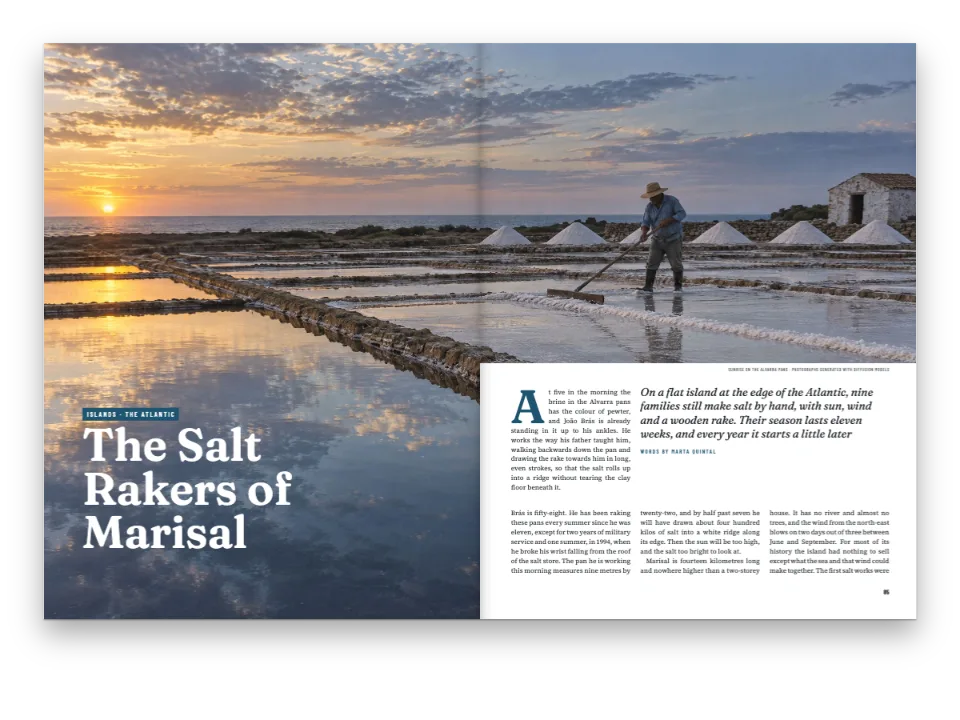
沿岸地域の雑誌の3ページです。河口の町の仕事を取り上げた特集で、扉には裁ち落としの写真を1枚、段の中には写真を5枚置きます。CodePenのサンプルは同じテキストから特集を2回組みます。1回目は写真がファイルの形のままで、2ページでは両方の段がグリッドの1行手前で終わります。左の段は最後の段落の下で、右の段は地に置いた写真の上で終わります。2回目は写真ごとに、常に見せる必要のある部分を指定し、エンジンはその外側を切り落とします。同じページでは、貝を採る人と網を繕う人の写真がそれぞれ1行ぶん高くなり、両方の段がグリッドの最終行で終わります。どのトリミングも、人が選ぶ必要はありませんでした。
このレシピが答える質問
- 写真を短い段いっぱいにトリミングしつつ、被写体が常に見えるようにするには?
- 段の下端をそろえ、最終ページの段の長さを均等にするには(垂直方向の両端そろえ)?
- 図の位置を制御するには(ページの上端、2段をまたぐ、まさにこの位置、余白)?
手短な答え
// Each photo names the rectangle that must always show, in fractions of the file:
// x and width of its width, y and height of its height. Outside it the engine may crop,
// so the photo can stand taller (sides cut, down to the area's width) or lower (top and
// bottom cut, down to its height) than the file, always as wide as its column.
const SAFE_AREAS = {
  mariscadora: { x: 0.2, y: 0.36, width: 0.34, height: 0.46 }, // Carmen, her rake and basket
  redeira: { x: 0.34, y: 0.14, width: 0.4, height: 0.66 }, // Rosa and the net in her lap
  carpintero: { x: 0.12, y: 0.2, width: 0.64, height: 0.62 }, // Manuel and the whole hull
  faro: { x: 0.34, y: 0.14, width: 0.32, height: 0.56 }, // the tower and the walker below it
  pulpeira: { x: 0.2, y: 0.08, width: 0.56, height: 0.82 }, // Lucía, the octopus, the cauldron
};
// Columns end flush on this grid by whole lines. A heading or a photo that does not fit a
// column's foot leaves lines empty there; these settings forbid the usual fixes (space above
// a heading, under a photo, or a paragraph run long), so only a photo with a safe area can
// take them, by growing a line at a time. Without safe areas the short columns stay short.
const balancing = { enabled: true, maxLinesPerHeading: 0, stretchAfterLists: false,
  stretchAfterFloats: false, looseParagraphs: false };
材料
- 機能
- 画像のセーフエリア段末そろえ図の配置リソースとしての図と表図を配置する参照その場に置く図キャプションのスタイル独自のリソースの種類デザインした章扉ページデザインの画像見出しの属性1段組みと2段組み見開きの余白柱とノンブルページの役割ごとの柱セマンティックカラーパレット段落スタイルキャンバス上のページPDFの書き出し
- 種類
- Newsreader, Archivo, Archivo Narrow (SIL OFL 1.1)
- 素材
carpintero-1600.jpgestuario-1700.jpgfaro-1600.jpgmariscadora-1600.jpgpulpeira-1600.jpgredeira-1600.jpg- The estuary at low water at dawn, with shellfish gatherers (Generated With Diffusion Models, オリジナル)
- A shellfish gatherer kneeling on the wet sand (Generated With Diffusion Models, オリジナル)
- A net mender on the quay (Generated With Diffusion Models, オリジナル)
- A shipwright planing a wooden boat in his shed (Generated With Diffusion Models, オリジナル)
- A lighthouse on a granite point and a walker below it (Generated With Diffusion Models, オリジナル)
- A cook lifting an octopus from a copper cauldron at a market (Generated With Diffusion Models, オリジナル)
作り方
#1 · 残すべき部分だけを指定する
コードは前の手短な答えにあります。セーフエリアは、画像の左上の角から測る4つの割合です。エンジンは写真を、ファイル全体からその長方形までの間の任意の形で、段の幅いっぱいに表示できます。左右を切れば縦長に、天地を切れば横長になります。セーフエリアの外側は両側の余白に比例して切り落とされるので、岸壁で中央より右に立つRosaは、左右を切っても中央より右に残ります。
#2 · 段末そろえが余りを吸収するのは写真だけにする
同じコードで段末そろえも設定しています。通常の調整手段は白を足すものです。見出しの上に1行加える、写真の下にアキを入れる、段落を1行長く組む、といった方法です。ここではそれらをオフにしているので、セーフエリアのない組版では短い段がそのまま見えます。セーフエリアのある写真は、オフにしていなくても、それらの調整手段より先に試されます。写真が高くなってもテキストに穴は残らないからです。
#3 · セーフエリアはリソースに属する
const FILES = { estuario: [1700, 1133] }; // px, declared as they are; the rest 1600 × 1067
// Caption and alt text of each photo, one block per photo: content.figures.<lang>.md.
const figureTexts = String.raw`mariscadora
Carmen Lago separa berberechos en su parcela de la ría, en bajamar.
Una mujer con botas verdes, de rodillas en la arena mojada junto a un rastro y una cesta.

redeira
Rosa Doval remienda un paño de cerco en el muelle.
Una mujer sentada en un taburete cose una red verde; detrás, barcos de pesca.

carpintero
Manuel Barreiro cepilla el forro de la gamela.
Un hombre mayor cepilla el costado de una barca de madera a medio construir.

faro
La punta de Arnela: el faro y el camino de la costa.
Un faro blanco sobre rocas de granito; abajo, una caminante con mochila roja.

pulpeira
Lucía Fraga saca un pulpo del caldero de cobre.
Una mujer con mandil saca un pulpo cocido de un caldero de cobre humeante.
`;
const CAPTIONS = Object.fromEntries(figureTexts.trim().split(/\n\s*\n/)
  .map((block) => block.split('\n').map((line) => line.trim()))
  .map(([id, caption, alt]) => [id, [caption, alt]]));
const PLACEMENT = { pulpeira: { position: 'here' } }; // the rest float to the first free slot
const photo = (id, safe) => {
  const [w, h] = FILES[id] ?? [1600, 1067];
  const [caption, alt] = CAPTIONS[id] ?? [];
  return { id, typeId: 'figure', kind: 'bitmap', createdAt: 0, updatedAt: 0,
    bitmap: { fileId: `${id}-${w}.jpg`, format: 'jpeg', width: w, height: h },
    ...(caption && { caption, altText: alt, placement: PLACEMENT[id] ?? { position: 'auto' } }),
    ...(safe && SAFE_AREAS[id] && { safeArea: SAFE_AREAS[id] }) };
};
const resources = (safe) => ['estuario', ...Object.keys(CAPTIONS)].map((id) => photo(id, safe));
safeAreaはリソースの上で、ファイル、キャプション、配置と並んで指定します。そのため写真はどこにフロートしても、それを使うどの文書でもセーフエリアを保ちます。サンプルはこれを渡すか省くかだけで、2つの組版の違いはそれだけです。扉の河口の写真は見出しスタイルが描くもので、フロートではないので、セーフエリアは要りません。
#4 · 両方を組んで比べる
const build = (safe) => buildDocumentWithFonts({ markdown, resources: resources(safe) }, config(),
  kitFonts(FONTS));
const docs = { plain: await build(false), safe: await build(true) };
2つの文書は1つの設定と1つのMarkdown文字列から作ります。地まで埋めるのは、次のページへ続くページだけです。3ページは特集の最後のページで、最後のページでは段の終わりの高さを互いにそろえるだけです。ここではすでにそろっているので、そのページで高くなる写真はありません。「PDF」ボタンは表示している方の組版を書き出し、PDFでも各写真は同じように枠でクリップされます。
レシピの全体
// ═══ Postext Cookbook · Nº 116 · Photos that grow to fill a short column ═══════════
// https://postext.dev/en/cookbook/photos-fill-short-columns
// Code: MIT · Text: original (CC BY 4.0) · Photos: diffusion models
// Fonts: Newsreader, Archivo, Archivo Narrow (SIL OFL 1.1) · Needs postext ≥ 1.25.0
//
// A magazine feature set twice. Without safe areas some columns end short; with them the
// engine crops each photo outside its area to set it taller, and the photos fill those lines.
import {
  buildDocumentWithFonts, renderPageToCanvas, registerResourceImage, defaultResourceTypes,
} from 'https://esm.sh/postext';
import { renderToPdf, decompressWoff2 } from 'https://esm.sh/postext-pdf';

const LANG = 'es'; // @lang: the language of the sample document ('es' | 'en')
const RECIPE = 'photos-fill-short-columns';

// ─── 1 · Design ─────────────────────────────────────────────────────────────
// #region palette: six named colours, the accents taken from the photos: sea slate, net green
const palette = {
  ink: '#1d2326', // text: a cold near-black
  sea: '#2f5d73', // the accent: kicker, caption labels, folios, references
  net: '#3f6b55', // the second colour: the opener's rule
  rule: '#c9d1d3', // hairlines
  muted: '#5f6a6e', // running heads, credits, the colophon
  paper: '#ffffff',
};
const col = (id) => ({ hex: palette[id], model: 'hex', paletteId: id });
const colorPalette = [
  ...Object.entries(palette).map(([id, hex]) => ({ id, name: id, value: { hex, model: 'hex' } })),
  // The engine's defaults link to 'main-color': pointed at the accent, no default blue shows.
  { id: 'main-color', name: 'sea (defaults)', value: { hex: palette.sea, model: 'hex' } },
];
// #endregion
const [TEXT, DISPLAY, LABEL] = ['Newsreader', 'Archivo', 'Archivo Narrow'];
const LEAD = 13.6; // body leading in pt: the grid the photos grow by
const [PAGE_W, PAGE_H, TOP, BOTTOM, INNER, OUTER, GUTTER] = [225, 297, 22, 22, 18, 16, 7]; // mm
const PHOTO_H = 150; // the opener's bleed photo: 225 × 150 mm, the shape of the file
const at = (to, edge, x, y, size) => ({ anchor: { to, edge }, offset: { x: mm(x), y: mm(y) },
  ...(size && { size }) });
const text = (id, content, family, size, color, placement, extra) => ({ kind: 'text', id,
  content, fontFamily: family, fontSize: pt(size), color: col(color), placement,
  align: 'left', overflow: 'wrap', ...extra }); // the running heads ask for an ellipsis instead
const caps = (size) => ({ fontWeight: 700, textTransform: 'uppercase',
  letterSpacing: pt(size * 0.18) });

// #region answer: a safe area per photo, and balancing that may only grow pictures
// Each photo names the rectangle that must always show, in fractions of the file:
// x and width of its width, y and height of its height. Outside it the engine may crop,
// so the photo can stand taller (sides cut, down to the area's width) or lower (top and
組み立てたscript.jsはそのまま動きます。任意のページのモジュールスクリプトに貼り付けるか、レシピをCodePenで開いてください。 GitHub上のレシピのフォルダー ↗ (新しいタブで開きます)
アレンジ
#インラインの写真をテキストのそばに残す
position: 'here'で組んだセーフエリアのある写真は、段に残った余地に対して少し高すぎるとき、次の段へ移る代わりに天地を切り落とされます。
-const PLACEMENT = { pulpeira: { position: 'here' } }; // the rest float to the first free slot
+const PLACEMENT = { pulpeira: { position: 'here' }, faro: { position: 'here' } };#段末そろえにほかの調整手段を戻す
初期設定でも写真が先に試され、写真のセーフエリアで吸収しきれない分を見出しとフロートが引き受けます。
-const balancing = { enabled: true, maxLinesPerHeading: 0, stretchAfterLists: false,
-  stretchAfterFloats: false, looseParagraphs: false };
+const balancing = { enabled: true };よくあるつまずき
- 画像全体を覆うセーフエリアや、辺が画像の2%未満のセーフエリアは無視されます。写真はセーフエリアがないときと同じく、全体が表示されます。
- 高くなるのは段のフロートとインラインの写真だけです。2段にまたがってフロートする写真は形を保ちます。高くすると、その下にあるすべての段を一度に押し下げてしまうからです。
クレジット
- 本文
- The feature, the captions and the colophon, in Spanish and English; Arnela and its people are imaginary · Postext Cookbook · CC BY 4.0
- 画像
- The estuary at low water at dawn, with shellfish gatherers · Generated With Diffusion Models · オリジナル
- A shellfish gatherer kneeling on the wet sand · Generated With Diffusion Models · オリジナル
- A net mender on the quay · Generated With Diffusion Models · オリジナル
- A shipwright planing a wooden boat in his shed · Generated With Diffusion Models · オリジナル
- A lighthouse on a granite point and a walker below it · Generated With Diffusion Models · オリジナル
- A cook lifting an octopus from a copper cauldron at a market · Generated With Diffusion Models · オリジナル
- フォント
- Newsreader (SIL OFL 1.1) · Archivo (SIL OFL 1.1) · Archivo Narrow (SIL OFL 1.1)