Em poucas palavras
Diga à diagramação qual parte de cada foto precisa aparecer sempre. Quando faltam algumas linhas numa coluna, a foto fica mais alta em vez de deixar um buraco.
O que você vai compor
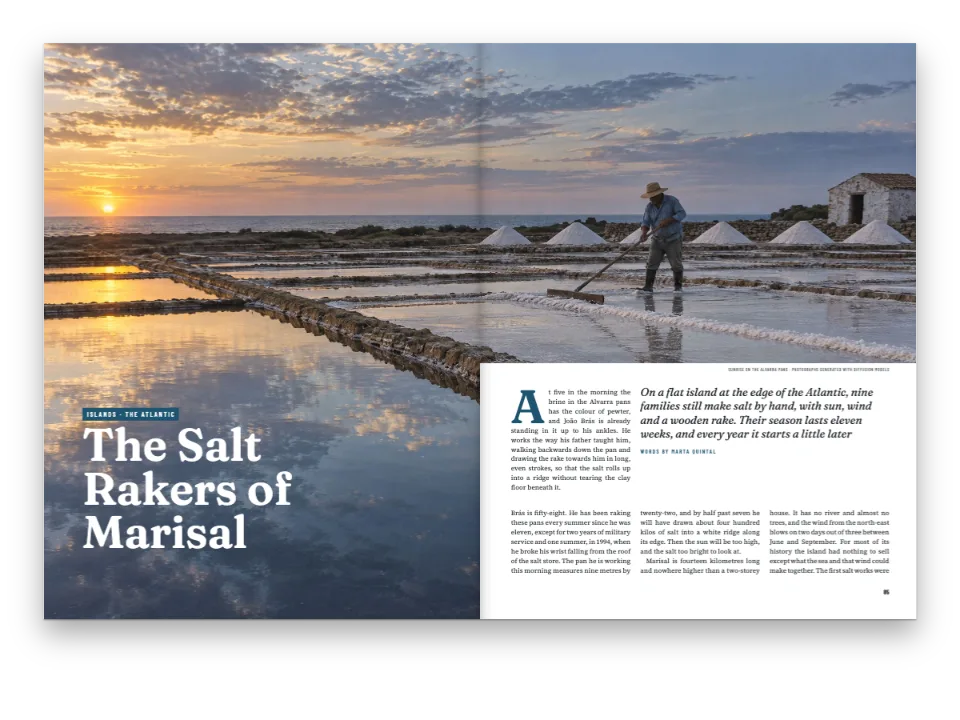
Três páginas de uma revista do litoral: uma reportagem sobre os ofícios de uma cidadezinha de estuário, com uma foto sangrada na abertura e cinco fotos nas colunas. O pen compõe a reportagem duas vezes a partir do mesmo texto. Na primeira composição, as fotos mantêm o formato dos arquivos, e na página 2 as duas colunas terminam uma linha antes do fim da grade: a da esquerda sob o último parágrafo, a da direita acima da foto do pé. Na segunda, cada foto indica a parte do enquadramento que precisa aparecer sempre, e o motor corta fora dela: na mesma página, a marisqueira e o remendador de redes crescem uma linha cada um, e as duas colunas terminam na última linha da grade. Ninguém precisou escolher os cortes.
Esta receita responde a
- Como deixo uma foto ser cortada para preencher uma coluna curta sem que o assunto principal saia do enquadramento?
- Como deixo as colunas alinhadas no pé e a última página equilibrada (justificação vertical)?
- Como decido onde vai uma figura: no alto da página, sobre as duas colunas, exatamente aqui ou na margem?
A resposta curta
// Each photo names the rectangle that must always show, in fractions of the file:
// x and width of its width, y and height of its height. Outside it the engine may crop,
// so the photo can stand taller (sides cut, down to the area's width) or lower (top and
// bottom cut, down to its height) than the file, always as wide as its column.
const SAFE_AREAS = {
  mariscadora: { x: 0.2, y: 0.36, width: 0.34, height: 0.46 }, // Carmen, her rake and basket
  redeira: { x: 0.34, y: 0.14, width: 0.4, height: 0.66 }, // Rosa and the net in her lap
  carpintero: { x: 0.12, y: 0.2, width: 0.64, height: 0.62 }, // Manuel and the whole hull
  faro: { x: 0.34, y: 0.14, width: 0.32, height: 0.56 }, // the tower and the walker below it
  pulpeira: { x: 0.2, y: 0.08, width: 0.56, height: 0.82 }, // Lucía, the octopus, the cauldron
};
// Columns end flush on this grid by whole lines. A heading or a photo that does not fit a
// column's foot leaves lines empty there; these settings forbid the usual fixes (space above
// a heading, under a photo, or a paragraph run long), so only a photo with a safe area can
// take them, by growing a line at a time. Without safe areas the short columns stay short.
const balancing = { enabled: true, maxLinesPerHeading: 0, stretchAfterLists: false,
  stretchAfterFloats: false, looseParagraphs: false };
Ingredientes
- Funcionalidades
- Área segura da imagemEquilíbrio de colunasPosicionamento de figurasFiguras e tabelas como recursosCitações que posicionam as figurasFiguras exatamente aquiEstilo de legendaTipos de recurso personalizadosAberturas desenhadasImagens nos designs de páginaAtributos de títuloUma ou duas colunasMargens espelhadasCabeços e fóliosCabeços por tipo de páginaPaleta de cores semânticaEstilos de parágrafoPáginas em um canvasExportação para PDF
- Tipografia
- Newsreader, Archivo, Archivo Narrow (SIL OFL 1.1)
- Materiais
carpintero-1600.jpgestuario-1700.jpgfaro-1600.jpgmariscadora-1600.jpgpulpeira-1600.jpgredeira-1600.jpg- The estuary at low water at dawn, with shellfish gatherers (Generated With Diffusion Models, original)
- A shellfish gatherer kneeling on the wet sand (Generated With Diffusion Models, original)
- A net mender on the quay (Generated With Diffusion Models, original)
- A shipwright planing a wooden boat in his shed (Generated With Diffusion Models, original)
- A lighthouse on a granite point and a walker below it (Generated With Diffusion Models, original)
- A cook lifting an octopus from a copper cauldron at a market (Generated With Diffusion Models, original)
Preparo
#1 · Marque o que precisa ficar, e nada mais
O código é a resposta curta logo acima. Uma área segura são quatro frações da imagem, medidas a partir do canto superior esquerdo. O motor pode mostrar a foto em qualquer formato entre o arquivo inteiro e esse retângulo, sempre na largura da coluna: mais alta cortando as laterais, mais baixa cortando em cima e embaixo. O que fica fora da área é cortado em proporção às margens de cada lado, por isso Rosa, à direita do centro no cais, continua à direita do centro quando as laterais são cortadas.
#2 · Deixe o equilíbrio compensar a sobra só com as fotos
A mesma região configura o equilíbrio. Os recursos de costume dele acrescentam branco: uma linha acima de um título, ar embaixo de uma foto, um parágrafo com uma linha a mais. Aqui eles estão desativados, para que a composição simples mostre cada coluna curta como ela fica. Uma foto com área segura é testada primeiro de qualquer forma, antes de qualquer um desses recursos, porque uma foto mais alta não abre buraco no texto.
#3 · A área segura pertence ao recurso
const FILES = { estuario: [1700, 1133] }; // px, declared as they are; the rest 1600 × 1067
// Caption and alt text of each photo, one block per photo: content.figures.<lang>.md.
const figureTexts = String.raw`mariscadora
Carmen Lago sorts cockles on her plot of the estuary at low water.
A woman in green boots kneels on wet sand beside a rake and a mesh basket.

redeira
Rosa Doval mends a purse-seine panel on the quay.
A woman on a stool sews a green net spread around her; fishing boats behind.

carpintero
Manuel Barreiro planes the planking of the gamela.
An old man planes the side of a half-built wooden boat inside a shed.

faro
Arnela point: the lighthouse and the coastal path.
A white lighthouse on granite rocks; a walker with a red backpack below it.

pulpeira
Lucía Fraga lifts an octopus out of the copper cauldron.
A woman in an apron lifts a boiled octopus from a steaming copper pot.
`;
const CAPTIONS = Object.fromEntries(figureTexts.trim().split(/\n\s*\n/)
  .map((block) => block.split('\n').map((line) => line.trim()))
  .map(([id, caption, alt]) => [id, [caption, alt]]));
const PLACEMENT = { pulpeira: { position: 'here' } }; // the rest float to the first free slot
const photo = (id, safe) => {
  const [w, h] = FILES[id] ?? [1600, 1067];
  const [caption, alt] = CAPTIONS[id] ?? [];
  return { id, typeId: 'figure', kind: 'bitmap', createdAt: 0, updatedAt: 0,
    bitmap: { fileId: `${id}-${w}.jpg`, format: 'jpeg', width: w, height: h },
    ...(caption && { caption, altText: alt, placement: PLACEMENT[id] ?? { position: 'auto' } }),
    ...(safe && SAFE_AREAS[id] && { safeArea: SAFE_AREAS[id] }) };
};
const resources = (safe) => ['estuario', ...Object.keys(CAPTIONS)].map((id) => photo(id, safe));
safeArea fica no recurso, ao lado do arquivo, da legenda e do posicionamento, de modo que a foto a mantém onde quer que flutue e em qualquer documento que a use. O pen a passa ou a omite, e essa é a única diferença entre as duas composições. O estuário da abertura é desenhado pelo estilo de título, não flutua, por isso não precisa de área segura.
#4 · Componha as duas e compare
const build = (safe) => buildDocumentWithFonts({ markdown, resources: resources(safe) }, config(),
  kitFonts(FONTS));
const docs = { plain: await build(false), safe: await build(true) };
Os dois documentos saem de uma mesma configuração e de um mesmo texto Markdown. Só as páginas que continuam são preenchidas até o pé: a página 3 fecha a reportagem, e numa página de fechamento as colunas só precisam terminar na mesma altura uma da outra, o que aqui já acontece, por isso nenhuma foto cresce ali. O botão do PDF compõe a versão que estiver na mesa, e o PDF recorta cada foto na moldura do mesmo jeito.
A receita completa
// ═══ Postext Cookbook · Nº 116 · Photos that grow to fill a short column ═══════════
// https://postext.dev/en/cookbook/photos-fill-short-columns
// Code: MIT · Text: original (CC BY 4.0) · Photos: diffusion models
// Fonts: Newsreader, Archivo, Archivo Narrow (SIL OFL 1.1) · Needs postext ≥ 1.25.0
//
// A magazine feature set twice. Without safe areas some columns end short; with them the
// engine crops each photo outside its area to set it taller, and the photos fill those lines.
import {
  buildDocumentWithFonts, renderPageToCanvas, registerResourceImage, defaultResourceTypes,
} from 'https://esm.sh/postext';
import { renderToPdf, decompressWoff2 } from 'https://esm.sh/postext-pdf';

const LANG = 'en'; // @lang: the language of the sample document ('es' | 'en')
const RECIPE = 'photos-fill-short-columns';

// ─── 1 · Design ─────────────────────────────────────────────────────────────
// #region palette: six named colours, the accents taken from the photos: sea slate, net green
const palette = {
  ink: '#1d2326', // text: a cold near-black
  sea: '#2f5d73', // the accent: kicker, caption labels, folios, references
  net: '#3f6b55', // the second colour: the opener's rule
  rule: '#c9d1d3', // hairlines
  muted: '#5f6a6e', // running heads, credits, the colophon
  paper: '#ffffff',
};
const col = (id) => ({ hex: palette[id], model: 'hex', paletteId: id });
const colorPalette = [
  ...Object.entries(palette).map(([id, hex]) => ({ id, name: id, value: { hex, model: 'hex' } })),
  // The engine's defaults link to 'main-color': pointed at the accent, no default blue shows.
  { id: 'main-color', name: 'sea (defaults)', value: { hex: palette.sea, model: 'hex' } },
];
// #endregion
const [TEXT, DISPLAY, LABEL] = ['Newsreader', 'Archivo', 'Archivo Narrow'];
const LEAD = 13.6; // body leading in pt: the grid the photos grow by
const [PAGE_W, PAGE_H, TOP, BOTTOM, INNER, OUTER, GUTTER] = [225, 297, 22, 22, 18, 16, 7]; // mm
const PHOTO_H = 150; // the opener's bleed photo: 225 × 150 mm, the shape of the file
const at = (to, edge, x, y, size) => ({ anchor: { to, edge }, offset: { x: mm(x), y: mm(y) },
  ...(size && { size }) });
const text = (id, content, family, size, color, placement, extra) => ({ kind: 'text', id,
  content, fontFamily: family, fontSize: pt(size), color: col(color), placement,
  align: 'left', overflow: 'wrap', ...extra }); // the running heads ask for an ellipsis instead
const caps = (size) => ({ fontWeight: 700, textTransform: 'uppercase',
  letterSpacing: pt(size * 0.18) });

// #region answer: a safe area per photo, and balancing that may only grow pictures
// Each photo names the rectangle that must always show, in fractions of the file:
// x and width of its width, y and height of its height. Outside it the engine may crop,
// so the photo can stand taller (sides cut, down to the area's width) or lower (top and
O script.js montado funciona como está: cole-o como script de módulo em qualquer página ou abra a receita no CodePen. Pasta da receita no GitHub ↗ (abre em uma nova aba)
Variações
#Mantenha uma foto em linha junto do texto
Uma foto com position: 'here' e área segura é cortada em cima e embaixo quando fica um pouco alta demais para o espaço que sobra na coluna, em vez de passar para a coluna seguinte.
-const PLACEMENT = { pulpeira: { position: 'here' } }; // the rest float to the first free slot
+const PLACEMENT = { pulpeira: { position: 'here' }, faro: { position: 'here' } };#Devolva ao equilíbrio os outros recursos
Com os valores padrão, as fotos continuam vindo primeiro, e os títulos e os flutuantes ficam com o que a área segura de uma foto não consegue cobrir.
-const balancing = { enabled: true, maxLinesPerHeading: 0, stretchAfterLists: false,
-  stretchAfterFloats: false, looseParagraphs: false };
+const balancing = { enabled: true };Erros comuns
- Uma área segura que cobre a imagem inteira, ou que tenha um lado menor que 2 % dela, é ignorada: a foto aparece inteira, como se não tivesse área segura.
- Só crescem os flutuantes de coluna e as fotos em linha. Uma foto flutuante na largura das duas colunas mantém o formato, porque crescer empurraria de uma vez todas as colunas embaixo dela.
Créditos
- Receita
- Ignacio Ferro
- Texto
- The feature, the captions and the colophon, in Spanish and English; Arnela and its people are imaginary · Postext Cookbook · CC BY 4.0
- Imagens
- The estuary at low water at dawn, with shellfish gatherers · Generated With Diffusion Models · original
- A shellfish gatherer kneeling on the wet sand · Generated With Diffusion Models · original
- A net mender on the quay · Generated With Diffusion Models · original
- A shipwright planing a wooden boat in his shed · Generated With Diffusion Models · original
- A lighthouse on a granite point and a walker below it · Generated With Diffusion Models · original
- A cook lifting an octopus from a copper cauldron at a market · Generated With Diffusion Models · original
- Fontes
- Newsreader (SIL OFL 1.1) · Archivo (SIL OFL 1.1) · Archivo Narrow (SIL OFL 1.1)
- Código
- MIT, como o Postext
Editar este texto ↗ (abre em uma nova aba)Pasta da receita no GitHub ↗ (abre em uma nova aba)