かんたんな説明
2ページの漫画を、印刷用のPDFと電子書籍にします。ページをそのまま保ってコマごとに拡大できるもの、Kindle向けのもの、せりふを文字にしたものです。
できあがり
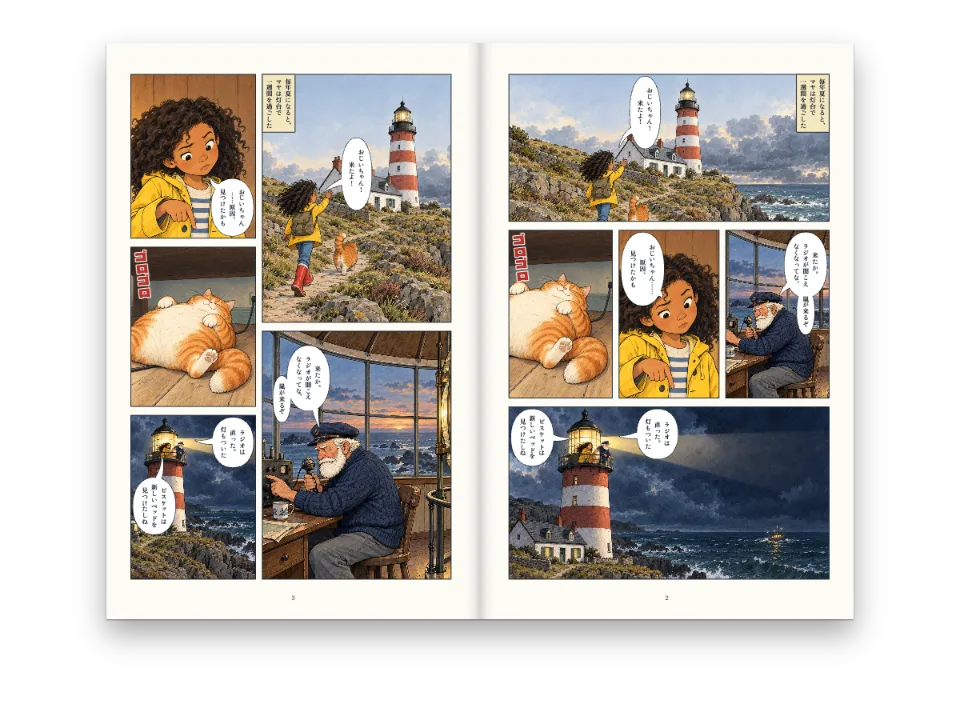
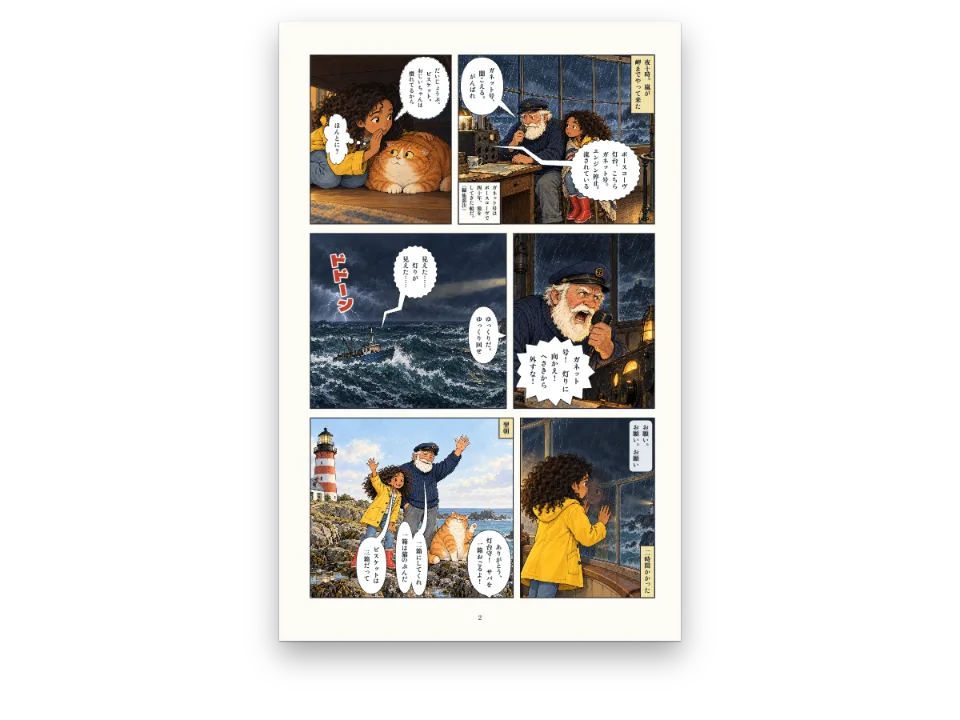
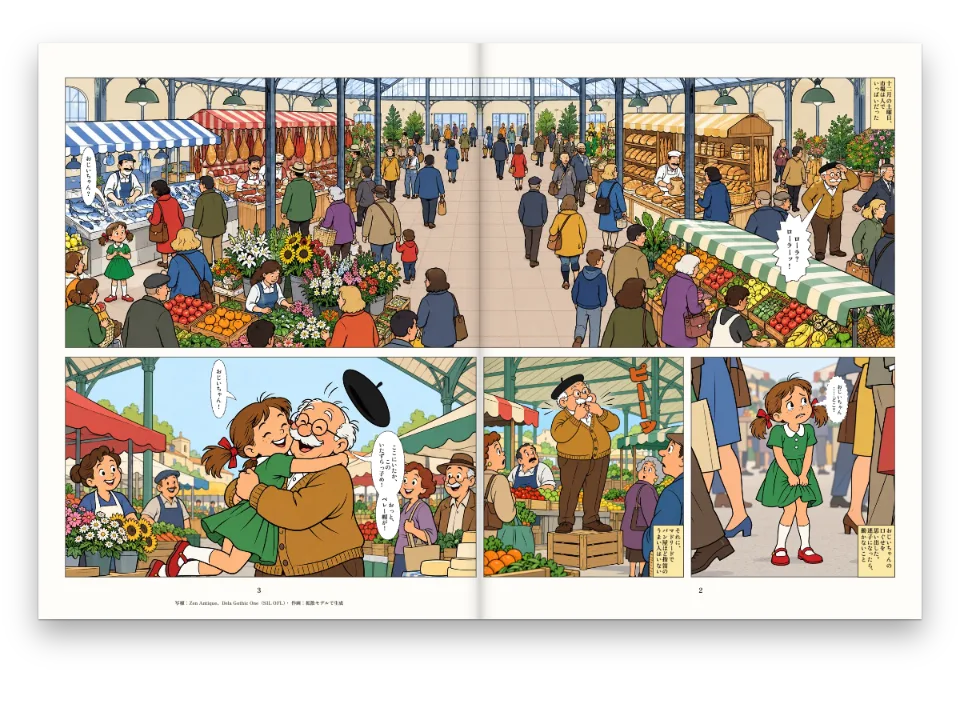
『ポースコーヴの灯』の第一話です。扉と漫画2ページを一度だけ組み、4通りに書き出します。PDFは印刷用。固定レイアウトのEPUBは印刷ページをそのまま保ち、リージョンナビゲーションを含むので、読書アプリは灯台に着くコマからラジオ、そしてマヤへと、一コマずつ拡大して見せられます。二つ目の固定EPUBにはKindle Panel Viewを加え、リフロー型の版は各コマを切り抜いた絵とそのせりふで組みます。ページには、読書アプリで開いたときの各ファイルの中身とダウンロードのリンクを並べます。十言語で出ます。
このレシピが答える質問
- コマごとに読める漫画のEPUBを作るには?
手短な答え
// The fixed layout keeps every printed page and writes regions.xhtml (EPUB Region-Based
// Navigation): one panel region per panel in reading order, its balloons nested in it.
// kindlePanelView adds Kindle's tap-to-magnify targets; the reflowable book sets each panel
// as its cropped picture followed by its lines as text.
const book = {
  metadata: { title: doc.metadata.title, creators: [doc.metadata.author], language: config().locale,
    modified: new Date('2026-10-07T00:00:00Z') }, // a fixed date: the same bytes on every run
  fonts: await epubFonts([LETTERING, SFX], markdown), // every face the pages set, as bytes
  resourceBytes: (fileId) => ({ bytes: imageBytes(fileId), mediaType: 'image/jpeg' }),
  onWarning: (w) => console.warn(`[epub] ${w.kind}`, w.family ?? w.fileId ?? w.detail),
};
const epubs = {
  fixed: await renderToEpub(doc, { ...book, layout: 'fixed' }),
  kindle: await renderToEpub(doc, { ...book, layout: 'fixed', kindlePanelView: true }),
  reflowable: await renderToEpub(doc, { ...book, layout: 'reflowable' }),
};
材料
- 機能
- PDFとEPUBの漫画EPUBの書き出しコマ割りコマの絵とトリミング漫画のページ漫画の写植他言語への写植し直し話者とアンカー吹き出しのスタイル画像のセーフエリアセマンティックカラーパレットキャンバス上のページPDFの書き出し
- 種類
- Comic Neue, Bangers, Zen Antique, Dela Gothic One, ZCOOL KuaiLe, ZCOOL QingKe HuangYou, Playpen Sans Arabic, Lalezar (SIL OFL 1.1)
- 素材
lh-arrive.jpglh-beam.jpglh-biscuit.jpglh-maya.jpglh-radio.jpg- Panel picture: Maya arrives at the lighthouse (Generated With Diffusion Models, オリジナル)
- Panel picture: Tomás at the radio (Generated With Diffusion Models, オリジナル)
- Panel picture: Maya finds the problem (Generated With Diffusion Models, オリジナル)
- Panel picture: Biscuit asleep on the cable (Generated With Diffusion Models, オリジナル)
- Panel picture: the lamp lit at night (Generated With Diffusion Models, オリジナル)
作り方
#1 · 同じ文書をEPUBに書き出す
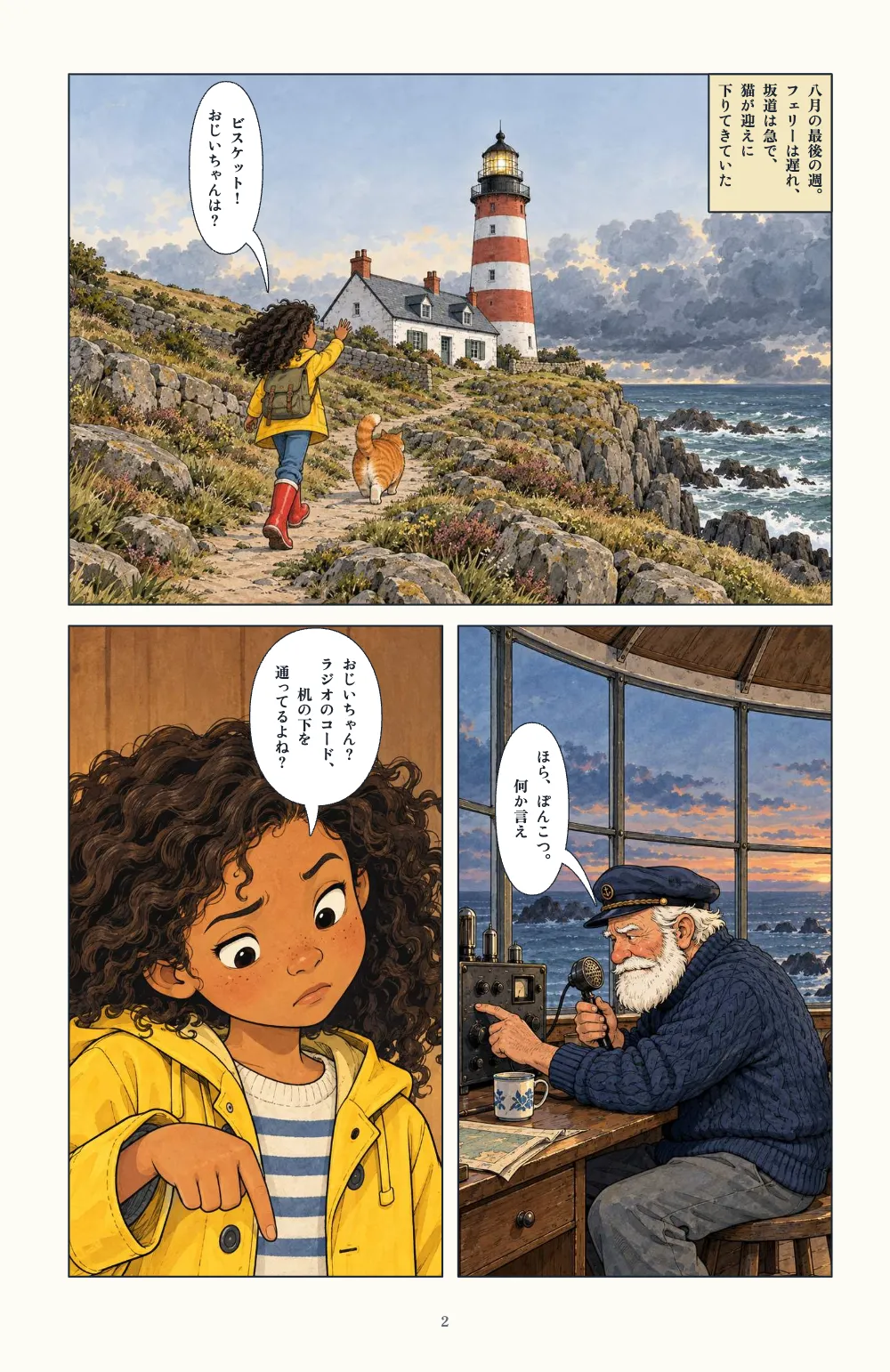
コードは前の手短な答えにあります。renderToEpubはrenderToPdfが印刷する文書を受け取るので、EPUBのページはPDFのページと同じです(漫画の出力)。layout: 'fixed'で本に漫画のページがあると、regions.xhtmlも書きます。読む順にコマごとのpanel領域があり、それぞれページに対する百分率の矩形で、中に吹き出し、ナレーション、描き文字の領域が入れ子になります。ページ送りの向きは漫画の読む方向に従うので、日本語版とアラビア語版は右から左へめくります。kindlePanelView: trueは、コマごとのタップ領域と拡大したコピー、Kindleが求めるメタデータを加えます。リフロー型の版には保つべきページがないので、各コマはページと同じに切り抜いた絵と、その後のせりふ「マヤ:ビスケット! おじいちゃんは?」になります。名前はcomics.castから取ります。
#2 · ページが使う書体を埋め込む
// For each weight and style the lettering asks for, the file loadComicFonts chose (the
// nearest one Fontsource ships), only the slices whose characters the book sets. A file that
// serves several weights is embedded once, with a weight range ('400 700').
const inRange = (range, cp) => range.split(',').some((part) => {
  const [lo, hi = lo] = part.trim().slice(2).split('-');
  return cp >= parseInt(lo, 16) && cp <= parseInt(hi, 16);
});
async function epubFonts(families, text) {
  const cps = [...new Set(text)].map((ch) => ch.codePointAt(0));
  const byFile = new Map(); // url → the face it serves
  for (const family of families) {
    const meta = await fontsourceMeta(family);
    const asks = [[400, 'normal'], [700, 'normal'], [400, 'italic'], [700, 'italic']];
    for (const [weight, style] of asks) {
      const w = meta.weights.reduce((a, b) => (Math.abs(b - weight) < Math.abs(a - weight) ? b : a),
        400);
      const s = style === 'italic' && meta.styles.includes('italic') ? 'italic' : 'normal';
      for (const { url, range } of await comicFaceFiles(family, w, s, meta, text)) {
        if (range && !cps.some((cp) => inRange(range, cp))) continue;
        const face = byFile.get(url) ?? { family, style: s, weights: new Set(), range };
        face.weights.add(weight);
        byFile.set(url, face);
      }
    }
  }
  return Promise.all([...byFile].map(async ([url, { family, style, weights, range }]) => ({
    family, style, format: 'woff2', unicodeRange: range,
    weight: weights.size > 1 ? `${Math.min(...weights)} ${Math.max(...weights)}` : [...weights][0],
    bytes: new Uint8Array(await (await fetch(url)).arrayBuffer()) })));
}
固定レイアウトのEPUBは、自分が持っている書体で文字を描きます。足りない書体は読書アプリの書体に置き換わります。写植はレギュラー、太字、イタリックを求めますが、漫画用の書体はそれより少ない数しかないので、それぞれloadComicFontsが選んだファイルを使い、二つのウエイトに使うファイルは'400 700'という範囲で一度だけ入れます。日本語と中国語の書体は、その版が使う文字を含む分割ファイルだけを入れるので、日本語版は1.4 MBに収まります。
#3 · 各ファイルを読み戻す
const el = (tag, css, text) => Object.assign(document.createElement(tag),
  { textContent: text ?? '' }, { style: css });
const shelf = el('section', 'display: flex; flex-wrap: wrap; gap: 16px; justify-content: center;'
  + 'padding: 24px 16px 0; color: #d9d5cc; font: 13px/1.5 system-ui, sans-serif');
for (const [name, bytes] of Object.entries(epubs)) {
  const epub = readEpub(bytes);
  const regions = new TextDecoder().decode(epub.files.get(`${epub.root}regions.xhtml`)
    ?? new Uint8Array());
  const panels = regions.split('<li epub:type="panel">').slice(1); // one per panel
  const card = el('article', 'width: min(300px, 92vw); padding: 16px; border: 1px solid #2c3038');
  const steps = el('ol', 'margin: 8px 0; padding-left: 22px');
  steps.append(...panels.map((p, i) => el('li', '', `panel ${i + 1}: ${(p.match(
    /epub:type="(balloon|caption|sound-area|text-area)"/g) ?? []).length} text regions`)));
  const link = Object.assign(el('a', 'color: #d8a21a', `Download ${RECIPE}-${name}.epub`), {
    href: URL.createObjectURL(new Blob([bytes])), download: `${RECIPE}-${name}.epub` });
  card.append(el('h2', 'margin: 0; font-size: 15px; color: #f4f1ea', `EPUB 3 · ${name}`),
    el('p', 'margin: 4px 0 0', `${epub.layout} · ${epub.pageProgression} · `
      + `${epub.spine.length} documents · ${Math.round(bytes.length / 1024)} KB`),
    panels.length ? steps : el('p', '', 'No region navigation: the panels are text.'), link);
  shelf.append(card);
}
document.getElementById('pages').before(shelf);
readEpubは読書アプリと同じようにバイト列を開きます。レイアウト、ページ送りの向き、スパインです。各カードのリストはregions.xhtmlから読んだガイドビューそのもので、五つのコマとその文字の領域が、読者がたどる順に並びます。三つのファイルは英語、日本語、アラビア語でEPUBCheck 5.4をエラーも警告もなく通ります。
#4 · 一つのレイアウトで十の版
const [LETTERING, SFX] = t({
  en: ['Comic Neue', 'Bangers'], es: ['Comic Neue', 'Bangers'], ca: ['Comic Neue', 'Bangers'],
  ja: ['Zen Antique', 'Dela Gothic One'], zh: ['ZCOOL KuaiLe', 'ZCOOL QingKe HuangYou'],
  ar: ['Playpen Sans Arabic', 'Lalezar'], pt: ['Comic Neue', 'Bangers'],
  fr: ['Comic Neue', 'Bangers'], de: ['Comic Neue', 'Bangers'], it: ['Comic Neue', 'Bangers'],
});
content.<lang>.mdには、同じ話者IDで一つの版の言葉を書きます。コマの領域はどの言語でも同じで、吹き出しの領域は、各言語の文字に合わせて写植し直された吹き出しとともに動きます。
レシピの全体
// ═══ Postext Cookbook · Nº 148 · A comic EPUB read panel by panel ═══════════════════
// https://postext.dev/en/cookbook/comic-epub-guided-view
// Code: MIT · Text: original (CC BY 4.0) · Pictures: generated with diffusion models
// Fonts: Comic Neue, Bangers and the faces of five editions (OFL) · Needs postext ≥ 1.65.0
//
// A short comic laid out once and exported four ways: a PDF for print, a fixed-layout EPUB
// whose region-based navigation lets a reading system step through it panel by panel, the
// same EPUB with Kindle Panel View, and a reflowable EPUB with each panel's lines as text.
// Each file is read back to list what a reader will find in it.
import {
  buildDocument, withLoadedFonts, renderPageToCanvas, registerResourceImage, loadVerticalAlternates,
} from 'https://esm.sh/postext';
import { renderToPdf, decompressWoff2 } from 'https://esm.sh/postext-pdf';
import { renderToEpub, readEpub } from 'https://esm.sh/postext-epub';

const LANG = 'ja'; // @lang: 'en' | 'es' | 'ca' | 'zh' | 'ar' | 'ja' | 'pt' | 'fr' | 'de' | 'it'
const RECIPE = 'comic-epub-guided-view';

// ─── 1 · Design ─────────────────────────────────────────────────────────────
// #region palette: the night sea, the lighthouse red and the yellow of the captions
const palette = {
  ink: '#1b2430', // panel borders, lettering and the title page
  accent: '#b8322a', // the lighthouse red: title and sound effects
  caption: '#f4e7bf', // caption boxes
  muted: '#5f6873', // folios and the imprint
  paper: '#fdfbf6',
};
const col = (id) => ({ hex: palette[id], model: 'hex', paletteId: id });
const colorPalette = [
  ...Object.entries(palette).map(([id, hex]) => ({ id, name: id, value: { hex, model: 'hex' } })),
  { id: 'main-color', name: 'accent (defaults)', value: { hex: palette.accent, model: 'hex' } },
];
// #endregion

// #region editions: six editions, each lettered in faces for its script
const [LETTERING, SFX] = t({
  en: ['Comic Neue', 'Bangers'], es: ['Comic Neue', 'Bangers'], ca: ['Comic Neue', 'Bangers'],
  ja: ['Zen Antique', 'Dela Gothic One'], zh: ['ZCOOL KuaiLe', 'ZCOOL QingKe HuangYou'],
  ar: ['Playpen Sans Arabic', 'Lalezar'], pt: ['Comic Neue', 'Bangers'],
  fr: ['Comic Neue', 'Bangers'], de: ['Comic Neue', 'Bangers'], it: ['Comic Neue', 'Bangers'],
});
// #endregion

const comics = {
  gutter: { horizontal: mm(4), vertical: mm(3) },
  panel: { borderWidth: pt(1), borderColor: col('ink'), background: col('paper') },
  lettering: { fontFamily: LETTERING, fontSize: pt(8), color: col('ink'), inset: mm(1.5) },
  balloonStyles: [{ id: 'speech', stroke: col('ink') }, { id: 'caption', fill: col('caption'),
組み立てたscript.jsはそのまま動きます。任意のページのモジュールスクリプトに貼り付けるか、レシピをCodePenで開いてください。 GitHub上のレシピのフォルダー ↗ (新しいタブで開きます)
アレンジ
#Kindle版を省く
リージョンナビゲーションはどの固定EPUBにも書かれます。Kindle Panel Viewはそれに加わるだけです。
- kindle: await renderToEpub(doc, { ...book, layout: 'fixed', kindlePanelView: true }),#リフロー版に表紙を付ける
-  reflowable: await renderToEpub(doc, { ...book, layout: 'reflowable' }),
+  reflowable: await renderToEpub(doc, { ...book, layout: 'reflowable',
+ cover: { bytes: imageBytes('lh-beam.jpg'), mediaType: 'image/jpeg' } }),よくあるつまずき
- 同じファイルをウエイトごとに埋め込むと4回コピーされます。ウエイトの範囲を使う前は、中国語版が5.3 MBありました。
クレジット
- 本文
- 書き下ろしの文章, CC BY 4.0
- 画像
- Panel picture: Maya arrives at the lighthouse · Generated With Diffusion Models · オリジナル
- Panel picture: Tomás at the radio · Generated With Diffusion Models · オリジナル
- Panel picture: Maya finds the problem · Generated With Diffusion Models · オリジナル
- Panel picture: Biscuit asleep on the cable · Generated With Diffusion Models · オリジナル
- Panel picture: the lamp lit at night · Generated With Diffusion Models · オリジナル
- フォント
- Comic Neue (SIL OFL 1.1) · Bangers (SIL OFL 1.1) · Zen Antique (SIL OFL 1.1) · Dela Gothic One (SIL OFL 1.1) · ZCOOL KuaiLe (SIL OFL 1.1) · ZCOOL QingKe HuangYou (SIL OFL 1.1) · Playpen Sans Arabic (SIL OFL 1.1) · Lalezar (SIL OFL 1.1)