かんたんな説明
音楽学校の和声教本から、終止形を扱う章を2段組みで組みます。5つの譜例はテキストで書かれ、本物の楽譜として刻譜され、図と同じように番号とキャプションが付いて、それに触れた段落の近くに置かれます。
できあがり
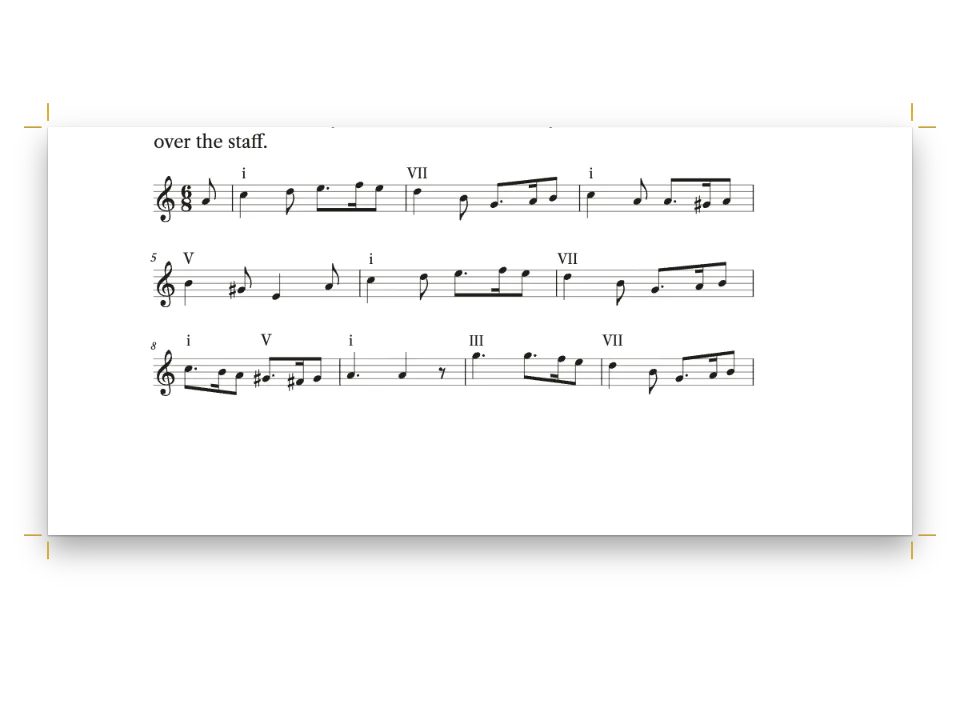
音楽学校の初年次向け和声教本『Four-Part Harmony』の第4章です。210 × 280 mmの判型に、Crimson Proで2段に組みます。課題は終止形で、5つの譜例はすべて2段の譜表に書いた4声のコラールです。バスの下にはローマ数字で度数を付けています。収めるのはト長調の5つの終止形、『Nun danket alle Gott』の3行、そしてジュネーヴ詩編第134編(Old Hundredth)の全曲です。各譜例にはExample 4.1から4.5(スペイン語版ではEjemplo)の番号が付き、ラベル用の書体のキャプションにワインレッドのラベルが付きます。譜例はそれを引用した段落のあとの段の天か地に置かれ、詩編の全曲は63ページの天に2段にまたがって組まれます。和声づけはこの教本のために書いたもので、平行5度・8度、声部間の間隔、導音の解決を確認しています。
このレシピが答える質問
- 2段組みの本で、譜例に番号を振り、図のように浮動させるには?
- 番号付きキャプションのある図を加え、本文で参照するには(「図3.2を参照」)?
- 図の位置を制御するには(ページの上端、2段をまたぐ、まさにこの位置、余白)?
手短な答え
// In the Markdown, :ref{id="ex-old-hundredth" style="full"} prints 'Example 4.4' ('Ejemplo
// 4.4' in Spanish) and ::resource{id="…"} anchors the float after the paragraph that cites it.
const example = (id, source, placement, styleId) => {
  const [caption, note, altText] = CAPTIONS[id];
  return { id, typeId: 'example', kind: 'score', caption, note, altText, placement,
    score: { format: 'humdrum', source, styleId }, createdAt: 0, updatedAt: 0 };
};
// The **kern sources are in #region art-scores; captions in content.captions.<lang>.md.
const resources = () => [
  example('ex-cadences', CADENCES, { position: 'bottom' }, 'column'),
  example('ex-nun-danket', NUN_DANKET, { position: 'top' }, 'column'),
  example('ex-nun-danket-3', NUN_DANKET_3, { position: 'auto' }, 'column'),
  // Across both columns in the document's own score style: the whole tune in two systems.
  example('ex-old-hundredth', OLD_HUNDREDTH, { position: 'top', span: 'page' }),
  example('ex-deceptive', DECEPTIVE, { position: 'auto', span: 'page' }),
];
材料
- 機能
- 番号付き譜例図の配置図を配置する参照楽譜の記譜楽譜スタイル番号付きキャプション「図」と「表」を文書の言語で独自のリソースの種類キャプションのスタイル出典とクレジット1段組みと2段組みデザインした章扉見出しの属性柱とノンブル見開きの余白ページの役割ごとの柱囲み段落スタイルセマンティックカラーパレット
- 種類
- Crimson Pro, Playfair Display, Fira Sans Condensed (SIL OFL 1.1)
- 素材
- なし:画像はすべてコードで描画
作り方
#1 · コラールをHumdrum **kernで書く
// Each example lists its spines as Humdrum wants them, lowest first: the bass staff split into
// tenor and bass, the **harm spine (printed under that staff), the treble staff split into
// soprano and alto. Writing them with spaces keeps the pen free of tab characters.
const kern = (meter, body) => [
  '**kern **harm **kern', '*clefF4 * *clefG2', '*k[f#] * *k[f#]', `*M${meter} * *M${meter}`,
  '*^ * *^', ...body.trim().split('\n'), '== == == == ==', '*- *- *- *- *-',
].map((row) => row.trim().split(/ +/)
  // Spanish harmony books write every degree in capitals: vi is VI, iib is IIb.
  .map((cell) => (LANG === 'es' && /^(?:i{1,3}|iv|vi{0,2})[bc7]?$/.test(cell)
    ? cell.replace(/^[iv]+/, (degree) => degree.toUpperCase()) : cell))
  .join('\t')).join('\n');
Humdrumは声部をタブ区切りの列で書き、いちばん低い声部から並べます。各譜表は1つの列(spine)で、*^で2つに分けます。ヘ音記号の譜表にテノールとバス、ト音記号の譜表にソプラノとアルトを置くので、刻譜エンジンは1つの譜表に2声部を符尾を分けて書きます(左の声部が上向き、右の声部が下向き)。バスの譜表のあとの**harm列が、その下に度数を印刷します。Ibは第1転回形、Icは四六の和音です。スクリプトは列をスペースで書いてタブに変えるので、どのエディターでもファイルが壊れません。スペイン語版では、スペインの和声教本の書き方にならって度数をすべて大文字(VI、IIb)にします。
#2 · 譜例をexample型のリソースにする
手短な答えが5つのリソースを作ります。typeId: 'example'は組み込みの「譜例」型を使います。リソースがこの型を使うと、エンジンが本のリソース型に加え、文書の言語で名前を付け(locale: 'es'ならEjemplo)、章ごとに番号を振ります。そのため第4章の最初の譜例は4.1になります。楽譜リソースは分割されず、図と同じように浮動します。position: 'top'または'bottom'は引用のあとで空きのある次の段の天か地を取り、span: 'page'はOld Hundredthを2段にまたがせます。キャプション、出典、代替テキストは、版ごとの2つ目のMarkdownファイルから読みます。
#3 · 段に入れる譜例の譜表を小さくする
const scoreStyle = {
  staffSize: mm(5.4), musicFont: 'Bravura', barNumbers: 'system', color: col('ink'),
  textFont: TEXT, // the Roman numerals under the bass, in the text face
  marginTop: pt(4), marginBottom: pt(2),
};
const scoreStyles = [ // rastral 4.6 mm: four staves of a chorale fit a column in two systems
  { id: 'column', name: t({ en: 'Column examples', es: 'Ejemplos de columna' }),
    staffSize: mm(4.6), barNumbers: 'none', spacing: 0.8 },
];
ページ幅の2つのコラールは文書のscoreStyleに従い、譜表の高さは5.4 mm、各段の頭に小節番号が付きます。段に入れる譜例は名前付きスタイルcolumnを選びます。譜表は4.6 mm、小節番号なし、間隔0.8で、譜例4.2の5小節を1段に収め、最後の1小節だけが2段目に残らないようにしています。
#4 · 組版の前に刻譜エンジンを起動する
await initMusicEngine(); // until it runs, every score is laid out as a grey box
const continuation = { pageNumbering: { startAt: 61 }, // odd: the opener is a recto
  headings: { h1: 3, h2: 0, h3: 0, h4: 0, h5: 0, h6: 0 } }; // the next # is chapter 4
const doc = await buildDocumentWithFonts({ markdown, resources: resources(), continuation },
  config, kitFonts(FONTS));
showPages(doc, { title: t({ en: 'Numbered chorale examples in a harmony method',
  es: 'Corales numerados en un método de armonía' }) });
initMusicEngine()はパッケージから刻譜エンジンVerovioを読み込みます。起動するまで、楽譜はすべて灰色の箱として組まれます。continuationでこの章を長い本の第4章にしているので、譜例は4.1から4.5と番号が付き、ノンブルは奇数ページの61から始まります。
#5 · 章扉を2段にまたがせる
const label = { fontFamily: LABEL, fontWeight: 600, textTransform: 'uppercase' };
const opener = {
  enabled: true, minHeight: mm(46),
  slot: { elements: [
      { kind: 'text', id: 'kicker', content: '{attr.kicker}', ...label, fontSize: pt(9),
        letterSpacing: pt(1.8), color: col('accent'), align: 'left',
        placement: { anchor: { to: 'container', edge: 'top-left' },
          offset: { x: mm(0), y: mm(6) } } },
      { kind: 'text', id: 'title', content: '{titleText}', fontFamily: DISPLAY, fontSize: pt(36),
        lineHeight: 1.05, fontWeight: 400, color: col('ink'), align: 'left',
        placement: { anchor: { to: '#kicker', edge: 'below' }, offset: { x: mm(0), y: mm(3) },
          size: { width: mm(150), height: 'auto' } } },
      { kind: 'text', id: 'deck', content: '{attr.deck}', fontFamily: TEXT, fontSize: pt(13),
        lineHeight: 1.25, italic: true, color: col('muted'), align: 'left',
        placement: { anchor: { to: '#title', edge: 'below' }, offset: { x: mm(0), y: mm(3) },
          size: { width: mm(120), height: 'auto' } } },
      { kind: 'rule', id: 'rule', direction: 'horizontal', thickness: pt(1.5), color: col('accent'),
        placement: { anchor: { to: '#deck', edge: 'below' }, offset: { x: mm(0), y: mm(5) },
          size: { width: mm(18) } } },
  ] },
};
章扉は2段にまたがり(第1レベルの見出しにspan: 'page')、柱見出しとリードを見出しの属性から取ります。minHeightで本文を46 mm下げるので、2つの段は罫の下の同じ行から始まります。
レシピの全体
// ═══ Postext Cookbook · Nº 166 · Numbered chorale examples in a harmony method ══
// https://postext.dev/en/cookbook/conservatory-method-chorales
// Code: MIT · Text and four-part settings: original (CC BY 4.0) · Melodies: public domain
// Fonts: Crimson Pro, Playfair Display, Fira Sans Condensed (OFL 1.1) · Needs postext ≥ 1.54.0
import {
  buildDocumentWithFonts, renderPageToCanvas, defaultResourceTypes, initMusicEngine,
} from 'https://esm.sh/postext';

const LANG = 'en'; // @lang: the language of the sample document ('en' | 'es')
const RECIPE = 'conservatory-method-chorales';

// ─── 1 · Design ─────────────────────────────────────────────────────────────
// A claret accent on warm paper tones, every colour linked by id.
const palette = { ink: '#1f1a17', accent: '#7a2531', tint: '#f5eee6', rule: '#cdbfb2',
  muted: '#6a5f57', paper: '#ffffff' };
const col = (id) => ({ hex: palette[id], model: 'hex', paletteId: id });
const colorPalette = [
  ...Object.entries(palette).map(([id, hex]) => ({ id, name: id, value: { hex, model: 'hex' } })),
  { id: 'main-color', name: 'accent (defaults)', value: { hex: palette.accent, model: 'hex' } },
];
const [TEXT, DISPLAY, LABEL] = ['Crimson Pro', 'Playfair Display', 'Fira Sans Condensed'];
const OUTER = 16; // outer margin in mm: running heads and folios align to it
const LEAD = 14.2; // body leading in pt

// #region answer: score resources typed 'example', floated and numbered like figures
// In the Markdown, :ref{id="ex-old-hundredth" style="full"} prints 'Example 4.4' ('Ejemplo
// 4.4' in Spanish) and ::resource{id="…"} anchors the float after the paragraph that cites it.
const example = (id, source, placement, styleId) => {
  const [caption, note, altText] = CAPTIONS[id];
  return { id, typeId: 'example', kind: 'score', caption, note, altText, placement,
    score: { format: 'humdrum', source, styleId }, createdAt: 0, updatedAt: 0 };
};
// The **kern sources are in #region art-scores; captions in content.captions.<lang>.md.
const resources = () => [
  example('ex-cadences', CADENCES, { position: 'bottom' }, 'column'),
  example('ex-nun-danket', NUN_DANKET, { position: 'top' }, 'column'),
  example('ex-nun-danket-3', NUN_DANKET_3, { position: 'auto' }, 'column'),
  // Across both columns in the document's own score style: the whole tune in two systems.
  example('ex-old-hundredth', OLD_HUNDREDTH, { position: 'top', span: 'page' }),
  example('ex-deceptive', DECEPTIVE, { position: 'auto', span: 'page' }),
];
// #endregion

// #region scores: one score style for the page-wide chorale, a smaller one for the columns
const scoreStyle = {
  staffSize: mm(5.4), musicFont: 'Bravura', barNumbers: 'system', color: col('ink'),
  textFont: TEXT, // the Roman numerals under the bass, in the text face
  marginTop: pt(4), marginBottom: pt(2),
組み立てたscript.jsはそのまま動きます。任意のページのモジュールスクリプトに貼り付けるか、レシピをCodePenで開いてください。 GitHub上のレシピのフォルダー ↗ (新しいタブで開きます)
アレンジ
#番号なしの譜例を本文に置く
コードブロックに書いた楽譜は、本文から引用されずにそのまま本文に置かれます。別行立ての数式と同じで、番号もキャプションも付きません。
- ::resource{id="ex-cadences"}
+ ```humdrum {style="column" alt="ト長調の5つの終止形"}
+ **kern	**harm	**kern
+ …
+ ```#「音楽譜例」と呼ぶ
別の名前にするには独自の型を定義し、typeIdをそれに向けます。
- resourceTypes: defaultResourceTypes(LANG),
+ resourceTypes: [...defaultResourceTypes(LANG), { id: 'musex', name: '音楽譜例',
+   shortLabel: '譜例', captionPrefix: '音楽譜例', numberingTemplate: '{h1}.{n}',
+ resetOn: 'h1', counterFormat: 'decimal' }],よくあるつまずき
つまずき
::resource{id="…"}は二重引用符でしか書けない
ブロックの埋め込みとして認識されるのは、二重引用符を使った::resource{id="…"}の形だけです。ほかの書き方は、目に見える1行として本文に残ります。 その場に置く図 →
- 楽譜リソースは段やページをまたいで分割されません。浮動させる譜例は数小節にとどめ、長い曲はコードブロックに入れます。コードブロックなら段と段のあいだで分かれます。
- 刻譜エンジンは各段を置き場所の幅いっぱいに広げ、最後の段だけは自然な幅のままにします。譜例の1小節だけが2段目に残るときは、そのスタイルの
spacingか譜表の大きさを下げます。
クレジット
- 本文
- Chapter text and the four-part settings of every example · Ignacio Ferro · CC BY 4.0
- Melody of Nun danket alle Gott (Praxis pietatis melica, 1647), read from the soprano of Bach's setting BWV 386 · Johann Crüger · パブリックドメイン
- Melody of the Old Hundredth (Psalm 134 in the Genevan Psalter, 1551) · Louis Bourgeois (attributed) · パブリックドメイン
- フォント
- Crimson Pro (SIL OFL 1.1) · Playfair Display (SIL OFL 1.1) · Fira Sans Condensed (SIL OFL 1.1)