かんたんな説明
章の始め方を扱った短い本で、章ごとに違う体裁で始まります。1つの設定で、章に独自の色、余白、レイアウトを与える方法を示します。
できあがり
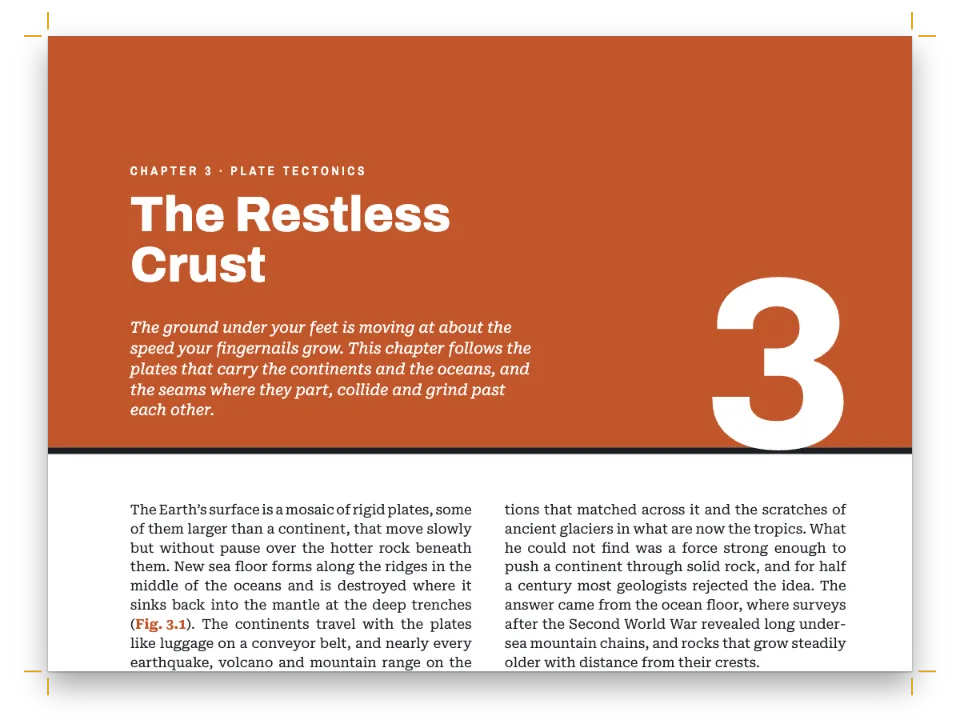
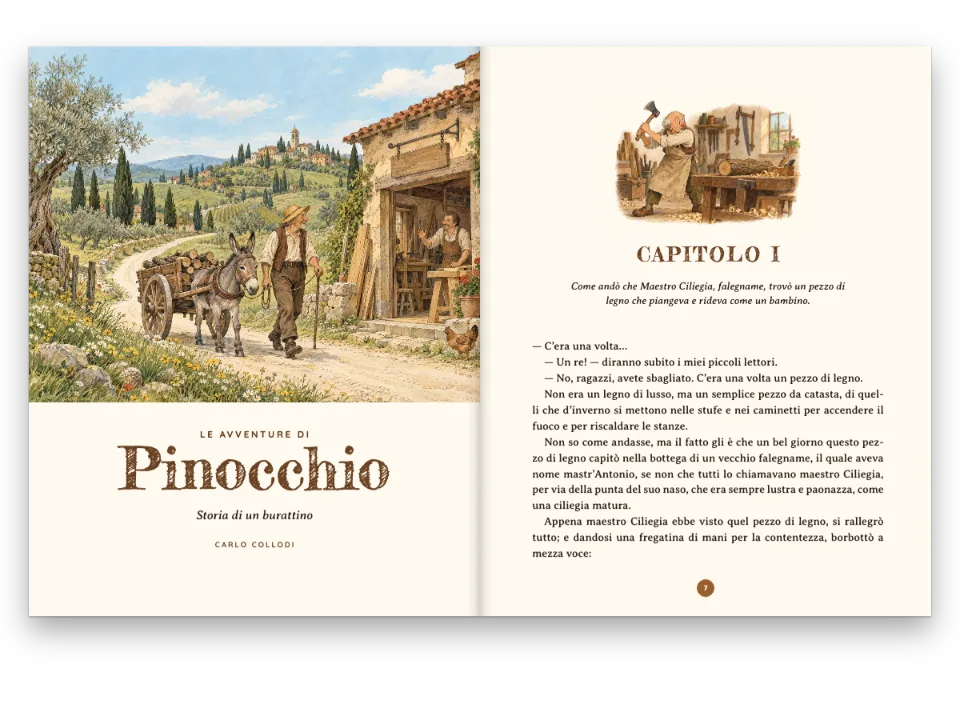
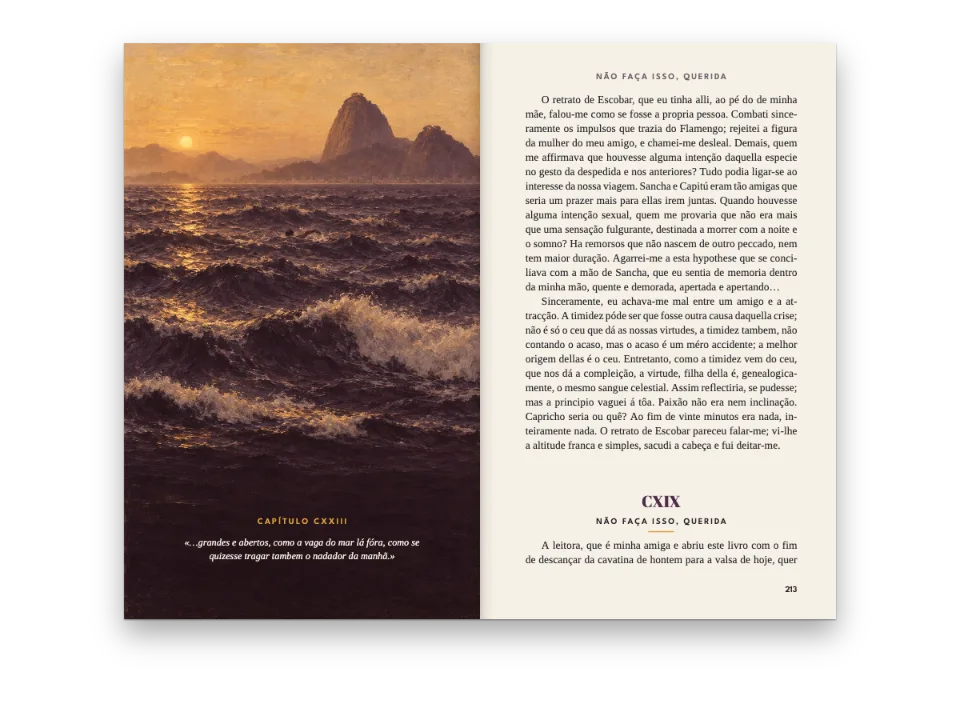
『Five Ways to Begin』は章扉について書いた7ページの本で、判型は180 × 240 mm、各章はその章が説明する章扉で組まれます。第1章は小説の章扉です。字間を空けたキッカー(題の上の小さな見出し)、細いイタリックの題、5行分の赤い頭文字が入り、続くページには柱が付きます。第2章は、2本の青い罫で描いたクリーム色のカルトゥーシュの中に題と花形装飾を収めます。第3章は、ページから裁ち落としたマゼンタの地に白いFraunces Blackで題を積み上げ、その下に箱から白抜きにした等幅書体の頭文字を置きます。マニュアルである第4章は、等幅書体の柱、題の横のオレンジの番号バッジ、Geistの2段組みです。終章は何もないページの中ほどに題を置き、その下に突き出しの頭文字を置きます。第1章はレベル1自身の章扉を使い、ほかの4章は見出し行で見出しスタイルの名前を指定します。
このレシピが答える質問
- 章ごとに異なる写真、色、章扉のバリエーションを与えるには?
- 章扉に著者名の行、リード文、ドロップキャップ付きの導入文を加えるには?
- 章タイトルをページ幅いっぱいに置き、その下で本文を2段組みにするには?
- タイトルの横に、番号が増えると幅が広がる番号バッジ(9 → 10)を作るには?
手短な答え
// A heading line picks a style by id, and its attributes feed the opener's {attr.…} texts:
//   # The Frame {style="framed" kicker="Chapter the Second"}
// A style overrides the level fields it names (opener, drop cap) and, until the next level-1
// heading, the section fields it names; the rest comes from the level and the document.
const level1 = () => ({ level: 1,
  // span 'page' opens each chapter at the head of a new page and runs its opener across
  // every column (chapter four has two). By default an H1 waits for a recto, with a blank
  // page before it; parity 'any' lets these short chapters open on either side.
  span: 'page',
  breakBefore: { enabled: true, parity: 'any' },
  marginBottom: pt(0), // each opener ends where its first paragraph starts
  advancedDesign: literary, // chapter one, unstyled: the book's own opener
  dropCap: { lines: 5, fontFamily: 'Fraunces', fontWeight: 400, color: col('accent'),
    gap: mm(2.5) } }); // a five-line drop in rubric red
const headingStyles = () => [ // factories, called by config() once every design exists
  // Each style brings its opener and swaps 'accent' for a colour of its own, on its pages.
  { id: 'framed', advancedDesign: framed, palette: { accent: palette.lapis },
    margins: { left: mm(EVEN), right: mm(EVEN) }, // a centred text block; 'accent' is blue:
    dropCap: { lines: 3, fontFamily: 'Fraunces', fontWeight: 600, color: col('accent'),
      gap: mm(2) } },
  { id: 'stacked', advancedDesign: stacked, palette: { accent: palette.magenta }, // white, on
    dropCap: { lines: BOXED, fontFamily: 'Geist Mono', fontWeight: 700, color: col('paper'),
      gap: mm(2.2) } }, // the square the opener draws for it
  { id: 'spec', advancedDesign: spec, palette: { accent: palette.signal }, dropCap: false,
    marginBottom: pt(0), // the hairline under the title is the separator
    margins: { left: mm(SPEC), right: mm(SPEC) }, // a 144 mm text block
    layout: { layoutType: 'double', gutterWidth: mm(7) },
    bodyStyle: { fontFamily: 'Geist', fontSize: pt(9.8), textAlign: 'left' }, // on the grid
    header: { elements: [...specHead('even'), ...specHead('odd')] },
    footer: { elements: [] } }, // no folio at the foot: the head gives the page
  { id: 'quiet', numbered: false, // a coda: it advances no chapter counter
    advancedDesign: quiet, palette: { accent: palette.graphite }, footer: tinyFolio,
    dropCap: { lines: 1, fontFamily: 'Fraunces', fontWeight: 300, fontSize: pt(46), // raised:
      color: col('accent'), gap: mm(1.2) }, // on the first baseline, rising into the white
    margins: { left: mm(QUIET.inner), right: mm(QUIET.outer) }, // a 106 mm measure
    bodyStyle: { fontSize: pt(QUIET.size), lineHeight: pt(QUIET.lead), textAlign: 'left' } },
]; // hook-up in config(): headings: { levels: [level1(), …] }, headingStyles()
材料
- 機能
- 見出しスタイル節ごとのページ構成本文段落のドロップキャップ節ごとの柱デザインした章扉部ごとの色番号のない章段抜きの章見出し帯ページデザインのテキスト・罫・ボックスページデザインの画像見出しの属性裁ち落としの帯とツメタイトル内の改行デザイン要素の基準位置柱とノンブルページの役割ごとの柱セマンティックカラーパレット番号付き見出し段落スタイルリソースとしての図と表
- 併用する機能
- 明示的な縦のアキ
- 種類
- Lora, Fraunces, Geist, Geist Mono (SIL OFL 1.1)
- 素材
- なし:画像はすべてコードで描画
作り方
#1 · 本の章扉をレベルに設定する
// The first paragraph, in :::paragraphs{style="lead"}, starts 17 mm under the title.
const literary = design([
  text('kicker', '{attr.kicker}', 'Geist', 8, centred(22), { ...caps(1.7), align: 'center' }),
  text('title', '{titleText}', 'Fraunces', 32, at('#kicker', 'below', 0, 4, 'fill'),
    { fontWeight: 300, italic: true, lineHeight: 1.05, align: 'center' }),
  { kind: 'rule', id: 'rule', direction: 'horizontal', thickness: pt(0.8), color: col('accent'),
    placement: at('#title', 'below', (MEASURE - 18) / 2, 6, 18) }, // an 18 mm rule, centred
  room('#title', 17),
]);
第1章にはスタイルがないので、レベル1自身のデザインを使います。どのスタイルもこのデザインを出発点にします(レベルとスタイルは手短な答えにあります)。章の最初の段落はMarkdownにあり、本文より一回り大きい:::paragraphs{style="lead"}のグループに入っています(本文の10.8/14.5 ptに対して12/17 pt)。レベルのdropCapがこの段落を頭文字で始めます(ドロップキャップ)。Mは5本目のベースラインに立ち、fontSizeを指定しなければ上端が1行目の大文字とそろいます。どちらのキャップハイトもFrauncesとLoraから測ります。章扉は題の17 mm下に置いた空の箱room()で終わり、書き出しの段落はそこから始まります。書き出しの段落の下の:::spaceが1行空け、本文を字下げなしで始めます。
#2 · 題を2つの箱で囲む
const FRAME = 62; // mm: the outer box's height
const INSET = 3; // mm: the hairline box runs this far inside it
const FLEURON = 44; // mm: the ornament's width, centred under the title
const framed = design([ // array order is paint order: the boxes first, the type on top
  { kind: 'box', id: 'frame', placement: { ...at('container', 'top-left', 0, 0),
    size: { width: 'fill', height: mm(FRAME) } },
  style: { backgroundColor: col('tint'), borderColor: col('accent'), borderWidth: pt(1.6) } },
  { kind: 'box', id: 'hairline', placement: { ...at('#frame', 'align-top', INSET, INSET),
    size: { width: mm(MEASURE - 2 * INSET), height: mm(FRAME - 2 * INSET) } },
  style: { borderColor: col('accent'), borderWidth: pt(0.5) } },
  text('kicker', '{attr.kicker}', 'Geist', 7.5, centred(14), { ...caps(1.6), align: 'center' }),
  text('title', '{titleText}', 'Fraunces', 34, at('#kicker', 'below', 0, 3.5, 'fill'),
    { fontWeight: 600, lineHeight: 1.05, align: 'center' }),
  // An image element draws a registered resource, never numbered or captioned. Its resourceId
  // may be '{attr.photo}' (postext ≥ 1.8): then each heading names its own photo.
  { kind: 'image', id: 'fleuron', resourceId: 'fleuron',
    placement: at('#title', 'below', (MEASURE - FLEURON) / 2, 4.5, FLEURON) },
  room('#frame', 9), // the text starts 9 mm under the frame
]);
配列の順が描画の順なので、箱を先に、文字を上に置きます。装飾は画像要素で、登録したSVGリソースを描きますが、そのリソースが番号付けされたり参照されたりすることはありません。章ごとに独自の写真を与えるのも画像要素です。postext 1.8からresourceIdがプレースホルダーを受け付けるので、resourceId: '{attr.photo}'とすれば、1つのスタイルで各見出しが名前を指す写真を描けます。# The Frame {style="framed" photo="lake"}のように書き、レシピカードの料理写真と同じ仕組みです(画像要素)。手短な答えのframedスタイルはpaletteを設定してこの章のページでaccentを青に変えるので、罫、キッカー、地側のノンブルが青で刷られます。またmarginsで版面を枠の下の中央に置きます。スタイル自身のdropCapはcol('accent')を指定し、パレットはこれも青に変えるので、3行分のLは枠と同じ色になります。
#3 · 題を積み上げ、頭文字を箱に入れる
const FIELD = 130; // mm from the trim: the foot of the colour field
const S_BEARING = 1.2; // mm: the white left of the title's S (0.0365 em at 94 pt)
// The boxed initial: the style's drop cap sets the white letter; the opener draws the square,
// fitted by hand in pt. The text starts on the grid line 8 mm under the field (from the trim).
const TEXT_TOP = Math.ceil(((FIELD - TOP + 8) * 72) / 25.4 / LEAD) * LEAD; // pt
const BASE = 0.8; // a line's baseline stands 0.8 down its line box
const CAPS = 0.7; // the height of a capital in Lora, em
// Geist Mono, em: cap height, the advance every capital shares, the white either side of an M
const MONO = { caps: 0.71, advance: 0.6, side: 0.044 };
const BOXED = 3; // lines the initial spans
const capsTop = TEXT_TOP + BASE * LEADIN.lead - CAPS * LEADIN.size; // the first line's capitals
const foot = TEXT_TOP + (BOXED - 1 + BASE) * LEADIN.lead; // the third baseline: the letter's foot
// The M runs from the first line's capitals to its foot; the square runs past both as far as
// the M's sides sit in, so the colour is as wide on all four sides.
const letter = (foot - capsTop) / MONO.caps, pad = MONO.side * letter;
const stacked = design([
  { kind: 'box', id: 'field', style: { backgroundColor: col('accent') },
    placement: { anchor: { to: 'bleed', edge: 'top-left' }, size: { height: mm(FIELD) } } },
  text('kicker', '{attr.kicker}', 'Geist', 8, at('container', 'top-left', 0, 4),
    { ...caps(1.8), color: col('paper') }),
  // {titleText} keeps the \\ breaks from the Markdown, so each line ends at the writer's \\.
  // Moved left by the S's side bearing, so its curve meets the text edge.
  text('title', '{titleText}', 'Fraunces', 94,
    at('container', 'top-left', -S_BEARING, 15, 'fill'),
    { fontWeight: 900, lineHeight: 0.84, color: col('paper') }),
  { kind: 'box', id: 'initial', style: { backgroundColor: col('accent') }, reserve: false,
    placement: { anchor: { to: 'container', edge: 'top-left' }, offset: { y: pt(capsTop - pad) },
      size: { width: pt(MONO.advance * letter), height: pt(foot - capsTop + 2 * pad) } } },
  room('container', (TEXT_TOP * 25.4) / 72, 'top-left'), // the opener ends where the text starts
]);
積み上げはMarkdownに書きます。# Say it \\ out \\ loud.は\\ごとに{titleText}を改行し、柱とPDFのしおりは題を1行として読みます(タイトル内の改行)。地色は塗り足しの上端から全幅で130 mmの深さまで下がり、書き出しの段落はその8 mm下の最初のグリッド線から始まります(TEXT_TOP)。箱の頭文字は2つの部品からなります。スタイルのdropCapがMを書き出しの段落の3行分に白で組み、章扉はその下にマゼンタの箱を描きます。箱の位置はTEXT_TOP、書き出しの段落の行送り、Geist Monoのメトリクスから決めるので、Mの上下の色の幅はサイドベアリングと同じになります。箱は章扉の中に場所を取りません(reserve: false)。空のroomの箱が、書き出しの段落の始まる位置で章扉を終えます。
#4 · マニュアルにバッジ、2段組み、独自の柱を与える
const SPEC = 18; // mm: both side margins, for a 144 mm text block in two columns
const PAD = 1.6; // mm of colour over the badge's figures
const spec = design([
  { kind: 'rule', id: 'top-rule', direction: 'horizontal', thickness: pt(2.4), color: col('ink'),
    placement: at('container', 'top-left', 0, 0, 'fill') },
  text('kicker', '{attr.kicker}', 'Geist Mono', 7.5, at('container', 'top-left', 0, 3.2),
    { ...caps(1.2, 500), color: col('graphite') }),
  // The badge's width follows its text, with padding on both sides, so 9 → 10 widens it. Its
  // line box holds 1 mm more under the figures than over them, so the foot pads 1 mm less.
  text('badge', '{chapterNumber}', 'Geist Mono', 26, at('container', 'top-left', 0, 12),
    { fontWeight: 700, lineHeight: 1, box: { backgroundColor: col('accent'), padding: {
      top: mm(PAD), right: mm(2.4), bottom: mm(PAD - 1), left: mm(2.4) } } }),
  // Same size and line height as the badge, dropped by its top padding, so the baselines meet.
  text('title', '{titleText}', 'Geist', 26, at('#badge', 'right-of', 4, PAD),
    { fontWeight: 700, lineHeight: 1 }),
  { kind: 'rule', id: 'hairline', direction: 'horizontal', thickness: pt(0.5), color: col('ink'),
    placement: at('container', 'top-left', 0, 31, 'fill') }, // room for a one-line title
]);
const specHead = (parity) => { // mono labels over the opener's rule, on every page of the section
  const [edge, s] = parity === 'even' ? ['top-left', 1] : ['top-right', -1];
  const mono = { ...caps(1.1, 500), color: col('graphite'), parity, pages: 'all' };
  return [
    text(`sp-page-${parity}`, '{pageNumber} / {totalPages}', 'Geist Mono', 7,
      at('container', edge, 0, HEAD_Y), mono),
    text(`sp-chap-${parity}`, '§ {chapterNumber} · {chapterTitle}', 'Geist Mono', 7,
      at('container', edge, s * 16, HEAD_Y), mono),
  ];
};
バッジは地色と内側余白があり、幅を指定しないテキスト要素なので、幅は{chapterNumber}に従います。題はそのright-ofに置きます。第10章になるとバッジは数字1つ分、5.5 mm広がり、題もそれに合わせて動きます。行ボックスは数字の下にそれだけ多く余白があるので、下の内側余白を上より1 mm少なくし、4が中央に来るようにしています。specスタイルではlayoutがこの節を2段組みにし、レベルのspan: 'page'が章扉を両段にまたがらせます。marginsは版面を144 mmに広げ、bodyStyleは本の14.5 ptのグリッドに左そろえのGeistを組み、headerは本の柱を置き換え、空のfooterはノンブルを消します。
#5 · 終章に余白を残す
const quiet = design([ // the kicker is in the accent, which this style turns graphite
  text('kicker', '{attr.kicker}', 'Geist', 7.5, at('container', 'top-left', 0, 92),
    caps(1.6, 500)),
  text('title', '{titleText}', 'Fraunces', 26, at('#kicker', 'below', 0, 3),
    { fontWeight: 300, lineHeight: 1.1 }),
  room('#title', 3), // and the initial's rise, in whole lines: the text 16 mm under the title
]);
const tiny = (parity, edge) => text(`tiny-${parity}`, '{pageNumber}', 'Geist', 6.5,
  at('container', edge, 0, -12), { fontWeight: 500, color: col('muted'), parity });
const tinyFolio = { elements: [tiny('even', 'bottom-left'), tiny('odd', 'bottom-right')] };
キッカーは版面の頭から92 mm下に下がり、突き出しの頭文字はquietスタイルの1行のドロップキャップです。足は1本目のベースラインに立ち、46 ptなので段落の中へ沈まずに上の余白へ伸びます。段落はこの突き出しの分を上に行単位で空けておくので、題の下の章扉のroomは3 mmで足ります。quietスタイルでは、marginsが行長を106 mmに狭め、bodyStyleが本文を12.5/17.5 ptの左そろえで組み、footerが地側のノンブルを小口の角の小さなノンブルに替え、paletteがキッカーを灰色にします。このページには章番号を刷るものがないので、numbered: falseの効果が見えるのは終章の後に章を足したときだけで、その章はやはり5番目になります。
レシピの全体
// ═══ Postext Cookbook · Nº 017 · Five chapter openers in one book ═════════════════
// https://postext.dev/en/cookbook/five-chapter-openers
// Code: MIT · Text: original (CC BY 4.0) · Ornament: generated in code (CC BY 4.0)
// Fonts: Lora, Fraunces, Geist, Geist Mono (SIL OFL 1.1) · Needs postext ≥ 1.25.0
// A small book about openers, each chapter set in the one it describes. Every heading style
// brings its opener and palette; three move the margins, two bring their own type and folios.
import {
  buildDocumentWithFonts, renderPageToCanvas, registerResourceImage,
} from 'https://esm.sh/postext';

const LANG = 'en'; // @lang: the language of the sample document ('en' | 'es')
const RECIPE = 'five-chapter-openers';

// ─── 1 · Design ─────────────────────────────────────────────────────────────
// #region answer: one opener per chapter: the level's own, then heading styles by name
// A heading line picks a style by id, and its attributes feed the opener's {attr.…} texts:
//   # The Frame {style="framed" kicker="Chapter the Second"}
// A style overrides the level fields it names (opener, drop cap) and, until the next level-1
// heading, the section fields it names; the rest comes from the level and the document.
const level1 = () => ({ level: 1,
  // span 'page' opens each chapter at the head of a new page and runs its opener across
  // every column (chapter four has two). By default an H1 waits for a recto, with a blank
  // page before it; parity 'any' lets these short chapters open on either side.
  span: 'page',
  breakBefore: { enabled: true, parity: 'any' },
  marginBottom: pt(0), // each opener ends where its first paragraph starts
  advancedDesign: literary, // chapter one, unstyled: the book's own opener
  dropCap: { lines: 5, fontFamily: 'Fraunces', fontWeight: 400, color: col('accent'),
    gap: mm(2.5) } }); // a five-line drop in rubric red
const headingStyles = () => [ // factories, called by config() once every design exists
  // Each style brings its opener and swaps 'accent' for a colour of its own, on its pages.
  { id: 'framed', advancedDesign: framed, palette: { accent: palette.lapis },
    margins: { left: mm(EVEN), right: mm(EVEN) }, // a centred text block; 'accent' is blue:
    dropCap: { lines: 3, fontFamily: 'Fraunces', fontWeight: 600, color: col('accent'),
      gap: mm(2) } },
  { id: 'stacked', advancedDesign: stacked, palette: { accent: palette.magenta }, // white, on
    dropCap: { lines: BOXED, fontFamily: 'Geist Mono', fontWeight: 700, color: col('paper'),
      gap: mm(2.2) } }, // the square the opener draws for it
  { id: 'spec', advancedDesign: spec, palette: { accent: palette.signal }, dropCap: false,
    marginBottom: pt(0), // the hairline under the title is the separator
    margins: { left: mm(SPEC), right: mm(SPEC) }, // a 144 mm text block
    layout: { layoutType: 'double', gutterWidth: mm(7) },
    bodyStyle: { fontFamily: 'Geist', fontSize: pt(9.8), textAlign: 'left' }, // on the grid
    header: { elements: [...specHead('even'), ...specHead('odd')] },
    footer: { elements: [] } }, // no folio at the foot: the head gives the page
  { id: 'quiet', numbered: false, // a coda: it advances no chapter counter
    advancedDesign: quiet, palette: { accent: palette.graphite }, footer: tinyFolio,
    dropCap: { lines: 1, fontFamily: 'Fraunces', fontWeight: 300, fontSize: pt(46), // raised:
組み立てたscript.jsはそのまま動きます。任意のページのモジュールスクリプトに貼り付けるか、レシピをCodePenで開いてください。 GitHub上のレシピのフォルダー ↗ (新しいタブで開きます)
アレンジ
#すべての章を奇数ページから始める
'odd'にすると、すべての章が右ページで始まり、第2章から第5章まではそれぞれ前に白い偶数ページが入るので、本は7ページから11ページに増えます。
-  breakBefore: { enabled: true, parity: 'any' },
+ breakBefore: { enabled: true, parity: 'odd' },#頭文字を3行分にする
fontSizeを指定しなければ大きさは行数に従うので、3行分の頭文字でも1行目の大文字とそろいます。
-  dropCap: { lines: 5, fontFamily: 'Fraunces', fontWeight: 400, color: col('accent'),
+ dropCap: { lines: 3, fontFamily: 'Fraunces', fontWeight: 400, color: col('accent'),#頭文字に続く語をスモールキャピタルにする
leadInは、多くの小説がするように、頭文字に続く最初の語をスモールキャピタルで組みます。words: 'line'にすると1行目全体が対象になります。
-    gap: mm(2.5) } });
+ gap: mm(2.5), leadIn: { words: 'line' } } });よくあるつまずき
つまずき
属性値には{も}も書けない。"を含む値は一重引用符で囲む
属性値は閉じ波かっこで終わるため、{や}を含められません。二重引用符を含む値は一重引用符で囲みます。ドル記号は問題ありません。 見出しの属性 →
- 書き出しの段落は、雑誌の章扉のように左そろえで組んでいます。5行分の頭文字の横で両端そろえにすると、語の少ない行で語間が大きく開くことがあります。
- マゼンタの箱は、Lora 12/17、Geist MonoのM、そして行ボックスの0.8の位置にある行のベースライン(
BASE)に合わせて手で調整しています。書き出しの段落の書体、サイズ、行送り、頭文字、行数、地色の深さのいずれかを変えたら、箱を1行目の大文字と照らし合わせて確かめ直してください。 - 題が回転したり縦に組まれたりすることはありません。デザインのテキストはつねに横組みです。代わりに、第3章のように
\\で語を積み上げてください。
クレジット
- 本文
- 書き下ろしの文章, CC BY 4.0
- フォント
- Lora (SIL OFL 1.1) · Fraunces (SIL OFL 1.1) · Geist (SIL OFL 1.1) · Geist Mono (SIL OFL 1.1)