かんたんな説明
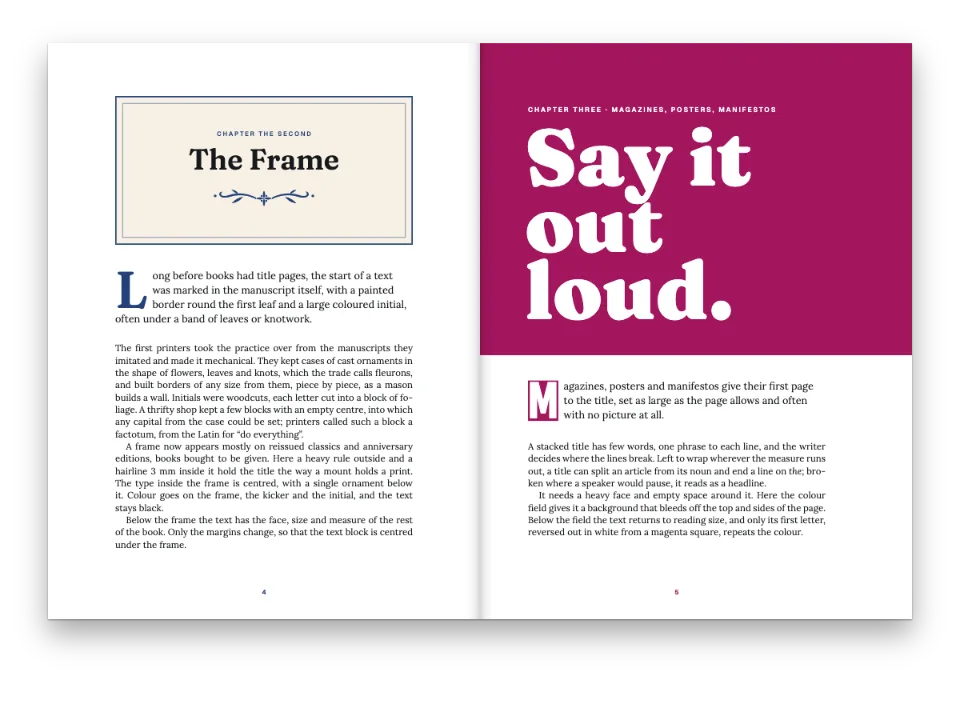
地質学の教科書の章扉です。大きな章番号を載せた色の帯がページの上端からはみ出して刷られ、デザインは一度設定すればすべての章に使えます。
できあがり
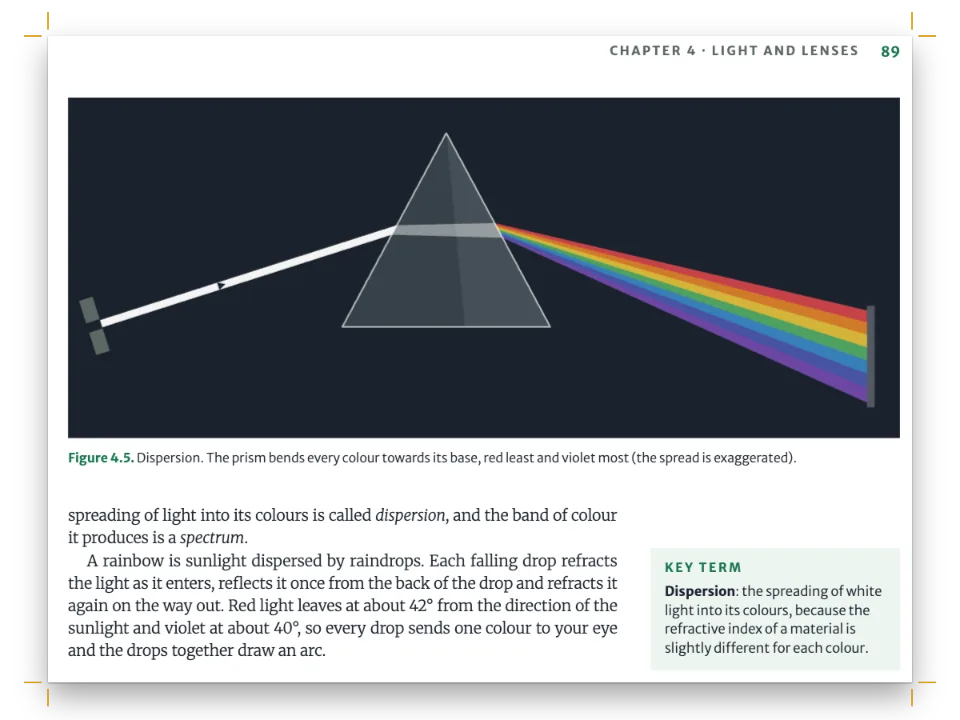
『Earth in Motion』という、210 × 280 mm判の地質学入門の教科書の章扉です。第3章は、ページ上端から裁ち落としにしたテラコッタ色の帯の下で始まります。帯には字間を広げたキッカー、著者が選んだ位置で改行したタイトル、イタリックのリード文、そして小口側で帯の濃い下端に立つ168 ptの章番号が載ります。帯の下から両端そろえの2段組みが始まり、沈み込むプレートの断面図がページの地を占めます。第4章は同じデザインをティール色で繰り返し、ツメ、節番号、参照、図のラベルまで色が変わります。デザインはレベル1見出しに一度だけ設定します。各章の見出し行が、キッカーの話題とリード文を属性として渡し、章が別の色を取るときはスタイルの名前を指定します。
このレシピが答える質問
- 裁ち落としまで届く色帯、大きな章番号、タイトルを備えた章扉を作るには?
- 章タイトルをページ幅いっぱいに置き、その下で本文を2段組みにするには?
- 章扉に著者名の行、リード文、ドロップキャップ付きの導入文を加えるには?
- 章ごとに異なる写真、色、章扉のバリエーションを与えるには?
- 見出しに番号(1、1.1、1.1.1)を振り、レベルごとに異なるスタイルにするには?
手短な答え
const TOP = 24; // top margin, mm: the opener's container starts here
const OUTER = 16; // outer margin, mm: the numeral and the folios line up on it
const BLEED = 0; // mm: 0 on screen; about 3 for print, which also switches on page.cutLines
const BAND = 100; // mm from the trim to the foot of the band
const NUMERAL = 168; // pt; the baseline of a design text sits 0.8 down its line box
const PT = 25.4 / 72; // mm in a point
const AIR = 12; // mm, foot to text: ≥ 0.2 × NUMERAL × PT ≈ 11.9, the numeral box below its baseline
const BEARING = 2; // mm past the text edge: a rough optical nudge, as each digit's bearing differs
const bleedTop = { to: 'bleed', edge: 'top-left' }; // the trim's corner, pushed out by BLEED
// Design text centres by default; in a heading design it wraps by default too.
const onBand = { color: col('paper'), align: 'left' };
const below = (id, y, width) => ({ anchor: { to: `#${id}`, edge: 'below' }, offset: { y: mm(y) },
  size: { width: mm(width) } }); // chained: a longer title pushes the standfirst down
const opener = { enabled: true,
  // The text starts below the lowest element or minHeight (gotcha: opener-reserves-anchored).
  minHeight: mm(BAND - TOP + AIR), // clears the numeral, so the text starts AIR below the foot
  slot: {
    elements: [ // array order is paint order: the band first, the type on top
      { kind: 'box', id: 'band', style: { backgroundColor: col('band') }, placement: {
        anchor: bleedTop, size: { height: mm(BLEED + BAND) } } }, // no width: runs to the far edge
      { kind: 'rule', id: 'foot', color: col('ink'), thickness: mm(1.6), placement: {
        anchor: bleedTop, offset: { y: mm(BLEED + BAND) } } },
      { kind: 'text', id: 'numeral', content: '{chapterNumber}', ...onBand,
        fontFamily: 'Archivo', fontWeight: 800, fontSize: pt(NUMERAL),
        lineHeight: 1, // a box as tall as the type: the y below counts on it
        placement: { anchor: { to: 'page', edge: 'top-right' }, // the fore-edge of a recto
          offset: { x: mm(BEARING - OUTER), y: mm(BAND - 0.8 * NUMERAL * PT) } } }, // on the foot
      { kind: 'text', id: 'kicker', ...onBand, fontFamily: 'Archivo Narrow', fontWeight: 600,
        content: `${t({ en: 'Chapter', es: 'Capítulo' })} {chapterNumber} · {attr.topic}`,
        fontSize: pt(8.5), letterSpacing: pt(2), textTransform: 'uppercase',
        placement: { anchor: { to: 'container', edge: 'top-left' }, offset: { y: mm(7) } } },
      { kind: 'text', id: 'title', content: '{titleText}', ...onBand, // breaks at the \\
        fontFamily: 'Archivo', fontWeight: 800, fontSize: pt(34), lineHeight: 1.02,
        placement: below('kicker', 3, 118) },
      { kind: 'text', id: 'lead', content: '{attr.lead}', ...onBand, fontFamily: 'Roboto Serif',
        italic: true, fontSize: pt(10.5), lineHeight: 1.36, placement: below('title', 6, 100) },
    ],
  },
}; // hook-up: headings.levels[0] = { span: 'page', breakBefore, advancedDesign: opener }
材料
- 機能
- デザインした章扉段抜きの章見出し帯見出しの属性タイトル内の改行見出しスタイル部ごとの色番号付き見出し奇数ページから始まる章デザイン要素の基準位置ページデザインのテキスト・罫・ボックス裁ち落としの帯とツメセマンティックカラーパレット柱とノンブルページの役割ごとの柱図を配置する参照図の配置リソースとしての図と表章ごとに組む本キャンバス上のページ
- 種類
- Roboto Serif, Archivo, Archivo Narrow (SIL OFL 1.1)
- 素材
- なし:画像はすべてコードで描画
作り方
#1 · 帯と数字をページから吊るす
コードは上の手短な答えにあります。帯とその下端は、塗り足し領域の左上の角に固定します。幅を指定しないボックスや罫線はどれもそうですが、その枠の反対側の端まで伸びるので、仕上がり線まで届き、BLEEDを設定すれば塗り足しまで届きます。数字はページの右上の角に固定します。y: BAND - 0.8 * NUMERAL * PTはベースラインを帯の下端に置き、BEARINGは数字のサイドベアリングを補うためにボックスを2 mm余白側へ動かすので、字面がおおよそ本文の端にそろいます。キッカーはコンテナーに固定します。タイトルはキッカーの下に、リード文はタイトルの下に、belowアンカーで固定し、見出しのデザインのテキストは既定で折り返すので、タイトルが長くなるとリード文は下へ押されます。リード文は見出しのlead属性で埋まるテキスト要素です。著者名の行を加えるなら、もうひとつ{attr.author}を同じようにつなげます。minHeight: BAND - TOP + AIRは本文の始まる位置を決めます。数字のボックスは下端よりサイズの0.2倍(11.9 mm)下まで届き、章扉は最も低い要素までのスペースを確保するので、AIRは少なくとも11.9 mm必要です。それより小さいと、本文の始まる位置を数字のボックスが決めてしまいます。
#2 · 章見出しにページを与える
  headings: {
    fontFamily: 'Archivo', color: col('band'),
    levels: [
      // parity: 'odd' keeps openers on rectos, so the numeral's right-edge anchor is the
      // fore-edge. The copy is fitted so no chapter spills a few lines onto a page of its own,
      // which would leave that page and a blank verso before the next opener.
      { level: 1, span: 'page', breakBefore: { enabled: true, parity: 'odd' },
        // 0: the hidden title's default 0.5 em would add a grid line, and AIR alone sets the gap
        marginBottom: pt(0), advancedDesign: opener },
      { level: 2, fontSize: pt(11.5), lineHeight: pt(LEAD), numberingTemplate: '{1}.{2}',
        marginTop: pt(LEAD), marginBottom: pt(0) }, // one grid line above, none below
    ],
  },
span: 'page'は各章を新しいページで始め、レベル1見出しを2段にまたがって組みます。advancedDesignは見出しのテキストの代わりに章扉を描き、本文は確保した高さの下から始まります。breakBeforeのparity: 'odd'は、どの章扉も奇数ページに置きます。奇数ページなら、数字の右側のアンカーが小口になります。レベル2では、numberingTemplate: '{1}.{2}'が節を3.1、3.2…と帯の色で番号付けします。レベル3に'{1}.{2}.{3}'を付ければ、3.1.1へと続きます。
#3 · 章の色に一度だけ名前を付ける
const palette = {
  ink: '#1b1f23', // text: a cool near-black
  band: '#c2562b', // the chapter colour: band, tab, section numbers, references, captions
  band2: '#2e6f73', // the second chapter colour, a teal; the sea in Figure 3.1
  land: '#d5cbc0', // the crust in the drawings
  muted: '#6b6259', // running heads and the colophon
  paper: '#ffffff', // type on the band
};
// col(id): a colour linked to its palette entry, with the entry's hex beside the link.
const col = (id) => ({ hex: palette[id], model: 'hex', paletteId: id });
const colorPalette = [
  ...Object.entries(palette).map(([id, hex]) => ({ id, name: id, value: { hex, model: 'hex' } })),
  // The engine's defaults link to 'main-color': point it at the band, so nothing prints blue.
  { id: 'main-color', name: 'band (defaults)', value: { hex: palette.band, model: 'hex' } },
];
// {style="teal"} on a heading line swaps 'band' up to the next level-1 heading: the style's
// palette reaches design slots through their link and repaints every text colour equal to
// the base 'band'.
const headingStyles = [{ id: 'teal', palette: { band: palette.band2 } }];
設定の中の色は、すべてこれらの項目のどれかにリンクしています。エンジン自身の既定値はmain-colorにリンクしているので、この項目を帯の色に向けると、設定で指定していない既定の色もすべて変わります。第4章の見出し行# Fire from \\ Below {style="teal" topic="Volcanoes" lead="…"}はスタイルを選び、次のレベル1見出しまでbandを入れ替えます。デザインの各要素はパレットのリンクを通じてこの入れ替えに従い、基本のbandと同じ文字色も塗り直されます。そのため43ページと44ページでは、ツメ、節とリストの番号、参照、キャプションのラベル、下ノンブルがティール色になります。同じ行が{attr.topic}と{attr.lead}を埋め、その中の\\が{titleText}を著者の望む位置で改行します(見出しの属性、タイトル内の改行)。
#4 · 図は最初の参照に置き場所を決めさせる
const figure = (id, placement, caption) => ({ id, typeId: 'figure', kind: 'svg', createdAt: 0,
  updatedAt: 0, svg: { fileId: `${id}.svg`, width: ART[id].width, height: ART[id].height },
  placement, caption, altText: ALT[id] }); // altText: read aloud in a PDF or HTML edition
const resources = [
  // 'auto' may take the citing page's foot, 'top' never can (gotcha: top-float-next-page)
  figure('plate-cycle', { position: 'auto', span: 'page' },
    t({ en: 'A plate’s life in cross-section: born at a ridge (left), it cools as it drifts away '
      + 'and sinks under a continent; dots mark earthquakes.',
    es: 'La vida de una placa, en corte: nace en la dorsal (izquierda), se enfría al alejarse y '
      + 'se hunde bajo el continente; los puntos son terremotos.' })),
  figure('two-volcanoes', { position: 'bottom', span: 'page' }, // under the text on a last page
    t({ en: 'Two volcanoes in cross-section: a broad shield built of runny basalt flows (left) '
      + 'and a steep stratovolcano of lava and ash layers (right).',
    es: 'Dos volcanes en corte: un escudo ancho, de coladas de basalto fluido (izquierda), y un '
      + 'estratovolcán de capas de lava y ceniza (derecha).' })),
];
:refは図に番号を付け、それを参照する段落の後の最初の空きスロットに置きます。図3.1はautoです。両方の段にまだ余裕があるうちに章扉で参照されるので、そのページの地を取ります。topのフロートなら42ページの頭に置かれていたはずです。フロートは自分の参照より上には決して行かないからです。図4.1は43ページの第2段の下のほうで参照され、そこにはもうページ幅の帯が収まらないので、bottomが44ページへ送ります。44ページは章の最後のページで、最後のページでは、エンジンが地のフロートを持ち上げ、上に隙間を空けずに本文の最終行の直下に置きます。
#5 · 柱、ツメ、下ノンブル
const HEAD = 15.5; // mm from the trim to the folio's and the head's baseline: 8.5 above TOP
const INSET = 9; // mm from the folio's edge to the head: room for a three-digit folio
const TAB = { y: 36, w: 9, h: 26 }; // the thumb tab, mm: its top, its width, its height
const tabSize = (w) => ({ width: mm(w), height: mm(TAB.h) });
const baseline = (size) => mm(HEAD - 0.96 * size * PT); // box: 1.2 × size, baseline 0.8 down
const label = { fontFamily: 'Archivo Narrow', fontSize: pt(7.5), fontWeight: 600,
  letterSpacing: pt(1.3), textTransform: 'uppercase', color: col('muted') };
const folio = { fontFamily: 'Archivo', fontSize: pt(9), fontWeight: 800, color: col('ink') };
const side = (parity) => { // the fore-edge is a verso's left edge and a recto's right edge
  const [edge, s] = parity === 'even' ? ['left', 1] : ['right', -1]; // s: into the page
  const at = (to, x, y, size) => ({ anchor: { to, edge: `top-${edge}` },
    offset: { x: mm(s * x), y }, ...(size && { size }) });
  return [
    { kind: 'text', id: `folio-${parity}`, content: '{pageNumber}', ...folio,
      placement: at('page', OUTER, baseline(9)) },
    // Textbooks name the chapter on the verso and the section on the recto: {firstMark.h2}
    // is the first level-2 heading that starts on the page, or the one in force.
    { kind: 'text', id: `head-${parity}`, content: s > 0 ? '{chapterTitle}' : '{firstMark.h2}',
      ...label, placement: at('page', OUTER + INSET, baseline(7.5)) },
    { kind: 'box', id: `tab-${parity}`, style: { backgroundColor: col('band') }, // off the trim
      placement: at('bleed', 0, mm(BLEED + TAB.y), tabSize(BLEED + TAB.w)) },
    { kind: 'text', id: `tab-no-${parity}`, content: '{chapterNumber}', ...folio, fontSize: pt(13),
      color: col('paper'), // design text centres by default: here, on the trimmed tab
      placement: at('page', 0, mm(TAB.y), tabSize(TAB.w)) },
  ].map((element) => ({ ...element, parity, pages: 'body' })); // never on an opener
};
const header = { elements: [...side('even'), ...side('odd')] };
const footer = { elements: [{ kind: 'text', id: 'drop-folio', content: '{pageNumber}',
  ...folio, color: col('band'), pages: 'opener', // centred by its anchor
  placement: { anchor: { to: 'container', edge: 'top' }, offset: { y: mm(10) } } }] };
ヘッダーの各要素はページの上の角に固定し、parityで絞り込むので、ノンブルとツメは常に小口側に来ます。ツメのボックスは代わりに塗り足し領域の角に固定し、BLEEDに応じて幅が広がるので、断裁後も裁ち落としのままです。pages: 'body'はこれらを章扉から外します。章扉にはフッターから下ノンブルが付きます。偶数ページの柱は{chapterTitle}で章名を1行で示します。\\がタイトルを改行するのは章扉の中だけだからです。教科書では奇数ページの柱に節名を入れるのが普通です。奇数ページの柱は{firstMark.h2}で節名を印刷します。そのページで始まる最初の節見出しを、始まるものがなければその時点で有効な節見出しを示します。この4ページでは、奇数ページが2つとも章扉なので、それが見えることはありません。
#6 · 本を第3章から始める
const continuation = { pageNumbering: { startAt: 41 }, // an odd folio: page 1 is still a recto
  headings: { h1: 2, h2: 0, h3: 0, h4: 0, h5: 0, h6: 0 } }; // the next # is chapter 3
const doc = await buildDocumentWithFonts({ markdown, resources, continuation }, config(),
  kitFonts(FONTS));
showPages(doc, { title: t({ en: 'Chapter opener on a full-bleed band',
  es: 'Apertura de capítulo sobre banda a sangre' }) });
この4ページは長い本の第3章と第4章なので、buildDocumentには、第1章と第2章が終わった時点のカウンターを入れたcontinuationを渡します。そのheadingsにh1: 2があるので、次の#は第3章になります。{chapterNumber}は3を印刷し、節は3.1から番号付けされ、最初の図は3.1になります。pageNumbering.startAt: 41はノンブルを41から始めます。偶奇は物理的なページで数え、pageIndexOffsetを0のままにしているので、最初のページはノンブルが何であっても奇数ページのままです。それに合わせて、最初のノンブル41も奇数にしています。
レシピの全体
// ═══ Postext Cookbook · Nº 003 · Chapter opener on a full-bleed band ══════════════
// https://postext.dev/en/cookbook/chapter-opener-bleed-band
// Code: MIT · Text: original (CC BY 4.0) · Drawings: generated in code (CC BY 4.0)
// Fonts: Roboto Serif, Archivo, Archivo Narrow (SIL OFL 1.1) · Needs postext ≥ 1.57.0
// Two chapters of a geology textbook. Every level-1 heading becomes a colour band bled off the
// top of the page, its number standing on the band's foot; a heading style recolours chapter 4.
import {
  buildDocumentWithFonts, renderPageToCanvas, registerResourceImage,
} from 'https://esm.sh/postext';

const LANG = 'en'; // @lang: the language of the sample document ('en' | 'es')
const RECIPE = 'chapter-opener-bleed-band';

// ─── 1 · Design ─────────────────────────────────────────────────────────────
// #region palette: semantic colours, and the style that swaps a chapter's
const palette = {
  ink: '#1b1f23', // text: a cool near-black
  band: '#c2562b', // the chapter colour: band, tab, section numbers, references, captions
  band2: '#2e6f73', // the second chapter colour, a teal; the sea in Figure 3.1
  land: '#d5cbc0', // the crust in the drawings
  muted: '#6b6259', // running heads and the colophon
  paper: '#ffffff', // type on the band
};
// col(id): a colour linked to its palette entry, with the entry's hex beside the link.
const col = (id) => ({ hex: palette[id], model: 'hex', paletteId: id });
const colorPalette = [
  ...Object.entries(palette).map(([id, hex]) => ({ id, name: id, value: { hex, model: 'hex' } })),
  // The engine's defaults link to 'main-color': point it at the band, so nothing prints blue.
  { id: 'main-color', name: 'band (defaults)', value: { hex: palette.band, model: 'hex' } },
];
// {style="teal"} on a heading line swaps 'band' up to the next level-1 heading: the style's
// palette reaches design slots through their link and repaints every text colour equal to
// the base 'band'.
const headingStyles = [{ id: 'teal', palette: { band: palette.band2 } }];
// #endregion

// #region answer: the opener: a bleed band, the numeral on its foot, texts from the heading
const TOP = 24; // top margin, mm: the opener's container starts here
const OUTER = 16; // outer margin, mm: the numeral and the folios line up on it
const BLEED = 0; // mm: 0 on screen; about 3 for print, which also switches on page.cutLines
const BAND = 100; // mm from the trim to the foot of the band
const NUMERAL = 168; // pt; the baseline of a design text sits 0.8 down its line box
const PT = 25.4 / 72; // mm in a point
const AIR = 12; // mm, foot to text: ≥ 0.2 × NUMERAL × PT ≈ 11.9, the numeral box below its baseline
const BEARING = 2; // mm past the text edge: a rough optical nudge, as each digit's bearing differs
const bleedTop = { to: 'bleed', edge: 'top-left' }; // the trim's corner, pushed out by BLEED
// Design text centres by default; in a heading design it wraps by default too.
const onBand = { color: col('paper'), align: 'left' };
組み立てたscript.jsはそのまま動きます。任意のページのモジュールスクリプトに貼り付けるか、レシピをCodePenで開いてください。 GitHub上のレシピのフォルダー ↗ (新しいタブで開きます)
アレンジ
#帯を深くする
BANDは帯の深さ、数字の位置、本文の上に確保する高さを決めます。帯を深くすると本文が次のページへ押し出されるので、章ごとに原稿量を合わせ直すか(最後のつまずきを参照)、章を追い込みにします。
-const BAND = 100; // mm from the trim to the foot of the band
+const BAND = 128; // mm from the trim to the foot of the band#裁ち落とし付きで印刷する
3 mmの塗り足しを付けると、帯、その下端、ツメは仕上がり線より3 mm外へはみ出し、数字は下端に立ったままで、page.cutLinesが同じ値で有効になります。
-const BLEED = 0; // mm: 0 on screen; about 3 for print, which also switches on page.cutLines
+const BLEED = 3; // mm: 0 on screen; about 3 for print, which also switches on page.cutLines#別の章の色を足す
章の色ひとつにつき、パレットの項目とスタイルをひとつずつ足します。その章の見出し行に{style="slate"}と書きます。
   band2: '#2e6f73', // the second chapter colour, a teal; the sea in Figure 3.1
+  band3: '#3d4f6b', // a third chapter colour, a slate blue
@@
-const headingStyles = [{ id: 'teal', palette: { band: palette.band2 } }];
+const headingStyles = [{ id: 'teal', palette: { band: palette.band2 } },
+ { id: 'slate', palette: { band: palette.band3 } }];#章を追い込みにする
'any'にすると、章は次のページで始まります。奇数ページで終わった章の次は偶数ページで、前に白ページを挟まずに始まり、数字はページの右端に固定しているので、のど側に立ちます。第3章はすでに偶数ページで終わっているので、この4ページは変わりません。
-      { level: 1, span: 'page', breakBefore: { enabled: true, parity: 'odd' },
+ { level: 1, span: 'page', breakBefore: { enabled: true, parity: 'any' },よくあるつまずき
つまずき
章扉はページに固定した要素のうち最も下のものまで高さを確保する
詳細デザインの章扉は、最も下にある要素までの高さを確保します。見出しより下にあるページや裁ち落としに固定した要素もこれに含まれるため、ページの下端に置いた装飾があると本文が次のページへ押し出されます。こうした要素にはreserve: falseを与えてください(postext 1.5から)。固定した位置に描かれ、高さは何も確保しません。帯そのものに従う要素(帯の下端に固定したものや、高さが'fill'のもの)が帯の高さを決めることはありません。 デザインした章扉 →
つまずき
属性値には{も}も書けない。"を含む値は一重引用符で囲む
属性値は閉じ波かっこで終わるため、{や}を含められません。二重引用符を含む値は一重引用符で囲みます。ドル記号は問題ありません。 見出しの属性 →
つまずき
'top'のフロートは参照ページの先頭を許さない限り次のページに置かれる
既定では、フロートが自分の参照より上に置かれることはありません。そのため、Nページで参照したページ幅の'top'フロートはN+1ページの頭に置かれます。リソースまたはその種類のdefaultPlacementにplacement.citingPage: trueを設定すると(本全体ならlayout.floatsAtCitingPage、postext 1.25から)、layout.maxTopFraction以内に収まり参照行がそのページに残る場合は代わりにNページの先頭に置かれ、参照より前の本文はその下に送られます。章の最初のページと強制改ページの後のページの先頭には置かれません。その場合は次のページに置かれ、'auto'または'bottom'なら参照したページの下端に入れられます。 図の配置 →
- 帯の高さは固定ですが、キッカー、タイトル、リード文は天の余白に固定して下へ伸びるので、リード文が長かったり、タイトルが3行になったりすると、帯の下端にぶつかります。リード文は両方の版と同じく5行程度に収めるか、いちばん長い章扉から
BANDを求めてください。 - 数字の
yの式はlineHeight: 1を前提にしています。デザインテキストのベースラインは行ボックスの上から0.8の位置にあり、0.8 * NUMERALがその距離に一致するのは、ボックスの高さが活字と同じときだけです。行送りやアンカーを変えたら、式も変える必要があります。BEARINGは目で合わせています。数字ごとにサイドベアリングが違うからです(ここでは3と4の終わりが0.8 mmずれています)。 - スタイルのパレットはデザイン要素と文字の色を変えます。画像は描かれた色のままです。図4.1がティール色なのはコードが
band2で描いているからで、テラコッタ色の図を第4章に置けばテラコッタ色のままです。 parity: 'odd'では、最後のページから数行はみ出した章は、ほとんど空のページと白の偶数ページを残してから次の章扉に進みます。ここの両方の版と同じく原稿量を合わせ、本文やBANDを変えるたびに各章の最後のページを確かめてください。
クレジット
- 本文
- 書き下ろしの文章, CC BY 4.0
- フォント
- Roboto Serif (SIL OFL 1.1) · Archivo (SIL OFL 1.1) · Archivo Narrow (SIL OFL 1.1)