かんたんな説明
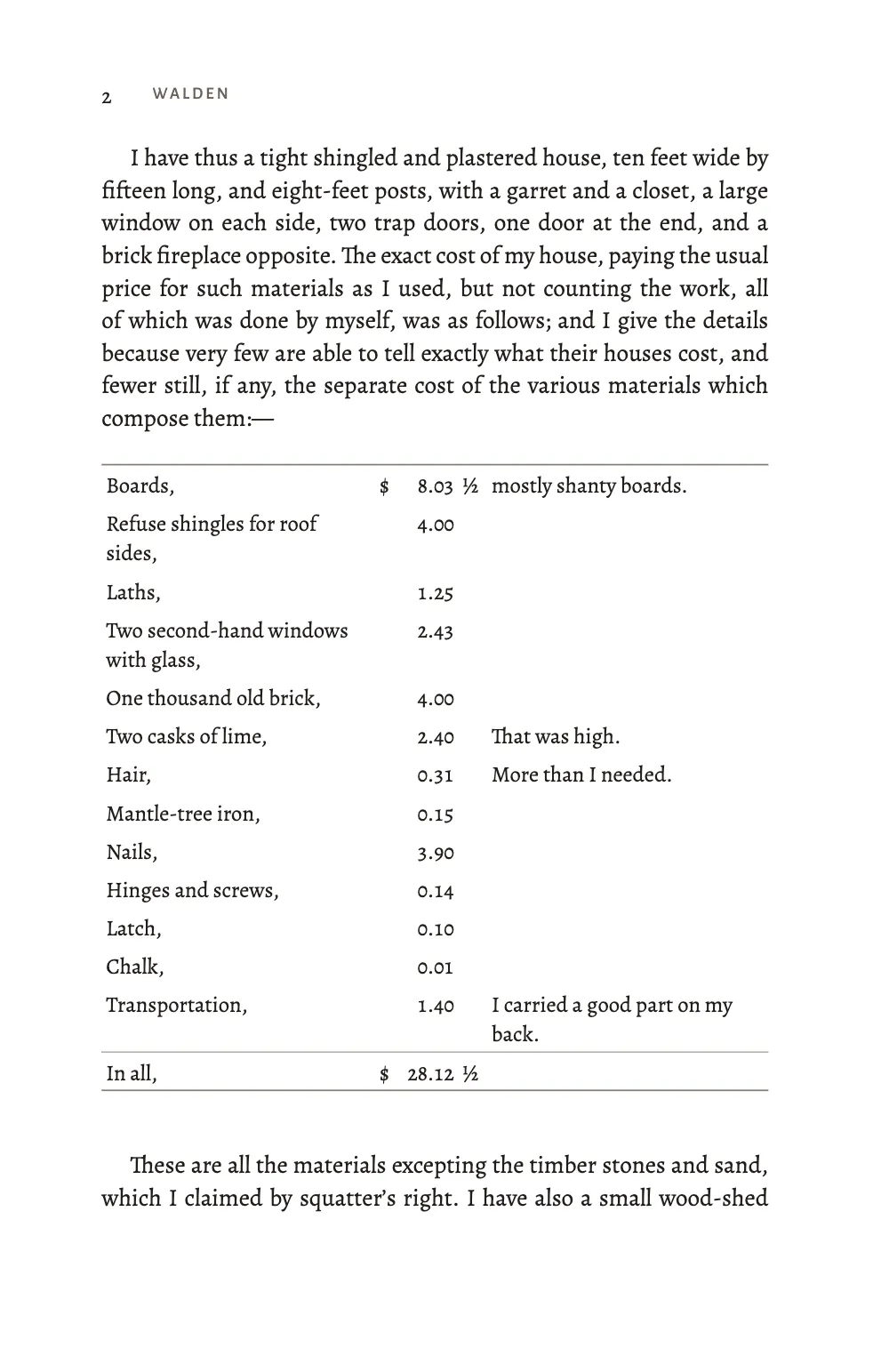
ソローが『ウォールデン』に載せた家計簿の小さな版です。本文の数字は小文字のように上下に伸び、見出しの年号は大文字と同じ高さで、家計簿の金額は列にそろいます。
できあがり
ソローが『ウォールデン』第1章に載せた家計簿の小さな版です。家にいくらかかったか、豆畑でいくら得たか、8か月で何を食べたか。140 × 216 mm のページに Alegreya ファミリーで組み、冒頭には1854年版の小屋の版画を置きます。数字は役目によって変わります。本文の March, 1845 や $13.34 はオールドスタイル数字で、小文字のように上下に伸びるので、日付が行から浮きません。見出しはスモールキャップで、その年号は大文字と同じ高さです。家計簿ではどの数字も同じ幅なので、板、木摺、釘など13行のセントが合計まで縦にそろいます。
このレシピが答える質問
- 本文にオールドスタイル数字、見出しにライニング数字、表にタビュラー数字を使うには?
- 番号のないアートワーク(オーナメント、カット、ロゴ)を組むには?
手短な答え
// Alegreya's own figures are old-style, so the prose asks for none: the cut Fontsource
// serves has no onum, and 'oldstyle' would change nothing (see the write-up).
const bodyText = {
  fontFamily: TEXT, fontSize: pt(10.8), lineHeight: pt(LEAD), color: col('ink'),
  boldColor: col('ink'), italicColor: col('ink'), referenceColor: col('ink'),
  textAlign: 'justify', firstLineIndent: mm(4.5), indentAfterHeading: false,
  hyphenation: { enabled: true }, optimalLineBreaking: true,
  avoidWidows: true, avoidOrphans: true, avoidRunts: true,
};
// Small capitals take lining figures (lnum), at the height of the capitals around them.
const section = { level: 2, fontFamily: CAPS, fontSize: pt(12.5), lineHeight: pt(LEAD),
  fontWeight: 400, letterSpacing: pt(0.6), color: col('accent'), figureStyle: 'lining',
  marginTop: pt(LEAD), marginBottom: pt(0) };
// The accounts: every figure on one width (tnum), so the cents stand in columns.
// 'tabular' keeps the font's form, old-style; 'lining-tabular' would set them at cap height.
const tableStyle = {
  figureStyle: 'tabular', bodyFontFamily: TEXT, bodyFontSize: pt(9.8), bodyColor: col('ink'),
  rules: 'booktabs', groupRules: true, borderColor: col('rule'), lightRuleWidth: pt(0.4),
  heavyRuleWidth: pt(0.7), headerBackgroundEnabled: false, headerFontFamily: TEXT,
  headerFontSize: pt(9.8), headerColor: col('ink'), headerBold: false, headerItalic: false,
  cellPadding: mm(0.7),
};
材料
- 機能
- 数字のスタイル表スタイルデータから作る表独自のリソースの種類図の配置デザインした章扉ページデザインの画像見出しの属性節ごとの柱柱とノンブル見開きの余白段落スタイルセマンティックカラーパレットPDFの書き出しPDFに埋め込むフォント
- 種類
- Alegreya, Alegreya SC, Alegreya Sans (SIL OFL 1.1)
- 素材
cabin-860.jpg- The vignette of Thoreau’s cabin from the title page of the first edition (1854), cropped and levelled to black on white (Ticknor and Fields, Boston, 1854 (engraver unknown), パブリックドメイン)
作り方
#1 · テキストのスタイルごとに数字を一種類
この手順のコードは上の手短な答えです。figureStyle はスタイルのフォントに OpenType の数字を指定します(数字のスタイル)。本文は何も指定しません。Alegreya の標準の数字がすでにプロポーショナルなオールドスタイル数字だからです。1 の幅は342ユニット、0 は533です。第2レベルの見出しは Alegreya SC に 'lining'、つまり lnum の数字を指定し、まわりの大文字と同じ高さにします。表のスタイルは 'tabular'、フォントの tnum を指定します。数字はオールドスタイルの形のまま、すべて450ユニットの同じ幅になり、値段の列が上から下へまっすぐ読めます。'lining-tabular' にすると大文字の高さになります(「アレンジ」を参照)。
#2 · 家計簿は5列の表
// A row starting '=' is a total (header cells: a light rule above it), '+' heads a group.
const C = (content, align = 'left', extra = {}) => ({ content, align, ...extra });
function account(tsv) {
  const rows = tsv.replace(/^\n+|\n+$/g, '').split('\n').map((line) => {
    const total = line.startsWith('='), group = line.startsWith('+');
    const [item, dollar, amount, fraction, remark] = line.replace(/^[=+]/, '').split('\t');
    if (group) return [C(item, 'left', { colSpan: 5, isHeader: true }),
      ...[1, 2, 3, 4].map(() => C('', 'left', { hiddenBy: { row: -1, col: 0 } }))];
    const h = { isHeader: total };
    return [C(item, 'left', h), C(dollar ? '\\$' : '', 'right', h), // `$` alone opens maths
      C(amount ?? '', 'right', h), C(fraction ?? '', 'left', h), C(remark ?? '', 'left', h)];
  });
  rows.forEach((row, r) => row.forEach((cell) => cell.hiddenBy && (cell.hiddenBy.row = r)));
  return { rows, headerRowCount: 0, columnWidths: [34, 2.4, 8, 3.6, 35] };
}
const accounts = String.raw`=== house
Boards,	$	8.03	½	mostly shanty boards.
Refuse shingles for roof sides,		4.00
Laths,		1.25
Two second-hand windows with glass,		2.43
One thousand old brick,		4.00
Two casks of lime,		2.40		That was high.
Hair,		0.31		More than I needed.
Mantle-tree iron,		0.15
Nails,		3.90
Hinges and screws,		0.14
Latch,		0.10
Chalk,		0.01
Transportation,		1.40		I carried a good part on my back.
=In all,	$	28.12	½
=== farm
	$	23.44
Deducting the outgoes,		14.72	½
=There are left,	$	8.71	½
=== food
Rice,	$	1.73	½
Molasses,		1.73		Cheapest form of the saccharine.
Rye meal,		1.04	¾
Indian meal,		0.99	¾	Cheaper than rye.
Pork,		0.22
+All experiments which failed:
Flour,		0.88		Costs more than Indian meal, both money and trouble.
Sugar,		0.80
Lard,		0.65
Apples,		0.25
Dried apple,		0.22
Sweet potatoes,		0.10
One pumpkin,		0.06
One watermelon,		0.02
Salt,		0.03
=== outgoes
House,	$	28.12	½
Farm one year,		14.72	½
Food eight months,		8.74
Clothing, etc., eight months,		8.40	¾
Oil, &c., eight months,		2.00
=In all,	$	61.99	¾
=== income
	$	23.44
Earned by day-labor,		13.34
=In all,	$	36.78
`; // content.accounts.<lang>.md: one block per table
const tables = Object.fromEntries(accounts.split(/^=== /m).filter(Boolean)
  .map((block) => [block.slice(0, block.indexOf('\n')).trim(), block.slice(block.indexOf('\n'))]));
ソローの家計簿は TSV として content.accounts.en.md に、1つの勘定ごとに1ブロックで置いてあります。スペイン語版はコードに手を触れずに品目を訳し、小数点をコンマに替えます。各行は品目、ドル記号、金額、分数、書き込みの5つです。2分の1と4分の3は別の列にします。½ は713ユニット、¾ は689ユニットで、タビュラー数字より広く、Alegreya にはほかの金額を埋める数字幅のスペースがありません。合計はヘッダーのセルで作るので、groupRules がその上に細い罫を引きます。ソローの印刷所が In all の前に引いた線と同じです。ドル記号は \$ と書きます。単独の $ は本文と同じくセルでも数式を始めるからです。リソースの種類 account は番号もキャプションの接頭辞も持たず、既定の配置は 'here' なので、各勘定はそれを紹介するソローの文のすぐ後に置かれます。
#3 · 冒頭のデザインは自分の数字を指定する
const at = (to, edge, y, x = 0) => ({ anchor: { to, edge }, offset: { x: mm(x), y: mm(y) } });
// 'below' starts a text at the left edge of what it hangs from: the texts take the measure
// and start half the difference to the left of the vignette, so they centre on the page.
const centred = (to, y) => ({ ...at(to, 'below', y, (VIGNETTE - MEASURE) / 2),
  size: { width: mm(MEASURE) } });
const opener = { enabled: true, minHeight: pt(19 * LEAD), slot: { elements: [
  { kind: 'image', id: 'cabin', resourceId: 'cabin',
    placement: { ...at('container', 'top', 0), size: { width: mm(VIGNETTE) } } },
  { kind: 'text', id: 'kicker', content: '{attr.kicker}', fontFamily: LABEL, fontWeight: 500,
    fontSize: pt(7.5), letterSpacing: pt(1.5), textTransform: 'uppercase', color: col('accent'),
    align: 'center', placement: centred('#cabin', 6) },
  { kind: 'text', id: 'title', content: '{titleText}', fontFamily: CAPS, fontSize: pt(30),
    letterSpacing: pt(1.2), lineHeight: 1, color: col('ink'), align: 'center',
    placement: { ...at('#kicker', 'below', 2.5), size: { width: mm(MEASURE) } } },
  // A design text names its own family, so it states its figures too.
  { kind: 'text', id: 'dates', content: '{attr.dates}', fontFamily: CAPS, fontSize: pt(11),
    letterSpacing: pt(0.8), color: col('accent'), align: 'center', figureStyle: 'lining',
    placement: { ...at('#title', 'below', 2.5), size: { width: mm(MEASURE) } } },
] } };
デザインのテキストは自分のファミリーを持つので、本文の数字の指定は届きません。Concord, 1845–1847 は Alegreya SC で、見出しと同じく自分で 'lining' を指定します。挿絵は1854年版の扉の版画で、切り抜いて白地に黒へ整えました。小見出し、表題、年号は版面の幅をとり、その下で中央にそろえます。
#4 · 奇数ページの柱に節の名前
const head = (id, content, parity, edge, x, extra = {}) => ({
  kind: 'text', id, content, parity, pages: 'body', fontFamily: LABEL, fontSize: pt(7.5),
  fontWeight: 500, letterSpacing: pt(1.2), textTransform: 'uppercase', color: col('muted'),
  placement: { anchor: { to: 'page', edge }, offset: { x: mm(x), y: mm(13) } }, ...extra });
const folio = { fontFamily: TEXT, fontSize: pt(9.5), fontWeight: 400, letterSpacing: pt(0),
  color: col('ink') };
const header = { elements: [
  head('verso-folio', '{pageNumber}', 'even', 'top-left', OUTER, folio),
  head('verso-title', '{title}', 'even', 'top-left', OUTER + 8),
  head('recto-title', '{firstMark.h2}', 'odd', 'top-right', -(OUTER + 8)),
  head('recto-folio', '{pageNumber}', 'odd', 'top-right', -OUTER, folio),
] };
const footer = { elements: [head('drop-folio', '{pageNumber}', 'all', 'top', 0, {
  ...folio, pages: 'opener', placement: at('container', 'top', 8) })] };
偶数ページの柱は書名、奇数ページは現在の節 {firstMark.h2} なので、3ページには The Bean-Field, 1845 と出ます。ノンブルは Alegreya で、オールドスタイル数字のままです。
レシピの全体
// ═══ Postext Cookbook · Nº 176 · Old-style, lining and tabular figures ═══════════════
// https://postext.dev/en/cookbook/old-style-and-tabular-figures
// Code: MIT · Text: H. D. Thoreau, Walden (1854, public domain) · Vignette: 1854 title page (PD)
// Fonts: Alegreya, Alegreya SC, Alegreya Sans (SIL OFL 1.1) · Needs postext ≥ 1.65.0
// Thoreau's accounts from Walden. Each text style asks Alegreya for one kind of figures:
// old-style in the prose, lining in the small-capital headings, tabular in the accounts.
import {
  buildDocumentWithFonts, renderPageToCanvas, registerResourceImage, defaultResourceTypes,
} from 'https://esm.sh/postext';
import { renderToPdf, decompressWoff2 } from 'https://esm.sh/postext-pdf';

const LANG = 'en'; // @lang: the language of the sample document ('en' | 'es')
const RECIPE = 'old-style-and-tabular-figures';

// ─── 1 · Design ─────────────────────────────────────────────────────────────
const palette = {
  ink: '#221e1a', // text: a warm near-black
  accent: '#7d3a1f', // walnut: headings, kicker, rules of the opener
  rule: '#8a7f73', // the light rules of the accounts
  muted: '#6b6158', // running heads, the colophon
  paper: '#ffffff',
};
const col = (id) => ({ hex: palette[id], model: 'hex', paletteId: id });
const colorPalette = [
  ...Object.entries(palette).map(([id, hex]) => ({ id, name: id, value: { hex, model: 'hex' } })),
  { id: 'main-color', name: 'accent (defaults)', value: { hex: palette.accent, model: 'hex' } },
];
const TEXT = 'Alegreya', CAPS = 'Alegreya SC', LABEL = 'Alegreya Sans';
const TRIM = [140, 216], INNER = 19, OUTER = 16; // mm: a trade paperback
const MEASURE = TRIM[0] - INNER - OUTER, VIGNETTE = 50; // mm
const LEAD = 14.5; // pt: the body leading, the grid the headings keep to

// #region answer: one figure style per text style
// Alegreya's own figures are old-style, so the prose asks for none: the cut Fontsource
// serves has no onum, and 'oldstyle' would change nothing (see the write-up).
const bodyText = {
  fontFamily: TEXT, fontSize: pt(10.8), lineHeight: pt(LEAD), color: col('ink'),
  boldColor: col('ink'), italicColor: col('ink'), referenceColor: col('ink'),
  textAlign: 'justify', firstLineIndent: mm(4.5), indentAfterHeading: false,
  hyphenation: { enabled: true }, optimalLineBreaking: true,
  avoidWidows: true, avoidOrphans: true, avoidRunts: true,
};
// Small capitals take lining figures (lnum), at the height of the capitals around them.
const section = { level: 2, fontFamily: CAPS, fontSize: pt(12.5), lineHeight: pt(LEAD),
  fontWeight: 400, letterSpacing: pt(0.6), color: col('accent'), figureStyle: 'lining',
  marginTop: pt(LEAD), marginBottom: pt(0) };
// The accounts: every figure on one width (tnum), so the cents stand in columns.
// 'tabular' keeps the font's form, old-style; 'lining-tabular' would set them at cap height.
組み立てたscript.jsはそのまま動きます。任意のページのモジュールスクリプトに貼り付けるか、レシピをCodePenで開いてください。 GitHub上のレシピのフォルダー ↗ (新しいタブで開きます)
アレンジ
#家計簿をライニング数字で組む
現代の本の帳簿や価格表は、数字を大文字の高さに組むことがよくあります。
-  figureStyle: 'tabular', bodyFontFamily: TEXT, bodyFontSize: pt(9.8), bodyColor: col('ink'),
+ figureStyle: 'lining-tabular', bodyFontFamily: TEXT, bodyFontSize: pt(9.8), bodyColor: col('ink'),#ノンブルをライニング数字で組む
ライニング数字のノンブルは、大文字で組んだ柱に合います。
-const folio = { fontFamily: TEXT, fontSize: pt(9.5), fontWeight: 400, letterSpacing: pt(0),
+const folio = { fontFamily: TEXT, fontSize: pt(9.5), fontWeight: 400, letterSpacing: pt(0),
+ figureStyle: 'lining',よくあるつまずき
- Fontsource が配る latin のファイルは
onumを省いていることがよくあります。Lora、EB Garamond、Source Serif 4、Crimson Pro、Newsreader、Literata はpnumとtnumしか持っていません。これらのファイルではfigureStyle: 'oldstyle'を指定しても何も変わらず、本文はライニング数字のままです。Alegreya、Gelasio、Cormorant Garamond のように標準の数字がオールドスタイルで、見出し用にlnumを持つ書体を選ぶか、フォントメーカーの完全なファイルを読み込んでください。 - Markdown や表のセルの
$は行内の数式を始めます。本文では\$14.72½、セルでは\$と書きます。
クレジット
- 本文
- The accounts and the passages around them from “Economy,” the first chapter of Walden; or, Life in the Woods (Boston: Ticknor and Fields, 1854) · Henry D. Thoreau · パブリックドメイン
- The headnote, and the Spanish translation of the passages and the accounts · Ignacio Ferro · CC BY 4.0
- 画像
- The vignette of Thoreau’s cabin from the title page of the first edition (1854), cropped and levelled to black on white · Ticknor and Fields, Boston, 1854 (engraver unknown) · パブリックドメイン
- フォント
- Alegreya (SIL OFL 1.1) · Alegreya SC (SIL OFL 1.1) · Alegreya Sans (SIL OFL 1.1)