かんたんな説明
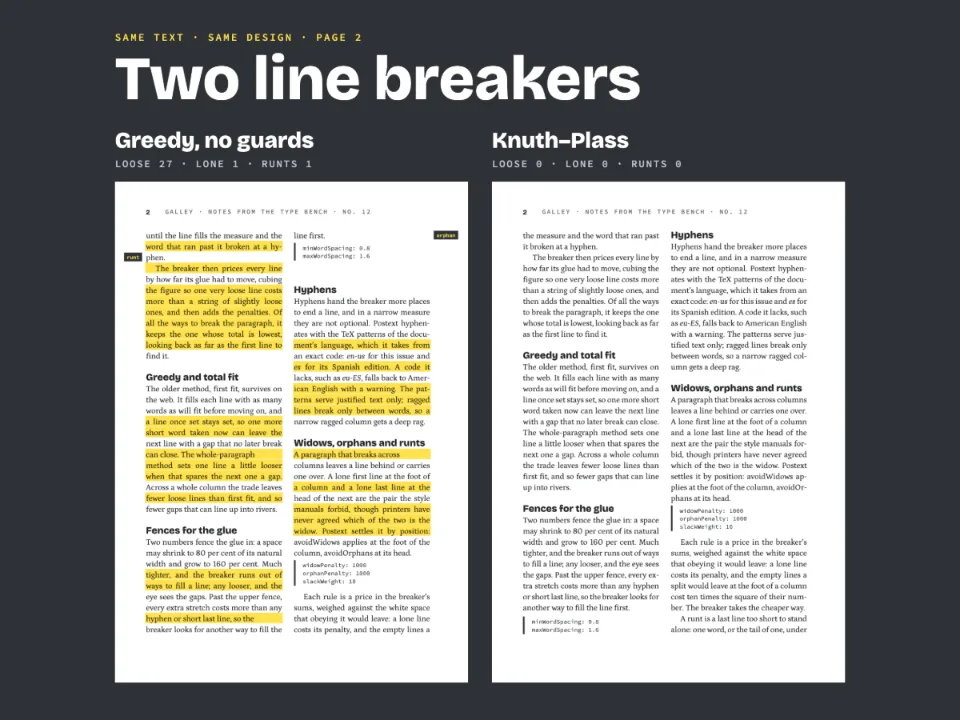
1878年のスペインの小説の最初の数ページを、小さな判型の本にします。単語をスペイン語の正しい音節で分け、語と語のあいだのすきまを均等に保つ方法を示します。
できあがり
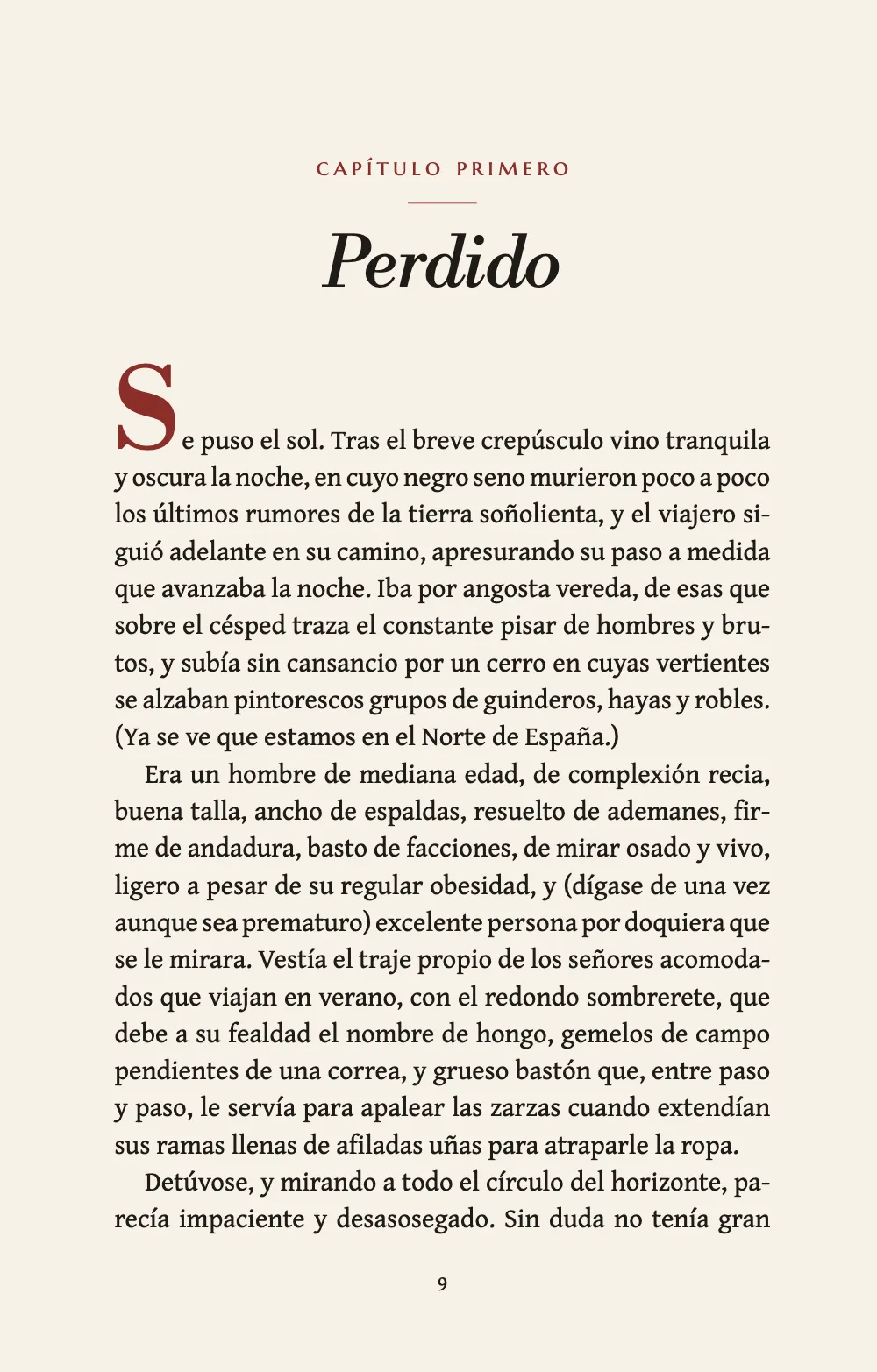
Galdósの『Marianela』(1878年)の冒頭を、11.5 × 18 cmのポケット判で組みます。第I章の向かいには、ソカルテス鉱山の推定図を置きます。章のLibre Bodoniのイタリックの表題の上には、capítulo primeroをスモールキャピタルで文字で書きます。Gentium Book Plusの本文はページの4分の1ほど下から、オックスブラッド色の上げたイニシャルで始まります。単語はスペイン語の音節で分かれ(hie-rro、esta-blecimiento)、語間は通常の幅の1.7倍未満に収まります。ハイフンで分けた単語の切れ端で終わる段落はありません。会話はrayaで組みます。これは全角ダッシュで、語り手のinciso(挿入句)を開いたり閉じたりするのにも使います。旅人の合言葉は«comillas latinas»(山括弧)に入れ、刊行者の注記が引用の中で引くところでは英語式の二重引用符に入れます。地図はFigura 1で、本文では[fig. 1]として引きます。Marcellus SCの柱は、偶数ページに著者名、奇数ページに書名を入れます。
このレシピが答える質問
- スペイン語・フランス語・ドイツ語のテキストで、きれいな両端そろえとハイフネーションを得るには?
- ウィドウ、オーファン、最終行の一語(ラント)を避け、見出しを本文と離さないようにするには?
- 会話のダッシュ、段落頭の年号、価格、記号そのものを、Markdownに誤読させずに書くには?
- 「図」や「表」のラベルを文書の言語で表示するには?
- 章扉に著者名の行、リード文、ドロップキャップ付きの導入文を加えるには?
手短な答え
const LOCALE = 'es'; // config().locale: Spanish hyphenation, and Spanish caption labels
const bodyText = { // config().bodyText
  fontFamily: TEXT, fontSize: pt(BODY), lineHeight: pt(LEAD), color: col('ink'),
  boldColor: col('ink'), italicColor: col('ink'), referenceColor: col('ink'),
  referenceBold: false, // '[fig. 1]' reads in roman, like the words around it
  firstLineIndent: mm(4), indentAfterHeading: false, // a paragraph after a heading starts flush
  // The defaults justify, hyphenate, break by Knuth–Plass and keep widows and orphans out.
  // Long Spanish words on an 86 mm measure need two more settings. Spaces under 1.7×: at
  // the default 2×, eight lines here open past 1.6×; at 1.7 it hyphenates hie-rro, ca-lles.
  // A last line under 26 space widths is a runt; at 20, 'siem- / pre adelante.' got through.
  maxWordSpacing: 1.7, runtMinCharacters: 26,
};
// config().resourceTypes: the built-in types, 'Figura' and 'Fig.' in Spanish, renumbered
// through the book (Figura 1) where the default counts by chapter (Figura 1.1).
const resourceTypes = defaultResourceTypes(LOCALE)
  .map((type) => ({ ...type, numberingTemplate: '{n}', resetOn: 'never' }));
材料
- 機能
- ハイフネーションと文書の言語最適な改行(Knuth–Plass)本文段落のドロップキャップデザインした章扉見出しの属性ページデザインのテキスト・罫・ボックスウィドウ、オーファン、ラント見開きの余白奇数ページから始まる章ページの役割ごとの柱柱とノンブル図を配置する参照番号付きキャプション「図」と「表」を文書の言語でその場に置く図見出しスタイル明示的な縦のアキ段落スタイルエスケープとそのままの文字用紙の色
- 種類
- Gentium Book Plus, Libre Bodoni, Marcellus SC (SIL OFL 1.1)
- 素材
- The conjectural map of the Socartes mines, drawn in code in the page’s palette (Ignacio Ferro, MIT)
作り方
#1 · スペイン語の音節で分け、語間を抑える
コードは上の手短な答えにあります。locale: 'es'でスペイン語のハイフネーションパターンが選ばれます。'es-ES'や'es-MX'のような地域付きのタグでも同じです。既定のロケールの米語の規則なら、cabal-los、hi-erro、establec-imientoと分かれてしまいます(対応するロケール)。両端そろえ、Knuth–Plass、ウィドウとオーファンの規則は既定で有効です。86 mmの行長では語間も抑える必要があります。既定のmaxWordSpacing: 2では8行が1.6倍を超えて開き、いちばん広い行は1.89倍になります。1.7にすると、いちばん広い行は1.65倍です。改行処理が代わりにhie-rroとca-llesをハイフネーションするからです(語間の上限と下限)。上限を超えた行はコストがずっと高くなりますが、許されないわけではないので、行長がもっと狭く、ほかによい改行位置がなければ、上限を超えることもあります。runtMinCharacters: 26は、既定のスペース20個分では通ってしまう、ハイフンで分けた切れ端を捕まえます。「siem- / pre adelante.」は「Adelante, / siempre adelante.」に、「So- / cartes [fig. 1].」は「de / Socartes [fig. 1].」になります(ラント)。
#2 · 行がきっちり収まるポケット判のページ
const TRIM = { width: 115, height: 180 }; // mm: 11.5 × 18 cm
const [TOP, INNER, OUTER] = [16, 15, 14]; // mm: a pocket page keeps its margins tight
const LINES = 30; // lines of LEAD per page, so every full page ends on the same line
const MEASURE = TRIM.width - INNER - OUTER; // 86 mm: about 57 characters of Gentium at 10 pt
const page = {
  width: mm(TRIM.width), height: mm(TRIM.height), dpi: 150, backgroundColor: col('paper'),
  margins: { top: mm(TOP), bottom: mm(TRIM.height - TOP - (LINES * LEAD * 25.4) / 72),
    left: mm(INNER), right: mm(OUTER), mirror: true }, // left is inner on a recto
};
下余白は仕上がり、上余白、LINESから計算するので、版面には13.8ptの行がちょうど30行入り、10ページと11ページのように、文字で埋まったページはどれも同じベースラインで終わります。mirror: trueにすると、見開きのどちらのページでも、15 mmの内側の余白がのどに、14 mmの外側の余白が小口に来ます(見開きの余白)。86 mmの行長には、10ptのGentium Book Plusで約57字が入ります。
#3 · 文字で書く章番号と、上げたイニシャル
const [LABEL_Y, RULE_Y, TITLE_Y] = [4, 10.5, 13.5]; // mm below the top of the text block
const SINK = 8; // lines of LEAD above the text: the chapter drops a quarter of the page
const INITIAL = 3 * LEAD; // pt: the initial's size, three leads
const RISE = 2; // lines of LEAD the raised initial keeps clear above the first line
const centred = (y) => ({ anchor: { to: 'container', edge: 'top' }, offset: { y: mm(y) } });
const opener = {
  enabled: true,
  slot: { elements: [
    // The ordinal is written in the heading, # Perdido {ordinal="primero"}: the plate before
    // the chapter is a level-1 heading too, so the level carries no counter.
    { kind: 'text', id: 'chapter', content: 'capítulo {attr.ordinal}', ...smallCaps,
      placement: centred(LABEL_Y) },
    { kind: 'rule', id: 'rule', direction: 'horizontal', thickness: pt(0.6),
      color: col('oxblood'), placement: { ...centred(RULE_Y), size: { width: mm(9) } } },
    { kind: 'text', id: 'title', content: '{titleText}', fontFamily: DISPLAY, italic: true,
      fontSize: pt(26), lineHeight: 1.1, color: col('ink'), align: 'center',
      overflow: 'wrap', // a longer title takes a second line
      placement: centred(TITLE_Y) },
  ] },
  // The text starts SINK lines down; the initial's rise takes the last RISE of them.
  minHeight: pt((SINK - RISE) * LEAD),
};
// parity 'any': each chapter opens on the next page, as pocket books do.
// marginBottom replaces the level's default, a blank line of its own. The first paragraph
// of the chapter opens with a raised initial: lines: 1 stands it on the first baseline,
// three leads tall, and the paragraph keeps its rise clear above it.
const chapter = { level: 1, breakBefore: { enabled: true, parity: 'any' },
  marginBottom: pt(0), advancedDesign: opener,
  dropCap: { lines: 1, fontFamily: DISPLAY, fontWeight: 700, fontSize: pt(INITIAL),
    color: col('oxblood') } };
capítulo primeroは見出し自身のordinal属性から取ります(見出しの属性)。'{1:ordinal}'で番号を付けたレベルならこの語を自分で綴りますが、章の前の図版もレベル1の見出しなので、このレベルにはカウンターを付けていません。イニシャルは章のレベルに属します。レベルのdropCapが、レベル1の見出しのたびにその後の最初の段落をイニシャルで始めるので、段落はMarkdownに読まれるとおりに書きます(ドロップキャップ)。lines: 1に行送り3行分のfontSizeを与えると上げたイニシャルになり、1本目のベースラインに立ちます。1行目はその幅と既定のアキの分だけ短くなり、段落のほかの行と同じく両端そろえで組まれます。イニシャルは1行目の上に突き出し、段落はその突き出しの分を上に行単位で空けておきます。ここでは2行(RISE)なので、minHeightは章扉をSINK - RISE行で終え、本文の1行目はやはりSINK行目、ページの4分の1下がったところに来ます。章のレベルのmarginBottom: 0は、空行をひとつ足してしまう既定の余白を置き換えます。ドロップキャップのある段落では1行目の字下げがなくなります。
#4 · 地図はFigura 1として章に向かい合う
const MAP_H = 112; // mm: a frontispiece map, the measure wide
const resources = [{
  id: 'plano', typeId: 'figure', kind: 'svg', createdAt: 0, updatedAt: 0,
  svg: { fileId: 'plano.svg', width: MEASURE, height: MAP_H }, // the ratio: set column-wide
  placement: { position: 'here' }, // where ::resource{id="plano"} stands, not a float
  caption: 'El camino de Golfín: de Villafangosa, por la pasadera y el cerro, al talud de '
    + 'las minas de Socartes.',
  note: 'Plano conjetural dibujado para esta edición a partir del capítulo primero.',
  altText: 'Plano: abajo, la villa, el río y la pasadera; en medio, un cerro arbolado; arriba, '
    + 'las minas en gradas. Un punteado lleva de la villa al talud de las minas.',
}];
// The plate's heading, # Las minas de Socartes {style="lamina"}, opens a page the heads skip.
const frontispiece = {
  id: 'lamina', // its own break, or it takes the chapter's (gotcha: style-inherits-break)
  breakBefore: { enabled: true, parity: 'any' }, marginBottom: pt(0),
  footer: { elements: [] }, // no drop folio
  advancedDesign: { enabled: true, slot: { elements: [{ kind: 'text', id: 'name',
    content: '{titleText}', ...smallCaps, // a line down: the plate centres on the page
    placement: { anchor: { to: 'container', edge: 'top' }, offset: { y: pt(LEAD) } } }] } },
};
const captionStyle = { fontFamily: TEXT, fontSize: pt(8.3), gap: mm(2),
  labelColor: col('oxblood'), descriptionItalic: true, note: { color: col('muted') } };
position: 'here'で、地図は専用の見出しの下、::resource{id="plano"}のある位置に置かれます。この見出しによって本の8ページは扉になり、柱は扉には入りません。見出しのスタイルはフッターを空にし、独自の改ページを設定します。こうして、章を奇数ページから始める設定にしても、図版は柱もノンブルもないまま第I章の向かいに残ります(見出しスタイル)。手短な答えのスペイン語の種類は、地図の下にFigura 1.、本文にFig. 1と印字します(resourceTypesがなければ、章ごとの番号でFigura 1.1になります)。Markdownの:refにcase="lower"を書くと、本文のほうはfig. 1になります。参照は角括弧に入れます。スペイン語の校訂版では、編者が著者の本文に加えたものを角括弧で示すからです。
#5 · 偶数ページに著者、奇数ページに書名
const [HEAD_Y, DROP_Y] = [9, -10]; // mm: heads from the top edge, drop folio from the foot
const head = (id, content, parity, edge, x, y = HEAD_Y, pages = 'body') => ({
  kind: 'text', id, content, parity, pages, // running heads skip the openers
  fontFamily: LABEL, fontSize: pt(8), letterSpacing: pt(1.2), color: col('muted'),
  placement: { anchor: { to: 'page', edge }, offset: { x: mm(x), y: mm(y) } },
});
const SHIFT = (INNER - OUTER) / 2; // mm: the text block's centre is off the page's centre
// Folios in the text face (Marcellus SC's 1 and 0 read as I and O), on the heads' baseline.
const folio = { fontFamily: TEXT, letterSpacing: pt(0), color: col('ink') };
const header = { elements: [
  { ...head('verso-folio', '{pageNumber}', 'even', 'top-left', OUTER), ...folio },
  head('verso-author', '{author}', 'even', 'top', -SHIFT),
  head('recto-title', '{title}', 'odd', 'top', SHIFT),
  { ...head('recto-folio', '{pageNumber}', 'odd', 'top-right', -OUTER), ...folio },
] };
const drop = (parity, x) => ({ ...head(`drop-${parity}`, '{pageNumber}', parity, 'bottom', x,
  DROP_Y, 'opener'), ...folio }); // a chapter can open on either side of the spread
const footer = { elements: [drop('odd', SHIFT), drop('even', -SHIFT)] };
parity: 'even'で偶数ページに著者名、'odd'で奇数ページに書名を置きます。pages: 'body'で、どちらも扉には入りません。扉に入る付き物は、pages: 'opener'で設定した地のノンブルだけです。柱はそれぞれページに固定し、SHIFTで版面の中央へ動かします。内側と外側の余白が違うので、版面の中央はページの中央から0.5 mmずれているからです。同じ理由で、地のノンブルも奇数・偶数の2通りを用意しています。Marcellus SCは1と0をIとOのように描くので、ノンブルはGentiumで組みます。
#6 · Markdownの中のスペイン語の約物
const paragraphStyles = [
  { id: 'asterismo', fontFamily: DISPLAY, fontSize: pt(11), color: col('oxblood'),
    textAlign: 'center' },
  // In ink: a muted note would need italicColor too, for its italic Marianela.
  { id: 'nota', fontSize: pt(8.3), lineHeight: pt(LEAD * 0.8), firstLineIndent: pt(0),
    marginTop: pt(LEAD) },
  { id: 'colofon', fontSize: pt(7.5), color: col('muted'), textAlign: 'center',
    firstLineIndent: pt(0), marginTop: pt(LEAD / 2) },
];
最後の12ページは、3つの段落スタイルで終わります。オックスブラッド色のBodoniのアステリスクは、空行ではアキが入らないので、:::space{lines=2}の後に中央そろえで置きます。刊行者の注記は8.3pt、行送り11pt、奥付は柱と同じグレーの7.5ptです。注記は墨のままにしています。グレーにするなら、スタイルにitalicColorも指定しないと、イタリックのMarianelaがまわりの語より濃く刷られてしまいます。Markdownでは、会話はハイフンではなくraya(—)で始めます。行頭のハイフンとスペースは箇条書きを始めてしまうからです。注記の先頭の「1878.」は番号つきリストを始めてしまうので、年の前に単語結合子(U+2060)を置きます。アステリスクはエスケープします(\*)。エスケープしないと、最初のひとつが箇条書きを、残りの2つがイタリックを始め、その行は消えてしまいます。
レシピの全体
// ═══ Postext Cookbook · Nº 016 · Justified Spanish in a pocket novel ═════════════════
// https://postext.dev/en/cookbook/spanish-pocket-novel
// Code: MIT · Text: B. Pérez Galdós, Marianela, 1878 (PD, Gutenberg #17340) · Map: drawn in code
// Fonts: Gentium Book Plus, Libre Bodoni, Marcellus SC (SIL OFL 1.1) · Needs postext ≥ 1.25.0
import {
  buildDocumentWithFonts, renderPageToCanvas, defaultResourceTypes, registerResourceImage,
  inlineSvgFonts,
} from 'https://esm.sh/postext';

const LANG = 'es'; // @lang: the language of the sample document (this recipe is Spanish only)
const RECIPE = 'spanish-pocket-novel';

// ─── 1 · Design ─────────────────────────────────────────────────────────────
const palette = {
  ink: '#1e1b18', // text: a warm near-black
  oxblood: '#8b2e2a', // the one accent: chapter label, rule, initial, asterisks, route
  muted: '#6d645a', // running heads, the map's paths, the caption's credit
  paper: '#f7f2e8', // an ivory book paper
  slag: '#c8553d', moss: '#6f7a4f', water: '#58707f', // the map: mined earth, woods, river
};
// col(id): a colour linked to its palette entry, in text styles and design slots alike.
const col = (id) => ({ hex: palette[id], model: 'hex', paletteId: id });
const colorPalette = [
  ...Object.entries(palette).map(([id, hex]) => ({ id, name: id, value: { hex, model: 'hex' } })),
  { id: 'main-color', name: 'oxblood (defaults)', value: { hex: palette.oxblood, model: 'hex' } },
];
const TEXT = 'Gentium Book Plus'; // the text face
const DISPLAY = 'Libre Bodoni'; // the chapter's title and the initial
const LABEL = 'Marcellus SC'; // small capitals: chapter label, running heads, map names
const [BODY, LEAD] = [10, 13.8]; // pt: the body size, and its leading: the grid's pitch
const smallCaps = { fontFamily: LABEL, fontSize: pt(9), letterSpacing: pt(1.6), // 2 labels
  color: col('oxblood'), align: 'center' };

// #region page: a pocket paperback; the text block holds 30 whole lines
const TRIM = { width: 115, height: 180 }; // mm: 11.5 × 18 cm
const [TOP, INNER, OUTER] = [16, 15, 14]; // mm: a pocket page keeps its margins tight
const LINES = 30; // lines of LEAD per page, so every full page ends on the same line
const MEASURE = TRIM.width - INNER - OUTER; // 86 mm: about 57 characters of Gentium at 10 pt
const page = {
  width: mm(TRIM.width), height: mm(TRIM.height), dpi: 150, backgroundColor: col('paper'),
  margins: { top: mm(TOP), bottom: mm(TRIM.height - TOP - (LINES * LEAD * 25.4) / 72),
    left: mm(INNER), right: mm(OUTER), mirror: true }, // left is inner on a recto
};
// #endregion

// #region answer: Spanish syllables, word spaces under 1.7×, captions that say Figura
const LOCALE = 'es'; // config().locale: Spanish hyphenation, and Spanish caption labels
const bodyText = { // config().bodyText
組み立てたscript.jsはそのまま動きます。任意のページのモジュールスクリプトに貼り付けるか、レシピをCodePenで開いてください。 GitHub上のレシピのフォルダー ↗ (新しいタブで開きます)
アレンジ
#どの章も奇数ページから始める
'odd'にすると、偶数ページから始まるはずの章の前に白ページが入り、ゆとりのある版のようになります。第I章はもともと奇数ページから始まり、図版は自分のスタイルで独自の改ページを設定しているので、ページは変わりません。
-const chapter = { level: 1, breakBefore: { enabled: true, parity: 'any' },
+const chapter = { level: 1, breakBefore: { enabled: true, parity: 'odd' },#図の番号を章ごとに振る
組み込みのスペイン語の種類をそのまま使うと、図の番号は第1レベルの見出しごとに振られます。地図はFigura 1.1、参照はfig. 1.1になります。
-const resourceTypes = defaultResourceTypes(LOCALE)
-  .map((type) => ({ ...type, numberingTemplate: '{n}', resetOn: 'never' }));
+const resourceTypes = defaultResourceTypes(LOCALE);よくあるつまずき
つまずき
段落の頭の'1998. 'や'- 'はリストになる
数字、ピリオド、スペースで始まる段落や、ハイフンとスペースで始まる段落はリスト項目になります。数字の前にワードジョイナー(U+2060)を入れ、会話文はemダッシュで書いてください。 エスケープとそのままの文字 →
つまずき
属性値には{も}も書けない。"を含む値は一重引用符で囲む
属性値は閉じ波かっこで終わるため、{や}を含められません。二重引用符を含む値は一重引用符で囲みます。ドル記号は問題ありません。 見出しの属性 →
つまずき
見出しスタイルはその階層の改ページを受け継ぐ
headingStylesの項目は、指定しなかったフィールドをすべて見出しの階層から受け継ぎ、breakBeforeも例外ではありません。:::pagebreakのあとのH1に付けた目次や奥付のスタイルはparity 'odd'を受け継ぎ、白ページの後ろに置かれます。こうしたスタイルにはbreakBefore: { enabled: false }を指定してください。 見出しスタイル →
- 章頭の下げを8行でなく9行にしたところ、11ページが1行足りなくなりました。
avoidWidowsがページの最終行で段落を始めさせなかったからです。設定や本文を変えたら、すべてのページの地を確かめてください。 RISEは、上げたイニシャルが本文の上に空けておく行数です。書体や大きさを変えると、この突き出しも変わります。イニシャルを小さくすると1行で足りることがあり、そのときはminHeightもいっしょに変えないと、本文が1行上から始まります。- ここで使う書体はどれも、Fontsourceの欧文ファイルにアステリズム⁂(U+2042)が入っていないので、ブラウザーはシステムのフォントから取ってくることになります。いずれにせよ、スペイン語の本では、間を空けた3つのアステリスクで区切りを示します。
クレジット
- 本文
- Marianela (1878), the opening of chapter I, “Perdido”, with today’s spelling and punctuation · Benito Pérez Galdós · パブリックドメイン
- The edition’s note and the map’s caption · Postext Cookbook · オリジナル
- 画像
- The conjectural map of the Socartes mines, drawn in code in the page’s palette · Ignacio Ferro · MIT
- フォント
- Gentium Book Plus (SIL OFL 1.1) · Libre Bodoni (SIL OFL 1.1) · Marcellus SC (SIL OFL 1.1)