かんたんな説明
小さなエッセイ集の5ページです。左ページの上に本の書名を、右ページの上にエッセイの表題を印刷する方法を示します。
できあがり
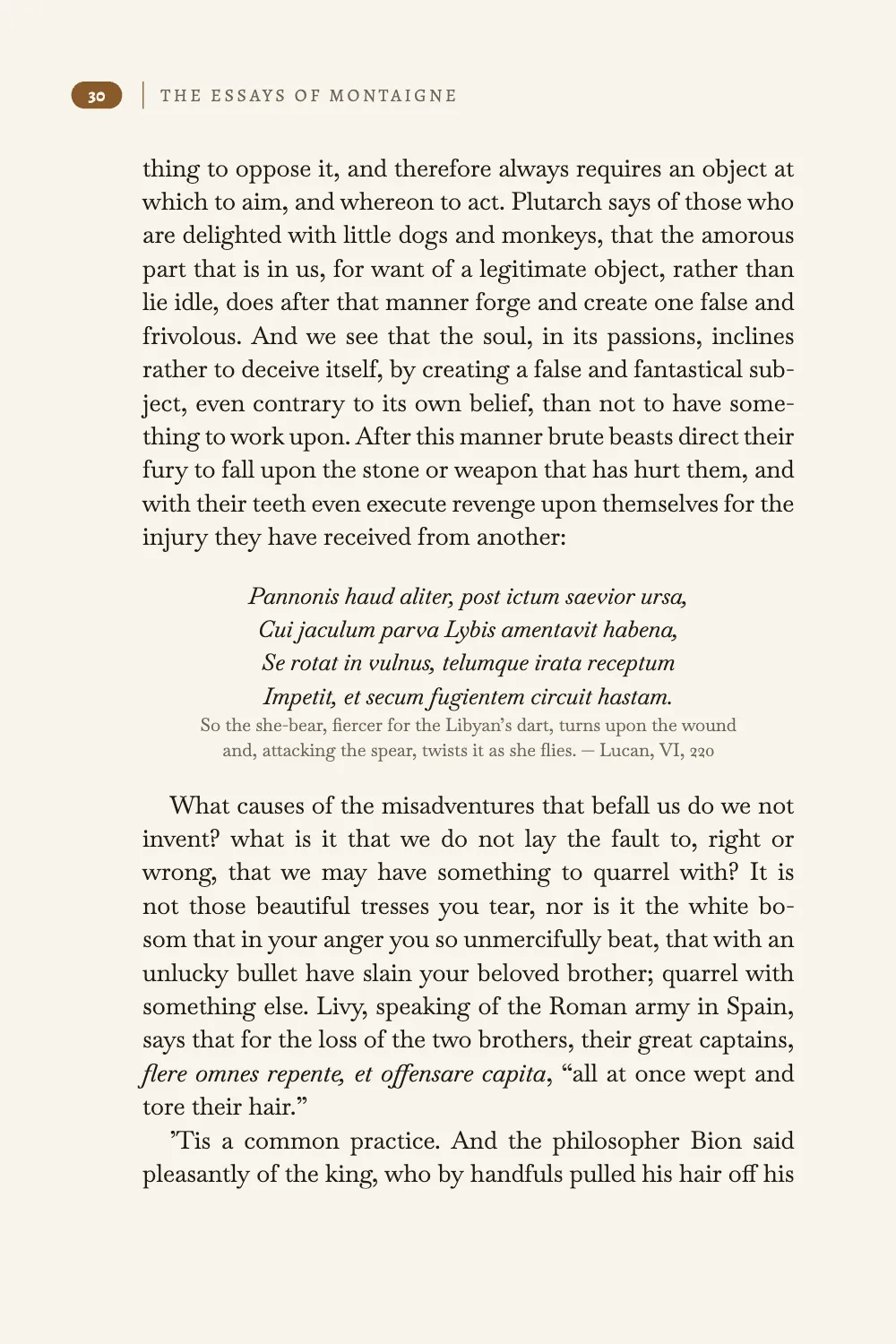
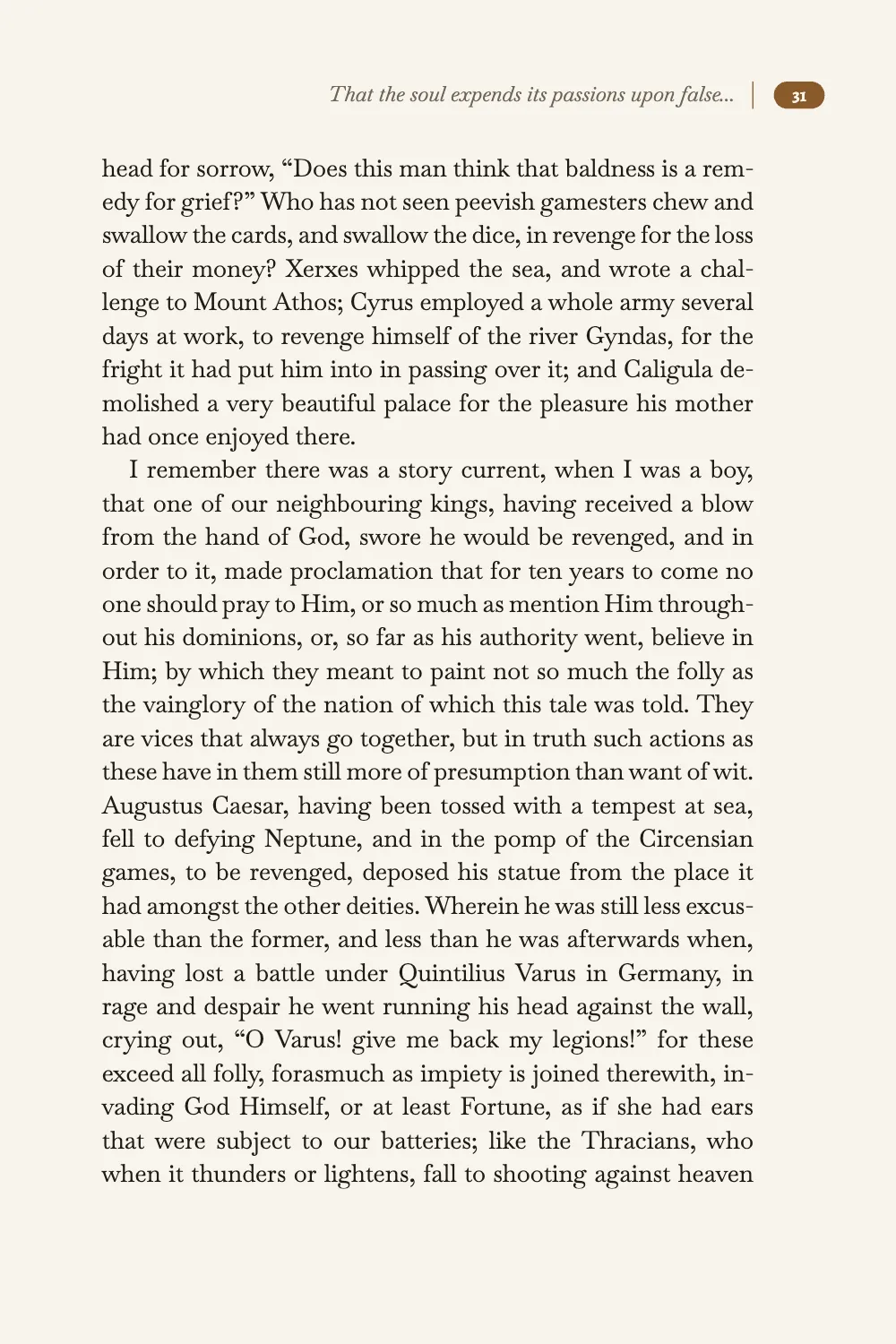
チャールズ・コットンの英訳によるモンテーニュ『エセー』の文庫版から、29ページから33ページまでを組みます。第IV章の全体と第V章の冒頭です。偶数ページには字間を空けた大文字で書名を入れます。奇数ページにはイタリックでエッセイの表題を入れ、第IV章の表題は81字あるので省略記号で切ります。ノンブルはそれぞれ小口の余白のセピアのタブに入り、版面の端の0.5 ptの罫から3 mm離れています。章扉には柱がなく、地にノンブルだけがあります。本文は温かみのあるオフホワイトのページにBaskervvilleで組み、表題はLibre Caslon Display、ノンブルと書名はAlegreya SCです。柱はすべて設定で定義しているので、エンジン組み込みの柱、8 ptの青いOpen Sansは印刷されません。
このレシピが答える質問
- 柱を設定するには(左ページに書名、右ページに章タイトル、ノンブルは小口側)?
- 章扉や白ページで柱を隠したり、空白の偶数ページを部の色で塗ったりするには?
- 見出し、太字、箇条書きの記号が青く出ないようにするには?
手短な答え
const GAP = 3; // mm from the tab to the divider, which lands on the text block's edge
const HEAD = 12; // mm from the top edge of the page to the top of the tab
const CAP = t({ en: 60.5, es: 66.8 }); // mm: the head's widest line, set per edition so
// essay IV's is cut after 'false' and 'objetos'; a short running title suits any title
const page = (edge) => ({ to: 'page', edge }); // the trim box (gotcha: negative-offsets)
const header = { elements: [
  // Verso (even): tab | divider | THE BOOK'S TITLE from the frontmatter
  folio({ id: 'folio-even', parity: 'even', pages: 'body', anchor: page('top-left'),
    x: OUTER - GAP - TAB, y: HEAD }),
  divider({ id: 'rule-even', parity: 'even', from: 'folio-even', edge: 'right-of', x: GAP }),
  { kind: 'text', id: 'book', content: '{title}', parity: 'even', pages: 'body',
    fontFamily: 'Alegreya SC', fontSize: pt(FOLIO_PT), lineHeight: LINE / FOLIO_PT,
    color: col('muted'), textTransform: 'uppercase', letterSpacing: pt(1.3),
    placement: { anchor: { to: '#rule-even', edge: 'right-of' }, // top: the tab's top
      offset: { x: mm(2.5), y: pt(PAD.top) } } }, // PAD.top down: on the folio's baseline
  // Recto (odd): the essay's title, cut short with an ellipsis | divider | tab.
  folio({ id: 'folio-odd', parity: 'odd', pages: 'body', anchor: page('top-right'),
    x: -(OUTER - GAP - TAB), y: HEAD }), // from the right edge, a negative x runs inwards
  divider({ id: 'rule-odd', parity: 'odd', from: 'folio-odd', edge: 'left-of', x: -GAP }),
  { kind: 'text', id: 'essay', content: '{chapterTitle}', parity: 'odd', pages: 'body',
    fontFamily: 'Baskervville', italic: true, fontSize: pt(TITLE_PT),
    lineHeight: LINE / TITLE_PT, color: col('muted'),
    overflow: 'ellipsis-end', // stated, though a running head's default
    placement: { anchor: { to: '#rule-odd', edge: 'left-of' },
      offset: { x: mm(-2.5), y: pt(PAD.top) }, size: { maxWidth: mm(CAP) } } },
] };
// Openers: no head, only a drop folio HEAD above the page's foot, centred under the text block.
const footer = { elements: [folio({ id: 'drop-folio', parity: 'all', pages: 'opener',
  anchor: { to: 'container', edge: 'bottom' }, y: -HEAD })] };
材料
- 機能
- 柱とノンブルページの役割ごとの柱デザイン要素の基準位置ページデザインのテキスト・罫・ボックスデザインした章扉見出しの属性タイトル内の改行奇数ページから始まる章見開きの余白仕上がりサイズ用紙の色文書のメタデータ太字・イタリックとその色セマンティックカラーパレット囲み段落スタイルウィドウ、オーファン、ラントキャンバス上のページ章ごとに組む本
- 併用する機能
- 段抜きの章見出し帯
- 種類
- Baskervville, Libre Caslon Display, Alegreya SC (SIL OFL 1.1)
- 素材
- なし:画像はすべてコードで描画
作り方
#1 · 組み込みの青い柱を置き換える
const palette = {
  ink: '#1f1b16', // text: a warm near-black, never #000
  sepia: '#8a5a2b', // the one accent: folio tabs, dividers, opener plates (5.3:1 on paper)
  muted: '#6f6558', // running heads, verse glosses, the colophon (5.2:1 on paper)
  paper: '#f8f4ec', // a warm off-white page; also the type reversed out of the sepia
};
const col = (id) => ({ hex: palette[id], model: 'hex', paletteId: id });
const colorPalette = [
  ...Object.entries(palette).map(([id, hex]) => ({ id, name: id, value: { hex, model: 'hex' } })),
  // Text-style defaults (headings, bold, italic, lists, boxes) link to 'main-color':
  // pointed at the sepia, none of them prints in the engine's blue.
  { id: 'main-color', name: 'sepia (defaults)', value: { hex: palette.sepia, model: 'hex' } },
];
設定の色はどれもこれらの項目のどれかにリンクしています。headerを定義しないままにすると、エンジンは組み込みの柱を描きます。奇数ページには{title}、偶数ページには{chapterTitle}を1 ptの罫の上に、8 ptのOpen Sans 600、#295AA3の青で組みます(ヘッダーとフッター)。main-colorをセピアに向けると文字の既定値の色が変わり、その柱の色も一緒に変わりますが、書体も罫も、どちらのページにどの表題が出るかも、エンジンが決めたままです。そこで、ここでは柱をそれぞれ完全に書き出し、色はすべてパレットの項目にリンクさせます。太字、イタリック、参照も既定ではmain-colorになるので、bodyTextでインキの色に戻しています。
#2 · 1つのタブからすべての柱を組み立てる
const FOLIO_PT = 7.5; // pt: the folio, and the book's title in capitals beside it
const TITLE_PT = 8.8; // pt: the essay's title, whose italic lowercase reads small at 7.5
const LINE = FOLIO_PT * 1.2; // pt: the folio and both titles share this line box and baseline
const PAD = { top: 1, bottom: 1.4 }; // pt: 0.4 pt more below for the descending 3, 5, 7, 9
const TAB = 7.5; // mm: the tab's width
const TAB_H = LINE + PAD.top + PAD.bottom; // pt: the tab's height, which the divider matches
const folio = ({ id, parity, pages, anchor, x = 0, y }) => ({
  kind: 'text', id, content: '{pageNumber}', parity, pages, fontFamily: 'Alegreya SC',
  fontSize: pt(FOLIO_PT), fontWeight: 700, lineHeight: LINE / FOLIO_PT, color: col('paper'),
  box: { backgroundColor: col('sepia'), borderRadius: mm(2), // a pill; the number is centred
    padding: { top: pt(PAD.top), bottom: pt(PAD.bottom) } }, // by default in both directions
  placement: { anchor, offset: { x: mm(x), y: mm(y) }, size: { width: mm(TAB) } },
});
const divider = ({ id, parity, from, edge, x }) => ({
  kind: 'rule', id, parity, pages: 'body', direction: 'vertical', thickness: pt(0.5),
  color: col('sepia'), placement: { anchor: { to: `#${from}`, edge }, offset: { x: mm(x) },
    size: { height: pt(TAB_H) } },
});
手短な答えでは各柱のタブを'page'に固定するので、オフセットは仕上がり線から測ります。top-rightの角からは正のxがページの外へ向かうので、奇数ページのタブには負の値を与えます。区切り線はタブに、表題は区切り線に固定します(要素の配置)。ほかの部品はタブの寸法から測るので、タブの寸法は名前付きの定数にしています。区切り線の高さはTAB_Hです。ノンブルと2つの表題は9 ptの行ボックスを共有し、デザインのテキストのベースラインは行ボックスの上から80%の位置にあるので、文字の大きさにかかわらず3つとも同じベースラインに並びます。
#3 · 余白を見開きにし、行数で版面を決める
const TRIM = { width: 132, height: 198 }; // mm
const TOP = 22; // mm: the top margin, which holds the heads (gotcha: header-paints-over-text)
const INNER = 15; // mm
const OUTER = 21; // mm: the outer margin, where the folio tabs hang
const LINES = 31; // whole lines of LEAD in the text block, so full pages end level
const MEASURE = TRIM.width - INNER - OUTER; // the text block's width: 96 mm
const geometry = { // left is the inner margin on a recto; mirror swaps it on the versos
  width: mm(TRIM.width), height: mm(TRIM.height), dpi: 150, // 150 dpi is for the screen
  backgroundColor: col('paper'),
  margins: { top: mm(TOP), bottom: mm(TRIM.height - TOP - (LINES * LEAD * 25.4) / 72),
    left: mm(INNER), right: mm(OUTER), mirror: true },
};
mirror: trueでは、奇数ページで小口側にあるrightの余白が偶数ページでは左に移るので、OUTERは常に小口側の余白で、タブはそこに固定されます。地の余白は仕上がりサイズ、天の余白、LINESから求めるので、仕上がりサイズや天の余白をどう変えても、版面はちょうどLEADの行LINES本分(ここでは31 × 14 pt)に保たれます。どの満ページも31行目で終わるので、30ページと31ページのような向かい合うページは同じ高さで終わります。
#4 · 章扉では表題を全部見せる
const PLATE = 26; // mm: a square plate at the head of the text block
const opener = {
  enabled: true,
  minHeight: mm(58), // the text of every essay starts on the same line
  slot: { elements: [
    { kind: 'box', id: 'plate', style: { backgroundColor: col('sepia') },
      placement: { anchor: { to: 'container', edge: 'top-left' },
        size: { width: mm(PLATE), height: mm(PLATE) } } },
    { kind: 'text', id: 'numeral', content: '{attr.num}', fontFamily: 'Libre Caslon Display',
      fontSize: pt(48), lineHeight: 1, color: col('paper'),
      placement: { anchor: { to: '#plate', edge: 'align-top' }, // the plate's own box, where
        size: { width: mm(PLATE), height: mm(PLATE) } } }, // the text centres by default
    { kind: 'text', id: 'book', content: '{subtitle}', fontFamily: 'Alegreya SC',
      fontSize: pt(8.5), letterSpacing: pt(1.4), color: col('sepia'), align: 'left',
      placement: { anchor: { to: 'container', edge: 'top-left' },
        offset: { x: mm(PLATE + 4.5), y: mm(PLATE - 2.9) } } }, // its baseline on the plate's foot
    { kind: 'text', id: 'title', content: '{titleText}', fontFamily: 'Libre Caslon Display',
      fontSize: pt(20), lineHeight: 1.12, color: col('ink'), align: 'left',
      overflow: 'wrap', // an opener shows the whole title; the running head cuts it
      placement: { anchor: { to: '#plate', edge: 'below' }, offset: { y: mm(6) },
        size: { width: mm(MEASURE) } } },
  ] },
};
章扉ではoverflow: 'wrap'で表題を全部組み、見出し行の\\ごとに改行します。この改行に従うのはページ全体に広がる章扉だけなので、このレベルにはspan: 'page'を指定します(タイトル内の改行)。柱では{chapterTitle}は常に表題を1行で返し、省略記号はその行を切ります。数字は見出しの{num="IV"}属性から、プレートの横のスモールキャピタルはフロントマターのsubtitleから取ります。
#5 · どのエッセイも奇数ページで始める
  headings: { // 400, the face's only weight: the default 700 would ask for one that is missing
    fontFamily: 'Libre Caslon Display', fontWeight: 400, color: col('ink'),
    levels: [
      // 'odd' puts every opener on a recto, adding a blank verso when one is needed;
      // span: 'page' makes the design an opener, where a \\ in the title breaks the line.
      { level: 1, span: 'page', breakBefore: { enabled: true, parity: 'odd' },
        marginTop: pt(0), marginBottom: pt(0), advancedDesign: opener },
    ],
  },
'odd'では、奇数ページで終わるエッセイのあとに白の偶数ページが入ります。スペイン語版では第IV章が31ページで終わるので、白ページが1つ入ります。ここでは第IV章は偶数ページの32ページで終わり、第V章は33ページで始まります。柱のpages: 'body'は、白ページと章扉(最初のブロックがこの見出しであるページ)に柱を出しません。フッターのpages: 'opener'は、地のノンブルを章扉にだけ印刷します(テキスト要素)。
#6 · ノンブルを29から始める
// 28 pages come before this one, so recto and verso, the mirrored margins and the odd/even
// heads follow the book page (gotcha: parity-page1-recto); the folios start at 29.
const continuation = { pageIndexOffset: 28, pageNumbering: { startAt: 29 } };
const doc = await buildDocumentWithFonts({ markdown, continuation }, config(), kitFonts(FONTS));
showPages(doc, { title: t({ en: 'Running heads by parity', es: 'Cabeceras según la paridad' }) });
parityは本の中でのページの位置で決まり、ノンブルは見ません。pageIndexOffset: 28はすべてのページの番号に28を足すので、奇数・偶数ページ、見開きの余白、奇数ページと偶数ページの柱が本のページに従います。そのうえでpageNumbering.startAtがこれらのページに29から33の番号を振ります。オフセットがないと、組版の最初のページは、どんなノンブルを印刷しても奇数ページになります。29ページならたまたま合いますが、startAt: 30にすると書名が31ページに、エッセイの表題が32ページに来て、どちらも見開きの反対側に出てしまいます。
レシピの全体
// ═══ Postext Cookbook · Nº 005 · Running heads by parity ═══════════════════════════════
// https://postext.dev/en/cookbook/running-heads-by-parity
// Code: MIT · Text: Montaigne, tr. Cotton (PD, Gutenberg #3600); es: new translation (MIT)
// Fonts: Baskervville, Libre Caslon Display, Alegreya SC (SIL OFL 1.1) · Needs postext ≥ 1.57.0
// Pages 29 to 33 of a pocket Montaigne. Versos carry the book's title and rectos the essay's,
// the folios sit in tabs in the outer margin, and an opener prints only a folio at the foot.
import { buildDocumentWithFonts, renderPageToCanvas } from 'https://esm.sh/postext';

const LANG = 'en'; // @lang: the language of the sample document ('en' | 'es')
const RECIPE = 'running-heads-by-parity';

// ─── 1 · Design ─────────────────────────────────────────────────────────────
// #region palette: four colours with semantic ids; main-color points at the sepia
const palette = {
  ink: '#1f1b16', // text: a warm near-black, never #000
  sepia: '#8a5a2b', // the one accent: folio tabs, dividers, opener plates (5.3:1 on paper)
  muted: '#6f6558', // running heads, verse glosses, the colophon (5.2:1 on paper)
  paper: '#f8f4ec', // a warm off-white page; also the type reversed out of the sepia
};
const col = (id) => ({ hex: palette[id], model: 'hex', paletteId: id });
const colorPalette = [
  ...Object.entries(palette).map(([id, hex]) => ({ id, name: id, value: { hex, model: 'hex' } })),
  // Text-style defaults (headings, bold, italic, lists, boxes) link to 'main-color':
  // pointed at the sepia, none of them prints in the engine's blue.
  { id: 'main-color', name: 'sepia (defaults)', value: { hex: palette.sepia, model: 'hex' } },
];
// #endregion
const LEAD = 14; // pt: the body leading, the pitch of the baseline grid

// #region tab: the folio tab and its divider, the two pieces every head is built from
const FOLIO_PT = 7.5; // pt: the folio, and the book's title in capitals beside it
const TITLE_PT = 8.8; // pt: the essay's title, whose italic lowercase reads small at 7.5
const LINE = FOLIO_PT * 1.2; // pt: the folio and both titles share this line box and baseline
const PAD = { top: 1, bottom: 1.4 }; // pt: 0.4 pt more below for the descending 3, 5, 7, 9
const TAB = 7.5; // mm: the tab's width
const TAB_H = LINE + PAD.top + PAD.bottom; // pt: the tab's height, which the divider matches
const folio = ({ id, parity, pages, anchor, x = 0, y }) => ({
  kind: 'text', id, content: '{pageNumber}', parity, pages, fontFamily: 'Alegreya SC',
  fontSize: pt(FOLIO_PT), fontWeight: 700, lineHeight: LINE / FOLIO_PT, color: col('paper'),
  box: { backgroundColor: col('sepia'), borderRadius: mm(2), // a pill; the number is centred
    padding: { top: pt(PAD.top), bottom: pt(PAD.bottom) } }, // by default in both directions
  placement: { anchor, offset: { x: mm(x), y: mm(y) }, size: { width: mm(TAB) } },
});
const divider = ({ id, parity, from, edge, x }) => ({
  kind: 'rule', id, parity, pages: 'body', direction: 'vertical', thickness: pt(0.5),
  color: col('sepia'), placement: { anchor: { to: `#${from}`, edge }, offset: { x: mm(x) },
    size: { height: pt(TAB_H) } },
});
組み立てたscript.jsはそのまま動きます。任意のページのモジュールスクリプトに貼り付けるか、レシピをCodePenで開いてください。 GitHub上のレシピのフォルダー ↗ (新しいタブで開きます)
アレンジ
#長い表題には短い柱用の表題を付ける
柱用の表題を見出し行に{num="IV" short="Of false objects"}と書き、表題全体の代わりにその属性を印刷します。shortのない章では、そこには何も印刷されません。
-  { kind: 'text', id: 'essay', content: '{chapterTitle}', parity: 'odd', pages: 'body',
+ { kind: 'text', id: 'essay', content: '{attr.short}', parity: 'odd', pages: 'body',#エッセイをどちらのページからでも始める
'any'では、エッセイは奇数でも偶数でも次のページから始まり、白ページは入りません。プレートは版面の左上の角に固定し、地のノンブルはその下で中央にそろえるので、どちらも偶数ページと奇数ページで同じ位置に来ます。
-      { level: 1, span: 'page', breakBefore: { enabled: true, parity: 'odd' },
+ { level: 1, span: 'page', breakBefore: { enabled: true, parity: 'any' },#白の偶数ページをアクセント色で塗る
pages: 'blank'を指定した囲みは、奇数ページへの改ページで加わったページにだけ印刷されます。スペイン語版では32ページをセピアで塗りつぶし、白ページのない英語版は変わりません。
 const footer = { elements: [folio({ id: 'drop-folio', parity: 'all', pages: 'opener',
-  anchor: { to: 'container', edge: 'bottom' }, y: -HEAD })] };
+  anchor: { to: 'container', edge: 'bottom' }, y: -HEAD }),
+  { kind: 'box', id: 'blank-leaf', pages: 'blank', style: { backgroundColor: col('sepia') },
+    placement: { anchor: page('top-left'),
+ size: { width: mm(TRIM.width), height: mm(TRIM.height) } } }] };よくあるつまずき
つまずき
コンテナー基準の負のオフセットでは何も描かれない
幅が自動のデザインのテキストはコンテナーの中に制限されるため、コンテナーからの負のオフセットで外に押し出されると何も描かれません。こうした要素はページか裁ち落としに固定してmm単位のオフセットを明示するか、幅を固定してください。 デザイン要素の基準位置 →
つまずき
ヘッダーとフッターの要素は本文の上に描かれる
ヘッダーとフッターの要素はページの上に重ねて描かれ、本文の領域はそのための場所を空けません。要素は余白の中に収めてください。その場所を確保するのは余白です。 柱とノンブル →
つまずき
1ページは奇数ページ。ページは物理的な番号で計画する
1ページは右ページで、2ページが最初の偶数ページです。見開きは物理的なページ番号で計画してください。偶数ページの章扉は、その次の奇数ページと向かい合います。 改ページと改段 →
レイアウト警告 · designTextTruncated
デザインのテキストが切り詰められています
原因. デザインのテキスト要素(柱、ノンブル、章扉、部扉、目次の部の行)が使える幅より広く、行の一部が失われました。overflowの指定どおり省略記号で切り詰められたか、overflow: 'clip'で要素の外にはみ出した部分が切り取られています。柱・ノンブル・目次の部の行は既定で省略記号になり、見出しと部のデザインは要素に指定がなければ折り返します。章のすべてのページで切り詰められる柱は一度だけ報告されます。
対処. 要素にoverflow: 'wrap'を設定して複数行に折り返すか、幅を増やす(size.widthやmaxWidthを広げる、fontSizeを小さくする、letterSpacingを詰める)か、テキストを短くします。柱のように1行であること自体がデザインなら省略記号のままでよく、その場合この警告は切り詰めた内容の確認になります。 ドキュメント →
CAPは各版で、ここで柱に出る唯一の表題であるエッセイIVの表題に合わせて決めています。省略記号は収まる最後の語のあとに付きますが、その語が前置詞になることもあります。64 mmにすると、スペイン語版の柱は“…sus pasiones sobre…”で終わります。長い表題の多い本には「アレンジ」の短い柱用の表題が必要です。- 英語版で
minWordSpacingを0.7から0.75に上げると、エッセイVの最初の行(“Quintus Marcius, the Roman legate…”)は許容範囲の中に改行位置がなくなり、語間が通常の2.4倍まで広がります。スペイン語版にはそのような行はありません。変更したら、キャプチャーが挙げるいちばんゆるい行を確認してください。
クレジット
- 本文
- Essays, Book I, chapters IV and V, in Charles Cotton’s translation edited by William Carew Hazlitt (1877) · Michel de Montaigne; Charles Cotton; William Carew Hazlitt · パブリックドメイン
- Essais, livre I, chapitres IV et V: the 1595 French text in the Général Michaud edition (Firmin-Didot, 1907) · Michel de Montaigne · パブリックドメイン
- Spanish translation, with its verse glosses · Postext Cookbook · オリジナル
- フォント
- Baskervville (SIL OFL 1.1) · Libre Caslon Display (SIL OFL 1.1) · Alegreya SC (SIL OFL 1.1)