かんたんな説明
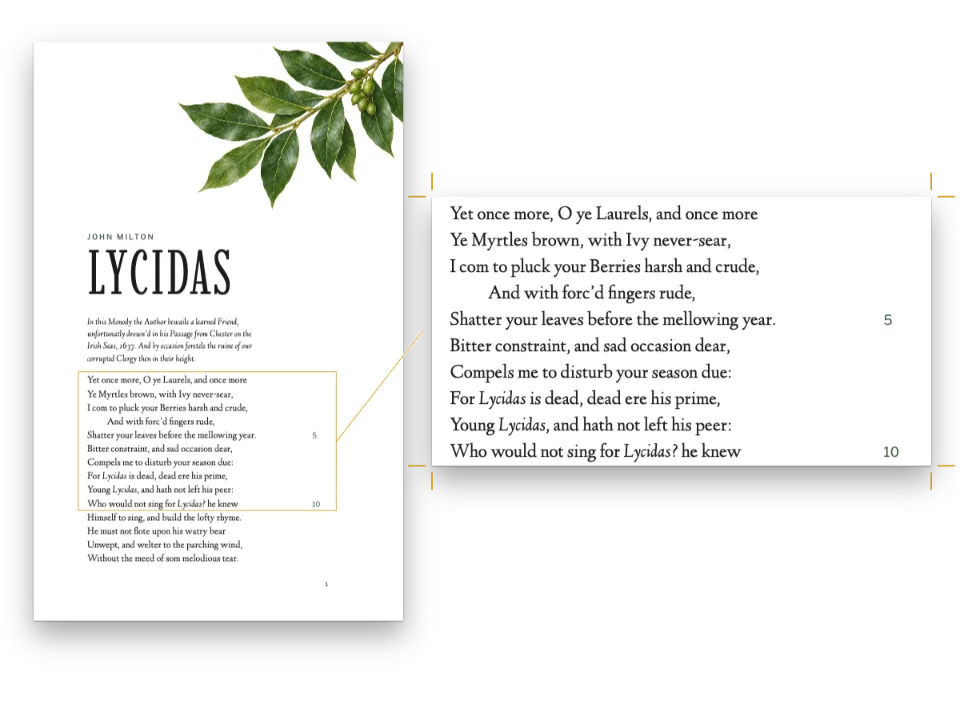
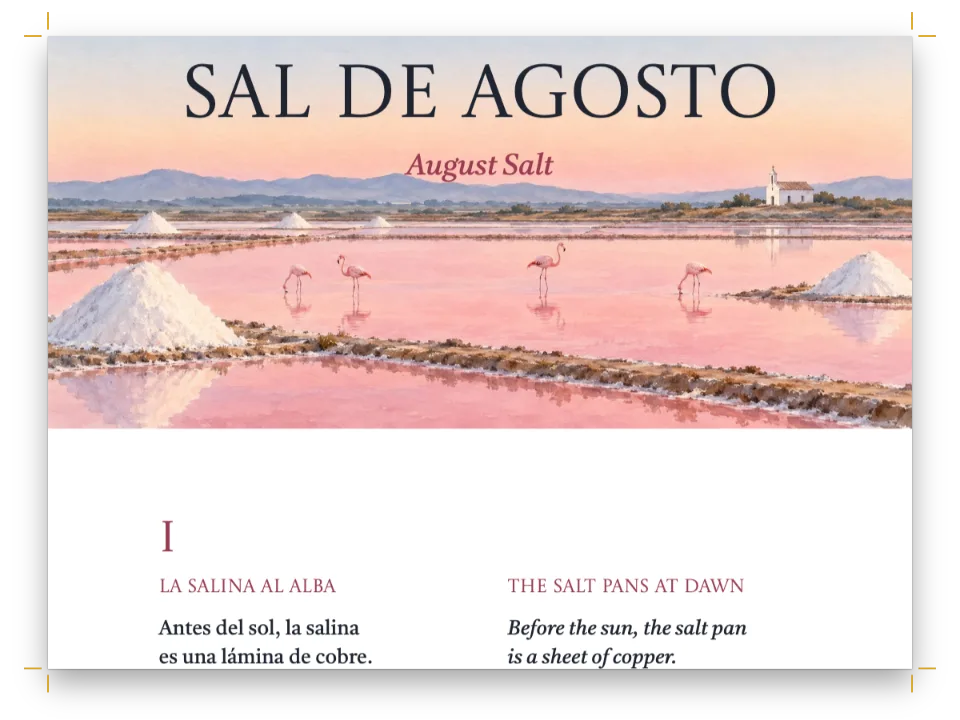
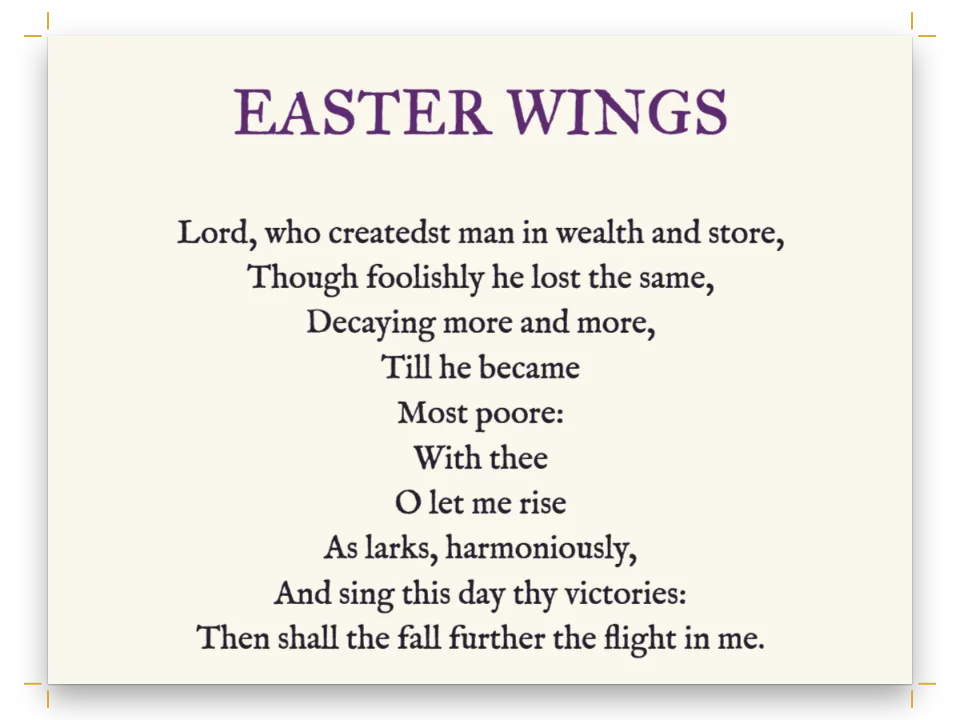
Gerard Manley Hopkinsの自然を詠んだ詩4編を収めた小さな詩集。詩の各行を独立させ、詩人の元のインデントと連の間の空行を保つ方法を示します。
できあがり
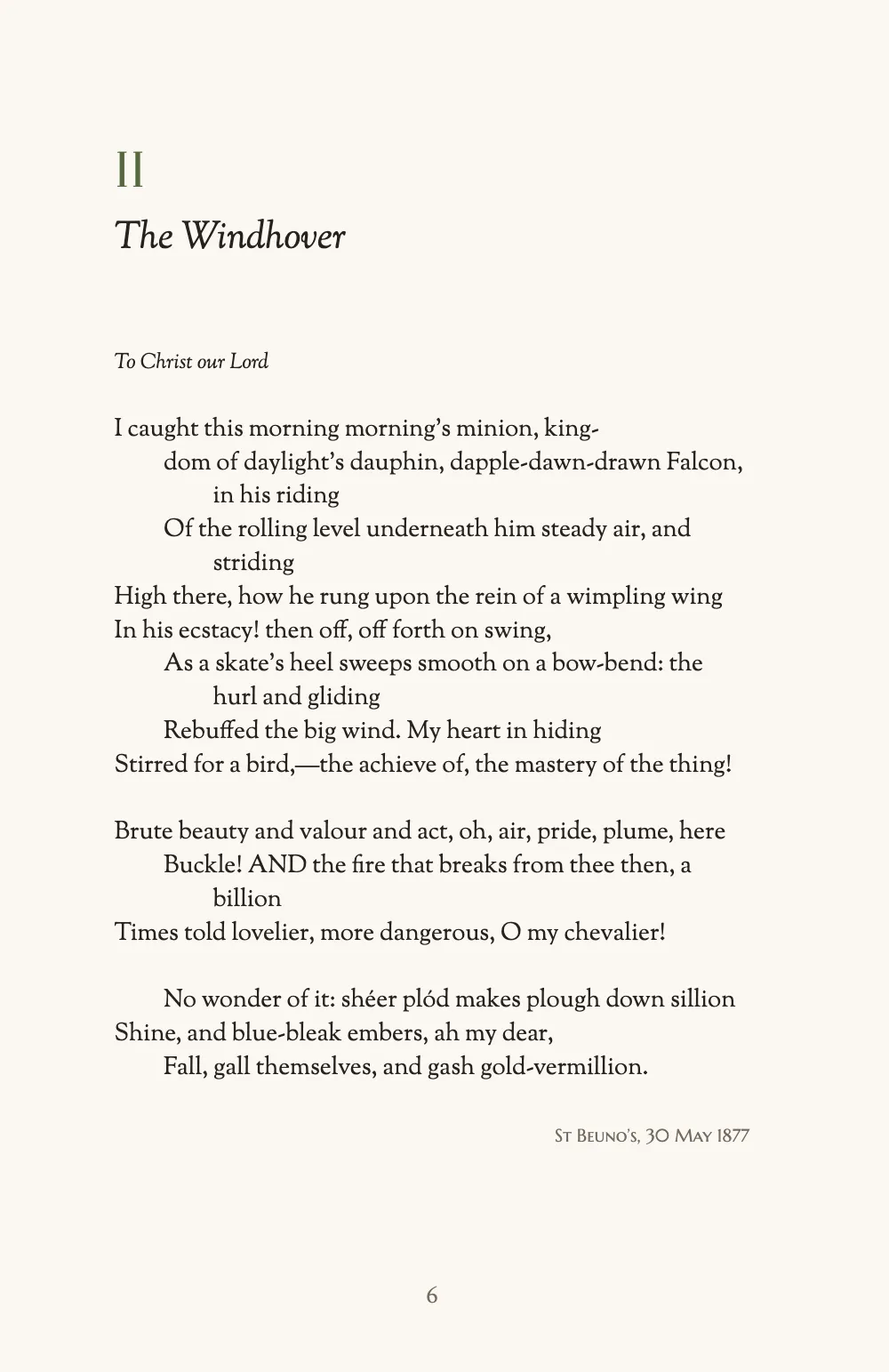
Gerard Manley Hopkinsの自然を詠んだ詩4編を収めた小冊子を、140 × 216 mmの判型で、1918年の初版の本文から組みます。小扉の後、シダとナナカマドのフォトグラムの口絵が、Italianaで組んだ扉と向かい合います。目次は各詩を数字とイタリックの題で示し、間隔を空けた点がノンブルまで続きます。各詩はページの頭から始まり、上にセージ色の数字とイタリックの題を置きます。各詩は1つの:::verseブロックで、1918年版どおりにインデントします。『Pied Beauty』の行は韻に応じて段階的に下がり、『The Windhover』の長い行は折り返して、インデントの2倍の深さの4 emでぶら下がります。連の間は1行空け、Hopkins自身が分けた箇所を除いて語は分割しません。日付は各詩の下に右そろえで置き、最後の詩の後にはナナカマドの小枝を添えます。詩のページには、下端中央にノンブルを入れます。
このレシピが答える質問
- 詩を組むには(1行に1詩行、連の間のアキ、折り返した行のぶら下げインデント、ハイフネーションなし)?
- 空行を入れても効かないとき、2つのブロックの間に縦のスペースを追加するには?
- 自動で更新される目次(リーダー、ノンブル、著者名、部の行)を追加するには?
- エピグラフ、献辞、署名、大きな引用符の付いたプルクオートを組むには?
- 番号のないアートワーク(オーナメント、カット、ロゴ)を組むには?
手短な答え
// A poem is one :::verse block written as it is printed: a line of verse a line, a blank line
// between stanzas (one line of the grid), and spaces before an indented line, two to an em:
//   :::verse{style="verse" align=start}
//   The world is charged with the grandeur of God.
//       It will flame out, like shining from shook foil;
//
//   And for all this, nature is never spent;
//   :::
// align=start sets the poem flush with the margin (the default centres it on its longest line).
const verse = {
  id: 'verse',
  hangingIndent: em(2), // a turnover hangs 2 em past its line's start: 4 em under a 2 em indent
  // Verse keeps its words whole, even where bodyText.hyphenation.ragged is switched on.
  hyphenation: false,
};
// Hook-up: paragraphStyles: [verse, …]; the Markdown goes to buildDocument as it is written.
材料
- 機能
- 行ごとの詩段落スタイル目次明示的な縦のアキ字下げ、行そろえ、段落間隔エスケープとそのままの文字番号付き見出しデザインした章扉見出しスタイル番号のない章見出しの属性ページデザインの画像表紙、扉、奥付文書のメタデータ節ごとの柱柱とノンブル独自のリソースの種類その場に置く図セマンティックカラーパレットページの役割ごとの柱
- 併用する機能
- 参考文献と用語集用紙の色リソースとしての図と表
- 種類
- Sorts Mill Goudy, Italiana, Marcellus SC (SIL OFL 1.1)
- 素材
plate-1120.jpg- The frontispiece photogram of fern and rowan (Generated With Diffusion Models, オリジナル)
- The rowan ornament, drawn in code in the page’s palette (Ignacio Ferro, CC BY 4.0)
作り方
#1 · 詩は:::verseブロック
:::verseブロックはMarkdownの各行を詩の1行として保つので、詩は印刷されるとおりに書けます(:::verse)。行頭の空白がインデントで、空白2つで1 emです。そのため韻を踏む行どうしは、1918年版と同じく同じ深さから始まります。連の間の空行はベースライングリッド1行分のあきになり、ページの先頭では捨てられます。行長より長い行は語間の空白で折り返し、詩のスタイルのhangingIndentだけ、その行自身の頭からぶら下がります。インデントのない行では2 em、2 emインデントした行の下では4 emで、折り返しが別の行に見えることはありません。align=startで各詩を余白にそろえます。指定しなければ、詩はいちばん長い行を基準に中央に置かれます。詩はハイフンで分割せず、詩の行がページの区切りで折り返しと離れることもありません。
#2 · 詩の周りの行にもスタイルがある
const lineStyles = [
  { id: 'dedication', fontSize: pt(9.5), marginBottom: pt(LEAD) }, // under The Windhover
  { id: 'date', fontFamily: 'Marcellus SC', fontSize: pt(8), color: col('muted'),
    textAlign: 'right', marginTop: pt(LEAD) }, // a line of space above, flush right
];
『The Windhover』の上の献辞と、各詩の下の場所と日付は詩の行ではありません。そこでそれぞれを1段落だけの:::paragraphsコンテナーにし、独自のスタイルで組みます。どちらのスタイルも行送りを設定せず、アキは1行分(15 pt)なので、詩は本文のグリッドに乗ったままです。日付は詩の1行下に右そろえで、ノンブルと同じ書体、8 ptのMarcellus SCで組みます。
#3 · 各詩は番号の下でページを始める
// '{1:I}' numbers the poems I to IV: {number} prints the numeral here, :::toc in the contents.
// The head is HEAD_LINES grid lines (minHeight, no bottom margin), so each poem starts on the same
// line; numeral and title fill 4, or 5 if the title wraps.
const HEAD_LINES = 6;
const poemHead = { enabled: true, minHeight: pt(LEAD * HEAD_LINES), slot: { elements: [
  { kind: 'text', id: 'numeral', content: '{number}', fontFamily: 'Italiana', fontSize: pt(22),
    color: col('sage'), align: 'left',
    placement: { anchor: { to: 'container', edge: 'top-left' } } },
  { kind: 'text', id: 'title', content: '{titleText}', fontFamily: 'Sorts Mill Goudy',
    italic: true, fontSize: pt(17), color: col('ink'), align: 'left',
    placement: { anchor: { to: '#numeral', edge: 'below' }, offset: { y: mm(2) },
      size: { width: 'fill' } } },
] } };
// Parity 'any': the next page, recto or verso, with no blank page between two poems.
const poems = { level: 1, numberingTemplate: '{1:I}', advancedDesign: poemHead,
  marginBottom: pt(0), breakBefore: { enabled: true, parity: 'any' } };
見出しはテキストの代わりに、段の中にデザインを印刷します。そのデザインの中で、{number}はnumberingTemplate: '{1:I}'が書式化した数(IからIV)、{titleText}は題です(幅と詳細デザイン)。レベルには下のアキがなく、minHeightですべての見出しをグリッド6行分(31.75 mm)の高さにします。数字と1行の題はそのうち4行を、折り返す題は5行を埋めるので、どの詩もページの同じ行から始まります。6ページ目では、その行に献辞が入ります。パリティ'any'は奇数ページか偶数ページかを問わず次のページへ改ページするので、詩の間に白ページはできません。
#4 · 前付けは見出しでできている
// Headings too, each on a page of its own, with no number, contents entry or folio.
// A style restates the break, or inherits the poems' (gotcha: style-inherits-break).
const leaf = { numbered: false, toc: false, span: 'page', footer: { elements: [] },
  breakBefore: { enabled: true, parity: 'any' } };
const onPage = (y, width) => ({ anchor: { to: 'page', edge: 'top' }, offset: { y: mm(y) },
  ...(width && { size: { width: mm(width) } }) }); // centred, y mm below the trim
const face = (id, content, font, size, y, extra = {}) => ({ kind: 'text', id, content,
  fontFamily: font, fontSize: pt(size), color: col('ink'), align: 'center',
  placement: onPage(y), ...extra });
const image = (id, placement) => ({ kind: 'image', id, resourceId: id, placement });
const design = (...elements) => ({ enabled: true, slot: { elements } });
const front = [
  { id: 'half-title', ...leaf,
    advancedDesign: design(face('title', '{titleText}', 'Italiana', 20, 60)) },
  { id: 'plate', ...leaf, advancedDesign: design( // span 'page': a column's foot would cut it
    image('plate', { anchor: { to: 'bleed', edge: 'top-left' }, size: { width: 'fill' } }),
    face('caption', '{attr.caption}', 'Sorts Mill Goudy', 8.5, 203,
      { italic: true, color: col('muted') })) },
  { id: 'title-page', ...leaf, advancedDesign: design(
    face('author', '{author}', 'Marcellus SC', 10, 46, // {author}, {title}: the frontmatter
      { letterSpacing: pt(2.4), textTransform: 'uppercase' }),
    face('title', '{title}', 'Italiana', 54, 56, { lineHeight: 1 }),
    face('subtitle', '{subtitle}', 'Sorts Mill Goudy', 13, 80,
      { italic: true, color: col('sage') }),
    image('sprig', onPage(96, 30)),
    face('press', '{attr.press}', 'Marcellus SC', 8.5, 182,
      { letterSpacing: pt(1.8), color: col('muted') })) },
  { id: 'contents', ...leaf, span: 'column', advancedDesign: { enabled: false },
    fontFamily: 'Italiana', fontSize: pt(24), lineHeight: pt(LEAD * 2), marginBottom: pt(LEAD) },
];
見出しスタイルは新しいページへ改ページし、そこにデザインを描けます。そのため小扉、口絵、扉はそれぞれ1つの見出しで、それぞれ独自のスタイルを使います。numbered: falseで数から外すので、最初の詩はIのままです。toc: falseで目次から外し、空のフッターでそれらのページにはノンブルを入れません(見出しスタイル)。スタイルがページ全体にまたがるのは、段の中に収まるデザインが版面の下端で切られ、裁ち落としの図版の下の部分とキャプションが欠けてしまうからです。キャプションは見出しのcaption属性から、扉の著者、題、副題はフロントマターから取ります。
#5 · 目次はひとりでに埋まる
// The numerals stand on the titles' baseline, in Italiana and sage, at the titles' size.
const contents = {
  levels: [{ level: 1, italic: true, marginBottom: pt(LEAD), numberFontFamily: 'Italiana',
    numberFontWeight: 400, numberColor: col('sage'), numberWidth: mm(6), numberGap: mm(3) }],
  pageNumber: { fontFamily: 'Marcellus SC', fontSize: pt(9), color: col('muted'), width: mm(6) },
  leader: { char: '. ', gap: mm(2) }, // spaced dots, right-aligned so they line up
};
:::tocは、スタイルが許すすべての見出しを、同じテンプレートによる数字と、見出しが置かれたページのラベルとともに並べます。組版は、それらのページラベルが変わらなくなるまで本を組み直します(目次)。このページ自身の見出しContentsは、numbered: falseのスタイルを使います。これがないと、Contentsが詩のIになってしまいます。リーダー'. 'は各点の後にスペースを入れます。点は右そろえなので項目から項目へと縦にそろいます。toc.leaderには色の設定がないので、点はノンブルと同じ書体と色で印刷されます。
#6 · 飾りはラベルのないリソースの種類
// No caption prefix and no caption: the sprig prints bare, where ::resource{id="sprig"} puts
// it (double quotes: gotcha resource-double-quotes), a fifth of the measure wide, centred.
const ornament = { id: 'ornament', name: 'Ornament', shortLabel: '', captionPrefix: '',
  numberingTemplate: '{n}', resetOn: 'never', counterFormat: 'decimal',
  defaultPlacement: { position: 'here', width: 0.2, align: 'center' } };
本文中の図版はリソースで、リソースにはすべて種類があります。装飾の種類はキャプションのプレフィックスが空で、小枝にはキャプションがないので、下に「Figure 1」のようなラベルは印刷されません(リソースの種類)。種類のdefaultPlacementは小枝を::resource{id="sprig"}の位置に、中央そろえで行長の5分の1の幅で置きます。そのため『Inversnaid』の下の尾飾りはMarkdown1行で済みます。resourceTypesは既定のリストを置き換えるので、この本にはFigureやTableの種類がありません。残したいときは、装飾の前にdefaultResourceTypes()を展開します。
レシピの全体
// ═══ Postext Cookbook · Nº 015 · Poems set line by line ═════════════════════════════
// https://postext.dev/en/cookbook/poetry-collection
// Code: MIT · Text: G. M. Hopkins, Poems, 1918 (PD) · Plate: diffusion models · Sprig: code
// Fonts: Sorts Mill Goudy, Italiana, Marcellus SC (SIL OFL 1.1) · Needs postext ≥ 1.34.0
import {
  buildDocumentWithFonts, renderPageToCanvas, registerResourceImage,
} from 'https://esm.sh/postext';

const LANG = 'en'; // @lang: the language of the sample document ('en' | 'es')
const RECIPE = 'poetry-collection';

// ─── 1 · Design ─────────────────────────────────────────────────────────────
const palette = { // every colour in the config links to one of these
  ink: '#26221f', // the text: a warm near-black
  sage: '#56673f', // the one accent: numerals, the subtitle, the ornament's leaves
  sepia: '#8c5f3a', // used for the rowan berries only
  muted: '#746a60', // dates, folios, leaders and the colophon
  paper: '#fbf8f2', // the page
};
// A colour is its hex and the palette entry it follows.
const col = (id) => ({ hex: palette[id], model: 'hex', paletteId: id });
const colorPalette = [
  ...Object.entries(palette).map(([id, hex]) => ({ id, name: id, value: { hex, model: 'hex' } })),
  // The engine's defaults link to 'main-color': point it at the accent, so nothing prints blue.
  { id: 'main-color', name: 'accent (defaults)', value: { hex: palette.sage, model: 'hex' } },
];
const TRIM_W = 140, TRIM_H = 216; // mm: a poetry trim, tall enough for a sonnet's turnovers
const LEAD = 15; // pt: the body's leading, the grid every line of verse sits on

// #region answer: verse: a :::verse block keeps each line, its indent, the stanza breaks
// A poem is one :::verse block written as it is printed: a line of verse a line, a blank line
// between stanzas (one line of the grid), and spaces before an indented line, two to an em:
//   :::verse{style="verse" align=start}
//   The world is charged with the grandeur of God.
//       It will flame out, like shining from shook foil;
//
//   And for all this, nature is never spent;
//   :::
// align=start sets the poem flush with the margin (the default centres it on its longest line).
const verse = {
  id: 'verse',
  hangingIndent: em(2), // a turnover hangs 2 em past its line's start: 4 em under a 2 em indent
  // Verse keeps its words whole, even where bodyText.hyphenation.ragged is switched on.
  hyphenation: false,
};
// Hook-up: paragraphStyles: [verse, …]; the Markdown goes to buildDocument as it is written.
// #endregion
組み立てたscript.jsはそのまま動きます。任意のページのモジュールスクリプトに貼り付けるか、レシピをCodePenで開いてください。 GitHub上のレシピのフォルダー ↗ (新しいタブで開きます)
アレンジ
#折り返しをもっと深くぶら下げる
ぶら下げインデントを深くすると、折り返した行の残りが余白からさらに離れます。行が頻繁に折り返す詩に向きます。
-  hangingIndent: em(2), // a turnover hangs 2 em past its line's start: 4 em under a 2 em indent
+ hangingIndent: em(4), // a turnover hangs 2 em past its line's start: 4 em under a 2 em indent#折り返しを行末にそろえる
bodyText.verseにturnover: 'right'を指定すると、行長より長い行の残りは次の行に開き角括弧を前に付けて右寄せで置かれます。英語の詩集の多くがこう組みます。
     indentAfterHeading: false, minWordSpacing: 0.8, maxWordSpacing: 1.6,
+    verse: { turnover: 'right' }, // a turnover flush right, behind [
},#どの詩も右ページから始める
パリティを'odd'にすると、各詩は次の奇数ページから始まります。本は8ページから11ページに増えます。3つの白い偶数ページにノンブルは印刷されません。ノンブルをページの役割で絞り込んでいるからです。
 const poems = { level: 1, numberingTemplate: '{1:I}', advancedDesign: poemHead,
-  marginBottom: pt(0), breakBefore: { enabled: true, parity: 'any' } };
+ marginBottom: pt(0), breakBefore: { enabled: true, parity: 'odd' } };#詩の番号を算用数字にする
テンプレートのカウンターのスタイルを変えると、詩のページと目次の数字が同時に変わります。
-const poems = { level: 1, numberingTemplate: '{1:I}', advancedDesign: poemHead,
+const poems = { level: 1, numberingTemplate: '{1}', advancedDesign: poemHead,よくあるつまずき
つまずき
段落の頭の'1998. 'や'- 'はリストになる
数字、ピリオド、スペースで始まる段落や、ハイフンとスペースで始まる段落はリスト項目になります。数字の前にワードジョイナー(U+2060)を入れ、会話文はemダッシュで書いてください。 エスケープとそのままの文字 →
つまずき
見出しスタイルはその階層の改ページを受け継ぐ
headingStylesの項目は、指定しなかったフィールドをすべて見出しの階層から受け継ぎ、breakBeforeも例外ではありません。:::pagebreakのあとのH1に付けた目次や奥付のスタイルはparity 'odd'を受け継ぎ、白ページの後ろに置かれます。こうしたスタイルにはbreakBefore: { enabled: false }を指定してください。 見出しスタイル →
つまずき
::resource{id="…"}は二重引用符でしか書けない
ブロックの埋め込みとして認識されるのは、二重引用符を使った::resource{id="…"}の形だけです。ほかの書き方は、目に見える1行として本文に残ります。 その場に置く図 →
- 1つの連の行の間には空行を入れません。
:::verseブロックの中の空行は、いくつ続いても新しい連を始めます。 - プラス記号とスペースで始まる行は段落ちの行で、上の行が終わった位置から始まります。プラス記号を印刷するには
\+と書きます。 align=startがないと各詩はいちばん長い行を基準に中央に置かれ、詩ごとに余白からの距離が変わります。- 2語を一緒に折り返すには、5ページ目の「the soil」や「bright wings.」のように、ノーブレークスペース(U+00A0)でつなぎます。
pagesを'all'のままにしたフッター要素は、白ページにも印刷されます。ここではノンブルを扉ページ用と本文ページ用の2つの要素に分けているので、白い偶数ページは白のままです。
クレジット
- 本文
- “God’s Grandeur”, “The Windhover”, “Pied Beauty” and “Inversnaid”, with the places and dates from the editor’s notes, in the first edition of Poems of Gerard Manley Hopkins (1918); accents and indents checked against the proofread Wikisource transcription of that edition · Gerard Manley Hopkins; Robert Bridges (editor) · パブリックドメイン
- The note on the text, the plate’s caption and the colophon · Ignacio Ferro · CC BY 4.0
- 画像
- The frontispiece photogram of fern and rowan · Generated With Diffusion Models · オリジナル
- The rowan ornament, drawn in code in the page’s palette · Ignacio Ferro · CC BY 4.0
- フォント
- Sorts Mill Goudy (SIL OFL 1.1) · Italiana (SIL OFL 1.1) · Marcellus SC (SIL OFL 1.1)