简单来说
一份四页的中文公文样例。按国家公文格式标准排版,有红色的发文机关标志、分级编号的标题和规定样式的页码。
成品一览
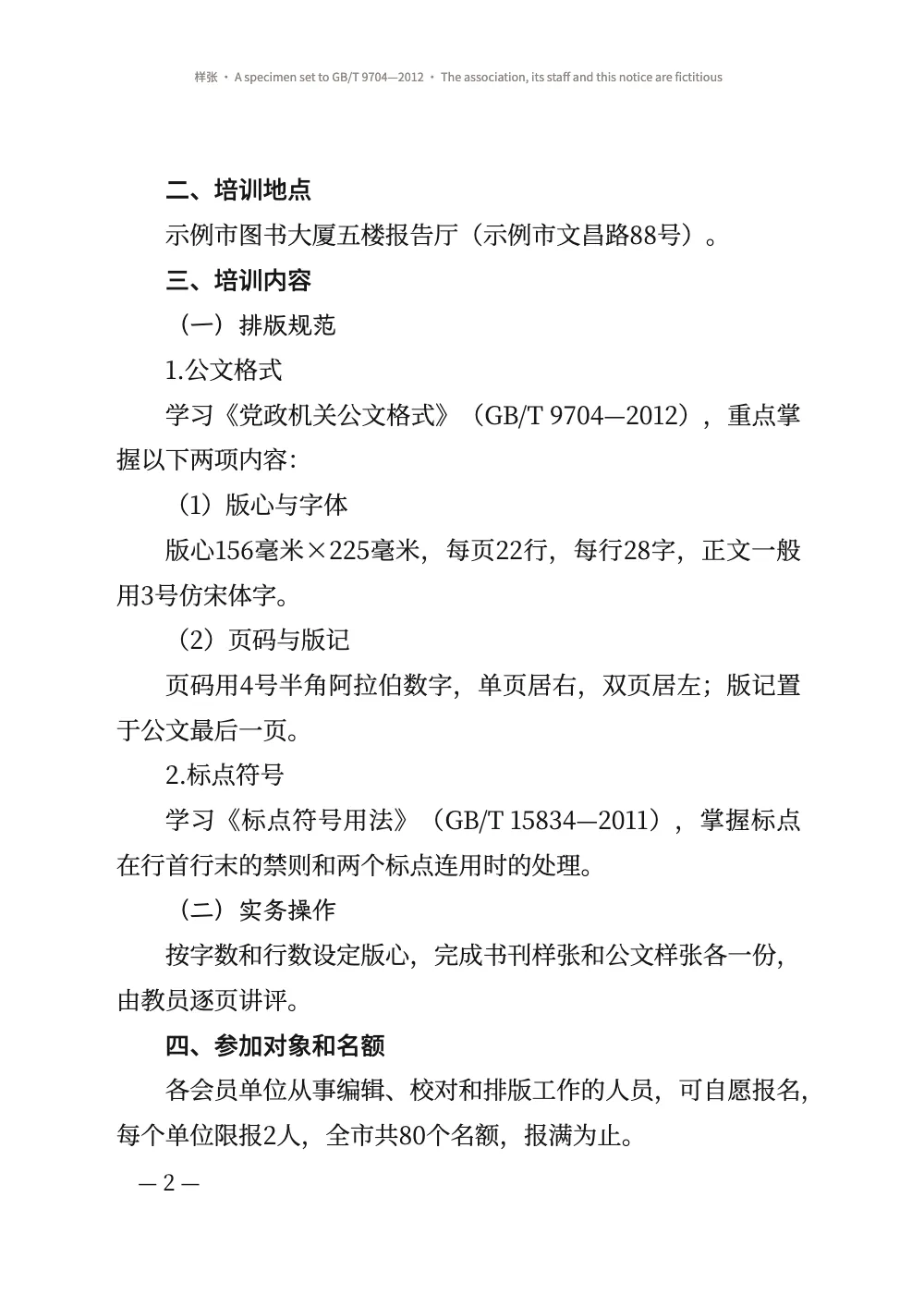
一份通知,发文机关是一个虚构城市“示例市”里虚构的出版协会,按中国大陆机关排公文的方式,依照GB/T 9704—2012《党政机关公文格式》排版。全文四页A4纸,每行28字,每页22行。第1页以红色的发文机关名称开头,发文字号排在一条红线上方,标题用二号字排成两行。标题按一、(一)1.(1)编号,每一级用各自的字体。署名和日期靠右排列,附件单独占一页,页脚在几条线之间排着版记。页码形如“— 1 —”,奇数页在右,偶数页在左。每页的天头都注明这是样张。按DIN 5008排商务信函按欧洲标准做的是同一类事。
这道食谱解答
- 怎样按GB/T 9704排中文公文,包括红色版头、网格和页码?
- 怎样按字数设定版心,每行多少字、每页多少行?
- 怎样用中文数字给章编号,排出第一回、第二回?
简短回答
const cjk = {
  grid: { enabled: true, charsPerLine: CHARS, linesPerPage: LINES }, // 28 ems × 22 lines
  // Every mark takes a whole cell, as on the standard's grid, and never gives any of it up.
  punctuationWidth: 'fullwidth', compressAdjacent: false, trimLineStart: false,
  hangingPunctuation: 'allow', // a , that may not open a line hangs past the 28th cell
  latinSpacing: em(0), // 〔2026〕7号 and 2026年9月28日 set solid, as the standard prints them
};
const page = {
  width: mm(210), height: mm(297), dpi: 150, backgroundColor: col('paper'),
  // With the grid on, margins are minimums. These leave 28 × 22 cells and 0.02 mm to share,
  // so the type area sits 37 mm under the head and 28 mm from the binding edge.
  margins: { top: mm(TOP), bottom: mm(297 - TOP - AREA.h - 0.02), left: mm(INNER),
    right: mm(210 - INNER - AREA.w - 0.02), mirror: true },
};
const bodyText = {
  fontFamily: SONG, fontSize: pt(BODY), lineHeight: pt(LEAD), color: col('ink'),
  boldColor: col('ink'), italicColor: col('ink'), referenceColor: col('ink'),
  textAlign: 'justify', // a short line spreads between its characters, never between words
  firstLineIndent: em(2), indentAfterHeading: true, // 左空二字,回行顶格
};
用料
做法
#1 · 以字格计量的版心
代码见上文的简短回答。GB/T 9704规定天头37 mm、订口28 mm,在156 × 225 mm的版心里排22行、每行28个三号字。cjk.grid直接采用这些数字:28个15.75 pt的em合155.6 mm,22行29 pt的行距合225.1 mm(字符网格)。Word里的三号是16 pt,行长会变成158 mm,超出标准的版心;15.75 pt是排版字号对照表里的值。网格开启后,页边距是最小值。这里只剩0.02 mm可以分配,所以版心正好落在标准规定的位置。标准规定正文用仿宋;Fontsource没有仿宋字体,所以正文用Noto Serif SC的宋体排(见常见问题)。
每个标点都占一整格,不做挤压,所以一行汉字里的每个字都落在标准所画网格的列上。阿拉伯数字比一格窄,所以在“版心156毫米×225毫米”这样的行里,数字之后的字会落在两列之间。当逗号落在第29格时,hangingPunctuation: 'allow'让它悬挂到页边,而不是把一个字挤到下一行、再把其余的字拉开(标点悬挂)。
#2 · 四级标题,各占一行
// One line each at the body size, nothing above or below: every head stays on the grid.
const level = (n, fontFamily, fontWeight, numberingTemplate) => ({ level: n, fontFamily,
  fontWeight, numberingTemplate, numberSeparator: '', fontSize: pt(BODY), lineHeight: pt(LEAD),
  marginTop: pt(0), marginBottom: pt(0), firstLineIndent: em(2) }); // 空二字,回行顶格
const levels = [
  level(2, HEI, 500, '{2:一}、'), // 一 is the informal numeral in the document's script
  level(3, KAI, 400, '({3:一})'),
  level(4, SONG, 400, '{4}.'),
  level(5, SONG, 400, '({5})'),
];
标准规定一、用黑体,(一)用楷体,1.和(1)用正文字体,字号都与正文相同。{2:一}按locale的文字印出中文小写数字(编号)。标题采用正文的字号和行距,且没有外边距,所以只占网格的一行,下面的正文也仍在网格上。firstLineIndent: em(2)让每个标题空两格(按正文字宽计),标题转到第二行时从行首起排,正合标准的要求;编号排在缩进之后,所以目录和 PDF 书签里的“一、”前面没有空格(按级别覆盖)。
#3 · 版头,逐行定位
const LINE = LEAD * MM; // 10.23 mm
const lineTop = (n) => (n - 1) * LINE; // mm from the top of the type area to grid line n
const face = (fontFamily, size, fontWeight, colour, lineHeight = LEAD / size) => ({
  fontFamily, fontSize: pt(size), fontWeight, color: col(colour), lineHeight });
// A text y mm down the type area, x mm in from its edge, as wide as the type area.
const text = (id, content, look, y, { edge = 'top-left', x = 0, width = AREA.w, ...more } = {},
) => ({ kind: 'text', id, content, ...look, align: 'center', overflow: 'wrap', ...more,
  placement: { anchor: { to: 'container', edge }, offset: { x: mm(x), y: mm(y) },
    size: { width: width === 'auto' ? 'auto' : mm(width) } } }); // wrap, not '…'
const rule = (id, y, thickness, colour = 'ink', reserve = false) => ({ kind: 'rule', id, reserve,
  direction: 'horizontal', thickness, color: col(colour), placement: { anchor: { to: 'container',
    edge: 'top-left' }, offset: { y: mm(y) }, size: { width: mm(AREA.w) } } });
const PAD = { left: pt(5), right: pt(5) }; // the specimen stamp's: not a GB/T 9704 element
const letterhead = { enabled: true, minHeight: pt(13 * LEAD), slot: { elements: [
  text('copy', '{attr.copy}', face(SONG, BODY, 400, 'ink'), lineTop(1), { align: 'left' }),
  text('stamp', '样 张', face(HEI, BODY, 500, 'red', 1.3), lineTop(1) + 1.5, { edge: 'top-right',
    width: 'auto', box: { borderColor: col('red'), borderWidth: pt(1), padding: PAD } }),
  // The name's ink starts 35 mm down, 0.07 em over its box; at 46 pt it ends in line 5.
  text('issuer', '{attr.issuer}文件', face(SONG, 46, 900, 'red', 1), 35 + 0.07 * 46 * MM),
  // The number two blank lines under the name; the red rule 4 mm under its characters.
  text('number', '{attr.number}', face(SONG, BODY, 400, 'ink'), lineTop(8)),
  rule('red-rule', lineTop(8) + ((LEAD + BODY) / 2) * MM + 4, mm(0.5), 'red', true),
  text('title', '{titleText}', face(SONG, 22, 900, 'ink'), lineTop(12)), // 二号, 2 lines under
] } };
const notice = { level: 1, span: 'page', advancedDesign: letterhead,
  marginTop: pt(0), marginBottom: pt(LEAD), // 空一行: a blank line, then the addressee
  breakBefore: { enabled: true, parity: 'any' } }; // a notice opens on the next page
版头是H1的版面设计,H1的属性带有份号、发文机关和发文字号:配置里放的是信笺格式,Markdown里放的是文档本身。lineTop(n)给出网格第n行的顶部,所以每个元素都落在标准计数的位置:发文字号在发文机关名称下空两行,标题在红线下空两行。46 pt时,名称的字面从版心顶部以下35 mm延伸到第5行底部,第6、7行空出,发文字号落在第8行;若用48 pt,字面会伸进第6行,把整页其余内容推下一行。标题里的\\在“关于举办”之后换行,上短下长,成梯形,这是标准允许的两种排法之一(另一种是菱形)。minHeight预留13行,marginBottom再加一行,所以主送机关从第15行开始(通栏与高级设计)。
#4 · 版心下方的页码
const FOLIO = 14; // pt: 四号
const folio = (id, parity, edge, x) => ({ kind: 'text', id, parity, content: '— {pageNumber} —',
  ...face(SONG, FOLIO, 400, 'ink', 1), align: edge.endsWith('left') ? 'left' : 'right',
  overflow: 'clip', placement: { anchor: { to: 'container', edge }, // the type area's foot
    offset: { x: pt(x), y: mm(7 - (FOLIO / 2) * MM) } } }); // the dashes 7 mm down
const footer = { elements: [folio('recto', 'odd', 'top-right', -FOLIO),
  folio('verso', 'even', 'top-left', FOLIO)] };
const header = { elements: [{ kind: 'text', id: 'specimen', content: '{subtitle}', // 样张 …
  ...face(HEI, 7.5, 400, 'muted', 1.2), align: 'center', overflow: 'wrap',
  placement: { anchor: { to: 'container', edge: 'top' }, offset: { y: mm(16) } } }] };
在页脚里,容器的上边缘就是版心底部,所以offset.y从正文往下量(页眉与页脚)。一字线位于版心下7 mm,距外侧边缘一个四号字格:parity让奇数页页码居右,偶数页页码居左。天头印的是前置元数据里的{subtitle}。英文版和西班牙文版之间,只有这一行和版记下的版权说明不同。
#5 · 附件与版记
const IMPRINT = AREA.h - 2 * LINE; // mm: two rows of the grid, ending on the type area's foot
const small = face(SONG, FOLIO, 400, 'ink', LEAD / FOLIO); // 四号
const inset = { x: FOLIO * MM, width: AREA.w - 2 * FOLIO * MM, reserve: false }; // 左右各空一字
const annex = {
  id: 'annex', numbered: false, toc: false, breakBefore: { enabled: true, parity: 'any' },
  span: 'page', marginTop: pt(0), marginBottom: pt(0), // line 4 is the table's float gap
  advancedDesign: { enabled: true, minHeight: pt(3 * LEAD), slot: { elements: [
    text('label', '{attr.label}', face(HEI, BODY, 500, 'ink'), lineTop(1), { align: 'left' }),
    text('title', '{titleText}', face(SONG, 22, 900, 'ink'), lineTop(3)),
    // reserve: false keeps the 版记 out of the room the heading takes: the table goes on.
    rule('imprint-top', IMPRINT, mm(0.35)),
    text('cc', '抄送:{attr.cc}', small, IMPRINT, { ...inset, align: 'left' }),
    rule('imprint-mid', IMPRINT + LINE, mm(0.25)),
    text('office', '{attr.office}', small, IMPRINT + LINE, { ...inset, align: 'left' }),
    text('printed', '{attr.printed}', small, IMPRINT + LINE, { ...inset, align: 'right' }),
    rule('imprint-foot', AREA.h - 0.35 / 2, mm(0.35)),
    text('colophon', '{attr.colophon}', face(HEI, 7, 400, 'muted'), AREA.h + 16, inset),
  ] } },
};
附件标题有自己的样式:另起一页,“附件”在第1行,标题在第3行,所预留的三行下面不加外边距。空着的第4行是每个行内资源上方保留的浮动间距(inlineResourceGap,见版面),所以表格的顶线落在第5行。版记属于同一个版面设计,画在结束于版心底部的两条网格线上。其元素设为reserve: false,不会增加标题所占的空间,表格也不会被它们推下去。标准把版记放在最后一页、附件之后;附件只有一页时,就是附件所在的那一页。附件更长的话,就需要由其最后一页上的某个标题来画版记。
#6 · 署名与日期
const paragraphStyles = [
  { id: 'flush', firstLineIndent: pt(0) }, // 主送机关:居左顶格
  { id: 'annexes', marginTop: pt(LEAD) }, // 附件说明:正文下空一行,左空二字
  // The date, 6.9 ems, starts two cells right of the name and ends two short: 右空二字.
  { id: 'signature', indent: em(17), firstLineIndent: pt(0), marginTop: pt(LEAD) },
  { id: 'date', indent: em(19), firstLineIndent: pt(0) },
];
不加盖印章的公文,发文机关署名右空二字,成文日期排在其下,比署名再右移二字。日期比署名长时,改为日期右空二字,署名左移,保持相差两格。这里日期宽6.9 em,比署名的7 em略短,照字面执行的话,日期会比署名右移两格,距页边只剩0.14 em。我们按这条规则的用意来理解,即日期永远不要顶到边缘,于是采用第二种情形:日期右边空出略多于两格。indent把两行都放在整格上,分别距页边17 em和19 em(段落样式)。
完整食谱
// ═══ Postext Cookbook · Nº 082 · A Chinese official document to GB/T 9704 ═════════
// https://postext.dev/en/cookbook/chinese-official-document
// Code: MIT · Text: a fictitious notice written for the recipe (CC BY 4.0) · Pictures: none
// Fonts: Noto Serif SC, Noto Sans SC, LXGW WenKai TC (SIL OFL 1.1) · Needs postext ≥ 1.25.0
import {
  buildDocument, withLoadedFonts, renderPageToCanvas, parseTSV, mergeCells,
} from 'https://esm.sh/postext';
import { renderToPdf, decompressWoff2 } from 'https://esm.sh/postext-pdf';

const LANG = 'en'; // @lang: the language of the sample document ('en' | 'es')
const RECIPE = 'chinese-official-document';

// ─── 1 · Design ─────────────────────────────────────────────────────────────
// GB/T 9704 prints everything black but the letterhead: the issuer's name and a rule in red.
const palette = { ink: '#161616', red: '#d2161e', muted: '#8a8580', paper: '#ffffff' };
const col = (id) => ({ hex: palette[id], model: 'hex', paletteId: id });
const colorPalette = Object.entries({ ...palette, 'main-color': palette.red })
  .map(([id, hex]) => ({ id, name: id, value: { hex, model: 'hex' } }));
const SONG = 'Noto Serif SC'; // 宋: the text (in place of 仿宋, see the write-up) and 小标宋
const HEI = 'Noto Sans SC'; // 黑: the 一、 heads, the annex label, the specimen stamp
const KAI = 'LXGW WenKai TC'; // 楷: the (一) heads
const MM = 25.4 / 72; // mm per pt
const [BODY, LEAD, CHARS, LINES] = [15.75, 29, 28, 22]; // 三号 on 29 pt lines, 28 × 22 of them
const AREA = { w: CHARS * BODY * MM, h: LINES * LEAD * MM }; // 155.6 × 225.1 mm: the 版心
const [TOP, INNER] = [37, 28]; // mm: 天头 and 订口, the head and binding margins

// #region answer: A4, 28 characters × 22 lines of 三号, full-width marks on the grid
const cjk = {
  grid: { enabled: true, charsPerLine: CHARS, linesPerPage: LINES }, // 28 ems × 22 lines
  // Every mark takes a whole cell, as on the standard's grid, and never gives any of it up.
  punctuationWidth: 'fullwidth', compressAdjacent: false, trimLineStart: false,
  hangingPunctuation: 'allow', // a , that may not open a line hangs past the 28th cell
  latinSpacing: em(0), // 〔2026〕7号 and 2026年9月28日 set solid, as the standard prints them
};
const page = {
  width: mm(210), height: mm(297), dpi: 150, backgroundColor: col('paper'),
  // With the grid on, margins are minimums. These leave 28 × 22 cells and 0.02 mm to share,
  // so the type area sits 37 mm under the head and 28 mm from the binding edge.
  margins: { top: mm(TOP), bottom: mm(297 - TOP - AREA.h - 0.02), left: mm(INNER),
    right: mm(210 - INNER - AREA.w - 0.02), mirror: true },
};
const bodyText = {
  fontFamily: SONG, fontSize: pt(BODY), lineHeight: pt(LEAD), color: col('ink'),
  boldColor: col('ink'), italicColor: col('ink'), referenceColor: col('ink'),
  textAlign: 'justify', // a short line spreads between its characters, never between words
  firstLineIndent: em(2), indentAfterHeading: true, // 左空二字,回行顶格
};
// #endregion
组合好的script.js可以直接运行:把它粘贴到任何页面的模块脚本中,或在CodePen上打开这道食谱。 GitHub上的食谱文件夹 ↗ (在新标签页中打开)
变化
#挤压相邻标点
像),和》(这样相邻的标点改占一格半,而不是两格,大多数图书都这样处理;它们之后的字会离开网格的列。
-  punctuationWidth: 'fullwidth', compressAdjacent: false, trimLineStart: false,
+ punctuationWidth: 'fullwidth', compressAdjacent: true, trimLineStart: true,#排版时显示网格
Canvas会为28 × 22网格的每一格画一个灰色方格;PDF里不画,除非给renderToPdf传入characterGrid: true。
-  grid: { enabled: true, charsPerLine: CHARS, linesPerPage: LINES },
+ grid: { enabled: true, charsPerLine: CHARS, linesPerPage: LINES, show: true },常见问题
易错点
Fontsource没有仿宋字体
GB/T 9704和大多数大陆公文用仿宋排正文,这是一种以毛笔细而略向上扬的笔画绘制的宋体。Fontsource上的中文字体家族没有一个是仿宋,所以食谱改用现有的宋体Noto Serif SC排正文,并加以说明。你持有授权的仿宋字体可以作为自己的字体加入:用FontFace注册其文件,在bodyText.fontFamily中写上家族名,并给renderToPdf一个返回其字节的fontProvider。 中日韩字体 →
易错点
中文字体通过cjk块分片加载
Fontsource把一个中文、日文或韩文字体家族按每个字重约一百个文件提供,每个文件覆盖一段字符范围。loadFonts只获取latin文件,所以屏幕上的汉字来自系统字体,测量不准;fontsourceProvider交给PDF的也是这个latin文件,汉字印出来是空框。列出kit中的cjk块,在loadFonts之后调用loadCjkFonts(FONTS, markdown)(书中用到几种CJK字体时,每种字体调用一次,并传入它所排的文字),并给renderToPdf传fontProvider: cjkPdfProvider:两者都会取用包含文中字符的那些文件。 中日韩字体 →
易错点
用zh-Hans或zh-Hant标记文档,不要用LANG
食谱的版本是en和es,但中文示例在两个版本里都是中文:`locale: LANG`会把它标记为英文或西班牙文,给其中的拉丁文词断词,把图标注为Figure或Figura,并给PDF标上错误的语言。postext 1.30起,这个标记也是文字成形所用的语言(测量、绘制和嵌入都按它进行),所以标记成英文或西班牙文时,中文字体的数字和与拉丁文共用的标点会换成另一套字形,断行的位置也随之改变。自己写出标记:'zh-Hans'(大陆规范:GB断行规则、开明式标点)或'zh-Hant'(台湾:全角居中标点);香港用'zh-HK'。单写'zh'按简体、大陆规范处理。日文示例写'ja'(见gotcha ja-locale-tag)。 中文断行 →
版面警告 · cjkGridClamped
字符网格太大
原因. `cjk.grid`要求的每行字数或每页行数,按正文字号和行距,超出了页边距留出的空间,因此网格按能容纳的最大值排出。
解决. 调低`charsPerLine`或`linesPerPage`,缩小页边距(它们是最小值),或调小`bodyText.fontSize`或`lineHeight`。 文档 →
- 两端对齐的行会把多余空间分给汉字之间和行内的空格,而空格分得更多:第2页上,GB/T 15834里的空格撑开到了上一行GB/T 9704里那个空格的近两倍宽。内容里这两个编号都用不换行空格(U+00A0)书写,让每个编号保持完整,多余空间就分到了汉字之间。
致谢
- 文本
- A notice from a fictitious publishers’ association, written for the recipe in the form GB/T 9704—2012 sets out · Postext Cookbook · CC BY 4.0
- 字体
- Noto Serif SC (SIL OFL 1.1) · Noto Sans SC (SIL OFL 1.1) · LXGW WenKai TC (SIL OFL 1.1)