かんたんな説明
地方週刊紙のニュース記事を、2度にわたって誤りがないか確かめます。不具合をページ上に赤で示し、それを生んだテキストの行に戻れるようにする方法を示します。
できあがり
郡の週刊紙『The Tideline』の第41号は、ソーヤー川を渡る夜行フェリーの復活をトップに据えています。CodePenのサンプルはこの記事を2度校正します。初校は入稿時の原稿で、校正済みの記事に7つの誤りを戻したものです。その中には、存在しないディレクティブとして打たれたスタンプや、閉じられないデータの囲みがあります。この7つの誤りで、11個の印が付きます。カードと同じく、各不具合はそれが組まれた行に赤い下線で示され(ゆるい行は下線ではなく地色で示します)、余白の番号はページの横のリストの項目番号と一致します。行や項目をクリックすると、そのMarkdownが選択されます。下に表示しているページは再校です。検査では何も見つからず、右上の角にPROOF · 2ND PASSのスタンプが留められます。
このレシピが答える質問
- 文書のどこに問題があるか(警告、はみ出し、収束しないレイアウト)を調べるには?
- エディターを作るために、描画したページ上のクリック位置をMarkdownのソースに対応づけるには?
- ある行だけが不ぞろいに組まれたり、伸びすぎたりするのはなぜですか(URL、長い複合語、セル内の長い単語)?
手短な答え
const MM = DPI / 25.4; // page px per mm
function proof(md, doc) {
  const faults = [];
  const add = (kind, from, to, detail, at) => faults.push({ kind, from, to, detail, at });
  const { blocks, issues } = parseMarkdownWithIssues(md); // a $, $$ or ::: left open
  for (const i of issues) add(i.kind, i.sourceStart, i.sourceEnd);
  for (const w of doc.warnings ?? []) { // calloutOverflow: a box no cut could split
    add(w.kind, w.sourceStart, w.sourceEnd, Math.round(w.overflowPx / MM), w);
  }
  if (!doc.converged) add('unsettled', 0, 1, doc.iterationCount); // the layout never settled
  // The pen's own readings of the source and the lines, in the same list and shape.
  const ids = new Set(resources.map((r) => r.id)); // an unknown id prints '?'
  for (const m of md.matchAll(/:ref\{id="([^"]*)"|^::resource\{id="([^"]*)"/gm)) {
    if (!ids.has(m[1] ?? m[2])) add('unknownResourceId', m.index, m.index + m[0].length);
  }
  for (const m of md.matchAll(/^:::?([a-z][\w-]*)/gim)) { // an unknown fence prints as text
    const known = KNOWN_CONTAINERS.has(m[1]) || KNOWN_DIRECTIVES.has(m[1]) || m[1] === 'resource';
    if (!known) add('unknownDirective', m.index, m.index + m[0].length);
  }
  for (const b of blocks) { // formulas count as faults only because this story has none
    if (b.startNumber > 999) add('yearList', b.sourceStart, b.sourceEnd); // 1971. opens a list
    for (const s of b.spans ?? []) if (s.math) add('formula', s.math.sourceStart, s.math.sourceEnd);
  }
  // The lines as set: spaces past maxWordSpacing, a line set ragged, a hyphen in an address.
  const max = doc.config.bodyText.maxWordSpacing;
  for (const l of doc.pages.flatMap((p) => p.columns.flatMap((c) => c.blocks))
    .flatMap((b) => b.lines ?? [])) {
    const ratio = Math.round(lineWordSpacing(l) * 100) / 100; // as the report prints it
    if (ratio > max) add('looseLine', l.sourceStart, l.sourceEnd, ratio);
    if (l.ragged) add('raggedLine', l.sourceStart, l.sourceEnd); // past 3×: no ratio left
    if (l.hyphenated && /[./]\S+-$/.test(l.text)) add('addressHyphen', l.sourceStart, l.sourceEnd);
  }
  return faults.sort((a, b) => a.from - b.from);
}
材料
- 機能
- 警告と診断エスケープとそのままの文字分割する囲み、分割しない囲み最適な改行(Knuth–Plass)固定位置の囲みとバッジ図を配置する参照フロート用の余白段欄外の注囲みの中や本文中の段組み囲みデザインした章扉段抜きの章見出し帯見出しの属性柱とノンブルページの役割ごとの柱キャンバス上のページリソースとしての図と表独自のリソースの種類セマンティックカラーパレット用紙の色
- 併用する機能
- 1段半組み
- 種類
- Charis SIL, Chivo, Fragment Mono (SIL OFL 1.1)
- 素材
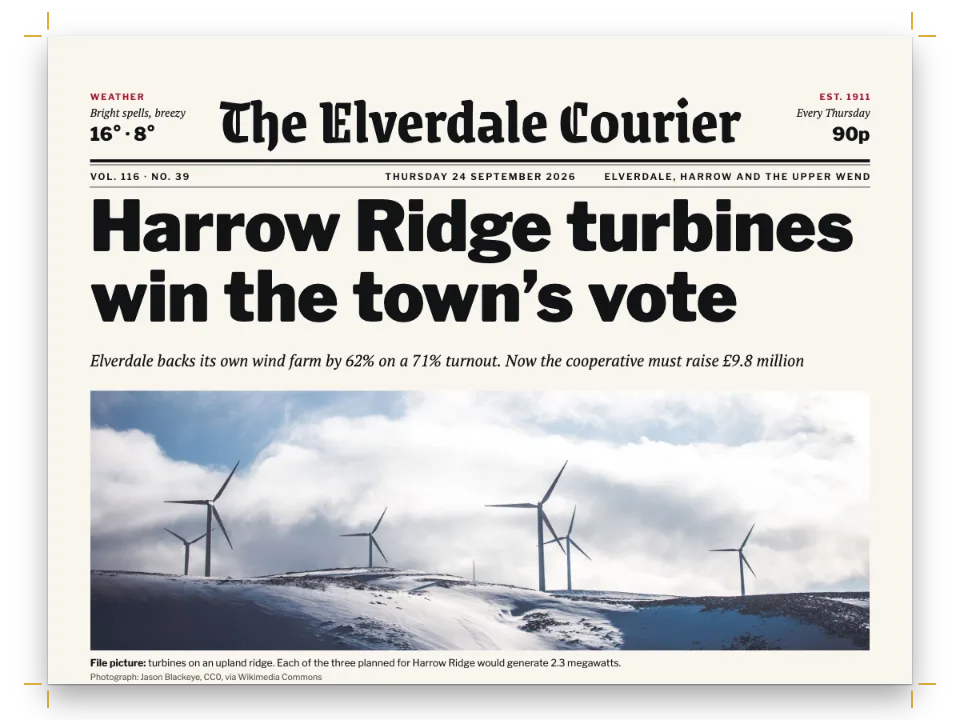
crossing-1590.jpg- The night crossing at the head of page 1 (Generated With Diffusion Models, オリジナル)
- The route map, drawn in code in the page's palette (Ignacio Ferro, CC BY 4.0)
作り方
#1 · エンジンの報告を読み、残りを自分で確かめる
コードは前出の手短な答えにあります。parseMarkdownWithIssues()は、開いたままの$、$$、:::ごとに問題を1件返し、doc.warningsには、どの分割位置でも分けられなかった囲みごとにcalloutOverflowが入ります。doc.convergedとdoc.iterationCountはレイアウトが収束したかどうかを示し、この記事は不具合の有無にかかわらず1回の反復で収束します。エンジンは未知のidと未知のディレクティブもdoc.contentWarningsに記録し、findLooseLinesはゆるい行を返します。Sandboxの「検査」パネル(サイドバーのパネル)が示すのと同じ検査です。proof()はこれらを自分で読み取り、すべての不具合を種類、Markdown上の範囲、詳細という同じ形の1つのリストにまとめます。:refと::resourceのidをビルドのresourcesと、ブロックの名前をKNOWN_CONTAINERSとKNOWN_DIRECTIVESと照合します。この記事に限っては、startNumberが年になったリストのブロックと、記事にはひとつもないはずの数式も見つけ出します。さらに組まれた行を読み、maxWordSpacingを超えて引き伸ばされたスペース、左そろえ(行末不ぞろい)で組まれた行、アドレスの中に追加されたハイフンを調べます。
#2 · 校正済みの原稿に不具合を戻す
const FIRST_PASS = [ // [corrected, faulty], replaced wherever it occurs
  [':::callout{type="stamp"}\n:::', t({ en: ':::stamp', es: ':::sello' })], // no such directive
  [':ref{id="route"}', ':ref{id="route-map"}'], // an id no resource has
  ['\\$', '$'], // bare dollars (gotcha: dollar-math)
  [' https://', ' '], // a web address without its scheme
  [':::\n:::\n', ''], // the fact box's two closing fences
  ['\u20601971.', '1971.'], // the word joiner before 1971 (gotcha: digit-period-list)
  [t({ en: 'October 2.\n:::', es: 'octubre.\n:::' }), t({ en: 'October 2.', es: 'octubre.' })],
]; // last: the timeline's closing fence, so its box stays open inside the open fact box
const firstPass = (md) => FIRST_PASS.reduce((out, [fix, fault]) => out.replaceAll(fix, fault), md);
CodePenのサンプルが持つMarkdownのファイルは校正済みの記事ひとつだけで、7つの修正を取り消して初校を作ります。こうすれば2つの版が食い違うことはなく、どの印も原因がわかっています。校正済みの原稿は最後にビルドし、下のページはそのビルドです。\$は価格のドル記号をエスケープするので、数式が開きません。2ページ目の年表の各年の前に置いたワードジョイナー(U+2060)は、1971. The Tern…のような項目が、その年から番号を振るリストとして始まるのを防ぎます。初校で外すのは1971の前のものだけです。https://のスキームが付いたWebアドレスは、アドレスとして組まれます。ハイフネーションは行わず、改行は区切りの位置だけで、1ページ目の.exampleの前がその例です。スキームがないとアドレスは普通の単語になり、初校ではnight-ferryとハイフンで分割されます。7つ目の項目は年表の囲みの終了行を外します。組版がそれをどう扱うかは手順3で述べます。
#3 · 各不具合を組まれた場所に示す
const linesOf = (page) => [...page.columns.flatMap((c) => c.blocks), ...(page.floats ?? [])]
  .flatMap((b) => (b.lines ?? []).map((l) => ({ ...l.bbox, from: l.sourceStart, to: l.sourceEnd,
    width: l.justifiedSpaceRatio // a bbox is the natural width; a justified line fills the block
      ? b.bbox.x + b.bbox.width - l.bbox.x : l.bbox.width })));
const REACH = 80; // characters after a fence where its first line may start
function spotOf(page, f) { // where a fault shows on this page: its first line, in page px
  if (f.at) { // a box that ran off its column: a bar under the column's foot
    const c = page.columns[f.at.columnIndex]?.bbox;
    return f.at.pageIndex === page.index ? { ...c, y: c.y + c.height, height: 1.6 * MM } : null;
  }
  const lines = linesOf(page); // a fence sets no line of its own: then the first line after it
  return lines.find((r) => r.from < f.to && r.to > f.from)
    ?? lines.find((r) => r.from >= f.from && r.from - f.to < REACH);
}
function paintMarks(canvas, page, faults, scale) {
  const ctx = canvas.getContext('2d');
  ctx.setTransform(scale, 0, 0, scale, 0, 0); // page px from here on
  Object.assign(ctx, { font: `${3 * MM}px "${MONO}"`, textAlign: 'center' });
  const taken = []; // the numbers set so far: two on one line sit side by side
  faults.forEach((f, n) => {
    const r = spotOf(page, f);
    if (!r) return;
    const wash = f.kind === 'looseLine'; // a loose line is washed, any other fault underlined
    Object.assign(ctx, { fillStyle: palette.proof, globalAlpha: wash ? 0.2 : 1 });
    ctx.fillRect(r.x, wash ? r.y : r.y + r.height, r.width, wash ? r.height : 0.45 * MM);
    const [left, y] = [r.x + r.width / 2 < page.width / 2, r.y + r.height / 2]; // nearest margin
    const shift = taken.filter((ty) => Math.abs(ty - y) < 4.5 * MM).length * 5.2 * MM;
    const [x, edge] = [left ? 6.5 * MM + shift : page.width - 6.5 * MM - shift,
      left ? r.x : r.x + r.width]; // the number, and a leader from it to the text
    taken.push(y);
    ctx.globalAlpha = 1;
    ctx.fillRect(Math.min(x, edge), y - 0.12 * MM, Math.abs(x - edge), 0.24 * MM);
    ctx.beginPath();
    ctx.arc(x, y, 2.4 * MM, 0, 2 * Math.PI);
    ctx.fill();
    ctx.fillStyle = palette.paper;
    ctx.fillText(String(n + 1), x, y + 1.05 * MM);
  });
}
VDTのどの行もsourceStartとsourceEndが付いているので、不具合のソース範囲からそれを刷った行にたどり着けます。コンテナーの開始行はそれ自体が刷られないため、その印は、開始行の後REACH(80)字以内で始まる最初の行に付けます。calloutOverflowには、それが示す段の地の下に棒を付けます。ひとつの誤りが複数の印を残すこともあります。エスケープしていないドル記号は$2.50 on foot, $を数式に変えますが、このサンプルは数式エンジンを読み込まないので何も刷られません。3つ目のドル記号は閉じられない数式を開きます。この語句が抜けると、運賃の段落の1行が、スペースを通常の1.9倍に広げて組まれます。データの囲みに2つの終了行が欠けていると、囲みとその:::columnsのグループが記事の終わりまで開いたままになり、続く内容はその中、グループの2段目に組まれます。段組みのグループは、それを包む囲みと同じく段と段の間で分割されるので、この2つの終了行だけでは何もはみ出しません。はみ出しを起こすのは年表の終了行です。年表の囲みはデータの囲みの中で開いたままになり、最後の5段落と奥付を取り込みますが、囲みの中の囲みは分割されません。この囲みは3ページ目に組まれ、段の地から69 mmはみ出します。地より下の部分は刷られず、初校は2ページではなく3ページになります。警告が持つソース範囲はデータの囲みのものです。組版が配置したのはこの囲みだからです。そのため項目8は、外側の囲みをその開始行から記事の終わりまで選択します。proof()は、語間(lineWordSpacing(line))がmaxWordSpacing(ここでは1.6)を超える行をゆるい行とみなします。スペースが3倍を超えてしまう行には比べる比率がありません。エンジンはそうした行を左そろえで組むからです。そこでproof()はraggedも確かめます。
#4 · 行の背後にあるMarkdownを選択する
function selectSource(from, to) {
  const all = source.value; // measure the wrapped height of the text before the selection
  source.value = all.slice(0, from);
  const top = source.scrollHeight;
  source.value = all;
  source.focus({ preventScroll: true });
  source.setSelectionRange(from, to); // the offsets the parser and the layout give
  source.scrollTop = top > source.clientHeight ? top - source.clientHeight / 3 : 0;
}
function onPageClick(canvas, page) {
  canvas.onclick = ({ clientX, clientY }) => {
    const box = canvas.getBoundingClientRect(); // CSS px to page px
    const [x, y] = [(clientX - box.left) * (page.width / box.width),
      (clientY - box.top) * (page.height / box.height)];
    const hit = linesOf(page).find((r) => x >= r.x && x <= r.x + r.width && y >= r.y
      && y <= r.y + r.height);
    if (hit?.from !== undefined) selectSource(hit.from, hit.to);
  };
}
クリックの座標はCSSピクセルで届きます。onPageClick()はそれをページのピクセルに換算し、bboxがその点を含む行を見つけて、その行のソース範囲をテキストエリアで選択します。リストの項目も同じように、その不具合の範囲を選択します。selectSource()はページをスクロールさせずにテキストエリアにフォーカスを移し、選択範囲より前のテキストの高さからscrollTopを設定します。両端そろえの行のbboxは、描画された幅ではなく行の自然な幅のままです。そこでlinesOf()がそれをブロックの右端まで広げます。そうしないと地色が余白の手前で止まり、右端近くをクリックしても何も選択されません。
#5 · データの囲みを分割させ、スタンプを留める
const boxes = [
  // keepTogether: false: cut between two blocks at the page foot; a line of white closes it.
  { id: 'facts', keepTogether: false, backgroundEnabled: false, marginBottom: pt(LEAD),
    stripe: { enabled: true, side: 'top', width: pt(2.5), color: col('proof') },
    padding: { ...NONE, top: mm(2.6) }, titleStyle: { ...caps(8), color: col('proof') },
    body: { fontSize: pt(9), lineHeight: pt(LEAD), textAlign: 'left', firstLineIndent: pt(0) },
    lists: { bulletChar: '•', color: col('proof') } },
  // 'fixed': pinned to the page its fence falls on, out of the flow; 'auto': as wide as its title.
  { id: 'stamp', placement: 'fixed', width: 'auto', backgroundEnabled: false,
    title: t({ en: 'Proof · 2nd pass', es: 'Segundas pruebas' }),
    fixed: { anchor: { to: 'page', edge: 'top-right' }, offset: { x: mm(-OUTER), y: mm(8) } },
    border: { enabled: true, color: col('proof'), width: pt(1.2) }, borderRadius: mm(1),
    padding: { top: mm(1.4), right: mm(2.4), bottom: mm(1.2), left: mm(2.4) },
    titleStyle: { ...caps(9), color: col('proof'), gap: mm(0) } },
];
keepTogether: falseにより、データの囲みは1ページ目の地で始まり、裏のページで赤い罫の下にタイトルなしで続きます。囲みには背景も地の罫もないので、2ページ目で時刻表と記事を隔てるのは余白だけです。そのためmarginBottomを行送りまるごと1行、14 ptにします。4 ptでは、時刻表が次の段落の1.5 mm上で終わってしまいます。スタンプはplacement: 'fixed'で、本文の流れから外れて天の端から8 mm下に留められます。width: 'auto'はスタンプをタイトルの幅まで縮め、主段の110 mmではなく42 mm幅にします。
レシピの全体
// ═══ Postext Cookbook · Nº 055 · A galley proof with every fault marked in red ══════
// https://postext.dev/en/cookbook/proof-sheet-diagnostics
// Code: MIT · Text: original (CC BY 4.0) · Map: code (CC BY 4.0) · Photo: diffusion models
// Fonts: Charis SIL, Chivo, Fragment Mono (SIL OFL 1.1) · Needs postext ≥ 1.34.0
import { buildDocumentWithFonts, prepareFonts, renderPageToCanvas, registerResourceImage,
  parseMarkdownWithIssues, KNOWN_DIRECTIVES, KNOWN_CONTAINERS, lineWordSpacing,
} from 'https://esm.sh/postext';

const LANG = 'en'; // @lang: the language of the sample document ('en' | 'es')
const RECIPE = 'proof-sheet-diagnostics';

// ─── 1 · Design ─────────────────────────────────────────────────────────────
// col() links a colour to its palette entry; the hex is the value the entry holds.
const palette = { // proof: the one accent and the marks; rule: the map's banks; muted: furniture
  ink: '#1d1d1b', proof: '#d7263d', paper: '#f6f3ea', rule: '#bdb8aa', muted: '#76726a' };
const col = (id) => ({ hex: palette[id], model: 'hex', paletteId: id });
const colorPalette = [...Object.entries(palette), ['main-color', palette.proof]] // every default
  .map(([id, hex]) => ({ id, name: id, value: { hex, model: 'hex' } })); // on main-color: red
const [TEXT, DISPLAY, MONO] = ['Charis SIL', 'Chivo', 'Fragment Mono'];
const [TRIM_W, TRIM_H, TOP, BOTTOM, INNER, OUTER] = [190, 253, 22, 20, 17, 14]; // mm, mirrored
const MEASURE = TRIM_W - INNER - OUTER; // mm: 159, the text block the opener spans
const [LEAD, ART_H, DPI] = [14, 50, 150]; // pt: leading; mm: the photograph; page px/inch
const NONE = { top: mm(0), right: mm(0), bottom: mm(0), left: mm(0) };
const caps = (size) => ({ fontFamily: MONO, fontSize: pt(size), letterSpacing: pt(size * 0.12),
  textTransform: 'uppercase', fontWeight: 400 });

const below = (id, gap, width = MEASURE) => ({ anchor: { to: id, edge: id === 'container'
  ? 'top-left' : 'below' }, offset: { x: mm(0), y: mm(gap) }, size: { width: mm(width) } });
const text = (id, content, family, size, color, placement, extra) => ({ kind: 'text', id,
  content, fontFamily: family, fontSize: pt(size), color: col(color), align: 'left',
  overflow: 'wrap', placement, ...extra });
const opener = { enabled: true, slot: { elements: [ // the drawing, then the words under it
  { kind: 'image', id: 'art', resourceId: 'crossing', placement: { ...below('container', 0),
    size: { width: mm(MEASURE), height: mm(ART_H) } } },
  // The words start 6 mm under the drawing, and the opener reserves down to the byline.
  text('kicker', '{attr.kicker}', MONO, 8, 'proof', below('container', ART_H + 6), caps(8)),
  text('title', '{titleText}', DISPLAY, 50, 'ink', below('#kicker', 1.4),
    { fontWeight: 900, lineHeight: 0.96 }), // a multiple of the size
  text('standfirst', '{attr.standfirst}', TEXT, 11.5, 'ink', below('#title', 4, 136),
    { italic: true, lineHeight: 1.3 }),
  text('byline', '{attr.byline}', MONO, 7.5, 'muted', below('#standfirst', 3), caps(7.5))] } };
const head = (id, content, parity, edge, x, y = 12) => text(id, content, MONO, 7.5, 'muted',
  { anchor: { to: 'page', edge }, offset: { x: mm(x), y: mm(y) } }, { ...caps(7.5), parity,
    pages: 'body', align: edge.split('-')[1] ?? 'center' }); // y: mm from the trim
const RUNNING = t({ en: ['The Tideline · issue 41', 'News · the night ferry'],
  es: ['La Marea · número 41', 'Noticias · la barcaza nocturna'] });
const header = { elements: [
  head('verso', `{pageNumber}   ${RUNNING[0]}`, 'even', 'top-left', OUTER),
<section id="proof">
  <header>
    <p id="slug" data-en="The Tideline 41 · news galley · proof desk" data-es="La Marea 41 · galerada · mesa de pruebas"></p>
    <h2 id="verdict"></h2>
    <p id="passes"></p>
  </header>
  <div class="desk">
    <div id="galley"></div>
    <ol id="report"></ol>
  </div>
  <div class="source">
    <label for="source" data-en="The galley’s Markdown: click a line on a page to select it here" data-es="El Markdown de la galerada: pulsa una línea de una página para seleccionarla aquí"></label>
    <textarea id="source" spellcheck="false"></textarea>
    <p>
      <button id="again" type="button" data-en="Proof again" data-es="Revisar de nuevo"></button>
      <button id="fixed" type="button" data-en="Load the second pass" data-es="Cargar las segundas pruebas"></button>
    </p>
  </div>
  <template id="words"><!-- the report's words, in the language of the sample -->
    <i data-key="unclosedMath" data-en="Unclosed maths" data-es="Fórmula sin cerrar"></i>
    <i data-key="unclosedMathBlock" data-en="Unclosed display maths" data-es="Fórmula en bloque sin cerrar"></i>
    <i data-key="formula" data-en="Stray formula" data-es="Fórmula perdida"></i>
    <i data-key="unclosedContainer" data-en="Unclosed fence" data-es="Valla sin cerrar"></i>
    <i data-key="calloutOverflow" data-en="Box runs {} mm past its column" data-es="El recuadro desborda su columna en {} mm"></i>
    <i data-key="unknownResourceId" data-en="Unknown id: prints “?”" data-es="Id desconocido: imprime «?»"></i>
    <i data-key="unknownDirective" data-en="Unknown directive: prints as text" data-es="Directiva desconocida: sale como texto"></i>
    <i data-key="yearList" data-en="A year opened a numbered list" data-es="Un año abrió una lista numerada"></i>
    <i data-key="looseLine" data-en="Loose line, {}×" data-es="Línea floja, {}×"></i>
    <i data-key="raggedLine" data-en="Line set ragged: its spaces would pass 3×" data-es="Línea en bandera: sus espacios pasarían de 3×"></i>
    <i data-key="addressHyphen" data-en="Hyphen added inside an address" data-es="Guion añadido dentro de una dirección"></i>
    <i data-key="unsettled" data-en="Layout did not settle in {} passes" data-es="La composición no se asentó en {} pasadas"></i>
    <i data-key="faults" data-en="{} faults" data-es="{} fallos"></i>
    <i data-key="fault" data-en="{} fault" data-es="{} fallo"></i>
    <i data-key="clean" data-en="Nothing to mark" data-es="Nada que marcar"></i>
    <i data-key="first" data-en="on the first pass" data-es="en las primeras pruebas"></i>
    <i data-key="second" data-en="on the second pass" data-es="en las segundas pruebas"></i>
    <i data-key="edited" data-en="in the edited copy" data-es="en la copia editada"></i>
    <i data-key="page" data-en="Proof, page {}" data-es="Prueba, página {}"></i>
    <i data-key="title" data-en="The Tideline · galley proof" data-es="La Marea · galerada"></i>
  </template>
</section>
<main id="pages"></main>
/* The proof desk: the first pass marked in red beside its report, the Markdown under them.
   Colours repeat the palette in script.js: newsprint, ink, the proofreader's red. */
#proof {
  background: #e6e0d2; color: #1d1d1b; padding: 36px 32px 40px;
  font: 15px/1.45 "Charis SIL", Georgia, serif;
}
#proof > * { max-width: 1216px; margin-inline: auto; }
#proof header { margin-bottom: 24px; }
#slug, #passes {
  margin: 0; font: 12px/1.2 "Fragment Mono", monospace; letter-spacing: .14em;
  text-transform: uppercase;
}
#slug { color: #b81d31; margin-bottom: 10px; }
#passes { color: #5f5b54; margin-top: 12px; text-transform: none; letter-spacing: .04em; }
#verdict { margin: 0; font: 900 clamp(38px, 6vw, 72px)/.95 Chivo, sans-serif; letter-spacing: -.01em; }
.desk { display: grid; grid-template-columns: auto minmax(0, 1fr); gap: 32px; align-items: start; }
#galley { display: flex; flex-wrap: wrap; gap: 14px; max-width: 854px; } /* two pages a row */
#galley canvas {
  display: block; width: 420px; aspect-ratio: 190 / 253; cursor: text; /* DESK_W */
  box-shadow: 0 1px 2px rgb(40 30 20 / .25), 0 18px 36px -18px rgb(40 30 20 / .55);
}
#report { list-style: none; margin: 0; padding: 0; border-top: 3px solid #d7263d; }
#report button {
  all: unset; box-sizing: border-box; display: grid; grid-template-columns: 30px minmax(0, 1fr);
  column-gap: 12px; width: 100%; padding: 9px 0 10px; border-bottom: 1px solid #bdb8aa; cursor: pointer;
}
#report button:hover span, #report button:focus-visible span { color: #b81d31; }
#report b {
  grid-row: span 2; width: 26px; height: 26px; border-radius: 50%; background: #d7263d;
  color: #f6f3ea; font: 13px/26px "Fragment Mono", monospace; text-align: center;
}
#report span { font: 400 16px/1.25 Chivo, sans-serif; }
#report code {
  font: 12px/1.5 "Fragment Mono", monospace; color: #5f5b54;
  overflow: hidden; white-space: nowrap; text-overflow: ellipsis;
}
.source { margin-top: 28px; }
.source label {
  display: block; margin-bottom: 8px; font: 12px/1.3 "Fragment Mono", monospace; color: #5f5b54;
}
#source {
  display: block; width: 100%; height: 280px; box-sizing: border-box; padding: 14px 16px;
  font: 13px/1.6 "Fragment Mono", monospace; color: #1d1d1b; background: #f6f3ea;
  border: 1px solid #bdb8aa; resize: vertical;
}
#source::selection { background: #d7263d; color: #f6f3ea; }
.source p { margin: 12px 0 0; display: flex; gap: 10px; flex-wrap: wrap; }
.source button {
組み立てたscript.jsはそのまま動きます。任意のページのモジュールスクリプトに貼り付けるか、レシピをCodePenで開いてください。 GitHub上のレシピのフォルダー ↗ (新しいタブで開きます)
アレンジ
#データの囲みを分割しない
既定のkeepTogetherでは、囲みはひとかたまりで2ページ目に移ります。1ページ目は33 mm足りずに終わり、記事は3ページ目まで続きます。
-  { id: 'facts', keepTogether: false, backgroundEnabled: false, marginBottom: pt(LEAD),
+ { id: 'facts', backgroundEnabled: false, marginBottom: pt(LEAD),#不具合が残るビルドを止める
ビルドスクリプトやテストでは、最終原稿にproof()を実行し、何か見つかったら例外を投げます。
 const doc = await build(markdown); // last: the corrected galley, the pages below
+if (proof(markdown, doc).length) throw new Error('The second pass still has faults.');よくあるつまずき
つまずき
段落の頭の'1998. 'や'- 'はリストになる
数字、ピリオド、スペースで始まる段落や、ハイフンとスペースで始まる段落はリスト項目になります。数字の前にワードジョイナー(U+2060)を入れ、会話文はemダッシュで書いてください。 エスケープとそのままの文字 →
Markdown警告 · unclosedMath
閉じられていない数式の区切り記号
原因. $でインライン数式が始まっていますが、閉じられていません。たいていは価格に付いたドル記号です。
対処. ドル記号そのものは\$と書くか、同じ行で数式を閉じてください。 ドキュメント →
Markdown警告 · unclosedContainer
閉じられていないコンテナー
原因. :::で始めたブロックが閉じられていないため、コンテナーが文書の末尾まで続きます。
対処. コンテナーの終わる位置に、:::だけを書いた行を加えてください。 ドキュメント →
レイアウト警告 · calloutOverflow
段からはみ出す囲み
原因. どこでも分割できない囲み(段より高い図、表、入れ子の囲み、または大きすぎるsplitMinLines)が、はみ出した状態で配置されました。エンジンはこれをdoc.warningsに記録し、Sandboxが一覧に表示します。空のサイド段より高いspan: 'side'の囲みも、はみ出した状態で配置されます。
対処. 囲みを短くする、keepTogether: falseで分割を許す、splitMinLinesを下げる、または別のスパンを指定してください。 ドキュメント →
Sandboxの検査 · unknownResourceId
不明なリソース
原因. :refまたは::resourceが、どのリソースにもないidを指定しています。参照は「?」と印字され、何も配置されません。
対処. idを修正する(二重引用符のみ使えます)か、リソースを追加してください。 ドキュメント →
レイアウト警告 · unknownDirective
不明なディレクティブ
原因. :::nameの行がPostextのディレクティブやコンテナーのどれにも当たらないため、テキストとして印字されます。
対処. 対応している名前(pagebreak、columnbreak、numbering、space、toc、callout、paragraphs、part、columns、paper)と綴りを照らし合わせてください。 ドキュメント →
Sandboxの検査 · looseLine
ゆるい行
原因. 両端そろえの行で、語間がしきい値を超えて広がっています。原因はたいてい長い単語、URL、または狭い行長です。
対処. 正しい言語でハイフネーションを有効にする、行長を広げる、文を書き換える、またはその箇所を左そろえ(行末不ぞろい)で組んでください。 ドキュメント →
- データの囲みが1ページ目を最後の行まで埋めるよう、原稿の長さを調整してください。ページを締めくくる囲みは、段末そろえのときにページの下端まで動きます(
headings.balancing.closingBox、既定は'first')。最初の段落の最後の文を削ると、囲みの罫は運賃の段落の下2.4 mmではなく6.4 mmに来ます。
クレジット
- 本文
- 書き下ろしの文章, CC BY 4.0
- 画像
- The night crossing at the head of page 1 · Generated With Diffusion Models · オリジナル
- The route map, drawn in code in the page's palette · Ignacio Ferro · CC BY 4.0
- フォント
- Charis SIL (SIL OFL 1.1) · Chivo (SIL OFL 1.1) · Fragment Mono (SIL OFL 1.1)